

The digital landscape, from the apps on our smartphones to the vast cloud infrastructure powering global enterprises, rests upon a foundation of servers. While the terms "virtual server" and "physical server" might suggest differences in tangible existence, they primarily describe distinct architectural approaches to hosting and managing digital resources. All data and systems, whether residing in a corporate data center or accessible via a public cloud, ultimately trace back to a physical machine operating in the real world. Understanding the nuances between these two server types is crucial for businesses and IT professionals navigating the complexities of modern infrastructure.
The Tangible Powerhouse: What is a Physical Server?
A physical server, often referred to as a bare-metal server, is a dedicated hardware machine comprising all the essential components for operation: a chassis, central processing unit (CPU), graphics processing unit (GPU), random-access memory (RAM), storage drives, a power supply unit, network interfaces, and an operating system. These machines are engineered for continuous operation, typically running 24/7, and are specifically designed to execute applications that serve other computers. This includes roles such as web servers, hosting platforms, database management, and a myriad of other server-centric tasks.
The size or location of a physical server is irrelevant to its classification; whether it’s a compact desktop unit or a large, rack-mounted enterprise system, it remains a physical server. Organizations can opt to house and manage these servers privately within their own facilities, granting them direct control over the hardware, or they can access bare-metal servers through major cloud service providers.
Key Features of Physical Servers
The defining characteristic of a physical server is its exclusive allocation of all machine resources to a single entity or workload. This dedicated access translates into enhanced security and superior performance potential, as there is no sharing of resources with other tenants. Key features include:
- Exclusive Resource Allocation: All CPU, RAM, storage, and network bandwidth are dedicated to the single operating system and its applications.
- Uncompromised Performance: With no overhead from virtualization layers or resource contention from other users, physical servers can deliver maximum raw processing power and I/O speeds.
- Enhanced Security and Isolation: The dedicated nature provides a high degree of isolation, reducing the attack surface and the risk of cross-tenant vulnerabilities.
- Direct Hardware Access: Administrators have direct control over the underlying hardware, enabling fine-grained tuning and compatibility with specific hardware-dependent applications.
- Predictable Performance: Performance is generally more consistent and predictable, as it is not subject to the fluctuations that can occur in a shared virtualized environment.
Historical Context and Use Cases of Physical Servers
In the early 2000s, the IT infrastructure landscape was predominantly populated by physical servers. Businesses would typically host their own dedicated machines to power their internal IT systems, websites, and applications. This era was characterized by individual machines fulfilling specific roles, with each company managing its own hardware lifecycle, maintenance, and security.
While the advent of virtualization has shifted the balance, physical servers remain indispensable for a variety of demanding workloads in modern IT infrastructures. Their continued relevance stems from specific use cases where their unique attributes are paramount:
- High-Performance Computing (HPC): Scientific simulations, complex data analysis, and rendering farms often require the raw, unadulterated power of physical servers for computationally intensive tasks.
- Large Databases and Data Warehousing: For exceptionally large databases or data warehousing solutions that demand high I/O throughput and low latency, dedicated physical hardware can offer superior performance.
- Mission-Critical Applications with Strict Performance Requirements: Certain financial trading platforms, real-time analytics systems, or legacy applications with specific hardware dependencies may necessitate the guaranteed performance and stability of a physical server.
- Security-Sensitive Environments: Organizations with extremely stringent security requirements, such as government defense agencies or certain financial institutions, may opt for physical servers to ensure complete isolation and control over their data.
- Licensing Models Tied to Hardware: Some software licenses are tied to specific hardware configurations or physical machines, making physical servers the only viable option.
- Gaming Servers and Dedicated Game Hosting: The low latency and high throughput required for hosting online multiplayer games often benefit from the dedicated resources of a physical server.
Industries Reliant on Physical Servers
Sectors that prioritize absolute control, maximum performance, and robust security often leverage physical servers. These include:
- Financial Services: For high-frequency trading platforms, core banking systems, and fraud detection, where milliseconds matter and security is paramount.
- Healthcare: For managing sensitive patient data, running complex medical imaging software, and supporting critical hospital infrastructure where uptime and data integrity are non-negotiable.
- Government and Defense: For classified operations, national security applications, and critical infrastructure management that demand the highest levels of isolation and security.
- Aerospace: For complex simulations, design processes, and mission control systems that require immense computational power and reliability.
- Manufacturing: For running industrial control systems, advanced robotics, and large-scale simulations that demand consistent performance and direct hardware interaction.
- Media and Entertainment: For high-end video editing, rendering farms, and content delivery networks that require significant processing power and storage bandwidth.
The Digital Abstraction: What is a Virtual Server?
A virtual server, also known as a virtual machine (VM), is a software-based emulation of a physical server. It is created by leveraging virtualization technology, which allows a single physical server’s resources to be partitioned and allocated to multiple independent virtual servers. Each VM functions as a self-contained computing environment, complete with its own operating system, applications, and resources, all running on shared physical hardware.
Virtualization is the cornerstone of modern cloud computing. It enables cloud providers to efficiently utilize their hardware by hosting numerous VMs for different customers on the same physical infrastructure, offering scalability and cost-effectiveness. The process involves a hypervisor, a software layer that manages the physical hardware and creates, runs, and manages the virtual machines.
Imagine a powerful, state-of-the-art physical server packed with computing power, substantial storage, and high-speed networking. Instead of dedicating this entire machine to a single user or application, virtualization allows it to be logically divided. This single physical server can then be transformed into several distinct virtual servers, each sharing the underlying hardware resources. Each of these virtual servers is assigned a portion of the CPU, RAM, and storage, operating as an isolated system within the host machine. This principle, applied at a massive scale, is what drives the growth and operational efficiency of cloud computing giants.
Key Features of Virtual Servers
Virtual servers offer a distinct set of advantages, primarily centered around flexibility, scalability, and cost-efficiency:
- Resource Pooling and Sharing: Multiple VMs share the resources of a single physical server, optimizing hardware utilization.
- Flexibility and Agility: VMs can be provisioned, de-provisioned, cloned, and migrated rapidly, enabling quick adaptation to changing business needs.
- Scalability: Resources can be easily scaled up or down for individual VMs without requiring physical hardware changes.
- Cost-Effectiveness: The ability to run multiple servers on a single piece of hardware significantly reduces hardware acquisition and operational costs.
- Isolation: While sharing hardware, VMs are logically isolated from each other, meaning a failure or issue in one VM generally does not affect others.
- Portability: VMs can be easily moved or migrated between different physical hosts, facilitating maintenance, load balancing, and disaster recovery.
Use Cases for Virtual Servers
The versatility of virtual servers has made them ubiquitous across nearly every industry and application. Their ease of deployment and management makes them ideal for a wide range of scenarios:

- Web Hosting: Hosting websites of all sizes, from small blogs to large e-commerce platforms, is a primary use case for virtual servers.
- Application Development and Testing: Developers frequently use VMs to create isolated environments for coding, testing, and debugging applications without impacting production systems.
- Database Management: Running database servers for applications, analytics, and data storage.
- Email Servers: Hosting email services for organizations.
- File Servers: Storing and sharing files within a network.
- Development and Staging Environments: Creating separate environments for testing code changes before deploying them to live production servers.
- Cloud Computing: The foundation of Infrastructure as a Service (IaaS), Platform as a Service (PaaS), and Software as a Service (SaaS) offerings.
- Virtual Desktops: Providing users with remote access to their desktop environments, enabling work from anywhere.
- Disaster Recovery and Business Continuity: Replicating critical systems onto VMs for quick recovery in case of an outage or disaster.
- Running Legacy Applications: Encapsulating older applications in a VM to ensure compatibility with modern hardware and operating systems.
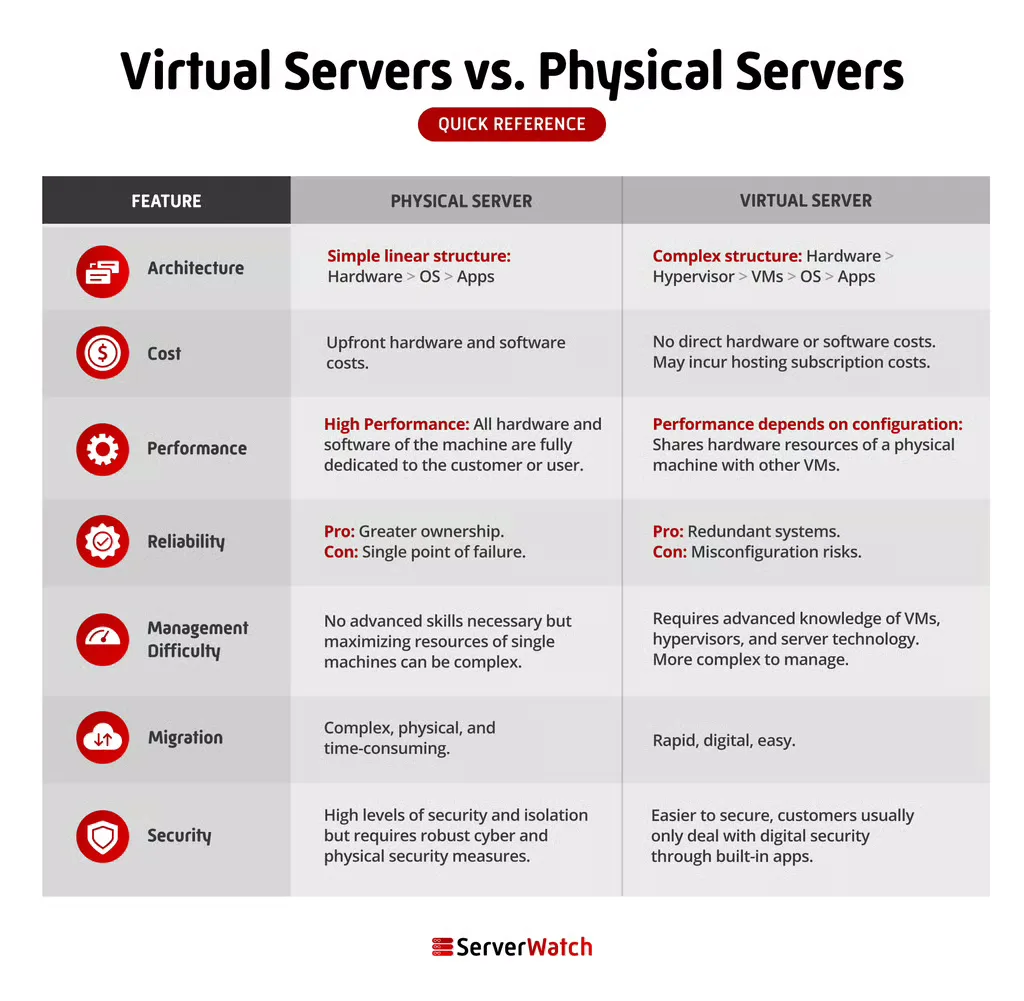
Virtual Servers Versus Physical Servers: A Comparative Analysis
The choice between physical and virtual servers hinges on a careful evaluation of their respective strengths and weaknesses relative to specific business requirements. While both serve the fundamental purpose of hosting digital resources, their underlying architecture leads to significant differences in performance, cost, management, and security.
Architecture
The core distinction lies in their structural design. A physical server is a singular, dedicated hardware unit. A virtual server, conversely, is a software construct that abstracts and partitions the resources of one or more physical servers. This architectural difference dictates how resources are allocated and managed.
Cost
While the initial setup of virtualization technology can involve complexity and investment in hypervisor software, the long-term cost-efficiency of virtual servers, particularly when deployed at scale, is a major advantage. The ability to run multiple VMs on a single physical server dramatically reduces hardware acquisition costs, power consumption, cooling, and physical space requirements. Furthermore, for cloud-based virtual servers, customers offload the significant capital expenditure and ongoing operational costs associated with maintaining physical data centers. Maintenance, hardware failures, energy bills, and the risk of physical damage from natural disasters are typically managed by the cloud provider, further reducing the total cost of ownership for virtual server users.
Performance
The performance race between physical and virtual servers is nuanced. Physical servers, by offering exclusive access to hardware, can deliver peak, unadulterated performance for demanding tasks. However, modern virtualization technologies have made significant strides, and well-configured virtual servers can achieve performance levels very close to, and sometimes indistinguishable from, their physical counterparts. Factors such as the efficiency of the hypervisor, the quality of the underlying hardware, network configuration, and the specific workload all play a critical role. For workloads that are not at the absolute bleeding edge of performance requirements, the performance of virtual servers is often more than adequate.
Reliability
Both physical and virtual servers can be engineered for high reliability. Physical servers can be deployed in redundant configurations with failover mechanisms to ensure uptime. Virtualization enhances reliability through features like live migration, where a running VM can be moved from one physical host to another with minimal or no downtime. Automated failover mechanisms within virtualized environments can quickly restart VMs on healthy hardware if a physical host fails. The overall reliability often depends more on the quality of the infrastructure design, maintenance practices, and the robustness of the software stack rather than the inherent nature of being physical or virtual.
Management Difficulty
Managing a physical server involves direct interaction with hardware, operating systems, and applications. This can be complex, requiring specialized IT expertise. When opting for a virtual server hosted by an external provider, many of the management burdens, such as hardware maintenance, patching of the underlying infrastructure, and physical security, are outsourced to the vendor. However, managing the operating system and applications within the VM still falls to the user. For on-premises virtualization, managing the hypervisor and the entire virtualized environment adds a layer of complexity.
Migration
Migrating virtual servers is significantly easier and faster than migrating physical servers. VMs are essentially software files that can be copied, cloned, and moved between physical hosts with a few clicks. This process is often seamless and can be performed while the VM is still running, minimizing disruption. In contrast, migrating a physical server involves physically moving the hardware, reconfiguring network settings, and manually backing up and restoring the entire operating system and application stack to a new machine. This is a more time-consuming, labor-intensive, and error-prone process.
Security
Both physical and virtual servers can be secured effectively, but they require diligent configuration and ongoing management. Physical servers offer inherent isolation, meaning they are not susceptible to the same types of cross-tenant vulnerabilities as virtualized environments. However, they are more vulnerable to physical threats like theft or unauthorized access to the data center. Virtualization introduces the hypervisor as a potential attack vector, but modern hypervisors are highly secure. Logical isolation between VMs is robust, but misconfigurations or vulnerabilities in the virtualization layer could potentially expose multiple VMs. Ultimately, the security posture of either server type is heavily dependent on the security practices implemented by the administrators.
The Bottom Line: Choosing the Right Server for Your Business
The decision between physical and virtual servers is not a one-size-fits-all proposition. Each offers distinct advantages and disadvantages, and the optimal choice is contingent upon a business’s specific needs, priorities, and operational context.
For the majority of businesses, virtual servers present a compelling solution. They are generally more affordable, offer exceptional flexibility and scalability, and provide access to cutting-edge technology through cloud providers. The agility to quickly deploy new services, scale resources up or down as demand fluctuates, and benefit from managed infrastructure makes them ideal for dynamic business environments.
However, physical servers retain their relevance for specific scenarios. Businesses requiring the absolute highest levels of dedicated performance, unparalleled ownership and control over hardware, or facing extremely stringent security mandates may find physical servers to be the superior option. This can include high-frequency trading firms, research institutions conducting massive simulations, or organizations operating under strict regulatory compliance that mandates complete physical isolation.
As the IT landscape continues to evolve, hybrid approaches that leverage both physical and virtual servers are also becoming increasingly common, allowing organizations to strategically deploy resources where they offer the most benefit. Understanding the fundamental differences and carefully evaluating workload requirements are paramount to making an informed decision that supports operational efficiency, cost-effectiveness, and long-term business success.
For organizations looking to harness the power of virtualization, exploring the best server virtualization software available can provide a strategic advantage, enabling them to optimize their infrastructure and capitalize on the latest advancements in this transformative technology.
