
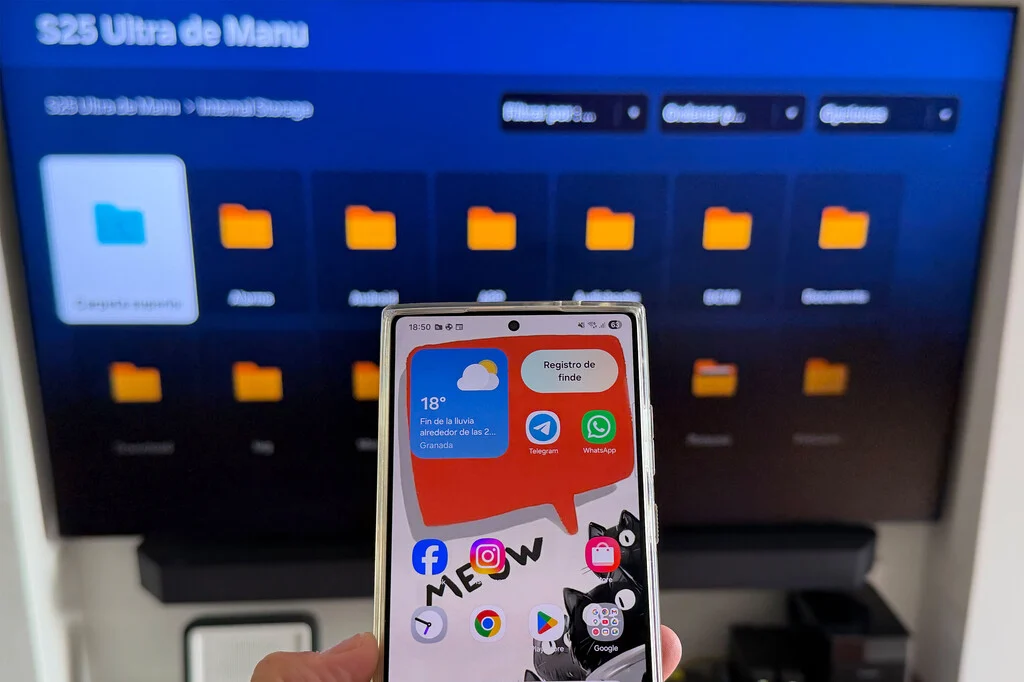

The tech giant Samsung has significantly enhanced its ecosystem interoperability, introducing a seamless, wireless method for users to display content from their Galaxy smartphones directly onto compatible Samsung Smart TVs. This innovative integration, centered around the "Share Storage" functionality, eliminates the historical reliance on third-party applications, external dongles, or cumbersome cable connections, marking a pivotal step towards a more unified and user-centric digital experience within the Samsung product family. The initiative underscores Samsung’s strategic commitment to fostering a cohesive environment where its diverse range of devices communicates effortlessly, ultimately simplifying media consumption and sharing for millions of users worldwide.
The Evolution of Content Sharing: A Historical Perspective
For decades, the challenge of bridging the gap between personal devices and larger display screens has driven innovation in the consumer electronics sector. Initially, users were limited to physical connections, primarily through HDMI cables, to mirror their laptop or desktop content onto a television. The advent of smartphones introduced new complexities, necessitating proprietary cables or specialized adapters. The early 2010s witnessed the rise of wireless casting technologies, such as Google Chromecast, Apple AirPlay, and Miracast, which offered a degree of freedom but often required additional hardware, specific apps, or intricate setup procedures. These solutions, while revolutionary at the time, frequently introduced latency, compatibility issues, or a fragmented user experience, compelling users to navigate multiple interfaces and ecosystems. Samsung itself has been a significant player in this space, developing features like Smart View and Tap View to facilitate mirroring, but "Share Storage" represents a more fundamental integration, treating the smartphone’s memory as an accessible drive for the television.
Samsung’s Ecosystem Vision: From Devices to Unified Experiences
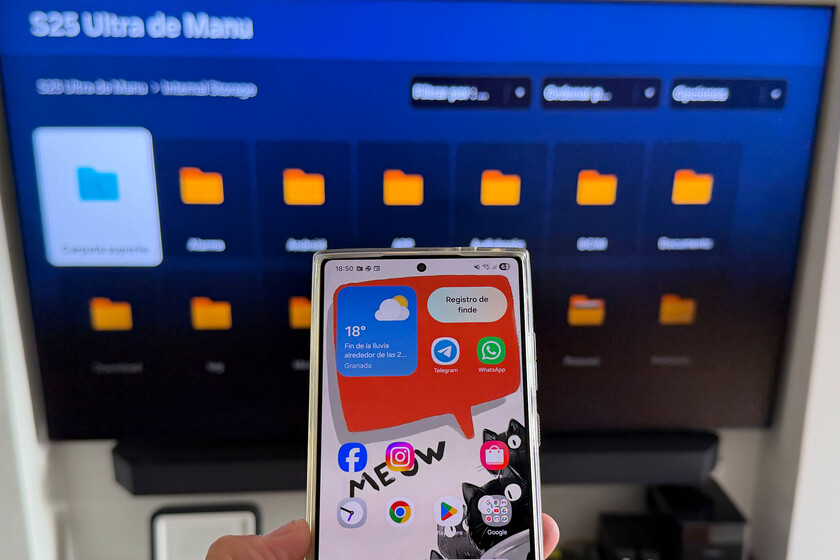
This latest feature is a testament to Samsung’s long-standing strategy of building a robust and interconnected ecosystem. The company, a global leader in both smartphone and smart TV markets, has consistently invested in platforms like SmartThings and One UI to create a synergistic relationship between its devices. SmartThings, Samsung’s IoT platform, serves as the central hub for managing smart home devices, including TVs. One UI, the custom Android overlay for Galaxy devices, prioritizes user experience and seamless interaction. The integration of "Share Storage" (or "Compartir almacenamiento" in its original Spanish context) aligns perfectly with this vision, transforming the Galaxy smartphone from a mere content source into a dynamic, wirelessly accessible storage drive for the Samsung Smart TV. This move is not merely about convenience; it is about solidifying brand loyalty and differentiating Samsung’s offerings in an increasingly competitive market by providing a tangible, added value through exclusive cross-device functionalities.
Technical Prerequisites and Seamless Configuration
The implementation of "Share Storage" is designed to be robust yet user-friendly, relying on a set of specific technical requirements to ensure optimal performance and security. For users to leverage this functionality, their Samsung Smart TV must operate on Tizen 9 or a newer version of Samsung’s proprietary operating system. Simultaneously, the Galaxy smartphone must be running One UI 7 or a more recent iteration. These software versions are crucial as they contain the necessary protocols and interfaces for the "Share Storage" feature to operate correctly. One UI 7, in particular, introduced several enhancements aimed at improving device connectivity and data management, making it an ideal platform for this kind of advanced interoperability.
Beyond software versions, network and account integration are paramount. Both the Galaxy smartphone and the Samsung Smart TV must be connected to the same Wi-Fi network. This local network connection facilitates the high-speed data transfer required for streaming media files seamlessly. Crucially, both devices must also be logged into the same Samsung account. This account synchronization acts as an authentication layer, ensuring that only authorized devices within a user’s ecosystem can access the shared storage, thereby enhancing security and privacy.
The setup process, while requiring a few initial steps, is designed for transparency and ease of use.
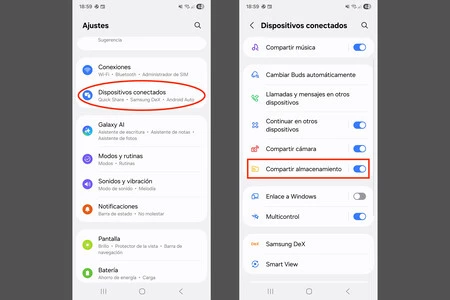
- Activating Share Storage on Galaxy: Users begin by navigating to their Galaxy phone’s settings, locating the "Connected Devices" section, and then enabling the "Share Storage" option. This step signals to other compatible Samsung devices that the phone’s storage is available for access.
- SmartThings Integration: The Samsung Smart TV must already be added to the user’s SmartThings ecosystem. SmartThings serves as the foundational layer for device recognition and management within Samsung’s connected home environment. If the TV is not yet registered, this becomes a prerequisite step.
- Bluetooth Pairing: A crucial component of establishing the connection involves pairing the Galaxy phone and the Smart TV via Bluetooth. This initial Bluetooth link helps in device discovery and secure channel establishment, similar to connecting any other peripheral like a speaker or headphones. Users simply access the Bluetooth settings on their Galaxy phone, search for the TV as a discoverable device, and confirm the pairing with a matching code displayed on both screens.
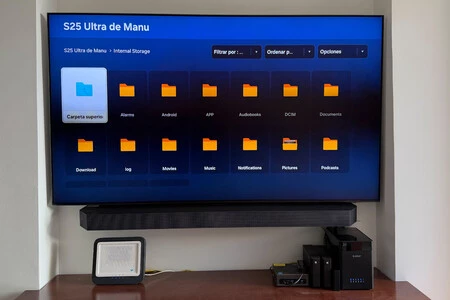
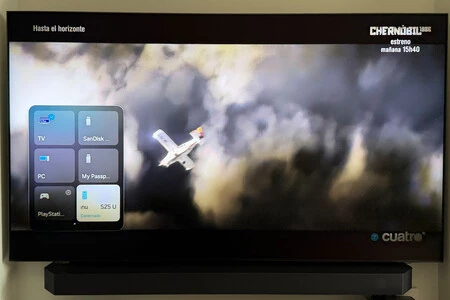
- Accessing Content on TV: Once the initial configuration and pairing are complete, the user can navigate to the "Connected Devices" menu on their Samsung Smart TV. Here, the Galaxy smartphone will appear as a recognized storage device, akin to an external hard drive or a networked PC. Upon selecting the Galaxy device, the TV interface will display a familiar file browser, allowing users to intuitively navigate through folders containing music, videos, photos, and other multimedia content stored on their phone. This browser functionality transforms the television into a large-format display for personal media archives, completely circumventing the need for any additional mirroring apps or media servers.
Market Impact and User Adoption
Samsung’s strategic move to deeply integrate smartphone and smart TV functionalities holds significant implications for the market and user behavior. With Samsung consistently holding substantial market shares in both global smartphone and smart TV segments, the potential reach of this feature is immense. According to recent market reports, Samsung remains a dominant force in the global smartphone market, particularly with its Galaxy series, and has maintained its leading position in the smart TV market for over a decade, largely powered by its Tizen OS. This dual dominance creates a fertile ground for seamless ecosystem features to thrive.
Millions of existing Samsung users, who already own both a Galaxy phone and a compatible Samsung TV, stand to benefit immediately. This broad user base provides a significant competitive advantage, as other manufacturers often struggle to achieve such deep integration across different product categories without relying on universal standards that may offer less control or tailored experiences. The ease of setup and the intuitive interface are expected to drive high adoption rates among this demographic, further solidifying their loyalty to the Samsung brand. Furthermore, for prospective buyers, the promise of a truly integrated home entertainment system could become a decisive factor, encouraging them to invest in Samsung’s full ecosystem rather than mixing and matching brands. This strategy not only enhances the user experience but also acts as a powerful retention tool, fostering a closed-loop ecosystem where users find increasing value in staying within the Samsung family of products.
Benefits for the Consumer: Unlocking Convenience and Efficiency
The "Share Storage" feature delivers a multitude of tangible benefits directly to the consumer:
- Unparalleled Convenience: The most immediate benefit is the sheer convenience. Users no longer need to transfer files to a USB drive, upload them to cloud services, or rely on third-party casting apps that may require separate installations and configurations. The process becomes as simple as selecting a connected device on the TV.
- Enhanced Reliability: Operating within a controlled, proprietary ecosystem, the connection between a Galaxy phone and a Samsung TV is inherently more stable and reliable than generic casting solutions. This reduces instances of disconnections, lag, or compatibility issues that can mar the viewing experience.
- Optimized Performance: By leveraging direct wireless protocols and optimized software within both Tizen and One UI, "Share Storage" can offer superior performance in terms of content loading speed and streaming quality, especially for high-resolution photos and videos.
- Cost Savings: Eliminating the need for external devices like Chromecast, Fire Stick, or Apple TV (specifically for sharing local content) represents a direct cost saving for consumers. While these devices offer broader streaming capabilities, for local file sharing, they become redundant within the Samsung ecosystem.
- Streamlined Photo and Video Sharing: For families or groups, showcasing vacation photos or home videos on a large screen becomes an effortless activity, fostering shared experiences without technical hurdles. Imagine instantly sharing a photo album from your phone to the living room TV during a gathering.
- Privacy and Security: Keeping content within the local network and the Samsung account ecosystem can offer a higher degree of privacy and security compared to solutions that might involve cloud uploads or less secure public casting protocols.
Expert and Industry Perspectives
Industry analysts have largely viewed Samsung’s deeper ecosystem integration as a strategic imperative in the evolving tech landscape. "Samsung’s ability to leverage its dual dominance in smartphones and smart TVs to create seamless experiences like ‘Share Storage’ is a significant differentiator," states a prominent tech industry analyst. "In an era where tech companies are vying for consumer loyalty through integrated ecosystems, Samsung is effectively raising the bar. This move strengthens their SmartThings platform and provides a compelling reason for consumers to invest wholly in the Samsung brand."
Furthermore, early, albeit anecdotal, user feedback collected from tech forums and social media platforms suggests a high degree of satisfaction with the ease of setup and the performance of the "Share Storage" feature. Users frequently commend the intuitive file browsing interface on the TV and the reliability of the connection, highlighting its practical utility for daily media consumption. This positive reception from the user base validates Samsung’s approach and indicates a strong market demand for such integrated solutions. The move is also seen as a proactive measure against fragmentation in the smart home space, where disparate devices often struggle to communicate efficiently.
Future Outlook and Strategic Implications
The introduction of "Share Storage" is not an isolated feature but a building block in Samsung’s broader strategy for the future of connected living. This enhanced interoperability paves the way for even more sophisticated cross-device functionalities. One could envision scenarios where AI-powered recommendations on the TV could suggest content based on files recently accessed on the Galaxy phone, or where collaborative media editing could occur seamlessly across both devices. This level of integration positions Samsung strongly against competitors like Apple, which has its own tightly integrated ecosystem with AirPlay, but potentially offers a more open, yet controlled, environment than some generic Android-based solutions.
Moreover, this feature contributes to the overall sustainability agenda by extending the useful life of existing devices. By making it easier to utilize current hardware for new purposes, Samsung reduces the perceived need for constant upgrades or additional peripheral purchases. It transforms the TV from a passive display into an active hub for personal content, enhancing its value proposition within the home. As media consumption habits continue to shift towards on-demand and personalized content, Samsung’s "Share Storage" prepares its ecosystem for these future trends, offering a robust and convenient platform for users to access and enjoy their digital lives on their terms. This commitment to user-centric design and technological synergy will undoubtedly continue to shape Samsung’s product development and market strategy for years to come.
Images: Manu García
