

After a period that saw Android users feeling increasingly marginalized, Google has finally rolled out Snapseed 4.0 for its dominant mobile operating system, an update that introduces a comprehensive redesign and a suite of powerful new features. This release comes months after a similar, significant update was exclusively launched for iOS, prompting frustration among Android users who had long cherished Snapseed as their go-to photo editing application. The long-awaited Android version, now accessible via the Google Play Store, signals Google’s renewed commitment to the acclaimed image editor, positioning it once again as a formidable, free-of-charge contender in the competitive mobile photography landscape.
A Tumultuous History: Snapseed’s Journey from NIK Software to Google’s Portfolio
To fully appreciate the significance of Snapseed 4.0’s arrival on Android, it is crucial to understand the application’s unique and somewhat tumultuous history. Snapseed was originally developed by Nik Software, a German company renowned for its professional-grade photo editing plugins for desktop applications like Adobe Photoshop and Lightroom. Launched in 2011, Snapseed quickly gained traction on iOS, offering a sophisticated yet intuitive touch-based editing experience that was revolutionary for its time. Its ability to provide granular control over images, coupled with a diverse set of tools, earned it widespread critical acclaim, including being named iPad App of the Year shortly after its debut.
In September 2012, Google acquired Nik Software, a move that sent ripples through the photography community. While Google stated its intention to leverage Nik Software’s expertise to enhance its mobile photography offerings and its social network, Google+, the acquisition also led to the gradual discontinuation of Nik Software’s popular desktop plugin suite as a paid product, eventually making it free. Snapseed, however, continued to evolve under Google’s stewardship, with versions released for both iOS and Android, maintaining its reputation as a powerful, professional-grade mobile editor. For years, it was considered a benchmark for what mobile photo editing could achieve, offering a depth of features typically found in desktop software but optimized for touchscreens.
However, in recent years, Snapseed’s development seemed to slow, leading many users to speculate about its future. The Android version, in particular, appeared to lag behind its iOS counterpart in terms of updates and new features. This disparity reached a critical point when Google rolled out a major update to Snapseed, introducing advanced manual camera controls and film emulations, but made it an exclusive feature for iPhone users. This decision, widely reported by technology outlets like The Verge in the preceding months, caused considerable consternation within the Android community, leaving many feeling abandoned and questioning Google’s commitment to its own platform. The sentiment was palpable: a beloved app, once a standard-bearer for mobile editing, seemed to have shifted its focus, leaving millions of Android users looking on from the sidelines. The recent release of Snapseed 4.0 for Android, therefore, is not merely an update; it is a declaration that the application is back in the game for all users, seeking to mend bridges and reaffirm its cross-platform utility.
A Comprehensive Overhaul: Diving into Snapseed 4.0’s Features for Android
The arrival of Snapseed 4.0 for Android is marked by a significant "redesign enorme," as described by early reviewers, following a period characterized by a "tiempo de letargo" or dormancy. This isn’t just a cosmetic refresh; it’s a deep overhaul that impacts both the user interface and the underlying functionality, aiming to modernize the application while retaining its core strengths.
The Integrated ‘Pro’ Camera Experience:
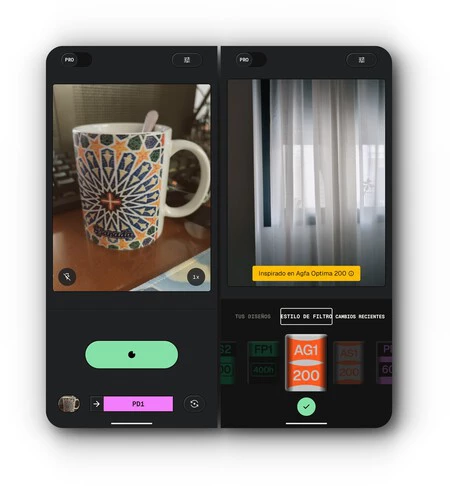
One of the most striking additions in Snapseed 4.0 is the integrated Snapseed Camera. This new feature allows users to "disparar desde la app de retoque," meaning they can capture photos directly within Snapseed. More importantly, it introduces "controles manuales," granting users professional-level control over critical photographic parameters such as ISO, shutter speed, and focus. This level of manual control is a game-changer for serious mobile photographers, moving Snapseed beyond merely an editing tool to an all-encompassing photographic suite.
Beyond technical controls, the Snapseed Camera also incorporates "emulaciones de película en tiempo real." This allows users to apply vintage film looks and artistic filters directly at the point of capture, providing instant creative feedback. The ability to "capturar con ese look retro" and then "resetear los ajustes más tarde" offers immense flexibility, encouraging experimentation without permanent commitment. This feature taps into the growing trend of digital photography embracing analog aesthetics, a move that resonates with a broad spectrum of users, from casual photographers to seasoned enthusiasts seeking a distinct visual style.
Redesigned Interface and Enhanced Fluidity:
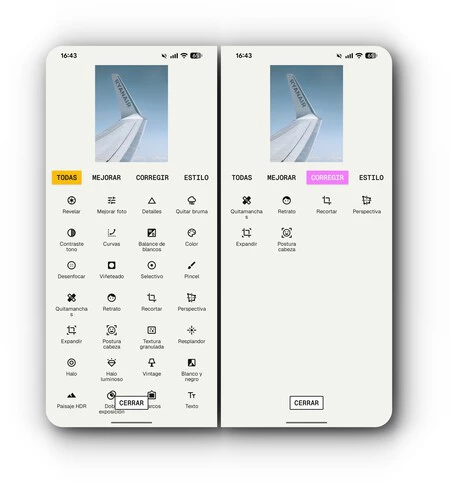
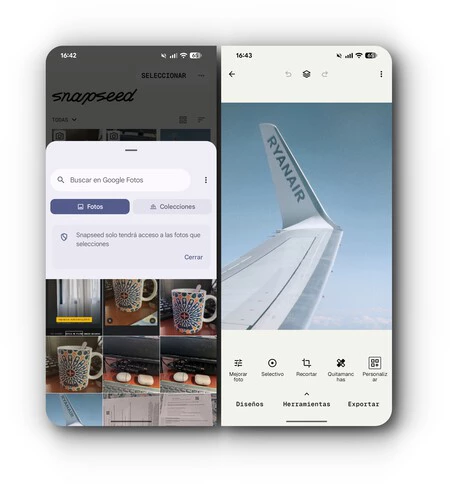
The core editing experience has also undergone a significant transformation. The interface is now organized into distinct tabs: "Diseño" (Design), "Herramientas" (Tools), and "Exportar" (Export). This structured layout aims to streamline the workflow and make the application more accessible, particularly for new users who might find the extensive array of tools less daunting when categorized. While the reviewer noted a personal preference for the "antigua pantalla de inicio," acknowledging it as a "cuestión de gustos," the general consensus points to a "aire moderno" that the new design exudes.
A critical improvement that transcends aesthetic preference is the "fluidez notoria" of the application. Snapseed 4.0 is described as feeling "ligera" and "vuela," significantly enhancing the user experience. This optimization addresses a common complaint in many feature-rich apps, where performance can sometimes suffer. The improved responsiveness means less waiting and more seamless interaction, allowing users to focus on their creative tasks rather than wrestling with the software.
Advanced Workflow and Tactile Control:
The reorganization of the interface also "desbloquea funciones nuevas" that significantly enhance productivity. One of the most anticipated additions is "edición por lotes" (batch editing). This feature allows users to "copiar el estilo de una foto y pegarlo en varias," dramatically speeding up the workflow for photographers who need to apply consistent edits across multiple images. This is a staple feature in professional desktop editing software, and its inclusion in a free mobile app like Snapseed is a substantial value proposition.
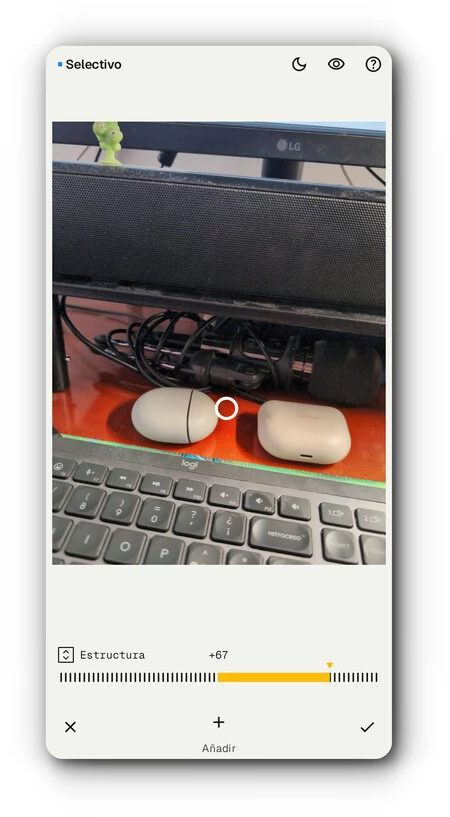
Furthermore, users can now "anclar las herramientas que más uso en la parte superior," providing quick access to frequently used functions without having to navigate through multiple menus. This customization option caters to individual user preferences and further optimizes the editing process. Crucially, Snapseed has retained its "esencia táctil," with the intuitive gesture-based controls – "arrastrar el dedo de un lado a otro para ajustar la intensidad y parámetros" – remaining intact, ensuring that long-time users will find the core interaction familiar and efficient.
New Creative Effects and Refinements:
While the majority of classic Snapseed tools are still present, version 4.0 introduces new effects oriented towards analog photography. "Halo" and "Bloom" are two such additions, designed to impart a "toque onírico" or dreamy quality to photos. While these might not revolutionize every user’s workflow, they expand the creative palette available, particularly for those interested in adding a soft, ethereal glow or a light-bleed effect to their images. These effects align with contemporary photographic trends that often seek to emulate the imperfections and unique characteristics of film photography.
However, not all design choices have been universally lauded. A minor, yet "descolocado" design decision noted by the reviewer is the inclusion of "una animación de unos ojos de dibujitos que se mueven por la pantalla" during the processing of certain effects. This seemingly "baladí" detail is perceived to "resta seriedad a la app" and detracts from the "inmersión ‘Pro’" that Snapseed otherwise strives to offer. While intended perhaps as a playful element, it clashes with the sophisticated image of a professional-grade editor.
The Persistent Challenge: Media Management
Despite the significant advancements, Snapseed 4.0 for Android carries a notable "limitación que me resulta difícil pasar por alto": the absence of an integrated file explorer. The app "depende del selector de medios de Android," which, while functional and "rápido," falls short in managing "bibliotecas grandes" and fails to provide a direct view of the entire camera roll within the app. This reliance on the native Android media picker creates friction, particularly when working with advanced features like "doble exposición," which often require selecting multiple images that may not be among the most recent. The reviewer highlighted a comparison with "Lightroom," which includes its own robust media selector, illustrating a gap in Snapseed’s user experience for power users accustomed to comprehensive in-app file management. This remains a "pero" for an otherwise stellar update, impacting the efficiency of complex editing workflows.
Strategic Implications and Market Position
The return of a robust Snapseed to Android carries significant strategic implications for Google and the broader mobile photography ecosystem. For years, Snapseed has been a cornerstone of Google’s mobile creative suite, offering a powerful, free alternative to subscription-based services like Adobe Lightroom Mobile or premium apps like VSCO. The fact that it offers "más de 30 herramientas de forma totalmente gratuita, sin exigir suscripciones, sin anuncios molestos y sin marcas de agua" is a testament to Google’s unique position in the market. While many companies monetize through subscriptions or in-app purchases, Google often leverages its applications to enhance its ecosystem, gather user data (anonymously for app improvement), or simply provide valuable services that keep users engaged with Android.
This update can be seen as Google reaffirming its commitment to high-quality, free creative tools, potentially to counter the growing dominance of third-party subscription models. In a market where a basic photo editor might cost a few dollars a month, Snapseed 4.0 offers professional-grade features at zero cost, making it highly attractive, especially in emerging markets or for users who cannot or prefer not to pay for software. The inclusion of manual camera controls also positions Snapseed as a direct competitor to dedicated camera apps that offer similar functionality, integrating the capture and editing process more seamlessly.
Furthermore, the update reinforces Android’s capabilities as a platform for serious photography. With smartphone cameras becoming increasingly sophisticated, the demand for equally powerful editing tools on the device itself has grown. Snapseed 4.0 helps fulfill this demand, ensuring that Android users have access to a tool that can fully leverage the photographic potential of their devices. This move could also be a subtle nudge to encourage greater adoption of Android devices by photographers who prioritize mobile editing capabilities.
The competitive landscape for mobile photo editing is fierce. Apps like Adobe Lightroom Mobile, VSCO, PicsArt, and even the built-in editing features of Google Photos itself, offer a range of functionalities. Lightroom Mobile, for instance, provides cloud syncing and integration with its desktop counterpart, appealing to professionals. VSCO is known for its curated filters and community features. Snapseed’s strength lies in its comprehensive set of tools, its tactile interface, and crucially, its price point. By revitalizing Snapseed for Android, Google is ensuring that it remains a relevant and powerful player, capable of "plantar cara a alternativas de pago."
The Road Ahead: Sustained Development and Ecosystem Integration
The conclusion drawn by the reviewer is unequivocal: "el rey de la edición de imágenes ha vuelto para reclamar su trono." This statement encapsulates the sentiment of many long-time users who have awaited a significant update for Android. The improvements in fluidity, the new camera features, and the batch editing capabilities are all substantial steps forward.
However, the future success of Snapseed on Android will depend heavily on "siga recibiendo actualizaciones," ideally "al mismo ritmo que en el iPhone." In the fast-evolving world of mobile technology, stagnation can quickly lead to obsolescence. Consistent updates, bug fixes, and the introduction of new features are vital to maintain user engagement and competitiveness. Addressing minor design quirks, such as the animated eyes, and more significant functional limitations, like the media selector, would further solidify its position.
Looking ahead, there’s potential for Snapseed to become even more deeply integrated within the broader Google ecosystem. The reviewer speculates about Google providing "una interfaz y controles para su nueva línea de portátiles con Android," hinting at the possibility of optimizing Snapseed for larger screens, such as Android tablets, foldable phones, or even potential ChromeOS devices that can run Android apps. Such a move would be "una enorme noticia" for users who frequently switch between devices and seek a consistent, powerful editing experience across their hardware.
Ultimately, Snapseed 4.0 for Android is more than just an app update; it’s a statement. It reassures a dedicated user base that their preferred tool has not been forgotten. By offering a powerful, feature-rich, and completely free editing solution, Google reinforces its position as a key player in the mobile photography space, ensuring that creative tools of exceptional quality remain accessible to millions of Android users worldwide. The "esperar estos meses ha merecido la pena," and the king has indeed returned, poised to continue its reign in the mobile editing arena.
