

A Network Policy Server (NPS) is a foundational component for modern network administration, empowering organizations to establish and enforce granular policies that govern network access. Its primary function is to centralize the authentication, authorization, and accounting (AAA) of users and devices connecting to a network, thereby bolstering security and streamlining management. Essentially, NPS represents Microsoft’s robust implementation of a Remote Authentication Dial-In User Service (RADIUS) server and proxy within the Windows Server ecosystem, playing a pivotal role in maintaining a secure and controlled network environment. This in-depth exploration will delve into the intricacies of NPS, beginning with an understanding of RADIUS protocols, followed by the specific purpose, benefits, operational roles, and best practices for managing NPS.
The paramount importance of robust network security and policy management cannot be overstated in today’s interconnected world. As businesses increasingly rely on digital infrastructure for operations, data exchange, and communication, their networks and associated servers become prime targets for malicious actors. This escalating threat landscape necessitates sophisticated security measures and meticulous policy enforcement. Effective network security prevents unauthorized access, protects sensitive data from breaches, and ensures the integrity and availability of critical IT resources. Policy management, in turn, provides the framework for controlling who can access what, when, and from where, aligning network access with organizational objectives and compliance requirements. Without these safeguards, organizations face significant risks, including financial losses due to data theft, reputational damage, operational disruptions, and legal liabilities stemming from regulatory non-compliance.
At the heart of NPS’s functionality lies the RADIUS protocol. RADIUS, an acronym for Remote Authentication Dial-In User Service, is a well-established networking protocol designed to provide comprehensive and centralized AAA management for users accessing network services. Developed in the early 1990s, RADIUS has become a de facto standard for network access servers, including VPN concentrators, wireless access points, and dial-up servers, facilitating secure and controlled connections. The protocol’s enduring relevance stems from its ability to centralize authentication and authorization decisions, simplifying network management and enhancing security.
The RADIUS protocol operates on three core principles, collectively known as AAA:
Authentication: Verifying Identity
Authentication is the initial and most critical step in the AAA process. It involves verifying the identity of a user or device attempting to access the network. When a connection request is initiated, the user typically provides credentials, such as a username and password, or utilizes other authentication factors like certificates or multi-factor authentication. The RADIUS client, often a network access device, forwards these credentials to the RADIUS server. The server then consults its user database and security policies to confirm the validity of the provided information. A successful authentication confirms that the entity attempting to connect is who they claim to be, preventing unauthorized access by imposters.
Authorization: Defining Access Privileges
Following successful authentication, the next crucial step is authorization. This process determines the specific network resources and services that an authenticated user or device is permitted to access and the actions they can perform. For instance, an IT administrator will likely have broader access privileges than a regular employee. RADIUS servers manage these permissions by enforcing policies that dictate access rights based on user roles, group memberships, or other predefined criteria. This ensures that users only have access to the information and functionalities necessary for their roles, adhering to the principle of least privilege and minimizing the attack surface.
Accounting: Tracking Resource Usage
The final component of AAA is accounting. This function involves meticulously tracking and recording user activity and network resource consumption. Key accounting data includes connection duration, services accessed, data transferred, and connection times. This information is invaluable for several reasons. It enables accurate billing for service providers, facilitates auditing to ensure compliance with security policies and regulations, and provides insights into network usage patterns. Understanding how resources are being utilized helps in capacity planning, performance optimization, and identifying potential security anomalies or policy violations.
The Mechanics of RADIUS Servers
RADIUS operates on a client-server model. The RADIUS client is typically a network access server (NAS), such as a wireless access point, VPN server, or dial-up server, which acts as an intermediary between the end-user and the RADIUS server. When a user attempts to connect, the NAS forwards the authentication and connection request to the RADIUS server. The RADIUS server then processes this request, consulting its internal databases and policies to determine whether to grant or deny access. Upon making a decision, the RADIUS server sends an Access-Accept or Access-Reject message back to the NAS, which then acts accordingly. In cases of Access-Accept, the server may also send configuration attributes, such as IP addresses or bandwidth limitations, back to the client to configure the user’s session.
Key features commonly associated with RADIUS servers include:
- Centralized AAA: Consolidating authentication, authorization, and accounting functions into a single point of management.
- Protocol Support: Adherence to the RADIUS protocol for communication between clients and servers.
- Policy Enforcement: The ability to define and enforce granular access policies based on various criteria.
- Scalability: Designed to handle a large number of concurrent connections and authentication requests.
- Integration Capabilities: Often capable of integrating with existing directory services (like Active Directory) and other security systems.
The Purpose and Functionality of NPS
Microsoft’s Network Policy Server (NPS) serves as a critical infrastructure component for organizations seeking to implement robust network access control. Its primary purpose is to provide a centralized platform for managing Authentication, Authorization, and Accounting (AAA) for all users and devices that connect to the network. By acting as a RADIUS server and proxy, NPS streamlines security operations, enhances control over network access, and ensures compliance with organizational policies and regulatory mandates.

Centralized Authentication and Authorization
NPS plays a crucial role in establishing a secure perimeter around an organization’s network. By centralizing authentication, it ensures that every entity attempting to gain access undergoes a rigorous verification process. This prevents unauthorized users or devices from entering the network, significantly reducing the risk of data breaches and cyberattacks. Furthermore, NPS handles authorization, defining precisely what authenticated users and devices are permitted to access within the network. Administrators can create detailed policies that grant specific levels of access based on user roles, group memberships, device compliance, and even the time of day. This granular control ensures that users only have access to the resources they need to perform their duties, a fundamental principle of modern cybersecurity.
Accounting and Compliance
The accounting capabilities of NPS are vital for maintaining network visibility and ensuring regulatory compliance. By meticulously logging user activities and resource utilization, NPS provides an auditable trail of network access events. This data is essential for forensic investigations in the event of a security incident, for understanding network performance, and for demonstrating compliance with industry regulations such as HIPAA, GDPR, or PCI DSS. The detailed accounting records generated by NPS can help organizations identify policy violations, track resource consumption for cost allocation, and proactively address security vulnerabilities.
Policy-Based Network Management
NPS empowers administrators with powerful policy-based network management capabilities. This allows for the creation and enforcement of dynamic access policies that can adapt to changing organizational needs and security requirements. For example, policies can be configured to grant temporary access to contractors, restrict access to sensitive data based on user roles, or even deny access to devices that do not meet specific security health requirements. This level of control provides a flexible and proactive approach to network security, moving beyond static access lists to intelligent, policy-driven access management.
Key Benefits of Implementing NPS
The adoption of NPS within an organization’s network infrastructure yields a multitude of advantages, significantly enhancing both security posture and operational efficiency. These benefits collectively position NPS as an indispensable tool for contemporary network management.
- Enhanced Security: By centralizing AAA, NPS significantly strengthens network security. It ensures that only authenticated and authorized users and devices can access network resources, thereby mitigating the risk of unauthorized access, data breaches, and internal threats.
- Centralized Management: NPS consolidates network access control into a single, manageable platform. This simplifies the administration of user access policies, reduces the complexity of managing distributed access control systems, and provides a unified view of network access activities.
- Improved Compliance: The robust accounting features of NPS provide detailed logs of network access and usage. This data is critical for meeting the stringent compliance requirements of various industry regulations, facilitating audits, and demonstrating due diligence in data protection.
- Increased Operational Efficiency: Automating authentication and authorization processes through NPS reduces manual intervention, freeing up IT staff to focus on more strategic initiatives. Consistent policy enforcement also minimizes user-related network access issues, leading to smoother operations.
- Scalability and Flexibility: NPS is designed to scale with an organization’s growth. It can handle a large volume of authentication requests and can be configured to support various network access technologies, offering flexibility in how network access is managed.
- Support for Network Access Protection (NAP): NPS can integrate with Microsoft’s Network Access Protection (NAP) framework. This integration allows organizations to enforce health policies for client computers before granting them network access, ensuring that only compliant and healthy devices can connect.
- Cost-Effectiveness: As a built-in component of Windows Server, NPS offers a cost-effective solution for network access control compared to many third-party RADIUS solutions, especially for organizations already invested in the Microsoft ecosystem.
The Three Distinct Roles of NPS
NPS is a versatile tool capable of fulfilling three critical roles within a network infrastructure, each contributing to its comprehensive network management capabilities.
1. NPS as a RADIUS Server
In its primary role as a RADIUS server, NPS acts as the central point for processing authentication and authorization requests for network access. When a network access server (NAS) receives a connection request, it forwards the user’s credentials and connection details to the NPS. NPS then evaluates these requests against its configured policies and user databases. If the credentials are valid and the user is authorized according to policy, NPS sends an Access-Accept message back to the NAS, granting access. This role is crucial for securing various network access methods, including Wi-Fi authentication (WPA2-Enterprise), VPN access, and dial-up connections. By centralizing this function, NPS ensures consistent policy enforcement across all connected devices and users.
2. NPS as a RADIUS Proxy
In complex or distributed network environments, NPS can function as a RADIUS proxy. In this capacity, NPS does not directly authenticate users but instead forwards authentication requests to other RADIUS servers within the network. This is particularly useful when an organization has multiple RADIUS servers located in different geographical regions or managing different sets of users. The proxy server can intelligently route requests to the appropriate RADIUS server based on predefined conditions, such as the user’s domain or the type of network resource they are trying to access. This role also enables load balancing by distributing requests across multiple RADIUS servers, improving performance and availability. Furthermore, it can provide failover mechanisms, ensuring that if one RADIUS server becomes unavailable, requests are automatically redirected to another, maintaining continuous network access.
3. NPS as a Network Policy Server
This role encapsulates the core function of NPS: managing and enforcing network access policies. NPS allows administrators to define a comprehensive set of conditions and constraints that govern network access. These policies can be highly granular, specifying which users or groups can access the network, under what conditions (e.g., time of day, day of the week), from which locations, and with what level of access. For example, an administrator can create a policy that grants full network access to IT administrators during business hours but restricts access to only essential services for general users outside of those hours. This policy-driven approach provides a dynamic and adaptable security framework, ensuring that network access aligns with evolving business needs and security best practices. NPS can also integrate with Network Access Protection (NAP) to enforce device health policies, ensuring that only compliant devices can join the network.
NPS Best Practices for Optimal Performance and Security
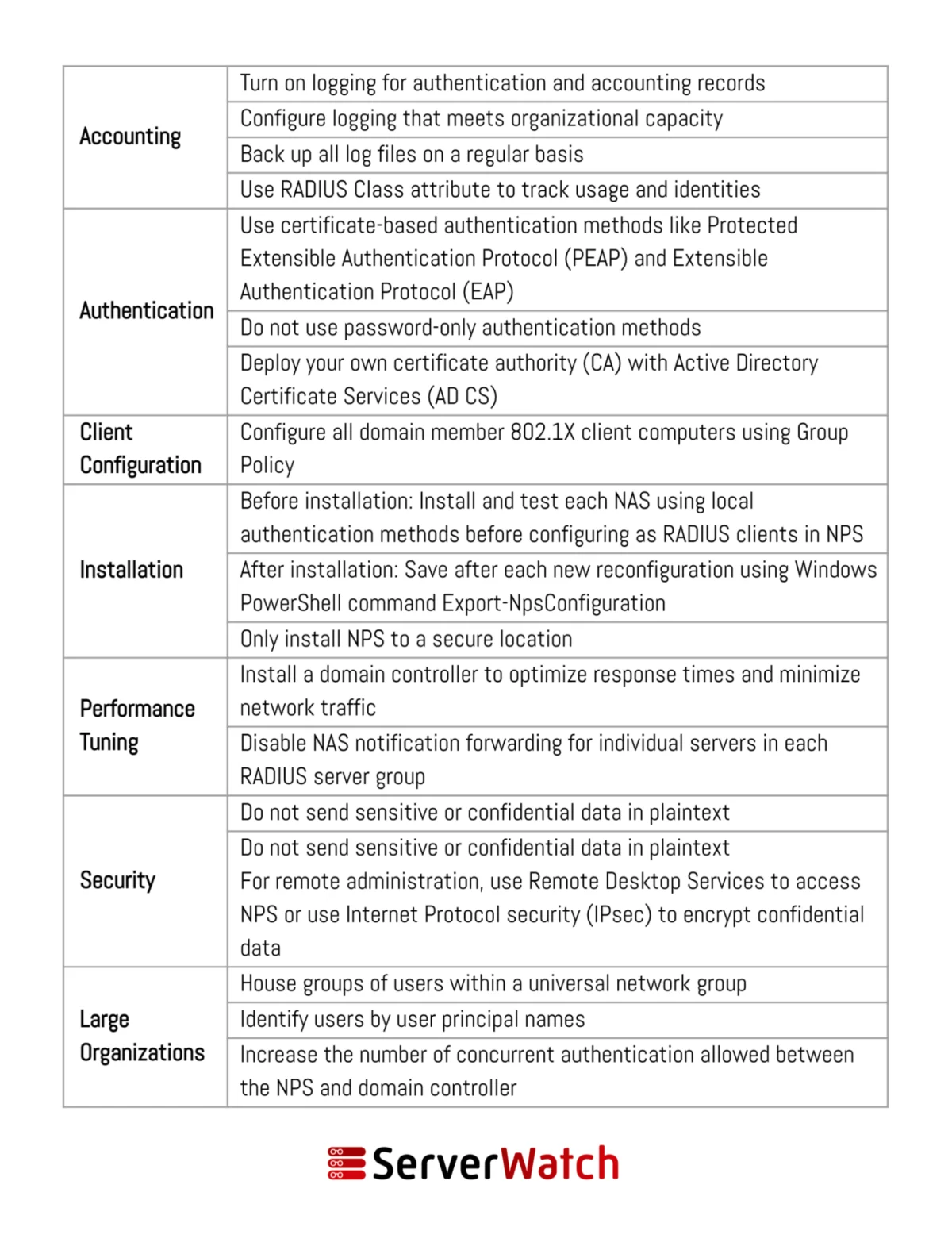
To maximize the effectiveness and security of an NPS deployment, adhering to established best practices is essential. These recommendations, often provided by Microsoft and industry experts, ensure that NPS operates efficiently, reliably, and in alignment with an organization’s overall network management strategy.
- Secure RADIUS Client Configuration: Ensure that all RADIUS clients (e.g., wireless access points, VPN servers) are configured with strong shared secrets and that these secrets are unique for each client. Regularly review and update these shared secrets.
- Leverage Active Directory Integration: Integrate NPS with Active Directory (AD) to utilize existing user accounts and group memberships for authentication and authorization. This simplifies user management and ensures that access policies are consistent with AD security configurations.
- Implement Strong Authentication Methods: Beyond basic password authentication, consider implementing more secure methods such as PEAP-MSCHAPv2, EAP-TLS with certificates, or multi-factor authentication (MFA) for enhanced security.
- Define Granular Network Policies: Create specific network policies that precisely define access rules based on user groups, network access methods, time of day, and device compliance. Avoid overly broad policies that grant excessive access.
- Configure Robust Accounting: Enable accounting to log all connection attempts, successful and failed, along with session details. Regularly review these logs for suspicious activity and for compliance auditing.
- Utilize NPS as a RADIUS Proxy Strategically: In distributed environments, leverage NPS as a proxy to centralize policy management and improve routing efficiency. Ensure proxy configurations are well-documented and tested.
- Regularly Update NPS: Keep the Windows Server operating system and NPS components updated with the latest security patches and updates to protect against known vulnerabilities.
- Monitor NPS Performance: Implement monitoring tools to track NPS server performance, CPU usage, memory consumption, and the rate of authentication requests. This helps in identifying potential bottlenecks or performance issues.
- Backup NPS Configuration: Regularly back up the NPS configuration, including policies and user databases, to facilitate quick recovery in case of hardware failure or accidental misconfiguration.
- Restrict NPS Server Access: Limit administrative access to the NPS server to authorized personnel only. Implement strong password policies for administrator accounts and consider using dedicated service accounts for NPS management.
- Plan for High Availability: For critical network services, consider deploying NPS in a highly available configuration, such as using Network Load Balancing (NLB) or a failover cluster, to ensure uninterrupted network access.
- Document All Configurations: Maintain comprehensive documentation of all NPS configurations, policies, and RADIUS client settings. This documentation is invaluable for troubleshooting, audits, and knowledge transfer.
Bottom Line: The Integral Role of NPS in Modern Network Management
The Network Policy Server (NPS) has solidified its position as an indispensable tool for contemporary network and server management. It provides a robust, flexible, and scalable solution for ensuring secure and efficient network operations. By seamlessly integrating NPS into an organization’s network infrastructure, IT departments can significantly bolster their security posture through the rigorous enforcement of access policies. Concurrently, NPS simplifies administrative tasks, streamlines user access management, and enhances the overall control and visibility of network resources.
In an era where cyber threats are increasingly sophisticated and data protection regulations are becoming more stringent, a well-implemented NPS is not merely a convenience but a necessity. It empowers organizations to maintain a secure, compliant, and highly operational network environment. By diligently applying the best practices outlined for deployment and ongoing management, organizations can effectively mitigate network security risks, ensure a seamless operational flow, and build a resilient digital foundation capable of supporting evolving business demands. The strategic utilization of NPS is a testament to proactive network security and efficient resource governance in the modern digital landscape.