

The widespread adoption of Android Auto has revolutionized in-car navigation and entertainment, offering a seamless integration of smartphone functionalities onto vehicle infotainment screens. However, a persistent annoyance for many users, particularly those who rely on Google Maps within the Android Auto ecosystem, has been the unsolicited display of "suggested destinations." These prompts, often irrelevant to current travel plans and occupying significant screen real estate, have led to considerable user frustration. While Google’s intent is likely to streamline navigation by anticipating user needs, the implementation frequently falls short, offering suggestions for past, one-off trips or locations that hold no current relevance. This issue, which many describe as a "first-world problem" but nonetheless impactful on user experience and safety, has finally seen an ingenious, user-discovered workaround: temporarily disassociating the Google account from Google Maps specifically within the Android Auto environment. This simple yet effective method provides a cleaner, less cluttered navigation interface, restoring user control over the in-car display.
The Persistent Problem: Unwanted Navigation Suggestions
Upon connecting a smartphone to Android Auto and launching Google Maps, a feature designed to enhance convenience often becomes a source of irritation. The system automatically presents a list of "quick" navigation suggestions, ostensibly based on the user’s location history and search patterns. For example, a user might see suggestions for a hotel visited months ago or a store from a single past errand, rather than regularly frequented locations like home or work, which are typically saved as favorites. This behavior is problematic for several reasons. Firstly, the suggestions are frequently irrelevant, failing to anticipate actual current needs. Secondly, they occupy a considerable portion of the navigation screen, obscuring the map view and requiring multiple taps to dismiss. In a driving scenario, any unnecessary interaction with the infotainment system can be a distraction, compromising safety.
The core of the problem lies in the predictive algorithms that, despite their sophistication, sometimes misinterpret user intent or prioritize less relevant historical data. While Google Maps on a smartphone offers extensive customization and the ability to manage location history and privacy settings, these granular controls do not fully translate to the Android Auto interface. Users have reported instances where a one-time visit to a remote location triggers repeated suggestions for that same place, even if it’s thousands of miles away from their current position. This creates a cluttered and inefficient user experience, contrary to the intuitive and streamlined design principles typically associated with in-car interfaces. The inability to disable these suggestions through conventional settings has left many drivers feeling that their digital co-pilot is more of a hindrance than a help.
The Genesis of the Feature: Google’s Intentions vs. User Reality
Google’s broader strategy across its vast ecosystem is heavily reliant on personalization and predictive AI. From search results to YouTube recommendations, the company aims to anticipate user needs, often before they are explicitly articulated. The "suggested destinations" feature in Google Maps for Android Auto is a direct extension of this philosophy. The underlying logic is sound: if a user frequently commutes to a specific office or regularly visits a particular gym, offering these as immediate navigation options could save time and enhance convenience. The system leverages location history, search queries, and even calendar events to identify potential destinations.
However, the real-world application reveals a critical disconnect. While the intent is to streamline navigation for common routes, the algorithms sometimes fail to differentiate between routine journeys and one-off excursions. A single visit to a new restaurant, a specific address for a delivery, or a hotel during a vacation might be logged and subsequently offered as a "quick destination," even when the user is back in their daily routine. This over-eagerness to predict often backfires, creating noise rather than utility. The issue highlights a fundamental challenge in AI-driven personalization: balancing the desire for proactive assistance with the need for user control and context awareness. When the system’s predictions are consistently inaccurate or irrelevant, the feature transitions from helpful to intrusive, undermining the very goal of a seamless driving experience.
A Timeline of User Frustration and Attempts at Resolution
The frustration surrounding unsolicited navigation suggestions in Android Auto is not a recent phenomenon; it has evolved alongside the platform itself.
- Early Android Auto (2015-2018): Initial versions focused on core functionalities like navigation, music, and communication. While Google Maps was central, the predictive features were less aggressive or sophisticated.
- Rise of Predictive AI (2019-Present): As Google’s AI capabilities advanced, more sophisticated predictive features were integrated into Google Maps. This included an increased emphasis on anticipating destinations based on learned patterns and location history. It was during this period that users began to report the growing prevalence of irrelevant suggestions in Android Auto.
- Community Outcry (2020-Present): Online forums, particularly Reddit communities like r/AndroidAuto, became hubs for users sharing their experiences with this issue. Threads discussing "how to disable suggested destinations" or "Google Maps cluttering my Android Auto screen" consistently appeared. Users attempted various conventional troubleshooting methods:
- Clearing Google Maps history: This often provided temporary relief but the suggestions would reappear as new location data was collected.
- Adding more favorites: Some hoped that by populating their favorites list with genuinely useful locations, the system would prioritize these. This proved largely ineffective against the persistent "random" suggestions.
- Adjusting privacy settings on the phone: While users could pause location history or activity tracking, this often had broader implications for other Google services and didn’t directly resolve the Android Auto display issue.
- The Search for a Definitive Fix: For years, the consensus remained that there was no official setting to disable these suggestions. This led to a continuous search for workarounds, often involving complex device settings or even third-party applications, none of which proved satisfactory or widely applicable. The sheer volume of discussions underscored the significant impact of this seemingly minor feature on daily driving.
This chronology illustrates a prolonged period of user dissatisfaction met with a lack of official, direct solutions, culminating in the community’s independent discovery of a viable workaround.
The Ingenious Workaround: Decoupling Google Accounts from Maps in Android Auto
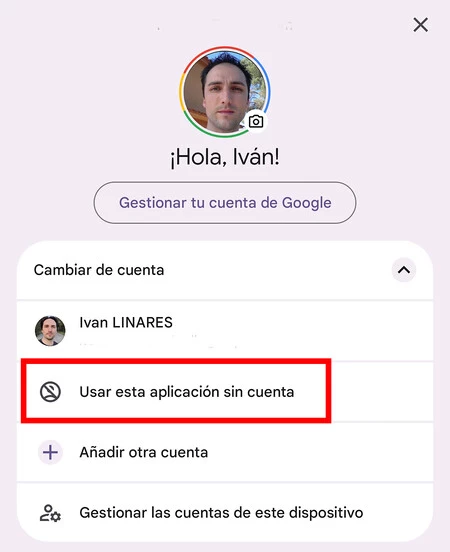
After numerous failed attempts with conventional methods, an ingenious solution emerged from the user community, specifically highlighted in discussions on platforms like Reddit: temporarily disconnecting the Google account from Google Maps within the Android Auto application settings. This method, while not an official feature toggle, effectively circumvents the system’s reliance on personalized data to generate suggestions.
The Mechanism:
Google Maps’ predictive capabilities, including destination suggestions, are deeply intertwined with the user’s Google account and the vast amount of location history and search data associated with it. When a Google account is actively linked, Maps accesses this historical data to attempt to "learn" and predict destinations. By selecting a "no account" option or effectively logging out of Google Maps within the Android Auto context, the application loses access to this personalized historical data. Without this input, Maps cannot generate personalized suggestions, resulting in a clean, uncluttered map interface.
Step-by-Step Implementation:
The process, as described by users and demonstrated in supporting visuals, is surprisingly straightforward:
- Access Android Auto Settings: On the connected smartphone, open the Android Auto application.
- Navigate to Google Maps Preferences: Within Android Auto settings, locate the section related to Google Maps. This might be under "Navigation apps" or "Customize launcher."
- Manage Accounts in Google Maps: Look for an option related to "Google Maps Accounts" or "Accounts in Google Maps."
- Select "No Account": Here, users will typically see their currently linked Google account. Alongside it, there should be an option to select "No account" or "Sin cuenta" (as shown in the provided images). Selecting this option effectively logs out Google Maps from the specific Google account within the Android Auto environment.
Once this change is applied, the next time Android Auto launches Google Maps, the screen will display a clean map without the distracting list of suggested destinations. This provides the user with full control over the map view, allowing them to manually input their desired destination or select from their saved favorites (though accessing favorites will require a temporary re-linking of the account).
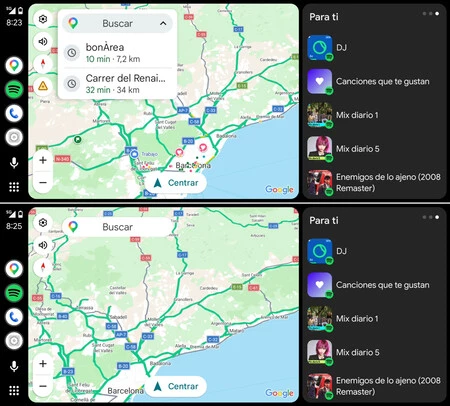
The visual comparison between a Google Maps interface with a linked account (showing the cluttered suggestions) and one without an account (displaying a clean map) vividly illustrates the effectiveness of this workaround. It transforms a frustratingly busy screen into a minimalist, driver-focused display, addressing a core usability concern for many.
Analyzing the Implications and Trade-offs of the Solution
The "no account" workaround, while highly effective in addressing the immediate problem of screen clutter, comes with a set of implications and trade-offs that users must consider.
Pros:
- Clean Interface: The primary benefit is a significantly cleaner and less distracting Google Maps display within Android Auto. This allows drivers to focus solely on the map and their chosen route.
- Reduced Distraction: Eliminating irrelevant suggestions means fewer visual elements competing for attention and fewer unintentional taps or gestures while driving, contributing to enhanced safety.
- Improved User Control: Users regain control over their navigation experience, choosing when and how to input destinations rather than being prompted with unsolicited options.
- Simple Implementation: The process of switching accounts is quick and reversible, making it a practical solution for daily use.
Cons:
- Loss of Immediate Favorites Access: Without a linked Google account, users cannot directly access their personalized saved places (home, work, starred locations) within Google Maps in Android Auto. To navigate to a favorite, the account must be re-linked, which, while quick, adds a step.
- Reduced Personalization: Beyond suggestions, a logged-in Google account enables other personalized features like real-time traffic predictions based on learned routes, personalized points of interest, and syncing of search history across devices. These features might be diminished or unavailable when no account is active.
- Workaround, Not a Feature: This is not an officially supported "disable suggestions" toggle. It’s a clever circumvention of how the system functions, which means Google could theoretically change its behavior in future updates, rendering the workaround ineffective.
- Context Switching: For users who frequently switch between wanting a clean map and needing access to their favorites, the constant logging in and out, while quick, can become a minor inconvenience.
Broader Implications:
This workaround highlights a fundamental tension between user autonomy and the drive for hyper-personalization in modern technology. While companies like Google aim to create "smart" systems that anticipate needs, there’s a growing user demand for explicit control over such features, especially in safety-critical environments like driving. The necessity of such a workaround underscores a design oversight: the absence of a simple, direct toggle to manage predictive navigation suggestions. It suggests that while data-driven features are powerful, they must be accompanied by robust user configuration options to truly enhance, rather than detract from, the user experience. This situation serves as a case study for human-computer interaction in connected vehicles, emphasizing that predictive intelligence must always be balanced with user choice and clarity.
Expert and User Reactions, and the Call for Official Solutions
The discovery and propagation of this workaround have been met with overwhelmingly positive reactions from the Android Auto user community. Forums and social media platforms are abuzz with users expressing relief and gratitude, confirming the effectiveness of the method. Many have voiced their frustration that such a basic customization option was not officially available from Google in the first place. The sentiment is clear: while appreciated, a workaround should not be necessary for a core function in a widely used navigation system.
Tech Analysts and Experts: Technology analysts generally view this situation as indicative of a common challenge in software development: the difficulty of designing features that cater to a diverse user base with varying preferences. They often suggest that Google, as a leader in mobile and AI technology, should implement a dedicated, easily accessible toggle within Android Auto settings to disable these suggestions. Such a feature would align with principles of user-centric design and minimize potential distractions for drivers. Experts also point out that relying on account management for a display preference is an indirect solution that could be streamlined.
Google’s Implicit Stance: While Google has not issued an official statement specifically addressing this workaround or the user demand for a disable feature, their general approach emphasizes the benefits of personalization. Their ongoing development of Android Auto, including the recent "Coolwalk" redesign, aims to offer a more modern and flexible interface. However, even with these updates, the specific issue of unsolicited map suggestions persists, indicating that it might be a deeper architectural decision rather than a simple oversight. Google typically states that it is "constantly evaluating user feedback" to improve its products, suggesting that sustained user demand for such a feature could eventually lead to an official solution.
The Call for Official Integration:
The overarching sentiment from the user base and tech community is a strong call for Google to integrate a direct, user-friendly setting to control navigation suggestions within Android Auto. This would eliminate the need for users to engage in account management gymnastics and would demonstrate Google’s responsiveness to specific user pain points. Such a feature would not only improve user satisfaction but also enhance the safety and usability of Android Auto, aligning it more closely with the expectations for modern in-car infotainment systems. The evolution of connected car technology increasingly prioritizes customization and driver-focused interfaces, making the inclusion of such a toggle a logical and necessary step forward.
Conclusion: User Empowerment in the Connected Car Era
The saga of the unwanted Google Maps suggestions in Android Auto, and the community-driven solution, offers a compelling illustration of user empowerment in the digital age. What began as a minor but persistent annoyance for countless drivers has found a practical resolution not through official channels, but through the collective ingenuity of its user base. This workaround, by temporarily decoupling a Google account from Maps within Android Auto, provides a much-desired clean and uncluttered navigation interface, enhancing both usability and driver focus.
While effective, this solution remains a workaround, highlighting a crucial gap in user control within Google’s otherwise sophisticated in-car platform. It underscores the ongoing tension between a company’s drive for data-driven personalization and the user’s fundamental need for explicit control over their digital experience, particularly in safety-critical environments like driving. The enthusiastic adoption of this trick by users worldwide sends a clear message to Google: while predictive intelligence is valued, it must always be balanced with granular customization options.
As the connected car landscape continues to evolve, with increasingly integrated and intelligent systems, the demand for user-centric design will only grow. The ability for drivers to tailor their infotainment experience, free from unwanted digital clutter, is paramount. The ultimate resolution to this issue would be Google’s integration of a direct and intuitive setting to manage or disable these navigation suggestions. Until then, the user community’s ingenious solution stands as a testament to collective problem-solving and a beacon for greater autonomy in our increasingly digital journeys.