
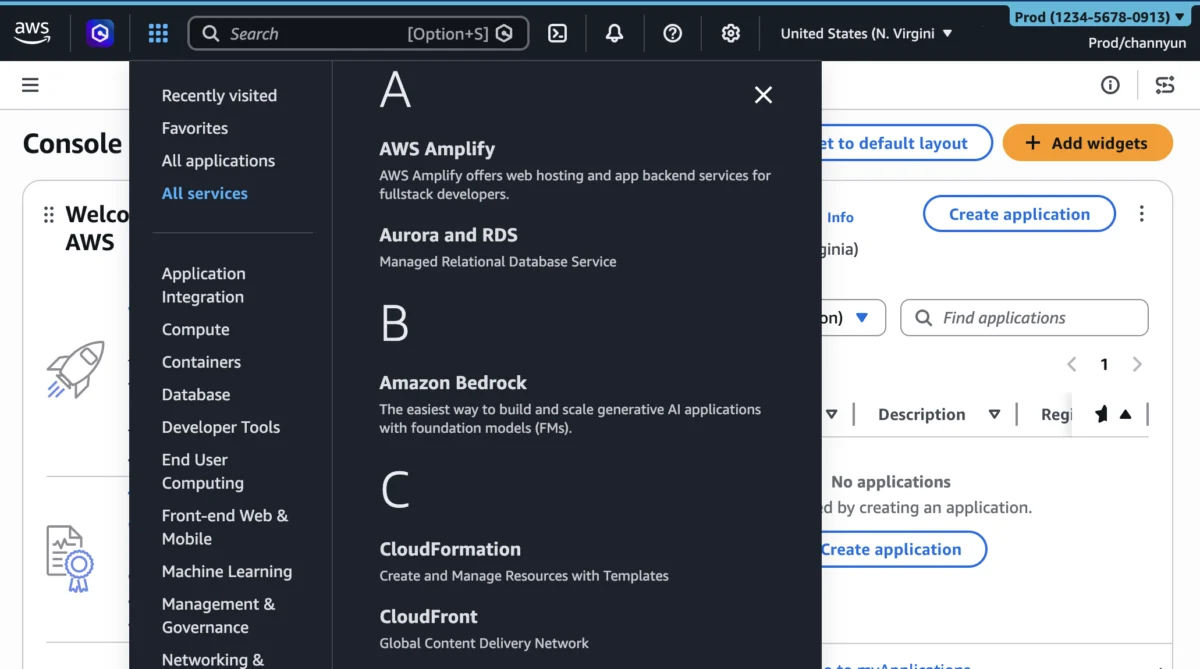

Amazon Web Services (AWS) today announced a significant expansion of its User Experience Customization (UXC) capabilities for the AWS Management Console, empowering account administrators to selectively display relevant AWS Regions and services to their teams. This enhancement, building upon the initial introduction of account color assignment in August 2025, marks a pivotal step in AWS’s ongoing commitment to refining the user interface, aiming to reduce cognitive load, streamline workflows, and boost operational efficiency for millions of users navigating complex cloud environments. The new features allow for a tailored console experience, ensuring that individual team members are presented only with the AWS resources pertinent to their roles and responsibilities, thereby minimizing distractions and accelerating task completion.
A Chronology of User-Centric Evolution in the AWS Console
The AWS Management Console, serving as the primary graphical interface for interacting with AWS services, has undergone continuous evolution since its inception. Initially designed to provide comprehensive access to a growing suite of cloud services, its increasing breadth and depth over the years presented both opportunities and challenges. As AWS expanded its global footprint with new regions and rapidly innovated with hundreds of new services annually, the console’s complexity naturally grew. For many users, particularly those in large enterprises or specialized roles, navigating the extensive list of services and regions could become a cumbersome task, leading to potential inefficiencies and even errors.
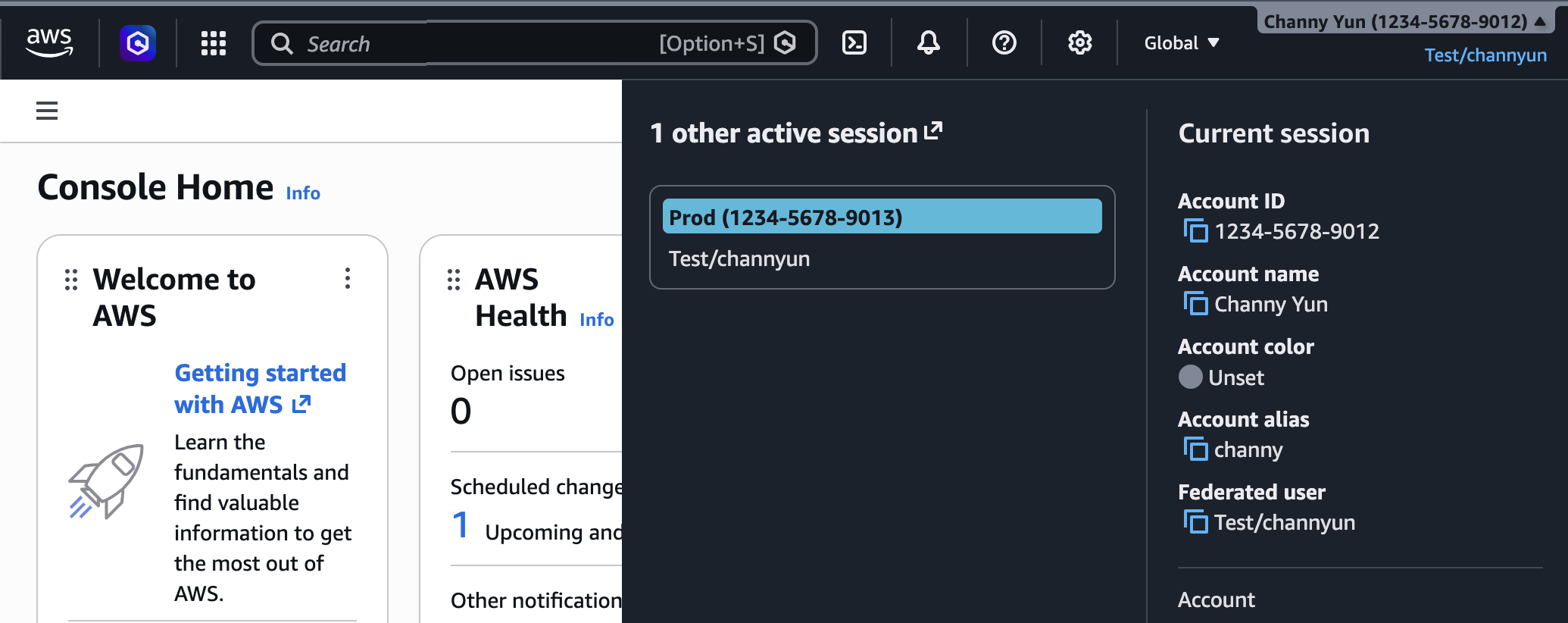
Recognizing these evolving user needs, AWS introduced the User Experience Customization (UXC) capability in August 2025. The inaugural feature under UXC allowed account administrators to assign distinct colors to AWS accounts. This seemingly simple addition addressed a critical pain point in multi-account strategies, enabling development teams, operations staff, and security personnel to visually differentiate between various environments—such as development, testing, staging, and production accounts—at a glance. For instance, a common practice quickly emerged: using vibrant orange for development, a calming light blue for testing, and a cautionary red for production accounts. This visual cue significantly reduced the risk of deploying changes to the wrong environment, a common source of costly operational incidents. The August 2025 launch laid the groundwork for a more personalized and secure console experience, signaling AWS’s intent to move beyond a one-size-fits-all interface.
Today’s announcement, in March 2026, represents the next logical progression in this user-centric journey. By adding the ability to selectively control the visibility of AWS Regions and services, AWS is directly addressing the information overload often experienced by users. This expansion transforms the console from a universal dashboard into a highly customizable workspace, attuned to the specific needs of different user groups within an organization.
Strategic Benefits: Reducing Cognitive Load and Enhancing Focus
The core philosophy behind these new UXC enhancements is the reduction of cognitive load. In today’s fast-paced cloud development and operations landscape, engineers and administrators are constantly sifting through vast amounts of information. Presenting an overwhelming array of options can lead to decision fatigue, increased error rates, and slower task execution. By intelligently hiding irrelevant AWS Regions and services, the console now provides a more focused and streamlined environment.

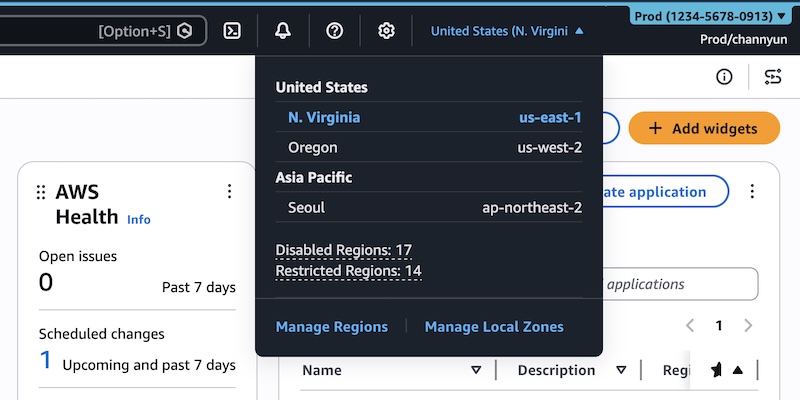
Consider an organization operating solely in us-east-1 and eu-west-1 for compliance and proximity reasons. Before this update, every user would see all available AWS Regions in the dropdown selector, regardless of their operational scope. With the new customization, administrators can configure the console to display only us-east-1 and eu-west-1, eliminating the need for users to scroll through dozens of irrelevant regions. This not only saves time but also significantly mitigates the risk of accidental resource provisioning in unapproved geographical locations, which can have serious implications for data residency, regulatory compliance (such as GDPR or HIPAA), and cost management.
Similarly, the ability to control service visibility addresses the ever-growing catalogue of AWS services. With over 200 fully featured services spanning compute, storage, databases, networking, analytics, machine learning, and more, a typical developer or operator rarely uses more than a fraction of them on a daily basis. For a database administrator, seeing only Amazon RDS, Amazon DynamoDB, Amazon Aurora, and related analytics services would be far more efficient than sifting through a list that includes quantum computing, satellite ground stations, or game development tools. This targeted approach means fewer clicks, less scrolling, and a quicker path to the desired service, ultimately translating into enhanced productivity and a more pleasant user experience.
Categorizing Accounts by Color: A Visual Safeguard
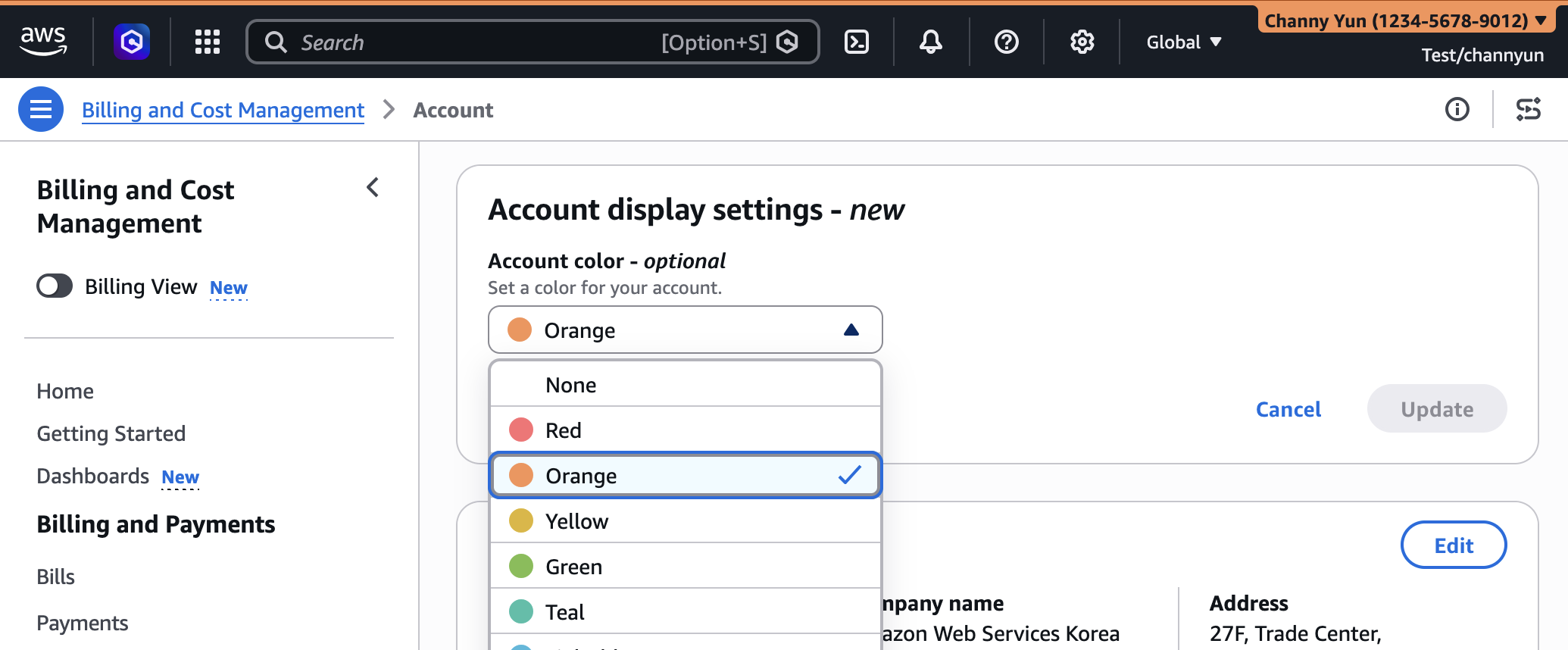
The initial UXC feature, account color assignment, remains a cornerstone of the personalized console experience. Account administrators can still effortlessly assign a distinct color to each AWS account. This visual categorization is not merely an aesthetic choice; it serves as a powerful operational safeguard.
For example, an enterprise might adopt a color scheme where:
- Red signifies production accounts, demanding utmost caution.
- Orange denotes staging or pre-production environments, where testing and validation occur before live deployment.
- Light Blue represents development accounts, providing a sandbox for experimentation and feature building.
- Green could be used for security-focused accounts, such as audit or log archiving accounts.
When a user logs into the AWS Management Console, the assigned color prominently displayed in the navigation bar immediately communicates the account’s purpose. This instant visual context helps prevent common errors, such as inadvertently modifying a production resource while intending to work in a development environment. The clarity provided by these visual cues contributes to a more secure and error-resistant operational posture, particularly in complex multi-account architectures managed through AWS Organizations.
Administrators can access this setting by signing into the AWS Management Console, selecting their account name in the navigation bar, and then choosing "Account" to update the display settings. The chosen color is immediately reflected, providing instant feedback.
Tailoring Regions and Services Visibility: Precision at Scale
The newly introduced capabilities for customizing Region and service visibility offer unprecedented control over the console interface. This feature is accessible to administrators via the gear icon in the navigation bar, leading to "See all user settings," where a new "Account settings" tab awaits configuration. By default, all Regions and services remain visible if no customizations are applied, ensuring backward compatibility.
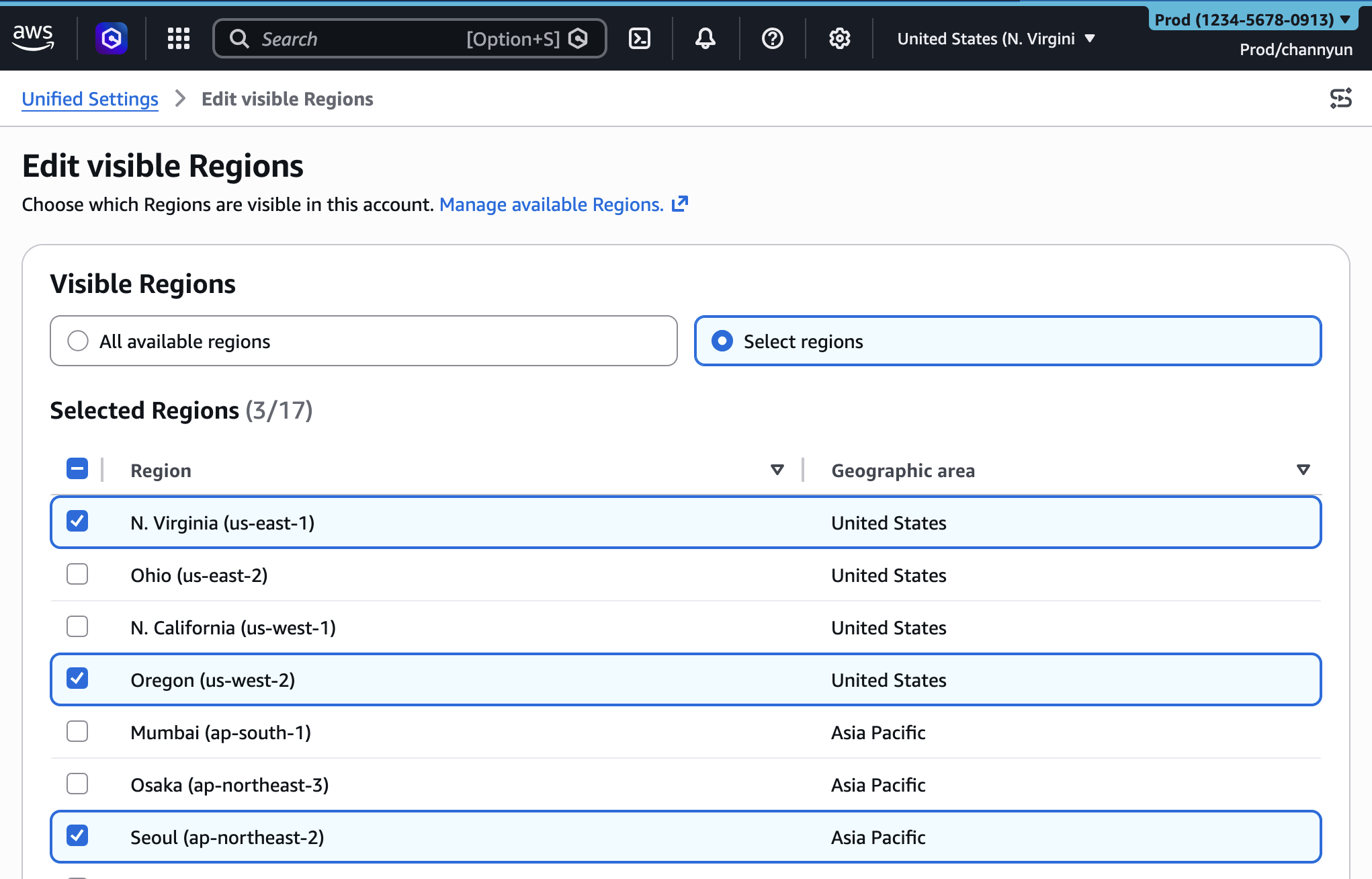
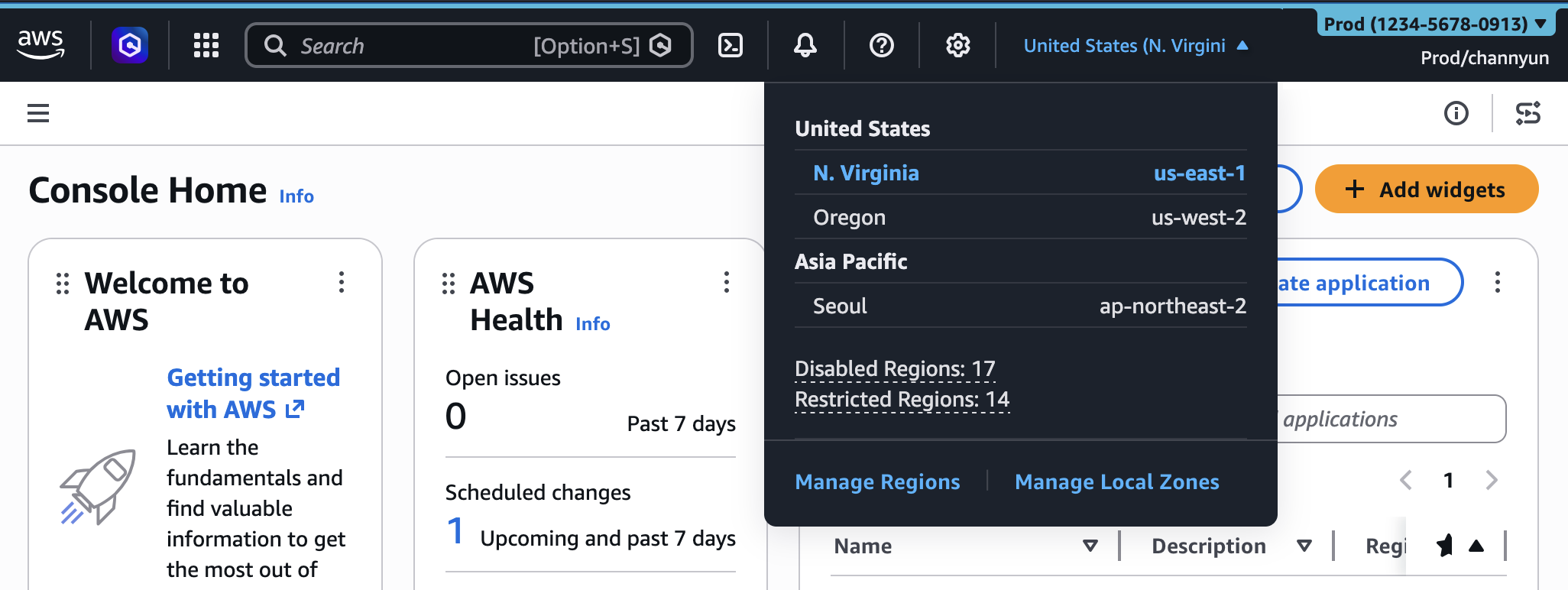
To customize visible Regions, administrators can choose between "All available Regions" or "Select Regions." The latter option presents a comprehensive list, allowing specific regions to be whitelisted for display. Once saved, the Region selector in the console’s navigation bar will only present the chosen subset of regions. This is particularly valuable for organizations with strict data sovereignty requirements or those that standardize operations within a limited set of AWS Regions. For example, a company operating exclusively in Europe and North America can hide all Asian, South American, African, and Australian regions, simplifying the interface for its employees and reinforcing operational policies.
Similarly, service visibility can be configured with precision. Administrators can search for specific services or select them from categorized lists, such as "Popular services." This granular control allows for the creation of highly specialized console views. A machine learning engineer might only see SageMaker, Rekognition, Comprehend, and associated data services, while a network engineer would have immediate access to VPC, Route 53, Direct Connect, and other networking tools. This specialization not only makes the console less daunting but also accelerates navigation to frequently used services. After configuration, the "All services" menu and the search bar will only present the selected services, providing a focused environment tailored to individual or team roles.
Important Distinction: UI Visibility vs. Access Control
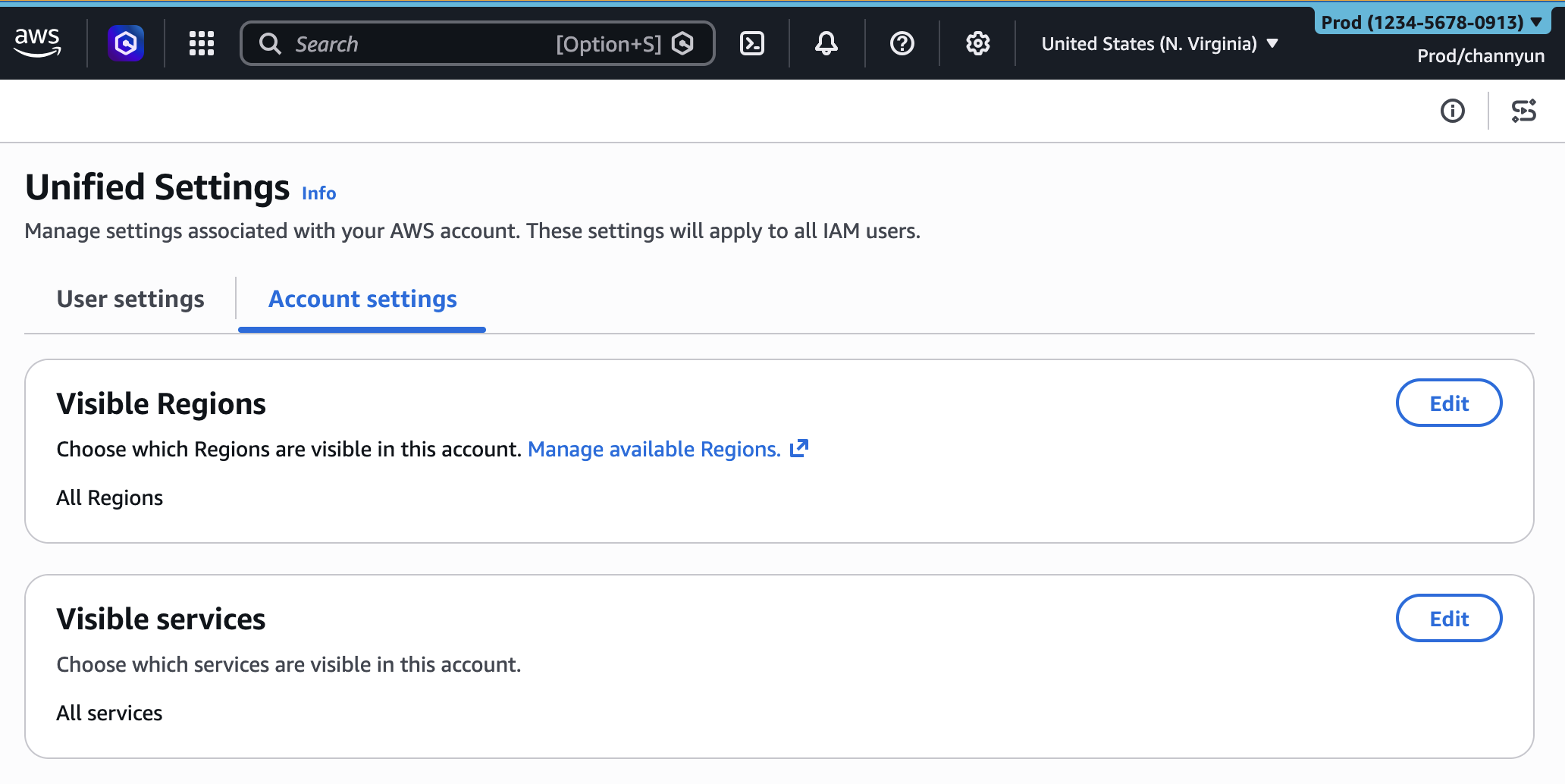
A critical aspect highlighted by AWS is that these UXC settings solely control the appearance of services and Regions within the AWS Management Console. They do not, in any way, restrict actual access to AWS resources or services through alternative programmatic interfaces. This means that if a user has the necessary permissions via AWS Identity and Access Management (IAM), they can still interact with hidden Regions or services using the AWS Command Line Interface (AWS CLI), AWS SDKs, direct AWS APIs, or even through tools like Amazon Q Developer.
This distinction is paramount for security and governance. UXC is a productivity and usability feature, not a security mechanism. Access control remains the exclusive domain of IAM policies, which dictate what actions a user or role can perform on which resources. This separation of concerns is crucial for maintaining a robust security posture while simultaneously enhancing user experience. Administrators must continue to implement strong IAM policies to enforce least privilege access, complementing the console’s visual streamlining with foundational security controls.
Programmatic Control for Enterprise-Scale Management
Recognizing the needs of large enterprises and organizations that embrace Infrastructure-as-Code (IaC) principles, AWS has also extended programmatic control for these new customization settings. The AWS::UXC::AccountCustomization CloudFormation resource now includes visibleServices and visibleRegions parameters.
This programmatic capability is a game-changer for automating console customization across hundreds or even thousands of AWS accounts within an organization. Instead of manually configuring settings in each account, administrators can define their desired console experience within CloudFormation templates. This allows for:
- Standardization: Ensuring consistent console experiences across all accounts for specific teams or environments.
- Version Control: Managing console settings like any other infrastructure component, tracking changes, and rolling back if necessary.
- Automation: Integrating console customization into existing CI/CD pipelines, automatically applying settings when new accounts are provisioned or when organizational policies change.
- Auditability: CloudFormation provides an audit trail of changes made to these settings, enhancing governance.
The provision of a CloudFormation sample template demonstrates the ease with which these customizations can be deployed:
AWSTemplateFormatVersion: "2010-09-09"
Description: Customize AWS Console appearance for this account

Resources:
  AccountCustomization:
    Type: AWS::UXC::AccountCustomization
    Properties:
      AccountColor: red
      VisibleServices:
        - s3
        - ec2
        - lambda
      VisibleRegions:
        - us-east-1
        - us-west-2
This snippet exemplifies how an administrator can declare that an account should be colored red, only display Amazon S3, EC2, and Lambda services, and restrict visible regions to us-east-1 and us-west-2. Such templates can be deployed using the AWS CLI, enabling rapid and scalable management of console experiences. This programmatic approach significantly benefits organizations that prioritize automation and consistent configuration management across their cloud estate.
Broader Implications and Industry Impact
The expanded AWS User Experience Customization capabilities carry significant implications for cloud adoption and operational practices:
- Enhanced Operational Efficiency: By reducing clutter and focusing the user interface, AWS estimates that users could save significant time daily, potentially shaving minutes off each task that involves navigating the console. Over a large workforce, these cumulative time savings translate into substantial productivity gains and cost efficiencies.
- Reduced Error Rates: Clear visual distinctions and fewer irrelevant options directly contribute to a decrease in human error, particularly in critical production environments. This not only prevents costly outages but also bolsters confidence in cloud operations.
- Improved Compliance and Governance: The ability to restrict visible regions aids organizations in enforcing data residency and regulatory compliance requirements. It makes it harder for users to accidentally deploy resources in non-compliant geographies.
- Faster Onboarding for New Users: New employees or those new to AWS can be presented with a simplified, role-specific console, dramatically reducing the learning curve and accelerating their time to productivity. This lowers the barrier to entry for cloud adoption within an organization.
- Developer and Operator Satisfaction: A more personalized and less overwhelming console experience directly contributes to higher job satisfaction for cloud professionals, allowing them to focus on innovation rather than navigating complex interfaces.
- Enterprise-Grade Personalization: This move solidifies AWS’s position in catering to large, complex enterprise environments that demand sophisticated control over their cloud infrastructure and user experiences. It aligns with a broader industry trend towards hyper-personalized digital workspaces.
These enhancements underscore AWS’s continuous dedication to customer feedback and its strategic investment in user experience. As cloud environments grow in complexity, the tools used to manage them must evolve to provide clarity, efficiency, and control. The AWS UXC, with its growing suite of customization options, is poised to become an indispensable feature for organizations striving for optimal productivity and governance in their cloud operations.
AWS encourages users to explore these new features in the AWS Management Console today and provide feedback through the console’s feedback link, the AWS re:Post forum for the AWS Management Console, or by reaching out to their AWS Support contacts. This iterative approach to feature development, driven by real-world user needs, ensures that the AWS Management Console remains a powerful and user-friendly interface for the ever-expanding world of cloud computing.