

Seattle, WA – Amazon Web Services (AWS) today announced a significant expansion of its User Experience Customization (UXC) capabilities, empowering account administrators to selectively display relevant AWS Regions and services within the AWS Management Console. This enhancement, building upon the initial UXC launch in August 2025, aims to mitigate cognitive overload and streamline cloud operations by providing a more focused and efficient user interface tailored to specific team needs. The new features allow for combined customization of account colors, Region visibility, and service visibility, representing a critical step forward in AWS’s commitment to enterprise user experience.
The evolution of cloud computing has brought unprecedented agility and scale to businesses worldwide. However, with this growth comes complexity. AWS, a pioneer in the public cloud space, now offers well over 200 fully featured services, ranging from compute and storage to machine learning and quantum computing, deployed across more than 30 geographic Regions and 90 Availability Zones globally. While this vast ecosystem provides immense flexibility, it can also present a daunting challenge for users, particularly those managing large, multi-account environments. Navigating a console populated with hundreds of services and dozens of global locations, many of which may not be relevant to a user’s specific role or project, can lead to inefficiencies, potential misconfigurations, and a steep learning curve. This persistent issue of information overload has driven AWS to continuously innovate in how users interact with its platform.
The journey towards a more personalized console experience began with the introduction of AWS User Experience Customization (UXC) in August 2025. This initial rollout focused on foundational UI tailoring, most notably the ability for account administrators to assign distinct colors to AWS accounts. This feature was immediately recognized for its practical value in multi-account strategies. For instance, an organization managing separate AWS accounts for development, testing, and production environments could assign a unique color (e.g., orange for development, blue for testing, red for production) to each. This visual cue, prominently displayed in the console’s navigation bar, provides an instant, unmistakable indicator of the active account, drastically reducing the risk of performing actions in the wrong environment—a common source of operational errors and security incidents in complex cloud setups. The simplicity of this visual distinction belied its profound impact on operational safety and user confidence, laying the groundwork for more advanced customization.

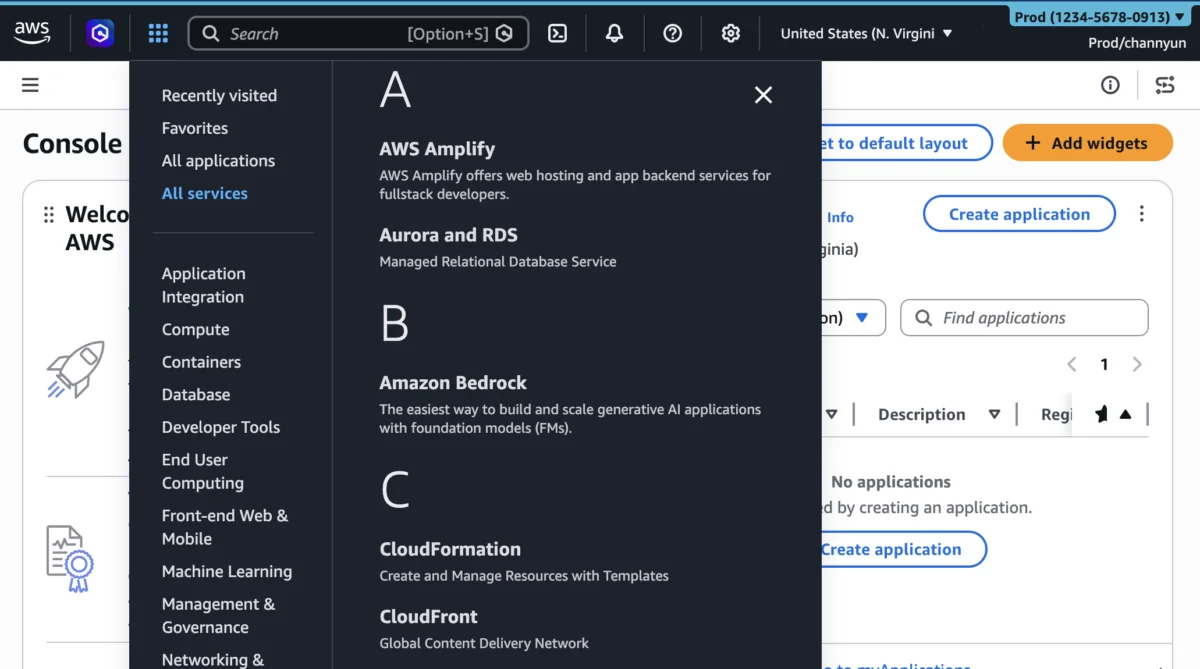
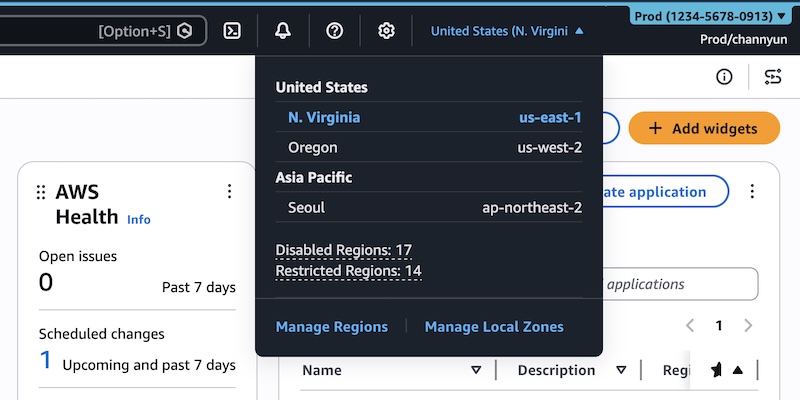
Today’s announcement marks a substantial leap in this customization journey, directly addressing the challenge of navigating AWS’s expansive service and geographical footprint. The new UXC features enable administrators to define precisely which AWS Regions appear in the Region selector and which AWS services are visible within the console navigation and search results. By hiding unused Regions and services, organizations can create a highly curated console experience that presents only the tools and locations relevant to a team member’s responsibilities. This targeted approach significantly reduces "noise" in the interface, minimizing cognitive load and eliminating the need for unnecessary clicks and scrolling. The direct outcome is improved focus, faster task completion, and a more intuitive interaction with the cloud platform.
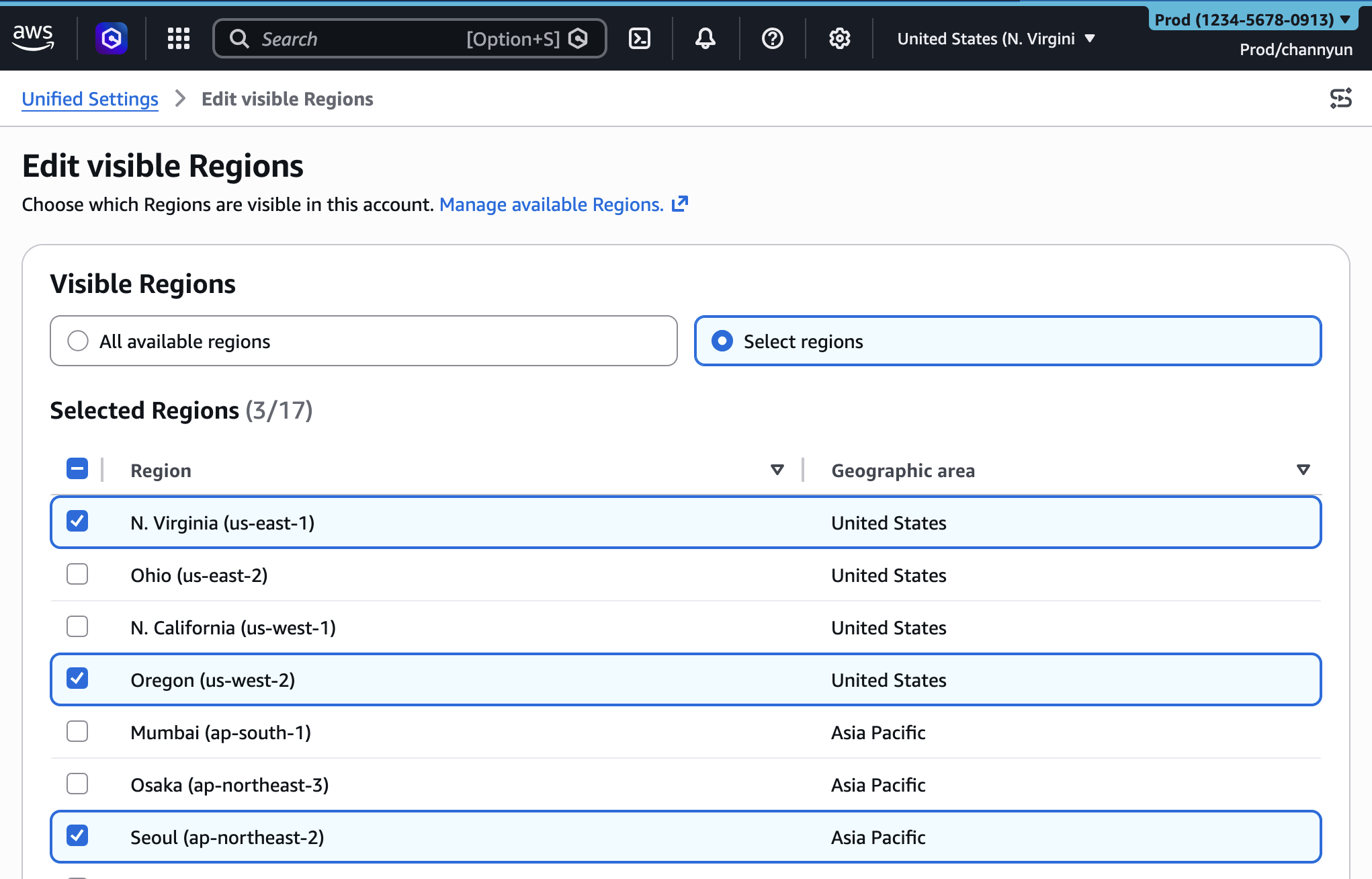
Consider a development team primarily operating out of the us-east-1 and eu-west-1 Regions, utilizing services like Amazon EC2, Amazon S3, AWS Lambda, and Amazon DynamoDB. Prior to this enhancement, their console experience would display all available AWS Regions and a comprehensive list of all AWS services. Now, an administrator can configure their account settings to show only us-east-1 and eu-west-1 in the Region selector, and only the four core services they actively use in the "All services" menu and search bar. This transforms a potentially overwhelming interface into a streamlined workspace, allowing developers to concentrate on their core tasks without distraction.
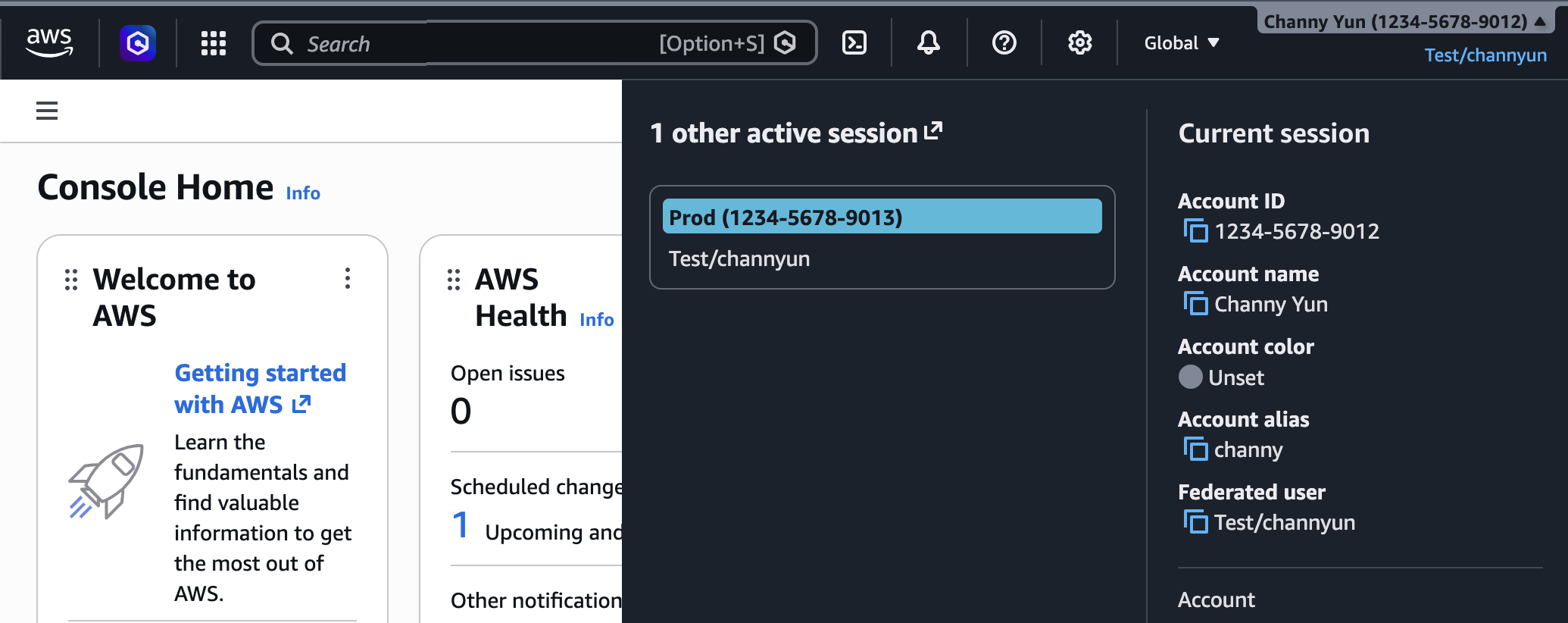
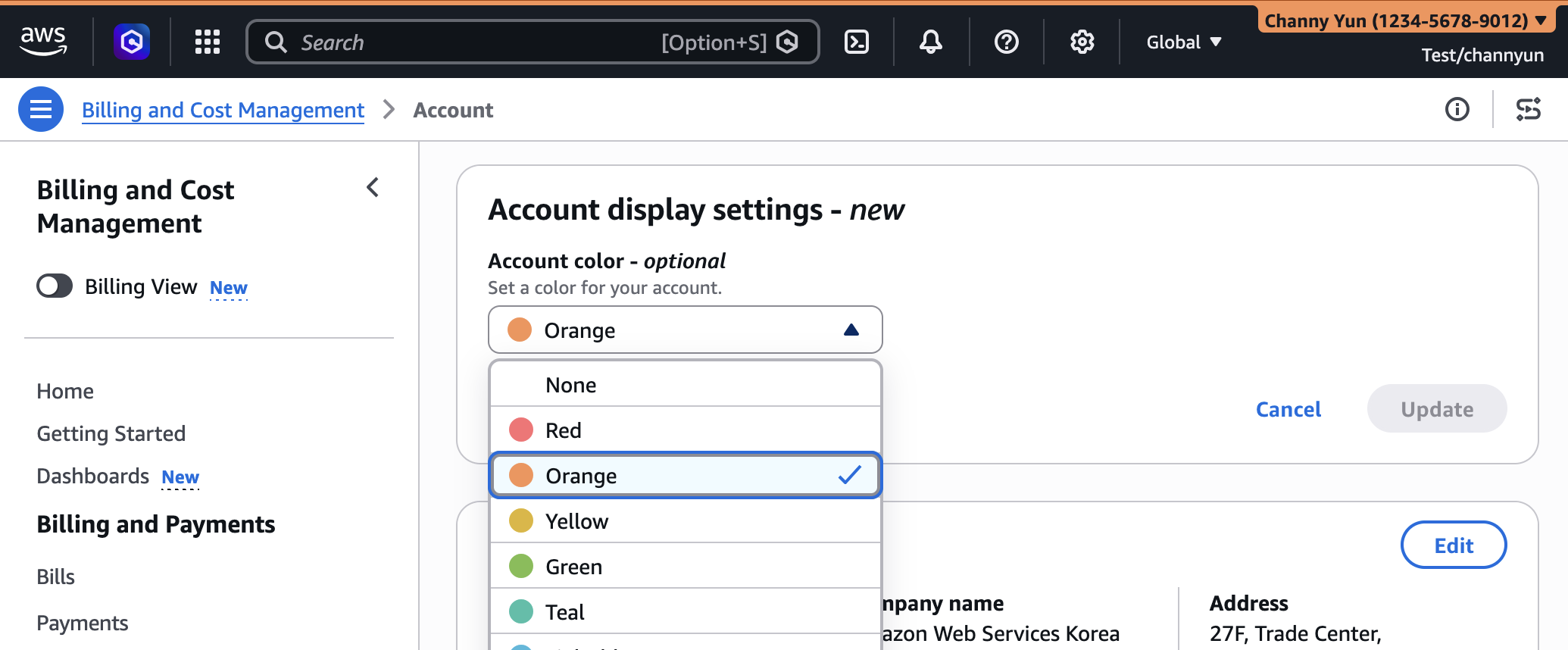
The practical implementation of these new customization options is designed for ease of use by account administrators. To categorize accounts by color, an administrator signs into the AWS Management Console, navigates to their account name on the navigation bar, and selects "Account" to access "Account display settings." Here, they can choose a preferred color from a palette, and this color will immediately reflect in the navigation bar, providing that instant visual distinction.
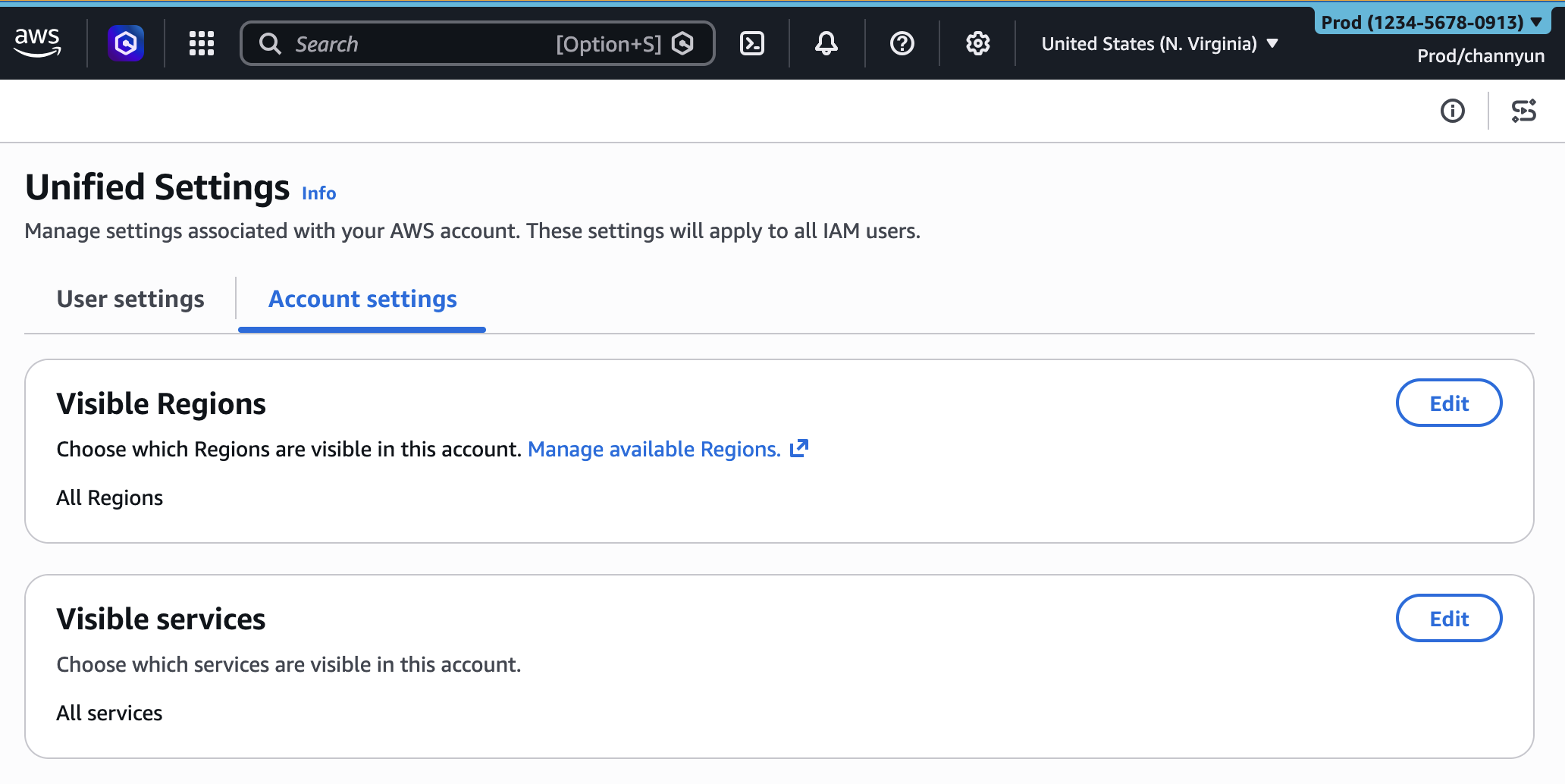
For the more granular control over Region and service visibility, administrators access the unified settings via the gear icon on the navigation bar, then select "See all user settings." A new "Account settings" tab now appears, providing the controls for "Visible Regions" and "Visible Services." If no settings have been configured, all Regions and services remain visible by default. Within the "Visible Regions" section, administrators can choose to either show "All available Regions" or "Select Regions," enabling them to pick specific geographical locations relevant to their operations. Similarly, the "Visible Services" section allows for searching or selecting services from various categories, including "Popular services," to build a tailored list. Once saved, these configurations immediately take effect, presenting a streamlined console interface to all users within that account.
It is crucial to emphasize that these UXC settings are purely for visual customization and do not constitute access control mechanisms. Hiding a Region or service in the console does not restrict access to that Region or service via programmatic interfaces such, as the AWS Command Line Interface (AWS CLI), AWS SDKs, AWS APIs, or developer tools like Amazon Q Developer. Access permissions remain governed by AWS Identity and Access Management (IAM) policies, which provide the fundamental security framework for controlling actions on AWS resources. This clear separation ensures that security and governance are maintained at the policy level, while UXC focuses on improving the user’s operational efficiency and reducing human error through interface simplification.
Beyond manual configuration through the console, AWS has also provided programmatic management capabilities for these new settings. Account administrators can leverage new visibleServices and visibleRegions parameters to define these customizations using infrastructure-as-code tools like AWS CloudFormation. This programmatic approach is particularly valuable for large organizations with robust governance frameworks and multi-account strategies, enabling them to standardize and deploy console customizations across hundreds or thousands of AWS accounts automatically. An AWS CloudFormation sample template demonstrates this capability, allowing organizations to declare desired account colors, visible services, and visible Regions within a YAML file, and then deploy these configurations consistently across their cloud estate. This integration with CloudFormation underscores AWS’s commitment to enterprise-grade management and automation.
"Simplifying the user experience while maintaining the depth and breadth of our platform is a continuous priority for AWS," stated an inferred spokesperson from the AWS Management Console product team. "The expansion of AWS User Experience Customization directly responds to customer feedback regarding the challenges of navigating complex cloud environments. By empowering administrators to tailor the console’s visibility of Regions and services, we are directly contributing to enhanced productivity, reduced operational friction, and a more intuitive experience for all users, from seasoned cloud architects to new developers."
From an enterprise perspective, the implications of these enhanced UXC capabilities are substantial. For organizations adhering to strict data residency requirements, limiting visible Regions to only those approved for use can help reinforce compliance policies. For development teams, a console filtered to only display the services they actively use can dramatically cut down on onboarding time for new hires, allowing them to become productive faster. A cloud operations team responsible for specific services can now have a console environment perfectly attuned to their daily tasks, reducing context switching and the likelihood of errors. These improvements translate directly into cost savings through increased efficiency and reduced downtime from operational mistakes.
Furthermore, this development aligns with broader industry trends towards personalized digital workspaces and intelligent interfaces. As cloud environments continue to grow in scale and complexity, the ability for users to customize their interaction points becomes paramount. AWS’s investment in UXC reflects a recognition that raw compute power and feature sets are only part of the equation; how easily and effectively users can access and manage these resources is equally critical for widespread adoption and sustained success. The ability to filter and categorize information effectively transforms a potentially overwhelming data landscape into a navigable, user-centric environment.
AWS encourages users to explore these new features within the AWS Management Console. Feedback can be provided directly through the "Feedback" link at the bottom of the console, by posting to the AWS re:Post forum for the AWS Management Console, or by reaching out to AWS Support contacts. This iterative approach to feature development, heavily influenced by customer input, ensures that AWS continues to build tools that genuinely solve real-world operational challenges for its diverse user base. The ongoing evolution of UXC signifies a clear direction towards an even more adaptable, efficient, and user-friendly cloud management experience.