

Google Colab, the popular cloud-based Python environment, has significantly advanced its AI-assisted coding capabilities with the introduction of dedicated AI prompt cells, marking a pivotal moment in democratizing access to powerful generative AI for developers and researchers alike. This latest enhancement, rolled out progressively and becoming widely accessible in late 2025 and early 2026, allows users to generate, explain, and refine Python code directly within the familiar notebook interface, leveraging the advanced capabilities of Google’s Gemini family of AI models. The move aims to accelerate prototyping, lower the barrier to entry for aspiring data scientists, and enhance productivity for experienced practitioners by integrating sophisticated AI tools into everyday coding workflows.
A New Era for Cloud-Based Development
Google Colab has long been a cornerstone for machine learning and data science communities, offering a free, accessible platform that requires no local setup beyond a web browser. Its popularity stems from its ease of use, integration with Google Drive, and the provision of free GPU/TPU access, making it ideal for experimental code and initial data analysis workflows before deployment to production systems. The current evolution builds upon this foundation by embedding AI directly into the core user experience, transforming Colab from merely a cloud execution environment into an intelligent co-creator.
The primary innovation lies in the AI prompt cell, a new cell type designed for direct, natural language interaction with Google’s generative AI. Historically, Colab notebooks comprised two main cell types: code cells for executing Python code and text cells for markdown-formatted explanations and visuals. The AI prompt cell introduces a third dimension, allowing users to articulate complex coding requirements in plain English, thereby offloading the initial code generation phase to an AI model. This feature is particularly impactful for users with limited coding knowledge, providing an intuitive gateway into Python programming and data science.
Navigating Colab’s Enhanced AI Ecosystem
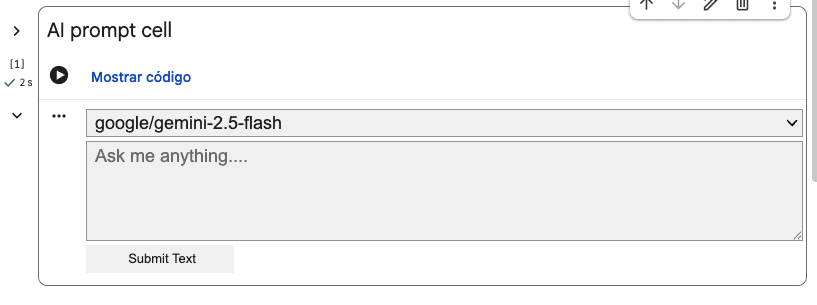
Accessing these new features begins with a simple sign-in to Google Colab using a Google account, followed by initiating a "New Notebook." The entire process remains cloud-native, necessitating only a web browser, ideally Google Chrome, eliminating the need for any local software installations. The novelty truly emerges when creating an AI prompt cell, a process initiated by selecting "Add AI prompt cell" from a dropdown menu adjacent to the "Code" button in the upper toolbar. This action inserts a specialized input field, prompting the user with "Ask me anything…"
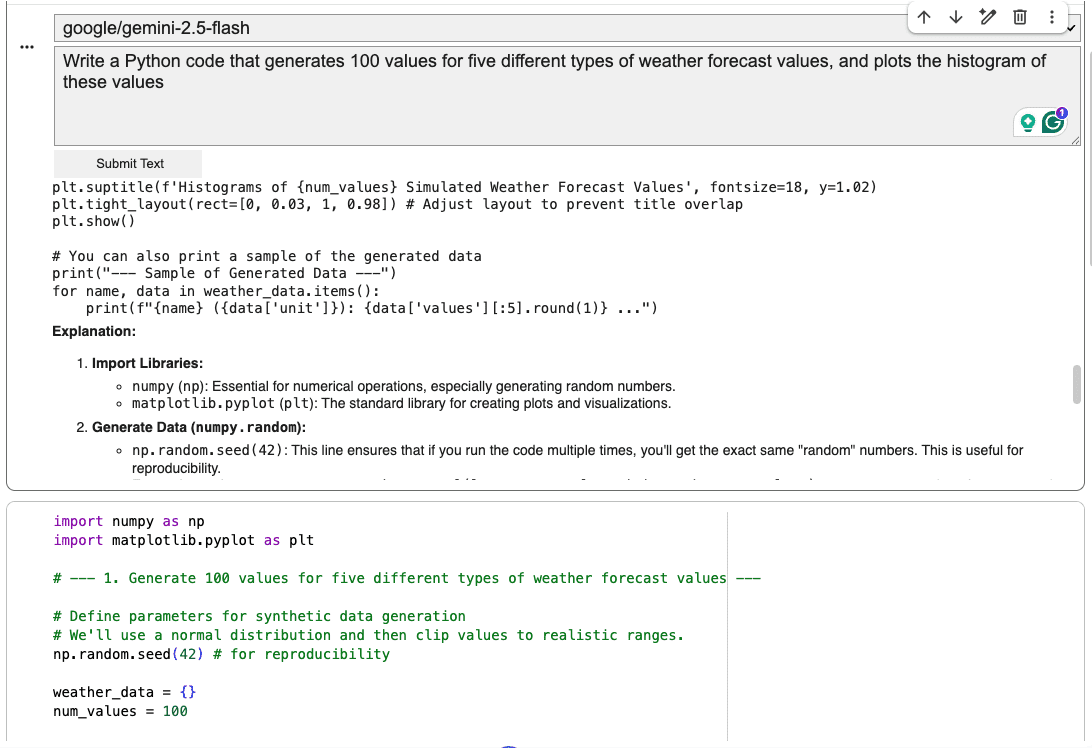
Upon entering a request, such as "Write Python code that generates 100 values for five different types of weather forecast values, and plots a histogram of these values," the underlying Gemini model processes the natural language input. After a brief pause, the AI returns a comprehensive response, typically including executable Python code alongside explanatory text. This output, while not directly executable within the AI prompt cell itself due to its hybrid nature, is designed to be easily copied into a standard code cell located immediately below for execution and testing. This symbiosis between the AI prompt cell and traditional code cells forms the core of Colab’s new AI-assisted coding environment.
Beyond Code Generation: Prototyping and Refinement
The utility of AI prompt cells extends far beyond initial code generation. They are instrumental in facilitating rapid prototyping and exploration of new ideas. Developers can use them to quickly scaffold complex functions, generate data visualization boilerplate, or even experiment with different machine learning model architectures without having to write every line of code from scratch. This iterative process allows for faster conceptualization and validation, significantly reducing the time spent on repetitive coding tasks.
Furthermore, these cells can be leveraged to enhance the clarity and self-explanatory nature of existing codebases. Users can prompt the AI to insert informative comments, generate docstrings, or even add diagnostic print statements at crucial junctures within a program. The persistent nature of the AI prompt cell within the notebook is a key advantage; if the initial AI-generated code doesn’t meet expectations, users can refine their prompts, iterate on the request, and continue the dialogue with the AI until the desired output is achieved. This conversational approach to coding fosters a more dynamic and adaptive development workflow.
Current Limitations and Strategic Best Practices
While revolutionary, the AI prompt cell feature, in its current iteration, comes with certain limitations that users must be aware of to maximize its effectiveness. A significant constraint is the cell’s lack of contextual awareness regarding other parts of the notebook. Unlike a human programmer who can easily reference previously defined variables or functions in other cells, an AI prompt cell operates in isolation. This means that if a user wishes to ask the AI to analyze, explain, or refactor a piece of code located elsewhere in the notebook, that code must be explicitly provided (pasted) into the AI prompt cell’s input field. The AI cannot automatically access or "read" other cells by identifier (e.g., "#7") or by descriptive references (e.g., "rewrite the third code cell").
This limitation necessitates a recommended workflow for optimal use:
- Formulate a Clear Prompt: Clearly articulate the desired code or task in the AI prompt cell.
- Generate and Review: Allow the AI to generate the code and accompanying explanations.
- Copy and Execute: Paste the generated code into a standard code cell for execution and testing.
- Iterate and Refine: If the code is not satisfactory, return to the AI prompt cell, refine the prompt, or paste relevant code sections for further analysis or modification.
It is also crucial to differentiate the AI prompt cell’s role from other AI-assisted features within Colab. For tasks such as explaining an existing code block within a standard code cell or refactoring it, the "magic wand" icon remains the more flexible and integrated approach. This icon, available directly within code cells, opens a dedicated Gemini tab on the right-hand side of the Colab interface, enabling a continuous, context-aware interaction with the AI regarding the specific code block. This distinction highlights that while AI prompt cells excel at initial generation and high-level interaction, the magic wand is better suited for in-depth analysis and transformation of existing code segments.
Broader Implications and Industry Impact
The integration of advanced AI-assisted coding features like the AI prompt cell in Google Colab signifies a broader industry trend towards intelligent development environments. According to a 2023 report by GitHub, developers using AI coding assistants like Copilot experienced a significant increase in productivity, with some studies indicating up to a 55% reduction in time spent on coding tasks. While direct comparisons are still emerging, Colab’s integration of Gemini models positions it strongly within this competitive landscape, offering similar benefits within a free, cloud-native ecosystem.
This development holds profound implications for various user segments:
- Students and Novices: The AI prompt cells drastically lower the entry barrier to programming and data science. Beginners can articulate their intentions in natural language and receive functional code, fostering learning through exploration and immediate feedback. This could significantly accelerate skill acquisition and promote wider participation in technical fields.
- Researchers and Academics: For academic researchers, Colab’s enhanced capabilities mean faster prototyping of experimental models, quicker data analysis script generation, and more efficient exploration of complex datasets. This allows them to focus more on scientific inquiry and less on the intricacies of coding.
- Data Scientists and ML Engineers: While experienced professionals may not rely on AI for basic code generation, the AI prompt cells serve as powerful accelerators for boilerplate code, complex visualizations, or exploring unfamiliar libraries. They can quickly generate templates, saving valuable time that can be redirected to higher-level problem-solving and model optimization.
- Businesses and Startups: For smaller teams and startups, access to such powerful AI tools for free or at a low cost can level the playing field, enabling them to innovate faster and bring products to market more efficiently without substantial investment in proprietary development tools.
Google’s Strategic Vision and the Future of AI in Development
Google’s continued investment in Colab’s AI capabilities aligns with its broader strategic push to integrate its advanced AI models, particularly the Gemini family, across its product ecosystem. By making Gemini accessible within a widely used developer tool, Google aims to solidify its position as a leader in AI innovation and foster a new generation of AI-native developers. This move also reflects an understanding that the future of software development will be increasingly augmented by AI, shifting the focus from manual code writing to intelligent interaction and prompt engineering.
Looking ahead, the evolution of AI prompt cells and similar features is expected to address current limitations. Future iterations might include greater contextual awareness, allowing AI cells to seamlessly integrate with and understand the entire notebook’s state. Enhanced code analysis capabilities, advanced debugging assistance, and even automated code refactoring suggestions could become standard. However, this advancement also necessitates ongoing discussions around ethical considerations, such as ensuring code security, mitigating biases in AI-generated code, and managing potential over-reliance on AI, which could impact critical thinking and fundamental coding skills.
Conclusion
The introduction of AI prompt cells in Google Colab represents a significant leap forward in AI-assisted coding, transforming how developers interact with their environments. By providing a natural language interface to powerful generative AI models, Colab is not only enhancing productivity and accelerating development workflows but also democratizing access to complex programming tasks. While current limitations exist, particularly regarding contextual awareness, the strategic integration of these features underscores Google’s commitment to pioneering the next generation of intelligent development tools. As these capabilities continue to evolve, they are poised to reshape the landscape of data science, machine learning, and software development, empowering a broader audience to innovate and create with unprecedented efficiency.