

A Network Policy Server (NPS) empowers network administrators to establish and enforce granular policies governing network access, ensuring that only authenticated and authorized users and devices can connect to critical network resources. This robust and versatile tool plays an indispensable role in centralizing the authentication, authorization, and accounting (AAA) processes for all entities attempting to access a network. Fundamentally, NPS represents Microsoft’s implementation of a Remote Authentication Dial-In User Service (RADIUS) server and proxy within the Windows Server operating system, making it a linchpin for comprehensive network management and security. To fully appreciate the significance of NPS, it is essential to first understand the underlying RADIUS protocol, its operational principles, and the critical importance of network security and policy management in today’s interconnected digital landscape.
The Paramount Importance of Network Security and Policy Management
In an era defined by pervasive digital connectivity, where business operations, data exchange, and global communication are inextricably linked to technology and the internet, networks and servers have become prime targets for malicious actors and sophisticated cyber threats. The escalating sophistication and frequency of these threats underscore the absolute necessity for implementing stringent network security measures and meticulously managing network access policies.
The importance of robust network security and effective policy management can be distilled into several key areas:
- Protection Against Unauthorized Access: Strong security protocols and well-defined policies act as a critical defense mechanism, preventing unauthorized individuals or devices from gaining access to sensitive data and proprietary systems. This is particularly vital in safeguarding intellectual property, customer data, and financial information from theft or compromise.
- Data Integrity and Confidentiality: By controlling who can access what information, network security and policy management ensure that data remains accurate, complete, and accessible only to authorized personnel. This is fundamental for maintaining business continuity and trust.
- Compliance with Regulations: Numerous industry-specific and general data privacy regulations (e.g., GDPR, HIPAA, PCI DSS) mandate strict security controls and auditing capabilities. Effective policy management is crucial for demonstrating compliance and avoiding substantial penalties.
- Operational Efficiency and Stability: A secure and well-managed network minimizes disruptions caused by security breaches or misconfigurations. This leads to enhanced operational efficiency, reduced downtime, and improved productivity.
- Resource Management and Cost Control: Policies can dictate the terms of network resource usage, helping to optimize bandwidth, storage, and other critical assets, thereby contributing to cost savings.
- Mitigation of Insider Threats: While external threats are a major concern, internal threats, whether malicious or accidental, also pose significant risks. Policy enforcement helps to limit the potential damage an insider can inflict.
Understanding the RADIUS Protocol: The Foundation of AAA
The Remote Authentication Dial-In User Service (RADIUS) protocol, established in 1991, has become a de facto standard for managing Authentication, Authorization, and Accounting (AAA) for users connecting to and utilizing network services. Its enduring relevance stems from its ability to provide a centralized, scalable, and robust framework for network access control. RADIUS plays a pivotal role in enabling network access servers, such as VPN gateways, wireless access points, and dial-up concentrators, to authenticate and authorize users before granting them access to the network.
Authentication: Verifying Identity
The "Authentication" component of AAA is the foundational step, where a user’s identity is rigorously verified. When a user or device attempts to connect to a network, they are prompted to provide credentials, typically a username and password, or a certificate. The RADIUS client, a device or software responsible for initiating the connection request (e.g., a Wi-Fi access point), forwards these credentials to the RADIUS server. The RADIUS server then consults its internal databases or external directories (like Active Directory) to validate these credentials. This process ensures that only legitimate users, possessing the correct credentials, can even begin to access the network’s resources.
Authorization: Defining Access Rights
Following successful authentication, the "Authorization" phase determines the scope of access an authenticated user is permitted to have within the network. This is where granular control is exercised. For instance, a network administrator might be granted full access to server configurations and system logs, while a regular employee might only be permitted access to specific departmental file shares and internal applications. RADIUS servers manage these permissions, ensuring that users can only access resources and services commensurate with their role and responsibilities. This principle of least privilege is a cornerstone of effective security, minimizing the attack surface.
Accounting: Tracking Usage and Activity
The final "Accounting" element involves meticulously tracking and logging the usage of network resources by authenticated users. This includes recording crucial details such as connection start and end times, the specific services or resources accessed, the amount of data transferred, and the IP addresses used. This comprehensive accounting data is invaluable for a variety of purposes, including:
- Billing and Auditing: For service providers or internal IT departments, accounting data can be used for chargeback models or for auditing purposes to verify resource allocation.
- Network Performance Analysis: Understanding usage patterns helps in capacity planning, identifying bottlenecks, and optimizing network performance.
- Security Monitoring and Forensics: Accounting logs are critical for investigating security incidents, identifying suspicious activity, and reconstructing events in the aftermath of a breach.
- Compliance Reporting: Many regulatory frameworks require detailed logs of network access and usage for audit and compliance purposes.
The Operational Mechanics of RADIUS Servers
RADIUS operates on a client-server architecture. The RADIUS client, typically a network access server (NAS) like a VPN appliance or a wireless controller, receives connection requests from users. It then packages the user’s credentials and other relevant information into a RADIUS Access-Request message and sends it to the RADIUS server. The RADIUS server processes this request by consulting its AAA databases and policies. Based on the authentication and authorization rules, it then sends an Access-Accept, Access-Reject, or Access-Challenge message back to the NAS. If access is granted (Access-Accept), the NAS establishes the connection. Concurrently, the RADIUS server begins its accounting function, logging the connection details.
Key features of RADIUS servers include:
- Centralized AAA Management: Consolidates user authentication, authorization, and accounting in one location, simplifying administration and enhancing security.
- Scalability: Can handle a large number of concurrent connections and user requests, making it suitable for enterprise environments.
- Extensibility: Supports various authentication methods, including PAP, CHAP, EAP, and more.
- Interoperability: Widely supported by network hardware and software vendors.
The Strategic Purpose of Network Policy Server (NPS)
Within the Microsoft ecosystem, the Network Policy Server (NPS) serves as the definitive implementation of a RADIUS server and proxy. Its primary objective is to consolidate and streamline the AAA processes for all users and devices attempting to access an organization’s network. By centralizing these critical functions, NPS significantly enhances network security, improves management efficiency, and provides granular control over network access.
Centralized Authentication and Authorization: The First Line of Defense
NPS’s ability to centralize authentication ensures that every user and device attempting to connect to the network is rigorously verified before being granted access. This process is fundamental to preventing unauthorized entry into the network. Coupled with authorization, which defines precisely what authenticated entities are permitted to access and do within the network, NPS creates a robust security perimeter.
NPS manages these crucial functions through a policy-driven framework:
- Connection Request Policies: These policies determine how NPS processes incoming connection requests. They can specify which RADIUS servers should handle the request, enabling NPS to act as a proxy.
- Network Policies: These are the core of NPS’s authorization capabilities. They define conditions (e.g., user group membership, time of day, device health) and grant access privileges or apply restrictions accordingly. For instance, a policy might grant full network access to members of the "IT Administrators" group but only internet access to members of the "Guest Users" group.
Accounting and Compliance: Ensuring Visibility and Accountability
The accounting capabilities of NPS are crucial for maintaining visibility into network usage and ensuring accountability. By logging all connection events and resource utilization, NPS provides administrators with the data needed for auditing, troubleshooting, and compliance.
NPS aids in ensuring compliance with various regulatory standards through:
- Detailed Logging: NPS generates comprehensive logs of connection attempts, successful connections, connection durations, and data transfer volumes. These logs are essential for demonstrating adherence to data protection and access control mandates.
- Auditing Capabilities: The accounting data can be easily accessed and analyzed, allowing for regular audits to verify that access policies are being enforced correctly and that no unauthorized activities are occurring.
- Reporting: NPS can generate reports on network usage patterns, user activity, and compliance metrics, which can be presented to auditors or used for internal review.
Policy-Based Network Management: Tailored Access Control
Policy-based network management, a core function of NPS, allows administrators to define and enforce specific network access rules tailored to the unique needs of an organization. This granular control over network access is paramount for maintaining a secure and efficient network environment.

NPS facilitates the creation of these policies, which significantly impact network security, user access, and overall network management:
- Granular Access Control: Policies can be configured based on a wide array of conditions, including user group membership, the specific network access server being used, the time of day, the client’s IP address, and even the health status of the client device (when integrated with Network Access Protection – NAP).
- Dynamic Policy Enforcement: Policies can be dynamically applied, meaning access rights can change based on evolving conditions or user roles.
- Simplified Management: By centralizing policy definition and enforcement, NPS simplifies the complex task of managing access for potentially thousands of users and devices.
The Multifaceted Benefits of Implementing NPS
The adoption of NPS within an organization’s network infrastructure yields a spectrum of advantages that significantly bolster both security posture and operational efficiency, making it an indispensable component for modern network management.
- Enhanced Network Security: By centralizing authentication and authorization, NPS acts as a robust gatekeeper, preventing unauthorized access and mitigating the risk of data breaches. This is particularly critical in protecting sensitive corporate data and intellectual property.
- Centralized Management: NPS consolidates the management of network access policies, user credentials, and accounting data into a single, manageable platform. This drastically reduces administrative overhead and the potential for configuration errors.
- Scalability and Flexibility: NPS is designed to scale with the growth of an organization, capable of handling a large and increasing number of users and devices. Its flexible policy engine allows for the creation of highly customized access rules to meet diverse organizational requirements.
- Improved Compliance: The detailed accounting and logging capabilities of NPS provide the necessary audit trails and reporting features to meet stringent regulatory compliance requirements, such as HIPAA, GDPR, and PCI DSS.
- Support for Various Network Access Technologies: NPS seamlessly integrates with a wide range of network access methods, including Wi-Fi (802.1X), VPN connections, dial-up services, and wired Ethernet connections, offering a unified approach to access control across different network segments.
- Reduced Risk of Rogue Devices: By enforcing policies that can include device health checks (via NAP), NPS helps prevent the introduction of compromised or non-compliant devices onto the network, thereby reducing the risk of malware propagation and security incidents.
- Streamlined Troubleshooting: The comprehensive accounting logs provided by NPS are invaluable for troubleshooting network connectivity issues and security-related incidents, enabling IT staff to quickly identify the root cause of problems.
- Cost-Effectiveness: As a built-in component of Windows Server, NPS offers a cost-effective solution for implementing enterprise-grade RADIUS services without the need for expensive third-party software.
The Three Pivotal Roles of NPS
NPS is a versatile tool that can fulfill three distinct yet interconnected roles within a network infrastructure, each contributing to its comprehensive network management capabilities.
1. NPS as a RADIUS Server: The Core Authentication Engine
In its primary role as a RADIUS server, NPS directly processes authentication and authorization requests for network access. When a user or device attempts to connect, the network access server forwards the request to NPS. NPS then verifies the user’s credentials against its configured databases (e.g., Active Directory) and applies the relevant network policies to determine the user’s access privileges. NPS can also work in conjunction with various network access servers, such as VPN servers, wireless access points, and dial-up servers, making it a versatile solution for diverse network environments. This role is fundamental to enhancing network security by centralizing and streamlining the authentication process, thereby efficiently managing user access across the entire network.
2. NPS as a RADIUS Proxy: Orchestrating Complex Networks
When configured as a RADIUS proxy, NPS acts as an intermediary, forwarding authentication and configuration requests to other RADIUS servers within the network. This capability is particularly invaluable in complex, distributed, or geographically dispersed network environments where a single RADIUS server might not be sufficient. The proxy role enables NPS to:
- Load Balancing: Distribute authentication requests across multiple RADIUS servers, preventing any single server from becoming a bottleneck and ensuring high availability.
- Failover Mechanisms: Route requests to an alternate RADIUS server if the primary server is unavailable, ensuring continuous network access.
- Centralized Policy Management for Distributed Networks: While forwarding requests, NPS can still apply some initial policies or route requests to specific RADIUS servers based on user attributes or network segments, simplifying management across disparate locations.
This role allows NPS to effectively manage authentication requests across different networks or sub-networks, facilitating seamless cross-network authentication and management.
3. NPS as a Network Policy Server: The Policy Enforcement Authority
In its capacity as a network policy server, NPS is responsible for defining, managing, and enforcing network access policies. It dictates the conditions under which users and devices are granted or denied network access. This role allows for highly granular control over network access, enabling administrators to:
- Create Sophisticated Access Rules: Policies can be based on a wide range of conditions, including user group membership, the time of day, the type of network connection, the client’s IP address, and even the health status of the client device when integrated with Network Access Protection (NAP).
- Enforce Security Postures: NPS can integrate with NAP to enforce device health policies. This ensures that only compliant and healthy devices (e.g., those with up-to-date antivirus software and operating system patches) are allowed to connect to or communicate on the network.
- Implement Different Access Tiers: Administrators can easily create policies that provide different levels of access to different user groups, ensuring that sensitive resources are only accessible by authorized personnel.
In this role, NPS acts as the ultimate authority on who can access what and under what conditions, providing a powerful tool for managing network security and user access.
Implementing NPS: Best Practices for Optimal Performance and Security
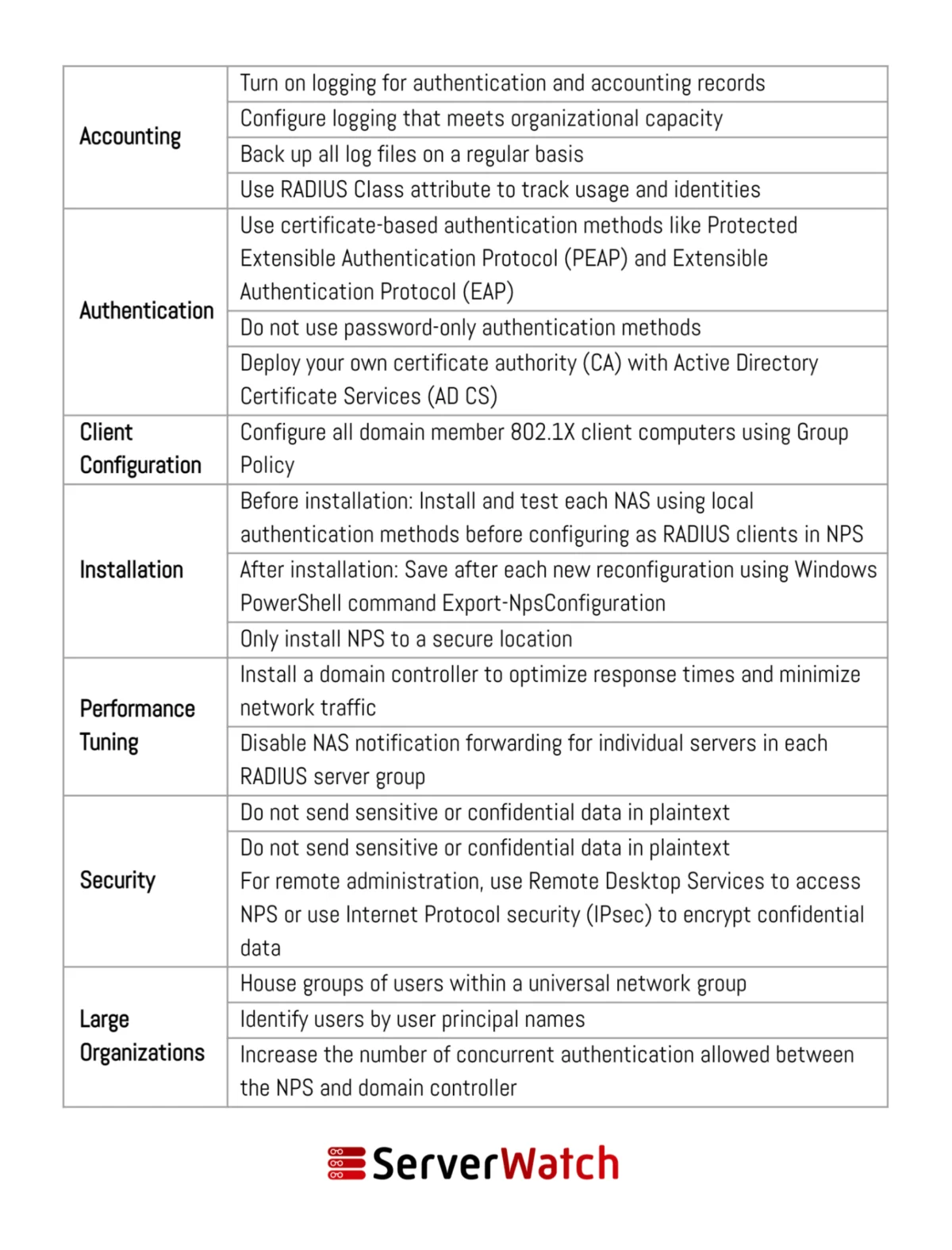
The effective deployment and ongoing management of NPS are critical for maximizing its benefits and ensuring a secure, efficient network environment. Adhering to established network and server management best practices, as recommended by Microsoft and industry experts, is paramount.
Microsoft outlines several key recommendations for NPS deployment and management:
- Dedicated Server for NPS: It is highly recommended to install NPS on a dedicated server rather than sharing it with other critical applications. This ensures that NPS has sufficient resources to handle authentication requests without performance degradation and isolates it from potential conflicts with other services.
- Use Strong Shared Secrets: When configuring RADIUS clients (network access servers), use strong, complex, and unique shared secrets for each client. These secrets are used to authenticate the RADIUS client to the NPS server and are crucial for the security of the communication channel.
- Implement IPsec for RADIUS Traffic: For enhanced security, especially in less trusted network segments, consider encrypting RADIUS traffic using IPsec. This protects the authentication credentials and accounting data from interception.
- Regularly Review NPS Logs: Actively monitor and review NPS event logs for authentication failures, policy violations, and other security-related events. This proactive approach allows for the early detection of potential security threats or misconfigurations.
- Configure RADIUS Proxy for Distributed Environments: In larger or distributed networks, leverage NPS’s RADIUS proxy capabilities to distribute the load and ensure high availability. This prevents a single point of failure and improves the overall responsiveness of the authentication system.
- Utilize Network Policies Effectively: Design and implement network policies meticulously. Define clear conditions and grant the least privilege necessary for users and devices to perform their functions. Avoid overly broad policies that could inadvertently grant excessive access.
- Integrate with Active Directory Groups: Leverage Active Directory groups for defining user access policies. This simplifies management by allowing administrators to assign users to groups with predefined access rights, rather than configuring individual user policies.
- Backup NPS Configuration: Regularly back up the NPS configuration. This ensures that in the event of a server failure or corruption, the configuration can be quickly restored, minimizing downtime.
- Keep NPS Updated: Ensure that the Windows Server operating system on which NPS is installed is kept up-to-date with the latest security patches and updates. This helps protect NPS from known vulnerabilities.
- Test Changes Thoroughly: Before deploying new or modified network policies in a production environment, test them thoroughly in a lab or staging environment. This helps prevent unintended consequences and ensures that policies function as expected.
Additional best practices to consider when deploying and managing an NPS include:
- Secure the NPS Server: Implement standard server hardening techniques, including restricting administrative access, disabling unnecessary services, and employing strong firewall rules, to protect the NPS server itself from compromise.
- Plan for High Availability: For mission-critical environments, consider deploying NPS in a highly available configuration, such as using Network Load Balancing (NLB) or Windows Server Failover Clustering, to ensure continuous operation.
- Document Policies: Maintain comprehensive documentation of all NPS policies, including their purpose, the conditions they enforce, and the intended outcomes. This documentation is invaluable for auditing, troubleshooting, and future administration.
- Monitor RADIUS Client Health: Ensure that the network access servers configured as RADIUS clients are functioning correctly and are able to communicate with the NPS server. Monitor their status and logs for any connectivity issues.
The Bottom Line: NPS as an Indispensable Component of Modern Network Management
The Network Policy Server (NPS) has firmly established itself as an indispensable tool in the arsenal of modern network and server administrators. It provides a powerful, flexible, and integrated solution for ensuring secure and efficient network operations. By strategically deploying NPS within an organization’s network infrastructure, companies can significantly bolster their security posture through the enforcement of rigorous access policies. Concurrently, NPS streamlines administrative tasks, leading to a more efficient and manageable network environment.
In an increasingly complex and threat-laden digital landscape, the ability to precisely control network access is no longer a luxury but a necessity. NPS empowers organizations to achieve this critical objective, mitigating risks associated with unauthorized access, data breaches, and compliance failures. By diligently adhering to the best practices outlined for deploying and managing NPS, organizations can not only safeguard their valuable digital assets but also ensure a seamless, reliable, and efficient operational flow. The integration of NPS is a testament to Microsoft’s commitment to providing robust, built-in security solutions that are both effective and cost-efficient, making it a cornerstone for secure and well-managed networks of all sizes.
To further enhance NPS functionality and performance, consider exploring the best free RADIUS server testing and monitoring tools, as selected and reviewed by our experts.
Sam Ingalls contributed to this article.