
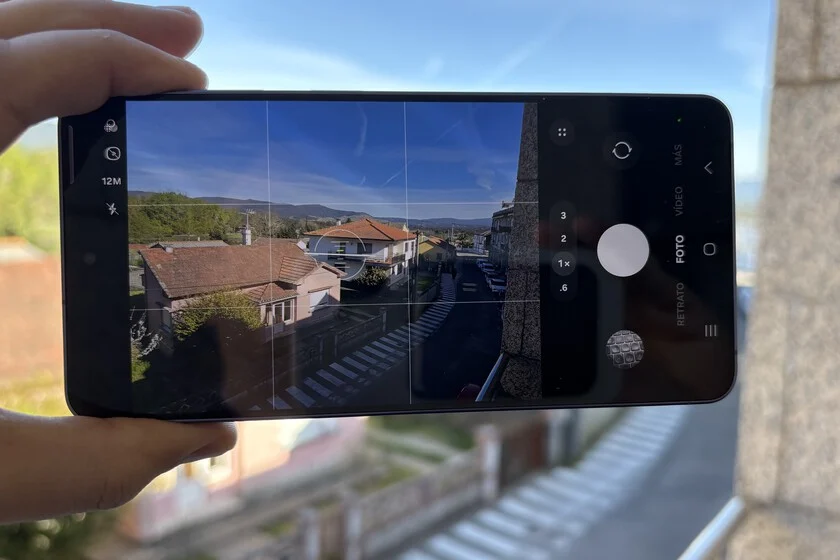

Upon acquiring a new Samsung Galaxy S26, the immediate inclination for many discerning users transcends superficial engagements like launching social media applications or customizing wallpaper. Instead, a significant number prioritize delving directly into the camera interface, meticulously configuring its settings to align with personal photographic preferences and operational demands. This immediate focus underscores a growing trend among smartphone users who seek not merely advanced camera hardware, but also granular control over their imaging experience. Samsung, with its latest Galaxy S26 series, demonstrably caters to this segment by offering extensive customization options directly within the native camera application and through the sophisticated Camera Assistant module, part of its Good Lock ecosystem. This strategic approach highlights a commitment to empowering users beyond automated defaults, allowing for a truly tailored photographic workflow.
The advent of the Galaxy S26 marks a notable evolution in Samsung’s camera philosophy. While continuous advancements in sensor technology, lens arrays, and computational photography algorithms remain paramount, the company is increasingly emphasizing the user’s ability to fine-tune the software interface and operational parameters. This refined focus on user accessibility and control is not merely an afterthought but a core component of the device’s imaging prowess. As previously reported by industry analysts, Samsung’s updates to Camera Assistant, particularly in recent flagship models leading up to the S26, indicate a deliberate move to place more power in the hands of the photographer. Features such as the configurable 24 MP mode and improved lens selection switches exemplify this trend, shifting the narrative from purely hardware specifications to a more integrated, user-centric system that adapts to individual shooting styles.
Foundational Enhancements: Grid and Level for Precise Composition
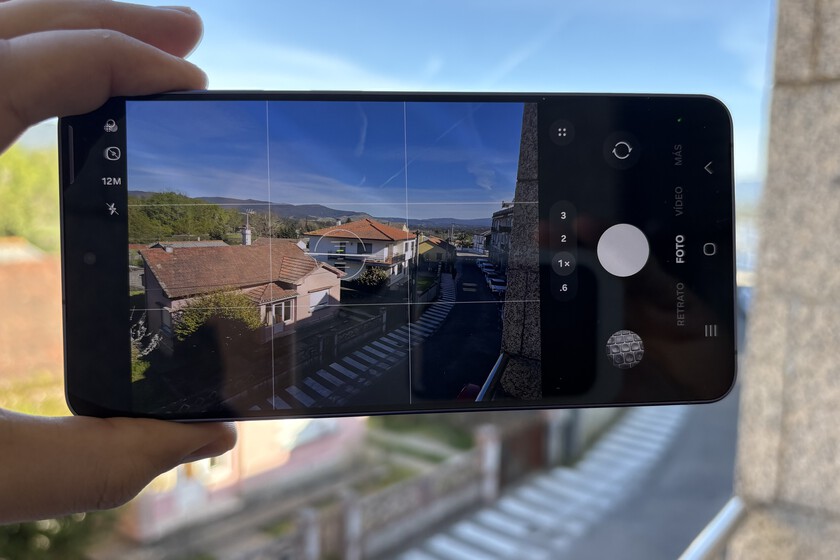
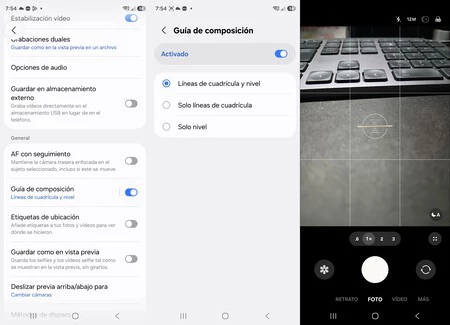
One of the most fundamental yet impactful configurations available within the Samsung Galaxy S26 camera interface is the activation of compositional aids: the grid and the level. Samsung has long incorporated these tools, recognizing their crucial role in improving photographic output. The S26 continues this tradition, offering seamless integration and even allowing users to separate their activation, catering to those who might prefer one guide over the other.
While seemingly basic, the practical implications of utilizing a grid and level are profound. The grid, typically based on the rule of thirds or similar compositional guidelines, assists photographers in strategically placing subjects and aligning elements within the frame. This simple visual overlay helps to create more balanced, aesthetically pleasing images by guiding the user to distribute visual weight effectively. For instance, positioning key subjects along the intersection points of the grid lines, or aligning horizons with one of the horizontal lines, can dramatically enhance the dynamism and structure of a photograph.
Complementing the grid, the digital level is an invaluable tool for ensuring horizontal and vertical alignment. In the fast-paced environment of smartphone photography, where shots are often taken quickly and impulsively, it is remarkably easy to capture an image with a slightly tilted horizon or a skewed vertical element. Such imperfections, often unnoticed during capture, become glaring upon later review, necessitating corrective editing. The level actively mitigates this common issue by providing real-time feedback, allowing photographers to adjust their phone’s orientation for a perfectly straight shot. On a device like the Galaxy S26, frequently used for spontaneous captures in diverse scenarios, having these two references active by default can significantly reduce the number of poorly framed or misaligned photographs, thereby enhancing the overall quality and consistency of a user’s photographic portfolio. This feature, though often overlooked, represents a critical step in elevating everyday mobile photography to a more professional standard without requiring complex manual adjustments.
Camera Assistant: Unlocking Advanced Control through Good Lock
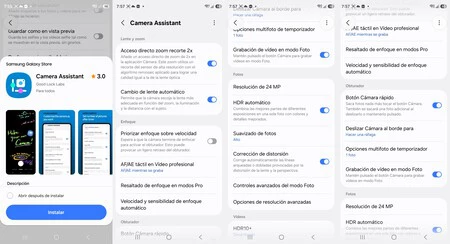
Beyond the integrated settings within the primary camera application, Samsung offers an even deeper layer of customization through Camera Assistant, a dedicated module within its Good Lock suite. Good Lock is Samsung’s proprietary customization platform, designed to extend the functionality and personalize the user interface of Galaxy devices. It operates as a collection of modular applications, each targeting a specific aspect of the user experience, from lock screen customization to advanced camera controls. Camera Assistant stands out as an indispensable tool for photographers who wish to move beyond automated decision-making and exert greater influence over their camera’s behavior.
The significance of Camera Assistant lies in its ability to fine-tune the camera’s responsiveness and decision-making algorithms, offering options that are not typically found in standard camera app menus. Many users, unaware of its existence or its capabilities, miss out on these powerful enhancements. By integrating it as a Good Lock module, Samsung caters to a more technically inclined user base, providing an avenue for advanced personalization without cluttering the main camera interface for casual users.
Key features within Camera Assistant, such as Auto lens switching, Picture softening, and Quick tap shutter, exemplify the level of control it provides. These aren’t merely cosmetic tweaks; they fundamentally alter how the camera captures and processes images, directly impacting the final output and user experience. For instance, the ability to control lens selection or shutter responsiveness can be the difference between a missed opportunity and a perfectly timed, artistically rendered photograph.
It is not necessary for users to activate every single option within Camera Assistant. Instead, the module serves as a powerful dashboard where users can review Samsung’s default algorithmic decisions and adjust them to better suit their personal preferences and photographic style. The true value of Camera Assistant lies precisely in this flexibility: it doesn’t fundamentally change the camera’s hardware capabilities, but it profoundly transforms its operational dynamics and responsiveness, making the device’s powerful imaging system more obedient to the user’s creative vision. This level of personalized control is increasingly becoming a differentiator in the competitive smartphone market, where hardware parity is often matched by varying degrees of software flexibility.
Mitigating Frustration: Disabling Auto Lens Switching
Among the myriad adjustments available in Camera Assistant, one setting consistently stands out as a critical first step for many experienced photographers: disabling "Auto lens switching." This feature, enabled by default on the Galaxy S26 and previous Samsung flagships, is designed to enhance convenience by allowing the camera system to automatically select the optimal lens (e.g., wide-angle, ultra-wide, telephoto) based on various factors such as zoom level, ambient lighting conditions, and the distance to the subject. Samsung’s official support documentation for Camera Assistant often explains this as an intelligent aid to ensure the best possible shot under prevailing circumstances.
However, the "intelligent aid" can frequently diverge from the user’s specific creative intent. The primary issue arises when the camera’s algorithm makes a lens selection that the photographer did not anticipate or desire. A common scenario involves low-light conditions, where the system might opt for the main wide-angle sensor, which typically has a larger aperture and better low-light performance, even when the user intends to use a telephoto lens for a zoomed-in shot. While the main sensor might produce a technically brighter image, it fails to deliver the desired focal length and perspective, effectively altering the photograph’s composition and artistic vision.
This automatic intervention can lead to significant frustration. Users often perceive it not as a helpful assist, but as the camera "failing" or autonomously changing the shot mid-capture. The result is a photograph that deviates from the photographer’s expectation, forcing them either to retake the shot with manual overrides or to accept a compromise. By deactivating "Auto lens switching," users regain complete control over which lens is employed for each shot. This ensures that when a user taps the 3x or 10x zoom icon, they are indeed activating the corresponding telephoto lens, rather than a digitally cropped image from the main sensor. This predictability is paramount for photographers who value consistency and precise control over their tools. It transforms the camera from an autonomous system into a more predictable and responsive instrument, directly aligning its actions with the user’s explicit commands.
Picture Softening: A Nuance in Image Processing
Another important setting within Camera Assistant is "Picture softening." This feature addresses a common aesthetic preference in digital photography, particularly relevant to images captured by high-resolution sensors found in devices like the Galaxy S26. Modern smartphone cameras often strive for maximum detail and sharpness, which can sometimes result in images that appear overly processed, with harsh edges or exaggerated textures. "Picture softening" provides a counterbalance to this default tendency.
Its purpose is to subtly reduce the perceived sharpness and micro-contrast in images, leading to a smoother, more organic look. This can be particularly beneficial in certain photographic contexts. For instance, in portrait photography, excessive sharpness can unflatteringly emphasize skin imperfections. A slight degree of softening can produce more natural-looking skin tones and a more pleasing overall aesthetic. Similarly, in landscapes or still life photography, softening can help create a more painterly effect, reducing digital artifacts and enhancing the sense of atmosphere.
The decision to enable or disable "Picture softening" is entirely subjective and depends on individual artistic preference. Some photographers prefer the crisp, highly detailed output that comes with minimal processing, while others appreciate the more gentle, artistic touch that softening provides. Camera Assistant empowers users to make this choice, allowing them to define the default aesthetic of their photographs without resorting to post-processing applications. This level of control over the camera’s internal image processing pipeline is a testament to Samsung’s commitment to catering to diverse photographic styles.
Quick Tap Shutter: Enhancing Responsiveness for Critical Moments
For photographers who prioritize speed and responsiveness, the "Quick tap shutter" feature in Camera Assistant is a valuable asset. In standard camera operation, there can sometimes be a slight delay between the moment a user taps the shutter button and when the image is actually captured. While often imperceptible to the casual user, this millisecond delay can be critical in capturing fleeting moments, fast-moving subjects, or dynamic scenes.
"Quick tap shutter" aims to minimize this latency by optimizing the camera’s response time to the shutter input. When activated, the camera prioritizes immediate capture, reducing any software-induced delays. This can be particularly advantageous in street photography, sports photography, or any scenario where precise timing is essential. For instance, capturing a child’s spontaneous expression, a bird in flight, or a decisive moment in an event often hinges on the camera’s ability to react instantaneously.
By making the shutter response more immediate, "Quick tap shutter" helps photographers to capture exactly what they see, when they see it. This enhances the predictability of the camera and significantly improves the chances of securing that perfect, unrepeatable shot. In a phone like the Galaxy S26, designed for high-performance and versatile usage, such an optimization can elevate the overall photographic experience, making the camera feel more like a direct extension of the photographer’s intent.
The Broader Implications: User Empowerment and Creative Freedom
The cumulative effect of these granular camera adjustments on the Galaxy S26 is profound. By providing accessible tools for customization through both the native camera app and Camera Assistant, Samsung is moving beyond the traditional model of a "black box" camera system. Instead, it is fostering an environment of user empowerment, where the device adapts to the photographer rather than the other way around.
This philosophy has several key implications:
- Enhanced Predictability: When users configure their camera settings to their liking, the camera’s behavior becomes more consistent and predictable. This reduces frustration and builds confidence, allowing photographers to focus on composition and timing rather than battling automated decisions.
- Increased Creative Control: The ability to disable features like auto lens switching or adjust image softening directly translates into greater creative freedom. Photographers can consciously choose the lens, the level of detail, and the processing style that best suits their artistic vision for each shot.
- Improved Image Quality (Subjective): While automated systems strive for objective "best" images, subjective quality often depends on personal preference. Customization allows users to achieve an image aesthetic that they personally find superior, leading to greater satisfaction with their photographs.
- Learning and Development: Engaging with these advanced settings encourages users to learn more about photography principles. Understanding why one might disable auto lens switching or activate a grid naturally leads to a deeper appreciation of photographic technique and compositional rules.
- Competitive Edge: In a market saturated with high-quality smartphone cameras, the degree of user control offered by a manufacturer can be a significant differentiator. Samsung’s commitment to Good Lock and Camera Assistant positions the Galaxy S26 as a device for serious mobile photographers who demand more than just point-and-shoot simplicity.
The evolution of smartphone photography is not solely about megapixel counts or sensor sizes; it is increasingly about the intelligent integration of hardware and software, coupled with the flexibility for users to define their own photographic experience. Samsung’s approach with the Galaxy S26, emphasizing deep customization options from the moment the device is unboxed, represents a forward-thinking strategy that acknowledges the growing sophistication of mobile photographers. These adjustments, though seemingly minor individually, collectively transform the Galaxy S26 camera into a highly personal and powerful creative instrument, making every captured moment more intentional and rewarding.
Images: Manuel Naranjo
Further Reading: Xataka Móvil on Samsung’s AI configuration in Galaxy S26, and virtual aperture in Galaxy S25 Ultra zoom.