


In an increasingly digital world, the performance of a home internet connection is paramount, impacting everything from professional productivity to entertainment streaming. While many users rely on the default settings provided by their internet service providers (ISPs), a deeper dive into router configurations can reveal significant opportunities for improvement, particularly concerning connection speed and security. Among the various customizable parameters—such as Wi-Fi network names, passwords, signal strength, and channel selection—the configuration of Domain Name System (DNS) servers stands out as a critical yet often overlooked factor that can dramatically enhance the perceived speed and responsiveness of internet access.
Understanding DNS: The Internet’s Directory Service
At its core, the Domain Name System acts as the internet’s phone book. Every website or service on the internet has a unique numerical address called an IP address (e.g., 192.168.1.1). However, remembering these numerical strings for every website would be impractical for users. Instead, we use human-readable domain names (e.g., google.com, wikipedia.org). When a user types a domain name into a browser, their device sends a request to a DNS server. This server’s job is to translate that domain name into its corresponding IP address, allowing the browser to locate and connect to the correct server hosting the website. This translation process, known as DNS resolution, is a fundamental step in nearly every internet interaction. The speed and efficiency with which a DNS server performs this translation directly influence how quickly a web page begins to load or an online application responds.
The Critical Role of DNS in Connection Speed
While many factors contribute to the overall speed of an internet connection—including the contracted bandwidth from the ISP, the quality of the router, the distance to the server hosting the content, and network congestion—the speed of DNS resolution plays a pivotal role in the initial loading phases of web content. A slow DNS server can introduce noticeable delays, even if the underlying internet connection has high bandwidth. For instance, if a DNS server takes 200 milliseconds to resolve a domain name, and another takes 50 milliseconds, the latter will shave 150 milliseconds off the initial connection time for every new domain accessed. Across a typical browsing session involving multiple websites and embedded content from various domains, these small delays accumulate, leading to a perceptibly slower browsing experience. Therefore, optimizing DNS settings is not about increasing raw download or upload speeds, but rather about accelerating the time it takes for a connection to be established and for data to begin flowing, thereby enhancing the overall responsiveness and "snappiness" of internet usage.
ISP-Provided Routers vs. Independent Devices: A Customization Divide
A notable distinction in the realm of home networking lies between the routers supplied by internet service providers and those purchased independently by consumers. ISPs often provide routers pre-configured with their specific settings, including their proprietary DNS servers. While convenient, these devices frequently come with restricted access to advanced configurations. Companies often implement these limitations with good intentions, aiming to prevent users from inadvertently misconfiguring their network, which could lead to service interruptions and increased support calls. However, this restriction also limits a user’s ability to fine-tune their network for optimal performance, security, and privacy. Independent, or "neutral," routers, by contrast, typically offer a full suite of customizable options, empowering users to modify settings such as signal power, Wi-Fi channels, Quality of Service (QoS) parameters, and crucially, DNS server addresses. This flexibility is a primary reason why many tech-savvy individuals opt to invest in their own router, gaining greater control over their digital environment.
Why Default DNS May Not Be Optimal
Internet service providers automatically assign their own DNS servers to customers’ routers. While these servers are functional, they are not always the fastest or most privacy-focused options available. ISP DNS servers are primarily designed to efficiently manage their network traffic and provide a consistent service to their subscriber base. However, their performance can vary geographically and depend on network load. More importantly, ISPs can log DNS queries, creating a comprehensive record of users’ online activities. This data can be used for various purposes, including targeted advertising or compliance with data retention regulations, raising privacy concerns for many users. The pursuit of faster resolution times, coupled with a desire for enhanced privacy and security, drives many to seek alternative DNS providers.

Choosing Your DNS Champion: Cloudflare, Google, and Others
The market for public DNS services offers several compelling alternatives to ISP defaults, each with distinct advantages in terms of speed, privacy, and security features. Among these, Cloudflare’s 1.1.1.1 and Google Public DNS (8.8.8.8) are two of the most popular choices.
-
Cloudflare (1.1.1.1): Cloudflare’s 1.1.1.1 DNS service is widely lauded for its speed and strong commitment to user privacy. Launched in 2018, Cloudflare positioned 1.1.1.1 as "the internet’s fastest, privacy-first DNS resolver." The company explicitly states that it does not log users’ IP addresses or sell their data to third parties. Its primary DNS server is 1.1.1.1, with a secondary server at 1.0.0.1. For users seeking additional security, Cloudflare also offers 1.1.1.2 (for malware blocking) and 1.1.1.3 (for malware and adult content blocking). Independent benchmarks frequently show Cloudflare’s DNS to be among the fastest globally, often outperforming even Google’s offerings in many regions. Its robust infrastructure and global network of data centers contribute to its low latency and high reliability, making it a preferred choice for users prioritizing both speed and data privacy.
-
Google Public DNS (8.8.8.8): Google’s Public DNS, with its primary server at 8.8.8.8 and secondary at 8.8.4.4, is another immensely popular option. Known for its reliability and widespread availability, Google Public DNS offers a consistent and generally fast experience. Its global anycast network ensures that users are typically routed to the closest available server, minimizing latency. While Google states that it anonymizes and aggregates query data, some privacy advocates express concerns regarding Google’s broader data collection practices across its ecosystem of services. Nonetheless, for users prioritizing stability and speed from a well-established provider, Google Public DNS remains a solid choice.
-
OpenDNS: Acquired by Cisco, OpenDNS provides a suite of services beyond basic DNS resolution. Its primary appeal lies in its security features and parental controls. OpenDNS offers filtering services that can block access to malicious websites, phishing attempts, and undesirable content categories. Users can configure custom filtering policies by signing up for a free account. The default OpenDNS servers are 208.67.222.222 and 208.67.220.220. While potentially not as fast as Cloudflare or Google in raw resolution speed, its added layers of security make it an attractive option for families or small businesses seeking to enhance network protection.
-
Quad9: For users with a strong emphasis on security, Quad9 (9.9.9.9) is an excellent alternative. This non-profit service focuses on blocking malicious domains, including those associated with malware, phishing, spyware, and botnets. Quad9 integrates threat intelligence from multiple cybersecurity partners, providing real-time protection against new and emerging threats. It prioritizes user privacy and does not log personal data. While its primary focus is security, its performance is also highly competitive.
The Practical Steps: How to Change DNS on Your Router
Configuring custom DNS servers on a router is a straightforward process, though the exact steps may vary slightly depending on the router’s manufacturer and firmware version. The general procedure involves:
- Accessing the Router’s Administration Panel: Open a web browser and type the router’s IP address into the address bar. Common default IP addresses include 192.168.1.1, 192.168.0.1, or 192.168.1.254. If the default has been changed or is unknown, it can often be found by checking the network adapter details on a connected computer.
- Logging In: Enter the router’s administrative username and password. These are often printed on a sticker on the router itself. If defaults are still in use, changing them immediately for security reasons is highly recommended.
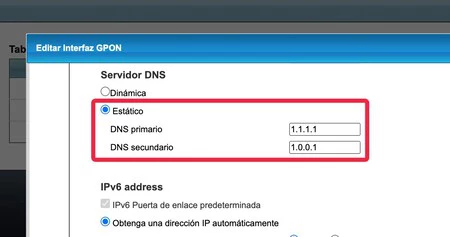
- Locating DNS Settings: Navigate through the router’s interface to find the DNS settings. These are typically located under sections like "WAN Settings," "Internet Settings," "Network Settings," or "DHCP/DNS Settings." Look for fields labeled "Primary DNS Server" and "Secondary DNS Server."
- Entering New DNS Addresses: Input the desired primary and secondary DNS server addresses (e.g., 1.1.1.1 and 1.0.0.1 for Cloudflare). Some routers may offer an option to "Use ISP’s DNS" or "Get DNS Automatically"; ensure this option is deselected.
- Saving and Restarting: Save the changes and then restart the router (either through the interface or by physically unplugging it for 10-15 seconds and plugging it back in). A restart is crucial for the new settings to take effect across all connected devices.
Once the router’s DNS settings are updated, all devices connected to that router will automatically use the new DNS servers, benefiting from the chosen provider’s speed, privacy, and security features.
Beyond Speed: DNS for Enhanced Security and Privacy
The benefits of custom DNS extend beyond mere speed. Enhanced security and privacy are significant motivators for many users. Traditional DNS queries are sent in plain text, making them vulnerable to eavesdropping and manipulation (DNS spoofing). To counter this, modern DNS protocols like DNS over HTTPS (DoH) and DNS over TLS (DoT) encrypt DNS traffic, preventing third parties from monitoring or tampering with resolution requests. While not all routers support DoH or DoT directly, many public DNS providers, including Cloudflare and Google, offer these services. Implementing them at the device level (on individual computers or smartphones) or through advanced router firmware (like OpenWrt) can significantly bolster online privacy. Furthermore, DNS providers that block malicious domains act as a crucial first line of defense against phishing, malware, and other cyber threats, preventing devices from connecting to known dangerous websites.
The Nuance of Speed: What DNS Changes (and What It Doesn’t)
It is important to manage expectations regarding the impact of changing DNS servers. While a faster DNS can significantly improve the responsiveness of internet browsing and the initial loading times of web pages, it will not directly increase the maximum download or upload bandwidth provided by your ISP. If you have a 100 Mbps internet plan, changing DNS won’t magically make it 200 Mbps for large file transfers. The change primarily affects the latency of establishing connections and resolving domain names. However, because so much of the modern web relies on resolving multiple domains for a single page load (e.g., for images, scripts, advertisements, and content delivery networks), even small improvements in DNS resolution speed can contribute to a noticeable and consistent improvement in the overall user experience, making the internet feel "faster" and more fluid. Studies have indicated that DNS lookup times can account for a significant portion of initial page load delays, making optimization in this area particularly impactful for perceived performance.
Advanced Router Settings for Comprehensive Optimization
While DNS configuration is a powerful tool, it’s part of a broader suite of router settings that can be optimized for a superior home network. Adjusting Wi-Fi signal strength, for example, can extend coverage or reduce interference in dense environments. Selecting less congested Wi-Fi channels can minimize signal degradation from neighboring networks. Implementing Quality of Service (QoS) settings allows users to prioritize certain types of traffic (e.g., video streaming or online gaming) over others, ensuring critical applications receive sufficient bandwidth. For advanced users, custom firmware like OpenWrt or DD-WRT can unlock even more granular control, offering features like VPN client/server functionality, advanced firewall rules, and robust network monitoring tools. A holistic approach to router optimization, combining smart DNS choices with other fine-tuning, can transform a standard internet connection into a highly efficient and personalized network.
Evaluating DNS Performance: Tools and Techniques
Users curious about the performance of their current DNS servers or wanting to compare different options can utilize various tools. Software like DNS Benchmark by GRC (Gibson Research Corporation) allows users to test the speed and reliability of numerous DNS servers from their specific location. Online tools and websites also offer quick DNS speed tests. These tools measure the response time of DNS servers, providing objective data that can help users make informed decisions about which DNS provider is best suited for their particular network environment. Regular testing can also reveal if an ISP’s DNS has improved or if a chosen public DNS provider is experiencing temporary slowdowns, prompting a re-evaluation of settings.
Industry Perspectives and User Empowerment
The increasing focus on DNS customization highlights a broader trend towards user empowerment in managing personal technology. While ISPs traditionally maintained tight control over network configurations, a growing segment of users demands greater autonomy, driven by concerns over performance, privacy, and security. ISPs, in turn, are continually balancing the need for network stability and ease of support with customer demands for advanced features. This dynamic fosters innovation in both router hardware and public DNS services, pushing the boundaries of what consumers can achieve with their home networks. The simple act of changing DNS servers represents a tangible step towards reclaiming control over one’s digital experience, moving beyond the default and optimizing for a faster, more secure, and more private online life. By understanding and leveraging these powerful yet accessible configuration options, users can significantly enhance their daily internet interactions.