

All digital data and systems, from the cloud platforms powering global services to the apps on your smartphone, are ultimately hosted on real-world machines. The distinction between "virtual server" and "physical server" does not denote a difference in tangible existence but rather in their operational architecture and resource allocation. Understanding these fundamental differences is crucial for businesses navigating the complexities of modern IT infrastructure.
Defining the Core Concepts: Physical Servers
A physical server, often referred to as a bare-metal server, is a tangible piece of hardware. It comprises a chassis, central processing unit (CPU), graphics processing unit (GPU), random-access memory (RAM), storage drives, a power supply unit, network interface, and an operating system. These machines are engineered for continuous operation, typically running 24/7, and are dedicated to serving other computers with specific applications, such as hosting websites, managing databases, or facilitating network services.
The size and form factor of a physical server can vary significantly, from a compact desktop unit to a large, rack-mounted enterprise-grade machine. Regardless of its dimensions or physical location, its core nature remains that of a standalone, dedicated hardware resource. Organizations can house and manage these servers on-premises or access them through cloud vendors.
Key Features of Physical Servers:
- Exclusive Resource Allocation: The most significant differentiator is that a physical server dedicates all its processing power, memory, and storage exclusively to its own operations. This exclusivity translates to enhanced security and robust performance, as there is no resource contention with other entities.
- Direct Hardware Access: Physical servers provide direct, unmediated access to the underlying hardware, allowing for fine-grained control over configurations and optimizations.
- High Performance Potential: For computationally intensive tasks, direct hardware access can often yield superior performance compared to virtualized environments, especially when optimized for specific workloads.
- Enhanced Security and Isolation: The dedicated nature of physical servers offers a high degree of isolation, making them inherently more secure against certain types of network-based threats that target shared environments.
- Full Ownership and Control: Organizations that own and operate their physical servers have complete control over their infrastructure, including hardware selection, security protocols, and maintenance schedules.
Historical Context and Use Cases of Physical Servers:
In the early 2000s, the vast majority of the digital world was powered by physical servers. Companies typically managed their own dedicated hardware, with each machine often serving a singular purpose for their internal IT systems. This era saw a proliferation of individual servers, each housing specific applications and data.
While the landscape has dramatically shifted with the rise of virtualization and cloud computing, physical servers continue to play a vital role in modern IT infrastructures, particularly for demanding workloads.
Popular Use Cases for Physical Servers:
- High-Performance Computing (HPC): For scientific simulations, complex data analysis, and rendering, where maximum processing power and minimal latency are critical.
- Large Databases: Hosting massive datasets that require direct access to high-speed storage and significant I/O capabilities.
- Gaming Servers: Providing low-latency, high-throughput environments for online multiplayer gaming experiences.
- Dedicated Web Hosting: For websites with extremely high traffic volumes or specific performance requirements that benefit from dedicated resources.
- Mission-Critical Applications: Running essential business applications that demand the utmost reliability, security, and performance.
- Legacy Systems: Supporting older applications or infrastructure that may not be compatible with virtualized environments.
Industries Leveraging Physical Servers:
Sectors that prioritize absolute control, peak performance, and stringent security often opt for physical servers. These include:
- Financial Services: For high-frequency trading platforms, core banking systems, and sensitive financial data processing where security and low latency are paramount.
- Healthcare: To manage electronic health records (EHRs), medical imaging, and patient data with the highest levels of privacy and security.
- Government and Defense: For classified information systems, secure communication networks, and critical infrastructure management.
- Aerospace: For complex simulations, design processes, and real-time control systems.
- Manufacturing: For industrial control systems, real-time production monitoring, and supply chain management.
- Media and Entertainment: For high-end video editing, rendering farms, and large-scale content delivery networks.
These industries value the inherent reliability, performance ceilings, security isolation, and the tangible ownership that physical servers provide.
Defining the Core Concepts: Virtual Servers
A virtual server, often referred to as a virtual machine (VM), is a software-based emulation of a physical server. It is created by partitioning the resources of a single physical server into multiple isolated virtual environments. This process, known as virtualization, is the cornerstone of cloud computing and allows hyperscale providers to maximize hardware utilization by hosting numerous independent virtual servers on the same underlying physical infrastructure.
Imagine a powerful, state-of-the-art physical server packed with significant computing power, vast storage, exceptional speed, and robust reliability. Virtualization allows this single machine to be transformed into a platform capable of running multiple virtual servers simultaneously. Each virtual server is then allocated a dedicated portion of the physical server’s resources, such as CPU cores, RAM, and storage space. These VMs operate as independent systems, isolated from one another, yet sharing the same hardware.
This fundamental principle of resource sharing and isolation is what drives the scalability and efficiency of cloud computing.
Key Features of Virtual Servers:
- Resource Abstraction: Virtual servers abstract the underlying hardware, presenting a standardized environment to the operating system and applications. This abstraction simplifies management and migration.
- Scalability and Elasticity: Virtual servers can be easily scaled up or down by reallocating resources from the host physical server or by spinning up additional VMs. This elasticity is a hallmark of cloud services.
- Cost-Efficiency: By consolidating multiple workloads onto a single physical server, virtualization significantly reduces hardware costs, power consumption, and data center footprint.
- Rapid Deployment and Provisioning: New virtual servers can be provisioned and deployed in minutes, drastically accelerating IT project timelines.
- Disaster Recovery and Business Continuity: Virtualization simplifies backup and recovery processes. VMs can be easily replicated and migrated to different physical locations, enhancing resilience.
- Isolation and Security: While sharing hardware, VMs are designed to be isolated from each other, preventing issues on one VM from affecting others. However, security configurations are crucial to maintain this isolation.
Use Cases for Virtual Servers:

The applications for virtual servers are virtually limitless, permeating nearly every aspect of modern digital life. From powering complex enterprise applications to enabling everyday online interactions, VMs are ubiquitous.
Popular Use Cases for Virtual Servers:
- Web Hosting: Providing scalable and cost-effective hosting for websites of all sizes.
- Application Development and Testing: Creating isolated environments for developers to build, test, and deploy applications without impacting production systems.
- Database Management: Hosting databases for various applications, offering flexibility in scaling and resource allocation.
- Cloud Computing Services: Forming the backbone of Infrastructure as a Service (IaaS), Platform as a Service (PaaS), and Software as a Service (SaaS) offerings.
- Virtual Desktops (VDI): Delivering desktop computing environments to users remotely, enhancing flexibility and manageability.
- Big Data Analytics: Running analytics platforms that require flexible scaling and access to distributed computing resources.
- Content Delivery Networks (CDNs): Distributing content across numerous virtual servers to ensure fast and reliable delivery to users worldwide.
- Microservices Architecture: Hosting individual components of a larger application, allowing for independent scaling and development.
Industries Benefiting from Virtual Servers:
Virtually every industry has adopted virtual servers due to their inherent flexibility, cost-effectiveness, and scalability. This includes:
- E-commerce: To handle fluctuating traffic demands and host dynamic product catalogs.
- Software Companies: For development, testing, and SaaS delivery.
- Startups: To minimize upfront infrastructure costs and scale rapidly as they grow.
- Educational Institutions: For research, online learning platforms, and administrative systems.
- Non-profit Organizations: To manage operations and outreach with limited budgets.
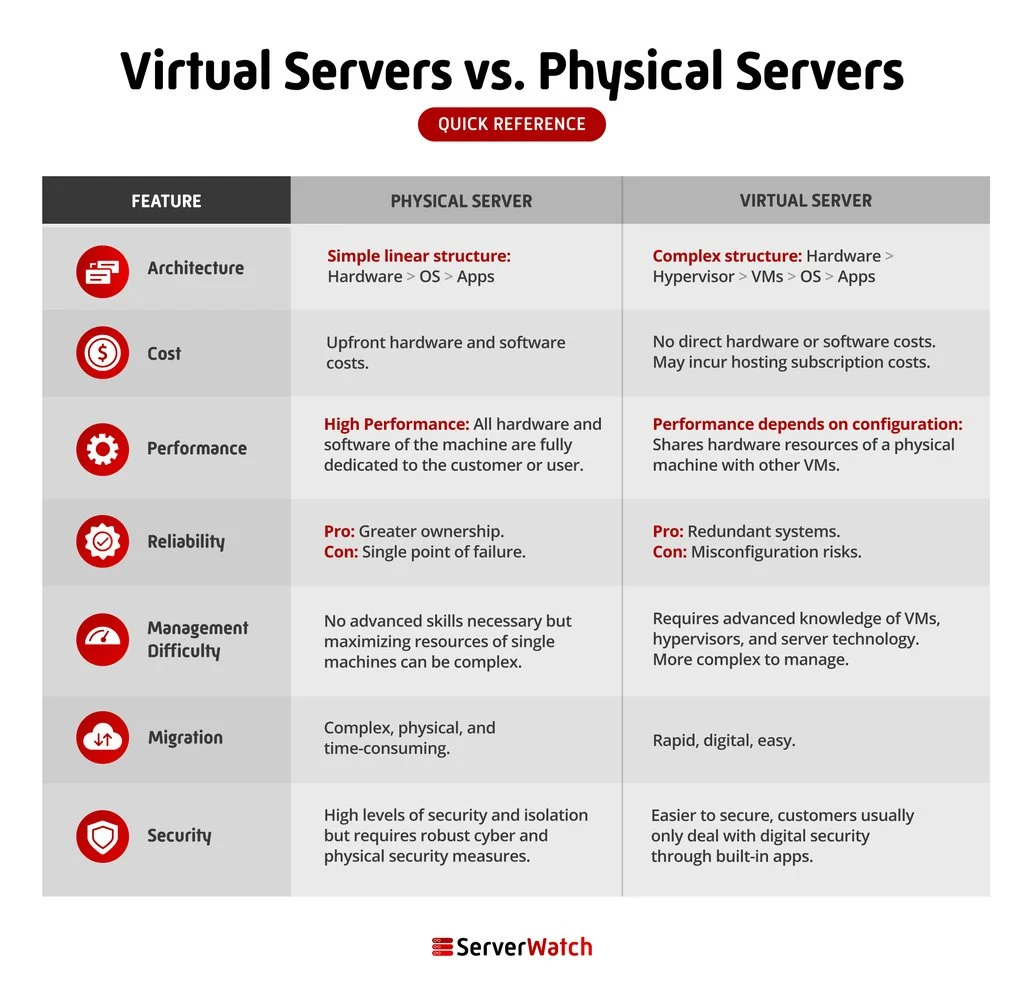
Virtual Servers vs. Physical Servers: A Detailed Comparison
The choice between a physical and virtual server hinges on a nuanced understanding of their respective strengths and weaknesses across several critical parameters.
Architecture
The fundamental architectural difference lies in their nature: physical servers are dedicated hardware, while virtual servers are software-defined entities running atop physical hardware. This distinction impacts resource allocation, control, and flexibility.
Cost
While virtualization technology involves initial investment in hypervisors and management software, its cost-efficiency becomes evident at scale. Virtual servers offer a significantly lower total cost of ownership (TCO) for many use cases due to reduced hardware acquisition, power consumption, cooling, and physical space requirements. Furthermore, when opting for cloud-based virtual servers, businesses offload responsibilities for hardware maintenance, repair, and physical security to the vendor. This includes mitigating risks associated with hardware failures, physical break-ins, theft, energy bills, and natural disasters.
Performance
The performance race between physical and virtual servers is not a simple one-size-fits-all scenario. While physical servers, with their direct hardware access, can offer peak performance for highly specialized and resource-intensive tasks, virtual servers have significantly closed the performance gap. Factors such as the quality of the hypervisor, the underlying hardware of the host server, the specific workload, and the network configuration all play a crucial role. For many common applications, the performance of well-configured virtual servers is indistinguishable from that of physical servers. However, for applications demanding absolute minimal latency or maximum raw processing power without any virtualization overhead, physical servers might still hold an advantage.
Reliability
Reliability is a critical consideration for any IT infrastructure. Both physical and virtual servers can be engineered for high reliability. Physical servers achieve this through redundant hardware components, robust power supplies, and resilient network connections. Virtualization introduces additional layers of reliability through features like live migration (moving a running VM from one host to another without downtime), automatic failover, and snapshotting. The overall reliability of a virtual server deployment is heavily dependent on the underlying physical infrastructure’s design and the management practices of the virtualization platform. Cloud providers, with their vast, redundant infrastructure, typically offer exceptionally high levels of availability for their virtual server offerings.
Management Difficulty
Managing physical servers can be complex, involving hardware maintenance, operating system patching, software updates, and troubleshooting. When operating physical servers on-premises, organizations bear the full burden of these tasks. In contrast, managing virtual servers can be simplified, especially when utilizing cloud services. Cloud providers handle the underlying hardware maintenance and often offer intuitive management consoles for provisioning, monitoring, and scaling VMs. However, within an organization’s own data center, managing a large virtualized environment still requires specialized expertise in virtualization platforms. The key takeaway is that with virtual servers, a significant portion of the physical infrastructure management is often outsourced to the vendor.
Migration
Migration is a clear area where virtual servers excel. The ability to easily copy, move, and clone virtual machines from one physical host to another, or between different cloud environments, is a significant advantage. This process can often be completed with a few clicks through management interfaces. Physical server migration, on the other hand, is a far more complex and time-consuming endeavor. It typically involves physically relocating hardware, reconfiguring network settings, and manually backing up and restoring entire systems to new machines, which can lead to extended downtime.
Security
Both virtual and physical servers can be secured to a high degree, but they present different security challenges and require different approaches. Physical servers offer inherent isolation by being standalone machines, making them less susceptible to certain network-based attacks that exploit shared resources. However, they are vulnerable to physical security breaches and hardware tampering. Virtual servers, while isolated from each other at the software level, share underlying physical hardware. This means that a compromise of the hypervisor or the host system could potentially impact multiple VMs. Therefore, robust security measures, including strong access controls, network segmentation, regular patching of the hypervisor, and endpoint security for each VM, are paramount for virtual server security. Cloud providers invest heavily in sophisticated security measures to protect their virtualized infrastructure.
The Bottom Line: Choosing the Right Server for Your Business
The decision between physical and virtual servers is not a binary choice but rather a strategic one that depends on an organization’s specific needs, priorities, and resources.
Virtual servers are generally the preferred choice for a broad spectrum of businesses due to their:
- Affordability: Lower upfront and ongoing costs.
- Scalability and Elasticity: Ability to adapt quickly to changing demands.
- Agility: Rapid deployment and provisioning for faster time-to-market.
- Accessibility: Easy access to advanced technology and global reach through cloud providers.
- Reliability: High availability offered by cloud infrastructure and robust disaster recovery capabilities.
However, physical servers remain the superior option for businesses that require:
- Maximum Ownership and Control: Complete command over hardware, configurations, and security protocols.
- Peak Performance: Uncompromised processing power and minimal latency for highly specialized, demanding workloads.
- Airtight Security: For applications with the most stringent security requirements where even the slightest risk of resource contention is unacceptable.
- Direct Hardware Access: For specific hardware optimizations or compatibility needs.
Ultimately, the optimal IT infrastructure often involves a hybrid approach, leveraging the strengths of both physical and virtual servers. Businesses can utilize physical servers for their most demanding or sensitive applications while benefiting from the flexibility and cost-efficiency of virtual servers for a wide range of other workloads. Exploring solutions like those offered by leading virtualization software providers can empower businesses to harness the full potential of modern server technologies.