
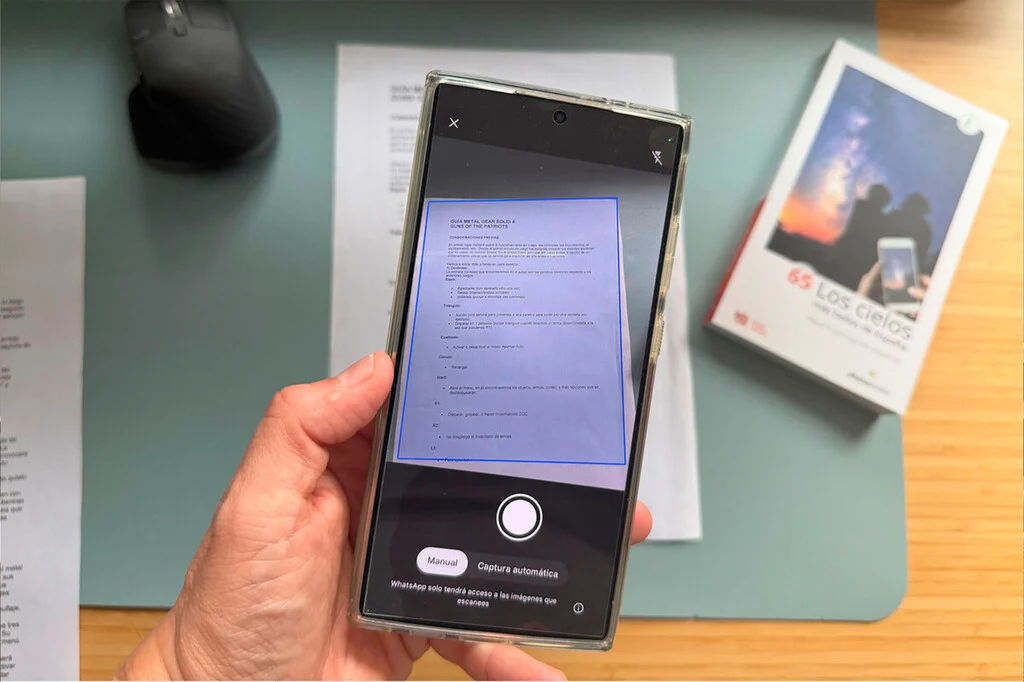

Samsung is set to extend its highly anticipated AI-powered document scanner functionality, a feature initially unveiled with the flagship Galaxy S26 and S26 Ultra series, to its predecessor models, the Galaxy S25, S25+, and S25 Ultra. This strategic rollout, confirmed through official channels within the Samsung community forums, signifies a broader commitment by the South Korean technology giant to democratize its cutting-edge artificial intelligence capabilities across its premium smartphone lineup. The integrated scanner, lauded for its intuitive operation and advanced AI enhancements, promises to streamline daily tasks by allowing users to effortlessly digitize documents directly within the native camera application, effectively minimizing reliance on third-party software.
The document scanner, first showcased as a marquee feature of the recently launched Galaxy S26 series, represents a significant leap in mobile productivity tools. Its core innovation lies in the seamless integration of artificial intelligence, which transforms the mundane task of scanning physical documents into a sophisticated, error-free process. Users simply point their device’s camera at a document, and the AI automatically detects the edges, corrects perspective, and intelligently removes common imperfections such as wrinkles, shadows, or even obstructing fingers. Beyond basic image capture, the feature boasts the capability to scan multiple pages sequentially and compile them into a single, cohesive PDF document, a functionality highly sought after by professionals and casual users alike.
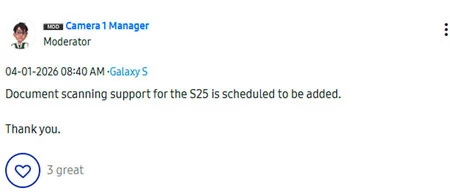
Upon its debut with the S26 series, there was considerable speculation regarding the exclusivity of this advanced scanner. Many users wondered if such a practical and powerful tool would remain confined to Samsung’s latest generation of flagship devices or if it would eventually trickle down to older models through software updates. The confirmation, emanating from a moderator on Samsung’s official community forums and subsequently reported by tech outlet Mojo Trick, has brought clarity and relief to owners of the Galaxy S25 series. While the announcement explicitly named the Galaxy S25, S25+, and S25 Ultra as recipients, it did not specify whether other Galaxy models would also benefit from this update, nor did it detail the precise timeline or method of its deployment. The integration could arrive either as an independent update to the camera application or as part of a broader system update, potentially with the anticipated One UI 8.5.
The Evolution of Mobile Document Scanning
The journey of document scanning on mobile devices has been a progressive one, reflecting the rapid advancements in smartphone camera technology and computational power. In the early days of smartphones, digitizing a document typically involved little more than taking a photograph, often resulting in skewed images, poor lighting, and illegible text. These rudimentary scans required significant manual cropping and editing, if any correction was attempted at all, making the process cumbersome and yielding suboptimal results.
This limitation soon paved the way for a burgeoning market of third-party document scanning applications. Apps like CamScanner, Adobe Scan, and various others emerged, offering specialized algorithms to detect document boundaries, correct perspective distortion, and enhance text clarity. These applications often included features like optical character recognition (OCR) to convert scanned images into editable text, cloud integration for storage, and batch scanning capabilities. While highly functional, they introduced an additional layer of complexity, requiring users to download, install, and often subscribe to separate applications, thereby fragmenting the user experience.
Recognizing the widespread need for integrated solutions, operating system developers and smartphone manufacturers began incorporating basic scanning functionalities directly into their platforms. Apple’s iOS, for instance, integrated a document scanner into its Notes app, allowing users to quickly digitize documents with automatic edge detection and basic image correction. Similarly, Google Drive offered a built-in scanner, and popular messaging platforms like WhatsApp and cloud services like Dropbox also included rudimentary scanning features. While these built-in options offered convenience, they often lacked the advanced image processing capabilities and AI-driven intelligence found in dedicated third-party apps or, more recently, in Samsung’s latest offering.
Samsung’s AI document scanner marks a pivotal moment in this evolution. By deeply embedding sophisticated AI capabilities directly into the native camera app, Samsung is setting a new standard for accessibility and quality in mobile document digitization. This move not only addresses the historical shortcomings of basic mobile scans but also aims to surpass the convenience of many third-party apps by offering a seamless, integrated, and highly intelligent solution that leverages the full power of modern smartphone hardware and AI processing.
Deep Dive into Samsung’s AI Document Scanner
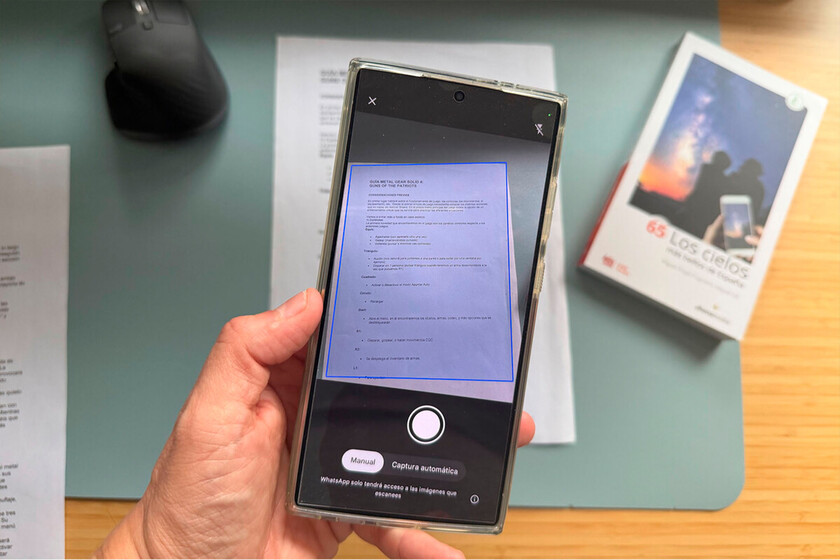
The advanced capabilities of Samsung’s AI document scanner are a testament to the company’s investment in artificial intelligence and its application to everyday utility. At its core, the system utilizes sophisticated machine learning algorithms to analyze the camera feed in real-time. When a document is detected, the AI automatically identifies its boundaries, even if it’s placed on a cluttered background or at an angle. This intelligent edge detection is crucial for generating a clean, professional-looking scan without manual intervention.
Beyond simple boundary recognition, the AI actively works to enhance the visual quality of the scan. It applies perspective correction, straightening skewed images as if they were perfectly perpendicular to the camera lens. This is particularly useful when scanning documents quickly without meticulously aligning the phone. Furthermore, the AI can intelligently detect and eliminate common visual impediments:
- Wrinkle Removal: It smooths out minor creases and folds, a common issue with physical papers, making the digitized document appear pristine.
- Finger Detection and Removal: A frequent problem with mobile scanning is accidentally capturing fingers holding down the document. The AI is designed to identify and digitally erase these obstructions, ensuring a clean image of the document alone.
- Shadow and Glare Reduction: Advanced image processing algorithms work to minimize shadows cast by lighting or the phone itself, as well as glare from glossy paper surfaces, ensuring uniform illumination and readability.
- Text Enhancement: The AI can subtly boost contrast and sharpen text, making it more legible and professional, even if the original document’s print quality was less than ideal.
One of the scanner’s most practical features is its multi-page capability. Users can continue scanning additional pages of a document, and the AI will intelligently collate them into a single, multi-page PDF file. This feature is invaluable for digitizing lengthy contracts, reports, lecture notes, or personal records, eliminating the need to combine separate image files manually later. The choice of PDF as the output format is strategic, as it is a universally recognized and secure document format, ensuring compatibility across various devices and platforms.
The "intuitive" aspect highlighted by Samsung means that this powerful functionality is directly accessible within the standard camera application. There’s no need to switch apps, navigate complex menus, or understand technical settings. It’s designed to be a one-tap solution: open the camera, point, and scan. This level of integration significantly boosts user efficiency, making it quicker and easier to manage paper documents digitally, whether for archiving, sharing, or record-keeping. For instance, a student can rapidly digitize lecture notes, a business professional can archive receipts or contracts on the go, and individuals can maintain digital copies of important personal documents with unprecedented ease. This capability not only saves time but also contributes to a more organized and paperless workflow, aligning with contemporary trends towards digital transformation and environmental consciousness.
Samsung’s Broader AI Strategy: "Galaxy AI" and Ecosystem
The integration of the AI document scanner into the Galaxy S25 series is not an isolated development but rather a key component of Samsung’s overarching "Galaxy AI" strategy. Launched with the Galaxy S26 series, Galaxy AI is Samsung’s ambitious initiative to infuse artificial intelligence deeply into every aspect of its mobile ecosystem, aiming to redefine user interaction and productivity. This strategy positions AI not as a separate feature, but as an integral layer that enhances core functionalities, making devices smarter, more intuitive, and more personal.
The document scanner aligns perfectly with this vision by providing a practical, daily-use AI application. It demonstrates how AI can solve real-world problems and simplify tasks that were previously cumbersome. Other prominent examples of Galaxy AI features include:
- Circle to Search with Google: Allows users to circle, highlight, scribble on, or tap anything on their screen to instantly get search results, powered by Google.
- Live Translate: Provides real-time voice and text translations during phone calls, breaking down language barriers.
- Note Assist: Helps users summarize, format, and translate notes using AI.
- Generative Edit: Empowers users to resize, reposition, or even remove objects in photos, with AI intelligently filling in the background.
By expanding the AI document scanner to the S25 series, Samsung reinforces its commitment to bringing these advanced AI capabilities to a wider audience within its premium segment. This move not only enhances the value proposition of existing devices but also strengthens the overall Galaxy ecosystem. When core functionalities like document scanning are robustly integrated and AI-powered, users are less likely to seek out alternative solutions from third-party developers. This creates a more cohesive and self-sufficient user experience within the Samsung environment, fostering greater loyalty and satisfaction. It allows Samsung to differentiate its devices not merely on hardware specifications but on the intelligence and utility embedded within its software.
Implications for Users and the Market
The rollout of the AI document scanner to the Galaxy S25 series carries significant implications for both users and the broader mobile technology market.
For Users:
- Unprecedented Convenience: Users will experience a substantial boost in convenience. The ability to scan high-quality documents directly from the camera app, without opening a separate application or navigating complex settings, saves valuable time and reduces friction in daily tasks.
- Enhanced Productivity: For students, professionals, and individuals managing personal paperwork, this feature is a productivity powerhouse. It simplifies archiving receipts, digitizing contracts, sharing handwritten notes, or storing important documents, making information readily accessible and organized.
- Reduced App Clutter: By offering a superior native solution, Samsung allows users to potentially uninstall several third-party scanning apps, thereby freeing up storage space and decluttering their device’s app drawer. This contributes to a cleaner, more efficient smartphone experience.
- Consistent Quality: The AI’s ability to correct common scanning flaws ensures a consistently high-quality output, eliminating the frustration of poorly scanned documents.
For the Market:
- Impact on Third-Party Scanner Apps: While specialized third-party apps may continue to cater to niche requirements (e.g., advanced OCR, specific cloud integrations, specialized security features), the widespread availability of a robust native scanner could significantly impact their user base for basic and intermediate scanning needs. Developers of these apps may need to innovate further to retain their competitive edge.
- Competitive Landscape: This move intensifies the competition among smartphone manufacturers, particularly in the premium segment. As AI becomes a battleground for differentiation, other Android OEMs and even Apple may feel compelled to enhance their native document scanning capabilities with similar AI-driven intelligence. The race to offer the most integrated, intuitive, and powerful AI features will likely accelerate.
- Strengthening Samsung’s Ecosystem: By integrating such a practical AI feature across its flagship lineup, Samsung strengthens its ecosystem and increases the stickiness of its devices. It demonstrates that advanced AI is not just for the latest models but is a core part of the Samsung experience that will be extended to deserving previous-generation devices. This reinforces customer loyalty and encourages users to remain within the Samsung family for future upgrades.
- Validation of AI Investment: The positive reception and strategic rollout of this feature validate Samsung’s substantial investment in AI research and development. It showcases that AI can deliver tangible, practical benefits that genuinely improve the user experience, moving beyond theoretical applications to concrete utility.
Anticipating the Rollout: When and How
While the confirmation of the AI document scanner’s arrival on the Galaxy S25 series has generated considerable excitement, the exact details surrounding its rollout remain to be disclosed. Samsung has not yet provided a definitive timeline, leaving users to anticipate whether the feature will arrive in the immediate future or as part of a larger software update cycle.
There are two primary possibilities for its deployment:
- Independent Camera App Update: The feature could be delivered through a standalone update to the native Samsung Camera application via the Galaxy Store. This method allows for faster deployment of specific features without requiring a full system software update.
- One UI 8.5 Update: Alternatively, the document scanner could be bundled with the next major iteration of Samsung’s custom Android skin, One UI 8.5. Major One UI updates typically introduce a suite of new features, performance enhancements, and security patches. Given that the S26 series likely launched with an advanced version of One UI (or a subsequent incremental update), integrating this feature with One UI 8.5 for the S25 series would ensure consistency and potentially deliver other new functionalities alongside it.
Regardless of the delivery mechanism, the anticipation among Galaxy S25 users is high. The proactive communication from a Samsung community moderator indicates that the company is listening to its user base and committed to enhancing the value of its existing flagship devices. This approach fosters a positive relationship with its customers and underscores Samsung’s dedication to continuous improvement and leveraging its technological prowess for practical user benefits.
In conclusion, the expansion of Samsung’s AI-powered document scanner to the Galaxy S25 series represents a significant step forward in mobile productivity and intelligent design. By bringing a highly practical and sophisticated AI feature to a wider array of premium devices, Samsung not only enhances the daily lives of its users but also reinforces its position as a leader in integrated AI experiences. This move underscores the company’s commitment to delivering tangible, user-centric innovations, solidifying the Galaxy ecosystem as a hub for advanced, intuitive, and efficient mobile technology. The future of document management on smartphones is undoubtedly smarter, and Samsung is leading the charge in making that future accessible today.