
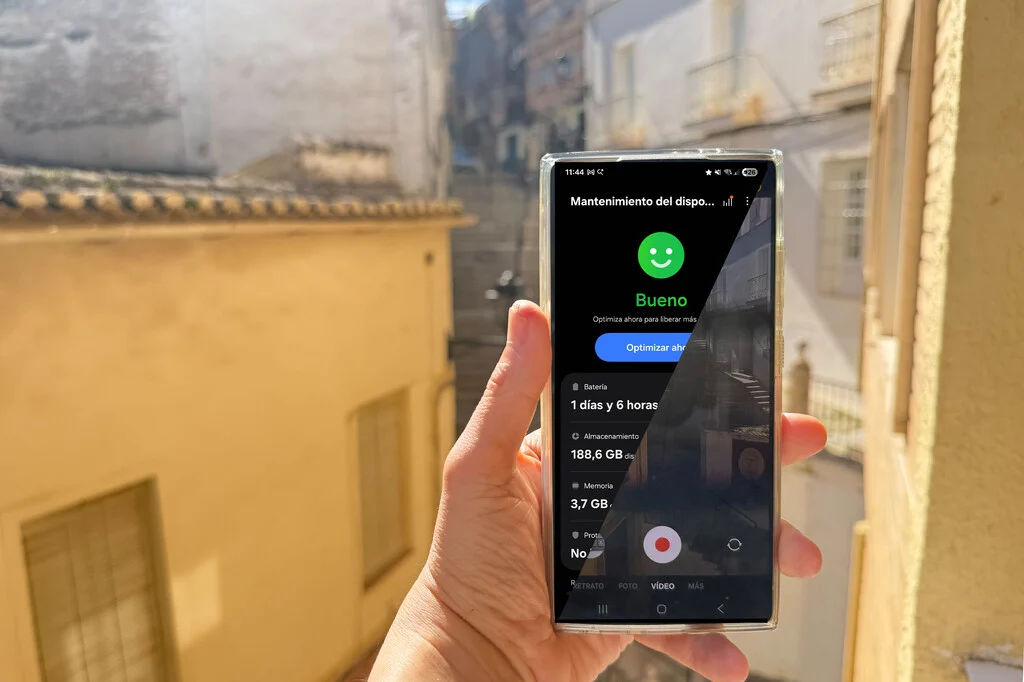

The escalating demand for high-fidelity video capture on mobile devices has pushed the boundaries of smartphone internal storage, often leaving users, particularly those on the latest Samsung Galaxy models, grappling with rapidly diminishing space. With the advent of advanced camera systems capable of recording stunning 4K and even 8K video, coupled with innovative codecs like APV, the conventional 256GB or 512GB of onboard memory can quickly become a bottleneck, especially during peak content creation periods such as holidays or professional assignments. Recognizing this critical challenge, Samsung has integrated a pragmatic and highly effective solution, allowing users to bypass internal storage limitations by directly recording video content onto external storage devices connected via the universal USB-C port. This feature, subtly implemented yet profoundly impactful, transforms the Galaxy smartphone into an even more versatile tool for videographers, content creators, and everyday users who demand uncompromised video quality without the constant worry of running out of space.
The Escalating Demand and the Internal Storage Conundrum
Modern smartphones, epitomized by the Samsung Galaxy S25 Ultra and the upcoming S26 Ultra, have evolved beyond simple communication devices to become sophisticated portable production studios. Their camera modules feature advanced optics, larger sensors, and powerful image signal processors (ISPs) that enable resolutions previously confined to professional cameras. Recording in 4K resolution, a standard for many serious creators, generates data at bitrates that can easily exceed 100 Mbps (megabits per second). An hour of 4K video can consume upwards of 45 GB, while 8K recording, with its even higher resolution and bitrate requirements, can double or triple that consumption, rapidly filling even the most generous internal storage configurations.
The introduction of advanced video codecs, such as Samsung’s proprietary APV (Advanced Picture Video) format on the Galaxy S26 Ultra, further enhances video quality and compression efficiency but still generates substantial file sizes due to the sheer volume of visual information captured. APV aims to bring mobile video closer to professional camera standards by optimizing image fidelity and dynamic range, which inherently demands more robust data handling. For users on vacation, documenting events, or engaged in continuous shooting, the internal storage, regardless of its capacity, becomes a finite resource. A recent industry report indicated that the average smartphone user’s storage consumption for media files, particularly videos, has increased by over 30% year-over-year, largely driven by higher resolution capture and increased sharing on social platforms. This trend underscores the urgency for robust storage solutions that extend beyond the physical confines of the device itself.
Samsung’s Strategic Solution: Direct-to-External Recording
In response to this growing storage crisis, Samsung has engineered a seamless solution: the ability to record video directly to an external storage device. This functionality leverages the versatility of the USB-C port, which supports USB On-The-Go (OTG) connectivity, allowing the smartphone to act as a host for peripherals. Unlike simply moving files after recording, which still consumes internal storage temporarily, this method directs the data stream straight to the external medium. This means that as soon as the record button is pressed, the high-bitrate video stream is written directly to the connected SSD, USB drive, or SD card, bypassing the phone’s internal Universal Flash Storage (UFS) entirely for the recording process.
This innovative approach is not limited by the type of external storage, offering remarkable flexibility. Users can connect various devices, including card readers housing microSD or full-size SD cards, standard USB flash drives, traditional external hard drives (HDDs), or, most optimally, external Solid State Drives (SSDs). The only prerequisite is that the device connects via USB-C or through a compatible adapter. This broad compatibility ensures that users can leverage existing storage solutions or invest in new ones tailored to their specific needs and budget.
From a technical standpoint, this feature significantly offloads the internal UFS storage, which is typically shared with the operating system, applications, and other data. By dedicating external storage solely to video recording, the smartphone’s overall performance remains unhindered, preventing potential slowdowns or interruptions that could arise from simultaneous read/write operations on a congested internal drive. This is a testament to Samsung’s commitment to enhancing user experience and empowering mobile content creators with professional-grade capabilities.
The Crucial Role of Transfer Speed and File System
While the flexibility of connecting various external storage devices is a major advantage, the performance of the chosen external medium is paramount, especially when dealing with high-resolution, high-bitrate video. The speed at which the external storage can write data directly impacts the quality and integrity of the recorded video. For 4K and 8K footage, particularly with advanced codecs, the data throughput can be immense. If the external storage device is too slow, it may not be able to "ingest" the data stream at the rate it is being generated by the camera sensor and processor. This can lead to dropped frames, stuttering video, corrupted files, or even recording failures.
This is where external SSDs (Solid State Drives) demonstrate their clear superiority. Unlike traditional HDDs, which rely on spinning platters and read/write heads, SSDs use flash memory, offering significantly faster read and write speeds, higher durability, and no moving parts. A high-performance external SSD, connected via USB 3.2 Gen 2 or Thunderbolt (if the phone supports it, though USB 3.2 Gen 1 is common for most current flagships), can easily handle the sustained write speeds required for 8K video. For instance, a typical 8K video stream might require sustained write speeds upwards of 150-200 MB/s (megabytes per second), which many modern external SSDs can comfortably achieve or exceed. Standard USB flash drives or older HDDs might struggle to maintain these speeds, especially over extended recording sessions. Users are advised to check the specified write speeds of their external storage devices to ensure compatibility with their desired video recording quality.
Beyond hardware speed, the file system format of the external storage is equally critical. Samsung mandates that the external device be formatted either in exFAT or FAT32. While both are compatible, exFAT is strongly recommended. FAT32, an older file system, imposes a significant limitation: it cannot handle individual files larger than 4 GB. Given that even a few minutes of 4K or 8K video can easily surpass this limit, using FAT32 would force the system to split videos into multiple 4 GB segments, complicating post-production and potentially leading to lost frames during the splitting process. ExFAT, on the other hand, supports much larger file sizes (up to 16 EB or exabytes), making it ideal for continuous high-resolution video recording.
It’s also important to note that if a user attempts to format an external drive directly from the Galaxy phone, the default option provided by the device might be FAT32. To avoid this limitation and ensure optimal performance for large video files, it is advisable to format the external storage on a personal computer (PC) or Mac, where exFAT can be explicitly selected as the file system. This preemptive step ensures that the storage is ready to handle the demands of professional-grade video capture from the outset.
Activating Direct External Video Recording: A Step-by-Step Guide
The implementation of this feature is designed to be user-friendly, though its availability and exact activation path depend on the version of Samsung’s One UI operating system running on the Galaxy device. This capability was introduced with One UI 7 and is further refined in subsequent versions.
Prerequisites:
- Compatible Galaxy Device: A Samsung Galaxy smartphone running One UI 7 or later. Older versions do not support this direct recording functionality.
- Formatted External Storage: An external storage device (SSD, USB drive, SD card in a reader, HDD) formatted to exFAT (preferred) or FAT32, connected via USB-C or a suitable adapter.
Activation Steps for One UI 7 and One UI 8:
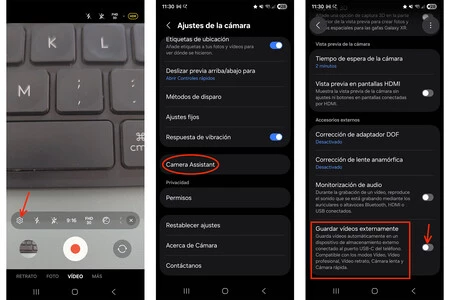
- Open Camera Application: Launch the default Camera app on your Galaxy phone.
- Access Camera Settings: Tap on the ‘Settings’ icon, usually represented by a cogwheel, within the camera interface.
- Navigate to Camera Assistant: Scroll down through the camera settings until you find the option labeled "Camera Assistant." If Camera Assistant is not present, it can be downloaded as a separate application from the Samsung Galaxy Store. Camera Assistant is a powerful utility that provides granular control over various camera features.
- Enable External Video Recording: Within Camera Assistant, scroll to the very bottom. You will find an option titled "Save videos externally." Toggle the switch next to this option to the ‘On’ position.
Once activated, your Galaxy phone will automatically detect when a compatible external storage device is connected via USB-C. When such a device is present, all subsequent video recordings will be directed to it, rather than consuming internal storage.
Activation Steps for One UI 8.5 (and Galaxy S26 onwards):
For devices running One UI 8.5, or for the upcoming Galaxy S26 series, Samsung has streamlined the access to this feature, integrating it directly into the main Camera app settings, thus removing the need to navigate through Camera Assistant.
- Open Camera Application: Launch the default Camera app.
- Access Camera Settings: Tap on the ‘Settings’ icon.
- Locate Video Section: Within the main camera settings, navigate to the section dedicated to video recording options.
- Enable External Video Recording: The option "Save videos externally" will be present here. Toggle the switch to ‘On’.
Regardless of the One UI version, once the feature is enabled and an external drive is connected, users will notice a visual confirmation on the screen. While recording, an icon, typically resembling a USB drive or external storage, will appear in the upper part of the screen, indicating that the video is being saved externally. Furthermore, the camera interface will display an accurate estimate of the remaining recording time, based on the available space on the connected external device, rather than the phone’s internal memory.
Accessing Recorded Videos and Broader Implications
After recording, the video files are readily accessible. Users can navigate to the "My Files" application, which is Samsung’s native file manager. Within "My Files," a new category titled "USB Storage" will appear when an external device is connected. All videos recorded using the external storage feature will be neatly organized within this section. This streamlined access ensures a smooth workflow for transferring, editing, or sharing the high-quality footage.
The introduction of direct external video recording has significant implications across various user segments and the broader mobile technology landscape. For professional videographers and serious content creators, this feature is a game-changer. It effectively transforms a high-end Galaxy smartphone into a primary camera for many projects, removing the biggest barrier to extended shooting: storage limitations. This allows creators to shoot for longer durations, capture more takes, and maintain higher quality settings without interruption, akin to working with dedicated professional camcorders that often record to external media.
From an economic perspective, this capability is likely to fuel the market for high-speed, portable external SSDs. As more users adopt this workflow, the demand for compact, durable, and fast USB-C SSDs will increase, potentially leading to more competitive pricing and innovative product designs in this accessory segment. This also indirectly benefits the broader ecosystem of mobile accessories, including USB-C hubs, power banks (as continuous recording and external drive usage consume more power), and protective cases for both the phone and the external drive.
Strategically, this move by Samsung reinforces its position as a leader in mobile innovation, particularly in camera technology. By addressing a practical pain point for power users, Samsung enhances the value proposition of its flagship Galaxy devices. It demonstrates a commitment to bridging the gap between consumer electronics and professional tools, empowering a new generation of mobile-first creators. This also contributes to the longevity and utility of existing devices, as users can extend their phone’s storage capabilities rather than feeling compelled to upgrade solely for more internal memory.
Looking ahead, this feature could become a standard expectation for high-end smartphones, pushing other manufacturers to integrate similar capabilities. It also hints at a future where smartphones become even more modular and adaptable, with peripherals playing an increasingly integral role in unlocking their full potential. As video resolutions continue to climb and computational photography demands more processing power, efficient data management solutions like direct external recording will be indispensable.
In conclusion, for those who frequently record high-quality video on their Samsung Galaxy devices, especially during travel or professional shoots, the direct external storage recording feature offers unparalleled freedom and peace of mind. By simply connecting an appropriate USB-C storage device and activating a setting in the camera app, users can eliminate storage anxiety and focus entirely on capturing stunning visual content, solidifying the Galaxy’s status as a formidable tool in the evolving landscape of mobile videography.