


For years, the tactile "back" button, once a staple of smartphone interaction, has evolved from a physical click to a virtual tap, and increasingly, to intuitive gestures. This fundamental navigational tool, crucial for user flow through countless applications and system menus, is undergoing another significant transformation within Samsung’s ecosystem. With the impending release of One UI 8.5, initially debuting on the flagship Galaxy S26 and S26 Ultra, Samsung is refining the "back" experience by introducing a dynamic, floating back button designed to optimize screen real estate and enhance usability. This strategic update reflects a broader industry trend towards more streamlined, efficient, and aesthetically pleasing mobile interfaces.
The Enduring Legacy of the Back Button: A Historical Perspective
The journey of the "back" function in mobile devices is a microcosm of smartphone evolution itself. Early smartphones, including some of the first Android devices, featured prominent physical buttons for "Home," "Menu," and crucially, "Back." These hardware elements provided immediate tactile feedback and a consistent point of interaction, anchoring the user experience. Apple’s original iPhone, famously minimalist, opted for a single physical home button, relying on in-app UI elements for navigation, a philosophy that diverged from Android’s more standardized hardware navigation.
As smartphone designs matured, the push for larger screens and slimmer bezels led to the gradual deprecation of physical buttons. Capacitive touch buttons emerged as a transitional phase, mimicking the layout of their physical predecessors but requiring only a touch. This was particularly common in Samsung’s early Galaxy lines, which often featured a physical home button flanked by capacitive back and multitasking buttons. However, even these soon gave way to fully virtualized navigation bars, integrated directly into the display. This shift allowed for greater flexibility in UI design and enabled full-screen experiences, albeit at the cost of some screen space dedicated to the navigation bar.
The introduction of gesture navigation marked another pivotal moment. Inspired by Apple’s iPhone X and subsequently adopted by Google into stock Android, gestures offered an immersive, full-screen interaction model, replacing the traditional navigation bar entirely. Users could swipe from the left or right edge to go back, swipe up for home, and swipe up and hold for recent apps. While initially met with mixed reactions due to the learning curve and occasional conflicts with in-app gestures, this method gained significant traction for its elegance and screen-maximizing potential.
Samsung’s Navigation Philosophy: Balancing Consistency and Innovation
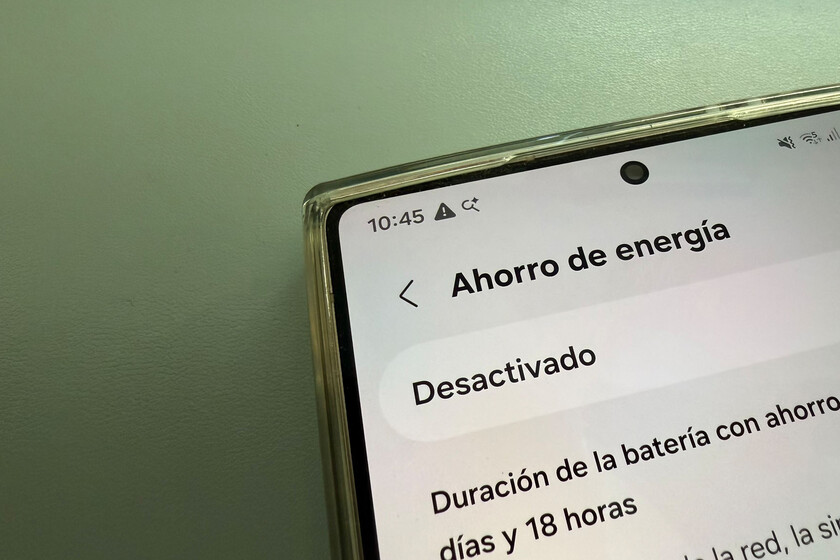
Samsung, with its highly customized One UI overlay, has consistently sought to balance the adoption of Android’s core navigation principles with its own user experience innovations. For a long time, Samsung devices offered both the traditional three-button navigation bar and gesture navigation options, allowing users to choose their preferred method. Beyond the primary navigation bar, One UI has also incorporated a secondary, context-sensitive back button, typically appearing as an arrow in the top-left corner of the screen within applications and system menus.
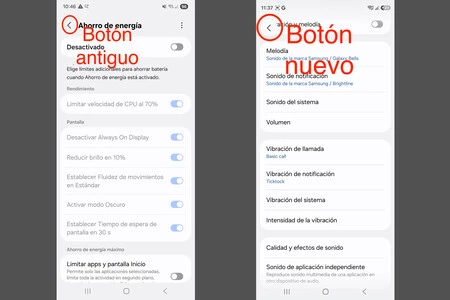
This top-left back arrow has been a consistent feature across multiple iterations of One UI, including One UI 8.0. It provides a highly visible and readily accessible option for users to revert to the previous screen, especially useful when deeper within an application’s menu structure. However, this implementation came with a trade-off: to ensure the back button’s constant availability, One UI often kept a static header at the top of the screen, displaying the current menu’s name alongside the back arrow. While informative, this static header consumed valuable screen real estate, particularly noticeable on applications or menus with extensive content that could benefit from maximum vertical display space.
Industry analysis and user feedback consistently highlight screen real estate as a premium commodity on modern smartphones. With devices becoming primary tools for content consumption, productivity, and communication, every pixel counts. Static UI elements, while providing continuity, can detract from the immersive experience, especially in applications like e-readers, video players, or even long social media feeds. This tension between persistent navigation and maximized content display has driven many UI innovations, and Samsung’s latest move with One UI 8.5 appears to be a direct response to this challenge.
One UI 8.5’s Innovative Approach: The Dynamic Floating Back Button
With One UI 8.5, Samsung is introducing a refined solution that addresses the limitations of the previous top-left back button while preserving its utility. The core innovation lies in transforming this element into an independent, dynamic, and floating back button. This design change, initially making its debut on the newly released Galaxy S26 and S26 Ultra, promises a more practical and visually appealing navigation experience.
The new implementation works as follows: when a user first enters a system menu or an application section that requires a "back" action, the familiar left-pointing arrow appears in the top-left corner, often alongside the menu’s title, similar to previous One UI versions. This initial state maintains continuity and ensures immediate discoverability. However, the critical change occurs when the user begins to scroll down the screen. As content fills the display and the static header (with the menu name) would typically scroll out of view, the back button detaches itself from the header. It transforms into a distinct, circular, floating icon, typically remaining anchored in the top-left portion of the screen.
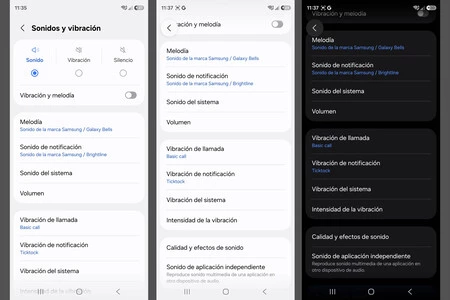
This "floating" characteristic is key. It allows the menu title and any other static header elements to disappear as the user scrolls, thereby recovering the previously occupied screen space for content. Yet, the back button itself remains perpetually visible and accessible, hovering above the content. This design choice strikes a balance between providing a consistent navigation anchor and maximizing the display area for dynamic information.
Enhancing User Experience: Beyond Just Space
The benefits of this new design extend beyond merely reclaiming screen space. The floating back button also contributes to an enhanced user experience in several ways:
- Improved Visibility and Discoverability: By becoming a distinct, circular icon, the back button gains visual prominence. It is no longer just a small arrow embedded within a text string but a standalone, actionable element. This can improve its discoverability, especially for users who might have previously overlooked the smaller, integrated arrow.
- Enhanced Usability: The floating nature means the button is always within easy reach, regardless of how far down a user has scrolled. This reduces the need for users to scroll back up to access the "back" function, streamlining navigation and making interactions more efficient. This is particularly valuable in long lists, extensive settings menus, or detailed articles.
- Dynamic Aesthetics: The transition from an integrated arrow to a floating circle creates a more dynamic and modern aesthetic. It adds a subtle layer of animation and responsiveness to the interface, contributing to a more polished and fluid user experience. This aligns with contemporary UI design trends that favor interactive and adaptive elements.
- Reduced Cognitive Load: By making the back button a consistent, easily identifiable floating element, Samsung potentially reduces the cognitive load on users. They don’t have to scan for a small arrow or remember where the header might be; the back button is simply "there," ready for action.
Samsung’s official statements, while not directly quoting specific designers on this feature, often emphasize the company’s commitment to "intuitive design" and "user-centric innovation." This update aligns perfectly with such a philosophy, demonstrating an iterative approach to refining core interactions based on practical usage patterns and the evolving demands of modern smartphone users.
Rollout and Broader Implications
The introduction of this new floating back button is not an optional feature within One UI 8.5; it is an integral part of the system’s updated navigation framework. This means that once a device receives the One UI 8.5 update, this new back button behavior will be automatically implemented across all system menus and, potentially, compatible third-party applications that adhere to standard Android UI guidelines.
The initial beneficiaries of this innovation are the users of the Galaxy S26 and S26 Ultra, which are the first devices to ship with One UI 8.5 pre-installed. Following this flagship debut, Samsung is expected to roll out One UI 8.5 to a wider range of its relatively recent Galaxy models. This phased approach is typical for major Android skin updates, allowing Samsung to gather feedback and ensure stability before a broader release. Users of other compatible Galaxy devices can anticipate experiencing this improvement in the coming months as Samsung pushes out the update.
This change, while seemingly minor, reflects Samsung’s ongoing effort to fine-tune the One UI experience. In an era where hardware advancements often overshadow software refinements, attention to such granular details underscores a commitment to holistic user satisfaction. Tech analysts widely anticipate that such subtle yet impactful UI adjustments will become increasingly important as smartphone hardware reaches peak maturity, pushing manufacturers to differentiate through superior software experiences.
The dynamic floating back button could also influence broader Android UI design trends. As Samsung is one of the largest Android OEMs, its design choices often set precedents or inspire similar implementations across the ecosystem. This move towards more intelligent, context-aware, and space-saving navigation elements could prompt other manufacturers to re-evaluate their own approaches to the ubiquitous "back" function, fostering a continuous cycle of innovation in mobile user interfaces.
In conclusion, the evolution of the back button from a physical component to a dynamic, floating virtual element in Samsung’s One UI 8.5 is more than just a cosmetic tweak. It represents a thoughtful refinement of a core interaction, addressing the perennial challenge of maximizing screen real estate while maintaining intuitive navigation. By enhancing visibility, usability, and aesthetic appeal, this small but significant change is poised to deliver a more fluid and efficient experience for millions of Galaxy users, reaffirming Samsung’s dedication to continuous improvement in the highly competitive smartphone market.