

Google Colab, a prominent cloud-based Python environment, is undergoing a significant evolution with the integration of advanced AI-assisted coding features, most notably the introduction of AI prompt cells. These innovations are reshaping how developers, data scientists, and learners interact with code, offering capabilities ranging from automated code generation and explanation to intelligent troubleshooting, all accessible through a standard web browser. This development underscores a broader industry trend towards democratizing complex coding tasks and accelerating the pace of development through artificial intelligence.
The Evolving Landscape of Cloud-Based Development
The proliferation of cloud computing has fundamentally altered the software development paradigm. Cloud-based Integrated Development Environments (IDEs) like Google Colab have emerged as crucial tools, providing accessible, scalable, and collaborative platforms for coding without the overhead of local installations. Google Colab, in particular, has gained immense popularity due to its free tier, robust support for Python, and seamless integration with Google’s broader ecosystem, making it an ideal choice for prototyping data analysis workflows, machine learning experiments, and educational purposes.
The integration of AI capabilities into these environments is the next logical step in their evolution. As artificial intelligence models become increasingly sophisticated, their ability to understand, generate, and refine code has opened new avenues for productivity and accessibility. Google, a frontrunner in AI research and development, has strategically positioned Colab at the forefront of this shift, leveraging its powerful generative AI models from the Gemini family to empower users with intelligent coding assistance. This move aligns with Google’s overarching vision to infuse AI across its product suite, making advanced computational tools more intuitive and user-friendly for a wider audience.
Introduction to Colab’s AI-Assisted Capabilities
Accessing Google Colab’s AI features begins with a simple sign-in using a Google account, followed by initiating a "New Notebook." The entire process is cloud-native, requiring only a web browser, ideally Google Chrome, eliminating the need for any local software installations. This inherent accessibility has been a cornerstone of Colab’s appeal, and the AI integration further amplifies its user-friendliness.
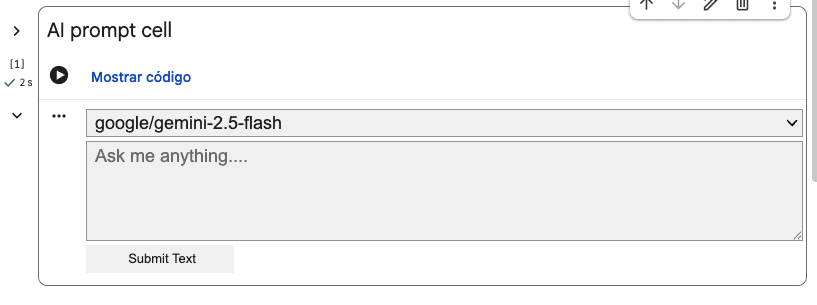
Historically, Colab notebooks comprised two fundamental cell types: code cells for script execution and text cells for documentation and visual explanations. The recent enhancement introduces a third, transformative cell type: the AI prompt cell. This innovation represents a direct conduit to Google’s cutting-edge generative AI, offering a streamlined interface for interacting with sophisticated models like Gemini. Its primary appeal lies in its ability to significantly lower the barrier to entry for coding, particularly benefiting individuals with limited programming experience.
The AI Prompt Cell: A Gateway to Intelligent Coding
Creating an AI prompt cell is an intuitive process. Within the Colab environment, users can typically find a dropdown menu next to the "Code" button in the upper toolbar, offering the option to "Add AI prompt cell." Once selected, a dedicated input box, often labeled "Ask me anything…," appears in the notebook, inviting natural language queries.
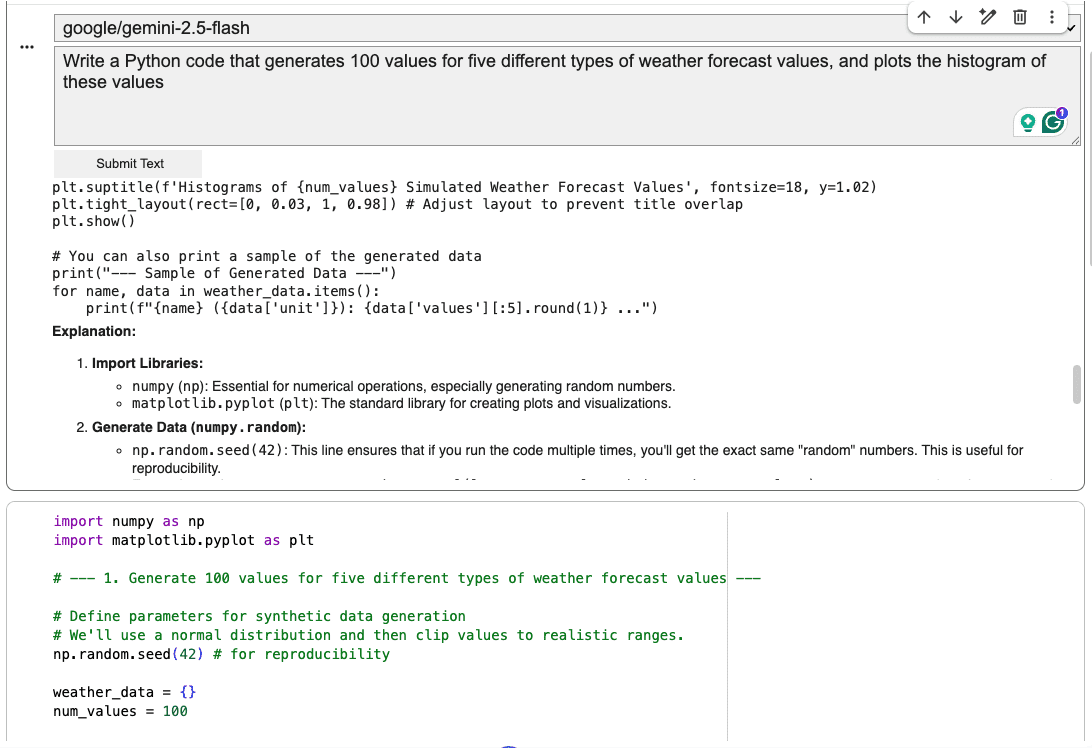
Consider a practical application: a user can input a request such as, "Write Python code that generates 100 values for five different types of weather forecast values, and plots a histogram of these values." After a brief processing period, during which the AI model interprets the request, a response is generated. This response typically includes a combination of descriptive text and Python code, tailored to fulfill the specified requirements. The AI’s ability to translate natural language into functional code snippets is a powerful demonstration of its potential to accelerate development cycles and enable rapid prototyping.
This feature transcends mere code generation; it cultivates an AI-assisted coding environment conducive to various development activities. Beyond creating new code, it is invaluable for quick prototyping, exploring novel algorithmic ideas, and even enhancing the clarity of existing programs. For instance, developers can prompt the AI to insert explanatory comments, docstrings, or informative print statements into relevant sections of their code, thereby improving its readability and maintainability. Understanding the distinct capabilities and operational nuances of the AI prompt cell is paramount to fully harnessing Colab’s latest AI-powered functionalities.
An Iterative Workflow: AI Prompt Cells and Standard Code Cells
The design of Colab fosters a symbiotic relationship between AI prompt cells and traditional code cells. While an AI prompt cell delivers the generated code and explanations, its output is not directly executable within the prompt cell itself, as it often includes conversational text alongside the code. The standard workflow involves copying the relevant code portion from the AI’s response and pasting it into a conventional code cell positioned below. This allows users to execute the generated code, observe its behavior, and verify its correctness.
A significant advantage of this iterative approach is the persistent nature of the AI prompt cell. Should the initial code fail to meet expectations or require modifications, the AI prompt cell remains active, allowing users to continue the dialogue with the AI. Developers can refine their prompts, request alternative solutions, or ask for specific adjustments until the generated code fully aligns with their project’s requirements. This iterative refinement process is critical for leveraging AI effectively, acknowledging that initial AI outputs may require human oversight and guidance to achieve optimal results.
Navigating Limitations and Best Practices
Despite their transformative potential, AI prompt cells, in their current iteration, present certain limitations that users must understand for effective deployment. A key constraint is their lack of automatic contextual awareness regarding the rest of the notebook. Unlike a human developer who might scan previous cells for definitions or variables, an AI prompt cell operates in relative isolation. Consequently, if a user wishes to query the AI about a piece of code located elsewhere in the notebook, that code must be explicitly provided (pasted) into the AI prompt cell.
For example, simply asking, "Explain the code in cell #7" or "Rewrite the third code cell in a more concise, Pythonic style" will not yield the desired result. The AI will typically respond by requesting the user to paste the code for analysis. This design choice, while potentially limiting seamless integration, ensures that the AI’s response is based on explicit input, reducing ambiguity and potential errors stemming from misinterpreted context.
To maximize efficiency and mitigate these limitations, a recommended best-practice workflow includes:
- Formulating Clear Prompts: Begin with precise, descriptive natural language prompts to guide the AI towards the desired outcome.
- Generating and Copying Code: Utilize the AI prompt cell to generate initial code snippets or explanations.
- Executing and Testing: Paste the generated code into a standard code cell for execution and immediate testing.
- Iterative Refinement: If the code requires modification or further elaboration, return to the AI prompt cell with refined prompts, pasting the relevant code snippet for the AI to analyze or transform.
- Contextual Code Provision: Always provide the specific code segment to the AI prompt cell when seeking analysis, explanation, or modification of existing code from other parts of the notebook.
It is also crucial to distinguish between the primary use cases for AI prompt cells and other AI-assisted features within Colab. While AI prompt cells excel at initial code creation and experimental interactions, for tasks such as explaining a specific piece of code within a given cell or transforming it, the "magic wand icon" functionality often found directly within a code cell offers a more integrated and flexible approach. This feature typically opens a dedicated Gemini tab on the right-hand side of the Colab interface, enabling a continued, context-aware interaction focused on the specific code block.
Broader Implications and Future Outlook
The introduction of AI-assisted coding features in Google Colab carries significant implications for various stakeholders within the technology ecosystem.
Impact on Developers: For experienced developers, these tools act as powerful accelerators, automating boilerplate code, generating initial drafts, and offering quick explanations for unfamiliar syntaxes or libraries. This frees up valuable time for focusing on complex problem-solving, architectural design, and innovative solutions. For junior developers and students, Colab’s AI features serve as an interactive tutor, demystifying complex concepts, correcting errors, and providing practical examples, thereby lowering the barrier to entry into the world of programming and data science. The ability to rapidly prototype and iterate on ideas is a game-changer for startups and researchers alike.
Educational Transformation: The democratizing effect of Colab’s AI extends deeply into education. Students can receive immediate, personalized feedback and assistance, fostering a more engaging and effective learning environment. Educators can leverage these tools to focus on higher-level concepts and problem-solving, knowing that basic syntax and common errors can be addressed by AI.
Competitive Landscape: Google’s investment in Colab’s AI capabilities positions it strongly in the burgeoning market of AI-powered developer tools. While competitors like GitHub Copilot offer similar code generation functionalities, Colab’s integration with the broader Google Cloud ecosystem and its free accessibility provide a distinct advantage, particularly for individual developers and educational institutions. This competition is likely to drive further innovation, leading to more sophisticated and seamlessly integrated AI features across various IDEs.
Ethical Considerations and Responsible AI: As with any powerful AI technology, ethical considerations are paramount. While Colab’s AI-assisted features enhance productivity, the output still requires human review and validation to ensure accuracy, security, and adherence to best practices. Potential biases in training data could inadvertently be reflected in generated code, and the risk of "hallucinations" (AI generating plausible but incorrect information) necessitates a critical approach. Google emphasizes responsible AI development, but the ultimate responsibility for the code’s quality and impact rests with the human developer.
Future Developments: The current iteration of Colab’s AI features is likely just the beginning. Future enhancements could include greater contextual awareness across the entire notebook, more sophisticated debugging capabilities, multimodal interactions (e.g., generating code from diagrams or verbal descriptions), and deeper integration with version control systems. As AI models continue to advance, Colab is poised to become an even more indispensable tool in the developer’s arsenal.
In conclusion, Google Colab’s continuous release of AI-assisted coding features, particularly the innovative AI prompt cell, represents a significant leap forward in making programming more accessible, efficient, and intuitive. While these tools come with their unique strengths and limitations, understanding how to effectively leverage them—and discerning when to use alternative AI functions—is key to unlocking their full potential. As the synergy between human intelligence and artificial intelligence deepens, Colab is set to play a pivotal role in shaping the future of software development, empowering a new generation of creators and innovators.