
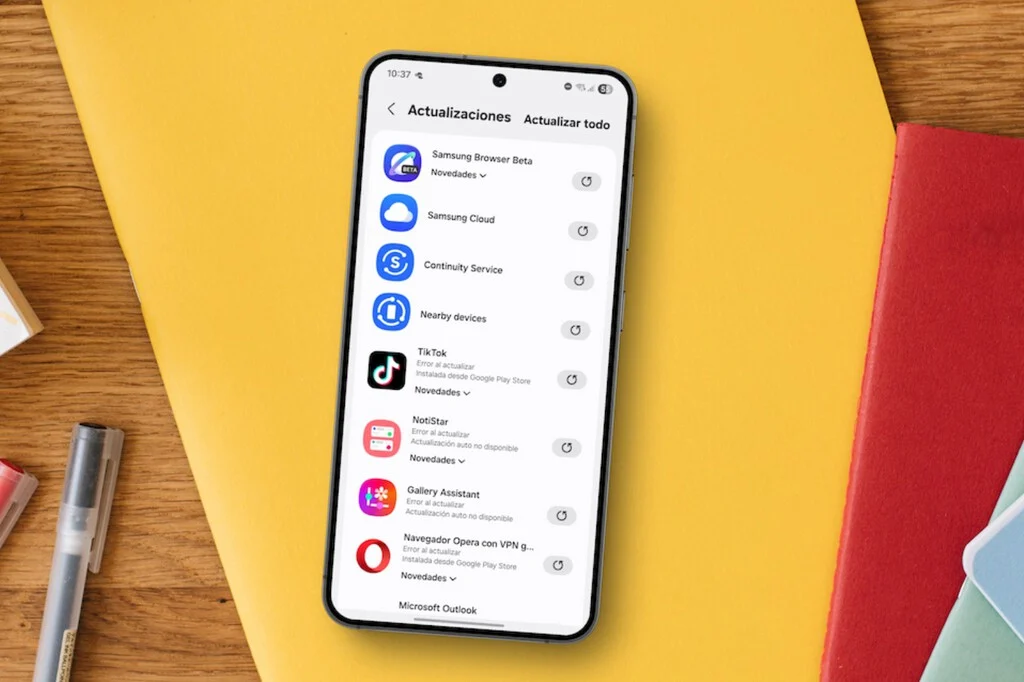

The ubiquitous frustration of discovering an application on a Samsung Galaxy device has remained stagnant for days, despite the expectation of seamless background updates, is a common experience for many users. This seemingly sudden cessation of automatic updates is rarely attributable to a singular flaw but rather a sophisticated interplay of device settings, system optimizations, and user habits, all converging to create a nuanced challenge in maintaining up-to-date software. Understanding these intricate layers is paramount for diagnosing and rectifying the issue, ensuring optimal device performance, security, and access to the latest features.
At its core, the problem often stems from a combination of the device’s inherent automatic update configurations within its respective app stores and the stringent battery and background data restrictions implemented by Samsung. These restrictions, while designed to prolong battery life and manage mobile data consumption, can inadvertently impede the silent operations critical for timely app updates. This delicate balance between user convenience, device longevity, and data efficiency forms the crux of the dilemma, reflecting a broader industry trend where device manufacturers strive to optimize performance metrics without compromising the user experience. The principles governing app updates on Samsung Galaxy devices echo similar considerations seen in network settings management, where user control over data usage and background processes is crucial to prevent unexpected costs or performance bottlenecks, particularly when traveling.
The Critical Role of App Updates in Modern Smartphone Ecosystems
Before delving into the specifics of Samsung Galaxy devices, it is essential to contextualize the critical role that app updates play in the broader mobile ecosystem. Modern smartphones are complex computing devices, and the applications running on them are constantly evolving. Updates are not merely about adding new features; they are fundamental for:
- Security Vulnerabilities and Patches: Cyber threats are ever-present and continually evolving. App developers, often in conjunction with operating system providers like Google, regularly identify and patch security vulnerabilities. Delayed updates leave devices exposed to potential exploits, data breaches, and malware infections. Industry reports consistently highlight that a significant percentage of successful cyberattacks leverage unpatched software vulnerabilities.
- Performance Enhancements and Bug Fixes: Applications become more efficient, faster, and more stable with each update. Developers routinely optimize code, fix bugs, and resolve compatibility issues that can lead to crashes, slowdowns, or unexpected behavior. Regular updates ensure a smoother, more reliable user experience.
- New Features and Functionality: Updates introduce innovative features, improve existing functionalities, and adapt apps to new operating system versions or hardware capabilities. Users who delay updates may miss out on significant enhancements that could improve productivity, communication, or entertainment.
- Compatibility with Evolving OS: As Android itself evolves, apps must update to remain fully compatible with the latest APIs, security protocols, and design guidelines. Outdated apps may experience issues on newer OS versions or fail to leverage new system-level optimizations.
The necessity of keeping applications updated underscores why automatic updates are a default and preferred mechanism. The expectation is that the device intelligently manages these processes in the background, minimizing user intervention and ensuring a secure and efficient environment.
The Dual Ecosystem: Navigating Google Play Store and Samsung Galaxy Store Update Settings
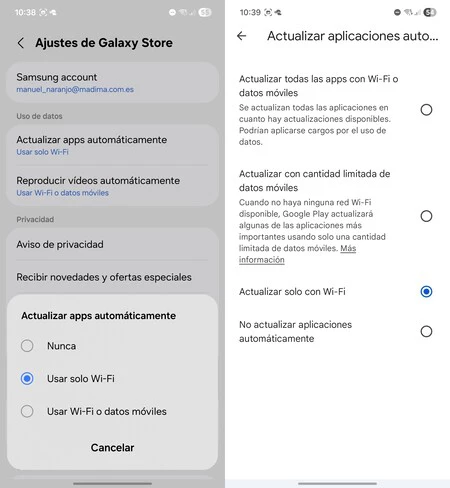
A primary area of investigation for any user experiencing delayed updates should be the individual settings within both the Google Play Store and the Samsung Galaxy Store. These two distinct platforms manage app installations and updates on Galaxy devices, each with its own set of configurations that can significantly influence update frequency. The Google Play Store, the dominant Android app marketplace globally, features an "Auto-update apps" setting. This setting typically offers options such as "Don’t auto-update apps," "Auto-update apps over Wi-Fi only," or "Auto-update apps over any network." According to Google’s data, millions of app updates are pushed daily through the Play Store, highlighting its massive scale.
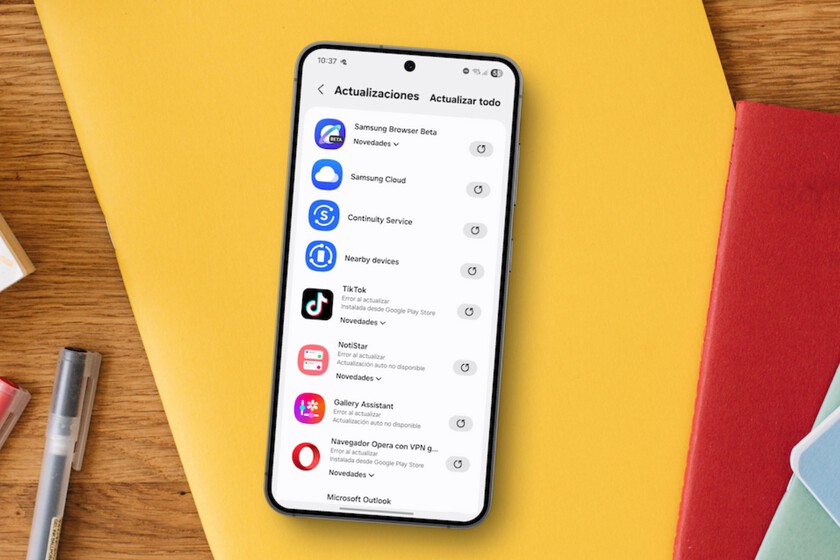
Similarly, the Samsung Galaxy Store, which hosts proprietary Samsung applications and select third-party software specifically optimized for Galaxy devices (such as Good Lock modules or certain games), includes an equivalent "Update apps automatically" option within its menu. Its settings also usually mirror those of the Play Store, offering Wi-Fi-only or any-network options. Samsung strategically maintains its own app store to offer exclusive content, faster updates for its own ecosystem apps, and a more tailored experience for Galaxy users. If either of these settings has been inadvertently switched to a manual or Wi-Fi-only update mode (and the device is not consistently on Wi-Fi), it directly contributes to the perceived lack of automatic updates.
Beyond the simple activation of automatic updates, a critical nuance lies in the system’s intelligent scheduling. Even when automatic updates are enabled, applications are not always installed instantaneously. Modern Android operating systems, including Samsung’s One UI, employ sophisticated algorithms to determine the most opportune moment for downloading and installing updates. This often involves waiting for specific conditions to be met, such as when the device is idle, connected to a stable Wi-Fi network, or actively charging. This strategic delay is designed to minimize disruption to active usage, conserve mobile data, and prevent unnecessary battery drain during critical periods. For instance, initiating a large app update (which can range from tens to hundreds of megabytes) while a user is on a video call using mobile data would be highly inefficient and detrimental to the user experience. Consequently, what might appear to be a failure of background updates is often the system patiently awaiting more favorable conditions, an optimization strategy that prioritizes user experience and resource management.
Samsung’s Optimization Strategies: The Impact of Background Usage Limits and Power Saving Modes
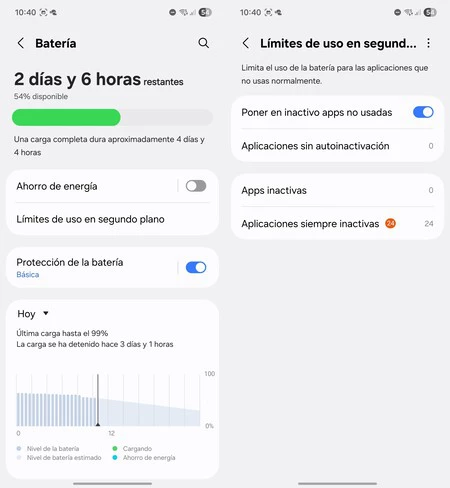
Samsung Galaxy devices are renowned for their extensive suite of optimization features aimed at maximizing battery life and managing system resources efficiently. One of the most impactful areas where these optimizations intersect with app updates is the "Limits of usage in the background" setting, typically found under "Settings > Battery." This section is a cornerstone of Samsung’s aggressive power management philosophy, designed to extend device longevity between charges.
Within this section, users encounter categories such as "Applications without automatic deactivation" (apps that are never put to sleep), "Applications in deep sleep" (apps that won’t run in the background), and "Applications always inactive" (apps that won’t run at all unless opened manually). These lists are designed to identify and manage applications that consume significant resources in the background, allowing the system to restrict their activity to conserve power. While beneficial for overall device longevity and battery performance – with average smartphone battery life being a constant concern for users – this aggressive background management can inadvertently impact app stores or critical applications by limiting their ability to perform background tasks, including checking for and downloading updates.
If the Google Play Store, Samsung Galaxy Store, or even specific apps that handle their own updates (e.g., certain gaming platforms like Epic Games or Steam Link) fall into the "Applications in deep sleep" or "Applications always inactive" categories, their background operations will be severely curtailed, leading to delayed or non-existent automatic updates. Users might not realize that an app they rarely open, such as an app store, is still crucial for updating other components or services, and by restricting it, they inadvertently create a bottleneck. Samsung’s One UI is designed to learn user habits and automatically place less-used apps into these restrictive categories, which can sometimes include essential system components if they aren’t frequently interacted with directly.
Furthermore, the activation of the "Power Saving Mode" on a Galaxy device imposes a blanket restriction on background data usage across virtually all applications. This mode, designed to drastically extend battery life by throttling CPU speed, limiting network usage, reducing background activity, and sometimes even scaling down screen resolution, directly interferes with the silent update processes. When a device is operating under power-saving constraints, it actively postpones non-essential background tasks, including the downloading of large update files. This means that even if all automatic update settings are correctly configured, the system will prioritize battery conservation over immediate app updates, deferring them until the device is no longer in power-saving mode or until more favorable conditions (like charging and Wi-Fi connectivity) are met. Data from analytics firms suggests that a significant portion of smartphone users activate power-saving modes when their battery drops below 20-30%, creating common windows where updates might be paused.
The rationale behind Samsung’s robust power management features is well-founded. With the increasing complexity and demands of modern applications, smartphones face constant pressure to deliver extended battery life. Studies indicate that background app activity can account for a significant portion of daily battery drain, especially for chat apps, social media, and location services. By providing granular control over background usage, Samsung empowers users to customize their device’s energy consumption, but it also places the onus on them to understand the implications of these settings for features like automatic updates. The objective is to strike a balance between a feature-rich experience and a device that can last throughout the day, a challenge that all smartphone manufacturers grapple with.
The Confluence of Schedules, Charging, and Wi-Fi: Orchestrating the Update Process
Samsung, like many other device manufacturers and app store providers, strongly recommends utilizing Wi-Fi networks for automatic app updates. This recommendation is primarily driven by two critical factors: data conservation and update stability. Downloading potentially large update files (which can easily exceed 100MB per app) over mobile data can quickly deplete a user’s data allowance, leading to unexpected charges or throttled speeds, especially for users on limited data plans. Furthermore, Wi-Fi connections generally offer greater stability and speed compared to mobile data, minimizing the risk of corrupted downloads or interrupted update processes, which can lead to incomplete installations and app malfunctions.
However, this reliance on Wi-Fi means that if a device spends less time connected to a stable Wi-Fi network or is not frequently plugged in to charge during idle periods, the opportunities for automatic updates diminish significantly. The system’s intelligent scheduling mechanisms are programmed to wait for these optimal conditions—a combination of stable Wi-Fi, sufficient battery charge (or charging state), and device idleness—before initiating downloads and installations. For example, a user who primarily relies on mobile data and charges their phone briefly during active usage hours might find their apps lagging in updates compared to someone who leaves their phone charging overnight while connected to home Wi-Fi.
This behavior is not indicative of a malfunction but rather a sophisticated resource management strategy. The system aims to perform updates discreetly and efficiently, ensuring they do not interrupt user activity, incur unexpected data costs, or drain the battery at inconvenient times. The perceived "failure" of automatic updates is often a reflection of a shift in a user’s practical usage patterns, making the conditions for silent, background updates less favorable than they once were. This mirrors how many operating systems handle major system updates, often requiring a charging state and Wi-Fi connection to proceed.
Broader Implications: Security, Performance, and User Experience
The phenomenon of delayed app updates, while often a result of sensible optimization, carries several significant implications for users and their devices:
- Elevated Security Risks: As previously mentioned, outdated applications are a prime target for cyber attackers. Each update often includes security patches for newly discovered vulnerabilities. If apps are not updated promptly, users remain exposed to these risks, potentially leading to data breaches, malware infections, or unauthorized access to their device. This is particularly critical for banking apps, messaging services, and social media platforms that handle sensitive personal information. Cybersecurity firms frequently issue warnings about the dangers of running outdated software.
- Degraded Performance and Functionality: Older app versions may contain bugs, performance issues, or compatibility problems with newer operating system versions. Delayed updates can lead to app crashes, slow loading times, reduced responsiveness, and a generally suboptimal user experience. Furthermore, users might miss out on critical new features or improvements that could enhance their productivity or enjoyment.
- Incompatibility Issues: As Android and Samsung’s One UI evolve, older app versions may gradually lose compatibility with the latest system libraries and APIs. This can result in apps failing to launch, exhibiting unexpected behavior, or losing access to certain device functionalities. This can be particularly problematic after a major OS update.
- Increased Data Consumption (if manual): If users resort to manually checking and updating apps, they might do so over mobile data, leading to higher data consumption than if updates were managed efficiently over Wi-Fi. This can lead to unexpected charges or slower data speeds once data caps are hit.
- User Frustration and Perceived Device Malfunction: The most immediate impact on the user is frustration. Believing their device is malfunctioning or that a feature has stopped working can erode trust in the product and lead to unnecessary troubleshooting efforts or even premature device replacement. This also generates increased support requests for manufacturers and app developers.
Best Practices and User Empowerment
Understanding these underlying mechanisms empowers users to take proactive steps to ensure their Galaxy devices remain current and secure. The resolution often lies in a few well-placed adjustments and an awareness of device behavior:
- Regularly Verify App Store Settings: Users should periodically check the "Auto-update apps" setting in both Google Play Store and "Update apps automatically" in the Samsung Galaxy Store. Ensure they are set to "Over Wi-Fi only" or "Over any network" based on personal data plan preferences, with Wi-Fi being the recommended default for most. It’s a good practice to review these settings after any major OS update or device reset.
- Optimize Battery and Background Settings: Navigate to "Settings > Battery > Limits of usage in the background." Review the "Applications in deep sleep" and "Applications always inactive" lists. Ensure that critical apps, especially the Google Play Store and Galaxy Store, are not inadvertently restricted. Consider adding them to the "Applications without automatic deactivation" list if consistent updates are a priority. This allows them to operate in the background without aggressive power-saving restrictions.
- Leverage Power Saving Mode Judiciously: Be mindful of when Power Saving Mode is activated. If automatic updates are desired, ensure the device is not perpetually in this mode, especially during periods when updates are likely to occur (e.g., overnight charging). Users can also customize power-saving modes to allow certain apps (like app stores) more leeway.
- Establish Optimal Charging and Wi-Fi Habits: Encourage the habit of connecting the Galaxy device to a stable Wi-Fi network and charging it, particularly overnight or during extended periods of idleness. This creates the ideal window for the system to download and install updates efficiently and discreetly without impacting active usage.
- Manual Checks as a Failsafe: While the goal is automatic updates, performing a manual check for updates in both stores periodically can serve as a failsafe, particularly if users notice apps are consistently outdated. This can be done by opening each store, navigating to the "My apps & games" (Play Store) or "Updates" (Galaxy Store) section, and manually initiating the update process.
Industry Trends and the Future of Seamless Updates
The challenge of seamless updates is not unique to Samsung; it is a fundamental aspect of modern mobile operating systems. The industry is continuously working towards more intelligent and less intrusive update mechanisms. Initiatives like Google’s "Seamless Updates" (also known as A/B updates), which were introduced with Android 7.0 Nougat, aim to minimize downtime by applying updates in the background on a separate partition, allowing users to continue using their devices while the update is prepared. Once ready, a quick reboot completes the process. While not universally implemented across all Android devices or for all app updates, this represents a direction towards making updates truly invisible and frictionless for the user.
Furthermore, advancements in AI and machine learning are enabling devices to predict optimal update times with greater accuracy, further refining the balance between performance, battery life, and up-to-dateness. These intelligent systems can learn user habits, identify periods of inactivity, and determine network conditions to schedule updates in the least intrusive manner possible. The sheer volume of applications and the frequency of updates will only increase with technological advancements, making these sophisticated management systems indispensable. As devices become more integrated into daily life, ensuring their software is current without constant user intervention becomes a critical factor in user satisfaction, long-term device security, and overall digital well-being.
In conclusion, encountering delayed app updates on a Samsung Galaxy device is not typically a sign of a malfunctioning phone but rather a symptom of a highly optimized system balancing multiple priorities. Samsung’s commitment to battery longevity and efficient resource management, combined with the dual app store ecosystem and user-configurable settings, creates a complex environment. By understanding these layers—from specific app store configurations to the implications of power-saving modes and the necessity of stable network connections—users can confidently manage their devices, ensuring that their applications remain current, secure, and performant. With a few informed adjustments, the seamless, silent updates that users expect can typically be restored, allowing the Galaxy device to operate at its full potential.
Images | Manuel Naranjo
In Xataka Móvil | Mi móvil ya no soporta nuevas actualizaciones: qué significa y qué puede pasar si lo sigues usando
In Xataka Móvil | Samsung ha conseguido que los Galaxy S26 se configuren solos. Para lograrlo solo ha tenido que triplicar la IA