
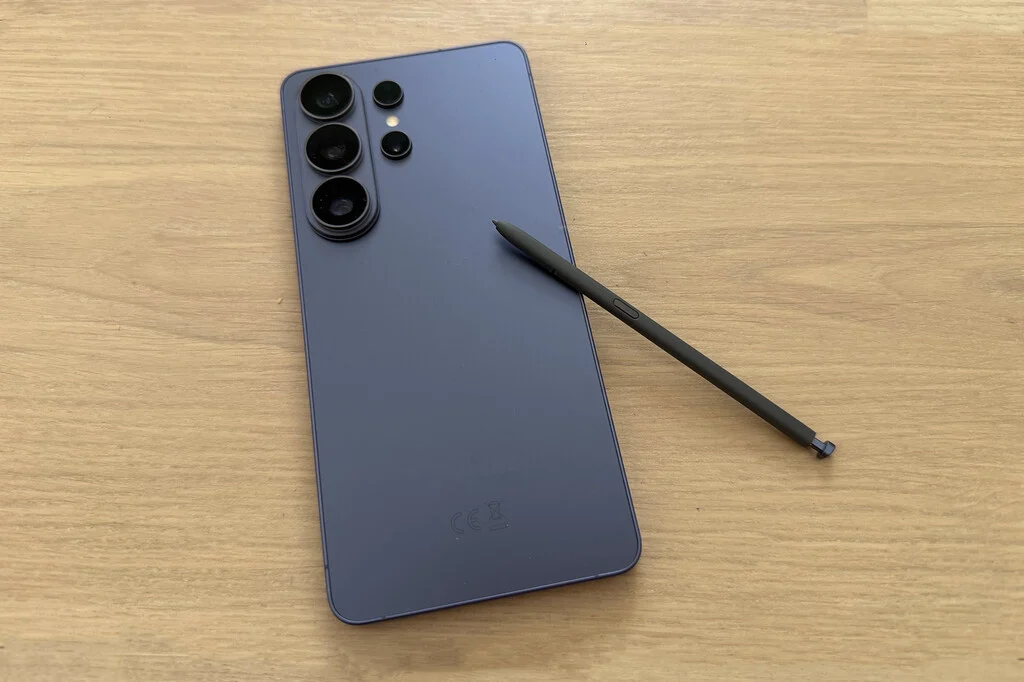

For seasoned users of Samsung’s Ultra series, particularly the latest Galaxy S26 Ultra, the S Pen is an indispensable tool, seamlessly integrated into the daily workflow. While its full potential may not be exploited by every user, and despite some lingering debates about the relevance of a stylus in an increasingly touch-centric digital age, its inherent utility remains undeniable. The synergy between the Galaxy S26 Ultra’s advanced hardware and the refined One UI 8.5 operating system significantly amplifies the S Pen’s capabilities, transforming it from a mere accessory into a powerful extension of the user’s hand. This latest iteration brings forth a suite of practical enhancements that promise to boost productivity, creativity, and overall user experience, solidifying the S Pen’s position as a cornerstone of Samsung’s premium smartphone offering.
The Evolution of Precision: A Brief History of the S Pen
The S Pen’s journey began over a decade ago with the original Samsung Galaxy Note in 2011. At a time when styluses were largely dismissed as remnants of a bygone PDA era, Samsung boldly reintroduced the concept, positioning it as a tool for precision and productivity rather than a mere input device. The initial S Pen, while basic by today’s standards, offered pressure sensitivity and allowed for handwriting, drawing, and basic navigation on the then-revolutionary large screen of the Note. This marked a pivotal moment, establishing a new category of "phablets" and proving that a stylus could indeed enhance the smartphone experience.
Over the years, Samsung consistently iterated on the S Pen, integrating advanced features that expanded its utility far beyond simple note-taking. Key milestones include the introduction of Air Command with the Galaxy Note 3 in 2013, providing a quick menu for S Pen-specific functions. The Galaxy Note 9 in 2018 brought Bluetooth Low Energy (BLE) connectivity, enabling remote control functionalities such as camera shutter activation or presentation navigation. The most significant shift, perhaps, occurred with the Galaxy S21 Ultra in 2021, when S Pen support was extended to the flagship S series, signaling Samsung’s strategic intent to integrate this advanced input method across its premium lineup and eventually absorbing the Note series entirely into the Ultra branding, as seen with the S22 Ultra and subsequent models. Each generation has seen improvements in latency, pressure sensitivity, and integration with Samsung’s software ecosystem, culminating in the highly responsive and feature-rich S Pen found with the Galaxy S26 Ultra and One UI 8.5. This continuous innovation reflects Samsung’s commitment to empowering users with versatile tools that bridge the gap between analog intuition and digital efficiency.
Samsung Notes: The Unrivaled Digital Canvas
Undoubtedly, the application where the S Pen finds its most natural and profound expression is Samsung Notes. This powerful application transforms the Galaxy S26 Ultra into a sophisticated digital notebook, offering an experience remarkably akin to traditional pen and paper. Users can swiftly jot down fleeting thoughts, capture important information, or sketch ideas with a fluidity that belies the digital medium. The synergy between the S Pen’s precise input and Samsung Notes’ intuitive interface ensures that every stroke is registered accurately, providing a seamless transition from mental concept to digital record.
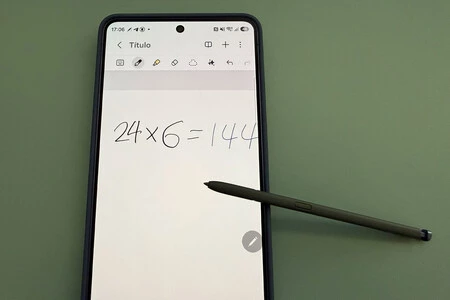
One of the most compelling features within Samsung Notes, particularly for students, engineers, and anyone dealing with quantitative data, is the Mathematics Solver. Accessible via the three-dot menu in the upper-right corner of a note, activating this function allows the Galaxy S26 Ultra to instantly recognize and solve handwritten equations and calculations. Users simply write down an arithmetic problem or even complex algebraic equations with the S Pen, append an equals sign (=), and the device automatically displays the solution. This feature streamlines problem-solving, eliminates the need to switch between apps for calculations, and significantly enhances productivity for academic or professional tasks requiring quick computations.
Furthermore, when engaging with documents or web pages within Samsung Notes’ Reading Mode, the S Pen elevates interactivity to a new level. Users can effortlessly interact with embedded elements such as hyperlinks, telephone numbers, email addresses, and URLs. A simple tap or hover with the S Pen can activate these elements, allowing for direct dialing, email composition, or webpage navigation without requiring cumbersome finger gestures or text selection. This nuanced interaction streamlines research, communication, and information retrieval, making the digital content consumption more dynamic and efficient.
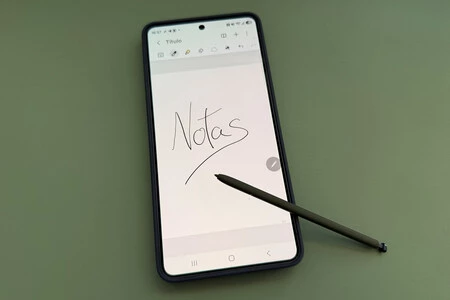
For those moments of sudden inspiration or urgent information capture, the Screen-Off Memo function proves invaluable. This feature, configurable in Settings > Advanced Features > S Pen, allows users to quickly pull out the S Pen and, while holding its button, immediately begin writing on the locked screen. This bypasses the need to unlock the device, open an app, or navigate menus, providing an instantaneous digital scratchpad. The note is automatically saved to Samsung Notes once the S Pen is re-inserted, ensuring that no idea, no matter how fleeting, is lost. This instant access to note-taking epitomizes the S Pen’s role in enhancing spontaneous productivity.
Revolutionizing Document Management: PDF Annotation
The once-dreaded task of interacting with PDF documents—especially those requiring signatures or form filling—is dramatically simplified with the S Pen and Samsung Notes. The Galaxy S26 Ultra transforms into a highly capable document editor, allowing users to open any PDF file directly within Samsung Notes. From there, the S Pen enables effortless annotation, highlighting, text entry, and digital signature placement. Reviewing contracts, filling out applications, or signing official documents becomes as intuitive as working with physical paper, but with the added benefits of digital archiving and easy sharing.
A crucial feature complementing this functionality is S Pen to Text. When activated, this intelligent system automatically converts handwritten input into neatly typed text, adhering to the document’s existing typography. This not only ensures professional presentation but also maintains consistency across digital forms. Imagine filling out a complex form by hand, only for the system to convert it into perfectly legible, uniform typed characters—this is the power the S Pen brings to digital document workflows, dramatically reducing the reliance on printing, scanning, and re-typing.
Calendar Integration: Blending Analog Planning with Digital Efficiency
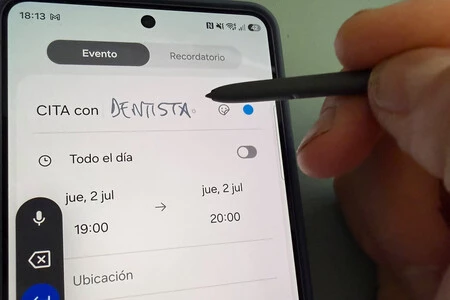
The Samsung Calendar app also receives a significant boost in utility from the S Pen, transforming it into a more flexible and personal planning tool. Users can directly write on calendar dates with the S Pen, jotting down appointments, reminders, or personal notes with the familiar feel of a physical planner. This blend of handwritten input and digital organization provides a unique advantage for those who prefer the tactile experience of writing while still leveraging the organizational power of a digital calendar.
Much like in Samsung Notes, the Calendar app intelligently integrates the S Pen to Text functionality, automatically converting handwritten entries into the app’s standard font. This ensures that while the input method is personal and intuitive, the resulting digital record remains clear, organized, and easily searchable. Whether it’s marking important dates, sketching out a weekly schedule, or adding quick event details, the S Pen makes calendar management more engaging and efficient.
S Pen as a Magnifying Glass: Accessibility and Precision with Pentastic
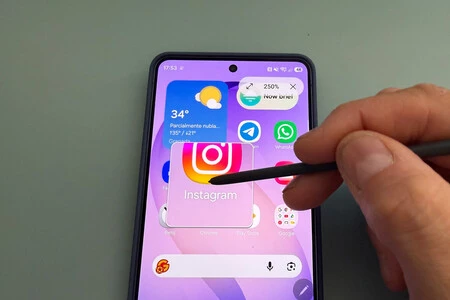
Beyond its core functions, the S Pen expands its utility through modules like Pentastic, part of Samsung’s powerful customization suite, Good Lock, available for free in the Galaxy Store. Pentastic introduces a range of additional features, one of the most practical being Amplify (or Magnifier). This function turns the S Pen into a sophisticated digital magnifying glass, allowing users to enlarge specific areas of the screen with remarkable precision.
Once added to the S Pen’s Air Command menu, Amplify can be activated to magnify any content beneath the S Pen’s tip. Users have the flexibility to adjust the magnification percentage, choosing between a default 150%, or increasing it to 200%, 250%, or even 300%. This feature is invaluable for a diverse range of users: those with visual impairments can effortlessly read small text, professionals can examine intricate details in images or schematics, and anyone needing a closer look at fine print or complex interfaces will find it immensely useful. It exemplifies how the S Pen, combined with Samsung’s customizable software, enhances both accessibility and precision.
Air Command: Your Personalized S Pen Hub
At the heart of the S Pen’s advanced user experience lies Air Command, a customizable quick-access menu designed to put the most frequently used S Pen functions at the user’s fingertips. Upon drawing the S Pen from its slot, a small circle with a pen icon typically appears on the right side of the screen, indicating the Air Command menu is ready. A tap on this icon, or a press of the S Pen button while hovering over the screen, instantly brings up a selection of shortcuts.
Air Command is highly customizable, allowing users to tailor it to their specific needs. The menu’s appearance can be modified, from a compact column of icons to a more expansive grid with text labels. More importantly, users can select up to ten of their most frequently used S Pen features or even add specific applications to the menu for quick launching. This level of personalization ensures that whether a user primarily employs the S Pen for drawing, note-taking, or productivity tasks, their preferred tools are always just a tap away. The integration with Pentastic further expands the range of functions that can be added to Air Command, unlocking even more specialized capabilities not available out-of-the-box. Moreover, users have control over Air Command’s visibility; they can choose to have its icon always present when the S Pen is out, or opt for a cleaner interface where the menu only appears upon pressing the S Pen’s button.
Never Lose Your S Pen: Smart Reminders
Despite its integral role, the S Pen, like any detachable accessory, is susceptible to being misplaced. Recognizing this common user concern, Samsung has integrated a clever loss prevention feature: the "S Pen Left Behind" Alert. This intelligent system monitors whether the S Pen is detached from the device and, if the device moves a certain distance without the S Pen re-inserted, it triggers an on-screen notification. This prompt asks the user if they have deliberately left the S Pen behind or if they have forgotten it, serving as a timely reminder to retrieve the stylus. This thoughtful addition to the S Pen’s settings menu underscores Samsung’s holistic approach to user experience, extending beyond functionality to encompass practical considerations like device security and accessory management. It ensures that users can confidently utilize their S Pen without the constant worry of misplacing this valuable tool.
Broader Implications: Defining the Premium Mobile Experience

The continuous refinement of the S Pen and its deep integration with the Galaxy S26 Ultra and One UI 8.5 carry significant implications for the broader mobile industry and the future of personal computing. Samsung’s sustained investment in stylus technology solidifies its unique position in the high-end smartphone market. While other manufacturers, notably Apple, offer stylus support for tablets, Samsung remains the primary OEM to seamlessly integrate a highly functional, internal stylus directly into a flagship smartphone. This creates a distinct competitive advantage, catering to a niche yet growing segment of power users, creative professionals, and individuals who demand precision, detailed input, and enhanced multitasking capabilities from their mobile device.
The S Pen’s evolution also reflects a broader trend towards more intuitive and versatile human-computer interaction. As smartphones become increasingly powerful, capable of handling tasks traditionally reserved for laptops, input methods must also evolve. The S Pen, with its low latency, pressure sensitivity, and contextual intelligence, addresses this need by providing a more natural and efficient way to interact with complex digital environments than traditional finger-only input. Its features, from advanced note-taking to PDF annotation and mathematical solving, promote a more paperless and digitally efficient workflow, aligning with contemporary demands for sustainability and streamlined operations.
Furthermore, the S Pen’s role in fostering creativity—through drawing, sketching, and digital art—positions the Galaxy S26 Ultra not just as a productivity powerhouse but also as a portable creative studio. This dual functionality broadens its appeal and reinforces the idea that a smartphone can be a comprehensive tool for both work and artistic expression. As AI capabilities continue to advance, future S Pen iterations could see even more intelligent features, such as real-time language translation of handwritten notes, advanced generative AI art creation, or even more sophisticated haptic feedback for a truly immersive writing and drawing experience.
In conclusion, the S Pen on the Samsung Galaxy S26 Ultra, powered by One UI 8.5, is far more than a simple accessory; it is a meticulously engineered tool that enhances virtually every aspect of the smartphone experience. From instantaneous note-taking and seamless document management to advanced mathematical computations and personalized accessibility features, the S Pen empowers users with unparalleled precision, efficiency, and creative freedom. Its robust feature set, coupled with Samsung’s ongoing commitment to innovation and user-centric design, ensures that the S Pen remains a defining characteristic of the premium Galaxy Ultra series, continually redefining what is possible with a mobile device.
