

A Network Policy Server (NPS) stands as a cornerstone of modern network security and management, empowering administrators to meticulously craft and rigorously enforce policies that govern access to network resources. Its primary function is to ensure that only authorized users and devices can traverse the digital pathways of an organization, thereby safeguarding sensitive data and critical infrastructure. NPS serves as the central nervous system for authentication, authorization, and accounting (AAA) for all entities attempting to connect to a network. Fundamentally, NPS is Microsoft’s robust implementation of a Remote Authentication Dial-In User Service (RADIUS) server and proxy within the Windows Server operating system, playing an indispensable role in maintaining network integrity and operational efficiency. To fully appreciate the significance of NPS, it is essential to first understand the broader landscape of network security and policy management, the underlying RADIUS protocol, and the multifaceted roles NPS performs.
The Paramount Importance of Network Security and Policy Management
In an era defined by pervasive digital connectivity, where business operations, data exchange, and communication are inextricably linked to technology and the internet, networks and their associated servers have become prime targets for malicious actors. The escalating sophistication of cyber threats necessitates a proactive and comprehensive approach to network security and meticulous policy management. Robust network security is not merely a technical requirement; it is a strategic imperative that protects an organization’s intellectual property, customer data, financial assets, and operational continuity.
The key reasons underpinning the critical importance of network security and policy management include:
- Data Protection: Networks house vast amounts of sensitive data, including customer information, financial records, proprietary research, and employee PII. Unauthorized access or data breaches can lead to severe financial losses, reputational damage, and legal liabilities.
- Business Continuity: Disruptions to network services, often caused by cyberattacks like ransomware or denial-of-service (DoS) attacks, can halt business operations, leading to significant downtime and lost productivity.
- Regulatory Compliance: Numerous industry regulations and data privacy laws (e.g., GDPR, HIPAA, PCI DSS) mandate strict security controls and data handling practices. Non-compliance can result in substantial fines and legal repercussions.
- Reputation Management: A significant data breach or security incident can irrevocably damage an organization’s reputation, eroding customer trust and investor confidence.
- Resource Management: Well-defined policies ensure that network resources are utilized efficiently and appropriately, preventing overuse and ensuring availability for critical business functions.
Understanding the RADIUS Protocol: The Foundation of Network Access Control
The RADIUS (Remote Authentication Dial-In User Service) protocol, established in 1991, has become a de facto standard for managing network access. It provides a centralized framework for Authentication, Authorization, and Accounting (AAA) for users connecting to and utilizing network services. RADIUS servers act as intermediaries, verifying user identities, granting appropriate access levels, and logging network usage. This protocol has been instrumental in managing network access control for a wide array of network access servers, including dial-up modems, VPN gateways, and wireless access points.
The three core components of the RADIUS protocol are:
- Authentication: This is the foundational step where a user’s identity is verified. When a user attempts to connect to a network, they are prompted to provide credentials, such as a username and password. The RADIUS server interrogates these credentials against its user database or an external directory service (like Active Directory) to confirm the user’s legitimacy. This process is crucial for preventing unauthorized access.
- Authorization: Once a user is authenticated, authorization determines the scope of their network privileges. This means defining what resources the authenticated user is permitted to access and what actions they can perform. For instance, a regular employee might have access to specific shared drives, while an IT administrator would possess broader permissions to manage servers and network devices. RADIUS servers enforce these granular permissions, ensuring that users operate within their designated access boundaries.
- Accounting: The final ‘A’ in AAA, accounting, involves the meticulous tracking and logging of user activity on the network. This encompasses details such as connection duration, services accessed, data transferred, and IP addresses used. This information is invaluable for various purposes, including billing (especially for service providers), auditing network usage, capacity planning, and forensic investigations in the event of a security incident.
The Functionality of RADIUS Servers
RADIUS operates on a client-server model, where network access servers (NAS) act as clients and the RADIUS server handles the AAA requests. When a user attempts to connect, the NAS (e.g., a Wi-Fi access point or VPN concentrator) forwards the user’s credentials and connection request to the RADIUS server. The RADIUS server then consults its policies and user database to authenticate and authorize the user. Subsequently, it sends a response back to the NAS, either permitting or denying access, and may also send back configuration information, such as IP addresses or session timeouts.
Key features and functions of RADIUS servers include:
- Centralized AAA Management: Consolidating authentication, authorization, and accounting processes in one location simplifies administration and enhances security.
- Support for Various Network Access Technologies: RADIUS is compatible with a wide range of network access methods, including VPNs, Wi-Fi (WPA2-Enterprise), dial-up connections, and network device access.
- Extensibility and Customization: Policies can be tailored to specific organizational needs, allowing for complex access control rules based on user groups, time of day, location, and device type.
- Security Enhancements: By centralizing authentication, RADIUS reduces the risk of credential compromise compared to distributed authentication methods. It also supports encryption of sensitive data during transit.
The Purpose and Multifaceted Roles of NPS
An NPS (Network Policy Server) is Microsoft’s dedicated service for managing network access policies, serving as a powerful implementation of a RADIUS server and proxy within the Windows Server ecosystem. Its overarching purpose is to centralize and streamline the critical AAA processes for users and devices attempting to access a network, thereby bolstering security and improving management efficiency.
Centralized Authentication and Authorization:
NPS is instrumental in establishing a robust security perimeter by ensuring that every entity seeking network access undergoes a verification process.
- Unified Authentication: NPS consolidates the authentication of users and devices, often by integrating with Active Directory. This means administrators can manage user credentials and access rights from a single point, reducing the complexity of managing distributed authentication mechanisms. For example, when a user connects to the corporate Wi-Fi, their credentials are sent to NPS, which verifies them against Active Directory.
- Granular Authorization: Once authenticated, NPS applies predefined policies to determine what network resources the user or device is permitted to access. This ensures that individuals only have access to the information and services necessary for their roles. For instance, sales team members might be authorized to access the CRM system and sales reports, while the engineering team would have access to development environments and technical documentation.
Accounting and Compliance:
NPS plays a vital role in monitoring and recording network activity, which is essential for both operational insights and regulatory adherence.

- Auditing and Monitoring: NPS logs detailed accounting information about network connections, including connection times, duration, data transferred, and the specific resources accessed. This audit trail is indispensable for troubleshooting network issues, identifying potential security breaches, and understanding how network resources are being utilized.
- Compliance Enforcement: Many regulatory frameworks require organizations to maintain accurate records of access to sensitive data and systems. NPS accounting data can be leveraged to demonstrate compliance with these regulations, providing evidence of who accessed what, when, and for how long. For example, in healthcare, HIPAA regulations mandate strict access controls and auditing of patient data; NPS accounting logs can help meet these requirements.
Policy-Based Network Management:
NPS empowers administrators to move beyond basic access control to sophisticated policy-driven network management.
- Tailored Access Policies: Administrators can create highly specific policies that define access rules based on a multitude of conditions. These conditions can include user group membership, the type of network connection (e.g., VPN vs. Wi-Fi), time of day, location, the security posture of the connecting device (when integrated with Network Access Protection or NAP), and the type of network resource being requested.
- Dynamic Access Control: This policy-driven approach allows for dynamic adjustments to access permissions. For example, a policy could automatically revoke access for a device that fails a security health check, thereby preventing compromised endpoints from infecting the network. This proactive approach significantly enhances the overall security posture.
The Tangible Benefits of Implementing NPS
The adoption of NPS within an organization’s network infrastructure yields a multitude of advantages that bolster both security and operational efficiency. These benefits make NPS a strategic asset for any entity seeking to optimize its network management practices.
- Enhanced Security: By centralizing authentication and enforcing granular access policies, NPS significantly reduces the attack surface and mitigates the risk of unauthorized access and data breaches.
- Improved Network Performance and Stability: Well-defined policies ensure that network resources are allocated effectively, preventing bottlenecks and improving the overall performance and reliability of the network.
- Simplified Administration: Managing user access and network policies from a single console, often integrated with Active Directory, drastically simplifies administrative tasks and reduces the potential for human error.
- Scalability: NPS is designed to scale with the organization’s needs, capable of handling a large volume of authentication requests and supporting complex network environments.
- Cost-Effectiveness: As a built-in feature of Windows Server, NPS offers a cost-effective solution for implementing robust AAA services, often eliminating the need for third-party RADIUS solutions.
- Compliance Readiness: The comprehensive accounting features of NPS provide the necessary audit trails and reporting capabilities to meet stringent regulatory compliance requirements.
- Increased Visibility: Detailed logging and reporting provide administrators with invaluable insights into network usage patterns, security events, and user activity, enabling more informed decision-making.
The Three Distinct Roles of NPS
NPS is a versatile tool capable of fulfilling three critical functions within a network infrastructure, each contributing to a comprehensive network management strategy.
1. NPS as a RADIUS Server
In its primary role, NPS functions as a full-fledged RADIUS server. It directly processes authentication and authorization requests originating from network access servers. When a user or device attempts to connect, NPS intercepts the request, verifies the credentials against its configured data sources (typically Active Directory), and applies relevant network access policies to determine the outcome.
- Authentication and Authorization Engine: NPS acts as the decision-maker, validating user identities and granting or denying access based on established policies.
- Integration with Network Access Servers: NPS seamlessly integrates with a wide array of network access servers, including VPN gateways, wireless access points, dial-up servers, and even network switches supporting 802.1X authentication. This broad compatibility makes it a flexible solution for diverse network environments.
- Centralized Authentication Point: By consolidating the authentication process, NPS enhances security by providing a single point of control and reducing the complexity of managing authentication across multiple devices and services.
2. NPS as a RADIUS Proxy
In more complex or distributed network architectures, NPS can operate as a RADIUS proxy. In this capacity, it does not perform the AAA functions itself but rather forwards authentication and configuration requests to other RADIUS servers located elsewhere in the network.
- Request Forwarding: NPS receives requests from clients and intelligently routes them to the appropriate RADIUS server based on predefined proxy policies. This is particularly useful for organizations with multiple network segments or geographically dispersed locations.
- Load Balancing: A RADIUS proxy can distribute incoming requests across a pool of RADIUS servers, preventing any single server from becoming overwhelmed and ensuring high availability.
- Failover Mechanisms: If a primary RADIUS server becomes unavailable, the proxy can automatically redirect requests to a backup server, ensuring uninterrupted network access. This is crucial for maintaining business continuity.
- Inter-Network Authentication: NPS as a proxy facilitates seamless authentication across different network domains or administrative boundaries, enabling users to access resources in various parts of a large or federated network.
3. NPS as a Network Policy Server
This role highlights NPS’s core strength: the ability to define, manage, and enforce granular network access policies. It acts as the central policy engine that dictates the conditions under which network access is granted or denied.
- Policy Definition and Enforcement: NPS allows administrators to create sophisticated policies based on a wide array of conditions, such as user group membership, the type of connection, the time of day, and even the health status of the connecting device. These policies are then enforced for all network access requests.
- Integration with Network Access Protection (NAP): When integrated with Microsoft’s Network Access Protection (NAP) framework, NPS can enforce health policies for client computers. This means that only devices that meet specific security requirements (e.g., updated antivirus software, installed patches) are granted access to the network, thereby preventing malware infections and protecting the network from compromised endpoints.
- Dynamic Access Control: Policies can be configured to dynamically adjust access privileges based on changing conditions, providing a flexible and responsive security posture. For example, access might be restricted during non-business hours or for users connecting from untrusted networks.
Best Practices for Deploying and Managing NPS
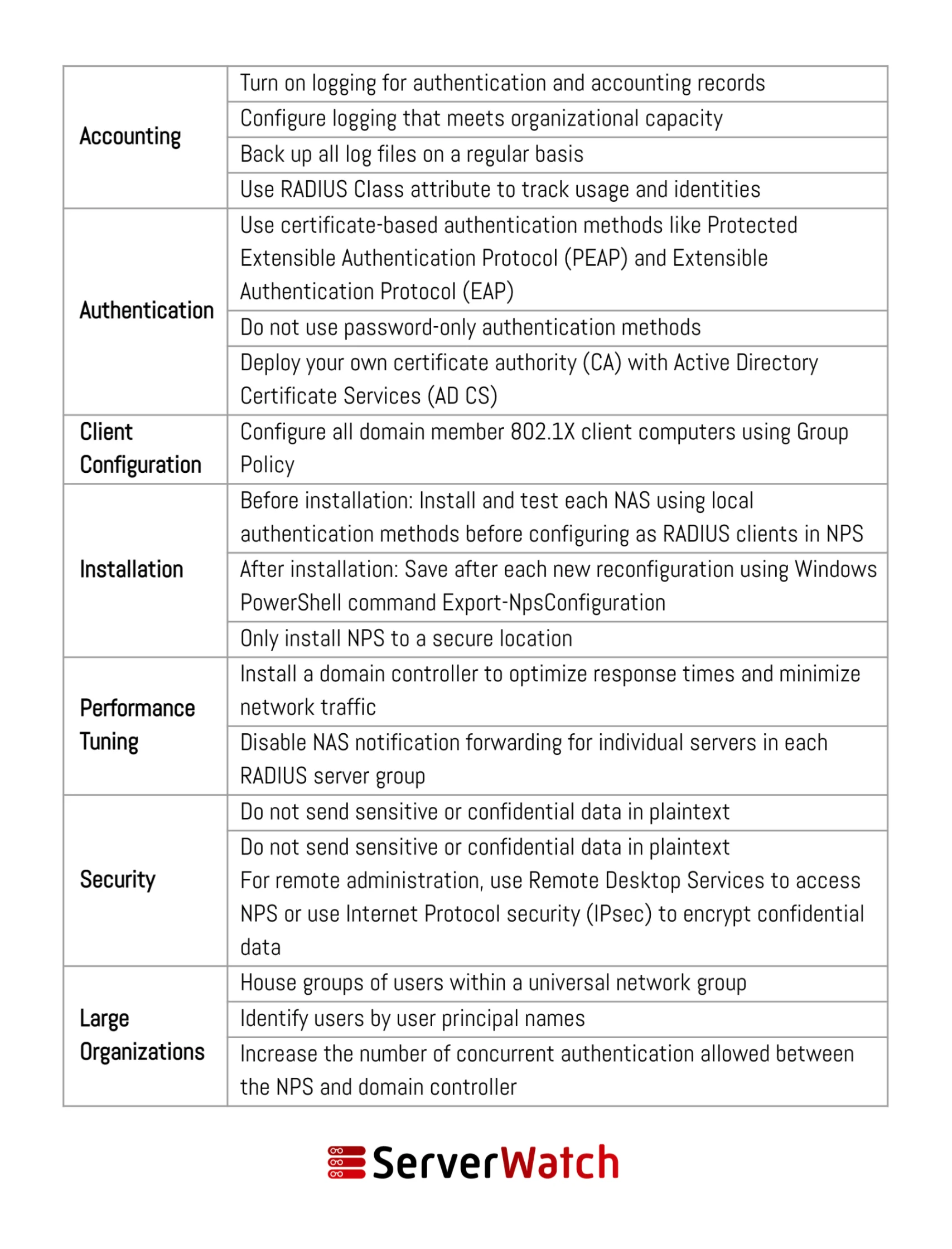
Effective utilization of NPS hinges on adhering to established network and server management best practices. These recommendations, often provided by Microsoft and industry experts, ensure that NPS operates efficiently, securely, and in alignment with an organization’s broader network management objectives.
- Secure Communication: Ensure that all communication between RADIUS clients (network access servers) and the NPS server is secured. Configure RADIUS clients to use strong shared secrets and consider using EAP (Extensible Authentication Protocol) methods that support strong encryption.
- Centralized Management with Active Directory: Leverage Active Directory for user and group management. NPS policies can then be directly tied to AD groups, simplifying user provisioning and deprovisioning and ensuring consistency.
- Principle of Least Privilege: Apply the principle of least privilege to NPS administrators. Grant only the necessary permissions required to manage the server and its policies.
- Regular Policy Review and Updates: Network requirements and security threats evolve. Regularly review and update NPS policies to ensure they remain relevant, effective, and aligned with current security best practices and business needs.
- Robust Logging and Monitoring: Configure NPS to generate detailed logs for authentication, authorization, and accounting. Implement a centralized logging solution (e.g., SIEM) to aggregate and analyze these logs for security monitoring, incident detection, and auditing.
- Redundancy and High Availability: For critical network services, deploy NPS in a redundant configuration. This could involve using multiple NPS servers in a cluster or implementing NPS as a RADIUS proxy that can failover to backup RADIUS servers.
- Secure Shared Secrets: If using RADIUS shared secrets, ensure they are strong, unique, and changed regularly. Treat shared secrets as highly sensitive credentials.
- Test Policies Thoroughly: Before deploying new or modified policies in a production environment, test them thoroughly in a lab or staging environment to prevent unintended consequences or access disruptions.
- Document Your Configuration: Maintain detailed documentation of your NPS configuration, including server roles, policies, client configurations, and security settings. This documentation is invaluable for troubleshooting, disaster recovery, and knowledge transfer.
- Keep NPS Updated: Ensure that the Windows Server operating system hosting NPS is kept up-to-date with the latest security patches and updates to mitigate known vulnerabilities.
Bottom Line: The Integral Role of NPS in Modern Network Management
The Network Policy Server (NPS) has firmly established itself as an indispensable component of modern network infrastructure, offering a robust, flexible, and scalable solution for ensuring secure and efficient network operations. Its integration into an organization’s network fabric not only significantly enhances security through the rigorous enforcement of access policies but also streamlines administrative tasks, leading to more efficient utilization and management of network resources.
By diligently adhering to best practices in the deployment and ongoing management of NPS, organizations can substantially mitigate the inherent risks associated with network security. This proactive approach ensures a seamless operational flow, protecting valuable data and maintaining the integrity of critical business processes. As cyber threats continue to evolve, the role of a well-configured and meticulously managed NPS becomes even more critical, serving as a vital defense mechanism in the ever-changing digital landscape.
For organizations looking to further enhance their network security posture and gain deeper insights into their network’s performance, exploring specialized tools can be highly beneficial. This includes leveraging the best free RADIUS server testing and monitoring tools, carefully selected and reviewed by experts, to optimize NPS functionality and proactively identify potential issues.
