

In the rapidly evolving landscape of Large Language Model (LLM) application development, choosing the right foundational tools is paramount for long-term success. This article delves into how LangChain, LlamaIndex, and raw API calls each address distinct layers of the LLM application stack, guiding developers and project managers on selecting the optimal solution based on specific project requirements and future scalability. We will explore the strengths and weaknesses of each approach, supported by performance benchmarks, real-world development trends, and practical code examples demonstrating their core functionalities.
The Evolving Landscape of LLM Application Development
The journey from a functional LLM prompt to a robust, production-ready application is often fraught with architectural complexities. Initially, a simple client.chat.completions.create() call might suffice, yielding impressive responses from a well-engineered prompt. However, as project requirements mature, the need for advanced functionalities quickly emerges. Developers soon encounter demands for conversational memory, allowing models to recall past interactions; retrieval-augmented generation (RAG), enabling models to synthesize answers from proprietary or external documents; or sophisticated tool use, where LLMs must interact with databases, perform calculations, or invoke external APIs. These escalating complexities necessitate a strategic architectural decision, moving beyond basic API interactions to more structured frameworks.
The financial stakes in this decision are considerable. Industry reports indicate a dramatic surge in LLM API expenditure, with costs doubling from an estimated $3.5 billion in late 2024 to $8.4 billion by mid-2025. This exponential growth underscores the importance of efficient framework layers – the code that mediates between an application and the underlying LLM. An ill-suited framework can lead to inflated token costs, deep and convoluted stack traces, and costly migrations down the line, directly impacting production budgets and development timelines. This analysis provides an unbiased comparison, outlining what each option truly offers, its genuine advantages, hidden costs, and a pragmatic decision framework for immediate application.
Understanding the Core Architectures
Before delving into comparative trade-offs, it’s crucial to grasp the fundamental purpose and design philosophy behind each option. LangChain, LlamaIndex, and raw API calls do not compete on the same plane; rather, they address different facets of the LLM application challenge. LangChain primarily functions as an orchestration toolkit, designed to sequence complex operations. LlamaIndex, conversely, is a specialized retrieval toolkit, engineered for efficient data indexing and querying. Raw API calls represent a deliberate choice for minimal abstraction, offering direct control over the LLM interaction. Many sophisticated production systems often integrate two or more of these approaches, highlighting that the critical question is always: "Given my specific development goals, which layer of abstraction genuinely provides value commensurate with its cost?"
LangChain: The Orchestration Powerhouse
LangChain’s undeniable strength lies in its ability to compose intricate LLM workflows. For applications demanding multiple sequential steps, conditional routing, stateful memory across turns, dynamic tool integration, or sophisticated agentic reasoning, LangChain provides a comprehensive suite of modular building blocks. Its extensive ecosystem boasts connectors to over 500 services, and its large, active community ensures that solutions for common and even obscure edge cases are often readily available.
A significant evolution within the LangChain ecosystem is LangGraph, which achieved v1.0 stability in October 2025. LangGraph redefines agent workflows by modeling them as directed graphs, where Python functions serve as nodes and state transitions define edges. A central, typed state object seamlessly flows through the entire execution, offering a robust mechanism for complex multi-step processes. A key differentiator for LangGraph in production environments is its built-in persistence, facilitated by checkpointers that can store agent states in databases like SQLite, PostgreSQL, or Redis. This feature allows agents to pause mid-workflow, persist their complete state, and resume hours or days later – a challenging capability to implement reliably from scratch, and a clear justification for LangChain’s adoption in agent-centric projects.
However, a candid assessment of LangChain also reveals certain trade-offs. Benchmarks indicate that LangChain adds approximately 10ms of framework overhead per step, with LangGraph adding around 14ms. While negligible for most human-facing applications where LLM calls typically take 1-3 seconds, this overhead can compound significantly in high-throughput pipelines processing thousands of requests per minute. Furthermore, debugging production errors in LangChain-based systems can be challenging, with stack traces often spanning 15 to 40 frames of internal framework code, making it slower to pinpoint the root cause compared to self-written systems. For simpler use cases, studies have documented LangChain incurring up to 2.7 times higher token costs than a native implementation for a basic RAG pipeline, suggesting that abstraction overhead can consume unnecessary tokens.
The journey to LangChain v1.0 was marked by a turbulent v0.1 through v0.3 period, which necessitated multiple breaking API migrations. While the v1.0 release in October 2025 committed to API stability, this history is a relevant consideration for new projects and a potential migration cost for teams still operating on older v0.x codebases.
LangChain in Action: Illustrative Examples
A fundamental LangChain LCEL (LangChain Expression Language) chain demonstrates its compositional power. This modern approach allows chaining prompt templates, llm models, and output parsers using the intuitive | operator. This structure facilitates readability and inherently supports streaming, batching, and asynchronous execution through a consistent interface, making it a compelling choice for projects requiring diverse execution patterns without code modifications.
# langchain_chain.py
# A LangChain LCEL chain: prompt template → model → output parser
# Prerequisites: pip install langchain langchain-openai python-dotenv
# How to run: python langchain_chain.py

import os
from dotenv import load_dotenv
from langchain_core.prompts import ChatPromptTemplate
from langchain_core.output_parsers import StrOutputParser
from langchain_openai import ChatOpenAI

load_dotenv()

# 💡💡 MODEL 💡💡💡💡💡💡💡💡💡💡💡💡💡💡💡💡💡💡💡💡💡💡💡💡💡💡💡💡💡💡💡💡💡💡💡💡💡💡💡💡💡💡💡💡💡💡💡💡💡💡💡💡💡💡💡💡💡💡💡💡💡💡💡💡💡💡💡💡💡💡💡💡💡💡💡💡💡💡💡💡💡💡💡💡💡💡💡💡💡💡💡💡💡💡💡💡
# ChatOpenAI wraps OpenAI's chat models. Swap the model string to switch
# to gpt-4o-mini (cheaper) or claude-3-5-sonnet (via langchain-anthropic) --
# the chain code below stays identical either way. This model portability
# is one of LangChain's genuine advantages over raw API calls.
llm = ChatOpenAI(
    model="gpt-4o",
    temperature=0.2,
    api_key=os.getenv("OPENAI_API_KEY")
)

# 💡💡 PROMPT TEMPLATE 💡💡💡💡💡💡💡💡💡💡💡💡💡💡💡💡💡💡💡💡💡💡💡💡💡💡💡💡💡💡💡💡💡💡💡💡💡💡💡💡💡💡💡💡💡💡💡💡💡💡💡💡💡💡💡💡💡💡💡💡💡💡💡💡💡💡💡💡💡💡💡💡💡💡💡💡💡💡💡💡💡💡💡💡💡💡💡💡💡💡
# ChatPromptTemplate defines the message structure with named variables.
# topic gets filled in at runtime -- templates are reusable and versionable.
prompt = ChatPromptTemplate.from_messages([
    ("system", "You are a concise technical explainer. Keep answers under 100 words."),
    ("human", "Explain topic in simple terms.")
])

# 💡💡 OUTPUT PARSER 💡💡💡💡💡💡💡💡💡💡💡💡💡💡💡💡💡💡💡💡💡💡💡💡💡💡💡💡💡💡💡💡💡💡💡💡💡💡💡💡💡💡💡💡💡💡💡💡💡💡💡💡💡💡💡💡💡💡💡💡💡💡💡💡💡💡💡💡💡💡💡💡💡💡💡💡💡💡💡💡💡💡💡💡💡💡💡💡💡💡
# StrOutputParser extracts the text content from the model's AIMessage response.
# Without it you get back an AIMessage object rather than a plain string.
parser = StrOutputParser()

# 💡💡 CHAIN (LCEL) 💡💡💡💡💡💡💡💡💡💡💡💡💡💡💡💡💡💡💡💡💡💡💡💡💡💡💡💡💡💡💡💡💡💡💡💡💡💡💡💡💡💡💡💡💡💡💡💡💡💡💡💡💡💡💡💡💡💡💡💡💡💡💡💡💡💡💡💡💡💡💡💡💡💡💡💡💡💡💡💡💡💡💡💡💡💡💡💡💡💡💡💡
# The pipe operator (|) builds a sequential chain: prompt → llm → parser.
# LCEL (LangChain Expression Language) makes the composition readable and
# supports streaming, batching, and async execution with the same interface.
chain = prompt | llm | parser

if __name__ == "__main__":
    # invoke() runs the full chain synchronously
    result = chain.invoke("topic": "vector embeddings")
    print(result)

    # stream() yields tokens as they arrive -- no code changes needed for streaming
    print("n--- Streaming response ---")
    for chunk in chain.stream("topic": "RAG pipelines"):
        print(chunk, end="", flush=True)
    print()
This foundation can be readily extended to complex tool-using agents with LangGraph. create_react_agent abstracts the entire reasoning loop, allowing the model to decide tool usage, execute tools, and integrate results into its message history until a final answer is achieved. This conciseness – transforming what would be 50+ lines of raw code into just four – highlights LangGraph’s value proposition for sophisticated agentic applications.
# langchain_agent.py
# A LangGraph ReAct agent with two tools: web search and a calculator
# Prerequisites: pip install langchain langchain-openai langgraph langchain-community python-dotenv
# How to run: python langchain_agent.py

import os
from dotenv import load_dotenv
from langchain_openai import ChatOpenAI
from langchain.tools import tool
from langchain_community.tools import DuckDuckGoSearchRun
from langchain_core.messages import HumanMessage
from langgraph.prebuilt import create_react_agent

load_dotenv()

llm = ChatOpenAI(model="gpt-4o", temperature=0, api_key=os.getenv("OPENAI_API_KEY"))

# Web search -- no API key required
search = DuckDuckGoSearchRun()

@tool
def calculate(expression: str) -> str:
    """
    Evaluate a safe mathematical expression. Use for arithmetic or percentage calculations.
    Input: a Python math expression string (e.g., '1500 * 0.08').
    """
    try:
        result = eval(expression, "__builtins__": , )
        return f"Result: result"
    except Exception as e:
        return f"Error: str(e)"

tools = [search, calculate]

# create_react_agent wires together the LLM, tools, and a built-in ReAct loop.
# The agent thinks, calls a tool, reads the result, and continues until done.
agent = create_react_agent(llm, tools)

if __name__ == "__main__":
    result = agent.invoke(
        "messages": [HumanMessage(content="What is 15% of 2400?")]
    )
    print(result["messages"][-1].content)
LlamaIndex: The Retrieval Specialist
LlamaIndex was meticulously engineered with a singular focus: empowering LLMs to effectively reason over external data sources. This specialized design is both its defining strength and the clearest indicator for its adoption. When an application’s core challenge revolves around accurately answering questions from vast, unstructured document repositories, LlamaIndex emerges as the optimal starting point.
The performance metrics underscore this specialization. LlamaIndex demonstrates superior indexing capabilities, processing documents 2.5 times faster than LangChain. It consistently achieves sub-200ms query latency even when dealing with 10,000 documents. Its framework overhead is remarkably low, approximately 6ms, which favorably compares to LangChain’s ~10ms and LangGraph’s ~14ms. Economically, LlamaIndex is also more token-efficient, utilizing around 1.6K tokens per query compared to LangChain’s ~2.4K – a 33% difference that accumulates rapidly at scale.
These performance distinctions are rooted in LlamaIndex’s architectural philosophy, which treats retrieval as a first-class primitive rather than a composite component. Its five core abstractions—data connectors, node parsers, indices, query engines, and workflows—are designed for seamless, out-of-the-box integration. Advanced features like hierarchical chunking, which preserves parent-child relationships within document sections, auto-merging retrieval for recombining related chunks during queries, and sub-question decomposition for breaking down complex queries, are all readily available with minimal coding effort. Developers often find that building equivalent RAG pipelines in LlamaIndex requires 30-40% less code than in LangChain, streamlining development and reducing potential error surface.
LlamaIndex’s primary limitation, however, lies in its agentic capabilities. While its Workflows system effectively handles asynchronous, event-driven pipelines, developing stateful, multi-turn agents with built-in persistence requires more manual implementation compared to LangGraph. LangGraph’s robust checkpointing system, allowing agents to pause and resume with their full state intact, is a feature that LlamaIndex Workflows can mimic but does not provide natively. For document Q&A and knowledge retrieval, this distinction is rarely significant. However, for complex, long-running agentic workflows that may require human intervention or extended state preservation, LangGraph typically offers a more integrated and less labor-intensive solution.
LlamaIndex in Action: Illustrative Example
A complete LlamaIndex RAG pipeline demonstrates its efficiency from document ingestion to query. Settings.llm and Settings.embed_model allow for global configuration of the entire pipeline, with all subsequent components automatically inheriting these settings. The VectorStoreIndex.from_documents() method efficiently handles chunking, embedding, and indexing in a single, concise call—a process that would typically require significantly more lines of code in a less specialized framework. The as_query_engine() method then seamlessly creates a retrieval and generation pipeline, offering parameters like similarity_top_k and response_mode for fine-grained control over retrieval behavior without manual assembly of individual components. This streamlined approach underscores LlamaIndex’s value proposition: reduced boilerplate, enhanced retrieval quality.
# llamaindex_rag.py
# Complete LlamaIndex RAG pipeline: ingest documents → index → query
# Prerequisites: pip install llama-index llama-index-llms-openai
#                llama-index-embeddings-openai python-dotenv
# How to run: python llamaindex_rag.py

import os
from dotenv import load_dotenv
from llama_index.core import VectorStoreIndex, Document, Settings
from llama_index.llms.openai import OpenAI as LlamaOpenAI
from llama_index.embeddings.openai import OpenAIEmbedding

load_dotenv()

# 💡💡 GLOBAL SETTINGS 💡💡💡💡💡💡💡💡💡💡💡💡💡💡💡💡💡💡💡💡💡💡💡💡💡💡💡💡💡💡💡💡💡💡💡💡💡💡💡💡💡💡💡💡💡💡💡💡💡💡💡💡💡💡💡💡💡💡💡💡💡💡💡💡💡💡💡💡💡💡💡💡💡💡💡💡💡💡💡💡💡💡💡💡💡💡💡
# LlamaIndex v0.10+ uses a global Settings object instead of ServiceContext.
# Configure your LLM and embedding model once here -- all pipeline components
# pick them up automatically. Swap models here to change the whole pipeline.
Settings.llm = LlamaOpenAI(
    model="gpt-4o",
    temperature=0,
    api_key=os.getenv("OPENAI_API_KEY")
)
Settings.embed_model = OpenAIEmbedding(
    model="text-embedding-3-small",  # Fast and cost-effective for most RAG tasks
    api_key=os.getenv("OPENAI_API_KEY")
)

# 💡💡 DOCUMENTS 💡💡💡💡💡💡💡💡💡💡💡💡💡💡💡💡💡💡💡💡💡💡💡💡💡💡💡💡💡💡💡💡💡💡💡💡💡💡💡💡💡💡💡💡💡💡💡💡💡💡💡💡💡💡💡💡💡💡💡💡💡💡💡💡💡💡💡💡💡💡💡💡💡💡💡💡💡💡💡💡💡💡💡💡💡💡💡💡💡💡💡💡
# In production, replace with: SimpleDirectoryReader("./docs").load_data()
# LlamaHub provides 300+ connectors for Notion, Google Drive, PDFs, databases.
# Documents created inline here to keep the example fully self-contained.
documents = [
    Document(
        text=(
            "LlamaIndex is a data framework for LLM applications. "
            "It specializes in document ingestion, chunking, embedding, and retrieval. "
            "Core abstractions: data connectors, node parsers, indices, query engines, "
            "and workflows. LlamaHub provides 300+ pre-built data connectors."
        ),
        metadata="source": "llamaindex_overview"
    ),
    Document(
        text=(
            "LangChain is a general-purpose LLM orchestration framework. "
            "It excels at chaining operations, multi-step agents, tool use, and memory. "
            "LangGraph -- the recommended way to build stateful agents in the LangChain "
            "ecosystem -- stabilized at v1.0 in October 2025."
        ),
        metadata="source": "langchain_overview"
    ),
    Document(
        text=(
            "Raw API calls use the OpenAI or Anthropic SDK directly with no framework. "
            "This approach has the lowest latency and highest transparency. "
            "Best for simple, one-off tasks where framework abstraction adds no value. "
            "As complexity grows, a thin internal wrapper is usually preferable to "
            "adopting a full orchestration framework."
        ),
        metadata="source": "raw_api_overview"
    ),
]

# 💡💡 INDEX 💡💡💡💡💡💡💡💡💡💡💡💡💡💡💡💡💡💡💡💡💡💡💡💡💡💡💡💡💡💡💡💡💡💡💡💡💡💡💡💡💡💡💡💡💡💡💡💡💡💡💡💡💡💡💡💡💡💡💡💡💡💡💡💡💡💡💡💡💡💡💡💡💡💡💡💡💡💡💡💡💡💡💡💡💡💡💡💡💡💡💡💡💡
# from_documents() handles the full pipeline: chunk → embed → store.
# By default, vectors are stored in memory. For production, pass a vector store:
# index = VectorStoreIndex.from_documents(docs, storage_context=storage_context)
# where storage_context points to Pinecone, Weaviate, Chroma, etc.
index = VectorStoreIndex.from_documents(documents)

# 💡💡 QUERY ENGINE 💡💡💡💡💡💡💡💡💡💡💡💡💡💡💡💡💡💡💡💡💡💡💡💡💡💡💡💡💡💡💡💡💡💡💡💡💡💡💡💡💡💡💡💡💡💡💡💡💡💡💡💡💡💡💡💡💡💡💡💡💡💡💡💡💡💡💡💡💡💡💡💡💡💡💡💡💡💡💡💡💡💡💡💡💡💡💡💡💡💡
# as_query_engine() creates a retrieval + generation pipeline in one call.
# similarity_top_k=2 retrieves the 2 most relevant chunks per query.
# response_mode="compact" merges retrieved chunks before passing to the LLM --
# reduces token usage compared to "default" mode, which sends each chunk separately.
query_engine = index.as_query_engine(
    similarity_top_k=2,
    response_mode="compact"
)

if __name__ == "__main__":
    questions = [
        "What is LlamaIndex best suited for?",
        "How does LangChain differ from LlamaIndex?",
        "When should I use raw API calls instead of a framework?",
    ]
    for q in questions:
        print(f"Q: q")
        response = query_engine.query(q)
        print(f"A: responsen")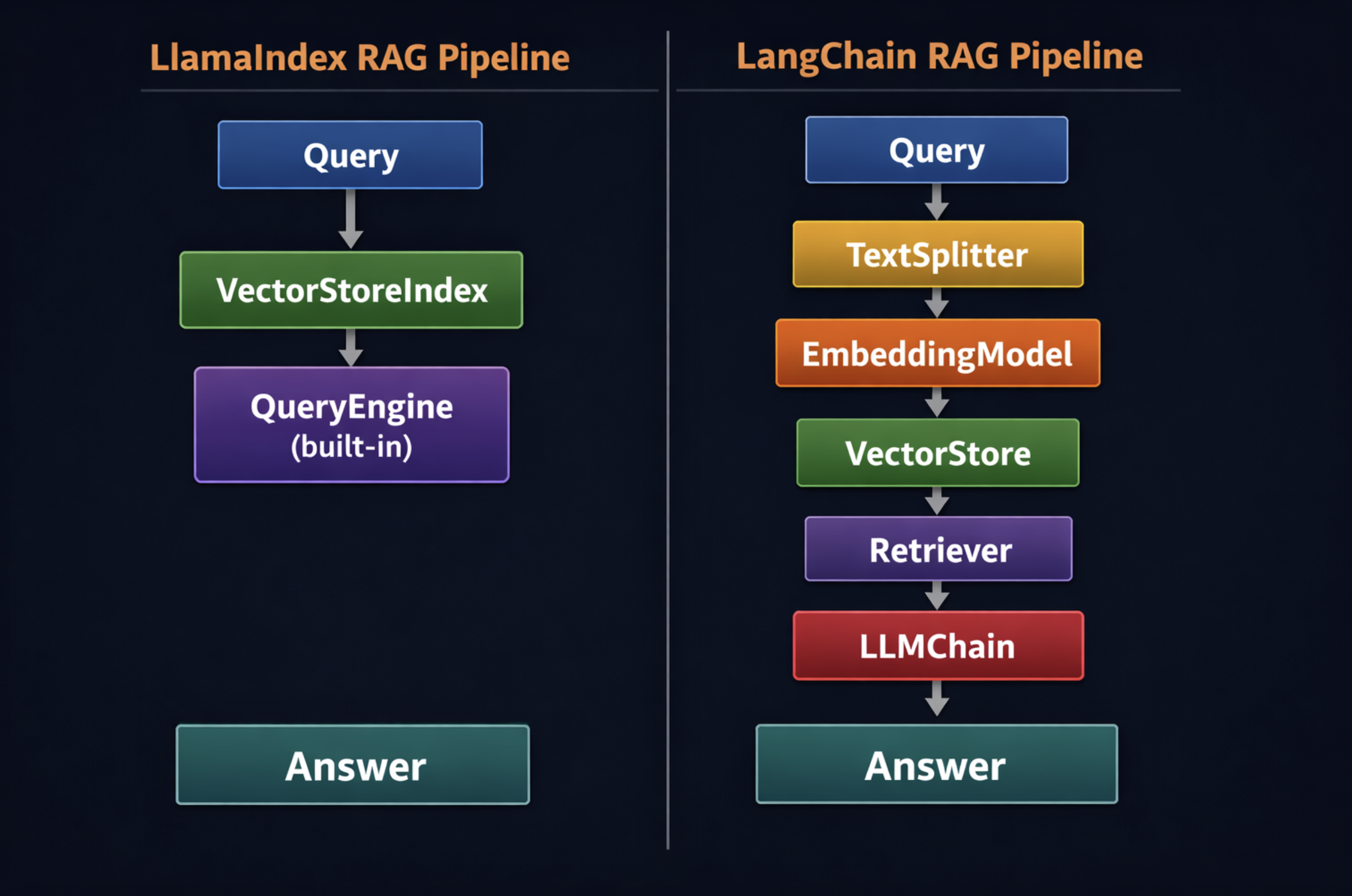
Raw API Calls: The Lean and Transparent Path
The prevailing wisdom in the early days of LLM development suggested starting with raw API calls and migrating to frameworks as projects scaled. However, a noticeable trend emerging in 2026 reveals a reverse pattern: some development teams are quietly rewriting parts of their LangChain-based systems to leverage raw SDKs directly. This shift is largely driven by the maturation of native LLM provider SDKs, which have absorbed many functionalities previously exclusive to frameworks.
A prime example is the OpenAI Agents SDK, launched in March 2025. With an impressive 26,900 GitHub stars and 10.3 million monthly downloads, this SDK now offers native support for tool use, multi-agent handoffs, built-in tracing, and guardrails within a minimal package. Its overhead per tool call is a mere 2-5ms, significantly lower than LangChain’s 10-30ms. Teams transitioning from LangChain to raw SDKs frequently report a 40-60% reduction in code volume and a remarkable 70-90% decrease in monthly framework maintenance burden.
The fundamental argument for the raw API path is not an indictment of frameworks, but rather a re-evaluation of the value of abstraction. In 2022, reliable prompt chaining and tool invocation often necessitated framework support due to inconsistent vendor APIs. By 2026, leading providers like OpenAI and Anthropic have integrated critical features—tool calling, streaming, function schemas, and multi-turn memory—directly into their native SDKs. In this evolved landscape, generic framework abstractions may no longer hide meaningful technical differences; instead, they can obscure clarity, introduce unnecessary overhead, and complicate debugging.
Raw API calls consistently deliver the fastest performance due to the absence of framework overhead and extra LLM calls for orchestration. Frameworks can introduce 100-500ms of Python overhead per agent step, which is a critical factor for latency-sensitive applications such as real-time customer support, voice agents, or high-throughput data processing pipelines. For these workloads, minimizing every millisecond of latency is paramount, making the raw path a compelling choice.
Raw API Calls in Action: Illustrative Example
A complete tool-using agent built using the raw OpenAI SDK can be implemented in under 80 lines of code, demonstrating remarkable conciseness compared to its framework counterparts. The agent loop is entirely transparent, with no hidden logic between the developer and the model’s response. A while True loop executes until the model indicates it has sufficient information to provide a final answer (i.e., message.tool_calls is empty). Every message—system, user, assistant, and tool result—is explicitly managed within a standard Python list, offering full inspectability, logging capabilities, and modifiability at any point. This inherent transparency is the core advantage of the raw API path: when issues arise, the exact point of failure is immediately apparent, simplifying diagnosis and resolution.
# raw_api_agent.py
# A complete tool-using agent on the raw OpenAI SDK -- no framework.
# This is ~75 lines including comments. Compare it to the LangChain equivalent.
# Prerequisites: pip install openai python-dotenv
# How to run: python raw_api_agent.py

import os
import json
from dotenv import load_dotenv
from openai import OpenAI

load_dotenv()

client = OpenAI(api_key=os.getenv("OPENAI_API_KEY"))

# 💡💡 TOOL DEFINITIONS 💡💡💡💡💡💡💡💡💡💡💡💡💡💡💡💡💡💡💡💡💡💡💡💡💡💡💡💡💡💡💡💡💡💡💡💡💡💡💡💡💡💡💡💡💡💡💡💡💡💡💡💡💡💡💡💡💡💡💡💡💡💡💡💡💡💡💡💡💡💡💡💡💡💡💡💡💡💡💡💡💡💡💡
# The model reads these descriptions to decide when and how to call each tool.
# Clear, specific descriptions are more important here than in any framework --
# there is no wrapper to fill in gaps.
TOOLS = [

        "type": "function",
        "function":
            "name": "calculate",
            "description": (
                "Evaluate a mathematical expression. Use for arithmetic, "
                "percentages, or numerical computation. "
                "Input: a Python math expression as a string."
            ),
            "parameters":
                "type": "object",
                "properties":
                    "expression":
                        "type": "string",
                        "description": "A Python math expression, e.g. '1500 * 0.08'"

                ,
                "required": ["expression"]


    ,

        "type": "function",
        "function":
            "name": "get_word_count",
            "description": "Count the number of words in a given string of text.",
            "parameters":
                "type": "object",
                "properties":
                    "text": "type": "string", "description": "The text to count."
                ,
                "required": ["text"]


]

# 💡💡 TOOL IMPLEMENTATIONS 💡💡💡💡💡💡💡💡💡💡💡💡💡💡💡💡💡💡💡💡💡💡💡💡💡💡💡💡💡💡💡💡💡💡💡💡💡💡💡💡💡💡💡💡💡💡💡💡💡💡💡💡💡💡💡💡💡💡💡💡💡💡💡💡💡💡💡💡💡💡💡💡💡💡💡💡💡💡💡💡💡
def calculate(expression: str) -> str:
    try:
        result = eval(expression, "__builtins__": , )
        return str(result)
    except Exception as e:
        return f"Error: e"

def get_word_count(text: str) -> str:
    return str(len(text.split())))

# Maps tool name → Python function for dynamic dispatch in the loop below
TOOL_DISPATCH = "calculate": calculate, "get_word_count": get_word_count

# 💡💡 AGENT LOOP 💡💡💡💡💡💡💡💡💡💡💡💡💡💡💡💡💡💡💡💡💡💡💡💡💡💡💡💡💡💡💡💡💡💡💡💡💡💡💡💡💡💡💡💡💡💡💡💡💡💡💡💡💡💡💡💡💡💡💡💡💡💡💡💡💡💡💡💡💡💡💡💡💡💡💡💡💡💡💡💡💡💡💡💡💡💡💡💡💡
def run_agent(user_message: str) -> str:
    """
    A complete ReAct-style agent loop using raw OpenAI tool calls.
    The model decides whether to call a tool or return a final answer.
    The loop continues until the model stops requesting tool calls.
    Every step is visible -- no framework wrapping, no hidden logic.
    """
    messages = [
        "role": "system", "content": "You are a helpful assistant.",
        "role": "user",   "content": user_message,
    ]
    while True:
        response = client.chat.completions.create(
            model="gpt-4o",
            messages=messages,
            tools=TOOLS,
            tool_choice="auto",  # Model decides: call a tool or respond directly
            temperature=0,
        )
        message = response.choices[0].message
        messages.append(message)  # Always add the assistant message to history
        # No tool calls = the model has its final answer
        if not message.tool_calls:
            return message.content
        # Execute each tool call the model requested
        for tool_call in message.tool_calls:
            name = tool_call.function.name
            args = json.loads(tool_call.function.arguments)
            fn   = TOOL_DISPATCH.get(name)
            result = fn(**args) if fn else f"Unknown tool: name"
            # Tool result goes back into the message history.
            # The model reads this on the next iteration to decide what to do next.
            messages.append(
                "role":         "tool",
                "tool_call_id": tool_call.id,
                "content":      result,
            )
        # Loop -- the model now processes the tool results