


A recent unconventional experiment involving placing a smartphone in a controlled oven environment has provided critical insights into how modern mobile devices respond to extreme temperatures and the sophisticated safety protocols designed to prevent irreversible damage. The study, initially conceived to capture visual evidence of a phone’s overheating warning, evolved into a comprehensive investigation into thermal management, revealing significant differences in safety mechanisms across device tiers and underscoring the importance of adhering to manufacturer guidelines.
The genesis of this unique research stemmed from a common journalistic challenge: illustrating the often-discussed but rarely seen "overheating warning" on a smartphone. While most users have encountered performance degradation or an explicit alert during prolonged heavy use or exposure to direct sunlight, concrete visual documentation for an article was lacking. The idea of intentionally inducing an overheating state, initially proposed as a lighthearted suggestion, was quickly embraced as a method for controlled observation. The objective was clear: to precisely determine the temperature thresholds at which a phone initiates its safety protocols, to observe the sequence of system responses, and to document the user-facing warnings.
The Controlled Environment: An Oven as a Laboratory
The choice of an oven as the experimental environment, while seemingly unorthodox, was a deliberate decision rooted in the need for precision and safety. Initial considerations included exposing the device to direct sunlight, a common real-world scenario for overheating. However, this method was quickly dismissed due to its inherent lack of control. Sunlight exposure is inconsistent; it fluctuates in intensity, introduces uncontrolled variables like UV radiation which can damage screen components over time, and makes it impossible to maintain a stable, measurable temperature for extended periods.
In contrast, a modern kitchen oven, particularly one equipped with a precise digital thermostat, offered an ideal "laboratory" setting. This allowed the researcher to incrementally increase the ambient temperature in a highly controlled manner, ensuring uniformity and repeatability. This level of environmental control was paramount for accurately observing the phone’s thermal response at specific, rising temperatures, providing a clearer understanding of its internal safety logic.

The experiment underscored a fundamental, albeit dramatic, lesson: under no circumstances should users attempt to replicate such conditions at home. The research was conducted under controlled circumstances, specifically to answer a technical question, and confirmed that the built-in safety mechanisms are robust enough that users do not need to risk their devices or personal safety.
Unpacking the Smartphone’s Thermal Defenses: A Case Study with the Samsung Galaxy S26 Ultra
Manufacturers consistently advise that the safe operating temperature range for most smartphones typically falls between 0°C and 35°C (32°F and 95°F). This range is crucial for maintaining the optimal performance and longevity of critical components such as the lithium-ion battery, the display, and the intricate semiconductor circuitry. Exceeding these temperatures can accelerate battery degradation, reduce processor lifespan, and potentially cause irreparable damage to the display panel or other sensitive electronics.
The experiment commenced with a Samsung Galaxy S26 Ultra, a high-end device known for its advanced features and presumably robust engineering. The oven’s thermostat was gradually adjusted, starting at 50°C. Initially, the phone exhibited no overt signs of distress, operating within its design parameters even beyond the recommended safe zone, indicating a degree of thermal resilience. However, as the temperature continued to climb, the device’s internal safeguards began to activate.
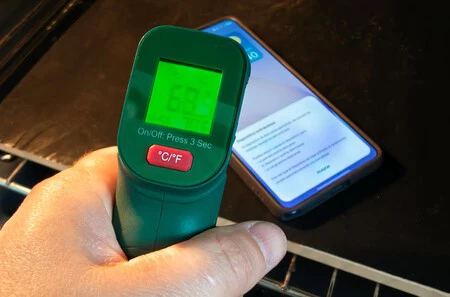
The critical threshold for the S26 Ultra’s explicit overheating alarm was reached when the external ambient temperature inside the oven registered 72°C (161.6°F). At this point, internal sensors, monitored via the "Device Info" application, indicated that the processor itself was operating at approximately 65°C (149°F). This discrepancy between external and internal temperatures is significant, highlighting the phone’s internal heat dissipation mechanisms and the fact that the casing often acts as a heat sink, radiating warmth away from the core components.
Upon reaching this critical internal temperature, the S26 Ultra initiated a series of cascading safety measures:

- Performance Throttling: The most immediate and noticeable effect was a drastic reduction in system performance. Graphics-intensive applications, such as the 3DMark benchmark test run during the experiment, showed a brutal drop in frames per second (fps). This "thermal throttling" is a fundamental mechanism where the CPU and GPU automatically reduce their clock speeds to generate less heat, preventing them from exceeding their maximum safe operating temperatures.
- Display Dimming: The screen brightness was automatically lowered. High display brightness consumes significant power and generates heat, so reducing it helps to mitigate the overall thermal load.
- Application Closure: Several applications, particularly those demanding high processing power or memory, began to close automatically. This forced termination of non-essential processes further reduces the workload on the processor and associated components.
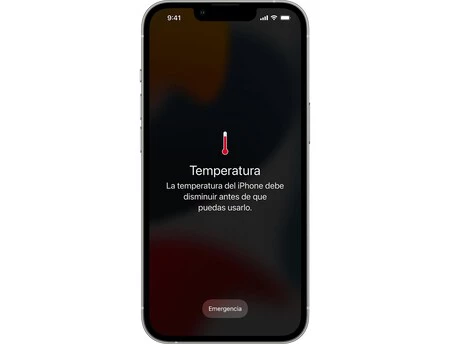
- System-Level Warnings: The device displayed prominent visual warnings. On the S26 Ultra, this included a thermometer icon with an alert triangle in the status bar, a persistent notification, and a full-screen pop-up message explicitly stating that the phone’s temperature was excessive and advising the user to cool the device.
- Functionality Lockout: Ultimately, the Android-based One UI system reached a point where it essentially ceased normal operation. The phone became largely unresponsive, akin to a "hot brick," severely limiting user interaction until temperatures normalized. Apple’s iOS, as noted in the research, employs a similar strategy, often presenting a full-screen warning and disabling most phone functions until it has adequately cooled down.
Variations in Device Safety: A Tale of Two Phones
The experiment also revealed a crucial disparity in thermal management capabilities across different smartphone models, particularly between flagship devices and more budget-oriented options. The researcher initially conducted tests with an older Xiaomi Mi A3, a device representative of the more affordable segment of the market. This particular model exhibited a significantly less robust response to escalating temperatures.
Even when the external temperature surpassed 70°C (158°F), the Xiaomi Mi A3 showed no discernible inclination to cut processes, dim the screen, or display any explicit overheating warnings. This observation suggests that while all smartphones incorporate some form of thermal regulation, the sophistication, sensitivity, and aggressiveness of these safety mechanisms can vary widely.
This disparity has significant implications for consumers. While premium devices like the Samsung Galaxy S26 Ultra are engineered with multiple layers of protection, incorporating advanced sensors and software algorithms to meticulously monitor and react to thermal stress, cheaper models may rely on more rudimentary or less stringent protocols. This could potentially leave them more vulnerable to long-term component degradation, reduced lifespan, or even safety hazards such as battery swelling or potential fire risks if exposed to extreme heat for prolonged periods without adequate warnings or system shutdowns. The cost-benefit analysis for manufacturers often leads to compromises in non-visible features like advanced thermal management in lower-priced segments.
The Science of Overheating: Why it Matters
Smartphone overheating is not merely an inconvenience; it poses substantial risks to device longevity and user safety. Modern smartphones pack powerful multi-core processors, high-resolution displays, advanced camera systems, and fast-charging batteries into increasingly thin form factors. All these components generate heat during operation, and without efficient thermal management, this heat can accumulate rapidly.
Key components susceptible to heat damage include:
- Lithium-ion Batteries: High temperatures accelerate the chemical degradation of lithium-ion batteries, leading to reduced capacity, shorter lifespan, and in extreme cases, swelling or thermal runaway, which can result in fire or explosion.
- Processors (CPU/GPU): Sustained high temperatures can permanently damage the intricate silicon circuitry, leading to instability, crashes, and ultimately, component failure. Thermal throttling is designed to prevent this, but persistent overheating can still cause micro-damage.
- Displays: OLED and LCD panels can suffer from permanent burn-in or discoloration when exposed to excessive heat, especially if the device is left in direct sunlight.
- Other Components: Sensors, cameras, and storage chips can also be negatively impacted by prolonged exposure to temperatures outside their specified operating ranges.
Manufacturers invest heavily in thermal design, incorporating passive cooling solutions like graphite sheets, copper vapor chambers, and heat pipes to dissipate heat away from critical components and distribute it across the device’s chassis. Some high-performance gaming phones even include active cooling systems with tiny fans. The software-based thermal management, as demonstrated by the S26 Ultra’s response, is the final line of defense, dynamically adjusting performance to prevent hardware damage.
Manufacturer Protocols and User Guidelines
Smartphone manufacturers provide detailed instructions and warnings regarding safe operating temperatures for a reason. These guidelines are not arbitrary; they are based on extensive testing and engineering to ensure device reliability and user safety. According to support documentation from leading manufacturers like Apple and Samsung, operating devices outside the 0-35°C range is discouraged.
When a device detects excessive heat, its primary objective is to protect its internal components. This protection manifests as the observed performance reductions, display dimming, and ultimately, system shutdowns. These measures are automated and designed to be non-negotiable once critical thresholds are breached, prioritizing hardware integrity over immediate user functionality. This also means that users should respect these warnings and take prompt action to cool their devices.
Best Practices for Users: Preventing and Addressing Overheating
While an oven experiment is a controlled simulation, real-world overheating scenarios are far more common and preventable. The insights gained reinforce critical user best practices:
- Avoid Direct Sunlight: Never leave a smartphone exposed to direct sunlight for extended periods, especially in enclosed spaces like car dashboards, where temperatures can quickly soar to dangerous levels.
- Mind Demanding Tasks: Intense gaming, prolonged video recording at high resolutions, or using GPS navigation with the screen on for extended periods can generate significant heat. If the phone feels excessively warm, take a break from these activities.
- Optimize Charging Environment: Charging generates heat. Avoid charging your phone under pillows, blankets, or in direct sunlight. Always use the manufacturer-provided charger or a certified third-party accessory.
- Use Appropriate Cases: While some cases offer protection, thick, non-breathable cases can trap heat. If your phone frequently overheats, consider removing the case or using one designed for better heat dissipation.
- Ensure Proper Ventilation: When using the phone for demanding tasks, ensure it has adequate airflow. Avoid placing it on soft surfaces that can block vents or trap heat.
If a smartphone displays an overheating warning, the most effective and safest course of action is simple:
- Move to a Cooler Environment: Immediately take the phone out of direct sunlight or any hot environment.
- Power Down (if possible): If the system allows, power down the device completely to stop all heat-generating processes.
- Remove Case: Take off any protective case to allow for better air circulation.
- Allow Natural Cooling: Place the phone in a shaded, cool area and allow it to cool down naturally. Do not place it in a refrigerator or freezer, as rapid temperature changes can cause condensation and internal damage. Do not attempt to cool it with water.
The phone’s internal systems are designed to manage the cooling process once the external heat source is removed and internal activities are reduced. The warning is not just a visual alert but an active mechanism for self-preservation.
Broader Implications for Smartphone Design and Consumer Awareness
The experiment, while extreme, highlights the continuous engineering challenge faced by smartphone manufacturers: balancing ever-increasing performance demands with the physical constraints of thermal dissipation within compact devices. As processors become more powerful, 5G connectivity becomes standard, and battery capacities grow, effective thermal management will remain a critical differentiator and a key factor in device longevity.
For consumers, this research serves as a stark reminder of the sophisticated technology packed into their pockets and the importance of respecting its limitations. Understanding the signs of overheating and knowing how to react can prevent costly repairs and extend the life of a device. It also underscores that while a phone might feel warm, it’s the internal temperature, meticulously monitored by its sensors, that dictates when safety protocols are triggered.

Conclusion: The Value of Robust Safety Systems
The daring experiment of pushing a smartphone to its thermal limits in a controlled oven environment yielded valuable lessons. It confirmed that modern flagship smartphones, exemplified by the Samsung Galaxy S26 Ultra, possess robust and multi-layered safety mechanisms that effectively protect internal components from dangerous temperatures. These systems proactively reduce performance, limit functionality, and issue explicit warnings long before catastrophic damage occurs. Conversely, it highlighted that not all devices offer the same level of protection, with budget models potentially lacking the sophisticated safeguards found in their premium counterparts.
Most importantly, the research unequivocally reiterated a critical safety message: users should never attempt to intentionally overheat their devices. The experiment provided the answers without the need for individual risk. The inherent value of a smartphone’s overheating warning extends beyond a mere notification; it is a vital defense mechanism, ensuring the device’s longevity and, ultimately, user safety by transforming a potentially damaging thermal event into a temporary, manageable inconvenience.
