

The fundamental distinction between a "virtual server" and a "physical server" lies not in their tangible existence, but in their structural organization and operational deployment. Every piece of digital information, every online service, and every application we interact with ultimately resides on a physical machine, a real-world piece of hardware. This article delves into the intricacies of both server types, exploring their characteristics, use cases, and the critical differences that inform their selection for various business needs.
The Foundation: What is a Physical Server?
A physical server, often referred to as a bare-metal server, is a tangible piece of hardware designed for dedicated, continuous operation. It comprises all the essential components of a computer: a central processing unit (CPU), graphics processing unit (GPU), random-access memory (RAM), storage drives, a power supply unit, a network interface, an operating system, and server application software. Unlike a typical desktop computer, physical servers are engineered for 24/7 uptime and are specifically tasked with running applications that serve other computers. This includes hosting websites, managing databases, facilitating network services, and performing other server-centric functions.
The size and form factor of a physical server can vary significantly, ranging from compact desktop units to large, rack-mounted systems that occupy dedicated server rooms. Regardless of its physical dimensions or location, it remains a physical server. Organizations can house and manage these servers on their own premises, or they can access them through cloud computing providers, often referred to as dedicated bare-metal offerings.
Key Features of Physical Servers
The primary advantage of a physical server is its exclusive dedication of all machine resources to the tasks it performs. This inherent isolation contributes to enhanced security and superior performance for demanding workloads. Key features include:
- Exclusive Resource Allocation: All CPU, RAM, storage, and network bandwidth are dedicated solely to the server’s functions, preventing resource contention with other systems.
- Uncompromised Performance: For applications requiring maximum processing power and low latency, physical servers offer direct access to hardware, bypassing any virtualization overhead.
- Enhanced Security Through Isolation: The absence of virtualization layers can reduce the attack surface, offering a more robust security posture for highly sensitive data and applications.
- Full Control and Customization: Administrators have complete control over the hardware and software stack, allowing for deep customization and optimization.
- Predictable Performance: Performance metrics are generally more consistent and predictable as there are no shared resources to fluctuate.
Historical Context and Evolving Use Cases
In the early 2000s, the vast majority of the world’s digital infrastructure relied on physical servers. It was common for businesses to host their own server hardware on-site to power their entire IT operations. Each company would typically dedicate individual machines to specific functions, such as web hosting, email services, or internal application support.
While the landscape has dramatically shifted with the widespread adoption of virtualization, physical servers continue to play a vital role in modern IT infrastructures. Today, they are predominantly employed for highly demanding workloads where absolute performance, stringent security, or specific hardware requirements are paramount.
Popular use cases for physical servers include:
- High-Performance Computing (HPC): For scientific research, complex simulations, and big data analytics requiring immense processing power.
- Large-Scale Databases: Applications with massive datasets and transaction volumes benefit from dedicated resources for optimal speed and responsiveness.
- Gaming Servers: Online gaming platforms demand low latency and high throughput, which physical servers can consistently provide.
- Resource-Intensive Applications: Software that requires direct hardware access or significant computational power, such as video rendering or complex CAD software.
- Legacy Systems: Older applications that may not be compatible with virtualization environments.
Industries Reliant on Physical Servers
Several industries continue to leverage the unique benefits of physical servers due to their critical operational demands. These sectors prioritize reliability, raw performance, and uncompromising security. Notable industries include:
- Financial Services: Handling sensitive financial transactions and requiring extreme security and low latency for trading platforms.
- Healthcare: Protecting patient data (PHI) and running critical medical imaging or diagnostic software demands robust security and reliable performance.
- Government and Defense: National security applications and sensitive government operations necessitate the highest levels of isolation and control.
- Aerospace: Complex simulations, design processes, and critical operational systems require dedicated, high-performance computing.
- Logistics and Supply Chain: Real-time tracking and management of global supply chains benefit from consistent, high-performance server availability.
- Manufacturing: Industrial control systems and real-time process monitoring often rely on dedicated, highly stable hardware.
- Media and Entertainment: Rendering farms for visual effects and complex video editing workflows demand significant, dedicated processing power.
These sectors value the inherent reliability, raw performance capabilities, stringent security features, and the direct ownership and control that physical servers provide.
The Rise of the Digital Replica: What is a Virtual Server?
A virtual server, also known as a virtual machine (VM), is a software-based emulation of a physical server. It is created by partitioning the resources of a single physical server into multiple isolated virtual environments. This process, known as virtualization, is the cornerstone of cloud computing, enabling providers to maximize hardware utilization and deliver scalable, efficient computing resources on a global scale.
Imagine a powerful, state-of-the-art physical server equipped with substantial computing power, ample storage, and high-speed networking. Instead of dedicating this entire machine to a single client or application, virtualization technology allows it to be divided. A single physical server can host numerous virtual servers, each functioning as an independent entity with its own allocated CPU, RAM, storage, and operating system.
This scenario is precisely what underpins the growth and ubiquity of cloud computing. A cloud provider can take a robust physical server and transform it into a platform for many distinct virtual servers, each rented out to different customers for various purposes, such as website hosting, database management, or running specific applications.
Key Features of Virtual Servers
Virtual servers offer a distinct set of advantages, primarily centered around flexibility, scalability, and cost-effectiveness. Key features include:
- Resource Efficiency: Multiple virtual servers can run on a single physical machine, optimizing hardware utilization and reducing overall infrastructure costs.
- Scalability and Flexibility: Resources can be dynamically allocated and adjusted as needs change, allowing businesses to scale up or down rapidly.
- Rapid Deployment: New virtual servers can be provisioned and deployed in minutes, significantly reducing time-to-market.
- Cost-Effectiveness: The ability to share hardware resources and pay only for what is used often results in lower operational expenses compared to dedicated physical hardware.
- Disaster Recovery and Business Continuity: VMs can be easily backed up, replicated, and migrated, simplifying disaster recovery planning.
- Isolation and Sandboxing: While sharing hardware, VMs are logically isolated from each other, preventing issues on one VM from affecting others.
The Endless Applications of Virtual Servers
The use cases for virtual servers are virtually limitless, permeating nearly every facet of modern digital life and business operations. From the platforms users interact with daily to the complex back-end systems powering global enterprises, virtual servers are indispensable.

Some popular and prevalent use cases include:
- Web Hosting: Providing the infrastructure for websites of all sizes, from personal blogs to large e-commerce platforms.
- Application Hosting: Running a wide range of business applications, including customer relationship management (CRM), enterprise resource planning (ERP), and productivity suites.
- Database Management: Hosting and managing databases for applications, analytics, and data storage.
- Development and Testing Environments: Creating isolated environments for developers to build, test, and debug software without impacting production systems.
- Cloud Computing Services: The foundational technology for Infrastructure as a Service (IaaS), Platform as a Service (PaaS), and Software as a Service (SaaS).
- Virtual Desktops: Providing remote access to desktop environments for employees, enabling work from anywhere.
- Big Data Analytics: Processing and analyzing large datasets for business insights.
- Machine Learning and AI Development: Training and deploying machine learning models and artificial intelligence applications.
Beyond these common applications, virtual servers are also instrumental in advanced computing scenarios like High-Performance Computing (HPC) clusters and complex virtual desktop infrastructure (VDI) deployments.
Virtual Servers vs. Physical Servers: A Comparative Analysis
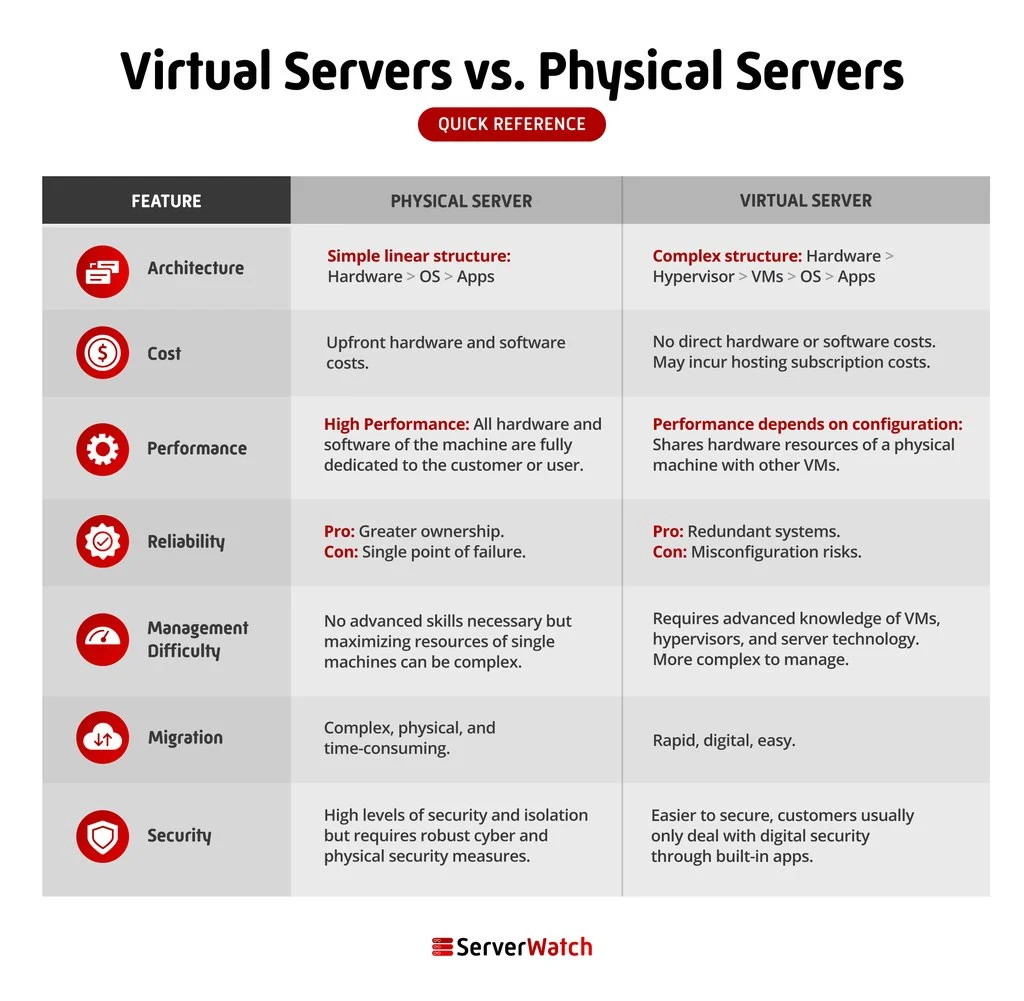
Understanding the distinctions between virtual and physical servers is crucial for making informed infrastructure decisions. While both serve the purpose of hosting digital services, their underlying architecture, operational characteristics, and cost implications differ significantly.
Architecture: The Fundamental Divide
The core difference lies in their architectural design. A physical server is a singular, dedicated piece of hardware. In contrast, a virtual server is a software-defined entity that runs on top of a physical server’s hardware, managed by virtualization software (a hypervisor). This hypervisor carves up the physical server’s resources and allocates them to multiple independent virtual machines.
- Physical Server Architecture: Direct hardware access, single operating system instance.
- Virtual Server Architecture: Runs on a hypervisor that abstracts hardware, multiple operating systems on a single physical machine.
Cost Implications: Efficiency vs. Dedication
When considering cost, virtualization generally offers greater efficiency, especially at scale. The ability to consolidate multiple workloads onto fewer physical machines reduces hardware acquisition costs, power consumption, and cooling requirements.
- Virtual Servers: Typically more cost-effective due to hardware consolidation and shared resources. Pricing models often involve pay-as-you-go or subscription services. While initial setup of virtualization technology can be complex, the long-term operational savings are substantial. Users of cloud-based virtual servers also offload responsibilities for physical security, hardware maintenance, and disaster-related risks like fires or floods.
- Physical Servers: Higher upfront hardware investment. Ongoing costs include power, cooling, maintenance, and physical space. While direct ownership can seem like a cost saving in some niche scenarios, the total cost of ownership (TCO) for physical servers is often higher due to the need for dedicated hardware for each workload and the lack of resource elasticity.
Performance: A Nuanced Competition
The performance comparison between virtual and physical servers is not always straightforward and depends on a multitude of factors.
- Physical Servers: Offer direct access to hardware, which can lead to superior performance for applications that are highly sensitive to latency or require maximum I/O throughput. There is no overhead from a virtualization layer.
- Virtual Servers: Performance can be excellent, but it is influenced by the hypervisor’s efficiency, the workload’s resource demands, and the configuration of other VMs sharing the same physical hardware. For most common workloads, the performance difference is negligible or can be mitigated through proper configuration and resource allocation. However, for extremely demanding applications where every millisecond counts, a physical server might hold an edge.
Reliability: Built-in Redundancy and Resilience
Both physical and virtual servers can be configured for high reliability, but they achieve it through different mechanisms.
- Physical Servers: Reliability often depends on the quality of the hardware components, redundancy built into the system (e.g., redundant power supplies, RAID storage), and robust maintenance practices.
- Virtual Servers: Reliability is enhanced through features like live migration (moving a running VM to another host without downtime), automatic failover, and clustering. Cloud providers leverage massive infrastructure redundancy to ensure high availability for their virtual server offerings. The ease of replicating and restoring VMs also contributes to their resilience.
Management Difficulty: Outsourcing vs. In-House Expertise
Server management can be complex for both types, but the responsibility can be distributed differently.
- Physical Servers: Require in-house expertise for hardware maintenance, OS patching, security updates, and troubleshooting. This necessitates a dedicated IT team with specialized skills.
- Virtual Servers: While the underlying virtualization platform requires skilled administrators, many management tasks are simplified. For cloud-based virtual servers, the provider handles much of the infrastructure management, allowing businesses to focus on application-level management.
Migration: Agility and Ease of Movement
The ease of migrating workloads is a significant differentiator.
- Virtual Servers: Migration is considerably easier. VMs are essentially files that can be copied, backed up, and moved between physical hosts with relative ease, often with just a few clicks. This agility is a cornerstone of cloud flexibility.
- Physical Servers: Migration is a more complex and time-consuming process. It typically involves physically moving the hardware, reconfiguring network settings, and potentially reinstalling operating systems and applications, often requiring significant downtime.
Security: Layers of Protection
Both virtual and physical servers can be secured effectively, but the security considerations differ.
- Physical Servers: Security focuses on physical access controls, network segmentation, and hardening the operating system. The isolation of hardware can be an advantage for highly sensitive environments.
- Virtual Servers: Security involves securing the hypervisor, the guest operating systems within VMs, and the network configurations between VMs and external networks. While virtualization introduces additional layers to secure, it also offers robust isolation mechanisms that can prevent a compromise on one VM from affecting others. Cloud providers invest heavily in securing their virtualized environments.
The Bottom Line: Choosing the Right Server for Your Business
Ultimately, the decision between virtual servers and physical servers hinges on a business’s unique requirements, operational priorities, and strategic goals. Both technologies offer distinct advantages and disadvantages.
For the majority of businesses, virtual servers present a compelling solution. They are typically more affordable, offer exceptional scalability, provide access to cutting-edge technology through cloud providers, and boast excellent reliability. Their flexibility allows businesses to adapt quickly to changing market demands and scale their IT resources as needed.
However, physical servers remain the preferred choice for businesses that demand the absolute highest levels of performance, require complete control over their hardware, or have stringent security mandates that necessitate dedicated, isolated infrastructure. Industries with critical, resource-intensive applications or those handling exceptionally sensitive data may find that the dedicated resources and direct hardware control of physical servers are indispensable.
As the technology landscape continues to evolve, the lines between virtual and physical may blur further with advancements in hybrid cloud solutions and bare-metal cloud offerings that combine the benefits of both. A thorough assessment of current and future needs is paramount to selecting the optimal server strategy for sustained success.
For organizations looking to harness the power of virtualization, exploring the latest advancements in server virtualization software is a prudent step towards optimizing infrastructure and unlocking new levels of efficiency and agility.
