


Many smartphone users have experienced the perplexing frustration of a screen inexplicably blacking out during a call, phantom touches activating features, or audio disruptions that suggest a failing earpiece or speaker. These issues, commonly perceived as critical hardware failures, frequently lead to premature repair requests or unnecessary device replacements. However, a significant body of evidence and expert analysis suggests that the root cause often lies not in the audio components, but in the subtle yet crucial operation of the device’s proximity sensor. This sensor, a small but vital component typically located near the top of the phone’s display, plays a critical role in managing screen behavior during voice calls and preventing inadvertent interactions. Its malfunction, often triggered by external factors rather than inherent defects, can create a cascade of user experience problems that mimic more severe hardware damage.
Understanding the Proximity Sensor: An Unsung Hero of Smartphone Functionality
The proximity sensor is an indispensable feature of modern smartphones, designed primarily to enhance usability and conserve battery life during voice calls. Its fundamental function is to detect the presence of nearby objects without physical contact, typically using infrared light. When a phone is lifted to the ear during a call, the sensor registers the proximity of the user’s face, automatically deactivating the touchscreen. This intelligent action serves multiple purposes: it prevents accidental button presses or menu selections by the ear or cheek, thereby avoiding unintended call disconnections, muting, or feature activations, and it significantly reduces power consumption by turning off the display, which is one of the most power-hungry components of a smartphone.
Historically, the integration of proximity sensors became widespread as smartphones transitioned from physical keypads to full touchscreens. Early touchscreen phones without reliable proximity sensing often suffered from frequent accidental touches during calls, leading to widespread user frustration. The evolution of sensor technology has seen improvements in accuracy and integration, moving from visible light sensors to more discreet infrared-based systems, ensuring seamless operation regardless of ambient light conditions. Modern sensors are highly sensitive and finely calibrated, designed to respond instantaneously to changes in proximity, typically within a few centimeters.
The Misdiagnosis Dilemma: When a Sensor Error Mimics Audio Failure

The core of the problem lies in the deceptive nature of proximity sensor malfunctions. When this sensor misbehaves, it can lead to symptoms that are easily mistaken for issues with the speaker, microphone, or earpiece. For instance, if the sensor incorrectly detects an object when none is present, the screen may turn off prematurely, making it impossible for the user to interact with the call interface (e.g., end the call, access the dial pad). Conversely, if the sensor fails to activate, the screen remains on, leading to accidental touches.
More critically, these sensor errors can create the perception of audio issues. If the screen is constantly turning on and off due to a faulty sensor, or if accidental touches are inadvertently muting the microphone or switching audio output modes, the user might experience intermittent sound, echoing, or complete audio loss. This sporadic behavior during calls, especially when the phone’s general audio functions (like playing music, videos, or using speakerphone) remain perfectly normal, is a strong indicator that the proximity sensor, and not the audio hardware, is the true culprit. Samsung, a leading smartphone manufacturer, explicitly highlights this scenario, noting that call-specific audio anomalies are often traceable to proximity sensor issues on their devices. This distinction is crucial for accurate troubleshooting and avoiding unnecessary repairs.
Leading Causes of Proximity Sensor Malfunction: The Ubiquitous Screen Protector
Among the various factors that can disrupt a proximity sensor’s operation, third-party screen protectors and protective cases stand out as the most common offenders. These accessories, while intended to safeguard the device, can inadvertently obstruct or interfere with the sensor’s delicate infrared light path.
- Physical Obstruction: Many screen protectors, particularly those that are ill-fitting, thick, or poorly aligned, can partially or completely cover the proximity sensor window. The sensor, usually a tiny, almost invisible component located at the very top bezel of the phone, relies on an unobstructed view. Even a thin layer of plastic or glass, if placed directly over the sensor, can diminish its ability to emit and receive infrared signals effectively.
- Material Opacity/Reflectivity: Some screen protector materials, especially those with anti-glare finishes or tinted designs, can have optical properties that interfere with infrared light. They might block the light, reflect it incorrectly, or diffuse it in a way that confuses the sensor, causing it to misinterpret its surroundings.
- Adhesive Issues: The adhesive used in some screen protectors can seep into or cloud the sensor area over time, creating a persistent obstruction.
- Case Interference: Bulky or poorly designed phone cases, particularly those with raised edges or front flaps, can also impinge on the sensor’s operational field, leading to similar detection problems.
Manufacturers, including Samsung, frequently issue advisories recommending that users temporarily remove such accessories to diagnose call-related screen and audio issues. This simple step often resolves the problem, confirming that the "hardware failure" was merely an accessory conflict. This situation has become increasingly prevalent with the industry trend towards minimal bezels and notch/hole-punch displays, which place sensors in more constrained and optically sensitive areas.
Beyond Accessories: Other Factors Affecting Sensor Performance
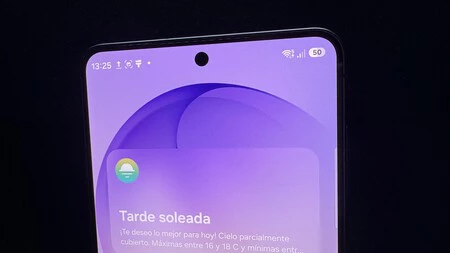
While screen protectors are a primary suspect, other factors can also contribute to proximity sensor issues:
- Dirt and Debris: Accumulation of dust, lint, makeup, or grime on the sensor window can create an opaque layer, mimicking a physical obstruction. Regular cleaning of the phone’s display, especially the top edge, can prevent this.
- Software Glitches: Firmware bugs or operating system errors can sometimes disrupt the sensor’s calibration or its interaction with the phone’s call management software. A software update or a simple restart can often rectify these transient issues.
- Accidental Damage: Although less common, a direct impact or severe drop could physically damage the sensor itself or its internal connections, leading to permanent malfunction.
- Manufacturing Defects: In rare instances, a sensor might be inherently defective from the factory. However, this is typically covered under warranty and is often accompanied by other symptoms from the outset.
Troubleshooting Steps: A User’s First Line of Defense
The good news for users encountering these issues is that the most common solutions do not involve costly repairs or part replacements. A methodical approach to troubleshooting can often identify and resolve the problem quickly:
- Remove Accessories: The first and most crucial step is to remove any screen protectors, tempered glass, or cases that might be covering or interfering with the proximity sensor area. After removal, test the phone’s call functionality. If the problem disappears, the accessory was the culprit. Consider replacing it with a manufacturer-approved or higher-quality alternative that guarantees sensor compatibility.
- Clean the Sensor Area: Thoroughly clean the top portion of the phone’s screen, specifically the area where the earpiece and front-facing camera are located, using a soft, lint-free cloth. Ensure no dust, smudges, or debris are obscuring the sensor.
- Restart the Device: A simple reboot can often clear temporary software glitches that might be affecting sensor performance.
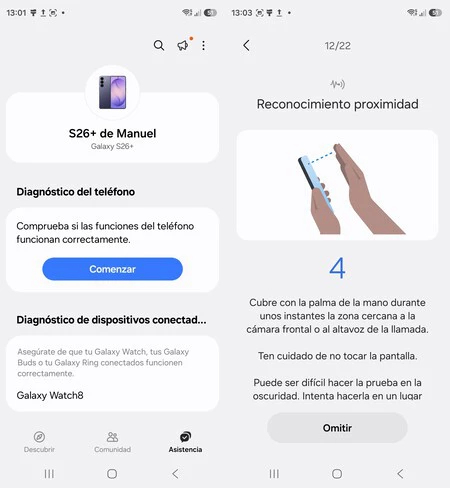
- Run Diagnostic Tests: Many smartphone manufacturers provide built-in diagnostic tools. For Samsung Galaxy users, the "Samsung Members" app offers a comprehensive suite of tests.
- Open the Samsung Members app.
- Navigate to Assistance.
- Select Phone Diagnostics (or similar, depending on app version).
- Choose Proximity Recognition (or "Proximity Sensor") from the list of tests.
- Follow the on-screen instructions, which typically involve waving your hand over the sensor area. The test will indicate whether the sensor is functioning correctly.
- If the test passes after removing accessories and cleaning, it strongly suggests a software or accessory-related issue rather than a physical sensor defect. If it fails, further investigation or professional repair might be warranted.
- Check for Software Updates: Ensure your phone’s operating system and firmware are up to date. Manufacturers often release updates that include bug fixes for sensor calibration or software conflicts.
- Calibrate the Sensor (Advanced/Specific Models): Some older Android devices or specific custom ROMs might offer an option to recalibrate the proximity sensor through hidden menus or third-party apps. However, this is not a standard feature on most modern devices and should be approached with caution.
The Economic and Psychological Impact of Misdiagnosis
The prevalence of proximity sensor issues and their frequent misdiagnosis carry significant implications. Economically, consumers might incur unnecessary expenses for "repairs" that involve replacing functional earpieces or speakers, or even purchasing new devices, when a simple accessory adjustment would suffice. A study by a major electronics repair chain once estimated that up to 15% of reported "audio issues during calls" were ultimately resolved by addressing proximity sensor interference, saving customers an average of $50-$150 per incident. On a larger scale, this translates to millions in avoidable repair costs globally.
Psychologically, persistent phone malfunctions, even minor ones, can erode user trust in their devices and brands. The frustration of being unable to reliably make calls or interact with the screen can lead to dissatisfaction and a perception of poor product quality, even if the underlying issue is easily fixable by the user. Educating consumers about the role of the proximity sensor and empowering them with simple troubleshooting steps is therefore crucial for enhancing user experience and maintaining brand loyalty.
Industry Response and Future Outlook
Smartphone manufacturers are increasingly aware of these common user complaints. While some have integrated better diagnostic tools, others are exploring hardware and software solutions to mitigate the problem. This includes:
- Improved Sensor Integration: Designing sensor placements that are less susceptible to interference from standard screen protectors.
- Software Algorithms: Developing more sophisticated algorithms that can differentiate between legitimate proximity events and false positives caused by obstructions.
- User Education: Providing clearer guidelines within device manuals and support websites regarding screen protector compatibility and troubleshooting steps.
- Accessory Partnerships: Collaborating with accessory manufacturers to ensure their products meet specific design standards that do not obstruct critical sensors.
Accessory manufacturers, in turn, are developing "sensor-friendly" screen protectors that feature precise cutouts or transparent areas specifically designed to accommodate proximity sensors, front cameras, and other vital components. Users are advised to look for these certifications or read product reviews carefully before purchasing screen protectors.
In conclusion, while a malfunctioning earpiece or speaker can certainly cause audio problems during calls, the humble proximity sensor often emerges as the silent culprit behind many perplexing call-related issues. By understanding its function, recognizing the symptoms of its interference, and performing basic troubleshooting steps, users can often resolve these frustrations without resorting to costly repairs or device replacements. This knowledge empowers consumers to become their own first line of defense against common smartphone maladies, ensuring a smoother and more reliable communication experience.
