

The rapidly evolving landscape of Artificial Intelligence is witnessing an unprecedented surge in the development of tools and frameworks designed to empower engineers and developers. These innovations are not merely augmenting existing capabilities but are fundamentally reshaping how custom AI applications are conceived, built, and deployed. However, this technological frontier is not without its complexities. Each significant advancement in AI, particularly in the realm of large language models (LLMs), is intrinsically linked to corresponding challenges. For instance, the burgeoning field of vector databases, exemplified by solutions like Chroma, has grappled with the critical issue of efficient data processing. This challenge is particularly pronounced given that a vast array of cutting-edge AI applications rely heavily on vector embeddings as the foundational architecture for LLMs.
Vector databases represent a paradigm shift from traditional relational databases. Unlike SQL databases, which are structured to store and query data with predefined schemas and exact value matching (e.g., using SELECT statements), vector databases are engineered to manage and query unstructured data. This encompasses a broad spectrum of data types, including text, images, and audio, all of which lack a fixed, tabular structure. The ability to store and retrieve information based on semantic similarity, rather than exact keyword matches, is what makes vector databases indispensable for modern AI.
This article delves into a practical application of these advanced concepts, offering a comprehensive guide to connecting a large language model with LangChain to custom data sources, specifically a PDF document. The process will leverage ChromaDB as a persistent vector database, acting as the memory for the AI system. This is where the paradigm of Retrieval Augmented Generation (RAG) becomes pivotal. RAG introduces the capability to store and retrieve relevant data dynamically during a conversation, and crucially, it enables the retention of chat history. This integration empowers developers to construct sophisticated AI applications with a robust sense of conversational memory.
The entire pipeline for this application can be visualized as a workflow where an initial user query is processed, relevant information is retrieved from a vector store, and this information is then used by an LLM to generate a contextually appropriate response. The incorporation of chat history ensures that the AI can understand and respond to follow-up questions that reference previous turns in the conversation, thereby mimicking human-like dialogue.
Project Workflow: A Step-by-Step Implementation
The core objective of this project is to construct an AI-powered question-answering system capable of understanding and responding to queries based on the content of a provided document. This involves a series of well-defined steps: loading the document into a format usable by LangChain, segmenting the document into manageable chunks, generating vector embeddings for these chunks, and finally, querying this vector store to retrieve the most relevant information for the LLM to formulate an answer.
Step 1: Installing Essential Dependencies
To embark on this project, a foundational set of Python packages must be installed. These libraries work in concert to facilitate document loading, text splitting, LLM interaction, and vector database management.
pip install pypdf docx2txt openai langchain chromadb langchain-community langchain-openai "langchain-chroma>=0.1.2"This installation command ensures that all necessary components are available for the subsequent development stages. pypdf is crucial for handling PDF files, docx2txt for Word documents, openai for accessing OpenAI’s powerful language models and embedding services, langchain as the orchestration framework, chromadb for the vector database, and langchain-community and langchain-openai provide integrations for various tools and models. The specific version constraint for langchain-chroma ensures compatibility with other components.

Step 2: Securing API Credentials
For projects utilizing services like OpenAI’s LLMs and embedding models, securely managing API keys is paramount. This is typically achieved by storing credentials in a .env file and loading them into the environment variables.
import os
from dotenv import load_dotenv, find_dotenv

load_dotenv(find_dotenv(), override=True)
This code snippet utilizes the dotenv library to load environment variables from a .env file located in the project’s root directory. It’s a standard practice to include .env files in .gitignore to prevent sensitive information from being committed to version control.
Step 3: Loading Source Documents
The ability to ingest data from various document formats is a critical first step. LangChain provides flexible document loaders for this purpose.
def load_document(file):
    import os
    name, extension = os.path.splitext(file)

    if extension == '.pdf':
        from langchain_community.document_loaders import PyPDFLoader
        print(f'Loading file')
        loader = PyPDFLoader(file)
    elif extension == '.docx':
        from langchain_community.document_loaders import Docx2txtLoader
        print(f'Loading file')
        loader = Docx2txtLoader(file)
    elif extension == '.txt':
        from langchain_community.document_loaders import TextLoader
        loader = TextLoader(file)
    else:
        print('Document format is not supported!')
        return None

    data = loader.load()
    return data
This function, load_document, dynamically selects the appropriate loader based on the file extension. It then uses the loader.load() method to ingest the document’s content, returning it as a list of LangChain Document objects. Each Document object contains the page content and associated metadata, such as the page number. This structured representation is essential for subsequent processing.
Step 4: Segmenting Data into Manageable Chunks
Large documents can be overwhelming for LLMs. Therefore, segmenting the loaded documents into smaller, semantically coherent chunks is a crucial preprocessing step.
def chunk_data(data, chunk_size=256):
    from langchain.text_splitter import RecursiveCharacterTextSplitter

    overlap = int(chunk_size * 0.15)
    text_splitter = RecursiveCharacterTextSplitter(chunk_size=chunk_size, chunk_overlap=overlap)

    chunks = text_splitter.split_documents(data)

    return chunks
The chunk_data function employs LangChain’s RecursiveCharacterTextSplitter. This splitter is designed to recursively split text based on a list of characters, ensuring that meaningful units of text are maintained. The chunk_size parameter defines the maximum length of each chunk, while chunk_overlap introduces a small overlap between consecutive chunks. This overlap helps maintain context across chunk boundaries, which is vital for accurate retrieval. The output is a list of text chunks, each ready for embedding.
Step 5: Querying and Retrieving Answers
This function encapsulates the core logic for interacting with the vector store and generating an answer using an LLM.
def ask_and_get_answer(vector_store, q, k=3):
    from langchain_openai import ChatOpenAI
    from langchain.chains import create_retrieval_chain
    from langchain.chains.combine_documents import create_stuff_documents_chain
    from langchain_core.prompts import ChatPromptTemplate

    llm = ChatOpenAI(model='gpt-3.5-turbo', temperature=0.0)

    retriever = vector_store.as_retriever(search_type='similarity', search_kwargs='k': k)

    prompt = ChatPromptTemplate.from_template("""
    Answer the following question based only on the provided context:
    <context>
    context
    </context>
    Question: input""")

    document_chain = create_stuff_documents_chain(llm, prompt)
    retrieval_chain = create_retrieval_chain(retriever, document_chain)

    response = retrieval_chain.invoke("input": q)
    return response
Here, a ChatOpenAI model (specifically gpt-3.5-turbo) is initialized with a low temperature to ensure deterministic and factual responses. A retriever is created from the vector_store, configured to perform similarity searches and return the top k most relevant chunks. A ChatPromptTemplate is defined to guide the LLM, ensuring it answers based solely on the provided context. The create_retrieval_chain function orchestrates the process: the retriever fetches relevant documents, and the document_chain uses the LLM to generate an answer based on these documents and the user’s query.

Step 6: Utilizing ChromaDB as a Vector Database
ChromaDB is an open-source embedding database that is well-suited for this application. It allows for the storage and efficient retrieval of vector embeddings.
def create_embeddings_chroma(chunks, persist_directory='./chroma_db'):
    from langchain_chroma import Chroma
    from langchain_openai import OpenAIEmbeddings

    embeddings = OpenAIEmbeddings(model='text-embedding-3-small', dimensions=1536)

    vector_store = Chroma.from_documents(chunks, embeddings, persist_directory=persist_directory)

    return vector_store
This function, create_embeddings_chroma, is responsible for generating vector embeddings for the provided text chunks and storing them in ChromaDB. It initializes an OpenAIEmbeddings model, specifying text-embedding-3-small for efficiency and dimensions=1536 which is standard for this model. Chroma.from_documents then processes the chunks, creates their embeddings, and stores them in the specified persist_directory. This directory ensures that the database can be loaded later without re-embedding the data.
def load_embeddings_chroma(persist_directory='./chroma_db'):
    from langchain_chroma import Chroma
    from langchain_openai import OpenAIEmbeddings

    embeddings = OpenAIEmbeddings(model='text-embedding-3-small', dimensions=1536)

    vector_store = Chroma(persist_directory=persist_directory, embedding_function=embeddings)

    return vector_store
Conversely, load_embeddings_chroma allows for the retrieval of an existing ChromaDB instance from disk. It initializes the same embedding model and then instantiates a Chroma object, pointing it to the persist_directory. This function is crucial for applications that need to load a pre-built knowledge base without the computational cost of re-generating embeddings.
Step 7: Executing the RAG Pipeline
With all the components defined, it’s time to put them into action. This involves loading a document, chunking it, creating the vector store, and then posing queries.
First, load a sample PDF document (ensure you have a PDF file named rag_powered_by_google_search.pdf in a files directory or replace with your own file path).
data = load_document('files/rag_powered_by_google_search.pdf')
chunks = chunk_data(data, chunk_size=256)
vector_store = create_embeddings_chroma(chunks)
Upon execution, the output Loading files/rag_powered_by_google_search.pdf confirms that the document has been successfully loaded and processed.
Next, we query the system with an initial question.
db = load_embeddings_chroma() # Load the existing vector store

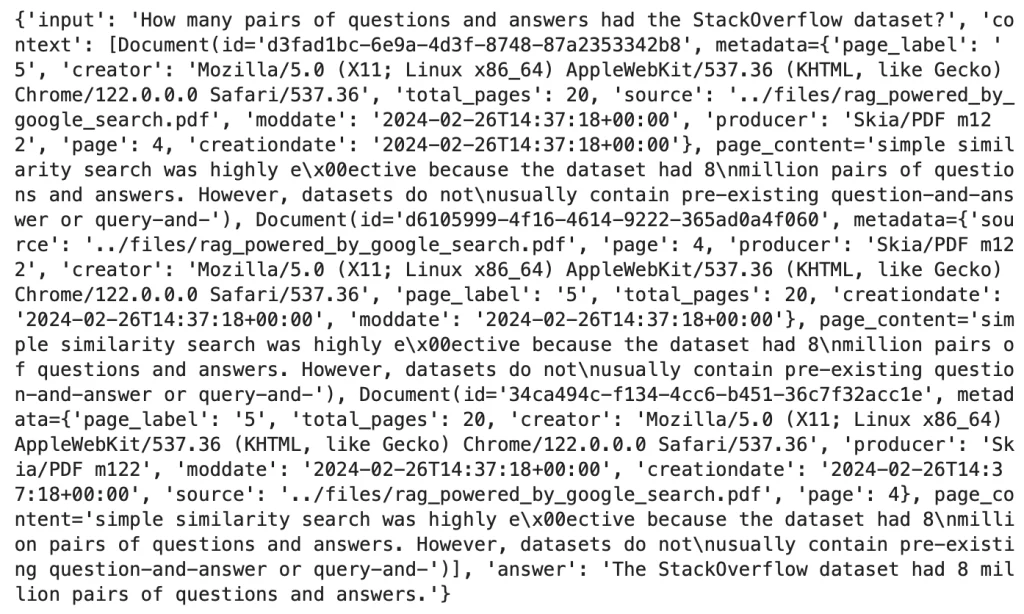
q = 'How many pairs of questions and answers had the StackOverflow dataset?'

answer = ask_and_get_answer(vector_store, q) # Use the created vector_store directly for query
print(answer)
The system retrieves information from the vector_store and formulates an answer. The output will be a dictionary containing the answer and potentially other metadata.

However, a common limitation of basic RAG systems becomes apparent when attempting follow-up questions that rely on conversational context.
q = 'Multiply that number by 2.'
answer = ask_and_get_answer(vector_store, q)

print(answer['answer'])
The response to this follow-up question will likely be along the lines of: "Since no specific number is provided in the context, it is not possible to multiply it by 2." This highlights the absence of conversational memory, which is crucial for maintaining context across multiple turns.
Step 8: Integrating Chat History for Conversational Memory
To overcome the limitation of stateless interactions, conversational memory must be integrated. This involves structuring the AI to understand and utilize chat history.
from langchain_openai import ChatOpenAI
from langchain.chains import (
    create_history_aware_retriever,
    create_retrieval_chain,
)
from langchain.chains.combine_documents import (
    create_stuff_documents_chain,
)
from langchain_core.prompts import ChatPromptTemplate, MessagesPlaceholder

llm = ChatOpenAI(
    model_name='gpt-3.5-turbo',
    temperature=0.0
)

retriever = vector_store.as_retriever(
    search_type='similarity',
    search_kwargs='k': 5
)

contextualize_q_system_prompt = (
    "Given a chat history and the latest user question "
    "which might reference context in the chat history, "
    "formulate a standalone question which can be understood "
    "without the chat history. Do NOT answer the question, just "
    "reformulate it if needed and otherwise return it as is."
)

contextualize_q_prompt = ChatPromptTemplate.from_messages([
    ("system", contextualize_q_system_prompt),
    MessagesPlaceholder("chat_history"),
    ("human", "input")
])

history_aware_retriever = create_history_aware_retriever(
    llm, retriever, contextualize_q_prompt
)

qa_system_prompt = (
    "You are an assistant for question-answering tasks. Use "
    "the following pieces of retrieved context to answer the "
    "question. If you don't know the answer, just say that you "
    "don't know. Use three sentences maximum and keep the answer "
    "concise."
    "nn"
    "context"
)

qa_prompt = ChatPromptTemplate.from_messages([
    ("system", qa_system_prompt),
    MessagesPlaceholder("chat_history"),
    ("human", "input")
])

question_answer_chain = create_stuff_documents_chain(
    llm, qa_prompt
)

rag_chain = create_retrieval_chain(history_aware_retriever, question_answer_chain)
This code defines a more sophisticated RAG chain. The contextualize_q_prompt is designed to transform user questions that reference chat history into standalone queries. The history_aware_retriever then uses this reformulated query to fetch relevant documents. Finally, the question_answer_chain generates the response, taking into account both the retrieved context and the chat history. The MessagesPlaceholder("chat_history") is key to injecting the conversation history into the prompt.
Step 9: Implementing a Conversational Query Function
A dedicated function is needed to manage the interaction with the newly created conversational RAG chain.
from langchain_core.messages import HumanMessage, AIMessage

chat_history = [] # Initialize an empty list to store chat history

query = "How many pairs of questions and answers had the StackOverflow dataset?"

def ask_question(query, chain):
    response = rag_chain.invoke(
        "input": query,
        "chat_history": chat_history
    )
    return response

result = ask_question(query, rag_chain)
print(result['answer'])

# Update memory manually after each turn
chat_history.append(HumanMessage(content=query))
chat_history.append(AIMessage(content=result["answer"]))
The ask_question function takes the user’s query and the RAG chain as input. It invokes the chain, passing the query and the current chat_history. After receiving the response, the user’s query and the AI’s answer are appended to the chat_history as HumanMessage and AIMessage objects, respectively. This manual update is crucial for building the conversational context.
Now, let’s test a follow-up question to demonstrate the enhanced memory.
query = 'Multiply the answer by 4.'

result = ask_question(query, rag_chain)

print(result['answer'])
With the chat history correctly managed, the system can now understand the reference to the previous answer and provide a relevant response, such as "32 million," demonstrating its ability to perform contextual calculations.

Step 10: Creating an Interactive Question Loop
For a truly dynamic user experience, an interactive loop can be implemented, allowing users to engage in a continuous conversation with the AI.
while True:
    query = input('Your question: ')
    if query.lower() in ['exit', 'quit', 'bye']:
        print('Bye bye!')
        break
    result = ask_question(query, rag_chain)
    print(result['answer'])
    print('-' * 100)
This while loop continuously prompts the user for input. If the user types an exit command, the loop terminates. Otherwise, the input is processed by the ask_question function, the answer is displayed, and the conversation history is updated. This provides a seamless, interactive conversational experience.
The Era of Retrieval Augmented Generation
Retrieval Augmented Generation (RAG) is far more than a mere technical buzzword for AI practitioners; it represents a fundamental leap in the capabilities of AI systems. At its core, RAG is a sophisticated technique that synergistically combines the generative power of large language models with a robust information retrieval mechanism. This fusion allows AI models to access and synthesize information from external knowledge bases, thereby enhancing the factual accuracy, relevance, and depth of their responses.
The implications of adopting RAG systems are profound for developers and end-users alike. By enabling AI to reliably retrieve and process vital information from specific documents or datasets, RAG significantly boosts the trustworthiness of AI-generated answers. This approach circumvents the inherent limitations of LLMs, such as factual hallucinations or biases stemming from their training data, by grounding their responses in verifiable external context. This ensures that the AI’s reasoning remains factual and avoids the pitfalls of subjective interpretation or biased perspectives.
The journey through implementing a RAG application with LangChain and ChromaDB, as detailed in this guide, offers a tangible pathway for developers to harness the power of conversational AI. This empowers them to build applications that not only answer questions but also engage in meaningful, context-aware dialogues. As the AI landscape continues to mature, embracing RAG is not just a technological choice but a strategic imperative for building intelligent, reliable, and user-friendly AI solutions.
For those interested in exploring the complete implementation and experimenting further, the associated code repository is available for reference. This initiative underscores the collaborative spirit of the AI community and the continuous drive to democratize access to advanced AI capabilities.
