

In an era of escalating cyber threats and increasingly complex network infrastructures, organizations are continuously seeking robust solutions to safeguard their digital assets and ensure seamless access for authorized users. Microsoft’s Network Policy Server (NPS) stands as a cornerstone in this endeavor, providing a comprehensive framework for managing network access control through its implementation of the Remote Authentication Dial-In User Service (RADIUS) protocol. NPS empowers network administrators to establish and enforce granular policies, thereby ensuring that only legitimate users and devices can connect to critical network resources. This article delves into the intricacies of NPS, exploring its foundational principles, functional roles, and the significant benefits it offers in modern network security and management.
The imperative for robust network security and policy management has never been more pronounced. As businesses increasingly rely on digital technologies for operations, communication, and data exchange, their networks and associated servers become prime targets for malicious actors. The sophistication and frequency of cyberattacks, ranging from ransomware to data breaches, necessitate a proactive and layered security approach. Effective network security not only protects sensitive data from unauthorized access and theft but also ensures the continuity of business operations and maintains customer trust.
Central to this protective strategy is meticulous policy management. Network policies dictate who can access what resources, under what conditions, and for how long. Without well-defined and consistently enforced policies, networks become vulnerable to insider threats, accidental misconfigurations, and external attacks. This is where NPS plays a pivotal role, offering a centralized and scalable solution to manage these critical access controls.
Understanding the RADIUS Protocol: The Foundation of NPS
To fully appreciate the capabilities of NPS, it is essential to understand its underlying technology: the RADIUS protocol. Developed in 1991, RADIUS (Remote Authentication Dial-In User Service) is a widely adopted networking protocol that facilitates centralized Authentication, Authorization, and Accounting (AAA) for users accessing network services. Its widespread adoption stems from its ability to provide a standardized method for managing network access, making it a de facto standard for many network access servers, including VPN gateways, wireless access points, and dial-up servers.
The AAA framework, as implemented by RADIUS, breaks down network access control into three distinct, yet interconnected, phases:
-
Authentication: This is the initial and most critical step in the AAA process. Authentication is the mechanism by which the network verifies the identity of a user or device attempting to gain access. Typically, this involves the user providing credentials, such as a username and password, or other forms of verification like certificates or multi-factor authentication tokens. The RADIUS server, in this context, acts as a central authority that checks these credentials against a trusted user database, such as Active Directory. Only when the credentials are confirmed as valid is the user deemed authenticated. This prevents unauthorized individuals from even initiating further access attempts.
-
Authorization: Once a user’s identity has been successfully verified through authentication, the authorization phase determines the level of access they are granted. This is where network policies are applied. Authorization dictates which network resources a user can access, what services they can utilize, and what actions they are permitted to perform. For instance, a standard employee might have access to shared drives and email, while an IT administrator would possess broader permissions to manage server configurations and network devices. RADIUS servers, and by extension NPS, meticulously manage these permissions, ensuring that users operate within their defined roles and responsibilities, thereby minimizing the attack surface and preventing privilege escalation.
-
Accounting: The final component of the AAA framework is accounting, which involves tracking and logging the usage of network resources. This phase provides valuable insights into user activity, service consumption, and network traffic patterns. Information typically logged includes connection times, duration, data transferred, services accessed, and the specific access point used. This detailed record-keeping is indispensable for various purposes, including billing for metered services, auditing network activity for security compliance, troubleshooting network issues, and capacity planning. The accounting data generated by RADIUS servers is crucial for forensic analysis in the event of a security incident and for ensuring compliance with regulatory mandates.
The Client-Server Model of RADIUS
RADIUS operates on a fundamental client-server architecture. In this model, the RADIUS client is typically the network access server (NAS) – the device that users directly connect to, such as a wireless access point, VPN concentrator, or a network switch that enforces port-based access control. When a user attempts to connect, the NAS acts as a RADIUS client, intercepting the connection request and forwarding the user’s credentials and connection details to a RADIUS server.
The RADIUS server then processes this request. It consults its user database and applies relevant policies to authenticate the user. If authentication is successful, the server determines the appropriate authorization level and communicates this back to the NAS. The NAS then grants or denies access based on the server’s response. The accounting information is also collected and transmitted to the RADIUS server for logging. This distributed yet centralized approach allows for efficient management of access across a vast network infrastructure without the need to configure individual access policies on each NAS.
Key Features of RADIUS Servers:
- Centralized AAA Management: The primary function is to consolidate AAA services, simplifying administration and enhancing security consistency.
- Protocol Support: RADIUS supports various authentication methods, including PAP, CHAP, MS-CHAPv1/v2, EAP, and PEAP, allowing for flexible security configurations.
- Policy Enforcement: Enables administrators to define detailed policies for network access based on user attributes, time of day, device type, and more.
- Interoperability: Being a standard protocol, RADIUS clients and servers from different vendors can interoperate, providing flexibility in hardware choices.
- Scalability: The client-server model allows for the deployment of multiple RADIUS servers to handle a large volume of authentication requests and ensure high availability.
The Purpose and Functionality of Network Policy Server (NPS)
Microsoft’s Network Policy Server (NPS) is the embodiment of a RADIUS server and proxy within the Windows Server operating system. Its primary purpose is to provide a scalable and robust solution for centralized authentication, authorization, and accounting, thereby fortifying network security and streamlining administrative tasks. NPS acts as a gateway, controlling access to network resources and ensuring that only verified and authorized entities can connect.
Centralized Authentication and Authorization:
NPS is instrumental in establishing a single point of control for verifying user identities and determining their access privileges. This centralized approach is a fundamental security best practice. Instead of configuring access rights on every individual network device or server, administrators can manage these centrally through NPS.
-
Enhanced Security: By mandating authentication through NPS, organizations ensure that every connection attempt is rigorously vetted. This significantly reduces the risk of unauthorized access stemming from compromised credentials or unmanaged devices. NPS can integrate with Active Directory, allowing administrators to leverage existing user accounts and group memberships for authentication and authorization, simplifying management and improving security posture.
-
Granular Access Control: NPS allows for the creation of highly specific policies that define precisely what authenticated users and devices can access. These policies can be based on a multitude of conditions, including user group membership, time of day, the type of network connection (e.g., VPN, Wi-Fi), the location of the user, or even the security health of the connecting device (when integrated with Network Access Protection, or NAP). This granularity ensures that users only have access to the resources they need to perform their job functions, adhering to the principle of least privilege.
Accounting and Compliance:
The accounting capabilities of NPS are vital for maintaining visibility into network usage and ensuring compliance with industry regulations and internal policies.
-
Auditing and Monitoring: NPS logs detailed information about every connection, including connection initiation and termination times, the duration of sessions, the amount of data transferred, and the specific services accessed. This comprehensive audit trail is invaluable for security investigations, performance monitoring, and identifying potential misuse of network resources. In the event of a security breach, these logs can provide critical forensic data to understand the scope and origin of the incident.
-
Regulatory Compliance: Many regulatory frameworks, such as HIPAA, GDPR, and PCI DSS, mandate stringent controls over data access and require organizations to maintain detailed records of user activity. NPS’s accounting features directly support these compliance requirements by providing the necessary audit logs and evidence of policy enforcement. This helps organizations avoid costly fines and reputational damage associated with non-compliance.
Policy-Based Network Management:
The core strength of NPS lies in its ability to implement policy-based network management. This approach shifts network access control from device-centric configurations to a centralized policy engine.
-
Tailored Security: Administrators can define custom policies that align with the specific security requirements and operational needs of their organization. This allows for a dynamic and adaptive security posture that can be adjusted as business needs evolve or threat landscapes change. For example, policies can be implemented to restrict access to sensitive financial data during non-business hours or to grant specific types of access only to employees on the corporate network.
-
Streamlined Operations: Policy-based management significantly simplifies the administration of network access. Instead of manually configuring settings on numerous devices, administrators can create, modify, and deploy policies from a central location. This reduces the likelihood of human error, saves time, and ensures consistency across the network. The ability to define conditions and constraints for access means that network resources are utilized efficiently and securely, contributing to overall network stability.
Benefits of Implementing NPS
The adoption of NPS offers a multifaceted array of advantages that contribute to enhanced network security, improved operational efficiency, and greater administrative control. These benefits make NPS a strategic asset for organizations of all sizes looking to optimize their network management practices.
-
Enhanced Security Posture: By centralizing authentication and authorization, NPS acts as a robust gatekeeper, ensuring that only verified and authorized users and devices gain access to network resources. This significantly reduces the attack surface and mitigates risks associated with unauthorized access, credential theft, and insider threats. The ability to integrate with Active Directory for user management further strengthens this by leveraging existing security structures.

-
Centralized Management: NPS consolidates the management of network access policies, authentication methods, and accounting data into a single, manageable platform. This eliminates the need for device-by-device configurations, thereby reducing administrative overhead, minimizing the potential for human error, and ensuring consistent policy enforcement across the entire network.
-
Improved Compliance: The comprehensive accounting and logging capabilities of NPS provide the detailed audit trails necessary to meet the stringent requirements of various regulatory compliance standards. This facilitates easier audits and helps organizations avoid penalties and reputational damage associated with non-compliance.
-
Scalability and Flexibility: NPS is designed to scale with the needs of an organization. Whether managing a small office network or a large enterprise with thousands of users and devices, NPS can be configured to handle the load. Its flexibility allows it to support various network access technologies, including Wi-Fi, VPNs, and dial-up connections, and it can integrate with other security solutions.
-
Cost-Effectiveness: As a feature of Windows Server, NPS is a cost-effective solution, especially for organizations already invested in the Microsoft ecosystem. It eliminates the need for purchasing and maintaining separate AAA servers, reducing both capital expenditure and ongoing operational costs.
-
Policy Granularity: NPS enables administrators to define highly specific and granular access policies. These policies can be tailored based on a wide range of criteria, such as user groups, time of day, connection type, device health, and more, ensuring that access is granted precisely as needed, adhering to the principle of least privilege.
-
Support for Various Authentication Methods: NPS supports a broad spectrum of authentication protocols and methods, including EAP types like PEAP and EAP-TLS, which are crucial for secure wireless network access and VPN connections. This adaptability allows organizations to implement the most appropriate security measures for their specific environment.
The Three Roles of NPS
NPS is a versatile tool that can perform three distinct yet complementary roles within a network infrastructure, each contributing to its overall effectiveness in managing network access and security.
-
NPS as a RADIUS Server:
In its primary role, NPS functions as a full-fledged RADIUS server. It is directly responsible for processing authentication and authorization requests originating from RADIUS clients (network access servers). When a user or device attempts to connect to the network, the NAS forwards the authentication credentials to NPS. NPS then validates these credentials against its configured user databases (typically Active Directory) and applies defined network policies to determine whether to grant or deny access. It also dictates the specific network services and resources the user is permitted to access, as well as session parameters. This role is critical for securing access to resources like Wi-Fi networks, VPN tunnels, and dial-up connections, providing a centralized authentication point for a wide array of network access methods. -
NPS as a RADIUS Proxy:
In larger or more complex network environments, NPS can be configured to act as a RADIUS proxy. In this capacity, NPS does not directly authenticate users itself. Instead, it receives authentication and configuration requests from RADIUS clients and forwards these requests to one or more other RADIUS servers for processing. This role is particularly useful for:- Load Balancing: Distributing authentication requests across multiple RADIUS servers to prevent any single server from becoming a bottleneck and to ensure high availability.
- Centralized Policy Management in Distributed Networks: Allowing administrators to manage policies centrally while delegating the actual authentication to multiple RADIUS servers located in different geographical regions or network segments.
- Seamless Cross-Network Authentication: Facilitating authentication for users accessing resources across different network domains or subnets by acting as an intermediary.
- Failover: If a primary RADIUS server is unavailable, the proxy can redirect requests to a secondary server, ensuring continuous network access.
-
NPS as a Network Policy Server:
This role is intrinsic to NPS’s core functionality and encompasses the creation, management, and enforcement of network access policies. NPS defines the conditions under which users and devices are granted or denied access to network resources. This involves setting up Connection Request Policies (CRPs) and Network Policies.- Connection Request Policies (CRPs): These policies determine how NPS processes incoming connection requests. They can direct requests to local RADIUS server functions or forward them to remote RADIUS servers (acting as a proxy). CRPs also define conditions for whether the request should be granted or rejected at the proxy level.
- Network Policies: These policies are the heart of access control. They define specific conditions (e.g., user group membership, time of day, client device type, authentication method) that must be met for a user to be granted access. They also specify the access granted (e.g., allow or deny), the connection properties (e.g., encryption settings, IP address assignment), and the user profile attributes that should be returned to the RADIUS client.
Furthermore, in this role, NPS can integrate with Network Access Protection (NAP), a framework that ensures that devices attempting to connect to the network meet specific health requirements (e.g., up-to-date antivirus software, patches installed). This ensures that only compliant and healthy devices can access the network, preventing the spread of malware or vulnerabilities.
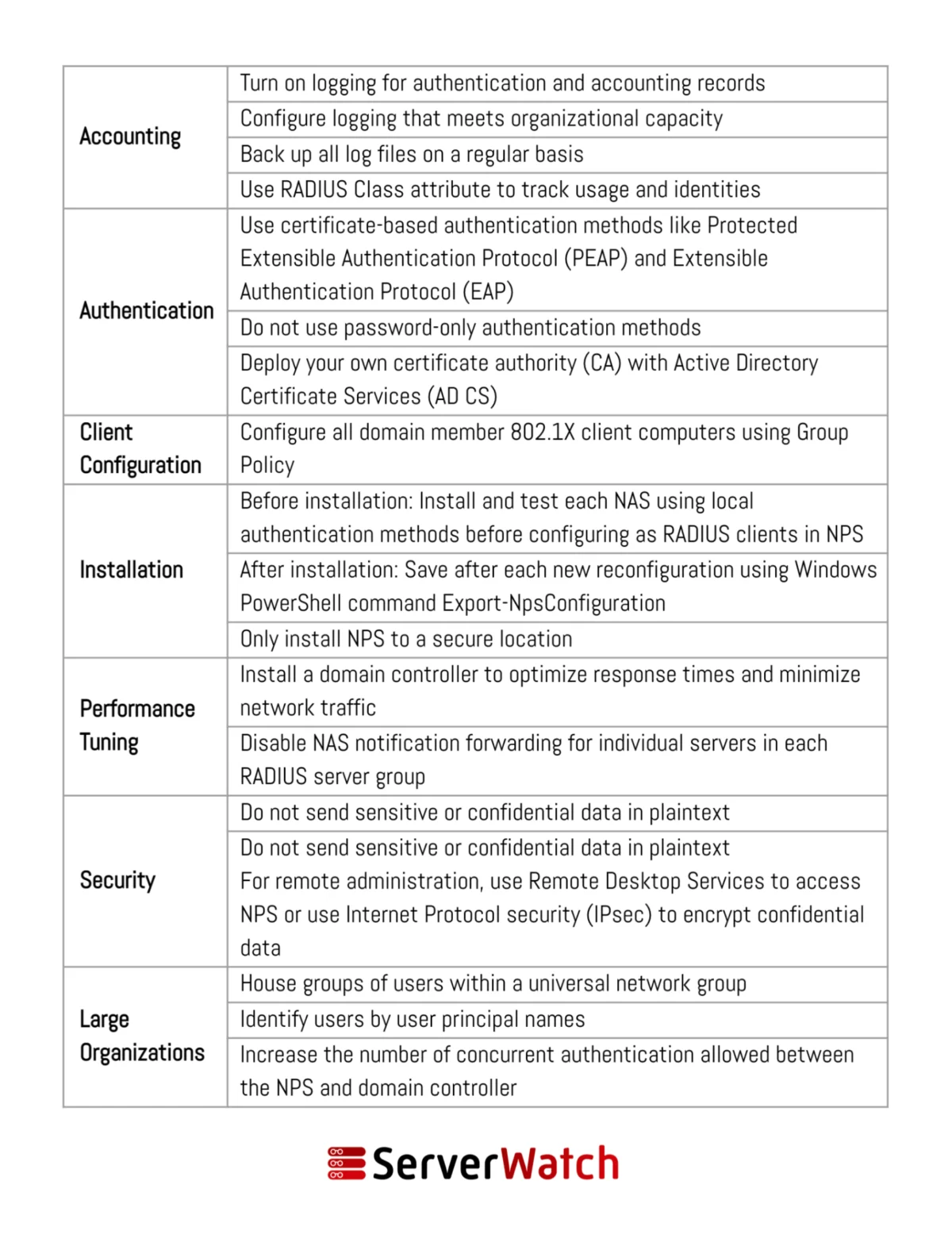
NPS Best Practices for Optimal Performance and Security
To harness the full potential of NPS and ensure its secure and efficient operation, adhering to established best practices is paramount. These recommendations, often provided by Microsoft and cybersecurity experts, cover deployment, configuration, and ongoing management.
-
Dedicated Server for NPS: It is highly recommended to install and run NPS on a dedicated server, rather than sharing it with other critical applications. This isolation prevents resource contention, minimizes the impact of security breaches on other services, and simplifies troubleshooting.
-
Secure RADIUS Ports: Ensure that the RADIUS ports (UDP 1812 for authentication, UDP 1813 for accounting, or their legacy equivalents UDP 1645 and 1646) are properly configured and secured. Restrict access to these ports only to authorized network devices and servers.
-
Strong Shared Secrets: When configuring RADIUS clients (NAS devices), use strong, complex, and unique shared secrets. These secrets are used to authenticate the RADIUS client to the NPS server and vice versa. Weak shared secrets can be easily compromised, leading to unauthorized access. Regularly rotate these secrets.
-
Leverage Active Directory Groups: For efficient user management and policy enforcement, integrate NPS with Active Directory. Instead of assigning policies to individual users, create AD security groups and assign policies to these groups. This simplifies administration and ensures that access rights are automatically updated as users join or leave groups.
-
Implement Multi-Factor Authentication (MFA): For critical access points, such as VPN connections, strongly consider implementing multi-factor authentication. NPS supports various EAP methods that can integrate with MFA solutions, providing an additional layer of security beyond just username and password.
-
Regularly Review and Audit Logs: The accounting logs generated by NPS are invaluable for security monitoring and compliance. Establish a routine for reviewing these logs to identify suspicious activity, unauthorized access attempts, or policy violations. Consider using log aggregation and analysis tools for more efficient monitoring.
-
Keep NPS Updated: Like any software, NPS should be kept up-to-date with the latest security patches and updates from Microsoft. This ensures that any known vulnerabilities are addressed and that the server is protected against emerging threats.
-
Configure Connection Request Policies (CRPs) and Network Policies Carefully: Understand the distinct purpose of CRPs and Network Policies. CRPs control how NPS handles incoming requests, while Network Policies define the conditions for granting access. Misconfigurations in either can lead to security gaps or access disruptions. Define explicit allow policies rather than relying on implicit denies.
-
Backup NPS Configuration: Regularly back up the NPS configuration. This includes the configuration files, network policies, and connection request policies. In the event of a server failure or accidental deletion, a recent backup can significantly reduce downtime and data loss.
-
Test Policies Thoroughly: Before deploying new or modified policies in a production environment, test them thoroughly in a lab or staging environment. This helps to identify any unintended consequences, access issues, or security loopholes before they impact live users.
-
Monitor NPS Performance: Keep an eye on NPS server performance metrics, such as CPU usage, memory consumption, and network traffic. High resource utilization could indicate an impending issue, a denial-of-service attack, or a need for more robust hardware or load balancing.
-
Document Your Configuration: Maintain detailed documentation of your NPS configuration, including server roles, network policies, AD group mappings, and shared secrets. This documentation is crucial for troubleshooting, knowledge transfer, and auditing purposes.
Bottom Line: The Integral Role of NPS in Modern Network Management
Network Policy Server (NPS) has solidified its position as an indispensable tool in the arsenal of network administrators and security professionals. By providing a robust, flexible, and scalable platform for centralized authentication, authorization, and accounting, NPS empowers organizations to significantly enhance their network security posture while simultaneously streamlining administrative tasks.
The integration of NPS into an organization’s network infrastructure is not merely about implementing a technical solution; it’s about establishing a foundational layer of security that underpins all digital operations. The ability to define and enforce granular access policies ensures that sensitive data remains protected, regulatory compliance is met, and network resources are utilized efficiently and responsibly. Furthermore, the simplification of management tasks frees up valuable IT resources, allowing them to focus on more strategic initiatives rather than mundane access control configurations.
In an environment where cyber threats are constantly evolving in sophistication and frequency, a well-implemented and properly managed NPS solution acts as a critical defense mechanism. By adhering to best practices in its deployment and ongoing management, organizations can significantly mitigate the risks associated with network security breaches, prevent unauthorized access, and ensure a seamless and secure operational flow for their authorized users. As businesses continue to expand their digital footprints, the role of NPS in safeguarding these critical infrastructures will only become more pronounced, making it a cornerstone of modern, resilient network management.
To further enhance the functionality and performance of NPS deployments, organizations are encouraged to explore specialized tools. As reviewed by experts, a selection of the best free RADIUS server testing and monitoring tools can provide invaluable insights, aid in troubleshooting, and ensure the continuous optimal operation of NPS, ultimately contributing to a more secure and efficient network environment.
