
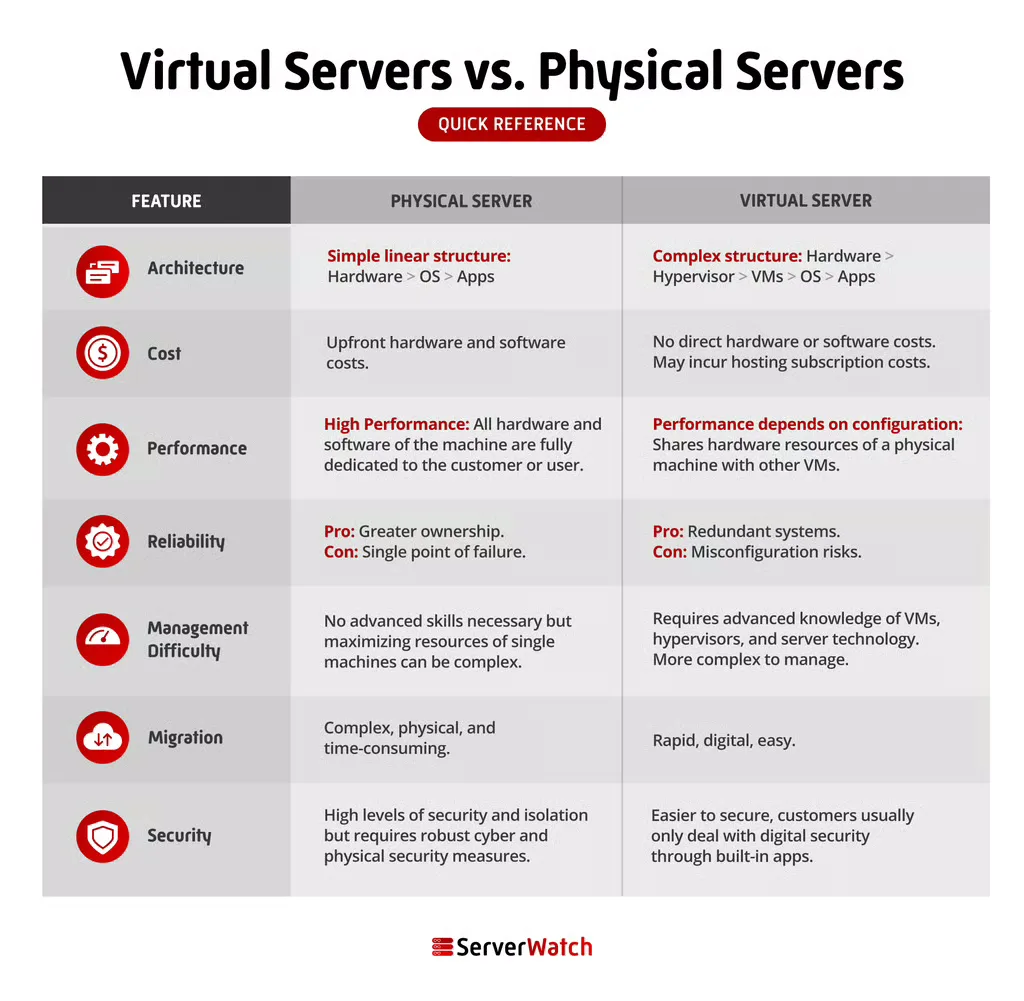

The terms "virtual server" and "physical server" do not refer to a state of tangible or intangible existence but rather to the way the machines are structured. All digital data and systems have to exist and be hosted somewhere in the real world. A platform that runs on the cloud, your personal accounts, a company website you visit online, or an app on your phone can all be traced back to where they are hosted: a real machine. With the ever-increasing demand for computing power and data storage, understanding the fundamental differences between these two foundational elements of IT infrastructure is crucial for businesses and individuals alike.
What is a Physical Server?
A physical server, often referred to as a bare-metal server, is a tangible piece of hardware. It comprises a dedicated machine equipped with a chassis, central processing unit (CPU), graphics processing unit (GPU), random-access memory (RAM), storage drives, a power supply unit, a network interface, and an operating system, along with server application software. These machines are engineered for continuous operation, typically running 24/7, and are specifically designed to serve applications and data to other computers, functioning as web servers, database hosts, or executing other specialized server tasks.
The size and location of a physical server are irrelevant to its classification. Whether it’s a compact desktop computer repurposed for server duties or a large, rack-mounted unit occupying significant space in a data center, it remains a physical server. Organizations can operate these servers privately within their own facilities, providing direct control over hardware and security, or access them through major cloud providers, often referred to as dedicated hosting or bare metal cloud services.
Key Features of Physical Servers
The defining characteristic of a physical server is its exclusive dedication of all its resources to the tasks it performs. This dedicated access translates into significant advantages in terms of security and performance.
- Exclusive Resource Allocation: All CPU, RAM, storage, and network bandwidth are solely for the use of the operating system and applications running on that specific server. This prevents resource contention that can occur in shared environments.
- Uncompromised Performance: Because resources are not shared, physical servers can deliver consistent and maximum performance, crucial for highly demanding applications that require predictable and high throughput.
- Enhanced Security: Direct hardware control and the absence of a hypervisor layer (which is used in virtualization) can offer a more secure environment, as there are fewer potential attack vectors. Isolation is inherent.
- Full Hardware Control: Administrators have complete control over the hardware, allowing for custom configurations, specialized hardware installations (like specific GPUs or network cards), and direct hardware troubleshooting.
- Predictable Costs (in some models): While initial capital expenditure can be high, the operational costs for dedicated hardware can be more predictable over the long term, especially when factoring in maintenance and lifecycle management.
Use Cases for Physical Servers
In the nascent stages of the internet and widespread digital adoption, physical servers were the undisputed backbone of all IT infrastructure. In the early 2000s, the vast majority of servers globally were physical machines, with individual companies typically hosting their own dedicated hardware to power their internal IT systems and public-facing services.
While the landscape has dramatically shifted with the rise of virtualization and cloud computing, physical servers continue to play a vital role in modern IT architectures, particularly for workloads that demand the utmost in performance, security, and direct hardware access.
Popular use cases for physical servers include:
- High-Performance Computing (HPC): Scientific research, complex simulations, weather modeling, and financial risk analysis often require immense, unshared processing power.
- Intensive Gaming Servers: Hosting online multiplayer games demands low latency and high throughput, making dedicated physical hardware a preferred choice.
- Large-Scale Databases: Mission-critical databases that handle massive transaction volumes and require predictable, high-speed I/O benefit from the dedicated resources of physical servers.
- Virtualization Hosts: Ironically, powerful physical servers are often used as the foundation upon which multiple virtual machines are built.
- Core Network Infrastructure: Routers, firewalls, and other critical network devices that manage high volumes of traffic often rely on dedicated physical hardware for reliability and performance.
- Gaming and Streaming Platforms: For services where low latency and consistent high bandwidth are paramount, physical servers offer a stable and powerful solution.
- Big Data Analytics: Processing and analyzing massive datasets can be computationally intensive, and dedicated physical resources can accelerate these operations.
Industries Leveraging Physical Servers
Sectors that place a premium on reliability, raw performance, stringent security, complete isolation, and direct ownership often opt for physical servers. These include:
- Financial Services: For high-frequency trading platforms, core banking systems, and sensitive financial data processing, where security and performance are non-negotiable.
- Healthcare: Storing and processing sensitive patient data (PHI) under strict regulatory compliance often necessitates dedicated, secure hardware.
- Government and Defense: National security applications, classified data processing, and critical infrastructure management demand the highest levels of isolation and control.
- Aerospace: Complex simulations, design processes, and data analysis in aerospace engineering often require significant computing power.
- Logistics and Supply Chain Management: Real-time tracking, optimization algorithms, and large-scale inventory management can benefit from dedicated processing power.
- Manufacturing: Industrial control systems, large-scale design software, and real-time operational monitoring often rely on robust, dedicated hardware.
- Media and Entertainment: High-end video rendering, special effects processing, and large-scale content delivery networks (CDNs) can leverage the power of physical servers.
What is a Virtual Server?
A virtual server, often referred to as a Virtual Machine (VM), is a software-based emulation of a physical server. It is created through a process called virtualization, where a piece of software known as a hypervisor divides the resources of a single physical server into multiple isolated virtual environments. Each VM functions as an independent server, complete with its own operating system, applications, and allocated resources such as CPU, RAM, and storage.
Virtualization is the fundamental technology underpinning cloud computing. It enables cloud providers to efficiently utilize their hardware infrastructure, offering scalable and cost-effective computing resources to a vast number of users simultaneously. Imagine a powerful, state-of-the-art physical server. Through virtualization, this single machine can be partitioned to host numerous virtual servers, each catering to the specific needs of different clients or applications.
When a customer requests a server, a cloud provider can quickly provision a virtual server by allocating a portion of the physical server’s resources. This virtual server is then isolated from other VMs running on the same hardware, ensuring that the performance and security of one VM do not impact another. This dynamic allocation and partitioning are key to the flexibility and scalability of cloud services.
Key Features of Virtual Servers
Virtual servers offer a distinct set of advantages driven by the flexibility and efficiency of virtualization technology.
- Scalability and Flexibility: Resources can be easily scaled up or down as demand fluctuates, often with minimal downtime. New VMs can be provisioned rapidly.
- Cost-Effectiveness: By sharing the resources of a single physical server among multiple VMs, organizations can reduce hardware acquisition, power consumption, and maintenance costs.
- Rapid Deployment: New virtual servers can be deployed in minutes, significantly reducing the time it takes to get applications and services up and running.
- Isolation: While sharing hardware, each VM is isolated from others, preventing issues on one VM from affecting others. This isolation is managed by the hypervisor.
- Portability and Migration: VMs can be easily moved between physical servers, enabling seamless upgrades, maintenance, and load balancing without significant disruption.
- Resource Optimization: Virtualization allows for efficient utilization of hardware resources, reducing idle capacity and minimizing waste.
- Disaster Recovery: VMs can be easily backed up, replicated, and restored, simplifying disaster recovery planning and execution.
Use Cases for Virtual Servers
The applications for virtual servers are virtually limitless, touching almost every aspect of modern digital life. They are instrumental across all industries and for a wide array of computing needs.
Some popular use cases for virtual servers include:
- Web Hosting: Providing reliable and scalable hosting for websites of all sizes, from personal blogs to large e-commerce platforms.
- Application Development and Testing: Creating isolated environments for developers to build, test, and debug applications without impacting production systems.
- Database Management: Hosting databases for various applications, with the ability to scale resources as data volume and query loads increase.
- Cloud Computing Services: The foundation of Infrastructure as a Service (IaaS), Platform as a Service (PaaS), and Software as a Service (SaaS) offerings.
- Virtual Desktops (VDI): Providing users with access to personalized desktop environments from any device, enhancing flexibility and remote work capabilities.
- DevOps and CI/CD Pipelines: Automating software development, testing, and deployment processes through containerization and virtualized environments.
- Disaster Recovery Sites: Maintaining redundant environments for critical applications that can be activated in the event of a primary site failure.
- Running Multiple Operating Systems: Testing compatibility or utilizing specific software that requires a different operating system than the host.
- Sandboxing: Creating isolated environments to safely run untrusted software or analyze potential malware without risking the host system.
Beyond these common use cases, virtual servers are also integral to advanced computing paradigms such as High-Performance Computing (HPC) clusters, complex big data analytics platforms, and secure multi-tenant environments.
Virtual Servers vs. Physical Servers: A Comparative Analysis
Understanding the nuanced differences between physical and virtual servers is essential for making informed decisions about IT infrastructure. The choice between them hinges on specific business requirements, budget constraints, and performance needs.
Architecture
The fundamental distinction lies in their architectural design. A physical server is a singular, dedicated hardware unit. In contrast, a virtual server is a software construct, an abstraction layer built upon the resources of one or more physical servers, managed by a hypervisor. This architectural difference dictates many of the subsequent performance, cost, and management characteristics.

Cost
The cost landscape presents a significant divergence. While physical servers incur substantial upfront capital expenditure for hardware acquisition, along with ongoing costs for power, cooling, maintenance, and physical space, virtual servers, particularly when utilized through cloud providers, typically operate on a pay-as-you-go or subscription model. This can result in lower initial costs and more predictable operational expenses, especially for businesses with fluctuating resource needs. However, for very high, consistent workloads, the long-term total cost of ownership for physical servers might become competitive.
Furthermore, the management overhead for virtual servers in a cloud environment is often borne by the provider. This includes managing hardware failures, physical security, power, and environmental controls, further contributing to cost savings for the end-user.
Performance
Performance is a closely contested area. A physical server, with its dedicated resources, can theoretically offer unparalleled raw performance, especially for applications that are highly sensitive to latency and require maximum I/O throughput. There is no overhead from a hypervisor or shared resource contention.
However, modern virtualization technologies have significantly closed this gap. When properly configured and resourced, virtual servers can deliver performance that is nearly indistinguishable from bare metal for many workloads. The efficiency of hypervisors and the availability of specialized hardware pass-through technologies further enhance VM performance. The key determinant of performance for both types of servers lies in their configuration, the quality of the underlying hardware, the efficiency of the software stack, and the network connectivity.
Reliability
Both physical and virtual servers can be engineered for high reliability, but the mechanisms differ. Physical servers can be equipped with redundant components (power supplies, RAID arrays for storage, multiple network interfaces) to mitigate hardware failures. However, a single critical hardware failure can bring the entire server offline.
Virtualization introduces another layer of reliability. VMs can be designed for high availability through features like live migration (moving a running VM from one host to another without downtime) and automatic failover (if a physical host fails, VMs can be automatically restarted on another available host). The ability to quickly provision new VMs and restore from backups also enhances overall system resilience. The reliability of a virtual server is also dependent on the reliability of the underlying physical infrastructure and the hypervisor’s management capabilities.
Management Difficulty
Managing a physical server involves direct interaction with hardware, including installation, configuration, patching, and troubleshooting. This requires specialized IT expertise and can be labor-intensive.
Virtual server management, especially within a cloud ecosystem, often abstracts away much of the underlying hardware complexity. While managing the VM’s operating system and applications still requires expertise, the tasks of hardware maintenance, power management, and physical security are handled by the cloud provider. This can significantly reduce the management burden on internal IT teams. However, managing a large number of VMs and their interconnectedness can introduce its own set of complexities.
Migration
Migration is a clear advantage for virtual servers. The ability to "snapshot" a VM’s state, copy it to another physical host, or even to a different virtualization platform, makes migration processes significantly simpler and faster. This can be accomplished with just a few clicks and minimal downtime.
Migrating a physical server is a much more involved process. It typically requires physically moving the hardware, reconfiguring network settings, and often involves complex data backup and restoration procedures. This process can be time-consuming, expensive, and carries a higher risk of data loss or system downtime.
Security
Both virtual and physical servers can be secured to a high degree, but the approaches and potential vulnerabilities differ. Physical servers offer inherent isolation by being a single, dedicated unit. Security measures focus on physical access control, network security, and secure configuration of the operating system and applications.
Virtual servers, while isolated from each other by the hypervisor, share underlying physical hardware. This introduces the potential for hypervisor-level vulnerabilities or side-channel attacks. However, modern hypervisors are robust, and cloud providers invest heavily in security. For VMs in the cloud, security is a shared responsibility, with the provider securing the infrastructure and the user securing their operating systems, applications, and data within the VM. Proper configuration, regular patching, and robust access controls are critical for the security of both types of servers.
Bottom Line: Virtual Servers vs. Physical Servers for Your Business
The choice between virtual and physical servers is not a one-size-fits-all decision. Both technologies offer distinct advantages and disadvantages, and the optimal selection depends entirely on an organization’s specific needs, priorities, and strategic objectives.
Virtual servers generally represent a more agile, scalable, and cost-effective solution for a broad spectrum of businesses. They are ideal for:
- Companies seeking rapid deployment and flexibility.
- Organizations with fluctuating resource demands.
- Businesses looking to minimize upfront capital expenditure.
- Those leveraging cloud computing for scalability and accessibility.
- Environments requiring frequent testing, development, or staging.
Physical servers, conversely, remain indispensable for scenarios demanding the absolute highest levels of performance, dedicated control, and uncompromising security. They are a superior choice for:
- Workloads that are extremely performance-sensitive and latency-critical.
- Applications requiring direct hardware access or specialized hardware configurations.
- Organizations with stringent regulatory compliance requirements mandating complete data isolation and control.
- Businesses prioritizing maximum ownership and control over their entire IT stack.
- Mission-critical systems where any potential overhead from virtualization is unacceptable.
As the digital landscape continues to evolve, a hybrid approach, combining the strengths of both physical and virtual servers, is often the most pragmatic and powerful strategy. This allows organizations to leverage the scalability and cost-efficiency of virtualization for general workloads while reserving dedicated physical hardware for their most demanding and critical applications. Exploring solutions like bare metal cloud offerings further blurs the lines, providing dedicated hardware with the agility of cloud management.
For businesses looking to harness the power of modern infrastructure, a thorough assessment of current and future needs, coupled with an understanding of these core server technologies, will pave the way for a robust and efficient IT strategy.
Explore our analysis of the best server virtualization software to start taking advantage of the latest advances in virtualization technology.
