
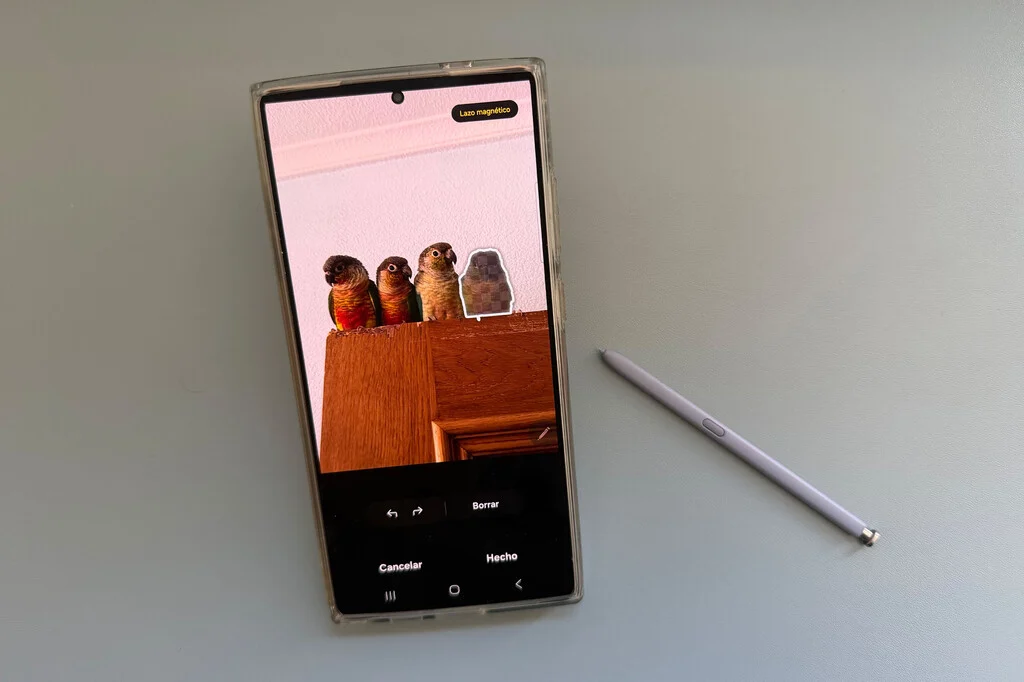

The digital photography landscape on mobile devices continues its rapid evolution, driven significantly by advancements in artificial intelligence. A recent development for users of Samsung Galaxy smartphones, particularly those who have updated their devices to One UI 8.5, marks a subtle yet strategically important shift in how photo editing tools are accessed. The widely utilized "Object Eraser" feature, long a staple for quick, on-device photo retouching, is no longer immediately available by default. Instead, users must now manually activate it through the Gallery app settings, a change that underscores Samsung’s broader initiative to prioritize and integrate its more advanced, server-based Galaxy AI functionalities.
This alteration, while seemingly minor, reflects a larger industry trend towards sophisticated AI-powered editing and raises questions about user experience, feature discoverability, and the technical distinctions between local and cloud-based processing. The Object Eraser, a feature that allowed users to effortlessly remove unwanted elements from their photographs in a matter of seconds, predates the widespread integration of Galaxy AI and was celebrated for its speed and accessibility. Its transition from a readily available tool to an opt-in setting highlights Samsung’s strategic pivot towards its next-generation AI ecosystem.
The Evolution of Mobile Photo Editing and Samsung’s Early Innovations
Before the advent of advanced generative AI capabilities, smartphone manufacturers focused on enhancing core camera functionalities and providing intuitive, on-device editing tools. Samsung, a dominant player in the global smartphone market, has consistently been at the forefront of these innovations. The Object Eraser was introduced as part of Samsung’s commitment to empowering users with professional-grade editing capabilities directly on their devices. Launched initially with One UI 3.1 on devices like the Galaxy S21 series, and subsequently rolled out to a wider range of Galaxy smartphones, it quickly became a fan favorite.
Its primary appeal lay in its simplicity and efficiency. Users could simply tap on an unwanted object – a photobombing stranger, a stray power cable, or an unsightly blemish – and the AI algorithms running locally on the device would intelligently analyze the surrounding pixels and seamlessly remove the selected element. This capability transformed the mobile photo editing experience, allowing users to perfect their shots without needing complex desktop software or extensive technical knowledge. The speed of execution, crucial for quick social media shares or immediate personal use, was a significant differentiator. It represented a major leap from basic cropping and filter applications, moving into the realm of intelligent content-aware manipulation.
The success of Object Eraser demonstrated the potential of on-device AI for practical, everyday applications. It set a precedent for what users could expect from their smartphone cameras and photo galleries, raising the bar for competitors and cementing Samsung’s reputation for delivering innovative software features alongside powerful hardware.
The Strategic Emergence of Galaxy AI and its Impact on Feature Prioritization
The landscape shifted dramatically with the unveiling of Galaxy AI alongside the Galaxy S24 series in January 2024. This comprehensive suite of artificial intelligence features marked a significant strategic commitment by Samsung to integrate generative AI across its mobile ecosystem. Galaxy AI encompasses a wide array of functionalities, from real-time language translation during calls and messages to advanced note summarization and, crucially, sophisticated photo editing capabilities that go beyond simple object removal.
Features like "Generative Edit" within Galaxy AI leverage cloud-based processing to perform more complex image manipulations, such as adjusting the angle of a subject, filling in generated backgrounds, or making significant alterations that require a deeper understanding and reconstruction of image data. These tasks are computationally intensive and often necessitate the vast processing power of remote servers, allowing for results that are far more intricate and nuanced than what can be achieved solely on a device’s local processor.
Samsung’s decision to de-emphasize the standalone Object Eraser by deactivating it by default in One UI 8.5 is a clear manifestation of this strategic pivot. By making Galaxy AI features more prominent and readily accessible, Samsung aims to steer users towards its cutting-edge, cloud-powered solutions. The implicit message is that while the legacy Object Eraser remains available for quick, localized touch-ups, the future of advanced photo manipulation lies within the more powerful, server-backed capabilities of Galaxy AI. This prioritization aligns with Samsung’s broader goal of positioning Galaxy AI as a central pillar of its mobile experience, differentiating its devices in an increasingly competitive market.
Technical Nuances: On-Device vs. Cloud-Based AI Processing
Understanding the technical distinction between on-device and cloud-based AI processing is crucial to comprehending Samsung’s recent changes.
On-Device AI (Edge AI):
- Processing Location: All computations occur directly on the smartphone’s Neural Processing Unit (NPU) or other dedicated AI hardware.
- Advantages:
- Speed: Near-instantaneous results, as there’s no latency associated with sending data to and from a server.
- Privacy: User data (photos) never leaves the device, addressing significant privacy concerns.
- Offline Functionality: Works without an internet connection.
- Reduced Data Usage: No data transfer required.
- Disadvantages:
- Limited Computational Power: Restricted by the device’s hardware, meaning less complex AI models can be run.
- Model Size: AI models must be compact enough to fit on the device.
- Accuracy/Sophistication: May not achieve the same level of accuracy or handle highly complex tasks as cloud AI.
- Examples: Object Eraser, basic image recognition, facial unlocking, real-time language processing (for simple tasks).
Cloud-Based AI:
- Processing Location: Data is sent to powerful remote servers (data centers) where large-scale AI models perform computations.
- Advantages:
- Vast Computational Power: Access to virtually unlimited processing resources, enabling highly complex and sophisticated AI models.
- Advanced Capabilities: Can perform tasks like generative content creation, complex scene reconstruction, highly accurate natural language processing, and intricate image manipulation.
- Scalability: Can handle many users and complex requests simultaneously.
- Model Updates: AI models can be updated and improved continuously on the server side without requiring device software updates.
- Disadvantages:
- Latency: Data transfer to and from the cloud introduces delays.
- Internet Dependency: Requires an active and stable internet connection.
- Privacy Concerns: User data must be transmitted to external servers, raising questions about data handling and security, although reputable companies employ robust encryption and privacy protocols.
- Data Usage: Consumes mobile data.
- Examples: Galaxy AI’s Generative Edit, Google Photos’ Magic Editor, ChatGPT, large language models.
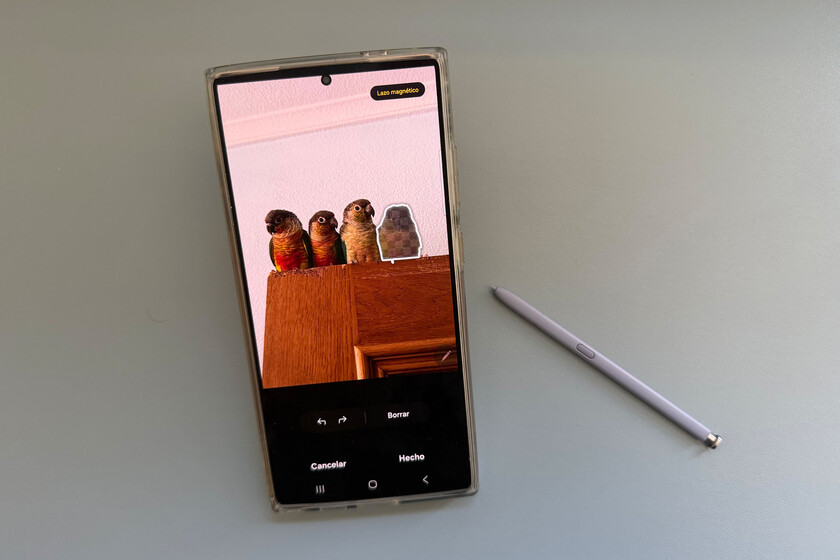
The Object Eraser, designed for immediate, local adjustments like removing a person in the background before sending a photo via WhatsApp, is a prime example of efficient on-device AI. Its strength lies in its speed and privacy. Conversely, Galaxy AI’s more advanced photo tools are intended for tasks that involve reconstructing backgrounds or performing complex, creative edits – tasks that benefit immensely from the superior computational power and vast data sets available in Samsung’s cloud infrastructure. By defaulting to the cloud-based solutions, Samsung is effectively guiding users towards experiences that, while potentially slower or requiring connectivity, promise a higher degree of sophistication and transformative results.
Reactivating the Familiar: A Step-by-Step Guide for Object Eraser Enthusiasts
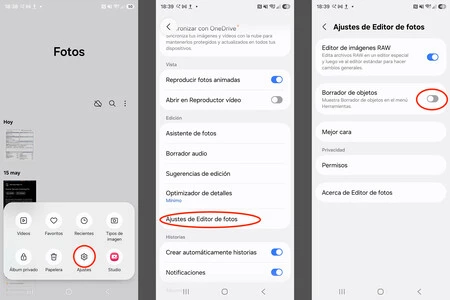
For users who prefer the speed and simplicity of the original Object Eraser, or who wish to perform quick edits without an internet connection, its continued availability is a relief. The process to reactivate it is straightforward, albeit now requiring a few additional taps:
- Open the Gallery App: Navigate to the standard photo gallery application on your Samsung Galaxy device.
- Access the Menu: In the bottom right corner of the screen, locate and tap the three horizontal lines or the "hamburger" icon, which represents the Gallery menu.
- Enter Settings: From the menu options, select "Settings."
- Navigate to Photo Editor Settings: Within the Settings menu, find and tap on "Photo editor settings."
- Activate Object Eraser: Here, you will find a toggle switch labeled "Object eraser." Simply tap this switch to activate the feature.
Once activated, the Object Eraser will reappear as the first option when you select the "Edit" function for any photo in your gallery, restoring its familiar accessibility. This process ensures that users retain control over their preferred editing workflow, balancing the introduction of new, advanced AI capabilities with the utility of established tools. The decision to make it an opt-in feature rather than removing it entirely indicates Samsung’s understanding of user loyalty to existing functionalities and the diverse needs of its user base.
User Experience, Feedback, and the Balance of Innovation
The shift in Object Eraser’s default status is likely to elicit mixed reactions from the Samsung user base. Long-time users accustomed to its immediate availability might experience initial confusion or frustration upon discovering its absence. The need to delve into settings to reactivate a previously prominent feature adds a minor hurdle to the user experience, potentially leading to a temporary perception of degradation in usability. However, for users who embrace the latest AI advancements, this change might be seen as a natural progression, streamlining the interface by surfacing more powerful tools by default.
This situation highlights a perennial challenge for technology companies: how to introduce groundbreaking innovations without alienating users accustomed to established workflows. The balance between pushing technological boundaries and maintaining user familiarity is delicate. Samsung’s approach here – making the advanced AI the default while retaining the legacy option – attempts to cater to both early adopters of AI and those who prefer the tried-and-true methods.
Feedback from the community will be crucial in determining the long-term success of this strategy. If a significant portion of users reactivate the Object Eraser, it might suggest that the immediate, on-device utility still holds considerable value. Conversely, if users quickly adapt to and prefer the Generative Edit tools, it would validate Samsung’s strategic prioritization. This iterative process of introducing new features, observing user interaction, and refining the user experience is a hallmark of software development in the mobile sector.
Samsung’s Broader AI Strategy and the Competitive Landscape
Samsung’s move with the Object Eraser is not an isolated incident but rather a piece of a much larger, cohesive strategy to establish itself as a leader in mobile AI. The company is investing heavily in integrating AI across its device ecosystem, from smartphones and tablets to wearables and home appliances. This vision, articulated in various keynotes and product launches, positions AI as the core differentiator for future Samsung products, aiming to create more intuitive, personalized, and intelligent user experiences.
In the competitive smartphone market, AI capabilities have become a critical battleground. Google, with its Pixel line, has long championed on-device AI, most notably with its "Magic Eraser" feature in Google Photos, which offers similar object removal capabilities. Apple, too, has steadily integrated AI into its iOS photo editing suite, offering sophisticated subject isolation and background manipulation tools. However, Samsung’s aggressive push with Galaxy AI, particularly its emphasis on cloud-based generative capabilities, positions it as a direct competitor to these established players, often surpassing them in the sheer breadth and depth of its AI offerings.
The decision to de-emphasize a local AI feature in favor of a cloud-based one also has implications for data monetization and ecosystem lock-in. By driving users towards its cloud services, Samsung can potentially gather more anonymized data to further refine its AI models, improve service offerings, and create a stronger dependency on its proprietary ecosystem. This approach mirrors strategies employed by other tech giants that leverage cloud infrastructure to enhance their AI capabilities and expand their service revenue streams.
Implications for Future One UI Updates and the Future of Mobile Photography
Looking ahead, the changes introduced in One UI 8.5 regarding the Object Eraser are indicative of a broader trend that will likely continue in future Samsung software updates, such as One UI 9 and beyond. We can anticipate further integration of Galaxy AI features, potentially with more seamless transitions between on-device and cloud processing, or even hybrid models that intelligently leverage both.
The future of mobile photography will likely involve an increasing fusion of user intent and AI execution. Instead of merely removing an object, AI might soon anticipate user desires, offering suggestions for improvements, generating entirely new elements, or transforming images in ways previously unimaginable. The distinction between a "photo" and an "AI-generated image" will become increasingly blurred, pushing the boundaries of what is possible with a smartphone camera.
Samsung’s current strategy aims to guide users towards these advanced capabilities, ensuring they are at the forefront of this technological shift. While the Object Eraser served its purpose admirably in an earlier era, the company is clearly betting on the superior power and flexibility of cloud-driven AI to define the next generation of mobile photo editing. The continued availability of the legacy tool, even if hidden behind a setting, provides a crucial bridge for users as they navigate this evolving digital landscape, ensuring that convenience and user choice remain paramount even amidst radical innovation.
In conclusion, the subtle change regarding the Object Eraser in One UI 8.5 is far more than a minor software tweak. It is a microcosm of Samsung’s expansive AI strategy, a testament to the ongoing technical debate between local and cloud processing, and a significant step in the continuous evolution of mobile photography. As Galaxy AI matures, users can expect an even richer and more intelligent photo editing experience, albeit one that may occasionally require a brief delve into the settings to retrieve a beloved, classic tool.
