
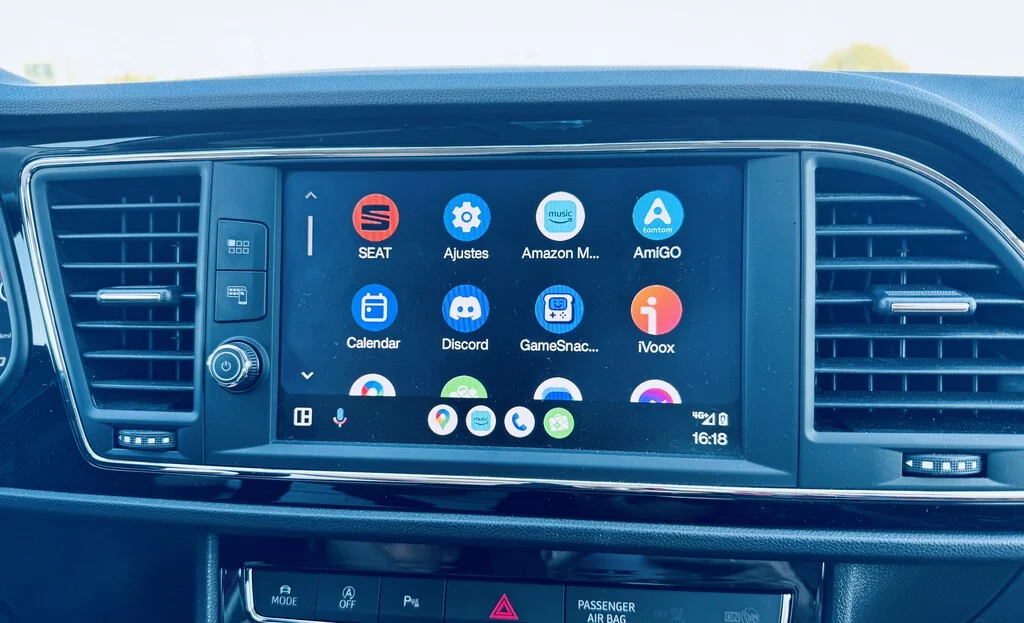

The contemporary automotive landscape is characterized by the ubiquitous presence of digital displays within vehicle dashboards. These sophisticated infotainment systems frequently integrate advanced connectivity platforms, with Android Auto emerging as a prominent solution for seamless smartphone integration. This article provides an in-depth exploration of Android Auto, detailing its functionality, historical evolution, technical requirements, application ecosystem, competitive positioning, and broader implications for the automotive industry and driver experience.
The Rise of In-Car Connectivity: Android Auto’s Genesis and Purpose
Android Auto represents Google’s strategic initiative to extend the Android smartphone experience into the vehicle environment. Fundamentally, it operates as a projection system, mirroring select applications and functionalities from an Android mobile device onto the car’s built-in infotainment screen. This design philosophy underscores a critical distinction: Android Auto is not an independent operating system running natively on the vehicle’s hardware, but rather a sophisticated interface powered by the connected smartphone. Its primary objective is to enhance driver safety and convenience by enabling access to essential smartphone features—such as navigation, communication, and multimedia—through a simplified, voice-controlled, and visually optimized interface that minimizes driver distraction.
Launched in 2015, Android Auto was conceived in response to the growing demand for smartphone integration in vehicles. Prior to its introduction, drivers often resorted to unsafe practices, such as manipulating their phones directly while driving. Google, recognizing this safety concern and the potential for a new digital frontier, developed Android Auto to provide a standardized, intuitive, and safer method for accessing mobile content. Its evolution has been marked by continuous updates, including significant UI redesigns like "Coolwalk" and the recent integration of advanced AI capabilities.
Core Functionality and Enhanced Driving Experience

At its core, Android Auto transforms the vehicle’s display into an extension of the Android phone. When a compatible Android smartphone is connected, the car’s screen presents a customized, car-friendly interface featuring large icons, simplified menus, and voice command integration. This design prioritizes ease of use and reduces the cognitive load on the driver, aligning with automotive safety standards.
Key functionalities include:
- Navigation: Integration with popular mapping applications such as Google Maps and Waze, providing real-time traffic updates, turn-by-turn directions, and estimated arrival times.
- Communication: Hands-free calling, sending and receiving messages via WhatsApp, Telegram, and SMS through voice commands or pre-set replies.
- Multimedia: Streaming music from services like Spotify, YouTube Music, and Pandora, as well as podcasts and audiobooks, all controllable via the car’s interface or voice.
- Voice Assistant: Initially powered by Google Assistant, now transitioning to Gemini, enabling natural language interactions for tasks ranging from setting destinations to checking weather or controlling smart home devices.
The system’s reliance on the connected smartphone for processing power, data connectivity, and application management means that the user experience is largely dictated by the phone’s performance and network signal. This design allows for rapid updates and feature enhancements to be rolled out via the phone’s operating system, rather than requiring complex vehicle firmware updates.
Technical Requirements and Connectivity Modalities
For Android Auto to function, several prerequisites must be met, encompassing both the vehicle’s infotainment system and the user’s mobile device, along with the method of connection.
Vehicle Compatibility:
The first and most crucial requirement is that the car’s infotainment system must be equipped with Android Auto support. This feature is now standard or an available option in a vast number of modern vehicles across a wide range of manufacturers. Google maintains an official list of compatible vehicles, which, though extensive, is not always immediately updated to reflect the latest models. Industry data suggests that over 500 car models from more than 50 brands now support Android Auto, making it accessible to a significant portion of the global automotive market. Manufacturers like Audi, BMW, Ford, Honda, Hyundai, Kia, Mercedes-Benz, Nissan, Opel, Peugeot, Renault, SEAT, Toyota, Volkswagen, and Volvo are among the many that have embraced this technology. However, a growing trend sees some manufacturers developing proprietary infotainment systems, potentially limiting the direct integration of third-party platforms in future models. Therefore, prospective buyers are advised to consult the specific vehicle’s technical specifications or manufacturer’s website for the most accurate compatibility information.

Mobile Device Specifications:
- Operating System: An Android smartphone running Android Pie (Android 9.0) or a newer version is required for basic wired Android Auto functionality. This covers a substantial majority of active Android devices today.
- Data Plan: A robust mobile data plan is essential, as Android Auto relies on the phone’s internet connection for navigation updates, music streaming, and other online services.
- Wireless Android Auto: For wireless connectivity, the requirements are more stringent. The phone must run Android 11 or later, with exceptions for Google Pixel and Samsung Galaxy devices, which may support wireless Android Auto on earlier Android versions (e.g., Android 10). Additionally, the phone must support a 5 GHz Wi-Fi connection. Critically, the vehicle’s infotainment system itself must also be specifically designed to support wireless Android Auto.
Connectivity Methods:
Android Auto offers two primary methods for connecting a smartphone to the vehicle’s display:
- Wired Connection: This is the universally supported method across all Android Auto-compatible vehicles. It involves connecting the Android phone to the car’s USB port using a high-quality USB cable. Google recommends using short, robust cables bearing the USB icon and advises against the use of USB hubs, extenders, or similar accessories, which can introduce connectivity issues or data transfer instabilities. The wired connection offers a reliable link and simultaneously charges the phone, albeit often at a slower rate than dedicated fast chargers.
- Wireless Connection: This more convenient method eliminates the need for physical cables, establishing a connection via Wi-Fi and Bluetooth. While highly desirable, wireless Android Auto is not universally supported by all compatible vehicles. It often requires specific hardware within the car’s head unit or may necessitate software updates. For vehicles lacking native wireless support, third-party adapters (dongles) are available in the market, allowing users to convert a wired Android Auto system into a wireless one. These adapters typically plug into the car’s USB port and create a local Wi-Fi network for the phone to connect to. The convenience of wireless connectivity, however, can sometimes come at the cost of increased battery drain on the smartphone and potential intermittent connection issues depending on the quality of the car’s Wi-Fi module or the adapter.
The choice between wired and wireless connectivity often depends on user preference, vehicle capabilities, and the need for phone charging during commutes. Both methods are designed to provide a consistent and safe in-car experience.
A Rich Application Landscape
The utility of Android Auto is profoundly shaped by its ecosystem of compatible applications. Google carefully curates the types of apps allowed on the platform, prioritizing those that enhance the driving experience without introducing undue distraction. The primary categories of applications available for Android Auto are navigation, messaging, and multimedia.
Key Categories and Popular Applications:

- Navigation: Beyond Google Maps and Waze, other GPS navigation apps like Sygic, TomTom Go Navigation, and Here WeGo are available, offering features such as offline maps, speed camera alerts, and advanced lane guidance. These applications are critical for route planning, avoiding traffic congestion, and ensuring drivers reach their destinations efficiently.
- Messaging: Communication apps like WhatsApp, Telegram, and Google Messages allow drivers to receive notifications and respond to messages using voice commands or pre-defined quick replies, minimizing the need to interact with the phone directly. This significantly enhances safety by keeping hands on the wheel and eyes on the road.
- Multimedia: A vast array of audio streaming services is supported, including Spotify, YouTube Music, Amazon Music, Tidal, and Deezer. Podcast players like Pocket Casts and radio apps are also compatible, providing entertainment options for any journey.
- Other Utilities: While less common, certain utility apps such as weather applications or parking finders are also integrated, offering practical information relevant to the driving context.
App Installation and Sideloading:
Installing compatible applications for Android Auto is generally straightforward. Users simply download the desired app from the Google Play Store onto their Android smartphone. If the app is officially supported by Android Auto, its icon will automatically appear on the car’s infotainment screen upon connection. This seamless integration ensures a consistent and curated experience.
However, a niche community of users explores the installation of unofficial or experimental applications not found on the Google Play Store. This "sideloading" often involves using third-party tools like Android Auto Apps Downloader (AAAD). While this offers access to a wider range of functionalities, it comes with inherent risks, including potential instability, security vulnerabilities, and a lack of official support. Users engaging in sideloading must be aware of these risks and exercise caution.
The Dawn of AI: Gemini’s Integration
A significant recent development in the Android Auto ecosystem is the integration of Gemini, Google’s advanced AI model, as the successor to Google Assistant. This transition marks a pivotal step towards a more intelligent and conversational in-car experience. Gemini is designed to offer more nuanced understanding of voice commands, enhanced contextual awareness, and the ability to perform more complex multi-step tasks that were previously beyond the capabilities of Google Assistant.
For instance, Gemini aims to facilitate more natural interactions, allowing drivers to ask follow-up questions, combine multiple requests, and receive more personalized assistance. While the rollout of Gemini to Android Auto is ongoing and still in its early stages, early reports suggest a substantial improvement in voice command accuracy and the scope of possible interactions. However, as with any nascent AI technology, initial implementation can encounter unexpected challenges or "bugs," as seen with some surreal location-related glitches reported during early testing. Despite these initial hurdles, the long-term vision for Gemini in Android Auto is to provide an intelligent co-pilot, enhancing navigation, communication, and overall driving productivity through sophisticated AI capabilities.
Competitive Landscape: Android Auto vs. Rivals

Android Auto operates within a competitive landscape, primarily contending with Apple CarPlay and Google’s own Android Automotive OS. Understanding these distinctions is crucial for grasping the strategic positioning of each platform.
Apple CarPlay:
Apple CarPlay is the direct competitor to Android Auto, offering a similar phone-mirroring functionality for iOS devices. It mirrors a simplified version of the iPhone’s interface onto the car’s display, providing access to Apple Maps, Apple Music, iMessage, and a curated selection of third-party apps. Both platforms share the common goal of reducing driver distraction by integrating smartphone features safely. The choice between Android Auto and Apple CarPlay largely depends on the user’s smartphone ecosystem preference (Android vs. iOS). From a market perspective, both systems have achieved widespread adoption, with many modern vehicles supporting both, allowing drivers to choose based on their device.
Android Automotive OS:
Crucially, Android Auto should not be confused with Android Automotive OS. While both are Google products for vehicles, their underlying architectures and functionalities are vastly different.
- Android Auto: A phone projection system. It requires a connected smartphone to function, essentially acting as a "dumb terminal" for the phone’s apps and data.
- Android Automotive OS: A full, standalone operating system built directly into the vehicle’s hardware. It does not require a smartphone to operate, running apps natively on the car’s infotainment system. It is a deeper integration, controlling vehicle functions (like climate control, vehicle settings) in addition to infotainment. Examples include systems found in newer Volvo, Polestar, and General Motors vehicles.
Android Automotive OS represents Google’s more ambitious play in the automotive sector, aiming for a deeper integration with vehicle systems and offering manufacturers a comprehensive, customizable platform. While Android Auto focuses on smartphone mirroring, Android Automotive OS aims to be the brain of the car’s digital experience. This distinction is significant as some manufacturers might opt for Android Automotive OS, potentially sidelining Android Auto in future models if they choose a fully integrated Google-powered vehicle platform.
Broader Impact and Future Outlook
The prevalence and ongoing evolution of Android Auto carry significant implications for driver safety, technological convergence, and the future trajectory of the automotive industry.

Driver Safety and Convenience:
One of the most profound impacts of Android Auto is its contribution to driver safety. By presenting essential smartphone functionalities in a simplified, glanceable, and voice-controlled format, it reduces the temptation for drivers to pick up their phones. Features like hands-free calling, voice-activated navigation, and voice-controlled music playback are direct interventions against distracted driving, a leading cause of accidents. The convenience it offers—from real-time traffic updates to seamless access to personal playlists—enhances the overall driving experience, making commutes more enjoyable and less stressful.
Technological Convergence and Industry Trends:
Android Auto exemplifies the growing convergence of consumer electronics and automotive technology. It highlights the smartphone’s central role in modern life, extending its utility into the vehicle. This trend has pushed automotive manufacturers to prioritize sophisticated infotainment systems, often collaborating with tech giants like Google and Apple.
However, the future landscape presents both opportunities and challenges. While Android Auto’s widespread adoption underscores its value, the emergence of Android Automotive OS and proprietary OEM systems suggests a diversification in strategies. Some manufacturers might seek to retain greater control over the in-car experience and monetize features through subscription models, potentially limiting the prominence of third-party mirroring solutions. This creates a dynamic tension between open platforms like Android Auto and closed, proprietary systems. Over-the-air (OTA) updates for vehicle software, deeper integration with vehicle telematics, and personalized user profiles are anticipated trends that Android Auto will need to adapt to, or potentially be superseded by more integrated solutions.
Conclusion
Android Auto has firmly established itself as an indispensable feature in modern vehicles, offering a safe, convenient, and intuitive way to integrate smartphone functionalities into the driving experience. Its continuous evolution, from user interface enhancements to the integration of advanced AI with Gemini, demonstrates Google’s commitment to maintaining its relevance in the rapidly changing automotive technology sector. While facing competition from Apple CarPlay and the strategic shift towards native Android Automotive OS by some manufacturers, Android Auto’s accessibility, robust application ecosystem, and focus on driver safety ensure its continued importance for a vast number of drivers. As the automotive industry continues its digital transformation, Android Auto will undoubtedly play a crucial role in shaping how drivers interact with their vehicles and the digital world beyond.
