


Samsung is poised to deliver a significant overhaul to its native Voice Recorder application, a cornerstone utility for millions of Galaxy users, with the impending release of One UI 9. While many One UI updates typically focus on visual refinements, this particular revision is distinguished by profound advancements "under the hood," fundamentally altering how audio is processed and managed. This update is not merely a cosmetic refresh; it represents a strategic pivot towards more sophisticated, AI-driven functionality, designed to elevate the Voice Recorder from a basic utility to a powerful productivity tool. The core of this transformation lies in the integration of cloud-based artificial intelligence for transcription, alongside crucial enhancements in file management, export versatility, and user interface ergonomics.
The Dawn of Precision: Cloud-Powered AI Transcription
Historically, the Samsung Voice Recorder app has relied exclusively on the local processing capabilities of the device itself to generate audio transcriptions. While this on-device approach offers advantages in terms of privacy and offline functionality, it often struggles with the complexities of real-world audio environments. Issues such as multiple interlocutors speaking simultaneously, diverse accents, or the ubiquitous presence of background noise frequently lead to inaccuracies, undermining the utility of the feature precisely when precision is most critical. Summarization features, by contrast, have previously leveraged cloud resources, indicating Samsung’s prior recognition of the cloud’s superior processing power for certain AI tasks.
The upcoming version of the Voice Recorder app will introduce a paradigm shift by offering users the option to upload recordings to Samsung’s secure cloud servers for AI-powered transcription. This move is not a replacement for local processing, which will remain available, but rather a robust alternative designed to address the most persistent complaints regarding transcription accuracy. Samsung asserts that this cloud-based methodology delivers significantly higher precision, a claim substantiated by the inherent advantages of cloud computing. Cloud AI models benefit from vast computational resources, access to larger and more diverse training datasets, and the ability to be continuously updated and refined without requiring device-specific software updates. This allows for more sophisticated algorithms capable of disentangling complex audio signals, distinguishing between speakers, and accurately interpreting nuanced speech patterns, even amidst significant environmental interference.
For professionals such as journalists conducting interviews, students recording lectures, or business users documenting lengthy meetings, the implications are substantial. The enhanced accuracy promised by cloud transcription means less time spent manually correcting errors and more reliable documentation of critical information. This feature also aligns perfectly with Samsung’s broader Galaxy AI initiative, which seeks to infuse advanced artificial intelligence capabilities across its ecosystem. The groundwork for such functionality has been laid with features like "Transcript Assist" within the Samsung Notes app, which allows users to convert lengthy audio recordings into manageable text summaries. With this update, the Voice Recorder app gains its own powerful transcription engine, providing a more direct and integrated pathway for transforming spoken word into searchable, editable text.
However, the shift to cloud processing naturally raises considerations regarding data privacy and security. Uploading sensitive audio content to external servers, regardless of the vendor, necessitates a robust framework for data protection. While Samsung has a strong track record in safeguarding user data, users will likely need to explicitly consent to cloud processing, and Samsung will be expected to provide clear assurances regarding data encryption, anonymization, and retention policies. The user’s ability to choose between local and cloud processing is a critical aspect of this feature, empowering individuals to weigh the benefits of enhanced accuracy against their personal privacy preferences, particularly for "delicate" or confidential recordings. This dual-processing model reflects a thoughtful approach to AI integration, balancing advanced functionality with user control.

Breaking Free from M4A: Versatile Export Options
Beyond the significant leap in transcription capabilities, the One UI 9 update for the Voice Recorder app also introduces a highly practical, albeit less glamorous, enhancement: the ability to export recordings into multiple audio formats. Currently, the app defaults to saving all recordings in M4A format, a container format for audio often associated with Apple products. While M4A offers good compression and quality, its compatibility can sometimes be a hindrance when sharing files with non-Samsung devices, specific software applications, or when needing to integrate audio into projects that require more universally accepted formats. This often necessitates the use of third-party external converters, adding an extra step to the user workflow and potentially compromising audio quality or data integrity.
The forthcoming update is expected to introduce options to export recordings to more widely compatible formats, specifically mentioning MP3 and WAV. MP3 remains the most ubiquitous lossy audio format, offering a balance of small file size and acceptable quality for general listening and sharing. WAV, on the other hand, is a lossless format renowned for its uncompressed, high-fidelity audio, making it ideal for professional use cases such as audio editing, archiving, or when absolute sound quality is paramount. While Samsung has yet to confirm the exact range of supported formats, the inclusion of MP3 and WAV alone would resolve a significant friction point for users.
This seemingly minor addition has substantial implications for workflow efficiency and interoperability. Students can easily share lecture recordings with classmates using diverse devices, professionals can seamlessly integrate audio notes into presentations or reports, and content creators gain more flexibility in their production pipelines. It democratizes the utility of the Voice Recorder, ensuring that recordings are not confined within a proprietary ecosystem but can flow freely across platforms and applications, enhancing the overall value proposition of the app for a broader user base.
Intelligent Organization: Redefining Audio Management
As users increasingly rely on their smartphones for capturing audio, the cumulative effect is often a rapidly growing, unmanageable list of recordings. This digital clutter can make it exceedingly difficult to locate specific audio files, leading to frustration and reduced productivity. Recognizing this common pain point, Samsung’s updated Voice Recorder app will introduce a dedicated "Storage Management" section designed to intelligently categorize and organize recordings.
This new feature will automatically group audio files into intuitive categories such as "large recordings," "short recordings," "old recordings," and even "spam calls." This proactive organization system represents a significant step beyond mere chronological listing, offering users a more semantic and contextual approach to managing their audio library. For instance, quickly locating a brief memo from weeks ago or reviewing an extensive meeting transcript becomes vastly simpler when files are pre-sorted. The "spam calls" category, if implemented accurately, could also offer a valuable tool for reviewing or reporting unwanted communications, further enhancing the app’s utility beyond pure recording.
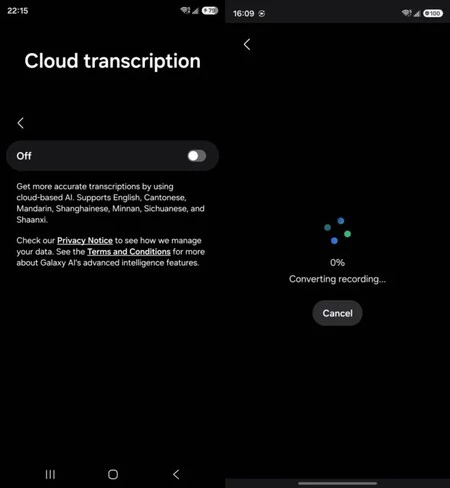
The integration of such intelligent categorization underscores a broader trend in mobile operating systems towards AI-powered file management, aiming to alleviate the cognitive load on users by automating routine organizational tasks. While the app itself doesn’t fundamentally change what it does—it still records audio—it profoundly transforms how users interact with and derive value from their accumulated recordings. This enhancement improves user experience by reducing friction, saving time, and preventing the overwhelming feeling of digital disorganization that often accompanies frequent use of such utilities. It reflects a maturing approach to software design, where not just features, but also the lifecycle and management of generated content, are given paramount importance.
Refined Aesthetics and Usability: Interface Enhancements
Beyond the functional improvements, the One UI 9 update also brings several subtle yet impactful refinements to the Voice Recorder’s user interface (UI) and user experience (UX). These visual tweaks are designed to enhance the app’s modern aesthetic and improve usability, aligning with Samsung’s overall One UI design philosophy of clarity, accessibility, and intuitive interaction.
One notable change is the introduction of an animated waveform display during playback from the recording list. Instead of a static progress bar, users will now see a dynamic visual representation of the audio, mirroring the ebb and flow of sound. This animated waveform provides richer visual feedback, making it easier to gauge the intensity and structure of the audio at a glance, and generally offering a more engaging and modern playback experience. Such visual cues can also be subtly helpful for quickly identifying silent passages or peaks in volume without needing to actively listen.
Additionally, the app’s settings screen will undergo a reorganization. The descriptive text for each option will now appear beneath its corresponding toggle switch, rather than being confined within the same card element. This seemingly minor adjustment contributes to a cleaner, less cluttered layout, improving readability and making it easier for users to quickly understand the function of each setting. By optimizing the visual hierarchy and spacing, Samsung aims to reduce cognitive load and enhance the overall user-friendliness of the configuration process. These UI/UX refinements, while not as revolutionary as cloud transcription, collectively contribute to a more polished, intuitive, and satisfying user experience, reinforcing Samsung’s commitment to holistic software development.
Strategic Context: One UI 9 and Samsung’s AI Vision
This comprehensive update to the Voice Recorder app is emblematic of Samsung’s broader strategic direction, particularly as articulated through its One UI development and the ambitious Galaxy AI initiative. One UI 9, which is currently undergoing beta testing and is expected to roll out more widely in the coming weeks, serves as the foundational platform for these advanced features. Each iteration of One UI aims to optimize the Android experience for Samsung devices, integrating hardware and software seamlessly. With One UI 9, the focus is clearly expanding beyond mere aesthetic enhancements to include a deeper integration of artificial intelligence that empowers core applications.
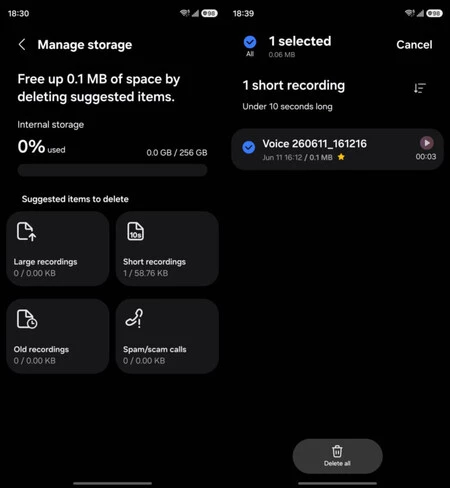
The enhancements to the Voice Recorder position it as a key component of the Galaxy AI ecosystem. By offering highly accurate transcription and intelligent organization, Samsung is directly addressing user needs for enhanced productivity and accessibility, areas where AI can deliver transformative value. This move also strengthens Samsung’s competitive stance against industry rivals like Apple and Google, both of whom have made significant strides in on-device and cloud-based AI for productivity apps. Google’s Pixel phones, for instance, are renowned for their Recorder app’s real-time, on-device transcription capabilities. By introducing a robust cloud-based option, Samsung ensures its Voice Recorder can compete effectively, offering a compelling alternative that may surpass local processing in accuracy for challenging audio.
The rollout of One UI 9, and consequently this updated Voice Recorder app, will be a phased process, beginning with beta participants and then extending to a wider range of compatible Galaxy devices. The timing of these updates is critical; launching these features in conjunction with a major OS release ensures maximum impact and consistent user experience across the updated device portfolio. This update is not an isolated event but a carefully orchestrated step in Samsung’s long-term vision to embed sophisticated AI capabilities into the daily lives of its users, transforming how they interact with their devices and manage information.
Broader Implications and Market Impact
The transformation of the Samsung Voice Recorder app carries significant implications for both users and the wider mobile technology market. For users, particularly those who frequently record audio, the update promises a substantial boost in productivity and reliability. The ability to obtain highly accurate transcriptions with minimal effort, coupled with improved file management and versatile export options, streamlines workflows and reduces the time spent on administrative tasks. This makes the smartphone an even more indispensable tool for students, professionals, and anyone needing to capture and process spoken information efficiently. Enhanced accessibility is another key benefit, as accurate transcriptions can aid individuals with hearing impairments or those who prefer to consume content in text format.
For Samsung, this update reinforces its commitment to building a comprehensive and intelligent software ecosystem. By enhancing a fundamental utility with advanced AI, Samsung differentiates its devices in an increasingly crowded market. It showcases the practical applications of its Galaxy AI strategy, demonstrating tangible benefits that go beyond marketing rhetoric. This strategic enhancement can also influence the competitive landscape for third-party transcription apps, as a robust native solution may reduce the need for external services, potentially consolidating more user activity within Samsung’s own ecosystem. The move also highlights the ongoing debate and development in the field of AI processing: the optimal balance between powerful, cloud-based intelligence and the privacy and immediacy offered by on-device AI. Samsung’s approach of offering both options provides users with flexibility and control, reflecting a nuanced understanding of these technological trade-offs.
In conclusion, the impending update to the Samsung Voice Recorder app, arriving with One UI 9, marks a pivotal moment in its evolution. Far from a superficial facelift, these changes delve deep into the core functionality of the application, leveraging cloud-powered AI to deliver unprecedented accuracy in transcription. Coupled with practical enhancements like multi-format export and intelligent storage management, and refined UI elements, the Voice Recorder is transforming from a simple recording tool into a sophisticated, AI-driven productivity hub. This underscores Samsung’s strategic vision for One UI 9 and its broader Galaxy AI initiative, signaling a future where even the most basic utilities are imbued with intelligent capabilities to enhance user experience and efficiency fundamentally. While easy to overlook in the grand announcement of a new OS, these "under-the-surface" changes are precisely the kind that users will notice and appreciate the first time they need to transcribe something truly important.
