
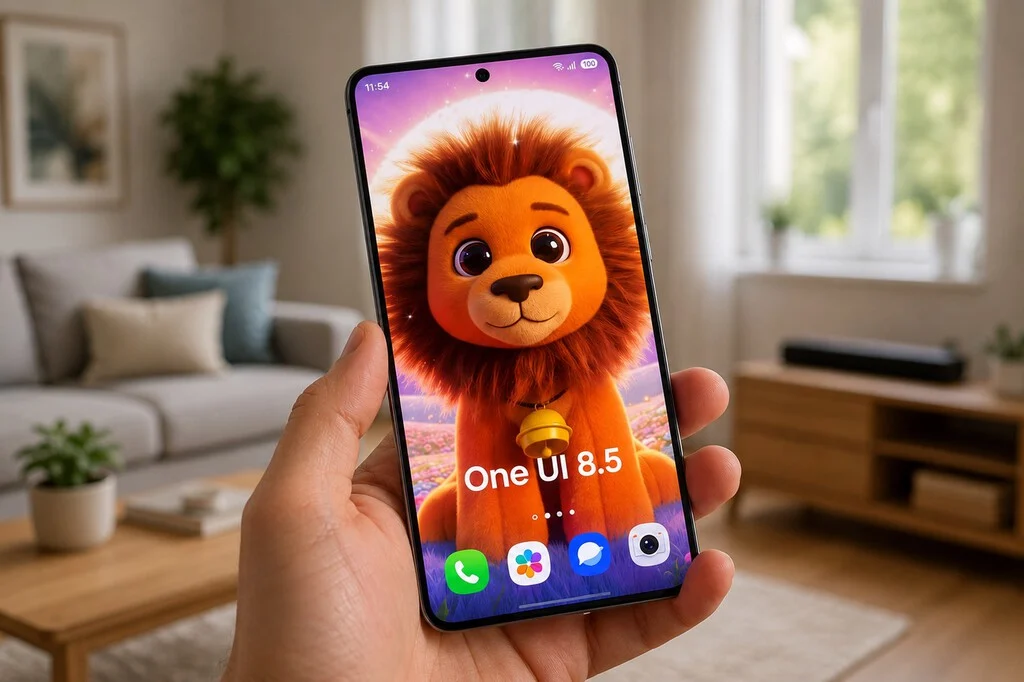

Samsung has initiated the rollout of One UI 8.5, an update that, despite its incremental numbering, introduces a suite of sophisticated enhancements poised to significantly elevate the user experience across a wide range of Galaxy smartphones. Unlike many software updates that offer fleeting changes, One UI 8.5 delivers a deeper, more intuitive level of personalization and integrates advanced artificial intelligence capabilities, particularly in creative tools. This update, which began its phased deployment weeks ago for flagship devices like the Galaxy S25 and S24 series, alongside a substantial portion of the mid-range lineup, is proving to be a pivotal release for users seeking greater control and creativity over their mobile environment. The refinements, though seemingly minor on the surface, collectively contribute to a more tailored and efficient daily interaction with Samsung devices, reflecting a strategic move by the South Korean tech giant to cement its leadership in user-centric mobile innovation.
Strategic Evolution of One UI: A Background
Since its inception, One UI has been Samsung’s proprietary Android overlay, designed to offer a distinct and user-friendly experience that complements its hardware. Moving away from the heavier TouchWiz interface, One UI prioritized ergonomics, visual clarity, and accessibility. Over successive iterations, Samsung has consistently focused on refining core functionalities while incrementally adding features that cater to diverse user preferences. The introduction of Good Lock, a modular customization suite, underscored Samsung’s commitment to advanced personalization, allowing users to fine-tune nearly every aspect of their device’s interface. One UI 8.5 builds upon this foundation, integrating advanced AI capabilities that leverage Samsung’s significant investments in on-device intelligence, exemplified by its Galaxy AI initiatives. This update represents a natural progression in Samsung’s software strategy, aiming to provide not just a functional operating system, but a highly adaptable digital companion.
Unlocking Unprecedented Quick Panel Customization
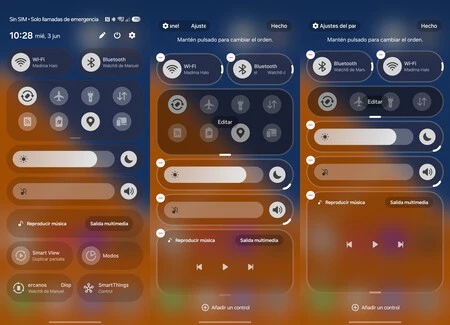
The Quick Panel, the nerve center for essential settings and notifications, has received one of the most significant overhauls in One UI 8.5. This area, frequently accessed throughout the day, now offers unparalleled customization options, moving beyond fixed layouts to a more fluid, user-driven arrangement. By simply swiping down twice from the top of the screen and tapping the edit icon, users can now reorganize shortcuts with remarkable freedom. This includes the ability to resize toggles, allowing some to shrink to a single square while others expand to occupy two, optimizing screen real estate based on usage priority. This level of granular control empowers users to declutter their Quick Panel, removing rarely used options and prioritizing those accessed most frequently, thereby enhancing operational efficiency.
Further extending this customization, the integration with Samsung’s Good Lock suite, specifically the QuickStar module, unlocks an additional layer of aesthetic and functional personalization. QuickStar allows users to apply custom backgrounds to various elements within the Quick Panel, including brightness and volume controls, button panels, and media players. A notable addition is the option to display exact numerical values for brightness and volume, replacing generic icons. This feature caters to power users and those with specific visual preferences, offering precise feedback at a glance. Moreover, within QuickStar’s Advanced settings, the "Split panel ratio" option provides control over the division of space between notifications and quick access toggles. This nuanced adjustment ensures that the Quick Panel adapts not just to what users need, but also to how they prefer to see it, reinforcing Samsung’s dedication to a truly personalized mobile experience. This enhanced Quick Panel functionality resonates deeply with the global Android user base, a significant portion of whom actively seek greater control over their device’s interface, a trend that has consistently driven the popularity of custom ROMs and launchers.
AI-Powered Wallpaper Generation with Creative Studio
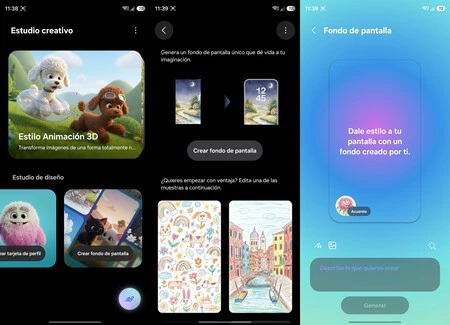
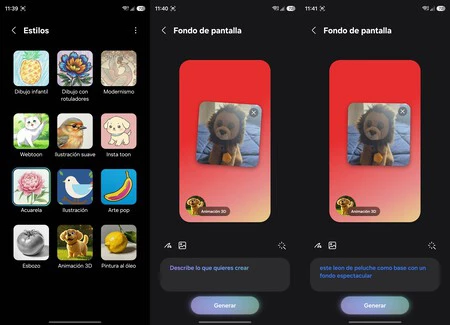
One UI 8.5 significantly advances the way users can create personalized wallpapers, leveraging sophisticated artificial intelligence through the enhanced Creative Studio. This feature moves beyond simple text-to-image generation, now allowing users to incorporate their own photographs as a foundational element for AI-generated artwork. This hybrid approach combines personal imagery with generative AI, producing highly unique and contextually relevant wallpapers.
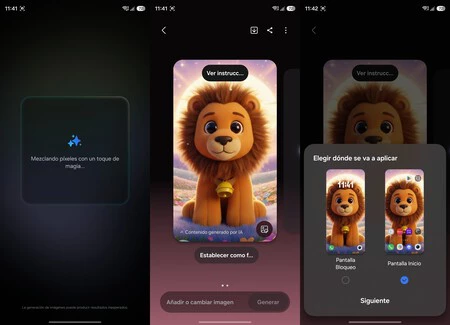
The process begins by accessing Creative Studio from the app drawer and navigating to the "Create wallpaper" option. Users are then presented with a variety of artistic styles, selectable via a magic wand icon. These styles range from "child’s sketch" and "oil painting" to "webtoon" and "3D cartoon," offering a broad palette for creative expression. The innovative step involves adding an image from the user’s gallery as a base. After selecting a photo, users can provide a text description to guide the AI, specifying desired elements or themes. Upon tapping "Generate," Creative Studio seamlessly merges the chosen photo, the artistic style, and the text prompt to produce a custom wallpaper.
This capability is a direct response to the growing demand for personalized digital content and showcases Samsung’s integration of advanced AI into daily user workflows. If the initial result isn’t satisfactory, users can easily refine the text prompt, alter the style, or generate new versions directly from the same interface. Once a desired design is achieved, the "Set as wallpaper" option allows for immediate application to the home screen, lock screen, or both. The ability to blend personal photos with AI-driven artistic interpretations creates wallpapers that are inherently unique to each user, a stark contrast to generic stock options. This feature not only enhances aesthetic personalization but also positions Samsung at the forefront of consumer-facing generative AI applications, transforming how users interact with their device’s visual identity. This aligns with broader industry trends where AI is increasingly used to personalize digital environments, making technology feel more bespoke and intimately connected to the user.
Streamlining the Camera Interface with Customizable Indicators
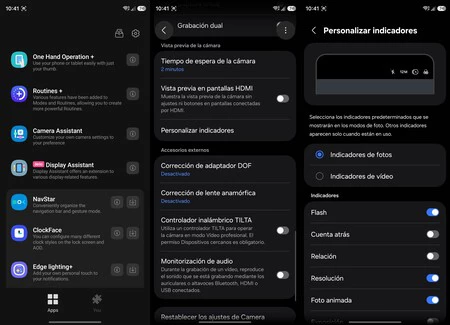
For many Galaxy users, the camera application is a primary interface, yet its default layout can often feel cluttered with an abundance of icons for settings like resolution, timer, aspect ratio, filters, and motion photo. One UI 8.5, through the Good Lock module Camera Assistant, addresses this by empowering users to customize and declutter their camera viewfinder. This enhancement provides a cleaner, more focused shooting experience without sacrificing functionality.
To access this feature, users must install the Camera Assistant module within Good Lock. Upon opening, navigating to "Customize indicators" reveals a comprehensive list of toggles for various camera settings. Users can independently decide which indicators appear in the viewfinder for both photo and video modes. Options include flash, timer, aspect ratio, resolution, motion photo, exposure, filters, and face detection, each with its own dedicated switch. This allows photographers and videographers to remove elements they rarely use, creating a streamlined interface that highlights only the most relevant settings for their workflow.
A significant advantage of this customization is that disabling an indicator does not remove its functionality. All deactivated options remain accessible via a four-dot menu located in the bottom right corner of the camera interface, ensuring that no features are lost. This design philosophy perfectly balances visual simplicity with comprehensive control. It’s important to note that certain critical indicators, such as Log mode, HDR status, and video resolution readouts, remain permanently visible due to their fundamental role in camera operation or their linkage to other system settings. This thoughtful approach to customization, allowing users to tailor their camera experience, speaks to Samsung’s understanding of diverse user needs, from casual point-and-shoot photographers to more advanced enthusiasts who demand a precise and uncluttered interface.
Dynamic Home Screen Organization with Resizable Folders
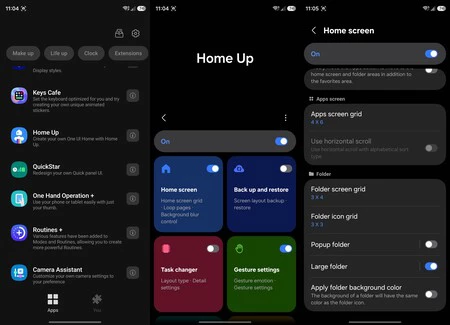
One UI 8.5 introduces a highly practical enhancement for home screen organization: the ability to resize folders like widgets, a feature facilitated by the Home Up module within Good Lock. This seemingly minor adjustment brings a significant improvement to how users manage and access their applications, especially for those who rely heavily on categorized folders.
Traditionally, folders on Android home screens have maintained a fixed size and layout, limiting their flexibility. With Home Up activated, users can now transform these static containers into dynamic, resizable elements. The process involves opening Good Lock, installing and activating Home Up, then navigating to "Home screen" and selecting "Large folder." Choosing the "Custom" option then allows users to return to their home screen, long-press a folder, and freely adjust its size. This functionality mirrors the resizing capabilities typically associated with widgets, providing an intuitive and flexible way to customize the home screen layout.
For users who meticulously organize their applications into folders—such as work-related apps, photography tools, or daily utilities—this feature offers substantial benefits. Larger folders can display more app icons at a glance, reducing the need to open the folder to find a specific application. Conversely, smaller folders can be used to conserve screen space for less frequently accessed categories. This dynamic resizing capability allows for a more efficient and aesthetically pleasing home screen arrangement, adapting to individual preferences and workflows. It empowers users to create a personalized dashboard that reflects their usage patterns, making navigation quicker and more intuitive. This feature is a testament to Samsung’s ongoing commitment to providing advanced personalization options that enhance daily usability, transforming the home screen from a rigid grid into a highly adaptable workspace.
Enhanced Privacy: Integrated Private Album in Gallery
In an era where digital privacy is paramount, One UI 8.5 introduces a streamlined and integrated method for users to protect sensitive photos and videos directly within the native Gallery app. This update eliminates the need for third-party applications or complex workarounds, making privacy a more accessible and seamless part of the user experience.
The new functionality allows users to send selected photos and videos to a dedicated "Private Album" with ease. The option to "Move to Private Album" now appears directly within the menu of individual media items (accessible via the three-dot icon in the upper right corner of a photo or video). Once moved, these items are securely protected and are no longer visible in the main gallery feed, system searches, or other public albums. This ensures that personal or confidential media remains hidden from casual browsing or accidental exposure.
To access the hidden content, users simply navigate to the Gallery, tap on "Menu," and then select "Private Album." Access to this album is typically protected by the device’s secure lock mechanism, such as a PIN, pattern, or biometric authentication, adding an extra layer of security. While Samsung devices have historically offered similar privacy features, One UI 8.5 enhances its discoverability and integrates it more fluidly into the standard Gallery workflow. This integration underscores Samsung’s dedication to user privacy and convenience, providing a robust, on-device solution for managing sensitive media. By making this feature more intuitive and readily available, Samsung responds to a critical user need for robust, yet simple, privacy management within their personal digital spaces.
Broader Implications and Samsung’s Ecosystem Strategy
The cumulative effect of these seemingly minor enhancements in One UI 8.5 extends far beyond individual feature improvements. They collectively reinforce Samsung’s strategic position in the competitive smartphone market, particularly within the Android ecosystem. By offering such deep levels of customization and integrating advanced AI capabilities, Samsung is not merely keeping pace with industry trends but actively shaping them.
One UI, with its extensive customization options often augmented by Good Lock, serves as a significant differentiator for Samsung Galaxy devices. In a market where hardware specifications frequently converge, software experience becomes a crucial battleground. The ability to personalize everything from the Quick Panel layout to camera indicators and home screen folders creates a more intimate and efficient user experience, fostering greater brand loyalty. This approach helps to cultivate an ecosystem where users feel their device truly belongs to them, rather than being a generic tool.
The enhanced AI integration, particularly in Creative Studio, showcases Samsung’s commitment to leveraging its Galaxy AI initiative across various facets of the user experience. This moves AI beyond productivity tools and into creative expression, making advanced technology accessible and fun for everyday users. This strategic move also positions Samsung favorably against competitors, including Apple’s iOS, which traditionally offers less UI customization, and other Android manufacturers who may not have as mature or extensive a customization suite as One UI combined with Good Lock.
Furthermore, these updates reflect a keen understanding of user feedback and the evolving demands for both control and simplicity. By allowing users to declutter interfaces while retaining access to full functionality, Samsung addresses a common frustration in modern digital interfaces. The emphasis on integrated privacy features also aligns with growing global concerns about data security and personal information, offering robust solutions within the native operating system.
Conclusion: A User-Centric Leap Forward
One UI 8.5 stands out as more than just another incremental update; it is a significant step forward in Samsung’s commitment to delivering a truly personalized and intelligent mobile experience. From the granular control over the Quick Panel and camera interface to the innovative AI-powered wallpaper generation and enhanced privacy features, each improvement is designed to empower users and make their Galaxy device an even more integral and intuitive part of their daily lives. By refining core functionalities and strategically integrating advanced AI, Samsung continues to demonstrate its leadership in mobile software innovation, ensuring that Galaxy users benefit from a sophisticated, adaptable, and deeply personal digital companion. These enhancements solidify One UI 8.5 as a pivotal release, setting a new benchmark for user-centric design and intelligent personalization in the Android landscape.
