

An in-depth analysis of a widely used Google Chrome extension, "Adblock for YouTube," has revealed a critical vulnerability allowing it to execute arbitrary JavaScript code. This discovery, made by security researchers at Island, highlights a dormant yet potent threat to the privacy and security of over 10 million users who have installed the extension, which currently holds a coveted "Featured" badge on the Chrome Web Store. The findings underscore the inherent risks associated with granting extensive permissions to browser extensions, even those designed for seemingly benign purposes like ad blocking.
Discovery and Initial Findings: A Dormant Threat Unveiled
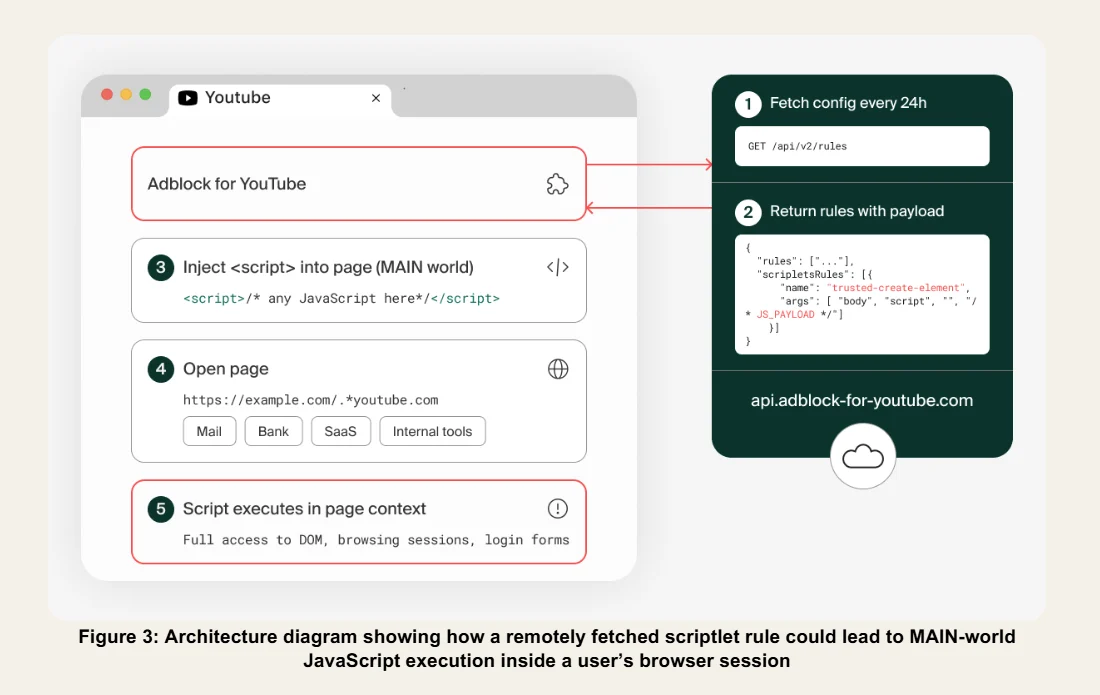
The security firm Island initiated its investigation into "Adblock for YouTube" (identified by ID: cmedhionkhpnakcndndgjdbohmhepckk) due to growing concerns surrounding the security posture of popular browser extensions, particularly those with broad access privileges. What they uncovered was a sophisticated architecture within the extension that, while not actively malicious at the time of their analysis, possessed the fundamental capabilities for arbitrary JavaScript execution across any website visited by the user. This potential for exploitation is particularly alarming because it can be activated through a simple server-side configuration change, bypassing the need for an extension update, a new review by the Chrome Web Store, or any visible notification to the end-user.
Oleg Zaytsev and Shachar Gritzman, the researchers leading the investigation at Island, articulated the gravity of their findings in a report shared with The Hacker News. They stated, "It also contains the architectural ingredients for arbitrary JavaScript execution on any website, activated by a single server-side configuration change, without an extension update, without a store review, and without any visible sign that something has changed." This statement encapsulates the stealthy and potent nature of the vulnerability, presenting a significant challenge to user trust and digital security.
The Technical Underpinnings of the Threat: Arbitrary JavaScript and Remote Activation
At the heart of the vulnerability lies the extension’s ability to inject and run arbitrary JavaScript code. JavaScript is the programming language that makes web pages interactive, but in the wrong hands, it can be a powerful tool for malicious activities. When an extension can execute arbitrary JavaScript, it essentially gains the power to control the user’s browser session. This includes, but is not limited to, reading the content of web pages, stealing sensitive data entered into forms (such as login credentials or financial information), and even performing actions as if they were the user within personal accounts, work applications, administrative panels, and other sensitive browser sessions.
The mechanism enabling this potential exploit is a bespoke scriptlet rule named "trusted-create-element," defined by the extension’s author. This rule allows for the creation of arbitrary <script> elements, which can then be used to inject and execute code. Crucially, Island’s analysis confirmed that while "trusted-create-element" was not active in the server response at the time of their examination, its presence meant the capability was merely dormant, not absent. The researchers emphasized that activating this potent feature would require nothing more than a single server-side change, completely bypassing the conventional security checks and update processes that typically govern browser extensions. This means that a malicious actor, or even the extension’s legitimate owner with nefarious intent, could activate this capability at any moment without user consent or knowledge.

Potential Ramifications: A Gateway to Comprehensive Compromise
The implications of such a vulnerability are far-reaching and deeply concerning. For individual users, the potential for personal data theft is immense. Imagine an attacker gaining the ability to:
- Harvest Credentials: Steal usernames, passwords, and multi-factor authentication codes as users log into banking sites, email accounts, or social media.
- Exfiltrate Sensitive Information: Read and extract private messages, documents, or proprietary company data from cloud services and enterprise applications.
- Impersonate Users: Perform actions on behalf of the user, such as sending emails, making purchases, or transferring funds, leading to financial loss or reputational damage.
- Plant Malware: Inject further malicious code into websites or download malware onto the user’s system.
- Track User Activity: Monitor browsing habits, search queries, and online behavior for targeted advertising or more sinister data collection purposes.
While Island stressed that there is no current evidence of a malicious payload having been distributed in this manner, the mere existence of this capability, particularly when coupled with the extension’s history and its ties to other ad-blocking extensions previously removed for malware, significantly elevates privacy and security risks. The trust users place in such widely adopted tools is immense, and a breach of that trust could have catastrophic consequences for millions.
A Troubling History: Ownership, Ad-Injection, and Malware Ties
The "Adblock for YouTube" extension has a notable and somewhat checkered history, which adds another layer of concern to Island’s findings. The extension first appeared on the Chrome Web Store in 2014, initially functioning as a straightforward YouTube ad blocker. However, its trajectory changed significantly four years later when it underwent an ownership transfer. This change in ownership often raises red flags in the cybersecurity community, as popular, established extensions can be acquired by malicious actors looking to leverage their large user bases for nefarious purposes.
Early versions of the extension, particularly after the ownership change, were found to incorporate an ad-injection Software Development Kit (SDK) known as Unistream SDK. Ad-injection SDKs are often used to display unauthorized advertisements to users, potentially overriding legitimate ads or injecting new ones onto web pages. While Unistream SDK was reportedly removed from the extension in June 2024, its prior presence underscores a history of potentially intrusive behavior.
Moreover, the report from Island explicitly links "Adblock for YouTube" to a list of other ad-blocking extensions that have since been delisted from the Chrome Web Store due to their involvement with malware. Although the specific list of related extensions was not detailed in the provided content, this connection paints a concerning picture of a broader ecosystem where seemingly innocuous tools are repurposed for malicious activities. This pattern of acquisition, ad-injection, and eventual removal for malware strongly suggests a calculated approach by some developers or malicious entities to monetize or exploit large user bases through deceptive means.
What has remained a constant since February 2025, according to the researchers, is the presence of remote-controlled script injection paths. This persistent architectural feature, even after the removal of the Unistream SDK, demonstrates a continuous capability within the extension to introduce and execute external code. This timeline suggests a deliberate design choice that has maintained a high-risk posture for users over several years, irrespective of other changes to the extension’s codebase or features.

Permissions and Deceptive Scope: Beyond YouTube
A critical aspect of this vulnerability lies in the extensive permissions that ad blocker extensions typically request upon installation. To effectively block ads and modify web page elements, these extensions often require broad access to inspect network requests, alter page content, hide elements, and adjust their behavior dynamically as ad systems evolve. This necessity for broad permissions creates a paradox: users grant significant trust to extensions to enhance their browsing experience, inadvertently opening doors for potential misuse.
"Adblock for YouTube" exemplifies this paradox. Contrary to its name, which implies a limited scope to YouTube, Island’s analysis revealed that the extension operates on every website a user visits in the browser. While it does include a check designed to activate its primary ad-blocking functions only when the current URL contains "youtube.com," this check itself is fundamentally flawed. The extension merely verifies if the string "youtube.com" appears anywhere within the URL, failing to validate the actual hostname, frame origin, or embedded player context.
This lax validation mechanism means the check can be trivially bypassed. An attacker or malicious website could simply embed "youtube.com" anywhere in a URL, such as example.com/malicious_page?q=youtube.com or https://www.fakewebsite.com/video/youtube.com/exploit, to trigger the extension’s full functionality on a non-YouTube site. This allows the extension to operate with its extensive permissions on virtually any webpage, extending the potential attack surface far beyond the video-sharing platform it claims to serve. Such a broad operational scope significantly increases the risk, as the dormant arbitrary JavaScript execution capability could theoretically be activated and leveraged on any sensitive website visited by the user.
Expert Commentary and Industry Reactions
The security community has long cautioned against the blind trust placed in browser extensions. Island’s researchers succinctly summarized the core concern: "The concern is not a single suspicious line of code. It is the combination: a high-install extension with all-site access, a remote-controlled injection path, prior ad-injection infrastructure, a major ownership and codebase change, and related extensions that were removed from the Chrome Web Store for malware." This holistic view emphasizes that the risk is not an isolated incident but rather a confluence of factors pointing to a potentially systemic vulnerability.
As of the reporting, The Hacker News has reached out to the developer of "Adblock for YouTube" for comment, and an update will be provided if a response is received. Google, as the operator of the Chrome Web Store, bears a significant responsibility for the security and integrity of the extensions distributed through its platform. While Google employs automated and manual reviews, the detection of dormant, server-activated vulnerabilities like this poses a persistent challenge. The fact that an extension with over 10 million installs and a "Featured" badge could harbor such a risk underscores the difficulty in vetting complex software and the evolving tactics of malicious actors.
Broader Threat Landscape: Impersonation and Affiliate Fraud
The disclosure about "Adblock for YouTube" is not an isolated incident but rather indicative of a broader trend of malicious or risky browser extensions. Coincidentally, Palo Alto Networks Unit 42 recently released its own findings, detecting 18 other browser extensions designed to impersonate well-known consumer brands. The primary objective of these impersonating extensions was to monetize through affiliate marketing fraud.

Unit 42’s report detailed how, upon installation, these extensions would open a .shop domain in a new tab. This .shop domain would then redirect to another domain, presenting a page that falsely claimed "further action is required" due to "incompatibility issues." Users were then prompted to install a "gaming-oriented browser." This elaborate scheme highlights how seemingly harmless prompts can lead users down a path of installing potentially unwanted or malicious software, all under the guise of brand impersonation and technical necessity.
These two separate but related disclosures from Island and Palo Alto Networks Unit 42 collectively paint a stark picture of the persistent and evolving threat posed by malicious browser extensions. Whether through dormant code capabilities or deceptive affiliate marketing tactics, these extensions exploit user trust and the extensive permissions they are granted, turning convenience into a security liability.
Safeguarding Against Malicious Extensions: User Recommendations
Given the pervasive nature of these threats, users must adopt a proactive and vigilant approach to managing their browser extensions:
- Exercise Caution with Permissions: Always review the permissions an extension requests before installation. If an ad blocker for YouTube asks for "access to all websites," question why this broad access is necessary.
- Verify Developers: Look for extensions from reputable and well-known developers. Check reviews, but be aware that fake reviews can be generated.
- Read Recent Reviews: Pay attention to recent reviews, especially negative ones, which might highlight new issues or changes in behavior.
- Avoid Unnecessary Extensions: Install only extensions that are absolutely essential for your workflow. The fewer extensions you have, the smaller your attack surface.
- Regularly Audit Extensions: Periodically review your installed extensions. Remove any that you no longer use or that seem suspicious.
- Keep Browsers Updated: Ensure your web browser is always running the latest version, as updates often include critical security patches.
- Use Security Software: Employ reputable antivirus and anti-malware software to detect and remove malicious programs that might be installed via compromised extensions.
- Be Wary of Ownership Changes: If an extension you use announces an ownership change, monitor it closely for any changes in behavior or new permission requests.
- Consider Open Source Alternatives: Some users prefer open-source extensions, as their code can be publicly audited for vulnerabilities.
The Challenge for Platform Providers: Google’s Role and Responsibilities
Google faces an immense challenge in maintaining the security of the Chrome Web Store. With millions of extensions and billions of installs, fully vetting every piece of code for dormant vulnerabilities or potential future misuse is a monumental task. While Google has implemented various security measures, including automated scanning and manual reviews, malicious actors continuously evolve their techniques to bypass these defenses.
This incident underscores the need for:
- Enhanced Proactive Scanning: More sophisticated static and dynamic analysis tools that can detect not just active malware but also dormant code paths and remote activation capabilities.
- Stricter Permission Models: Reviewing and potentially restricting the default permissions granted to certain categories of extensions, or implementing more granular, just-in-time permission requests.
- Faster Response and Delisting: A more agile process for delisting extensions once significant security risks are identified, even if no active malicious payload has been detected.
- Increased Transparency: Better communication with users about the risks associated with extensions and clearer warnings about potentially problematic software.
Conclusion: A Persistent Digital Security Challenge
The revelation regarding "Adblock for YouTube" serves as a stark reminder of the persistent and evolving nature of digital security threats. While ad blockers offer a cleaner, faster browsing experience, they also demand a high degree of trust from users due to the extensive access they require. The ability for a widely installed extension to execute arbitrary JavaScript code via a remote, server-side trigger, without user knowledge or platform review, represents a significant vulnerability that could compromise the data and privacy of millions. As the digital landscape continues to expand, vigilance, informed decision-making, and robust security practices remain paramount for both users and platform providers in the ongoing battle against sophisticated cyber threats.
