
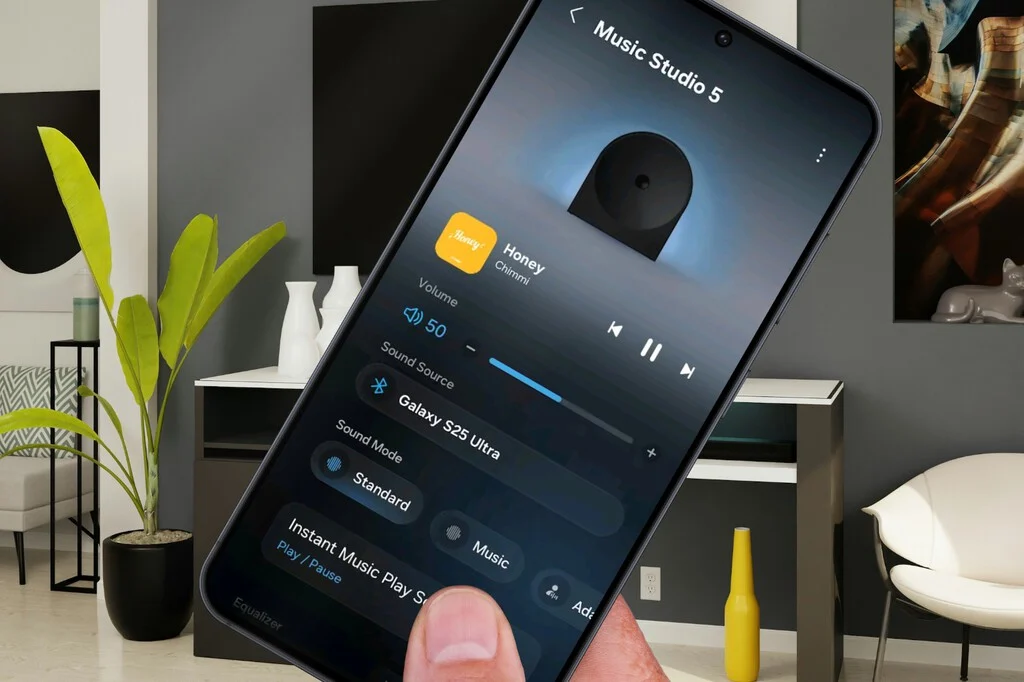

Samsung Electronics has officially introduced a new dedicated mobile application, "Samsung Sound," marking a pivotal strategic shift in how the technology giant approaches the control and management of its connected audio devices. Released initially on the Google Play Store, this application aims to provide a focused and streamlined user experience for configuring and operating Samsung’s range of WiFi-enabled speakers and soundbars, thereby decentralizing these specific functionalities from the broader SmartThings ecosystem. This move underscores a growing industry trend towards specialized applications designed to enhance user interaction with particular device categories, moving away from monolithic control platforms for all smart home devices.
A Strategic Redefinition of Connected Audio Control
For years, Samsung’s ambitious SmartThings platform has served as the central hub for managing an extensive array of smart home devices, including its audio products. While SmartThings offered comprehensive integration, allowing users to orchestrate complex routines and control diverse gadgets from a single interface, it also faced criticism regarding its perceived complexity and feature bloat for users primarily interested in specific device types. The introduction of Samsung Sound directly addresses this concern by offering a tailored experience for audio enthusiasts and casual users alike, simplifying the path to controlling their Samsung sound systems.
The decision to carve out a dedicated audio control app is not arbitrary but rather a calculated step within Samsung’s evolving smart home and consumer electronics strategy. The global market for smart speakers and soundbars has experienced robust growth, with market research firms like Statista projecting continuous expansion. As of recent reports, the smart speaker market alone is estimated to reach hundreds of millions of units shipped annually, with a significant portion featuring advanced connectivity options like Wi-Fi. Consumers increasingly demand intuitive, responsive, and feature-rich control mechanisms for these devices. By separating audio control, Samsung aims to capture this growing segment with an optimized, user-centric solution that can potentially offer quicker development cycles and more agile feature updates compared to a multi-purpose platform.
This strategic pivot aligns with Samsung’s broader efforts to strengthen its audio product portfolio. Recent introductions, such as the Galaxy Buds4 and Buds4 Pro, which emphasize enhanced audio quality and integrated smart features, highlight Samsung’s commitment to the sound experience. The development of a dedicated control application for home audio devices like soundbars and WiFi speakers can be seen as a natural extension of this focus, ensuring a cohesive and high-quality user journey across its entire audio hardware lineup.
Unpacking the Features and User Experience of Samsung Sound
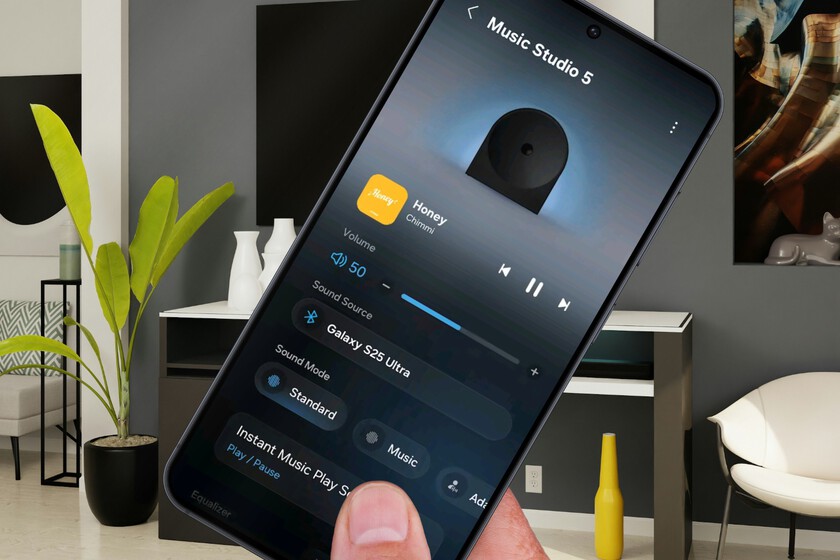
Upon its release, Samsung Sound immediately distinguishes itself with a redesigned user interface. Departing from the familiar aesthetic of SmartThings, the new app embraces a modern visual language characterized by soft gradients, transparencies, and an overall cleaner, more minimalist design. This aesthetic choice suggests an intent to provide a refreshing and less cluttered experience, potentially appealing to users who found the SmartThings interface overwhelming for simple audio tasks. While this new look deviates somewhat from the unified One UI design language that Samsung has been integrating across its other Galaxy applications, it grants Samsung Sound a distinct identity, emphasizing its specialized purpose.
Functionally, Samsung Sound incorporates a majority of the essential controls expected from a contemporary audio management application. Users can access critical settings such as:
- Sound Mode: Allowing selection from various audio presets (e.g., Standard, Surround, Game, Adaptive Sound).
- Sound Source: For managing input sources (e.g., HDMI, Optical, Bluetooth, Wi-Fi).
- Equalizer (EQ): Providing granular control over audio frequencies to customize the sound profile to personal preference or room acoustics.
- Audio Sync: To synchronize audio with video content, addressing potential latency issues.
- Advanced Sound Settings: Offering deeper configurations for specific audio enhancements.
- Channel Level Adjustment: Enabling users to fine-tune the volume levels of individual speaker channels (e.g., front, rear, center, subwoofer) for an optimized surround sound experience.
- Voice Guide: For auditory feedback and accessibility.
- Google Cast Integration: Allowing seamless streaming of audio content from compatible applications.
- Network Status Monitoring: To keep track of the device’s connectivity.
- Automatic Firmware Updates: For convenient maintenance and ensuring the device runs the latest software.
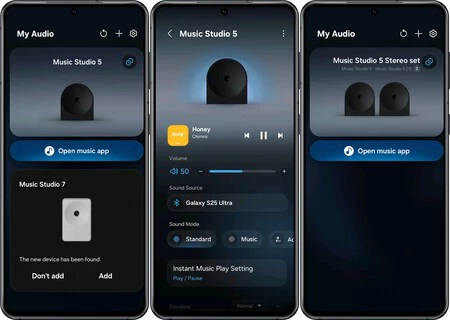
One notable and intriguing feature embedded within Samsung Sound is the prominently placed "Open music app" button. This shortcut provides direct access to popular streaming services such as Apple Music, Spotify, and YouTube Music if they are installed on the user’s device. If not, it directs the user to the Google Play Store to download them. While currently a straightforward launcher, this feature holds significant potential for deeper integration with music services in future updates, moving beyond mere shortcuts to potentially offer seamless content browsing and playback control directly within the Samsung Sound interface. This could further solidify the app’s position as a comprehensive audio hub.
The "Seven Differences": Samsung Sound vs. SmartThings
Despite its comprehensive feature set, Samsung Sound is not presented as a complete replacement for the audio management capabilities within SmartThings. The original article highlights several key functionalities present in SmartThings that are notably absent or limited in Samsung Sound, which are crucial for understanding its intended scope:
- IP Control: The new app does not include IP control, a feature vital for advanced network management and integration within complex smart home setups.
- Auto Power Off: The convenience of automatically powering down devices after a period of inactivity is not available in Samsung Sound, requiring users to manually intervene or rely on SmartThings for such automation.
- Direct Tap Sound Access: Samsung’s "Tap Sound" feature, which allows users to quickly transfer audio by tapping their Galaxy phone against a compatible speaker, is not directly accessible through the new app.
- Remote Power Off Limitation: Perhaps the most peculiar limitation, Samsung Sound allows users to remotely power on a connected soundbar or speaker, but the option to power it off remotely from within the app disappears once the device is active. This forces users to use physical controls, SmartThings, or other methods for shutdown.
These omissions suggest that Samsung Sound is intentionally designed as a focused control interface rather than a full-fledged smart home automation tool. Features like IP control and Auto Power Off are inherently more aligned with broader home automation and energy management, which remain the domain of SmartThings. This delineation aims to simplify the core audio control experience while acknowledging that power users or those seeking full automation will still need to leverage SmartThings.
Independent Operation and Coexistence in the Samsung Ecosystem
A critical aspect of Samsung Sound’s introduction is its independent operational model. Users are not forced to choose between Samsung Sound and SmartThings; adding or removing a soundbar or speaker in one application does not affect its configuration or presence in the other. This ensures a seamless transition for existing SmartThings users and provides flexibility for new users. This independent functionality is a testament to Samsung’s understanding of diverse user needs, allowing those who prefer the new, cleaner interface for daily audio control to use it without disrupting their established SmartThings routines. Conversely, users who require the advanced automation features of SmartThings can continue to rely on it, potentially using both apps concurrently for different aspects of device management.
This dual-app strategy allows Samsung to cater to different user profiles: the casual listener seeking simple, intuitive control and the smart home enthusiast desiring deep integration and automation. It mitigates the risk of alienating either segment and offers a pathway for iterative development of both platforms without one hindering the other.
Broader Market Implications and Future Outlook
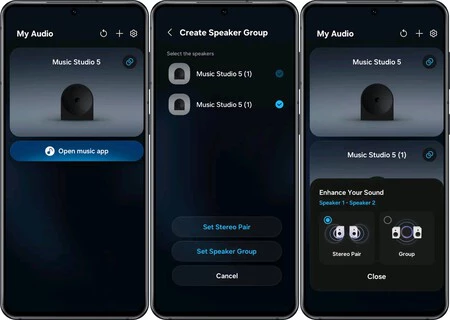
The launch of Samsung Sound carries significant implications for Samsung’s competitive stance in the connected audio and smart home markets. By offering a dedicated audio control app, Samsung aligns itself with industry leaders like Sonos, which built its reputation on a highly refined, specialized app for its multi-room audio systems. Apple’s Home app also provides dedicated control for its HomePod speakers, albeit within a broader home automation context. Google, too, has evolved its Google Home app to manage Nest speakers effectively. Samsung’s move signals a recognition of the value consumers place on specialized, high-performance control applications.
From a strategic perspective, this specialization could lead to several benefits for Samsung:
- Enhanced User Satisfaction: A simpler, more focused app can reduce frustration and improve the overall user experience, leading to higher product satisfaction and brand loyalty.
- Faster Innovation: A dedicated development team can focus solely on audio control features, potentially leading to quicker updates and more innovative functionalities tailored to sound.
- Market Segmentation: The app allows Samsung to more effectively target audiophiles and users primarily interested in audio performance, offering them a refined tool that speaks directly to their needs.
- Reduced SmartThings Bloat: By offloading specific functionalities, SmartThings can become leaner and more focused on its core mission of holistic smart home automation, potentially improving its performance and user perception.
However, the current limitations of Samsung Sound also present challenges. The lack of full feature parity with SmartThings means users might still need to switch between applications for certain tasks, which could introduce its own form of friction. The remote power-off anomaly, in particular, could be a source of minor inconvenience for users accustomed to full remote control.
Looking ahead, the evolution of Samsung Sound will be critical. Future updates could address the current limitations, potentially integrating more advanced features, deeper music service connections, and even some level of cross-app communication with SmartThings for a more unified, yet still specialized, experience. As the smart home landscape continues to mature, companies are increasingly refining their software offerings to match the sophistication of their hardware. Samsung Sound represents a significant step in this direction for Samsung, indicating a future where specialized, high-quality applications might become the norm for specific device categories within larger ecosystems. This strategic refinement promises a more intuitive and enjoyable experience for users navigating the complex world of connected audio.
