

All digital operations, from the apps on our smartphones to the vast infrastructure of global cloud services, ultimately rely on tangible hardware. The terms "virtual server" and "physical server" describe not a difference in existence, but rather the distinct architectural approaches to how these machines are structured and utilized. While both serve the fundamental purpose of hosting data and running applications, their underlying mechanisms, advantages, and use cases diverge significantly. This article delves into the core distinctions, offering a comprehensive overview for businesses and IT professionals navigating the complexities of modern server infrastructure.
The Unseen Foundation: What is a Physical Server?
A physical server, also known as a bare-metal server, is a tangible piece of computing hardware. It comprises all the essential components: a central processing unit (CPU), graphics processing unit (GPU) if applicable, random-access memory (RAM), storage drives, a power supply unit, network interfaces, and the operating system. These machines are engineered for continuous operation, typically running 24/7, and are dedicated to specific server tasks such as hosting websites, managing databases, or running complex applications. Unlike a general-purpose desktop computer, a physical server is optimized for performance, reliability, and the ability to serve requests from multiple other computers or devices.
Regardless of its size—whether it’s a compact tower unit or a large, rack-mounted system installed in a data center—if it’s a single, dedicated piece of hardware, it’s a physical server. Organizations can own and operate these servers within their own facilities, maintaining complete control over the hardware and its environment. Alternatively, they can access bare-metal servers through cloud providers, which offer dedicated physical machines for rent.
Key Features of Physical Servers: Uncompromised Resources
The most defining characteristic of a physical server is its exclusive access to all its resources. This dedicated allocation of CPU, RAM, storage, and network bandwidth makes physical servers exceptionally powerful and secure.
- Dedicated Resources: Every component of the physical server is available solely to the applications and operating system running on it. This eliminates the potential for resource contention that can occur in shared environments.
- High Performance: Due to the lack of virtualization overhead and direct hardware access, physical servers often deliver superior performance for highly demanding, resource-intensive applications.
- Enhanced Security: With complete control over the hardware and its configuration, organizations can implement stringent security measures, making physical servers ideal for sensitive data and mission-critical operations. Isolation is inherent, as the server is not sharing its underlying hardware with other tenants.
- Predictable Performance: The absence of resource sharing means performance is more consistent and less prone to fluctuations caused by the activities of other users.
- Full Hardware Control: Administrators have direct access to and control over the entire hardware stack, allowing for deep customization and optimization.
Historical Context and Evolving Use Cases
In the early 2000s, physical servers were the bedrock of virtually all digital infrastructure. Companies typically owned and managed their own server farms, housing individual machines for each IT function. This era was characterized by significant capital expenditure on hardware and the extensive operational overhead required for maintenance, cooling, and power.
While the landscape has dramatically shifted with the rise of virtualization and cloud computing, physical servers have not become obsolete. They remain crucial for specific workloads that demand the highest levels of performance, security, and direct hardware control.
Popular use cases for physical servers include:
- High-Performance Computing (HPC): Scientific simulations, complex data analysis, and rendering tasks that require immense processing power benefit greatly from the dedicated resources of physical servers.
- Large Databases: Enterprise-grade databases that handle massive transaction volumes and require the utmost speed and reliability often run on bare-metal configurations.
- Gaming Servers: Online gaming platforms that need low latency and consistent performance to support a large number of concurrent players often leverage physical servers.
- Virtualization Hosts: Ironically, powerful physical servers are often used as the foundation upon which virtual machines are built. In this scenario, the physical server’s resources are virtualized, but the underlying hardware is dedicated to the virtualization platform itself.
- Mission-Critical Applications: Systems where downtime is unacceptable and performance must be absolutely guaranteed, such as critical financial trading platforms or life-support systems in healthcare, are often deployed on physical servers.
Industries Reliant on Physical Servers
Sectors where the demands for reliability, raw performance, and stringent security are paramount continue to invest in physical server infrastructure. These include:
- Financial Services: For high-frequency trading, risk management, and secure transaction processing, where milliseconds matter and data integrity is non-negotiable.
- Healthcare: To host sensitive patient data, manage critical medical equipment, and run complex diagnostic systems where privacy and uninterrupted operation are vital.
- Government and Defense: For classified data processing, secure communication networks, and critical infrastructure management, where national security is at stake.
- Aerospace: For complex design simulations, flight control systems, and data analysis in research and development.
- Manufacturing: To run sophisticated industrial control systems, real-time production monitoring, and supply chain management software.
- Media and Entertainment: For high-end video editing, rendering, and streaming services that require immense processing power and storage.
These industries prioritize the tangible ownership, predictable performance, and robust isolation that physical servers provide, often alongside their existing virtualized environments.
The Power of Abstraction: What is a Virtual Server?
A virtual server, more commonly referred to as a Virtual Machine (VM), is a software-based emulation of a physical server. It leverages virtualization technology to partition a single physical server into multiple isolated virtual environments. Each VM operates as an independent server, with its own operating system, applications, and allocated resources (CPU, RAM, storage).
Virtualization is the cornerstone of cloud computing, enabling providers to maximize the utilization of their hardware by serving numerous customers from a single physical machine. Imagine a powerful, state-of-the-art physical server. Instead of dedicating this entire machine to one user, virtualization software (a hypervisor) divides its resources. This allows multiple customers to rent portions of that physical server’s capacity, each operating as a distinct virtual server.
Each VM is assigned a portion of the physical host’s CPU, memory, and storage, functioning as an isolated unit. This principle, scaled across thousands of physical servers, is what powers the vast capabilities and economies of scale offered by major cloud providers.
Key Features of Virtual Servers: Agility and Efficiency
Virtual servers offer a compelling set of advantages, primarily centered around flexibility, cost-efficiency, and ease of management.
- Resource Efficiency: Virtualization allows multiple VMs to share the resources of a single physical server, leading to significantly higher hardware utilization rates and reduced energy consumption compared to maintaining many underutilized physical machines.
- Scalability and Flexibility: VMs can be provisioned, scaled up or down, and de-provisioned rapidly, often within minutes. This agility allows businesses to adapt quickly to changing demands.
- Cost-Effectiveness: While initial virtualization software investment is required, the ability to run multiple servers on less hardware leads to substantial savings in capital expenditure, power, cooling, and physical space.
- Rapid Deployment: New virtual servers can be set up and configured much faster than physical ones, accelerating project timelines and time-to-market.
- Portability and Migration: VMs can be easily moved between physical hosts, both within an organization’s data center and across different cloud environments, facilitating disaster recovery and load balancing.
- Isolation: While sharing hardware, VMs are designed to be isolated from each other, preventing issues on one VM from affecting others.
The Dawn of Virtualization and its Ubiquitous Role
The concept of virtualization gained significant traction in the early 2000s as a means to address the underutilization of physical server hardware. Companies were investing heavily in hardware that often sat idle for large portions of the day. Virtualization offered a solution, allowing them to consolidate workloads onto fewer physical machines. This paved the way for the explosive growth of cloud computing, where providers offer virtualized resources as a service.

Today, virtual servers underpin a vast majority of global server workloads. They are the engines behind countless web applications, mobile apps, SaaS platforms, and enterprise IT systems. Even everyday users interact with virtual servers constantly, often without realizing it, as they access online services and digital accounts.
Popular use cases for virtual servers are exceptionally broad and include:
- Web Hosting: Serving websites and web applications for businesses of all sizes.
- Application Development and Testing: Providing isolated environments for developers to build, test, and deploy applications without impacting production systems.
- Database Management: Hosting databases for applications, analytics, and data warehousing.
- Email Servers: Managing corporate email services.
- File Servers: Providing centralized storage and access to shared files.
- Cloud Computing: The fundamental building block of IaaS (Infrastructure as a Service), PaaS (Platform as a Service), and SaaS (Software as a Service).
- Virtual Desktops: Providing users with remote access to desktop environments.
- Big Data Analytics: Running distributed computing frameworks like Hadoop and Spark.
Bridging the Divide: Virtual Servers vs. Physical Servers
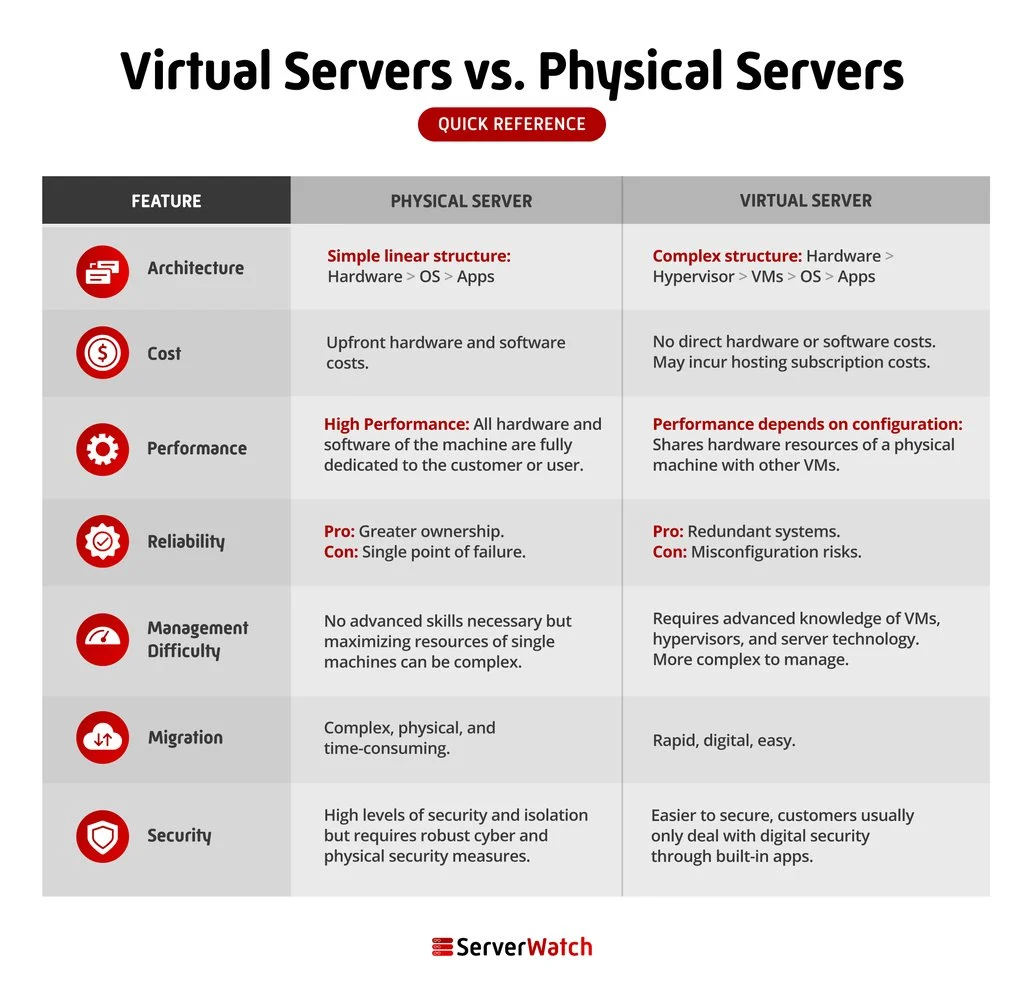
Understanding the core differences between physical and virtual servers is crucial for making informed infrastructure decisions. While both serve the purpose of hosting and running applications, their architectural approaches, operational characteristics, and cost implications vary significantly.
| Feature | Physical Server | Virtual Server |
|---|---|---|
| Architecture | Dedicated hardware, single OS instance | Software emulation, multiple OS instances on shared hardware |
| Resource Allocation | Exclusive access to all hardware resources | Shared access to host hardware resources, partitioned |
| Performance | Generally higher for raw, consistent throughput | Can be excellent, but subject to host load and contention |
| Scalability | Limited by hardware capacity, requires physical upgrades | Highly elastic, can scale up/down quickly via software |
| Cost | High initial capital expenditure, ongoing maintenance | Lower initial cost, pay-as-you-go, operational savings |
| Deployment Speed | Slow, requires hardware procurement and setup | Rapid, often minutes to deploy |
| Management | Full hardware and software management responsibility | Shared responsibility with provider for hardware/hypervisor |
| Migration | Complex, requires physical relocation/reconfiguration | Simple, can be migrated with a few clicks |
| Security | Full control, inherent isolation | Depends on hypervisor and configuration, potential for shared vulnerabilities |
| Reliability | Dependent on hardware quality and redundancy | Can be highly reliable through clustering and failover |
Architectural Differences: The Core Distinction
The fundamental divergence lies in their architecture. A physical server is a singular, tangible entity with its own dedicated hardware. A virtual server, conversely, is a software construct, a logical representation of a server that runs on top of a physical server, sharing its underlying resources with other virtual servers. This abstraction layer, managed by a hypervisor, is what enables the creation and operation of multiple virtual servers on a single piece of hardware.
Cost Considerations: Investment vs. Operational Efficiency
The cost calculus between physical and virtual servers often hinges on scale and operational model. Physical servers typically involve a significant upfront capital investment in hardware, along with ongoing costs for power, cooling, maintenance, and physical space. Virtualization, on the other hand, can have a lower initial hardware cost due to consolidation. However, the true cost-effectiveness of virtual servers shines through their operational efficiency: reduced power consumption, less physical space required, and the ability to rapidly scale resources on demand, often through a pay-as-you-go model offered by cloud providers. For organizations opting for cloud-based virtualization, the burden of hardware maintenance, physical break-ins, theft, and the costs associated with natural disasters like fires or floods are largely transferred to the provider.
Performance: A Nuanced Competition
The performance debate between physical and virtual servers is not always clear-cut. In scenarios demanding raw, unadulterated processing power and minimal latency, physical servers often hold an edge. They offer direct access to hardware, bypassing the overhead introduced by virtualization layers. However, advancements in virtualization technology have significantly closed this gap. Modern hypervisors are highly efficient, and for many common workloads, the performance difference is negligible. Factors such as the specific hardware configuration, the efficiency of the software stack, network latency, and the workload itself play a crucial role in determining which type of server will ultimately perform better. For instance, a well-configured virtual server can outperform a poorly optimized physical server.
Reliability: Designing for Uptime
Reliability, like performance, is achievable with both physical and virtual servers, but the methods and considerations differ. A physical server’s reliability is directly tied to the quality of its hardware components, its cooling and power infrastructure, and robust maintenance practices. For virtual servers, reliability is often enhanced through the capabilities of the virtualization platform. Features like live migration, automatic failover to other hosts, and resource pooling allow for continuous operation even if a physical host experiences issues. The architecture of the underlying cloud infrastructure or the on-premises virtualization cluster significantly influences the overall reliability of virtual servers.
Management Difficulty: Outsourcing Expertise
Managing servers, whether physical or virtual, can be a complex undertaking. This involves tasks such as operating system installation and patching, application deployment, security configuration, monitoring, and troubleshooting. When operating physical servers in-house, an organization bears the full responsibility for all these management aspects. However, when utilizing virtual servers, particularly from a cloud provider, many of these management duties are outsourced. The provider typically handles the maintenance of the physical hardware, the hypervisor, and the underlying infrastructure, freeing up the IT team to focus on managing the operating systems and applications running within the virtual machines.
Migration: Agility in Motion
Migration is a key area where virtual servers demonstrate a clear advantage. Moving a virtual server from one physical host to another, or even between different data centers or cloud providers, is a relatively straightforward process that can often be accomplished with minimal downtime and a few clicks. This is because a VM is essentially a set of files that can be easily copied and relocated. In stark contrast, migrating a physical server is a far more involved operation. It typically requires a complete system backup, followed by the physical relocation of the hardware, and then the restoration of the backup onto the new machine, often necessitating extensive reconfiguration.
Security: Layers of Protection
Both virtual and physical servers can be secured to a high degree, but the approach and potential vulnerabilities differ. Physical servers offer inherent isolation; once configured, they are not directly sharing their core hardware with other tenants. Security management focuses on physical access controls, network segmentation, and robust operating system and application security. Virtual servers, while providing logical isolation, operate on shared physical hardware. This means that the security of the virtualization platform itself (the hypervisor) is paramount. A vulnerability in the hypervisor could potentially affect multiple VMs. Therefore, securing virtual environments involves not only securing the guest operating systems and applications but also ensuring the integrity and security of the virtualization layer and its management interfaces. Cloud providers invest heavily in securing their underlying infrastructure, offering various security services and compliance certifications that can bolster the security posture of virtualized workloads.
The Bottom Line: Choosing the Right Server for Your Business
The decision between physical and virtual servers is not a one-size-fits-all proposition. Both technologies offer distinct advantages and disadvantages, and the optimal choice depends entirely on an organization’s specific needs, priorities, and technical capabilities.
Virtual servers have become the default choice for a vast majority of businesses due to their inherent flexibility, cost-effectiveness, and rapid scalability. They are ideal for:
- Startups and small to medium-sized businesses (SMBs) looking for agile and affordable IT solutions.
- Organizations that experience fluctuating workloads or need to provision resources quickly.
- Businesses that leverage cloud computing for their applications and services.
- Development and testing environments where rapid iteration is key.
However, physical servers retain their relevance and are often the superior choice for businesses that require:
- The absolute highest levels of performance for extremely demanding, resource-intensive applications.
- Complete control over the hardware and its configuration for specialized requirements or strict compliance mandates.
- Maximum security and isolation for highly sensitive data or mission-critical systems where any shared resource is considered a risk.
- Predictable and consistent performance without any potential for resource contention.
In many modern IT infrastructures, a hybrid approach is common. Organizations might utilize a cloud of virtual servers for general-purpose computing, web hosting, and application development, while reserving dedicated physical servers for their most demanding databases, high-performance computing tasks, or exceptionally sensitive workloads. Understanding these fundamental differences empowers businesses to architect a server infrastructure that is both powerful and cost-efficient, aligning with their strategic goals.
For those looking to harness the power of virtualization, exploring the leading solutions available in the market is a crucial next step. Investigating the best server virtualization software can provide valuable insights into the technologies that drive modern cloud infrastructure and offer pathways to enhanced efficiency and scalability.
