

A Network Policy Server (NPS) empowers network administrators to establish and rigorously enforce policies governing network access, thereby ensuring that only authenticated and authorized users and devices can access sensitive network resources. This adaptable tool is a cornerstone of centralized authentication, authorization, and accounting (AAA) for individuals and devices seeking to connect to an organization’s network infrastructure. Fundamentally, NPS represents Microsoft’s robust implementation of a Remote Authentication Dial-In User Service (RADIUS) server and proxy, integrated within the Windows Server operating system. Its role in maintaining network integrity and security cannot be overstated. To fully appreciate the significance of NPS, it is essential to first understand the underpinnings of RADIUS servers, followed by an exploration of NPS’s specific purpose, its multifaceted benefits, its critical function within networking architectures, and ultimately, the best practices for its effective management.
The Imperative of Network Security and Policy Management in the Digital Age
In an era defined by an ever-increasing reliance on technology for core business operations, seamless data exchange, and ubiquitous communication, networks and their associated servers have become prime targets for malicious cyber threats. This escalating threat landscape magnifies the critical need for robust network security measures and meticulously managed access policies. The consequences of inadequate security can range from costly data breaches and service disruptions to severe reputational damage and regulatory penalties. Therefore, organizations must prioritize comprehensive strategies to protect their digital assets.
The key drivers behind the paramount importance of network security and policy management include:
- Protection of Sensitive Data: Organizations store vast amounts of confidential information, including customer data, intellectual property, financial records, and employee personal details. Robust security protocols, enforced by policies, are essential to prevent unauthorized access, theft, or exposure of this critical data.
- Ensuring Business Continuity: Network downtime or compromise can cripple operations, leading to significant financial losses. Effective security and policy management minimize the risk of disruptions, ensuring that critical business functions can continue uninterrupted.
- Compliance with Regulations: Numerous industry-specific and general data protection regulations (e.g., GDPR, HIPAA, PCI DSS) mandate stringent security controls and data handling practices. Non-compliance can result in substantial fines and legal repercussions.
- Maintaining Customer Trust and Reputation: A data breach or security incident can severely erode customer confidence and damage an organization’s brand reputation, which can take years to rebuild.
- Preventing Unauthorized Access: Policies ensure that only legitimate users and devices with the appropriate permissions can access network resources, preventing internal misuse and external intrusions.
Understanding the RADIUS Protocol: The Foundation of Network Access Control
The Remote Authentication Dial-In User Service (RADIUS) protocol is a widely adopted networking protocol that provides comprehensive and centralized Authentication, Authorization, and Accounting (AAA) management for users accessing network services. Since its introduction in 1991, RADIUS has become an industry standard for network access servers, playing an indispensable role in managing network access control for a vast array of connection types.
The RADIUS protocol operates on a three-pronged approach:
Authentication: Verifying Identity
The first "A" in AAA stands for Authentication. This is the fundamental process of verifying a user’s claimed identity. When a user or device attempts to connect to a network, they are required to present credentials, such as a username and password, a certificate, or a token. The RADIUS server then scrutinizes these credentials against its established database of authorized users and their associated credentials. Successful authentication confirms that the entity attempting access is who they claim to be, thereby preventing unauthorized entry. For instance, in a corporate wireless network, a user attempting to connect will present their Active Directory credentials to a RADIUS server for validation.
Authorization: Defining Access Privileges
Following successful authentication, the process moves to Authorization, the second "A." This stage determines the specific resources and services that an authenticated user or device is permitted to access and utilize on the network. For example, an IT administrator might have broad access privileges, allowing them to manage servers and network devices, while a standard employee’s access might be limited to specific departmental file shares and email services. RADIUS servers manage these granular permissions, ensuring that users can only interact with the network resources that align with their designated roles and responsibilities. This principle of least privilege is critical for minimizing the attack surface and preventing lateral movement by potential attackers.
Accounting: Tracking Resource Utilization
The final "A" in AAA represents Accounting. This crucial function involves meticulously tracking and logging the usage of network resources by authenticated users. This encompasses recording the duration of user sessions, the specific network services accessed, the amount of data transferred, and the IP addresses used. This detailed audit trail is invaluable for several purposes, including billing for metered services, conducting security audits, identifying network performance bottlenecks, and gaining insights into overall network usage patterns. The accounting data can also be instrumental in forensic investigations following a security incident.
The Functionality of RADIUS Servers in Network Architectures
RADIUS operates within a well-defined client-server model. In this architecture, the RADIUS client is typically a network access server, such as a wireless access point, a Virtual Private Network (VPN) concentrator, or a dial-up server. When a user attempts to connect, the RADIUS client intercepts the connection request and forwards the user’s credentials and connection details to the RADIUS server.
The RADIUS server then processes these requests, consulting its user database and configured policies to authenticate and authorize the user. Upon completion of this process, the server sends a response back to the client, either granting or denying access. If access is granted, the response may also include specific network configuration parameters for the client, such as IP address assignment or specific security settings.
Key features and functionalities of RADIUS servers include:
- Centralized AAA: Consolidates authentication, authorization, and accounting functions into a single point of management.
- Protocol Support: Supports various authentication methods, including PAP, CHAP, EAP, and their derivatives, allowing for flexibility in securing different types of connections.
- Policy Enforcement: Enables the creation of sophisticated policies based on user groups, time of day, connection type, and other criteria.
- Extensibility: Can be integrated with other directory services and security systems for enhanced functionality.
- Scalability: Designed to handle a large volume of authentication requests, making it suitable for enterprise environments.
The Purpose of Network Policy Server (NPS)
Within the complex landscape of modern enterprise networks, a Network Policy Server (NPS) serves as a pivotal component. It functions as Microsoft’s native implementation of a RADIUS server and proxy, designed to centralize and streamline the AAA processes for all users and devices attempting to access network resources. The primary objective of NPS is to enhance both network security and management efficiency by providing a unified platform for controlling and monitoring network access.
Centralized Authentication and Authorization: The First Line of Defense
The bedrock of NPS’s security function lies in its ability to enforce centralized authentication and authorization. This means that all access requests, regardless of their origin (e.g., Wi-Fi, VPN, dial-up), are directed to NPS for verification.
NPS manages these critical functions through:
- User and Computer Authentication: Verifies the identity of users and the devices they are using, ensuring that only legitimate entities gain entry to the network. This can involve integrating with Active Directory to leverage existing user accounts and security groups.
- Connection Request Policies: These policies define the conditions under which NPS will process connection requests. For example, a policy might specify that only requests originating from specific IP address ranges or destined for particular network segments will be handled by NPS.
- Network Policies: Once authenticated, network policies dictate the access rights granted to users and devices. These policies are highly granular and can be based on factors such as user group membership, the type of network access being requested (e.g., wireless vs. VPN), the time of day, or even the health status of the connecting device (in conjunction with Network Access Protection – NAP). This ensures that users only have access to the resources they require to perform their duties, adhering to the principle of least privilege.
Accounting and Compliance: Ensuring Visibility and Accountability
The accounting capabilities of NPS are instrumental in providing the necessary visibility into network usage, which is crucial for both operational management and regulatory compliance. By diligently tracking user activities, organizations can gain a comprehensive understanding of how their network resources are being utilized.
NPS aids in ensuring compliance and accountability through:

- Connection Logging: NPS records detailed information about each connection, including the username, connection time, duration, IP address assigned, and the RADIUS client that facilitated the connection. This log data is essential for auditing purposes and for reconstructing events in the event of a security incident.
- Usage Reporting: The collected accounting data can be analyzed to generate reports on network usage patterns, identify potential misuse of resources, and forecast future capacity needs. This data is vital for capacity planning and performance optimization.
- Regulatory Adherence: Many compliance frameworks require organizations to maintain detailed audit trails of access to sensitive systems and data. NPS’s robust accounting features help organizations meet these stringent requirements, demonstrating due diligence in protecting sensitive information. For instance, healthcare organizations must comply with HIPAA regulations, which mandate strict access controls and audit logs for patient data.
Policy-Based Network Management: Tailoring Access to Organizational Needs
Policy-based network management, a core strength of NPS, allows administrators to define and enforce granular access controls that are tailored to the specific needs and security posture of the organization. This dynamic approach to network access control moves beyond static configurations, enabling adaptive security measures.
NPS facilitates the creation of these policies, impacting network security, user access, and overall management by:
- Defining Access Conditions: Policies can be built around a multitude of conditions, including user group membership (e.g., members of the "Sales" group), client security health (e.g., is the antivirus up-to-date?), day of the week, time of day, and the specific network access method used.
- Enforcing Access Restrictions: Based on the defined conditions, NPS can grant or deny network access, or apply specific restrictions. For example, a policy might allow wireless access only during business hours for users belonging to a specific department.
- Dynamic Policy Updates: As organizational needs evolve, administrators can easily modify or create new policies within NPS to reflect changes in security requirements or user roles, ensuring that network access remains aligned with current business objectives. This agility is crucial in today’s rapidly changing threat landscape.
The Multifaceted Benefits of Implementing NPS
The adoption of NPS within an organization’s network infrastructure yields a substantial array of benefits, significantly bolstering both security posture and operational efficiency. These advantages position NPS as an invaluable asset for organizations striving to optimize their network management strategies.
The key benefits of using NPS include:
- Enhanced Network Security: By centralizing authentication and enforcing granular access policies, NPS significantly reduces the risk of unauthorized access, malware infections, and data breaches. It acts as a strong gatekeeper, ensuring that only legitimate and authorized entities can traverse the network.
- Centralized Management: NPS consolidates AAA functions into a single, manageable platform, simplifying the administration of network access for large and complex environments. This reduces the burden on IT staff and minimizes the potential for configuration errors.
- Improved Compliance: The robust accounting and logging capabilities of NPS provide the necessary audit trails to meet various regulatory and industry compliance requirements. This helps organizations avoid penalties and maintain a strong compliance record.
- Increased Operational Efficiency: Automating the authentication and authorization process streamlines user onboarding and access management, freeing up IT resources to focus on more strategic initiatives.
- Support for Diverse Network Access Methods: NPS is versatile and can be used to secure various network access methods, including Wi-Fi (WPA2-Enterprise/WPA3-Enterprise), VPNs, dial-up connections, and secure remote access solutions.
- Scalability and Flexibility: NPS is designed to scale with the growth of an organization, supporting a large number of users and network access devices. Its flexible policy engine allows for customization to meet unique business needs.
- Integration with Active Directory: Seamless integration with Active Directory allows NPS to leverage existing user accounts, groups, and security policies, simplifying management and ensuring consistency across the IT environment.
- RADIUS Proxy Functionality: NPS can act as a RADIUS proxy, forwarding requests to other RADIUS servers, which is invaluable in distributed or federated network environments.
The Three Distinct Roles of NPS in Network Management
NPS is a multifaceted tool that can perform three distinct yet complementary roles within a network infrastructure, each contributing to its comprehensive network access management capabilities.
1. NPS as a RADIUS Server: The Central Authority
In its primary role, NPS functions as a RADIUS server. This means it directly processes authentication and authorization requests for network access. When a user or device initiates a connection, the network access server (the RADIUS client) forwards the request to NPS. NPS then verifies the presented credentials against its configured user database (typically Active Directory) and applies the relevant network policies to determine the user’s access level.
This role is critical for:
- Direct Authentication and Authorization: NPS acts as the authoritative source for validating user identities and granting or denying access based on predefined rules.
- Broad Compatibility: NPS can interoperate with a wide range of network access servers, including VPN servers, wireless access points, and dial-up servers, making it a versatile solution for securing diverse network access points.
- Centralized Security Enforcement: By centralizing the authentication process, NPS significantly enhances network security by ensuring a consistent and controlled approach to user access across the entire network.
2. NPS as a RADIUS Proxy: Orchestrating Access in Complex Environments
When operating as a RADIUS proxy, NPS acts as an intermediary, forwarding authentication and configuration requests to other RADIUS servers within the network. This role is particularly beneficial in complex, large-scale, or geographically distributed network environments where a single RADIUS server might not be sufficient or practical.
The proxy functionality enables:
- Load Balancing: NPS can distribute authentication requests across multiple RADIUS servers, preventing any single server from becoming a bottleneck and improving overall system performance and availability.
- Failover and High Availability: In the event of a RADIUS server failure, the proxy can redirect requests to an alternative server, ensuring continuity of network access and minimizing downtime.
- Centralized Policy Management for Distributed Servers: A RADIUS proxy can manage policies centrally and then distribute them to downstream RADIUS servers, simplifying policy updates and ensuring consistency across the distributed infrastructure. This is crucial for organizations with multiple branch offices or data centers.
- Inter-Network Authentication: NPS can facilitate authentication between different network segments or even different organizations, enabling secure access for partners or remote workers.
3. NPS as a Network Policy Server: The Policy Enforcement Engine
In its third key role, NPS functions as a dedicated network policy server. This means it is the primary engine for managing and enforcing the network access policies that govern user and device access. NPS defines the specific conditions under which network access is granted or denied, providing administrators with fine-grained control over network security.
This role empowers administrators to:
- Create Granular Policies: NPS allows for the creation of highly specific policies based on a wide range of criteria, including user group membership, the type of network access requested, the time of day, the location of the connection, and even the security posture of the connecting device.
- Enforce Access Controls: Based on these policies, NPS can enforce access restrictions, granting or denying connections, or applying specific limitations (e.g., bandwidth throttling).
- Integrate with Network Access Protection (NAP): NPS can integrate with Microsoft’s Network Access Protection (NAP) technology. This integration allows NPS to query the health status of a connecting device (e.g., ensuring it has updated antivirus software and patches) and deny access to non-compliant devices, thereby preventing the introduction of malware into the network.
Best Practices for Deploying and Managing NPS
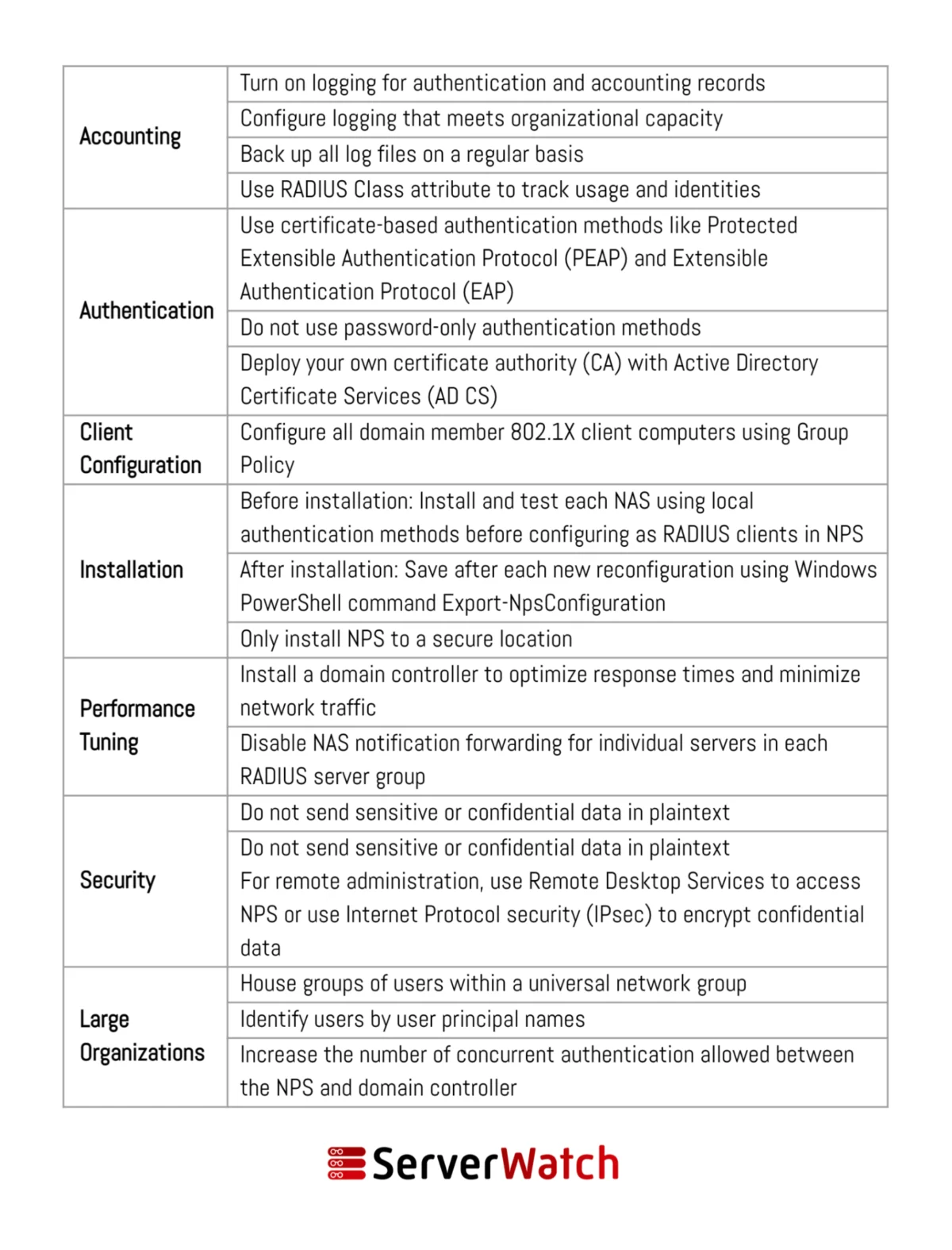
To ensure that NPS operates efficiently, securely, and in alignment with an organization’s network management goals, adherence to specific best practices is paramount. These recommendations, often provided by Microsoft and industry experts, are crucial for maximizing the value and effectiveness of an NPS deployment.
Key NPS best practices include:
- Secure RADIUS Secret Management: The shared secret used to establish communication between RADIUS clients and the NPS server is critical for security. It should be strong, unique, and managed securely. Avoid using default or easily guessable secrets. Implement a regular schedule for rotating these secrets.
- Leverage Active Directory Groups: Utilize Active Directory security groups to manage user access policies. This simplifies policy creation and ensures that access rights are automatically updated as users are added to or removed from groups.
- Implement Logging and Auditing: Configure NPS to log all authentication and accounting events. Regularly review these logs for suspicious activity, anomalies, and potential security threats. Establish a log retention policy that meets compliance requirements.
- Use Connection Request Policies: Configure connection request policies to direct traffic to the appropriate NPS server or RADIUS proxy. This is especially important in multi-server environments or when using NPS as a proxy.
- Define Clear Network Policies: Develop comprehensive network policies that clearly define access rights based on user roles, device types, and security requirements. Start with restrictive policies and gradually grant more access as needed, following the principle of least privilege.
- Configure RADIUS Client Security: Ensure that RADIUS clients (e.g., wireless access points) are configured with strong shared secrets and that their IP addresses are registered with the NPS server. Limit the number of RADIUS clients that can communicate with the NPS server to only authorized devices.
- Regularly Update and Patch NPS: Keep the Windows Server operating system and the NPS role updated with the latest security patches and updates from Microsoft. This helps protect against known vulnerabilities.
- Monitor NPS Performance: Implement monitoring solutions to track the performance of the NPS server, including CPU usage, memory consumption, and authentication request latency. This helps identify potential performance issues before they impact network availability.
- Test Policies Thoroughly: Before deploying new or modified network policies in a production environment, thoroughly test them in a lab or staging environment to ensure they function as expected and do not inadvertently block legitimate access.
- Plan for Disaster Recovery: Implement a disaster recovery plan for your NPS server(s). This might include regular backups of NPS configuration and data, and potentially a redundant NPS server for failover.
Bottom Line: The Integral Role of NPS in Modern Network Management
The Network Policy Server (NPS) has solidified its position as an indispensable tool in the modern IT infrastructure, offering a powerful, flexible, and robust solution for securing and streamlining network operations. Integrating NPS into an organization’s network architecture not only fortifies security by enforcing stringent access policies but also significantly simplifies administrative overhead, leading to more efficient and effective management of network resources.
By diligently adhering to the established best practices for deploying and managing NPS, organizations can substantially mitigate the inherent risks associated with network security threats. This proactive approach ensures a seamless operational flow, protects sensitive data, and maintains the trust of users and stakeholders. In an increasingly complex and threat-laden digital landscape, NPS stands as a critical safeguard, enabling organizations to navigate the challenges of network access control with confidence and efficiency.
To further enhance NPS functionality and performance, consider leveraging one of the best free RADIUS server testing and monitoring tools, carefully selected and reviewed by industry experts. These tools can provide invaluable insights into your NPS deployment, helping you maintain optimal security and operational efficiency.
