

All digital data and systems, from the websites we browse to the apps on our smartphones, are fundamentally hosted on real-world machines. The distinction between a "virtual server" and a "physical server" doesn’t represent a difference in their tangible existence but rather in their underlying architecture and how their resources are utilized. Understanding these differences is crucial for businesses making strategic decisions about their IT infrastructure.
What is a Physical Server?
A physical server, often referred to as a bare-metal server, is a dedicated piece of hardware comprising a chassis, central processing unit (CPU), graphics processing unit (GPU), random-access memory (RAM), storage drives, power supply unit, network interface, and operating system. Unlike a typical desktop computer, physical servers are engineered for continuous operation, designed to run 24/7 and dedicated to serving other computers or systems. They are the backbone for applications like web hosting, database management, and enterprise resource planning (ERP) systems.
The size of a physical server can vary dramatically, from compact desktop units to large, rack-mounted systems that occupy significant space within data centers. Regardless of its form factor or location, if it is a singular, dedicated piece of hardware, it is a physical server. These machines can be operated on-premises by an organization or accessed remotely through cloud providers, who manage the underlying physical infrastructure.
Key Features of Physical Servers:
A defining characteristic of physical servers is their exclusive ownership of all machine resources. This direct allocation of CPU, RAM, and storage to a single operating system and its applications provides a distinct advantage in terms of security and performance.
- Exclusive Resource Allocation: All computational power, memory, and storage are dedicated to the single operating system and its applications, ensuring no resource contention from other users or workloads.
- Uncompromised Performance: Without the overhead of a hypervisor or the sharing of resources, physical servers can often deliver peak performance for highly demanding applications.
- Enhanced Security and Isolation: The dedicated nature of a physical server inherently provides a higher level of isolation, reducing the attack surface and the risk of exploits from neighboring systems.
- Direct Hardware Access: Applications can interact directly with the hardware, which can be critical for certain specialized software or high-performance computing tasks.
- Full Control and Customization: Organizations have complete control over the hardware configuration, operating system, and software, allowing for deep customization to meet specific needs.
Historical Context and Use Cases:
In the early 2000s, the vast majority of server workloads were handled by physical servers. This era saw individual companies investing in and managing their own server farms to power their IT operations. This model provided a sense of ownership and control but also came with significant capital expenditure and ongoing maintenance responsibilities.
While the landscape has shifted dramatically with the rise of virtualization, physical servers remain relevant for specific, demanding workloads.
- High-Performance Computing (HPC): Tasks requiring immense processing power, such as complex scientific simulations, financial modeling, and advanced rendering, often benefit from the dedicated resources of physical servers.
- Databases Requiring Maximum Throughput: For mission-critical databases that demand the absolute lowest latency and highest transaction rates, bare-metal servers can provide the necessary performance edge.
- Specific Gaming and Application Hosting: Certain specialized applications, particularly in the gaming industry or for bespoke enterprise software, may have strict hardware requirements that are best met by dedicated physical machines.
- Legacy Systems: Some older applications are not designed to run in virtualized environments and therefore require dedicated physical hardware.
- Intensive Data Analytics and Machine Learning: Training large machine learning models or performing complex data analytics often requires the raw power and direct hardware access that physical servers can provide.
Industries Leveraging Physical Servers:
Sectors that place a premium on reliability, raw performance, and stringent security often continue to utilize physical servers. These include:
- Financial Services: For high-frequency trading platforms and core banking systems where milliseconds matter and security is paramount.
- Healthcare: For critical patient data management systems and advanced medical imaging processing that require high performance and data integrity.
- Government and Defense: For classified systems and mission-critical operations where absolute isolation and security are non-negotiable.
- Aerospace: For complex design, simulation, and engineering tasks that demand substantial computational resources.
- Manufacturing: For real-time control systems and industrial automation where consistent and predictable performance is essential.
- Media and Entertainment: For high-end video editing, rendering farms, and large-scale media processing.
What is a Virtual Server?
A virtual server, or virtual machine (VM), is a software-based emulation of a physical server. It is created by using virtualization software (a hypervisor) to partition the resources of a single physical server into multiple isolated virtual environments. Each VM operates as an independent server with its own operating system, applications, and allocated resources (CPU, RAM, storage, network).
Virtualization is the cornerstone of modern cloud computing, enabling providers to maximize hardware utilization and offer flexible, scalable, and cost-effective computing resources to a global customer base. Imagine a powerful, state-of-the-art physical server in a data center. Instead of dedicating this entire machine to a single client, a hypervisor can divide its capabilities among several virtual servers, each rented out to different users or applications.
Each VM is assigned a portion of the physical server’s resources, functioning as a distinct, isolated system. This allows for the creation of numerous virtual servers on a single piece of hardware, a concept that underpins the scalability and efficiency of major cloud platforms.
Key Features of Virtual Servers:

Virtual servers offer a distinct set of advantages driven by their software-defined nature and the underlying virtualization technology.
- Resource Efficiency and Consolidation: Multiple VMs can run on a single physical server, significantly reducing hardware costs, power consumption, and data center footprint.
- Scalability and Flexibility: Resources can be dynamically allocated and deallocated to VMs as needed, allowing for rapid scaling up or down of computing power.
- Rapid Deployment and Provisioning: New virtual servers can be created, cloned, and deployed in minutes, drastically reducing the time to get new applications or services online.
- Cost-Effectiveness: The ability to share hardware resources and pay-as-you-go models make virtual servers a more economical choice for many businesses, especially at scale.
- Disaster Recovery and Business Continuity: VMs can be easily backed up, replicated, and migrated to different physical hosts, facilitating robust disaster recovery strategies.
- Isolation and Sandboxing: While sharing hardware, VMs are logically isolated from each other, preventing issues on one VM from affecting others. This is also ideal for testing new software in a safe, contained environment.
Ubiquitous Use Cases:
The applications for virtual servers are virtually limitless, permeating nearly every aspect of modern digital life and business operations.
- Web Hosting: The vast majority of websites are hosted on virtual servers, allowing for efficient resource sharing among multiple clients.
- Application Development and Testing: Developers frequently use VMs to create isolated environments for coding, testing, and debugging without impacting production systems.
- Database Management: Many databases, from small applications to large enterprise solutions, run effectively on virtual servers.
- Cloud Computing Services: IaaS, PaaS, and SaaS models are built upon the foundation of virtualized infrastructure.
- Virtual Desktops (VDI): Delivering desktop environments to end-users from a central server, enabling remote work and BYOD policies.
- Big Data and Analytics: While some extreme cases might benefit from bare metal, many big data processing and analytics workloads are efficiently handled by clusters of virtual servers.
- Development and Staging Environments: Creating separate environments for development, testing, and staging before deploying applications to production.
- Running Multiple Operating Systems: Testing or running applications that require different operating systems on the same physical hardware.
Virtual Servers vs. Physical Servers: A Comparative Analysis
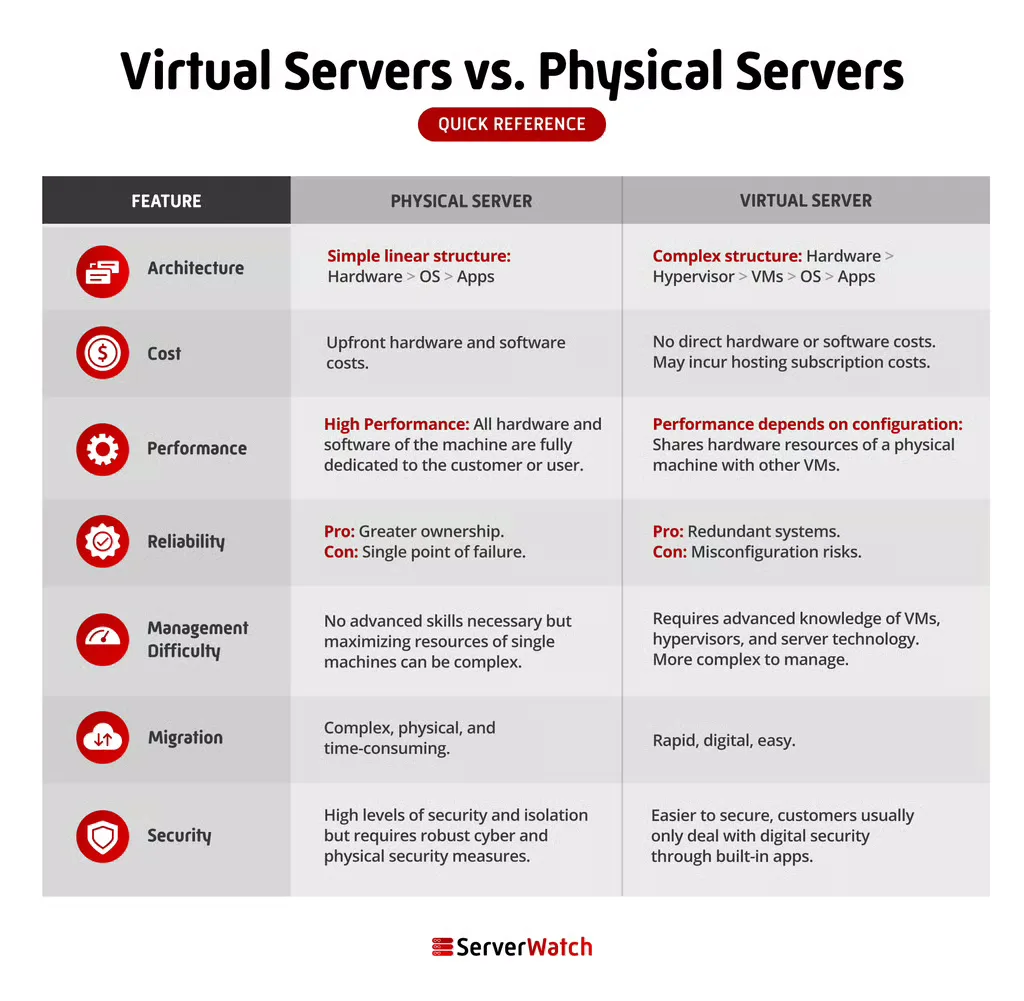
The fundamental difference lies in their architecture: physical servers are singular, tangible machines, while virtual servers are software-defined instances residing on physical hardware. This architectural distinction leads to significant variations in cost, performance, management, and other critical factors.
| Feature | Physical Server (Bare Metal) | Virtual Server (VM) |
|---|---|---|
| Architecture | Dedicated hardware, single OS, direct hardware access. | Software emulation, hypervisor layer, shared hardware resources. |
| Resource Use | 100% dedicated to a single OS/workload. | Resources are shared and allocated dynamically. |
| Cost | Higher upfront capital expenditure, ongoing maintenance costs. | Lower upfront cost, pay-as-you-go models, cost-efficient at scale. |
| Performance | Potentially higher peak performance for specific, demanding tasks. | Performance can be excellent but subject to hypervisor overhead and resource contention. |
| Reliability | Dependent on hardware quality and maintenance. | High reliability through redundancy, live migration, and vendor management. |
| Scalability | Limited by physical hardware upgrades. | Highly scalable, resources can be adjusted quickly. |
| Deployment | Slower, requires physical installation and configuration. | Rapid, can be provisioned and deployed in minutes. |
| Management | Full responsibility for hardware and software. | Vendor often manages underlying hardware; OS/app management still required. |
| Migration | Complex, requires physical movement and reconfiguration. | Relatively easy, can be copied or moved with minimal downtime. |
| Security | High isolation due to dedicated hardware. | Logical isolation via hypervisor; susceptible to hypervisor vulnerabilities. |
| Control | Complete hardware and software control. | Control over OS and applications; hardware managed by provider. |
Architecture: As highlighted, the core difference is the underlying structure. A physical server is a tangible entity. A virtual server is a software construct that mimics a physical server, existing within a larger physical host. The hypervisor acts as the intermediary, managing the allocation of the physical server’s resources to multiple VMs.
Cost: The economic implications are stark. Acquiring and maintaining physical servers involves significant capital investment in hardware, power, cooling, and physical space. Virtual servers, especially when accessed through cloud providers, often operate on a subscription or pay-as-you-go model, significantly reducing upfront costs and offering greater financial flexibility. For instance, a company might spend tens of thousands of dollars on a powerful physical server, whereas a comparable virtualized environment could be provisioned for a few hundred dollars per month, with the ability to scale as needed. Moreover, the operational costs associated with power, cooling, and physical security are borne by the cloud provider, further enhancing cost-effectiveness for virtual server users.
Performance: The performance debate is nuanced. For applications that require absolute, uncompromised raw power and minimal latency, such as high-frequency trading platforms or complex scientific simulations, a dedicated physical server can often outperform a virtual server. This is because physical servers have direct access to hardware without the overhead of a hypervisor layer. However, for a vast majority of business applications, the performance difference is negligible, and the efficiency gains of virtualization often outweigh any marginal performance discrepancies. Modern hypervisors have significantly minimized performance overhead, making virtual servers highly performant for most workloads.
Reliability: Both physical and virtual servers can be engineered for high reliability. Physical servers rely on robust hardware components and proactive maintenance. Virtual servers, particularly within cloud environments, leverage advanced technologies like live migration, automatic failover, and redundancy across multiple physical hosts. This means that if a physical host fails, the VMs running on it can often be seamlessly migrated to another operational host with minimal or no downtime, offering a superior level of resilience. Data from major cloud providers consistently shows high uptime percentages, often exceeding 99.9% for their virtualized services.
Management Difficulty: Managing a physical server involves responsibility for all aspects, from hardware diagnostics and repairs to operating system patching and security updates. This can be complex and resource-intensive. With virtual servers, especially those hosted by cloud vendors, many of the hardware management tasks are outsourced. While users are still responsible for managing their operating systems and applications within the VM, the burden of physical infrastructure maintenance is lifted. This simplification of management is a significant draw for many organizations.
Migration: The ease of migration is a key differentiator. Moving a virtual server from one physical host to another, or even from one data center to another, is a relatively straightforward process that can often be performed with minimal disruption, sometimes even live. This is achieved through features like live migration. In contrast, migrating a physical server is a far more involved undertaking. It typically requires shutting down the server, physically moving the hardware, reconfiguring network settings, and reinstalling or restoring the operating system and applications, a process that can take days and incur significant downtime.
Security: Security is a critical consideration for both. Physical servers offer a high degree of inherent isolation because they are dedicated machines. However, they are susceptible to physical threats like theft or damage. Virtual servers provide logical isolation through the hypervisor. While this isolation is robust, it’s not absolute and can be vulnerable to sophisticated attacks targeting the hypervisor itself or exploiting misconfigurations. Both require rigorous security practices, including strong access controls, regular patching, and network security measures. Cloud providers invest heavily in physical and network security, often exceeding what individual organizations can achieve.
The Bottom Line: Choosing the Right Server for Your Business
The decision between virtual and physical servers hinges on a business’s specific requirements, budget, and strategic goals.
Virtual servers are generally the more adaptable and cost-effective solution for a wide array of businesses. Their scalability, rapid deployment capabilities, and lower upfront costs make them ideal for startups, small to medium-sized enterprises, and businesses with fluctuating workloads. The flexibility to scale resources up or down as demand changes ensures that businesses only pay for what they use, optimizing their IT expenditure. Furthermore, the ease of management and the robust disaster recovery options offered by cloud-based virtual servers provide peace of mind and business continuity.
However, physical servers retain their relevance for organizations with exceptionally demanding performance needs, strict regulatory compliance requiring complete hardware control, or specialized legacy applications. Industries that require absolute maximum performance, such as high-frequency trading firms, or those handling highly sensitive data that must remain entirely on-premises, might find physical servers to be the superior choice. The guarantee of dedicated, unshared resources can be paramount in these niche scenarios.
Ultimately, a hybrid approach, combining the strengths of both physical and virtual servers, is often the most effective strategy for modern enterprises. This allows businesses to leverage the cost-efficiency and scalability of virtual servers for the majority of their workloads while reserving dedicated physical resources for the most critical or performance-intensive applications. As the technological landscape continues to evolve, the interplay between physical and virtual infrastructure will remain a key determinant of IT efficiency and business agility.
