
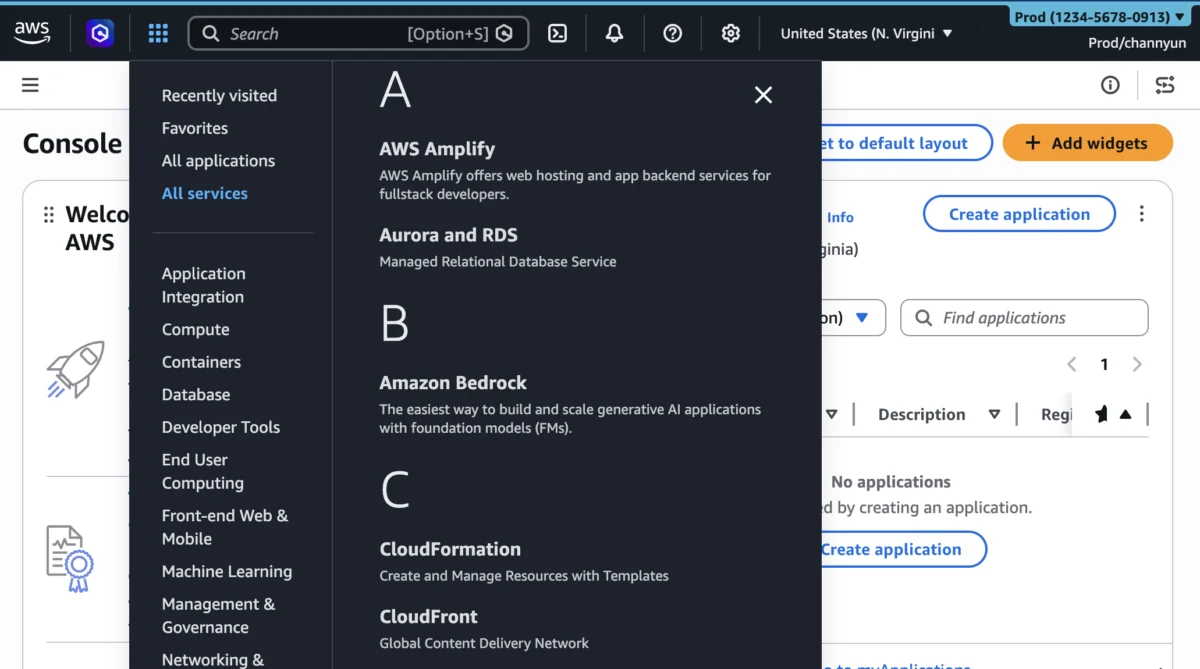

Amazon Web Services (AWS) has announced significant enhancements to its User Experience Customization (UXC) capabilities within the AWS Management Console, empowering account administrators to selectively display relevant AWS Regions and services for their teams. This new functionality, building upon the initial UXC rollout in August 2025, aims to streamline cloud operations by reducing cognitive load, minimizing unnecessary clicks and scrolling, and ultimately boosting user productivity. The update integrates region and service visibility customization alongside the existing account color assignment feature, offering a comprehensive suite of tools for tailoring the console interface.
The Evolving Landscape of Cloud Management and the Need for Customization
The exponential growth of cloud services and the increasing complexity of cloud environments have underscored the critical need for more intuitive and personalized management interfaces. AWS, a pioneer in the cloud computing space, now offers hundreds of distinct services spanning a global network of dozens of Regions and Availability Zones. While this vast portfolio provides unparalleled flexibility and power to organizations worldwide, it can also present a significant challenge for users navigating the AWS Management Console. Developers, operations engineers, and security professionals often interact with only a subset of these services and operate within specific geographic regions due to compliance, data residency, or architectural requirements. The sheer volume of options can lead to decision fatigue, increased potential for error, and a steeper learning curve for new team members.
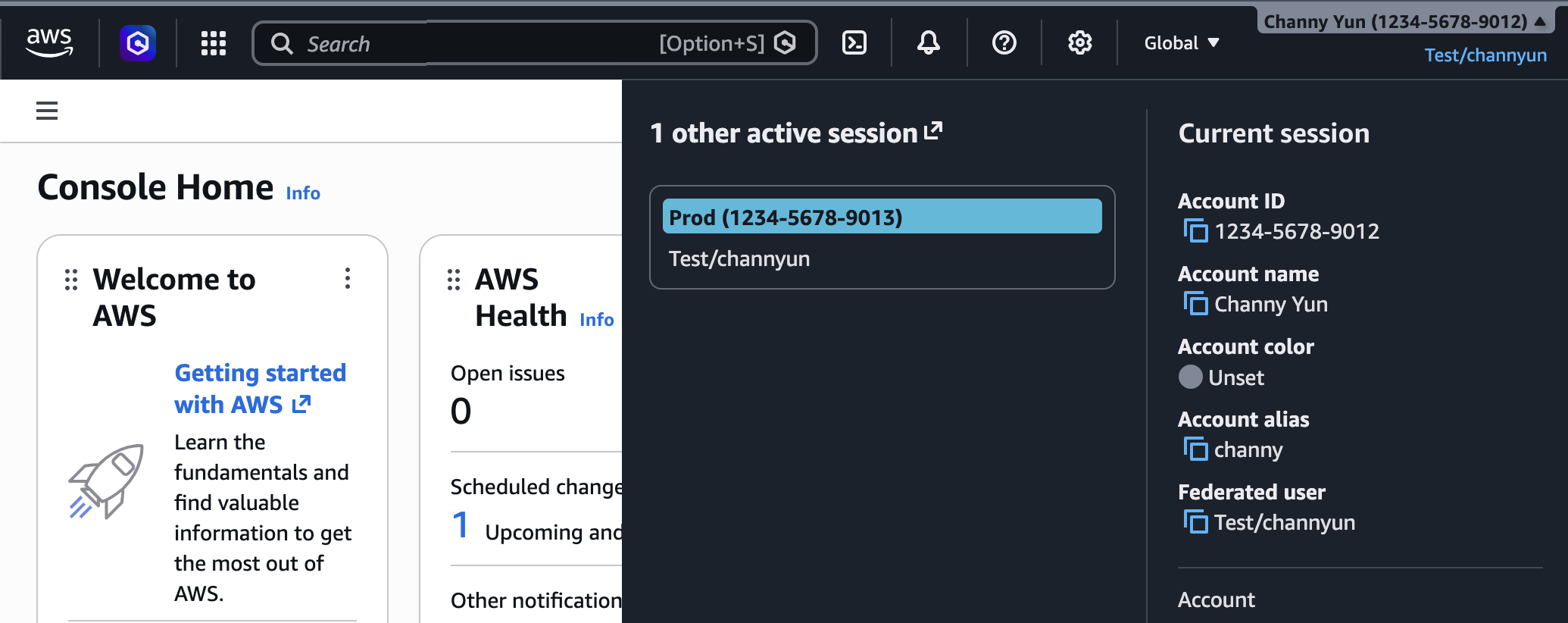
Recognizing this challenge, AWS introduced its User Experience Customization (UXC) capability in August 2025. The initial release focused on a crucial, yet often overlooked, aspect of multi-account management: visual distinction. Account administrators gained the ability to assign a unique color to each AWS account, a simple yet effective method for immediate identification. This feature proved invaluable for organizations operating complex multi-account strategies, where distinguishing between development, testing, and production environments is paramount to preventing costly mistakes. The visual cue in the navigation bar quickly informs users which account they are currently interacting with, acting as a preventative measure against misconfigurations or deployments in the wrong environment.
The latest announcement marks a strategic expansion of UXC, moving beyond mere visual differentiation to actively curate the console’s functional display. By allowing administrators to hide unused Regions and services, AWS is directly addressing customer feedback concerning interface clutter and the desire for a more focused user experience. This enhancement is a testament to AWS’s commitment to continuously refining its tools to meet the evolving demands of enterprise customers, who increasingly seek ways to optimize operational efficiency and minimize potential for human error in their cloud ecosystems.
Detailed Examination of New Customization Capabilities
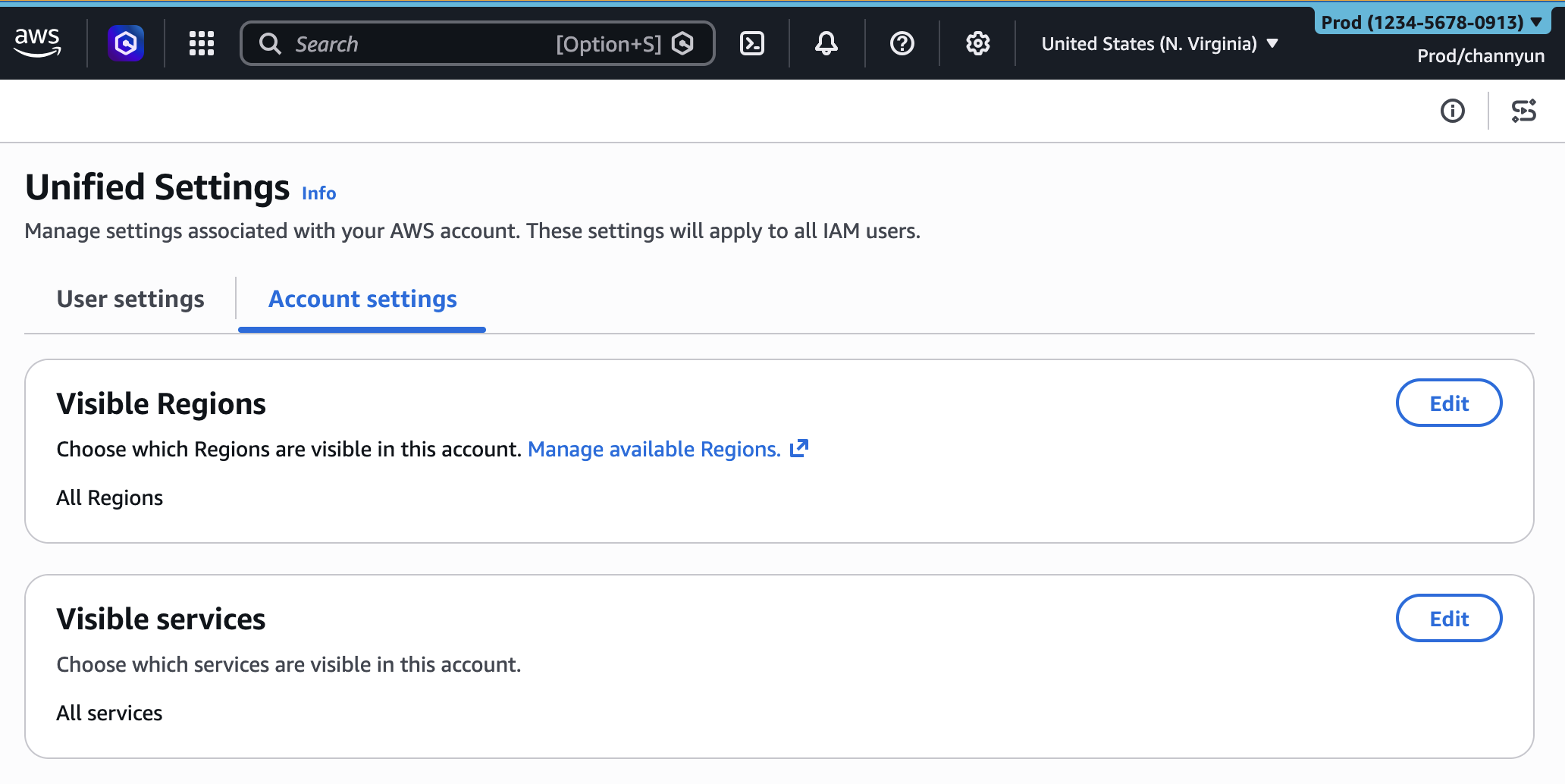
The core of the recent UXC update lies in its ability to control the visibility of AWS Regions and services within the console. These settings are managed by account administrators through a centralized "Account settings" tab in the unified settings interface.

Streamlining Region Selection:
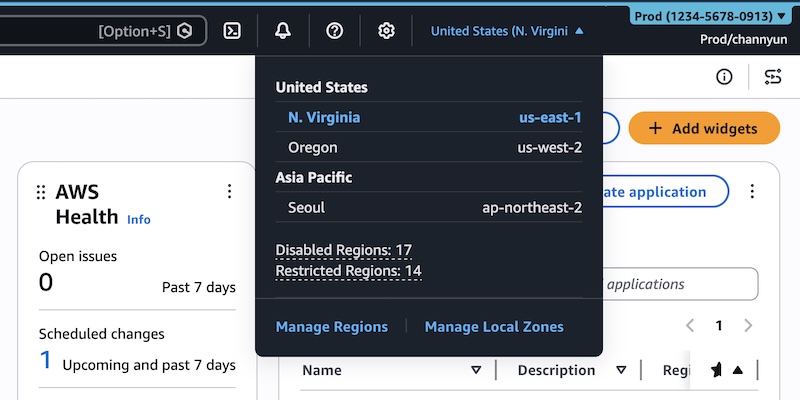
For organizations with global footprints, managing resources across multiple AWS Regions is a common practice. However, individual teams or projects often operate within a predefined set of regions to adhere to data sovereignty laws, latency requirements, or cost optimization strategies. Previously, the Region selector in the AWS Management Console would display all available AWS Regions globally, regardless of an organization’s operational scope.
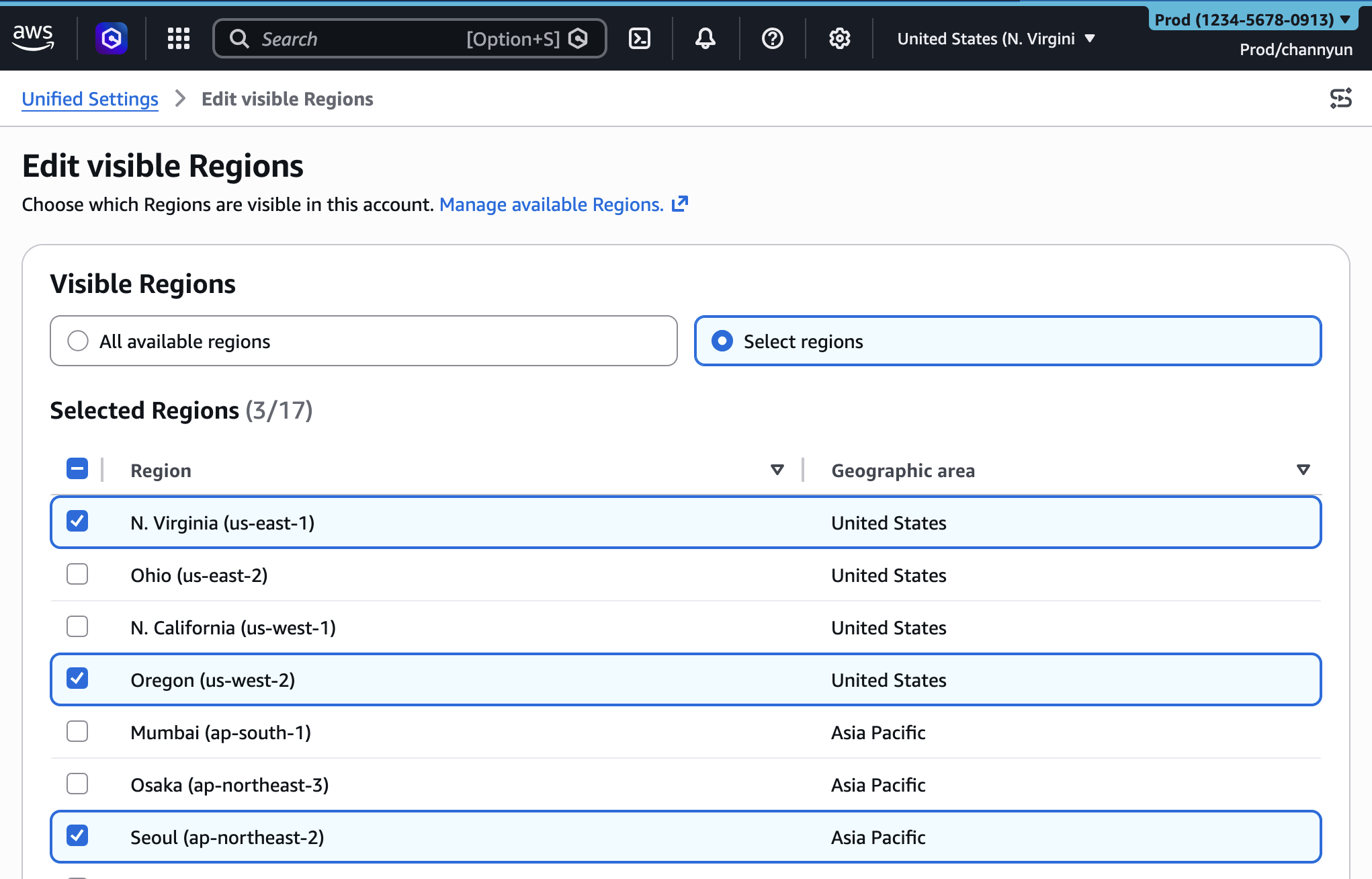
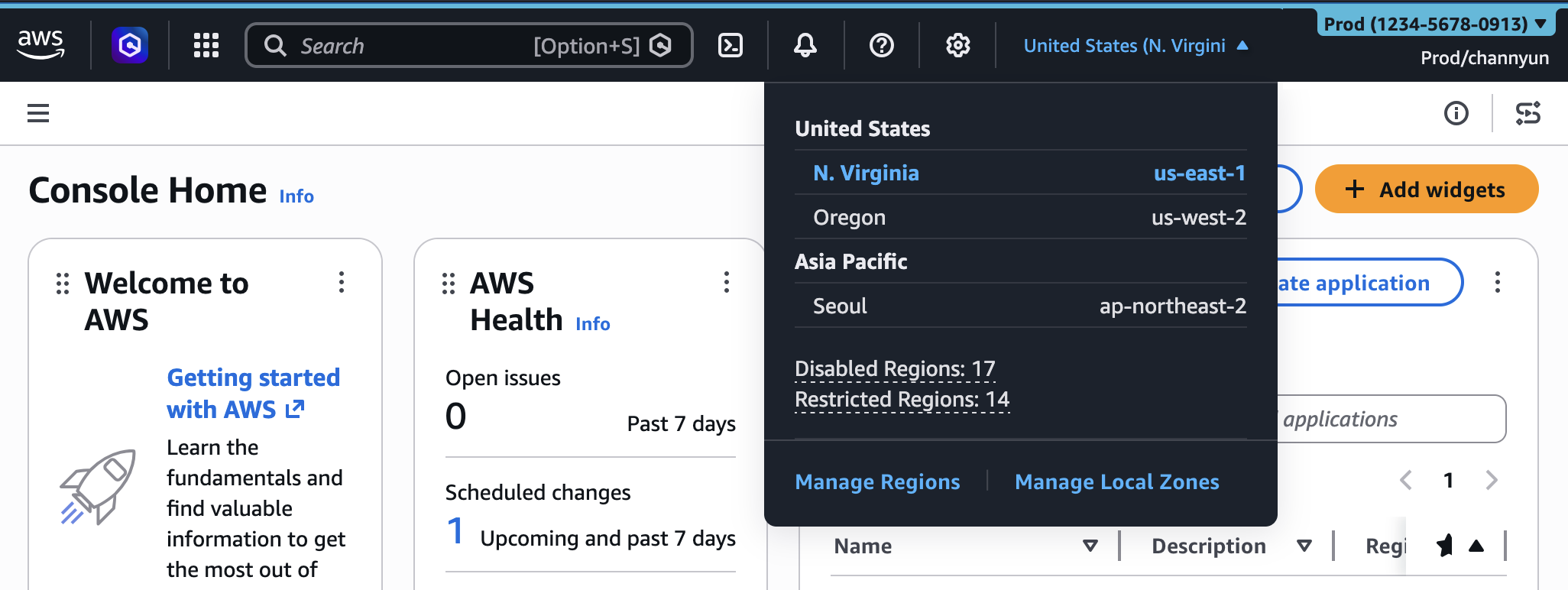
With the new "Visible Regions" setting, administrators can now curate this list. They have the option to either display "All available Regions" (the default behavior if no customization is applied) or select a specific subset of regions that are relevant to their account’s operations. For instance, a European-based company might configure their accounts to only show eu-west-1 (Ireland), eu-central-1 (Frankfurt), and eu-south-1 (Milan), effectively removing the cognitive distraction of regions in North America, Asia-Pacific, or other distant geographies. This targeted display significantly reduces the chances of accidentally provisioning resources in an unapproved or irrelevant region, which can have compliance, cost, or performance implications.
The process is straightforward: an administrator navigates to the unified settings, selects the "Account settings" tab, and chooses to edit the "Visible Regions" section. From there, a simple checkbox interface allows for the selection of desired regions. Once saved, the Region selector in the console’s navigation bar will only present these configured options, providing a cleaner, more focused operational view. This feature is particularly beneficial for large enterprises enforcing strict regional governance policies, as it visually guides users towards authorized deployment locations.
Tailoring Service Visibility:
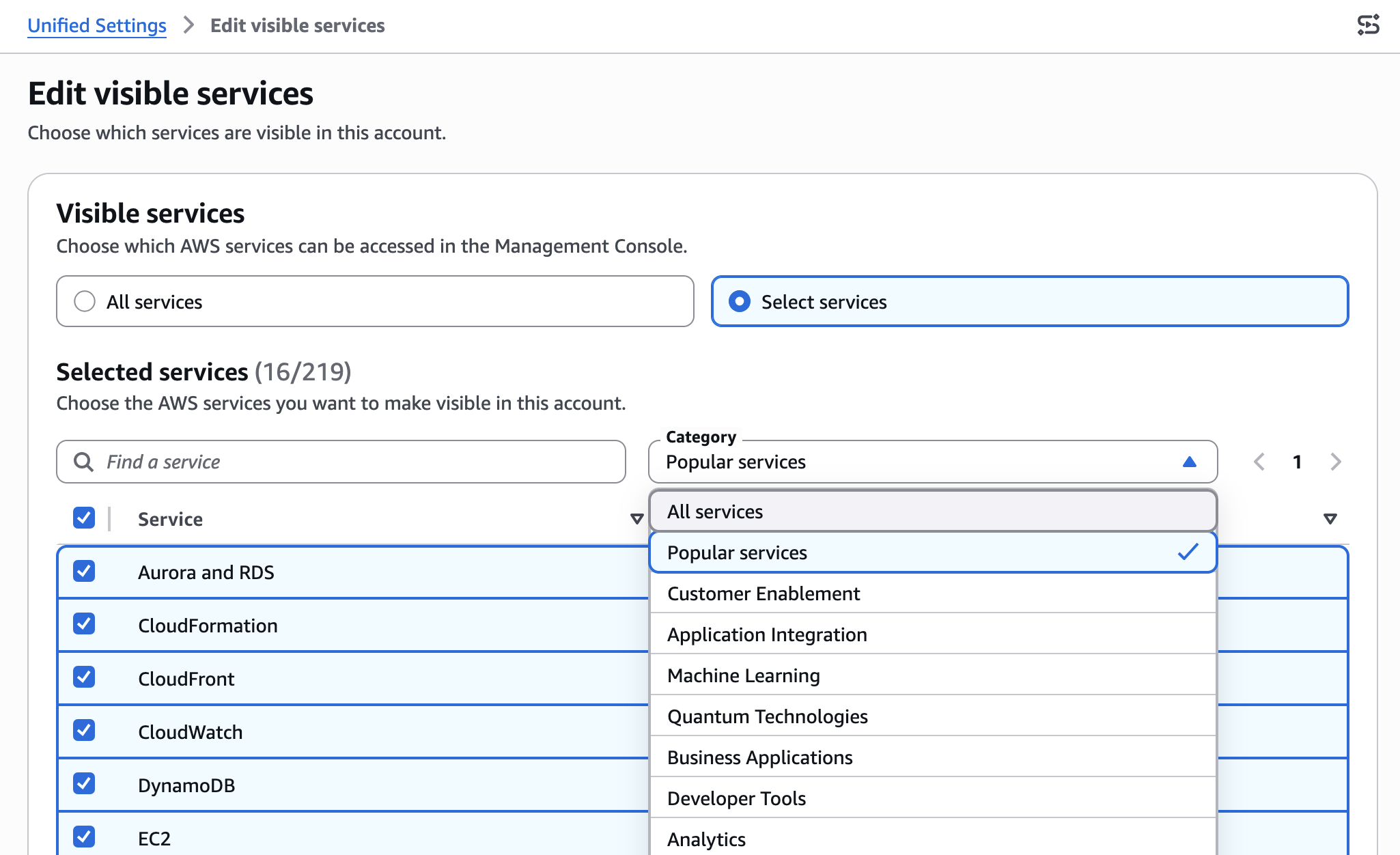
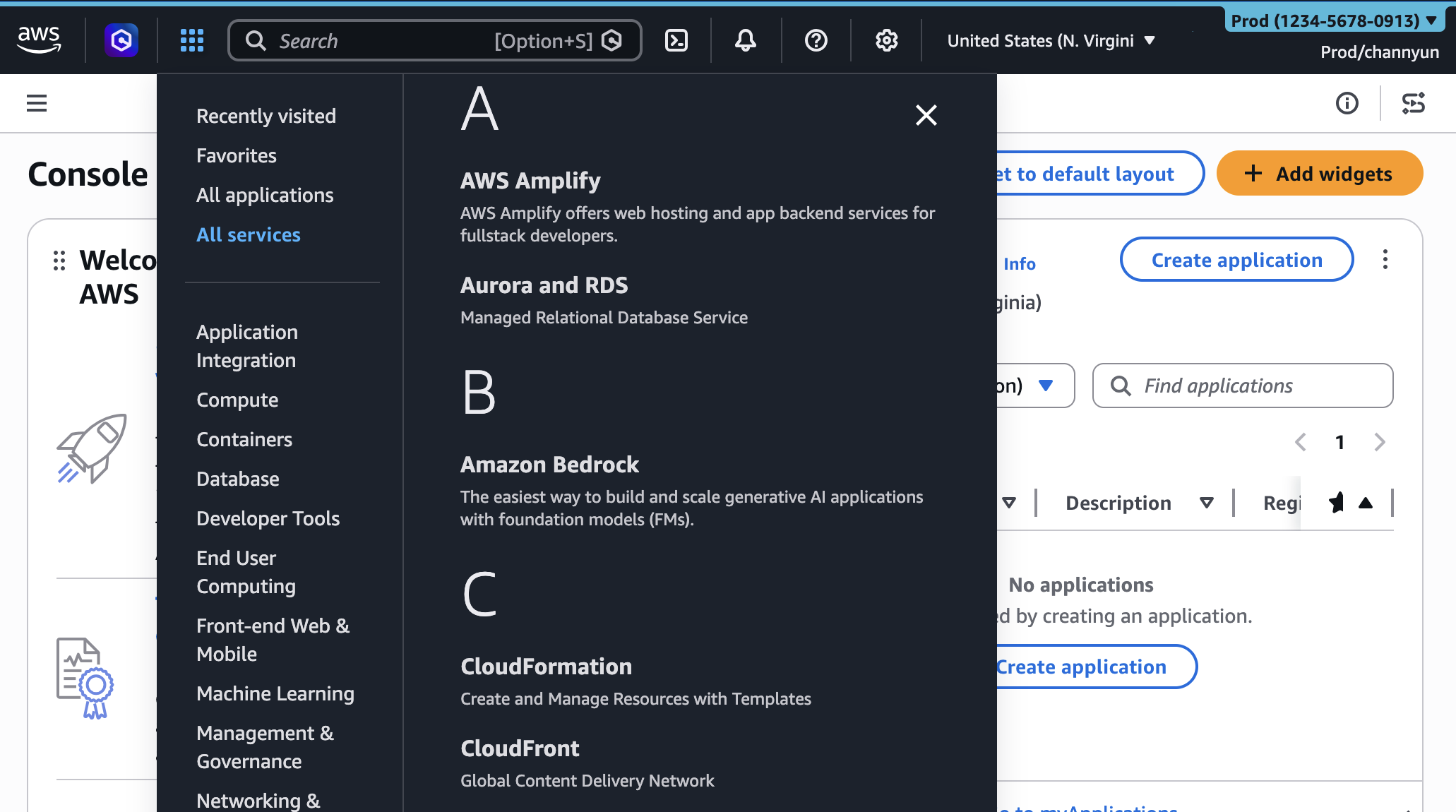
Perhaps even more impactful than Region customization is the ability to control the visibility of AWS services. The AWS console’s "All services" menu can be extensive, listing hundreds of offerings from compute and storage to machine learning, robotics, and quantum technologies. While this breadth is a strength of AWS, it can be overwhelming for users whose daily tasks revolve around a limited set of services. A database administrator, for example, might primarily interact with Amazon RDS, DynamoDB, and Aurora, while a machine learning engineer might focus on Amazon SageMaker, S3, and Lambda.
The "Visible Services" setting addresses this by allowing administrators to prune the service list to only those relevant to their team or account’s function. Administrators can search for specific services or select them from categorized lists (e.g., "Popular services," "Compute," "Storage"). This customization applies not only to the "All services" menu but also influences the search bar functionality, ensuring that users can only search for and select the services that have been designated as visible.
For a development team primarily building serverless applications, an administrator might configure visible services to include Amazon Lambda, API Gateway, DynamoDB, S3, and CloudWatch, effectively hiding dozens of other services like Amazon Neptune, AWS Outposts, or Amazon Braket that are irrelevant to their workflow. This dramatically reduces visual clutter, makes service discovery faster, and helps new team members quickly identify the tools they need without being distracted by an overwhelming array of options.
It is crucial to note that these visibility settings are purely for user interface simplification. As the announcement clarifies, "The Regions and services visibility settings control only the appearance of services and Regions in the console. They don’t restrict access through the AWS Command Line Interface (AWS CLI), AWS SDKs, AWS APIs, or Amazon Q Developer." This distinction is vital for maintaining security and programmatic automation. Access control remains the domain of AWS Identity and Access Management (IAM), ensuring that while the console looks simpler, the underlying security policies are enforced independently, preventing unauthorized actions even if a service is visually hidden.
Enhancing Account Categorization with Color Coding
The initial UXC feature, account color assignment, remains a cornerstone of console customization and works in concert with the new visibility options. The ability to set a distinct color for each AWS account provides an immediate visual cue about the account’s purpose or environment.
Consider a typical enterprise setup:
- Red for Production accounts, signaling extreme caution.
- Orange for Development accounts, indicating active build phases.
- Light Blue for Testing/Staging accounts, for quality assurance processes.
- Green for Sandbox or Experimentation accounts, encouraging safe innovation.
- Purple for Security or Management accounts, used by central IT teams.
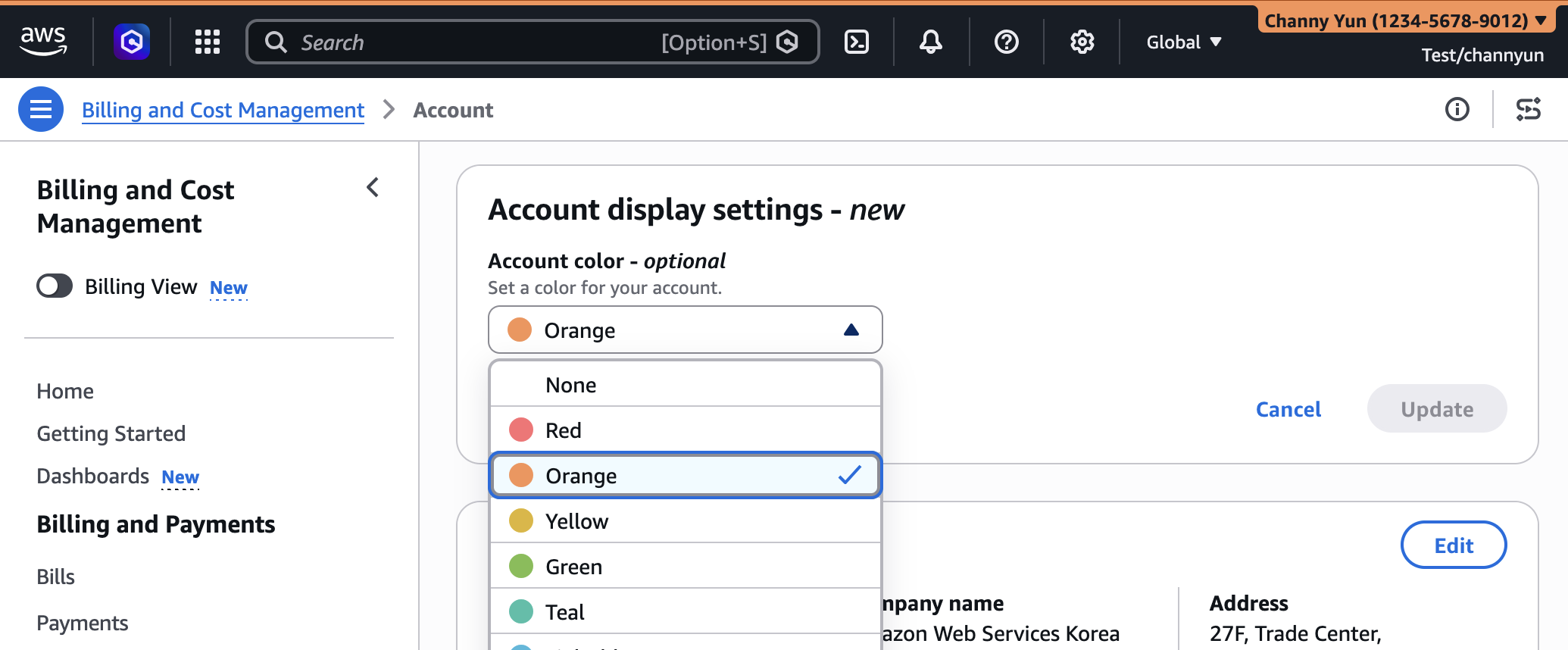
This color-coding system, visible in the console’s navigation bar, significantly reduces the risk of human error in multi-account environments. A quick glance is often enough to confirm whether a user is in the correct account before initiating a critical operation. The process for setting an account color is straightforward: users sign in to the AWS Management Console, click on their account name in the navigation bar, choose "Account," and then select their preferred color from the "Account display settings" section. This simple yet powerful visual aid has been widely adopted by organizations seeking to enhance operational safety and clarity.
Programmatic Management and Automation with Infrastructure as Code
A key differentiator and an essential feature for large-scale enterprise deployments is the ability to manage these UXC settings programmatically. AWS has extended its API and CloudFormation support to include the new visibleServices and visibleRegions parameters within the AWS::UXC::AccountCustomization resource type.
This means that organizations can define their console customization policies as Infrastructure as Code (IaC). Instead of manually configuring settings in each account via the console, administrators can write CloudFormation templates to standardize these customizations across their entire AWS organizational structure.
An example CloudFormation template demonstrates this capability:
AWSTemplateFormatVersion: "2010-09-09"
Description: Customize AWS Console appearance for this account

Resources:
  AccountCustomization:
    Type: AWS::UXC::AccountCustomization
    Properties:
      AccountColor: red
      VisibleServices:
        - s3
        - ec2
        - lambda
      VisibleRegions:
        - us-east-1
        - us-west-2
This template, once deployed using the AWS CLI command $ aws cloudformation deploy --template-file account-customization.yaml --stack-name my-account-customization, will automatically configure the specified account color, visible services (Amazon S3, EC2, Lambda), and visible regions (US East (N. Virginia), US West (Oregon)).
The benefits of programmatic management are manifold:
- Consistency: Ensures uniform console experiences across all accounts and teams.
- Version Control: Customization policies can be stored in source control systems (e.g., Git), allowing for tracking changes, rollbacks, and collaboration.
- Auditability: Changes to console configurations can be audited through IaC pipelines.
- Scalability: Automates the application of settings to hundreds or thousands of accounts, a critical capability for large enterprises.
- Efficiency: Reduces manual effort and the potential for human error in configuration.
This programmatic approach aligns perfectly with cloud best practices, enabling organizations to manage their AWS environments with greater control, efficiency, and adherence to internal standards. Further details on API and CloudFormation references are available in the AWS documentation.
Industry Reactions and Implications
The expanded AWS UXC capabilities are expected to be well-received across the cloud community, particularly by large enterprises and managed service providers.
An inferred statement from an AWS Product Manager might emphasize: "This enhancement directly responds to extensive customer feedback, particularly from organizations managing complex multi-account environments. Our goal is to empower users with a more tailored, less cluttered console experience, allowing them to focus on what matters most. By integrating region and service visibility with account coloring, we’re providing a powerful suite of tools that enhance operational efficiency and reduce cognitive load for every AWS user."
From the perspective of an Enterprise Cloud Architect or CIO, the benefits are tangible. A hypothetical statement could be: "Our engineering teams navigate dozens of AWS accounts daily, often specializing in specific services or operating within designated regions. The ability to selectively display only relevant services and regions will dramatically cut down on cognitive overload, reduce the risk of accidental misconfigurations, and accelerate onboarding for new team members. This is a significant step towards a more human-centric cloud management experience."
A Cloud Analyst might offer an assessment: "AWS’s latest UXC update underscores a growing maturity in cloud platform usability. As cloud environments become increasingly complex, simplified, customizable interfaces are no longer just a ‘nice-to-have’ but a ‘must-have.’ This move aligns with broader industry trends towards personalized digital workspaces and reinforces AWS’s commitment to providing enterprise-grade tools that support not just technical capabilities, but also operational excellence and user productivity. While not a security control in itself, it indirectly supports governance by guiding users towards approved operational parameters."
Broader Impact and Future Outlook
The implications of these enhanced UXC features extend beyond mere aesthetic improvements:
- Operational Efficiency and Productivity: By removing irrelevant options, users can locate services and regions faster, reducing clicks and scrolling. This translates into tangible time savings for engineers and administrators, allowing them to complete tasks more quickly and focus on innovation rather than navigation.
- Reduced Error Rates: A simplified interface inherently minimizes the potential for human error. When only approved regions and services are visible, the likelihood of deploying resources in the wrong location or using an unapproved service decreases significantly, particularly in critical production environments.
- Improved Onboarding and Training: New team members can become productive faster when presented with a console tailored to their specific role and scope of work. The learning curve is flattened, as they are not overwhelmed by the full breadth of AWS services from day one.
- Enhanced Governance and Compliance Support: While not a security enforcement mechanism, UXC provides a powerful visual layer of governance. By guiding users towards approved operational parameters, it reinforces organizational policies around data residency, service usage, and cost management.
- Scalability for Large Organizations: For enterprises managing hundreds or even thousands of AWS accounts, programmatic customization via CloudFormation becomes an indispensable tool for maintaining consistency and control across their vast cloud footprint.
- Developer Experience: A streamlined console contributes to a better developer experience, reducing frustration and allowing engineers to stay in their flow state.
Looking ahead, this expansion of UXC suggests a continuing trend towards deeper personalization and intelligent adaptation within the AWS Management Console. Future enhancements could potentially include customizable dashboards for specific roles, personalized service shortcuts, or even AI-driven suggestions for relevant services based on usage patterns. The emphasis on user experience is a strategic move, ensuring that as AWS continues to innovate with new services, its management tools remain accessible, efficient, and user-friendly for its diverse global customer base.
AWS encourages users to actively provide feedback on these new features through the console’s "Feedback" link, the AWS re:Post forum for the AWS Management Console, or by reaching out to their AWS Support contacts. This continuous feedback loop is crucial for the ongoing evolution of the console and its ability to meet the dynamic needs of cloud practitioners.
