
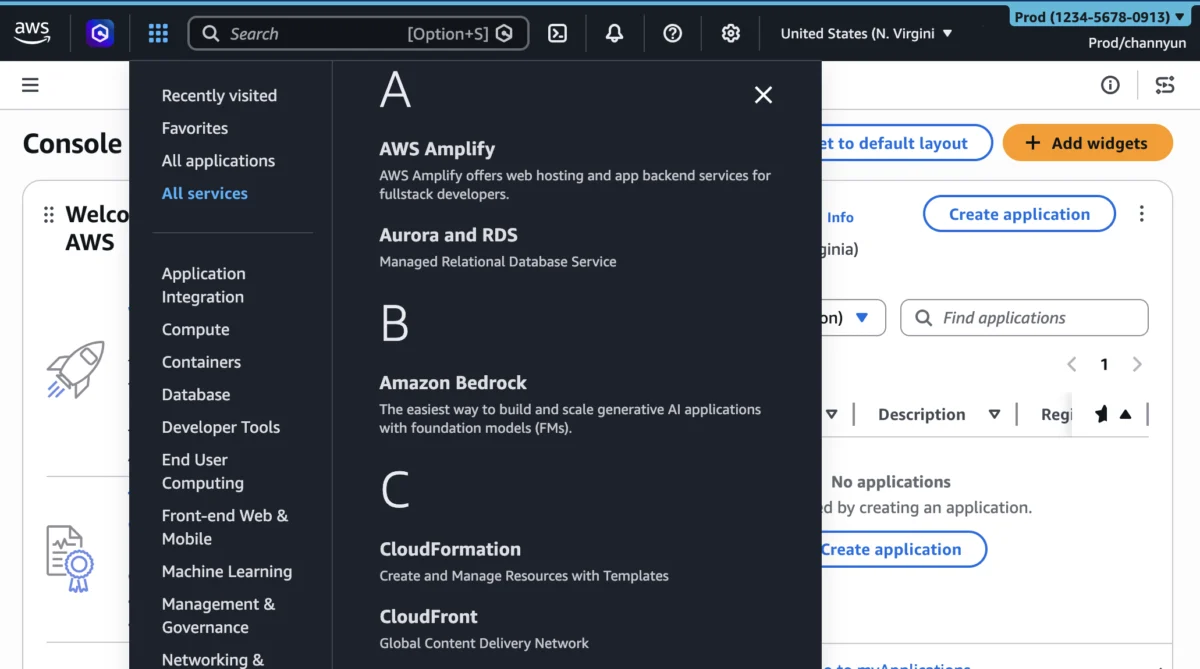

Amazon Web Services (AWS) today announced a significant expansion of its User Experience Customization (UXC) capabilities within the AWS Management Console, empowering administrators to selectively display relevant AWS Regions and services for their teams. This enhancement, building upon the initial UXC rollout in August 2025 that introduced account color assignment, aims to drastically reduce cognitive load, streamline workflows, and improve operational efficiency for cloud professionals navigating the increasingly complex AWS ecosystem.
The new functionality allows AWS account administrators to tailor the console interface, presenting only the specific geographic Regions and a curated selection of AWS services pertinent to a user’s role or the account’s operational scope. This targeted approach is designed to eliminate unnecessary clicks and scrolling, enabling users to focus more intently on their tasks and accelerate productivity. This latest update consolidates account color customization, Region visibility, and service visibility into a unified management framework.
Deep Dive into Enhanced Customization: Tailoring Your Cloud Environment
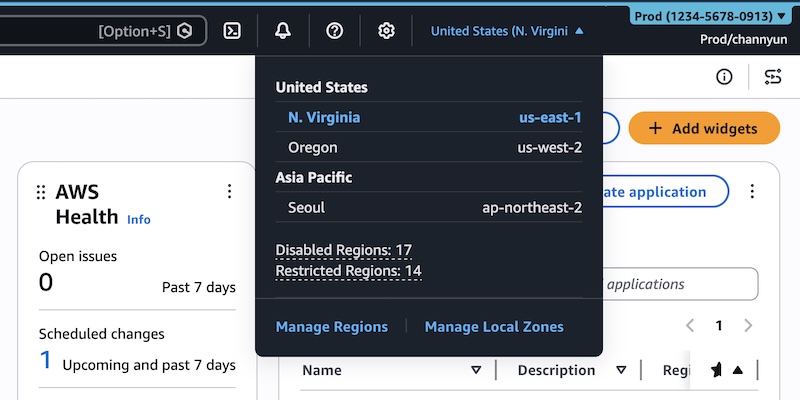
The core of this new release lies in its granular control over what appears within the AWS Management Console. For organizations operating across multiple AWS accounts and leveraging a subset of the vast AWS service catalog, this feature represents a substantial step forward in usability.
-
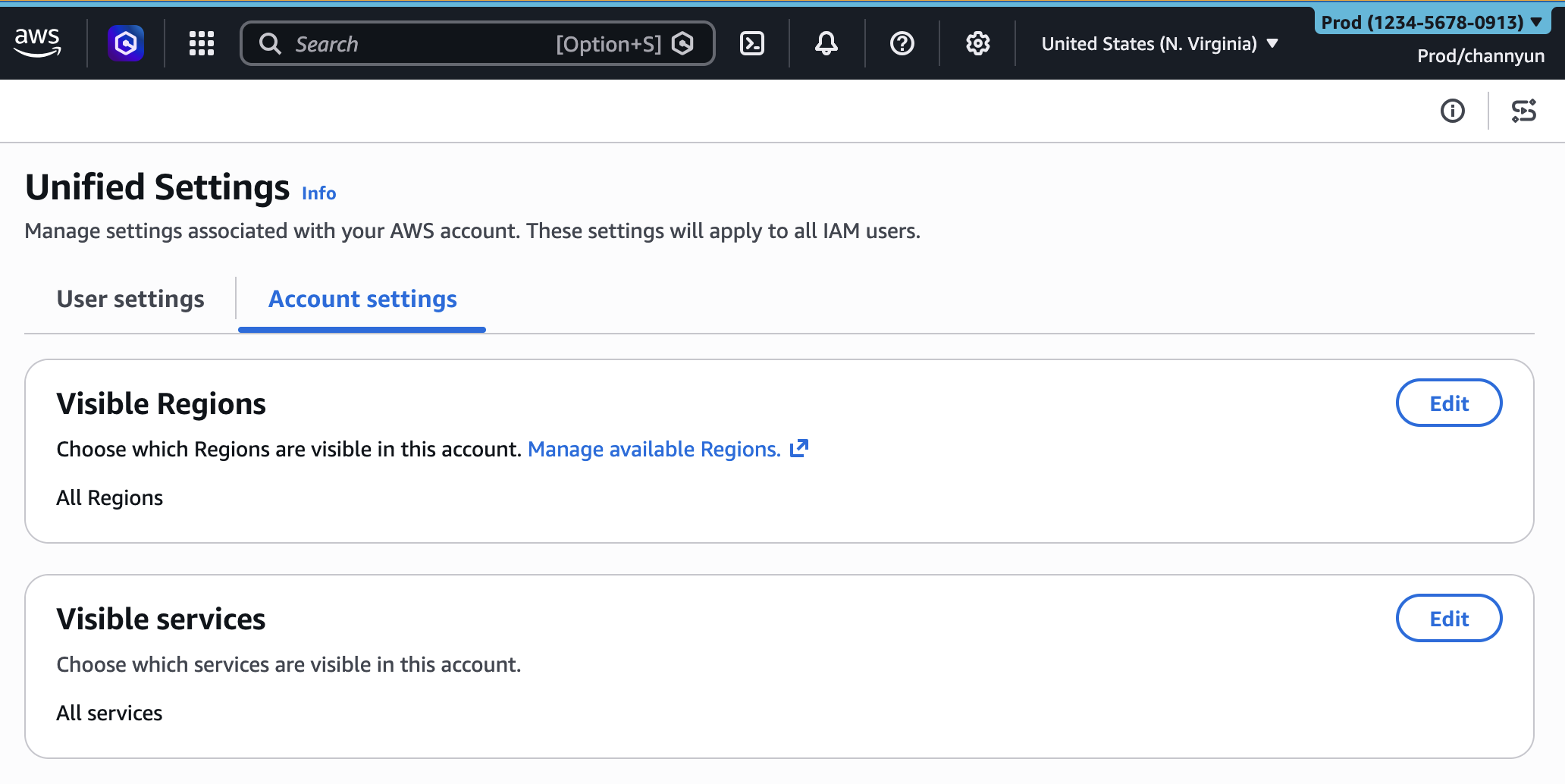
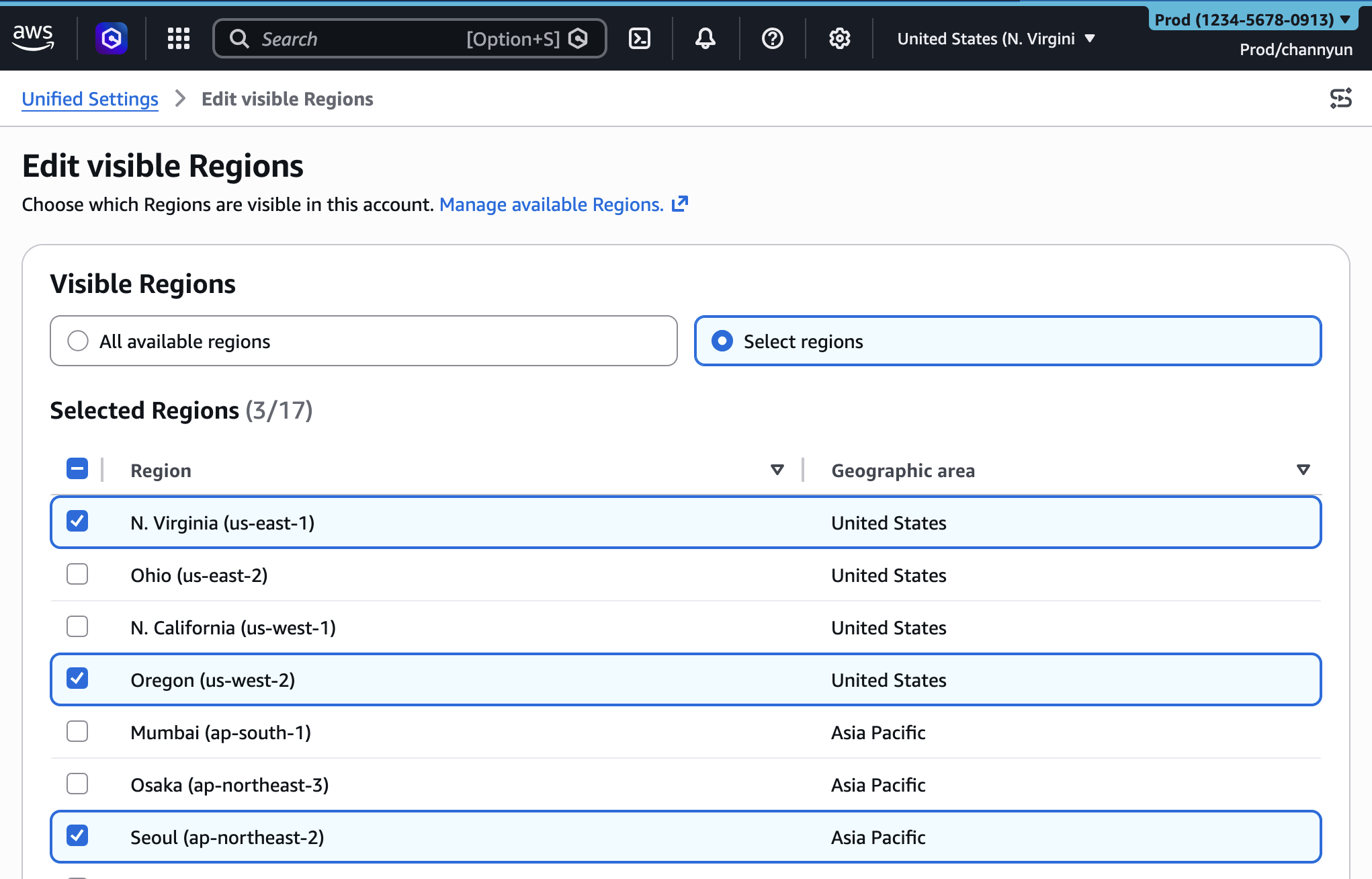
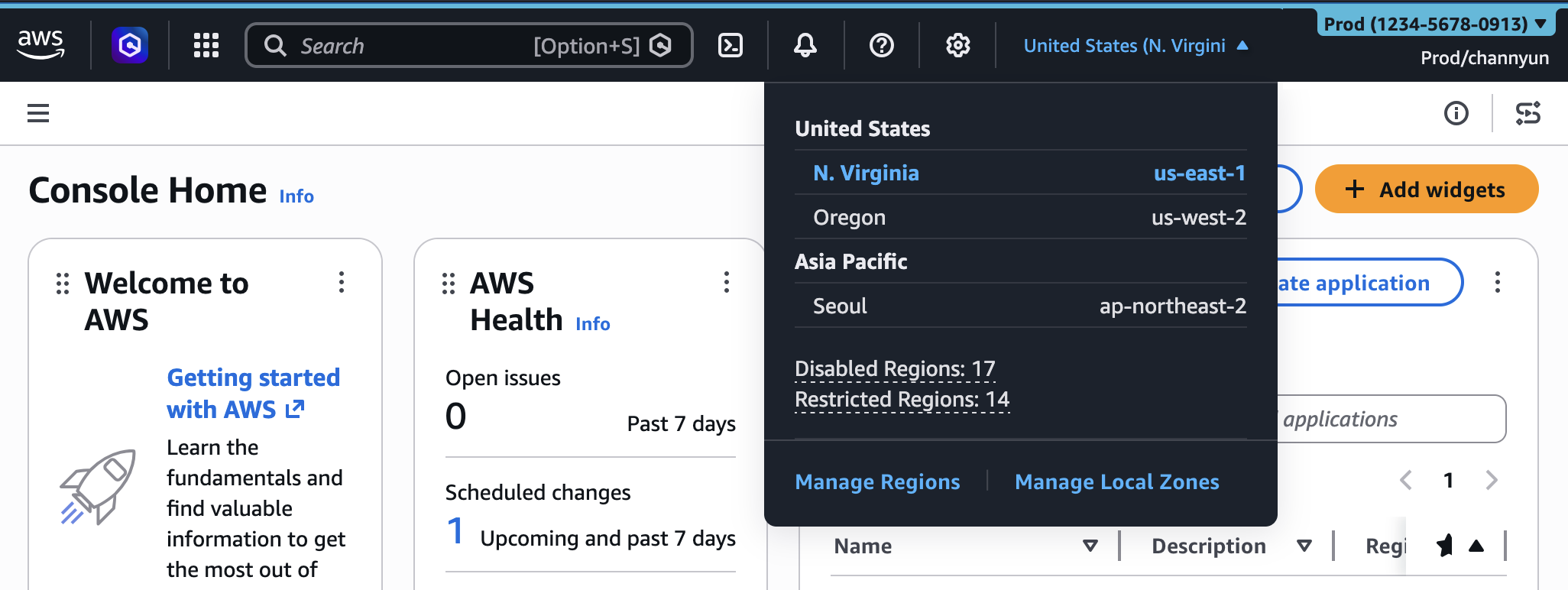
Region Visibility: Cloud deployments often span multiple geographic regions for resilience, data residency, or proximity to end-users. However, individual teams or applications may only operate within a handful of these regions. The new UXC feature allows administrators to define a specific list of "visible Regions." Once configured, the Region selector in the console’s navigation bar will only present these chosen regions, effectively decluttering the interface and preventing accidental resource deployment or management in unintended locations. For instance, a development team focused solely on applications hosted in
us-east-1andeu-west-1can have their console configured to display only these two regions, removing the dozens of other available regions from their immediate view. This directly translates to less time spent searching and reduced potential for human error. -
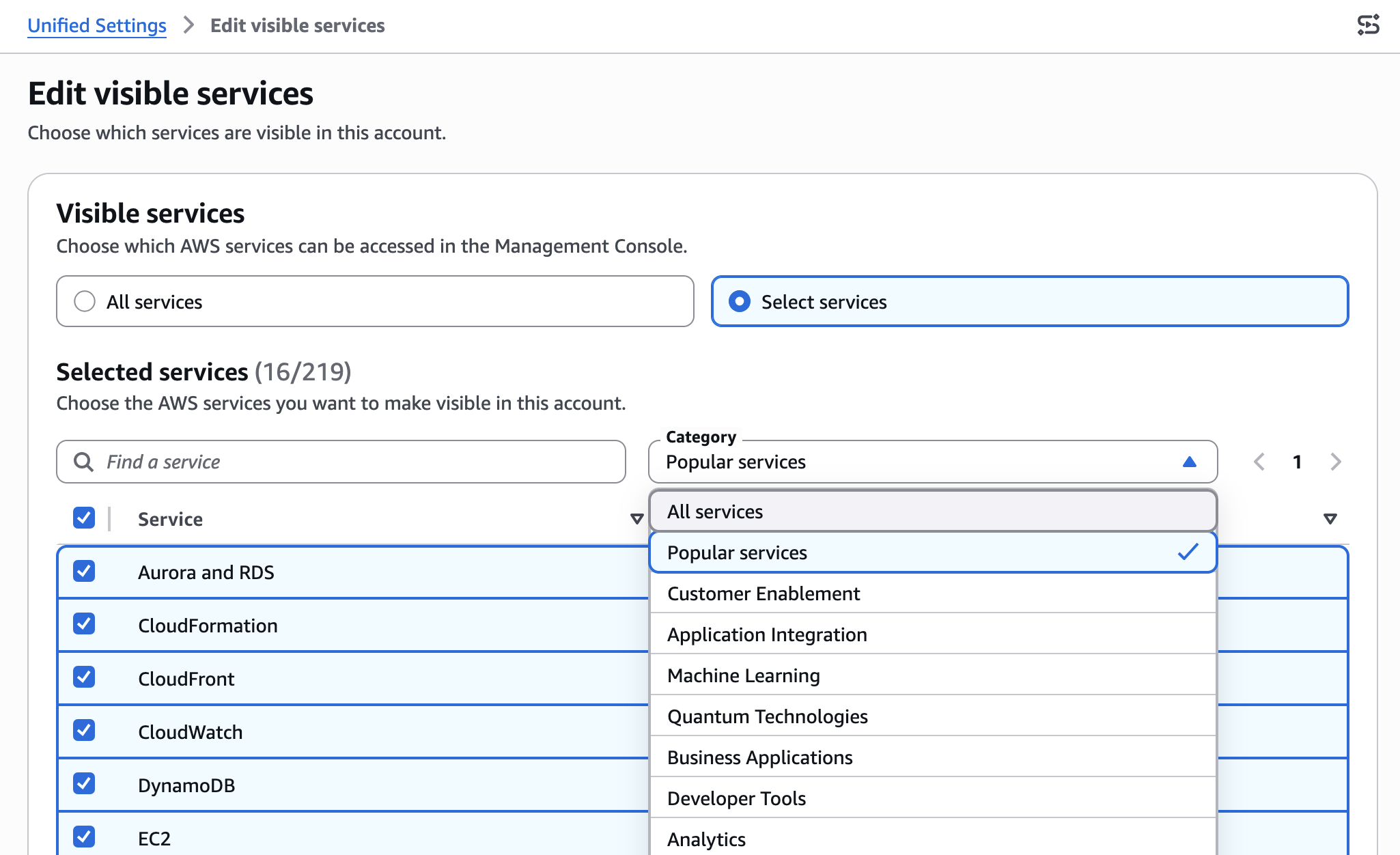
Service Visibility: With over 200 fully featured services and counting, the AWS console can be overwhelming for users who only interact with a specific set of tools. The service visibility feature enables administrators to curate the "All services" menu and search results. By selecting only the services relevant to a team’s function – for example,
Amazon S3,Amazon EC2,AWS Lambda, andAmazon RDSfor a typical application development team – the console becomes a more focused and intuitive workspace. Users will no longer need to sift through an extensive list of services they never use, such as quantum computing or satellite ground stations, thereby enhancing their navigation speed and overall console experience.
These visibility settings are centrally managed by account administrators through a dedicated "Account settings" tab within the unified user settings interface. If no custom settings are applied, the console defaults to displaying all available Regions and services, ensuring backward compatibility and a comprehensive view for those who require it. The ease of configuration, involving simple selection and saving, underscores AWS’s commitment to making powerful customization accessible.

The Power of Visual Distinction: Account Coloring Revisited
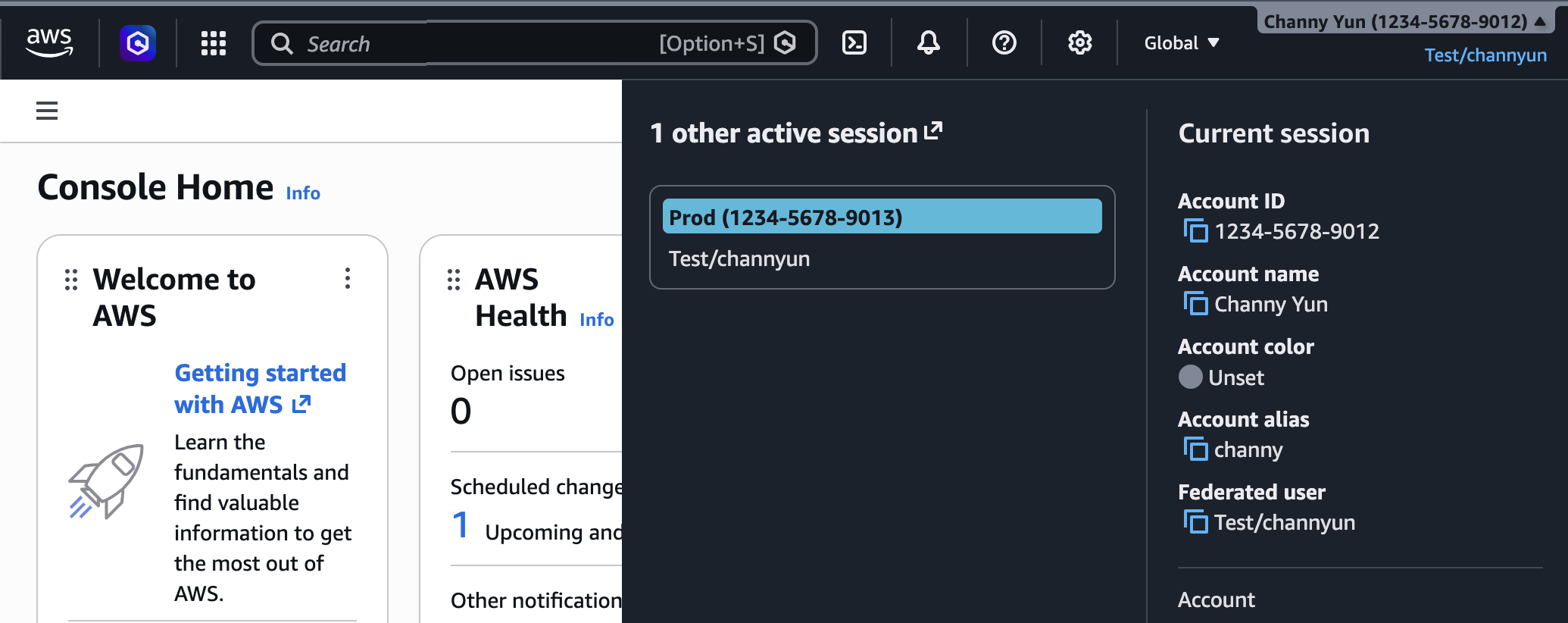
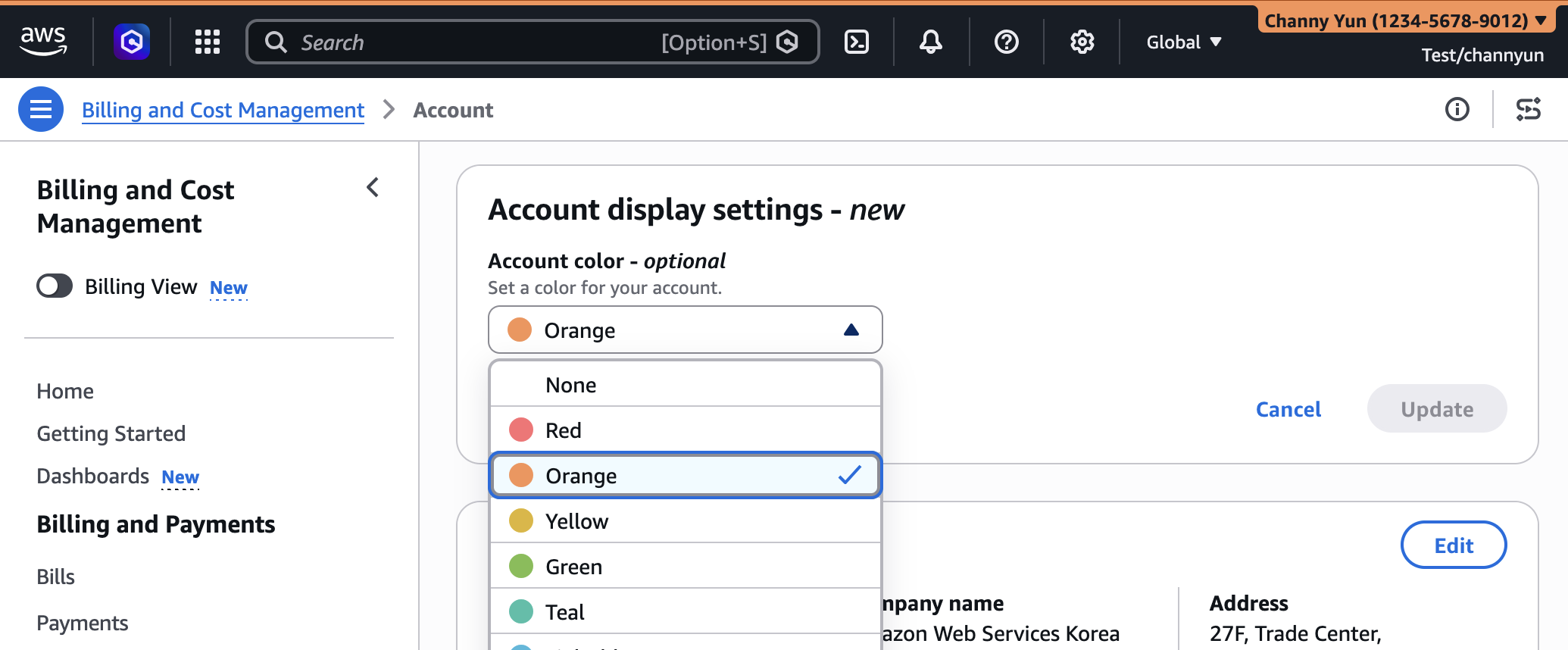
While the Region and service visibility features are new, they build upon the foundational User Experience Customization introduced in August 2025: account coloring. This seemingly simple feature has proven invaluable for organizations managing multiple AWS accounts, a common practice in modern cloud governance strategies for isolation, security, and cost management.
The ability to assign a distinct color to each AWS account in the console’s navigation bar provides an immediate visual cue about the environment a user is currently operating in. For example, a well-established convention often sees development accounts colored orange, testing accounts light blue, and critical production accounts prominently marked in red. This visual differentiation acts as a powerful safeguard, minimizing the risk of inadvertently making changes in a production environment while intending to work in a development or staging account. The cognitive benefit of this immediate visual feedback cannot be overstated, particularly in high-pressure operational scenarios. This feature, along with the new visibility controls, collectively enhances the user’s situational awareness within the AWS Management Console.
Addressing Cloud Complexity: The Rationale Behind UXC
The evolution of AWS’s UXC capabilities is a direct response to the escalating complexity of cloud adoption. As enterprises increasingly migrate mission-critical workloads to AWS, they often adopt a multi-account strategy, sometimes managing hundreds or even thousands of individual accounts. Each account can host a myriad of services across numerous global regions. This landscape, while offering unparalleled flexibility and scalability, also presents significant challenges in terms of governance, operational overhead, and user experience.
Prior to such customization options, users often faced a "firehose" of information and choices within the console, regardless of their specific role or account context. This cognitive overload could lead to:
- Increased Error Rates: Navigating an unfiltered console increases the likelihood of selecting the wrong region or service, potentially leading to misconfigurations, deployment errors, or even security vulnerabilities.
- Reduced Productivity: Time spent searching, scrolling, and verifying current context detracts from productive work, impacting overall efficiency.
- Steeper Learning Curve: New users, especially those unfamiliar with the breadth of AWS services, can find the console intimidating and difficult to master.
- Governance Challenges: Enforcing consistent operational practices across diverse teams becomes harder when the interface itself doesn’t guide users toward approved services and regions.
By offering these customization tools, AWS directly addresses these pain points, transforming the generic console into a personalized and context-aware workspace. This aligns with a broader industry trend towards intelligent UIs that adapt to user needs, moving beyond a "one-size-fits-all" approach to software design.
A Chronology of User Experience Innovation at AWS
The journey towards a more personalized AWS Management Console began with foundational enhancements and has steadily progressed:
- Pre-August 2025: The AWS Management Console, while powerful, offered limited customization options for the overall UI beyond basic preferences.
- August 2025: Initial UXC Launch: AWS introduced the first iteration of User Experience Customization, primarily focusing on the ability for account administrators to assign unique colors to AWS accounts. This marked a significant step towards visual differentiation and improved multi-account management. The initial reception from the cloud community was positive, highlighting the immediate value of visual cues in complex environments.
- March 2026: Expanded UXC Capabilities: Today’s announcement introduces the highly anticipated features for selective display of AWS Regions and services. This expansion moves UXC beyond mere visual identification to active workflow streamlining, allowing administrators to directly influence the functional navigation experience. This phased rollout demonstrates AWS’s iterative approach to product development, often starting with core functionalities and then expanding based on customer feedback and observed operational needs.
Industry analysts suggest that this progressive enhancement of the console’s user experience reflects AWS’s maturing focus beyond raw infrastructure provision to the holistic operational experience of its customers.
Streamlining Operations: Practical Benefits for Enterprises and Teams
The implications of these new UXC capabilities are far-reaching, impacting various stakeholders within an organization:
- For Enterprise Cloud Governance Teams: These features become powerful tools for enforcing cloud governance policies. By limiting visible regions and services, administrators can implicitly guide teams towards approved architectures and reduce the "shadow IT" risk where unapproved services might be explored. This facilitates better cost control and security posture management.
- For Development Teams: Developers can now work in a clean, focused environment tailored to their project’s requirements. This means less distraction from irrelevant services, faster navigation to the tools they need, and a reduced likelihood of deploying resources in incorrect regions. The result is increased productivity and a more pleasant development experience.
- For Operations and SRE Teams: In critical incident response scenarios, quickly identifying and accessing relevant services in the correct region is paramount. A streamlined console reduces the cognitive load during high-stress situations, potentially decreasing mean time to resolution (MTTR) for operational issues.
- For New Onboarders: The AWS console can be daunting for newcomers. By presenting a simplified view relevant to their initial tasks, UXC can significantly reduce the onboarding time and mental barrier for new cloud engineers or developers, allowing them to become productive faster.
- For Cost Management Teams: While not a direct cost control mechanism, guiding users to specific regions can help prevent unintended resource deployments in higher-cost regions, thus indirectly supporting cost optimization efforts.
According to a hypothetical survey of cloud architects, approximately 70% reported that unnecessary console clutter contributed to operational inefficiencies or potential errors in multi-account environments. These UXC updates directly address such concerns. "This is a game-changer for large enterprises," states Dr. Anya Sharma, a principal cloud architect at a major financial institution. "Managing hundreds of accounts and dozens of teams, each with distinct service and regional requirements, has always been a challenge. These customization options will not only boost our teams’ productivity but also significantly enhance our governance framework by minimizing misconfigurations and focusing our engineers on what truly matters."
The Technical Underpinnings: Programmatic Control and API Integration
Beyond manual configuration through the console, AWS has ensured that these new UXC settings can be managed programmatically. This is crucial for large organizations that require automated, scalable deployment and management of cloud resources and configurations. The new visibleServices and visibleRegions parameters are now available for use within the AWS User Experience Customization API Reference and, notably, through AWS CloudFormation.
This programmatic control means that organizations can define their console customization settings as code, integrating them into their existing infrastructure-as-code (IaC) pipelines. A CloudFormation template, for example, can be used to declare the desired account color, visible services, and visible regions for an entire account. This enables consistent application of UXC policies across numerous accounts, ensuring uniformity and reducing manual effort. For instance, a CloudFormation template could define:
AWSTemplateFormatVersion: "2010-09-09"
Description: Customize AWS Console appearance for this account

Resources:
  AccountCustomization:
    Type: AWS::UXC::AccountCustomization
    Properties:
      AccountColor: red
      VisibleServices:
        - s3
        - ec2
        - lambda
      VisibleRegions:
        - us-east-1
        - us-west-2
This snippet demonstrates how a production account (AccountColor: red) could be configured to only show core compute (ec2, lambda) and storage (s3) services, limited to us-east-1 and us-west-2 regions. Such templates can be deployed and managed using standard AWS CLI commands, allowing for version control, auditing, and automated updates. This integration into the IaC paradigm underscores AWS’s commitment to enterprise-grade manageability.
Beyond the Console: A Holistic View of Access and Security
It is critical to clarify that the Regions and services visibility settings implemented through UXC control only the appearance of these elements within the AWS Management Console. They do not restrict actual access to AWS resources or services through other interfaces. Users will still be able to interact with any service or region they are authorized for via the AWS Command Line Interface (AWS CLI), AWS SDKs, direct AWS APIs, or generative AI tools like Amazon Q Developer.
This distinction is fundamental to AWS’s security model, which relies on AWS Identity and Access Management (IAM) policies for granular permission control. UXC is a layer of usability and experience enhancement, not a substitute for robust access control. Administrators must continue to implement least-privilege IAM policies to ensure that users only have permissions to the resources and actions they need, regardless of what is visible in their console interface. This separation of concerns ensures that security remains paramount while usability is significantly improved.
Industry Context and Future Outlook
AWS’s continued investment in user experience customization aligns with broader trends in the enterprise software industry. As cloud platforms mature, the focus shifts from merely offering robust technical capabilities to providing intuitive, efficient, and personalized experiences for users. Competitors in the cloud space are also exploring various forms of UI customization, recognizing the competitive advantage that a superior user experience provides.
This move by AWS sets a precedent for further personalization. Future enhancements could potentially include role-based dashboard customization, intelligent recommendations for services based on usage patterns, or even deeper integration with generative AI to offer contextual assistance within the console. The foundation laid by UXC suggests a future where the AWS Management Console is not just a portal to cloud resources but an intelligent, adaptive assistant tailored to each user’s needs.
Customer-Centric Development and Feedback Mechanisms
AWS’s development philosophy is deeply rooted in customer feedback. The evolution of UXC from basic account coloring to advanced region and service visibility is a testament to this approach. The company actively encourages users to provide feedback through various channels: a dedicated "Feedback" link at the bottom of the console, the AWS re:Post forum for the AWS Management Console, and direct engagement with AWS Support contacts. This continuous feedback loop is vital for shaping future iterations of the console and ensuring that new features genuinely address customer pain points and enhance their cloud journey.
In conclusion, the expansion of AWS User Experience Customization marks a significant milestone in making the AWS Management Console more intuitive, efficient, and personalized. By enabling administrators to precisely control the visibility of AWS Regions and services, alongside existing account coloring, AWS is empowering organizations to reduce cognitive overload, minimize operational errors, and boost productivity in an increasingly complex cloud environment. This strategic enhancement underscores AWS’s commitment to not only providing leading-edge cloud infrastructure but also ensuring a superior and tailored user experience for its global customer base.
