

Amazon Web Services (AWS) today announced a significant expansion of its User Experience Customization (UXC) capabilities, introducing granular controls for selectively displaying relevant AWS Regions and services within the AWS Management Console. This latest enhancement, building upon the initial UXC rollout in August 2025 which introduced account color assignment, aims to drastically reduce cognitive load, streamline workflows, and enhance operational efficiency for cloud administrators and developers navigating increasingly complex cloud environments. The update allows administrators to configure account colors, visible AWS Regions, and visible services, consolidating these critical customization options for a more focused and productive user experience.
The evolution of cloud computing has seen AWS grow exponentially, now offering over 200 fully featured services and operating across 30 geographic regions globally. While this vast array provides unparalleled flexibility and choice, it also presents a significant challenge for users and organizations: information overload. Many enterprises manage multiple AWS accounts across various stages of development (e.g., development, testing, production) and often operate within a subset of AWS Regions or utilize only a specific set of services. Prior to these enhancements, the default console presented all available options, regardless of relevance to a particular user or account, leading to potential confusion, increased navigation time, and a higher risk of human error.
Addressing Cognitive Overload in Complex Cloud Environments
The problem of cognitive overload in complex software interfaces is well-documented in human-computer interaction research. When users are presented with an overwhelming number of choices, their decision-making process slows down, error rates increase, and overall satisfaction decreases. In a high-stakes environment like cloud infrastructure management, these issues can translate into costly misconfigurations, security vulnerabilities, or delayed project timelines. AWS’s decision to enhance UXC directly addresses this challenge by enabling administrators to tailor the console interface to present only the information and options pertinent to a user’s role and the account’s purpose.
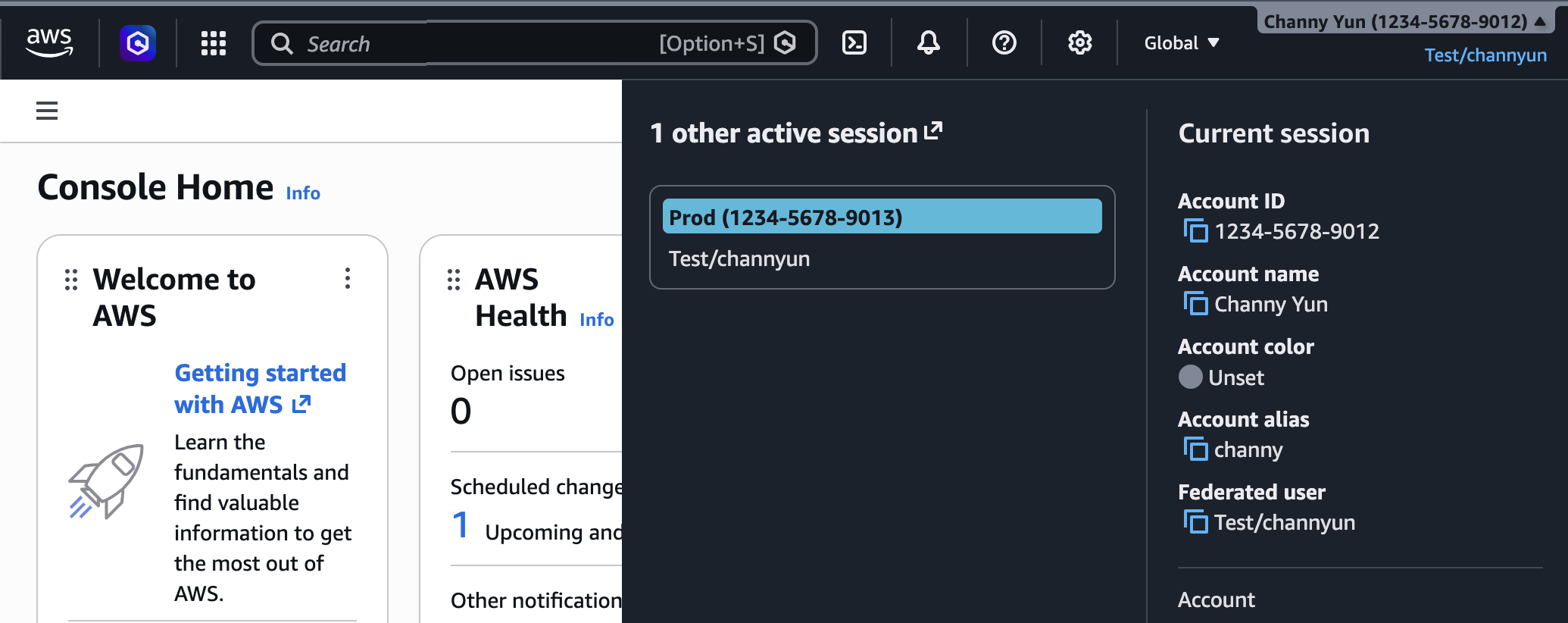
The initial launch of AWS UXC in August 2025 focused on a fundamental yet highly impactful feature: the ability to assign distinct colors to AWS accounts. This seemingly simple visual cue revolutionized how users could quickly identify and differentiate between various accounts, such as production, staging, and development environments. For instance, an organization might designate red for production accounts, blue for development, and green for testing, providing an immediate visual warning or confirmation of the operational context. This visual categorization has been instrumental in mitigating errors caused by inadvertently performing actions in the wrong environment, a common pitfall in multi-account strategies.
Detailed Breakdown of New Customization Capabilities

Today’s announcement expands upon this foundation by introducing two crucial new dimensions of customization: Region visibility and service visibility.
1. Enhanced Account Color Categorization:
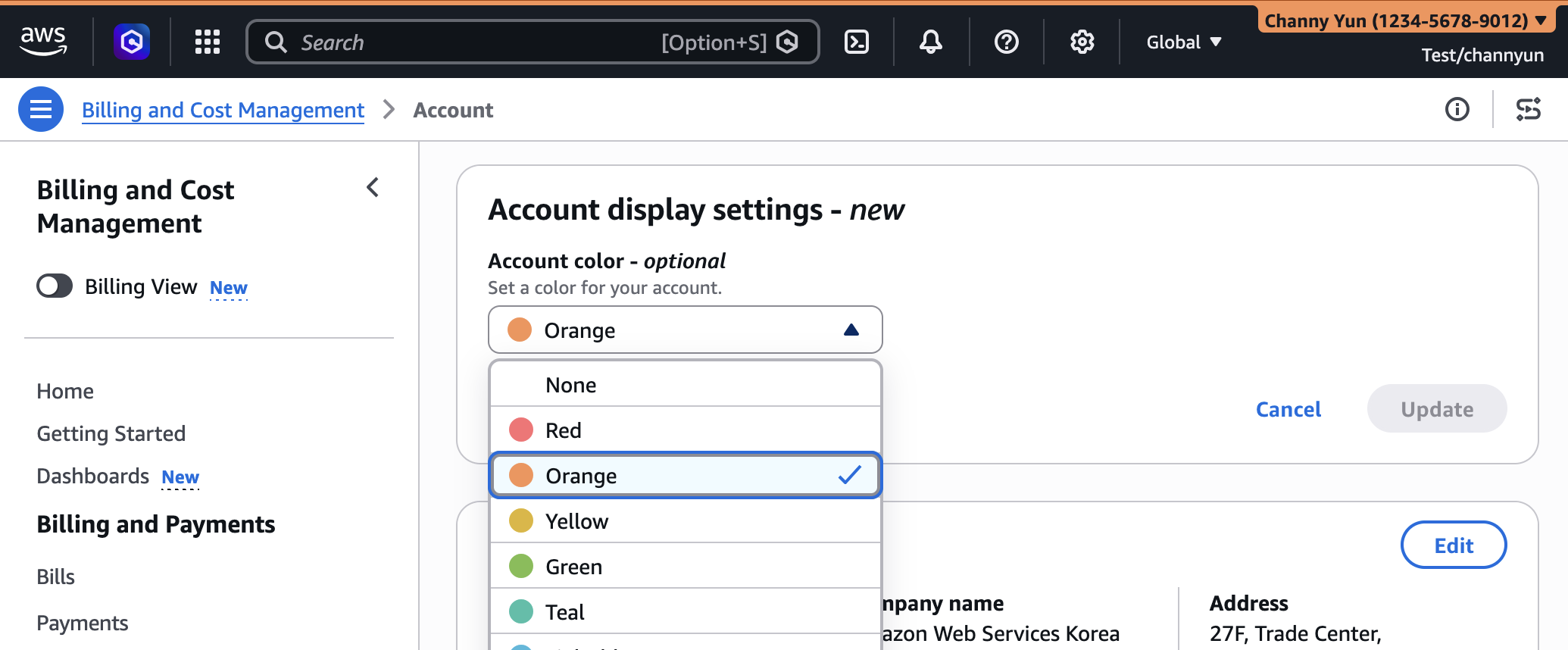
The ability to categorize accounts by color remains a cornerstone of UXC. Administrators can easily set a unique color for each AWS account directly from the AWS Management Console’s navigation bar. By navigating to their account name and selecting "Account," users can access "Account display settings" to choose their preferred color. This selected color then prominently appears in the navigation bar, serving as a persistent visual identifier. The practical applications are diverse:
- Production Accounts: Often assigned a striking color like red or orange to signify high-risk operations.
- Development Accounts: Might use a calmer color like light blue or green to indicate a testing or experimental environment.
- Sandbox Accounts: Could be assigned a distinct color to encourage exploration without fear of impacting critical systems.
This visual distinction is particularly valuable in organizations leveraging AWS Organizations for multi-account management, where developers and operations teams frequently switch between accounts for different tasks.
2. Granular Control Over Region Visibility:
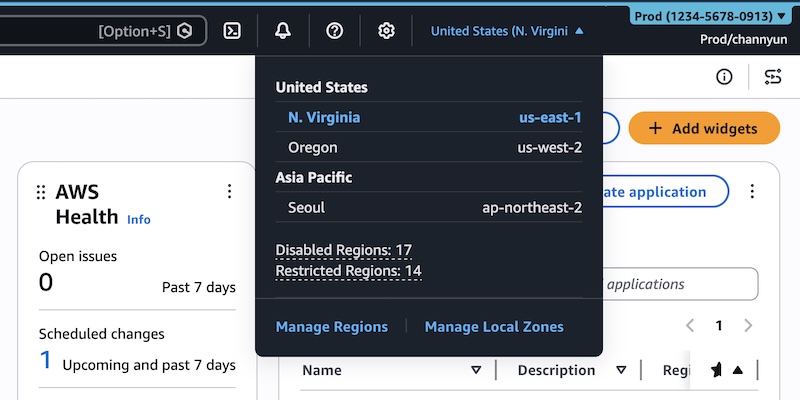
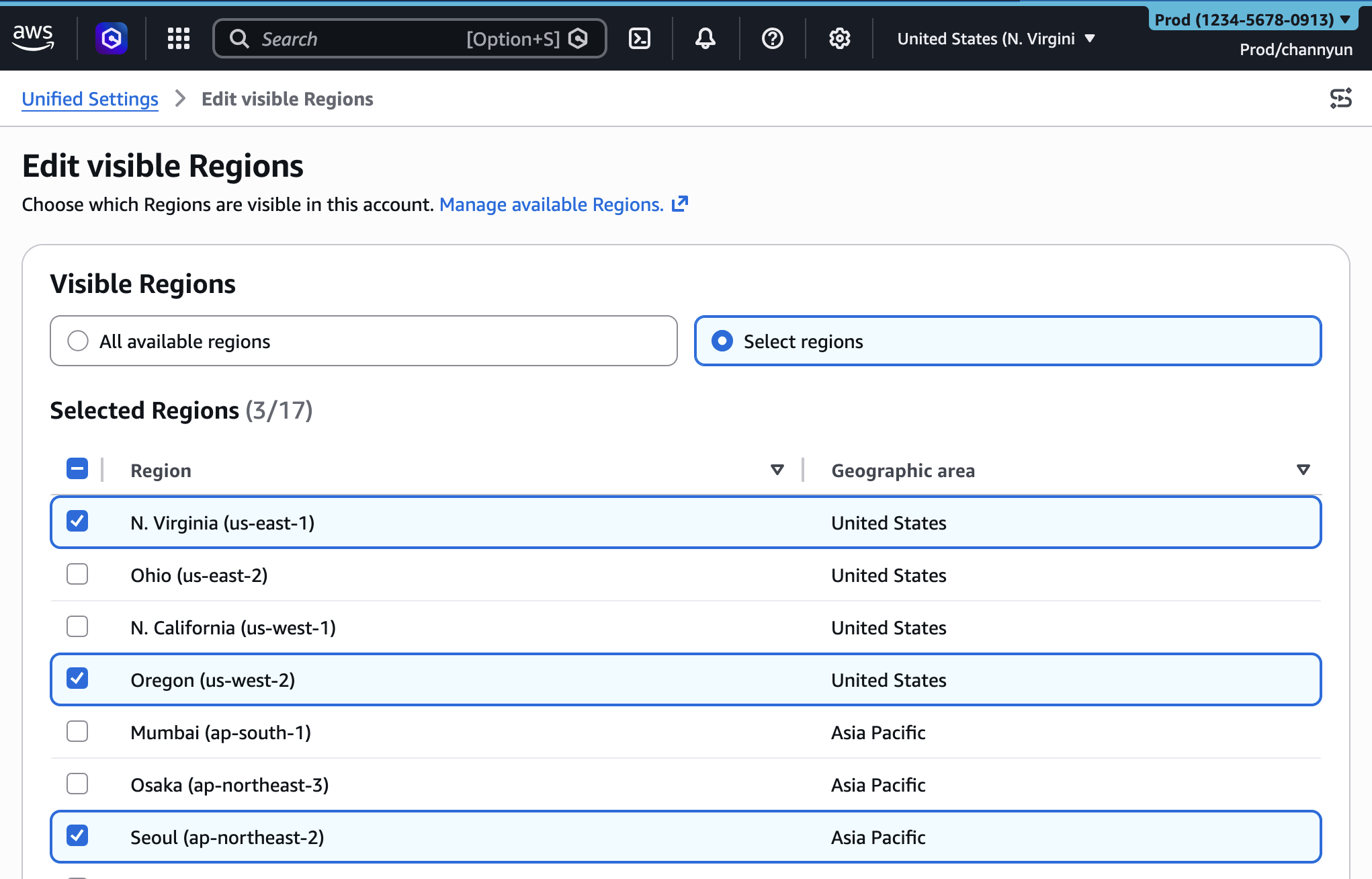
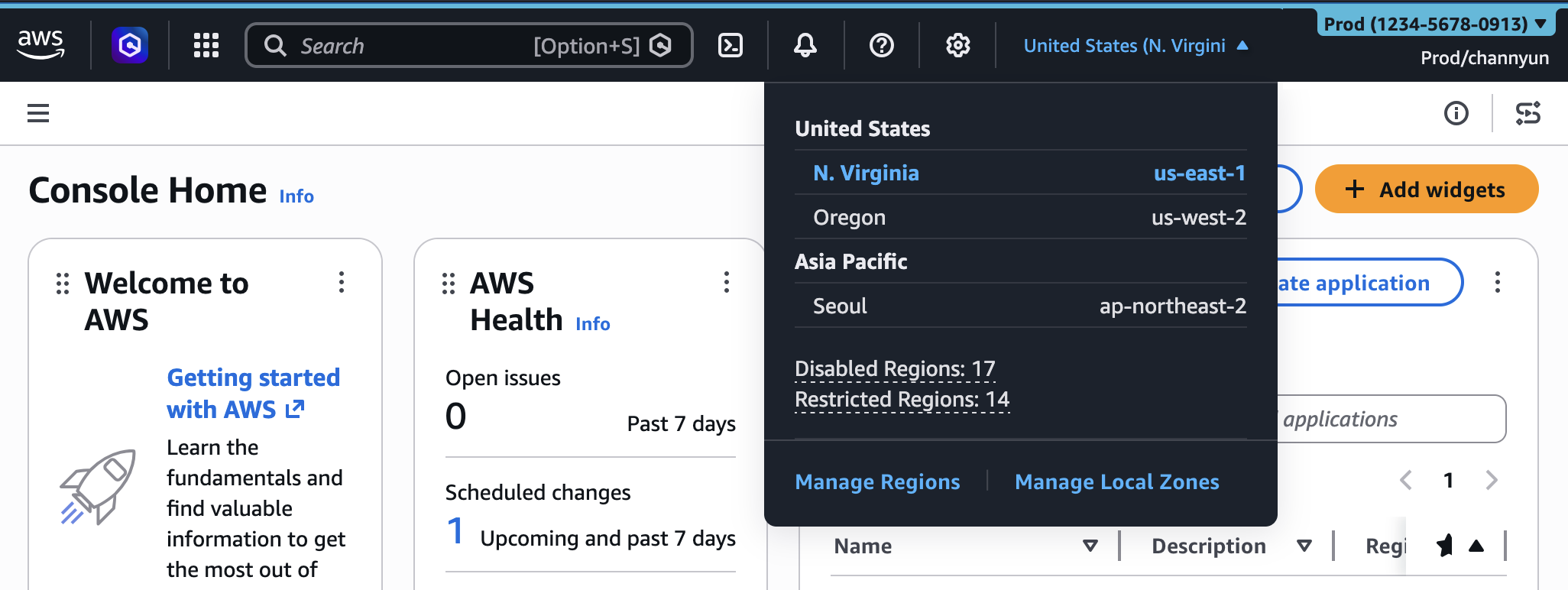
With over 30 global regions, the AWS Management Console’s Region selector can become a lengthy and potentially confusing list. Many organizations operate within a limited set of regions due to data residency requirements, latency considerations, or cost optimization strategies. The new UXC capability allows administrators to specify which AWS Regions are visible in the console’s Region selector.
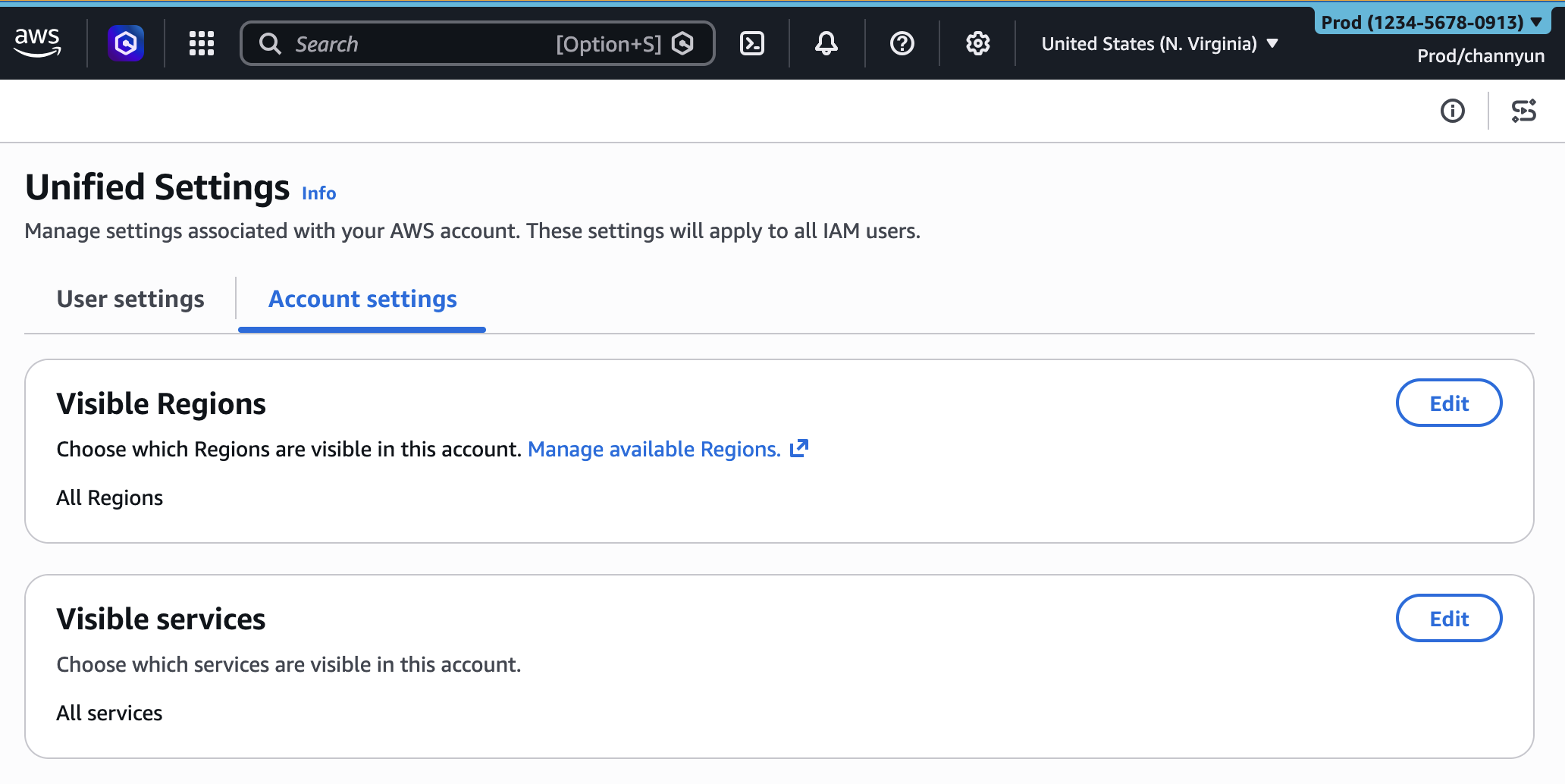
To configure this, an administrator accesses the unified settings via the gear icon in the navigation bar. Within the new "Account settings" tab, they can choose to either display "All available Regions" or "Select Regions." By choosing the latter, a customizable list appears, enabling them to check or uncheck specific regions. Once saved, the Region selector in the console will only display the pre-approved regions, drastically shortening the list and reducing the chance of selecting an incorrect region. This feature is crucial for:
- Compliance: Ensuring data is only deployed in approved geographic locations.
- Cost Management: Preventing accidental resource provisioning in more expensive or unapproved regions.
- Developer Focus: Streamlining the environment by removing irrelevant geographical options.
3. Tailored Service Visibility:
Perhaps the most impactful addition, the new service visibility feature allows administrators to curate the list of AWS services displayed in the console navigation. Given the vast and continually expanding portfolio of AWS services, finding specific services can sometimes feel like searching for a needle in a haystack. By hiding unused or irrelevant services, administrators can create a highly customized and focused console experience for their teams.
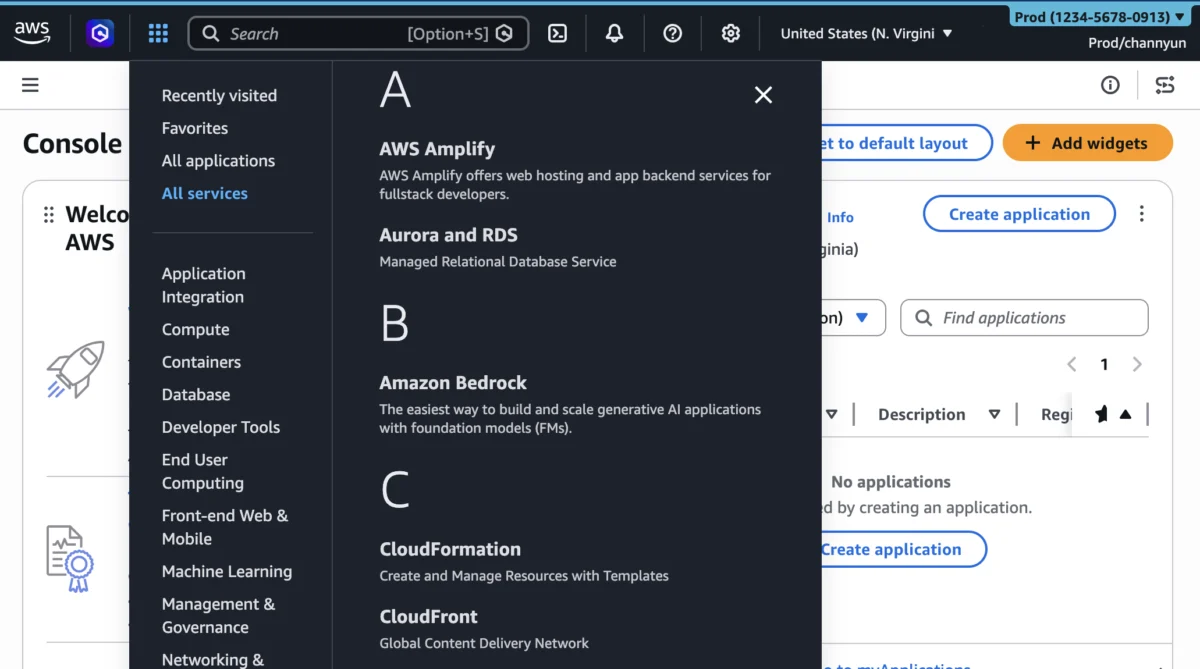
Similar to Region visibility, administrators can navigate to the "Account settings" tab and configure "Visible Services." They can search for specific services or select from categories, such as "Popular services." Once the selection is complete and saved, the "All services" menu and the console’s search bar will only present the chosen services. This capability offers profound benefits:
- Reduced Cognitive Load: Users are not distracted by hundreds of services they never use.
- Faster Navigation: Locating frequently used services becomes quicker and more intuitive.
- Improved Onboarding: New team members can be introduced to a simplified console tailored to their initial responsibilities, reducing the learning curve.
- Error Prevention: Minimizing the chance of accidentally clicking on or exploring services that are out of scope for a particular role or project.
It is important to note that these visibility settings are purely for the console’s appearance and do not impose access restrictions. Access control remains governed by AWS Identity and Access Management (IAM) policies, ensuring a clear separation of concerns between user experience customization and security permissions. This design allows organizations to simplify the interface without compromising their robust security posture.
Strategic Implications for Enterprise Cloud Adoption
The expansion of AWS UXC capabilities marks a strategic move by AWS to further enhance the manageability and usability of its cloud platform, particularly for large enterprises and managed service providers.
- Enhanced Operational Efficiency and Productivity: By removing clutter and focusing the user interface, AWS directly contributes to increased productivity. Developers and operations teams can find what they need faster, reducing the time spent on navigation and increasing time dedicated to actual work. This translates into faster development cycles and more agile operations.
- Improved Governance and Compliance: The ability to restrict visible regions and services offers a soft layer of governance. While not a security control in itself, it guides users towards compliant actions and reduces the likelihood of deploying resources in unapproved locations or using non-standard services. When combined with strong IAM policies, this creates a powerful layered defense.
- Simplified Multi-Account Management: Organizations often employ a multi-account strategy for better isolation, billing, and security. UXC features, especially account coloring and tailored visibility, make navigating these complex environments significantly easier and less error-prone. This encourages the adoption of best practices in cloud architecture.
- Reduced Training Overhead: For new employees or teams migrating to AWS, a simplified console interface can drastically reduce the learning curve. By presenting only relevant services and regions, organizations can tailor training materials and accelerate the onboarding process, leading to quicker time-to-value for new cloud initiatives.
- Customer-Centric Design Philosophy: This update underscores AWS’s commitment to a customer-centric design philosophy. By actively listening to feedback regarding the complexity of the console, AWS is continually refining the user experience to meet the evolving needs of its diverse customer base, from individual developers to large enterprises. An AWS spokesperson, commenting on the release, highlighted, "Our customers operate at immense scale and complexity. These new UXC capabilities are a direct response to their need for a more personalized and efficient console experience, empowering them to focus on innovation rather than navigating unnecessary options."
Technical Underpinnings and Programmatic Control
Recognizing the need for automation and consistency across large organizations, AWS has ensured that these new customization settings can be managed programmatically. This is a critical feature for enterprises that adhere to Infrastructure as Code (IaC) principles. The new visibleServices and visibleRegions parameters are now available through the AWS User Experience Customization API Reference and can be integrated into existing automation workflows.
A prime example of this programmatic control is the use of AWS CloudFormation. Administrators can define their desired console customizations within a CloudFormation template, treating the console’s appearance as part of their infrastructure definition.
AWSTemplateFormatVersion: "2010-09-09"
Description: Customize AWS Console appearance for this account

Resources:
  AccountCustomization:
    Type: AWS::UXC::AccountCustomization
    Properties:
      AccountColor: red
      VisibleServices:
        - s3
        - ec2
        - lambda
      VisibleRegions:
        - us-east-1
        - us-west-2
This CloudFormation template snippet demonstrates how an administrator can define an account to be "red," and restrict visible services to Amazon S3, Amazon EC2, and AWS Lambda, while limiting visible regions to us-east-1 and us-west-2. Deploying such a template via the AWS CLI ensures that all users accessing this specific account will experience the same standardized, customized console environment, enforcing consistency and reducing manual configuration errors. This programmatic approach is invaluable for managing hundreds or thousands of AWS accounts across an enterprise, ensuring a uniform and optimized experience for all teams.
Looking Ahead: The Future of Console Personalization
The continuous evolution of AWS UXC capabilities reflects a broader industry trend towards hyper-personalization in enterprise software. As cloud environments become more sophisticated and critical to business operations, the tools used to manage them must adapt to enhance human efficiency and reduce friction. This update from AWS is a strong indicator that the company views the user interface not just as a portal to its services, but as an integral component of the overall cloud experience, deserving of the same level of innovation and attention as its underlying infrastructure.
Feedback from the AWS community, gathered through the console’s feedback link and the AWS re:Post forum, remains a vital driver for these enhancements. As cloud adoption continues to accelerate, the demand for intelligent, context-aware, and highly customizable management tools will only grow. AWS’s latest UXC expansion is a significant step towards a future where the cloud console dynamically adapts to the user’s role, project, and organizational policies, making cloud management more intuitive, efficient, and less prone to error.
