

A Network Policy Server (NPS) is an indispensable component for modern network administrators, providing a robust framework for creating and enforcing granular policies that govern network access. This versatile tool centralizes the critical functions of authentication, authorization, and accounting (AAA) for users and devices connecting to an organization’s network infrastructure, acting as Microsoft’s proprietary implementation of a Remote Authentication Dial-In User Service (RADIUS) server and proxy within Windows Server operating systems. Its role is paramount in maintaining network integrity, security, and efficient resource management.
The increasing reliance on digital infrastructure for business operations, data exchange, and communication has amplified the vulnerability of networks and servers to cyber threats. In this elevated risk landscape, the necessity for sophisticated network security measures and meticulous policy management cannot be overstated. Effective network security and policy management are crucial for several interconnected reasons. Firstly, they are vital for safeguarding sensitive data from unauthorized access, theft, or corruption, which is paramount for maintaining customer trust and regulatory compliance. Secondly, robust security protocols ensure the continuous availability of network services, preventing disruptions that can lead to significant financial losses and reputational damage. Thirdly, well-defined policies streamline network operations by standardizing access protocols and resource allocation, thereby improving efficiency and reducing administrative overhead. Finally, adherence to security and policy best practices is often a mandatory requirement for meeting industry-specific regulations and legal obligations, such as GDPR, HIPAA, or PCI DSS.
At the heart of NPS’s functionality lies the RADIUS protocol. Developed in 1991, the Remote Authentication Dial-In User Service (RADIUS) protocol has evolved into a de facto standard for network access servers responsible for managing user connections to various network services. It provides a comprehensive and centralized approach to AAA management, ensuring that only legitimate users and devices gain access to network resources under defined conditions.
The RADIUS protocol is built upon three core pillars, collectively known as AAA:
Authentication: Verifying Identity
Authentication is the foundational step in the AAA process, concerned with verifying the identity of a user or device attempting to access the network. This typically involves the submission of credentials, such as usernames and passwords, or more advanced methods like smart cards or multi-factor authentication tokens. The RADIUS server rigorously checks these credentials against its central database of authorized users. A successful authentication confirms that the entity attempting to connect is who they claim to be, thereby preventing unauthorized access from the outset.
Authorization: Defining Access Privileges
Once a user or device has been successfully authenticated, the next crucial step is authorization. This process determines the specific permissions and access rights that the authenticated entity is granted on the network. For instance, a system administrator might have broader access to network configurations and sensitive data compared to a standard end-user. RADIUS servers manage these permissions, ensuring that users can only access the resources and services appropriate to their role and authorization level. This granular control is essential for maintaining the principle of least privilege, minimizing the potential impact of a compromised account.
Accounting: Tracking Network Usage
The final component of AAA is accounting, which involves the meticulous tracking and logging of user activities and network resource consumption. This includes monitoring the duration of user sessions, the specific services accessed, and the volume of data transferred. The accounting data generated is invaluable for various purposes, including billing for network services, conducting security audits, identifying network usage patterns for capacity planning, and investigating potential security incidents. By providing a detailed audit trail, accounting contributes significantly to overall network accountability and governance.
RADIUS operates under a well-established client-server model. In this architecture, the RADIUS client is typically a network access server (NAS), such as a wireless access point, a VPN concentrator, or a dial-up server. When a user attempts to connect, the NAS acts as an intermediary, forwarding the user’s credentials and connection request to the RADIUS server. The RADIUS server then processes this request, consulting its user database and defined policies to authenticate and authorize the user. Upon completion of this process, the server sends a response back to the NAS, either granting or denying access and specifying any access parameters.
Key features of RADIUS servers include:
- Centralized AAA: Consolidating authentication, authorization, and accounting functions into a single point of management.
- Scalability: The ability to handle a growing number of users and network access devices.
- Flexibility: Support for various authentication methods and network access technologies.
- Security: Encrypted communication between clients and servers to protect sensitive credentials.
- Interoperability: Compliance with industry standards, allowing integration with diverse hardware and software.
The Purpose and Functionality of NPS
The Network Policy Server (NPS) plays a pivotal role within the network infrastructure of numerous organizations. As Microsoft’s robust implementation of a RADIUS server and proxy, its primary objective is to centralize and streamline the AAA processes for all users and devices attempting to access network resources. This consolidation significantly enhances both network security and overall management efficiency.
Centralized Authentication and Authorization
NPS ensures that all users and devices are rigorously verified before being granted access to the network, a critical step in fortifying security defenses. Concurrently, it meticulously defines the scope of access for authenticated entities, specifying precisely which network resources they are permitted to utilize. This dual approach, managed centrally by NPS, maintains a secure and highly efficient network environment.
NPS manages these crucial functions by:
- Enforcing Strong Authentication: Supporting a wide array of authentication methods, including password-based authentication (PAP, CHAP, EAP), certificate-based authentication, and multi-factor authentication solutions, to verify user identities.
- Implementing Granular Authorization Policies: Allowing administrators to define detailed authorization rules based on user group membership, time of day, device compliance status, and other contextual factors.
- Integrating with Active Directory: Leveraging Active Directory (AD) as a primary source for user and group information, simplifying the management of authentication credentials and authorization policies.
Accounting and Compliance
The accounting function within NPS is paramount for tracking and logging all user activities and resource usage on the network. This detailed record-keeping is indispensable for auditing purposes, security monitoring, and ensuring compliance with stringent regulatory standards. In today’s data-sensitive world, where businesses face increasing scrutiny over data handling and privacy, NPS plays a critical role in aiding compliance efforts.
NPS aids in ensuring compliance with various regulatory standards by:

- Generating Comprehensive Audit Logs: Recording detailed information about connection attempts, successful authentications, authorization decisions, and accounting data, providing an auditable trail for compliance reviews.
- Facilitating Network Usage Analysis: Enabling administrators to monitor resource consumption, identify potential misuse, and optimize network performance based on actual usage data.
- Supporting Security Investigations: Providing essential data for forensic analysis in the event of a security incident, helping to determine the scope and nature of a breach.
Policy-Based Network Management
NPS empowers administrators with sophisticated policy-based network management capabilities. This allows for the creation and enforcement of specific network access policies, enabling organizations to tailor their network security and usage precisely to their unique operational needs. The flexibility of NPS in policy creation directly impacts network security, user access control, and overall network management effectiveness.
NPS facilitates the creation of these policies, influencing network security and user access through:
- Connection Request Policies: These policies determine whether NPS processes a connection request or forwards it to another RADIUS server, enabling load balancing and management of distributed RADIUS infrastructures.
- Network Policies: These are the core of NPS’s authorization capabilities, defining conditions for granting or denying network access based on user attributes, device compliance, connection type, and other criteria.
- Configurable Conditions and Constraints: Administrators can define complex conditions for policy matching, such as user group membership, time of day, dial-in properties, and RADIUS attributes, offering fine-grained control.
Benefits of Implementing NPS
The integration of NPS into a network infrastructure yields a multitude of benefits that significantly bolster both security posture and operational efficiency. These advantages position NPS as a crucial asset for organizations striving to optimize their network management practices.
Key benefits include:
- Enhanced Security: By centralizing authentication and authorization, NPS significantly reduces the attack surface and prevents unauthorized access to sensitive network resources. It enforces consistent security policies across the network, minimizing vulnerabilities.
- Improved Network Management: NPS simplifies the administration of network access policies, user credentials, and accounting data, reducing the burden on IT staff and minimizing the potential for human error.
- Scalability and Flexibility: NPS can scale to accommodate growing networks and evolving access requirements, supporting a wide range of network access technologies and authentication methods.
- Compliance and Auditing: The robust accounting features of NPS provide detailed logs essential for meeting regulatory compliance mandates and conducting thorough security audits.
- Cost-Effectiveness: As a feature integrated within Windows Server operating systems, NPS offers a cost-effective solution for implementing advanced AAA services without requiring additional specialized hardware or third-party software for basic functionality.
- Centralized Control: NPS provides a single point of control for managing network access policies, ensuring consistency and simplifying troubleshooting.
- Support for Various Network Access Technologies: NPS seamlessly integrates with VPNs, wireless access points, dial-up connections, and other network access solutions, offering a unified approach to access control.
- Integration with Network Access Protection (NAP): NPS can integrate with Microsoft’s Network Access Protection (NAP) framework to enforce health policies for client devices, ensuring that only compliant and secure devices can access the network.
The Three Essential Roles of NPS
NPS is designed to perform three distinct yet interconnected roles within a network environment, each contributing to its comprehensive network access management capabilities.
1. NPS as a RADIUS Server
In its primary role as a RADIUS server, NPS is responsible for processing authentication and authorization requests originating from network access servers. When a user or device attempts to connect, NPS verifies their credentials against established user databases and then determines their level of access based on predefined policies. This function is critical for securing various connection types, including VPNs, wireless networks, and remote access services. NPS’s ability to integrate with Active Directory simplifies the management of user accounts and authentication processes, ensuring that only legitimate users gain entry.
2. NPS as a RADIUS Proxy
When deployed in larger or more complex network topologies, NPS can function as a RADIUS proxy. In this capacity, NPS acts as an intermediary, forwarding authentication and configuration requests to other RADIUS servers within the network. This is particularly useful in distributed environments where different RADIUS servers might manage specific segments or user groups. The proxy role enables NPS to provide load balancing, distributing requests across multiple backend RADIUS servers to prevent overload and ensure high availability. It also facilitates failover mechanisms, directing requests to alternative servers if a primary server becomes unavailable, thereby maintaining uninterrupted network access.
3. NPS as a Network Policy Server
This role underscores NPS’s core function: managing and enforcing network access policies. NPS defines the precise conditions under which users and devices are granted or denied access to the network. This includes the ability to create highly specific policies based on a wide range of criteria, such as user group membership, the time of day, the type of network connection, or even the health status of a device when integrated with NAP. This level of control allows administrators to implement granular security measures and tailor network access to meet the dynamic needs of the organization.
Best Practices for NPS Deployment and Management
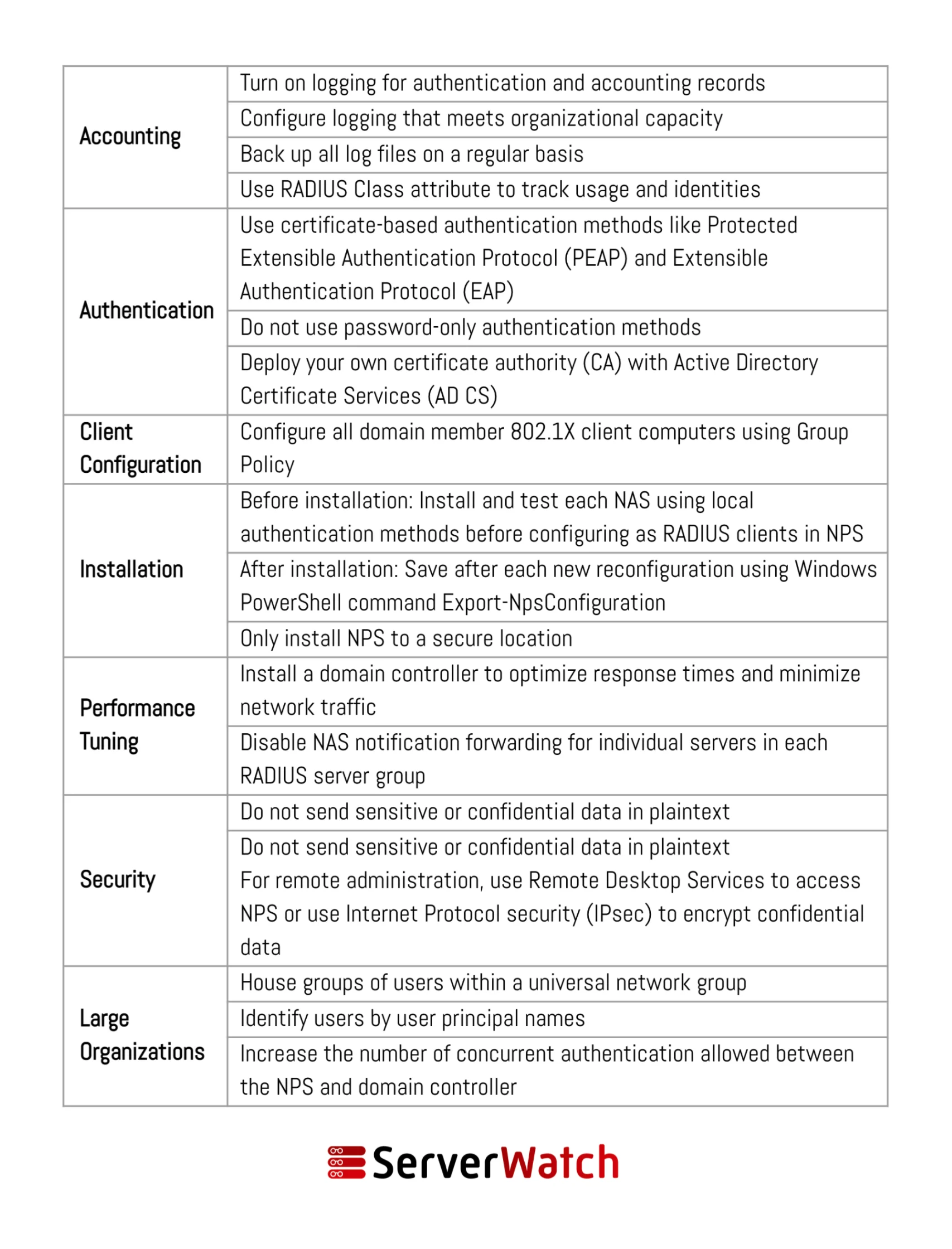
Effective utilization of NPS hinges on adhering to established network and server management best practices. These guidelines ensure that NPS operates with optimal efficiency, robust security, and in alignment with an organization’s overarching network management objectives. Microsoft offers comprehensive recommendations, and several additional practices are crucial for successful NPS deployment and ongoing management.
Key best practices include:
- Secure Communication: Always configure NPS to use secure communication protocols, such as PEAP or EAP-TLS, for transmitting credentials between the Network Access Server (NAS) and the NPS server. This encrypts sensitive data and protects against eavesdropping.
- Principle of Least Privilege: Implement policies that grant users and devices only the minimum necessary access privileges required for their intended functions. Regularly review and update these policies as roles and responsibilities change.
- Centralized Management: For larger environments, consider deploying NPS in a centralized manner or utilizing the proxy functionality to manage policies and configurations from a single point, ensuring consistency.
- Regular Auditing and Monitoring: Actively monitor NPS event logs for authentication successes and failures, accounting data, and any policy-related events. Regular auditing helps detect suspicious activity and ensure compliance.
- Strong Password Policies: Enforce strong password policies for all user accounts that are authenticated through NPS, including complexity requirements, regular password changes, and lockout policies.
- RADIUS Client Configuration: Ensure that all Network Access Servers (NAS) are correctly configured to point to the NPS server as their RADIUS client, and that shared secrets are strong and kept confidential.
- Policy Testing: Before deploying new or modified policies in a production environment, thoroughly test them in a lab or staging environment to avoid unintended access disruptions.
- Backup and Recovery: Implement a robust backup strategy for the NPS configuration and event logs. Ensure that recovery procedures are well-documented and regularly tested.
- Regular Updates and Patching: Keep the Windows Server operating system and the NPS role updated with the latest security patches and updates to protect against known vulnerabilities.
- Integration with Other Security Tools: Consider integrating NPS with other security solutions, such as Security Information and Event Management (SIEM) systems, for enhanced threat detection and incident response capabilities.
- Documentation: Maintain detailed documentation of all NPS configurations, policies, RADIUS clients, and user groups. This documentation is invaluable for troubleshooting, auditing, and knowledge transfer.
Bottom Line: The Integral Role of NPS in Modern Network Management
The Network Policy Server (NPS) has firmly established itself as an indispensable tool in the arsenal of network and server administrators, offering a powerful, flexible, and secure solution for managing network operations. Its seamless integration into an organization’s network infrastructure not only bolsters security through the rigorous enforcement of access policies but also significantly streamlines administrative tasks, leading to more efficient management of valuable network resources.
By diligently implementing and adhering to the best practices outlined for deploying and managing NPS, organizations can proactively mitigate risks associated with network security vulnerabilities and ensure a smooth, uninterrupted operational flow. In an era where digital assets are increasingly valuable and cyber threats are ever-present, the robust capabilities of NPS are critical for maintaining a secure, compliant, and efficiently managed network environment.
For organizations seeking to further enhance their NPS functionality and performance, exploring specialized tools can be beneficial. A review of the best free RADIUS server testing and monitoring tools, curated and evaluated by experts, can provide insights into solutions that offer advanced capabilities for ensuring the optimal operation and security of your RADIUS infrastructure.
Sam Ingalls contributed to this article.
