

The transition from wired Ethernet connections to pervasive wireless networking represents a fundamental shift in modern home technology. What was once a niche convenience has become an indispensable utility, driven by the exponential growth of connected devices. From smartphones and laptops to smart TVs, gaming consoles, and an ever-expanding array of Internet of Things (IoT) gadgets—thermostats, security cameras, smart speakers, and lighting systems—households are now teeming with hardware that relies entirely on a robust Wi-Fi signal. While the convenience of wireless connectivity is undeniable, the invisible waves that carry our digital lives often face significant challenges, leading to frustrating dead zones, intermittent connections, and sluggish speeds that fall far short of expectations. Despite theoretical ranges of approximately 46 meters for the 2.4 GHz band and about 15 meters for the 5 GHz band in ideal conditions, the reality within a typical home is often dramatically different. The intricate architecture of modern dwellings, combined with the strategic (or often, haphazard) placement of the router, profoundly impacts the quality of the internet connection, reducing coverage and, consequently, overall speed and reliability. Understanding the science behind Wi-Fi signal propagation and implementing best practices for router placement and antenna configuration are crucial steps towards unlocking the full potential of your home network.
The Evolution of Home Connectivity and the Wi-Fi Imperative
For decades, the standard for reliable internet access in homes involved a tangle of Ethernet cables, directly linking desktop computers to a central modem or router. This approach, while offering unparalleled stability and speed for individual devices, quickly became impractical as personal computing evolved and multiple devices demanded simultaneous connectivity across various rooms. The advent of Wi-Fi technology, leveraging radio waves to transmit data, revolutionized home networking, offering unprecedented freedom and flexibility. Early Wi-Fi standards like 802.11b and 802.11g laid the groundwork, operating primarily on the 2.4 GHz band, which offered decent range but was susceptible to interference and limited bandwidth. Subsequent advancements, notably 802.11n (Wi-Fi 4), introduced MIMO (Multiple-Input Multiple-Output) technology, allowing routers to use multiple antennas to send and receive multiple data streams simultaneously, significantly boosting speed and reliability. The introduction of 802.11ac (Wi-Fi 5) brought the 5 GHz band into prominence, offering higher speeds and less interference, albeit with a shorter effective range. More recently, Wi-Fi 6 (802.11ax) and the emerging Wi-Fi 7 (802.11be) have further refined these capabilities, introducing technologies like OFDMA (Orthogonal Frequency-Division Multiple Access) and MU-MIMO (Multi-User Multiple-Input Multiple-Output) to efficiently manage traffic from an ever-growing number of devices, ensuring smoother performance even in dense network environments. This technological progression underscores a critical point: while Wi-Fi hardware has become incredibly sophisticated, its performance is still fundamentally governed by the laws of physics and the physical environment in which it operates.
Strategic Router Placement: The Foundation of a Strong Network
Optimizing your home Wi-Fi begins with the router’s physical location. While complex mathematical calculations and advanced wave propagation theories exist, a practical, intuitive approach yields significant improvements. The overarching principle is straightforward: position the router as close as possible to the devices that will connect to it. This seemingly simple rule is paramount because the strength of the Wi-Fi signal diminishes exponentially with distance. Every meter further away from the router results in a significant drop in signal intensity, directly impacting connection speed and stability. Therefore, distance, alongside physical obstacles, emerges as the most critical factor influencing connection quality.
However, applying this rule becomes nuanced when considering the diverse array of devices in a modern home. Fixed devices, such as desktop PCs, smart TVs, or dedicated streaming boxes, present clear targets. But mobile devices—smartphones, tablets, and portable gaming consoles—are carried throughout the house, from the living room to the kitchen, bedrooms, and even outdoor areas like patios or balconies. The expectation is consistent connectivity regardless of location. To address this, a "Solomonic" or geometric solution is often recommended: placing the router as centrally as possible within the home. Since Wi-Fi signals radiate outwards in all directions, positioning the router in the geographic center of your living space ensures that the distance to any given room is minimized and relatively uniform. This prevents certain areas from becoming "dead zones" due to excessive distance from the signal source.
It is important to note that this central placement is a general guideline. If a household has a predominant area of use—for instance, a home office where most work is done, or a living room where streaming and gaming are concentrated—then prioritizing proximity to these high-demand zones may be more beneficial. The goal is to balance broad coverage with optimized performance for critical applications.

For multi-story homes, the same vertical logic applies. If dedicated Wi-Fi repeaters or mesh systems are not in use (though highly recommended for such configurations), the optimal placement for a single router is on the intermediate floor. This ensures that the signal has the best chance of reaching both upper and lower levels with adequate strength. Furthermore, considering verticality within a single floor, the router should ideally be placed at approximately the same height as the devices connecting to it. This often means placing it on a desk, shelf, or table, rather than tucked away on the floor or mounted high on a ceiling. This ensures the primary "donut" shaped signal propagation pattern aligns effectively with the horizontal plane of typical device usage.
Mitigating the Impact of Physical Obstacles and Interference
Equally crucial to optimal router placement is understanding and minimizing the impact of physical obstacles. Wi-Fi signals, being radio waves, are attenuated (weakened) each time they encounter and attempt to penetrate materials. Not all materials affect signals equally, and some can be particularly detrimental.
- Building Materials: Walls, floors, and ceilings are the primary culprits. Dense materials like concrete, brick, and stone significantly absorb and reflect Wi-Fi signals. Even plasterboard, while less impactful than concrete, can contribute to signal degradation, especially if multiple layers are present. Wooden doors, for instance, cause less signal reduction than solid walls.
- Metals: Metal is a formidable foe for Wi-Fi. It acts as a Faraday cage, reflecting signals and creating severe dead zones. Common metallic items include large appliances (refrigerators, washing machines, dryers, dishwashers), metal shelving, file cabinets, and even metallic studs within walls. Placing a router near these can severely limit its range and performance.
- Water: Water is surprisingly effective at absorbing Wi-Fi signals. Large aquariums, water heaters, and even human bodies can contribute to signal attenuation.
- Mirrors: Mirrors often have a thin metallic backing that can reflect and block Wi-Fi signals.
- Electronics: While routers are designed to operate alongside other electronics, some devices emit electromagnetic interference (EMI) that can disrupt Wi-Fi signals. Microwaves, cordless phones (especially older 2.4 GHz models), fluorescent lights, dimmer switches, and even certain electrical wiring can be sources of interference. Keeping the router away from these devices is a sensible precaution.
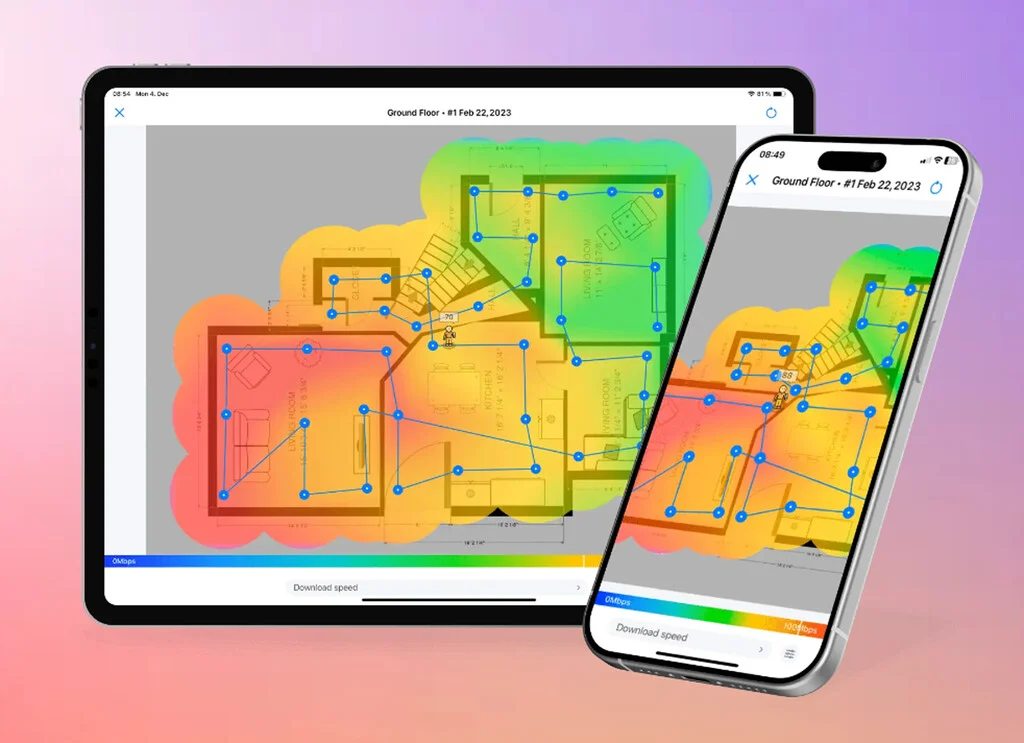
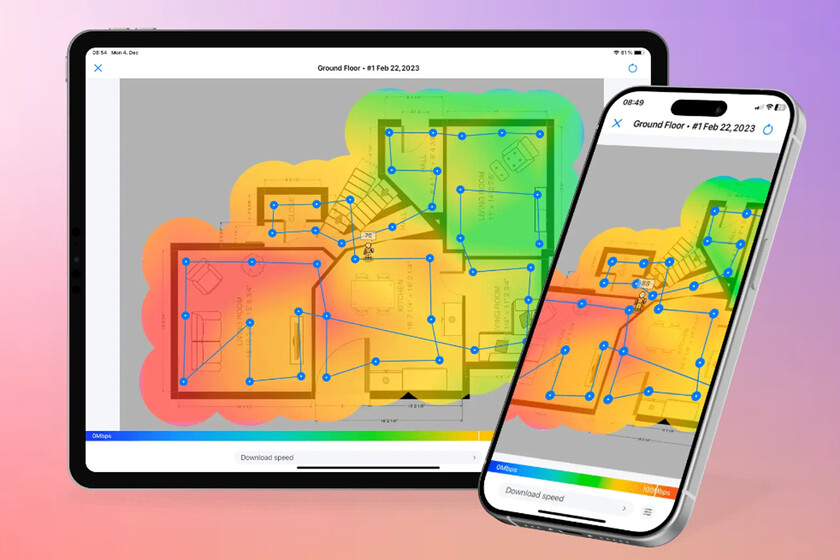
To visualize these signal impediments and identify problematic areas, users can leverage specialized applications like WiFi Analyzer (available for Android) or Netspot (free for iOS and Android, with professional desktop versions). These tools can generate a "heat map" of your home, graphically illustrating signal strength across different rooms and pinpointing dead zones. This data-driven approach allows for informed adjustments to router placement, ensuring maximum coverage and performance.

Optimizing Antenna Configuration for Targeted Coverage
Once the router’s physical location is established, the configuration of its antennas becomes the next critical step. Many modern routers feature multiple external antennas, and while they are often marketed as "omnidirectional," their radiation patterns are more akin to dipoles. A dipole antenna typically emits a signal pattern that resembles a flattened donut, expanding horizontally much more effectively than vertically.
- Vertical Alignment for Horizontal Coverage: The general rule for single-story homes or single-floor coverage is to position the antennas vertically, pointing towards the ceiling. This configuration maximizes the horizontal spread of the Wi-Fi signal, providing the best coverage across a broad, flat area.
- Mixed Polarization for Device Diversity: For routers equipped with multiple antennas, an advanced technique involves adjusting antennas to different orientations. For instance, setting one antenna vertically and another horizontally (or at a 45-degree angle) can be beneficial. This "mixed polarization" strategy increases the likelihood that the router’s transmitting antenna and the receiving antenna of a client device (which may have its internal antenna oriented vertically or horizontally, depending on the device’s design and how it’s held) are aligned. This can improve signal reception and throughput, particularly in environments with varied device types and orientations.
- Angled Antennas for Vertical Coverage: In multi-story homes where a single router is responsible for coverage across different floors, angling one or more antennas (e.g., at approximately 45 degrees) can help direct a portion of the signal vertically, improving connectivity to upper or lower floors. This must be balanced against the need for horizontal coverage on the router’s primary floor.
It is crucial to remember that while antennas are most effective from their sides, they are least effective directly from their tips. Therefore, aiming the tip of an antenna directly at a device is generally counterproductive. Experimentation is key. Users might need to try several antenna configurations, perhaps using a Wi-Fi analyzer app to measure signal strength in different areas, to determine the optimal setup for their specific home layout and device usage patterns.
Beyond Basic Optimization: Advanced Solutions for Complex Environments

Despite meticulous placement and antenna configuration, some homes, particularly larger ones, those with challenging layouts, or those constructed with signal-blocking materials, may still experience coverage issues. In such scenarios, advanced networking solutions become necessary:
- Wi-Fi Extenders/Repeaters: These devices capture an existing Wi-Fi signal and re-broadcast it, extending coverage into dead zones. While relatively inexpensive and easy to set up, they often come with a significant drawback: they typically halve the available bandwidth as they use the same radio to receive and transmit data.
- Mesh Wi-Fi Systems: Representing a more sophisticated and effective solution, mesh systems consist of multiple nodes (a main router and several satellite units) that communicate with each other to create a single, unified Wi-Fi network that blankets the entire home. They offer seamless roaming, allowing devices to automatically switch to the strongest signal as users move around, without dropping the connection. Mesh systems often utilize a dedicated backhaul (either wireless or wired) to communicate between nodes, minimizing bandwidth loss.
- Powerline Adapters: These devices use a home’s existing electrical wiring to transmit network data. They can be a good option for extending wired or wireless connectivity to areas where Wi-Fi signals struggle to reach, especially if running new Ethernet cables is impractical. Performance can vary depending on the quality and age of the electrical wiring.
- Ethernet Backhaul: For fixed devices or as the backbone for mesh Wi-Fi nodes, a direct Ethernet cable connection remains the gold standard. It provides the most stable, fastest, and lowest-latency connection, completely bypassing Wi-Fi limitations.
- Quality of Service (QoS): Many modern routers offer QoS settings, allowing users to prioritize specific types of traffic (e.g., video streaming, online gaming) or certain devices over others. This ensures critical applications receive the necessary bandwidth, even during periods of high network congestion.
The Broader Implications of Subpar Wi-Fi
The implications of poor Wi-Fi extend beyond mere inconvenience. In today’s interconnected world, a weak or unreliable network can significantly impact various aspects of daily life:
- Productivity: For remote workers and students engaged in online learning, consistent and fast Wi-Fi is non-negotiable. Dropped video calls, lagging screen shares, and slow file downloads can severely hinder productivity and educational outcomes.
- Entertainment: Streaming high-definition video, engaging in online multiplayer gaming, and accessing cloud-based entertainment services all demand robust bandwidth and low latency. Poor Wi-Fi leads to buffering, pixelated images, and frustrating lag, diminishing the entertainment experience.
- Smart Home Functionality: The burgeoning ecosystem of smart home devices relies heavily on a stable Wi-Fi connection. Smart lights, thermostats, security cameras, voice assistants, and smart appliances may become unresponsive or unreliable with an inadequate network, undermining the convenience and security they are designed to provide.
- Security: While not a direct consequence, a consistently weak signal might tempt users to disable security features or position devices in less secure locations to gain better signal, potentially exposing their network to vulnerabilities.
In conclusion, achieving optimal Wi-Fi performance in the modern home is no longer a luxury but a necessity. By understanding the fundamental principles of signal propagation, strategically placing the router, mitigating physical obstacles, and intelligently configuring antennas, users can significantly enhance their network’s reach, speed, and reliability. For more challenging environments, exploring advanced solutions like mesh Wi-Fi systems or powerline adapters can further ensure a seamless and robust digital experience for every connected device in the home. The investment of time and effort in optimizing your Wi-Fi environment will undoubtedly pay dividends in productivity, entertainment, and overall digital well-being.
