

All digital data and systems, from the cloud platforms powering global services to the apps on our smartphones, ultimately reside on physical hardware. The distinction between "virtual server" and "physical server" doesn’t denote an abstract versus tangible existence, but rather the fundamental architecture and operational model of these essential computing resources. This article delves into the intricacies of both physical and virtual servers, exploring their characteristics, use cases, and the critical differences that inform their selection for diverse business and technological needs.
The Foundation: What is a Physical Server?
A physical server, also known as a bare-metal server, is a tangible piece of hardware. It comprises all the essential components required for computing: a chassis, a central processing unit (CPU), potentially a graphics processing unit (GPU), random-access memory (RAM), storage drives, a power supply unit (PSU), network interfaces, an operating system (OS), and server application software. These machines are engineered for continuous operation, typically running 24/7, and are dedicated to serving the computing needs of other devices and applications. This contrasts with general-purpose desktop computers; servers are optimized for tasks like hosting websites, managing databases, running enterprise applications, and facilitating network services.
The size of a physical server can vary significantly, from compact desktop units to large, rack-mounted units housed in data centers. Regardless of its form factor or location, if it’s a dedicated piece of hardware running server software, it’s classified as a physical server. Organizations can own and operate these servers on-premises within their own facilities, or they can lease dedicated physical servers from cloud providers.
Key Features of Physical Servers
The defining characteristic of a physical server is its exclusive dedication of all its resources to the tasks it performs. This direct access to hardware provides a unique set of advantages:
- Dedicated Resources: All CPU, RAM, storage, and network bandwidth are available solely to the applications running on the physical server, ensuring predictable and unshared performance.
- Maximum Performance: Without the overhead of virtualization layers, physical servers can often deliver peak performance for highly demanding workloads.
- Enhanced Security: The isolated nature of a bare-metal server can offer a heightened level of security, as it is not sharing its underlying hardware with other tenants. This isolation minimizes the attack surface from other virtual environments.
- Complete Control and Ownership: Organizations have full administrative control over the hardware, OS, and all software installed, allowing for deep customization and optimization.
- Direct Hardware Access: For applications that require direct interaction with specific hardware components, such as specialized GPUs or network cards, physical servers provide unimpeded access.
Historical Context and Evolving Use Cases
In the early 2000s, the IT landscape was predominantly populated by physical servers. Businesses typically maintained their own server rooms, housing individual machines for each critical IT function. This model, while functional, was often inefficient and costly to scale. The advent of virtualization technology fundamentally shifted this paradigm.
Despite the widespread adoption of virtual machines (VMs), physical servers remain indispensable for specific demanding workloads. Their ability to offer raw, unadulterated power and complete isolation makes them the preferred choice for:
- High-Performance Computing (HPC): Complex simulations, scientific research, and large-scale data analysis often require the full processing power and memory of a dedicated machine.
- Large-Scale Databases: Mission-critical databases that handle massive transaction volumes benefit from the dedicated resources and predictable performance of physical servers.
- Resource-Intensive Applications: Certain enterprise software, game servers, or video rendering platforms that consume vast amounts of computational resources are best suited for bare-metal environments.
- Security-Sensitive Workloads: Organizations dealing with highly confidential data or operating under stringent regulatory compliance may opt for physical servers to maintain complete control over their security posture.
- Legacy Systems: Some older applications may not be compatible with virtualization environments and thus require dedicated physical hardware.
Industries that consistently leverage physical servers include financial services (for high-frequency trading and secure transaction processing), healthcare (for sensitive patient data management and medical imaging), government and defense (for classified operations and secure infrastructure), aerospace (for complex design and simulation), logistics, manufacturing, and media and entertainment (for high-throughput content delivery and rendering). These sectors prioritize the reliability, performance, security, isolation, and direct ownership that physical servers provide.
The Revolution: What is a Virtual Server?
A virtual server, often referred to as a virtual machine (VM), is a software-based emulation of a physical server. It is created by abstracting the resources of a physical server using virtualization software, known as a hypervisor. This technology allows a single physical server to host multiple isolated virtual servers, each functioning as an independent computing environment. Virtualization is the cornerstone of modern cloud computing, enabling cloud providers to efficiently allocate and scale resources to a vast number of customers by maximizing the utilization of their underlying hardware.
Imagine a powerful, state-of-the-art physical server packed with computing power, ample storage, and high-speed networking. Instead of dedicating this entire machine to a single client, virtualization allows it to be partitioned into several virtual servers. Each of these virtual servers is then allocated a specific share of the physical server’s resources – such as CPU cores, RAM, and storage space. Each VM operates as an isolated system, complete with its own operating system and applications, unaware that it is sharing its underlying physical infrastructure with other VMs. This ability to segment and share hardware is what drives the scalability and cost-effectiveness of cloud services.
Key Features of Virtual Servers
Virtual servers offer a distinct set of advantages driven by their software-defined nature:
- Scalability and Elasticity: Resources can be quickly scaled up or down by reallocating resources from the hypervisor or by migrating VMs to different physical hosts. This allows businesses to adapt rapidly to changing demands.
- Cost-Effectiveness: By sharing the resources of a single physical server among multiple VMs, organizations can reduce hardware acquisition costs, power consumption, and data center footprint.
- Rapid Deployment: New virtual servers can be provisioned and deployed in minutes, significantly accelerating development and deployment cycles.
- Portability and Migration: VMs can be easily moved or copied between physical servers, facilitating maintenance, upgrades, and disaster recovery without significant downtime.
- Isolation: While sharing hardware, each VM is isolated from others, preventing issues on one VM from impacting others.
- Resource Efficiency: Virtualization allows for better utilization of hardware, as idle resources on one VM can be allocated to another.
The Rise of Virtualization and its Applications
The use cases for virtual servers are virtually limitless, permeating nearly every facet of modern computing. From individual users accessing cloud-based applications to large enterprises managing complex IT infrastructures, virtual servers are ubiquitous.
Popular applications include:
- Web Hosting: Hosting websites and web applications for businesses of all sizes.
- Application Development and Testing: Providing isolated environments for developers to build, test, and deploy applications without impacting production systems.
- Database Management: Running databases for various applications, from small business needs to enterprise-level solutions.
- Cloud Computing Services: The foundation of Infrastructure as a Service (IaaS), Platform as a Service (PaaS), and Software as a Service (SaaS) offerings.
- Disaster Recovery (DR) and Business Continuity (BC): Enabling quick recovery of services by replicating VMs to off-site locations.
- Virtual Desktops (VDI): Providing users with desktop environments that run on remote servers, accessible from any device.
- Big Data Analytics: Processing and analyzing large datasets in scalable and flexible environments.
- DevOps Environments: Facilitating continuous integration and continuous delivery (CI/CD) pipelines.
Beyond these common applications, virtual servers are also instrumental in advanced computing paradigms such as High-Performance Computing (HPC) environments that benefit from their flexibility and scalability, and various other specialized cloud services.
The Crucial Divergence: Physical vs. Virtual Servers
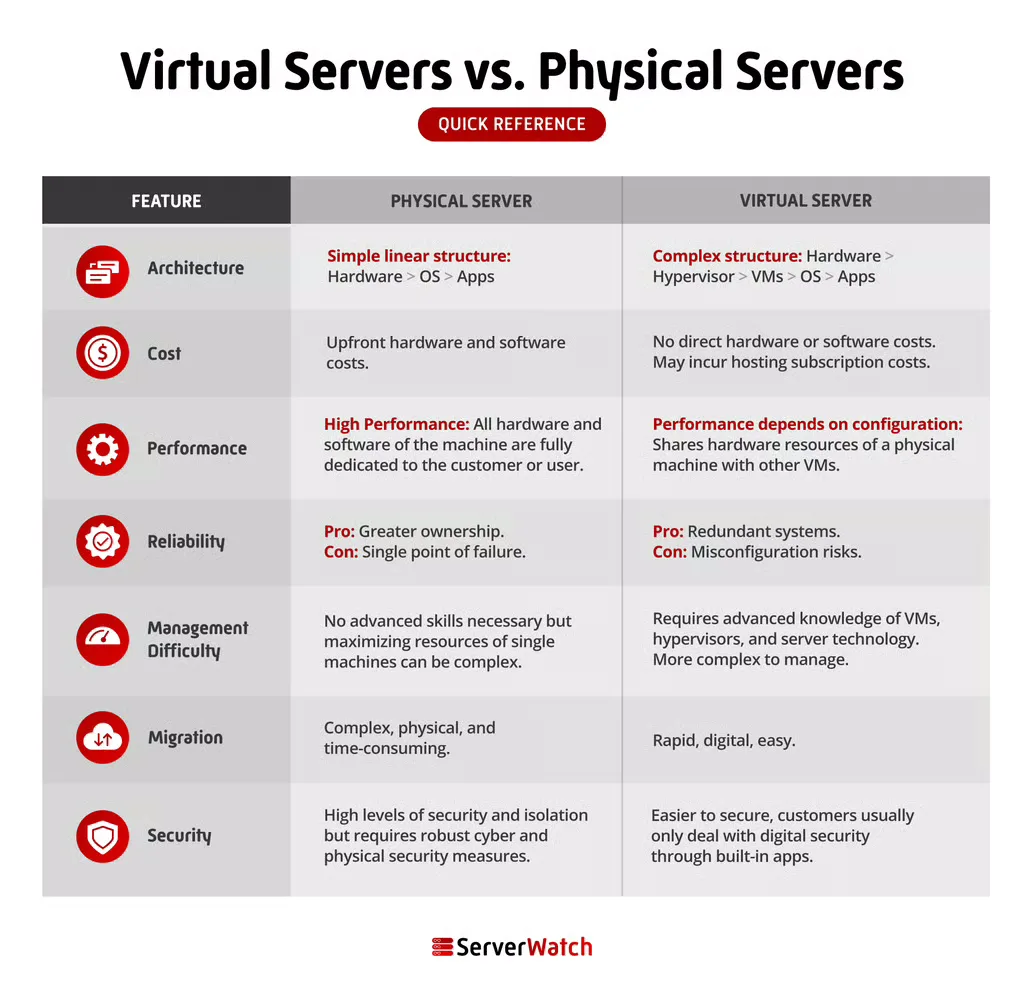
The fundamental differences between physical and virtual servers lie in their architecture, cost models, performance characteristics, reliability strategies, management complexity, and security approaches. Understanding these distinctions is paramount for making informed infrastructure decisions.

Architecture
The core architectural difference is the presence or absence of a virtualization layer. A physical server is a single, dedicated piece of hardware. A virtual server is a software construct that runs on top of a hypervisor, which itself resides on physical hardware. This abstraction layer is what enables multiple VMs to coexist on a single physical machine.
Cost
While virtualization technology might seem more complex, its ability to consolidate workloads onto fewer physical machines leads to significant cost efficiencies, especially at scale.
- Acquisition Costs: Virtual servers typically have lower upfront costs as you’re paying for a slice of a larger, shared resource rather than an entire dedicated machine.
- Operational Costs: Reduced hardware footprint translates to lower power consumption, cooling requirements, and data center space.
- Maintenance and Management: With cloud-based virtual servers, the responsibility for hardware maintenance, repairs, and physical security often falls to the provider, alleviating these burdens for the customer. Risks associated with physical break-ins, hardware theft, energy bills, and natural disasters are largely mitigated for cloud VM users.
In contrast, physical servers require a substantial initial investment in hardware, along with ongoing costs for power, cooling, maintenance, and physical security.
Performance
The performance comparison between physical and virtual servers is nuanced and highly dependent on several factors.
- Physical Servers: Generally offer the highest raw performance due to direct access to hardware and the absence of virtualization overhead. This makes them ideal for applications that are extremely sensitive to latency or require maximum throughput.
- Virtual Servers: Performance can be excellent and is often sufficient for a wide range of applications. However, the virtualization layer introduces a small degree of overhead. Performance can also be affected by the "noisy neighbor" effect, where the activity of other VMs on the same host can impact performance. Modern hypervisors and careful resource allocation have significantly minimized these issues.
The ultimate performance of either system hinges on its configuration, the quality of the underlying hardware, the efficiency of the software stack, and network capabilities.
Reliability
Both physical and virtual servers can be engineered for high reliability, but through different mechanisms.
- Physical Servers: Reliability is often achieved through redundant hardware components (e.g., dual power supplies, RAID storage) and robust environmental controls within the data center.
- Virtual Servers: Reliability is enhanced through features like live migration (moving a running VM to another host without downtime), automatic failover, and snapshots. Cloud providers often build highly resilient infrastructure, replicating data and services across multiple physical locations to ensure business continuity.
The perceived reliability of a virtual server is often tied to the Service Level Agreements (SLAs) offered by the cloud provider.
Management Difficulty
Managing servers, whether physical or virtual, can be complex. However, the deployment model significantly influences the management burden.
- Physical Servers: Require in-house expertise for hardware installation, configuration, OS management, patching, monitoring, and troubleshooting. This can be resource-intensive.
- Virtual Servers (Cloud-based): A significant portion of the management responsibility, particularly hardware maintenance and infrastructure upkeep, is outsourced to the cloud provider. Users primarily focus on managing the OS, applications, and data within their VMs. Self-hosted virtualization environments still require skilled personnel to manage the hypervisor and underlying hardware.
Migration
Migrating virtual servers is considerably easier than migrating physical servers.
- Virtual Servers: Can be "hot-migrated" – moved from one physical host to another with minimal or no downtime, often with just a few clicks through management consoles. VM images can also be easily copied and deployed elsewhere.
- Physical Servers: Migration involves physically moving hardware, often requiring significant downtime for backup, data transfer, and re-configuration on the new machine. This process is manual, time-consuming, and prone to errors.
Security
Both virtual and physical servers can be secured effectively, but the approaches and responsibilities differ.
- Physical Servers: Security is primarily about physical access control, network security at the perimeter, and robust OS/application-level security. The organization has complete control over its security posture.
- Virtual Servers: Security operates on a shared responsibility model. The cloud provider secures the underlying infrastructure, while the customer is responsible for securing the OS, applications, and data within their VMs. Isolation mechanisms within the hypervisor provide a baseline level of security, preventing VMs from directly accessing each other’s resources. However, misconfigurations or vulnerabilities within the VM’s OS or applications can still be exploited.
The Bottom Line: Choosing the Right Server for Your Business
The decision between physical and virtual servers is not a one-size-fits-all proposition. Both architectures offer distinct advantages, and the optimal choice hinges on a business’s specific requirements, budget, technical expertise, and growth trajectory.
Virtual servers are generally the preferred option for the majority of businesses today. Their affordability, inherent scalability, ease of deployment, and access to the latest technological advancements make them highly attractive. They empower businesses to be agile, respond quickly to market changes, and optimize resource utilization. The "pay-as-you-go" model and the offloading of infrastructure management to cloud providers further enhance their appeal.
However, physical servers (bare-metal servers) remain a superior choice for organizations that demand the absolute highest levels of performance, possess unique hardware requirements, or operate under extremely strict security and compliance mandates. Businesses that need complete ownership and control over their infrastructure, or those running applications that cannot tolerate any virtualization overhead, will find physical servers to be the more suitable solution.
Ultimately, a thorough assessment of current and future needs, coupled with an understanding of the capabilities and limitations of each server type, will guide businesses toward the most effective and efficient IT infrastructure strategy. Exploring the leading virtualization software solutions can provide further insights into leveraging the power of modern virtualized environments.
