

All digital data and systems, from the cloud platforms powering global services to the apps on our personal devices, ultimately reside on tangible hardware. The terms "virtual server" and "physical server" do not denote a difference in existence but rather a fundamental distinction in how computing resources are structured and accessed. Understanding these distinctions is crucial for businesses and individuals navigating the complexities of modern IT infrastructure. A physical server is a tangible machine, a dedicated piece of hardware with its own CPU, GPU, RAM, storage, and networking capabilities, designed to host applications and services. In contrast, a virtual server is a software-based emulation of a physical server, often carved out of the resources of a larger physical machine, allowing multiple isolated server environments to coexist on a single piece of hardware.
The Tangible Core: Understanding Physical Servers
A physical server, also known as a bare metal server, is a self-contained computing unit. It comprises all the essential components required for operation: a chassis, central processing unit (CPU), graphics processing unit (GPU) (though not always present or essential for all server tasks), random-access memory (RAM), storage drives, a power supply unit, and a network interface card. These machines are engineered for continuous operation, typically running 24/7, and are purpose-built to serve other computers rather than for general user interaction. Common applications include hosting websites, managing databases, and running specialized enterprise software.
The defining characteristic of a physical server is that it dedicates all of its hardware resources exclusively to the tasks it is assigned. This exclusivity contributes to its robust performance and enhanced security. Whether a compact desktop-like unit or a large, rack-mounted enterprise-grade machine, its fundamental nature as a singular, dedicated hardware entity remains. Organizations can own and operate these physical servers on their premises, maintaining complete control over the hardware, or lease them from cloud providers who manage the underlying infrastructure.
Key Features of Physical Servers
The exclusive access to all hardware resources is the paramount advantage of physical servers. This direct control translates into predictable performance and a higher degree of security as there is no shared infrastructure to contend with. Key features include:
- Dedicated Resources: All CPU, RAM, storage, and network bandwidth are exclusively allocated to the server’s operating system and applications.
- Uncompromised Performance: With no resource contention from other users or virtual machines, physical servers can deliver maximum raw performance for demanding workloads.
- Enhanced Security: The isolation of a physical server can offer a superior security posture, particularly for highly sensitive data or applications, as it eliminates the potential vulnerabilities associated with shared hardware environments.
- Complete Control: Organizations have full administrative control over the hardware, operating system, and software stack, allowing for deep customization and optimization.
- Predictable Costs (for owned hardware): While the initial investment can be significant, the ongoing operational costs for owned physical servers can be more predictable over the long term, especially for stable, high-usage workloads.
Historical Context and Evolving Use Cases
In the early 2000s, the IT landscape was dominated by physical servers. Businesses relied heavily on individual machines, often housed in their own data centers, to power their digital operations. Each server was typically dedicated to a specific function, such as running a company website, managing email, or hosting internal applications. This era represented a direct, one-to-one mapping of hardware to service.
While the paradigm has shifted significantly with the rise of virtualization and cloud computing, physical servers have not become obsolete. They continue to play a critical role in modern IT infrastructures, particularly for workloads that demand the highest levels of performance, security, or direct hardware access.
Popular use cases for physical servers today include:
- High-Performance Computing (HPC): Scientific simulations, complex data analysis, and rendering tasks often require the raw processing power that only dedicated hardware can consistently provide.
- Mission-Critical Databases: For applications where latency is unacceptable and data integrity is paramount, dedicated physical servers offer the highest level of performance and reliability.
- Resource-Intensive Applications: Large-scale gaming servers, video streaming platforms, and enterprise resource planning (ERP) systems that consume vast amounts of processing power and memory benefit from the dedicated nature of physical servers.
- Legacy Systems: Some older applications or systems may not be compatible with virtualized environments and require direct hardware access.
- Strict Compliance and Security Requirements: Industries with stringent regulatory requirements, such as finance and healthcare, may opt for physical servers to maintain complete control over their data and meet specific security mandates.
Industries Reliant on Physical Servers
Several key industries continue to leverage the unique advantages of physical servers:
- Financial Services: The need for robust security, low latency for trading platforms, and strict regulatory compliance makes physical servers a preferred choice for many financial institutions.
- Healthcare: Handling sensitive patient data necessitates the highest levels of security and reliability, often leading healthcare organizations to opt for dedicated physical hardware.
- Government and Defense: National security and critical infrastructure operations demand absolute control and isolation, making physical servers indispensable.
- Aerospace: Complex simulations and design processes in aerospace engineering require significant computational power that physical servers can efficiently deliver.
- Manufacturing: Industrial control systems and real-time data processing in manufacturing environments often benefit from the direct hardware access and predictable performance of physical servers.
- Media and Entertainment: High-definition video processing, rendering farms, and large-scale content delivery networks can strain virtualized environments, making physical servers a more suitable option for peak performance.
These sectors prioritize the unwavering reliability, exceptional performance, stringent security, and the absolute ownership and control that physical servers provide.
The Emulated Realm: Understanding Virtual Servers
A virtual server, or Virtual Machine (VM), represents a software-based abstraction of a physical server. It is created through a process known as virtualization, where a hypervisor (a software layer) divides the resources of a single physical server into multiple independent virtual environments. Each VM functions as a self-contained server, with its own operating system, applications, and allocated portions of the physical server’s CPU, RAM, storage, and network bandwidth.
The power of virtualization lies in its ability to maximize hardware utilization. A single, powerful physical server can host numerous virtual servers, each serving distinct purposes or clients. This approach is foundational to the scalability and cost-effectiveness of cloud computing. Instead of dedicating an entire physical machine to a single client or application, cloud providers can efficiently partition their hardware, offering customized computing resources on demand.
Imagine a high-performance physical server equipped with cutting-edge hardware. This machine possesses substantial processing power, ample storage, and high-speed networking. A client might wish to rent this server to host a website. However, if two more clients require the same server for database management, the physical server can be transformed into a virtual server environment. The hypervisor then creates several VMs, each sharing the physical server’s resources but operating as isolated entities. Each VM is assigned dedicated portions of CPU, memory, and storage, allowing it to function as an independent virtual server within the confines of the host hardware. This principle, scaled across vast data centers, is the engine driving the growth and accessibility of cloud computing services worldwide.
Key Features of Virtual Servers
Virtual servers offer a compelling set of advantages, driven by their flexible and dynamic nature:
- Resource Efficiency: Multiple virtual servers can run on a single physical server, significantly reducing hardware costs and energy consumption.
- Scalability and Flexibility: Resources can be easily allocated, reallocated, or scaled up or down for virtual servers as demand fluctuates, often with minimal downtime.
- Rapid Deployment: New virtual servers can be provisioned and deployed in minutes, compared to the hours or days required to set up a physical server.
- Cost-Effectiveness: For many applications, the pay-as-you-go model and shared infrastructure of virtual servers offer a more economical solution than investing in and maintaining dedicated physical hardware.
- Disaster Recovery: VMs can be easily backed up, replicated, and restored, facilitating robust disaster recovery and business continuity strategies.
- Isolation: While sharing hardware, VMs are designed to be isolated from each other, meaning an issue with one VM generally does not affect others on the same host.
- Portability: Virtual servers can be easily migrated between different physical hosts, enabling load balancing and hardware maintenance without service interruption.
Broad Applications and Ubiquitous Use Cases
The versatility of virtual servers means their use cases are virtually limitless, permeating nearly every aspect of modern digital life. From enterprise-level applications to the services powering everyday consumer platforms, VMs are in constant use.
Some popular use cases for virtual servers include:
- Web Hosting: Providing scalable and cost-effective hosting for websites of all sizes, from personal blogs to large e-commerce platforms.
- Application Development and Testing: Developers use VMs to create isolated environments for building, testing, and debugging software without impacting production systems.
- Database Management: Hosting and managing databases for various applications, with the ability to scale resources as data volumes grow.
- Email Servers: Running email services for businesses and organizations.
- Cloud Computing Platforms: The backbone of public and private cloud services, enabling the delivery of Infrastructure as a Service (IaaS), Platform as a Service (PaaS), and Software as a Service (SaaS).
- Virtual Desktops (VDI): Providing users with remote access to desktop environments, enhancing flexibility and security.
- Big Data Analytics: Supporting the processing and analysis of large datasets.
- Development and Staging Environments: Creating separate environments for testing and staging changes before deploying them to production.
Beyond these common applications, virtual servers are instrumental in supporting advanced technologies like High-Performance Computing (HPC), and enabling diverse cloud-based services.
Virtual Servers vs. Physical Servers: A Comparative Analysis
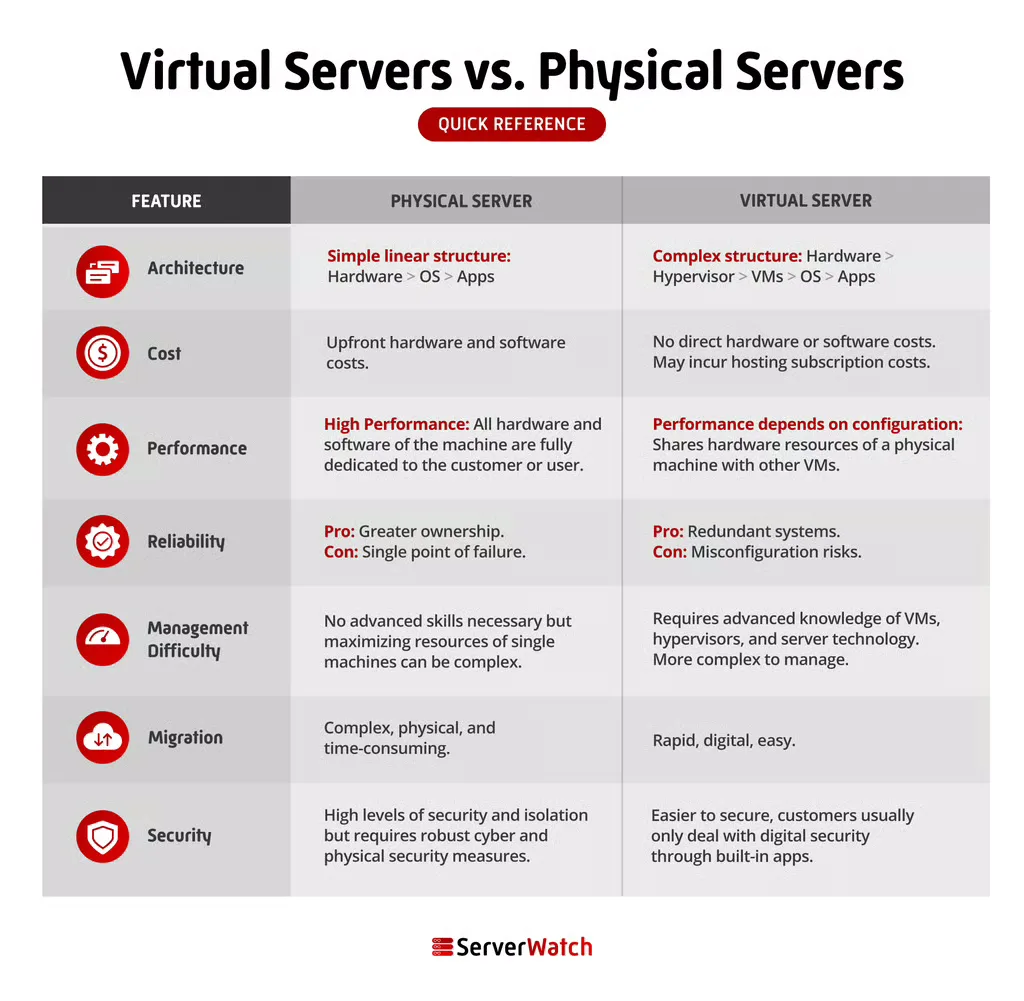
The choice between a physical and virtual server hinges on a careful evaluation of various factors, including architecture, cost, performance, reliability, management, migration, and security.

| Feature | Physical Server | Virtual Server |
|---|---|---|
| Architecture | Dedicated hardware with direct access to all system resources. | Software-based emulation, sharing resources of a physical host via a hypervisor. |
| Cost | High initial hardware investment; predictable operational costs for owned hardware. | Lower initial investment; variable operational costs based on usage and provider. |
| Performance | Maximum raw performance due to dedicated resources; can be prone to bottlenecks if oversubscribed. | Performance can vary depending on host load and resource allocation; generally excellent for most workloads. |
| Reliability | Highly reliable when well-maintained; single point of failure if hardware fails. | High reliability due to redundancy and easy migration; dependent on host hardware stability. |
| Management | Requires in-house expertise for hardware, OS, and software management. | Vendor typically manages underlying hardware; requires management of the VM OS and applications. |
| Migration | Complex and time-consuming; requires physical relocation and reconfiguration. | Relatively easy and fast; can be migrated between hosts with minimal downtime. |
| Security | Strong isolation by default; requires robust in-house security measures. | Isolation provided by the hypervisor; security depends on configuration and vendor practices. |
Architecture: The Core Distinction
As highlighted, the fundamental difference lies in their architecture. A physical server is a monolithic piece of hardware, while a virtual server is a software construct that lives on top of physical hardware. This architectural difference dictates how resources are accessed and managed. Physical servers offer direct access to hardware, providing an unadulterated experience for applications that require it. Virtual servers, on the other hand, abstract the hardware layer, allowing for greater flexibility and efficiency in resource utilization.
Cost Dynamics: Initial Investment vs. Operational Expenditure
The cost models for physical and virtual servers differ significantly. Acquiring physical servers involves a substantial upfront capital expenditure for hardware, installation, and often, dedicated data center space and power. While operational costs can become more predictable over the lifespan of the hardware, the initial outlay is considerable.
Virtual servers, particularly when leveraged through cloud providers, often operate on an operational expenditure (OpEx) model. This means businesses pay for the resources they consume on a subscription or pay-as-you-go basis. This approach dramatically lowers the barrier to entry and allows for greater financial agility. Furthermore, the costs associated with maintaining physical infrastructure—electricity, cooling, physical security, and hardware replacement—are largely borne by the cloud provider in a virtualized model, offloading these burdens from the end-user.
Performance: A Measure of Dedication and Contention
Performance is a hotly debated aspect, with both server types capable of delivering exceptional results. Physical servers, with their dedicated resources, can offer the highest possible raw performance for a given set of hardware. This is particularly advantageous for extremely demanding applications where even minor performance fluctuations can have significant consequences. However, if a physical server is not adequately provisioned or is tasked with more than it can handle, performance can degrade significantly.
Virtual servers offer excellent performance for the vast majority of workloads. The hypervisor efficiently allocates resources, and advancements in virtualization technology have minimized performance overhead. However, in a heavily utilized virtualized environment, performance can be influenced by the activity of other VMs on the same host, a phenomenon known as "noisy neighbor" effect. The ability to scale resources on demand for VMs also means that performance can be adjusted more readily to meet fluctuating needs.
Reliability: Resilience Through Design and Abstraction
Both physical and virtual servers can be engineered for high reliability. Physical servers achieve this through robust hardware components, redundant power supplies, and failover mechanisms. However, a catastrophic hardware failure on a single physical server can lead to complete service disruption unless robust backup and recovery plans are in place.
Virtual servers benefit from the inherent flexibility of virtualization. VMs can be quickly migrated to different physical hosts in case of hardware failure, often with minimal or no downtime. This inherent resilience and the ease of implementing disaster recovery solutions contribute to a high level of availability for virtualized environments. The reliability of a virtual server is also dependent on the underlying physical infrastructure and the hypervisor’s stability.
Management Complexity: Control vs. Outsourcing
Managing physical servers typically requires dedicated IT staff with expertise in hardware maintenance, operating system administration, and network configuration. This level of control offers deep customization but also entails significant management overhead and responsibility.
When using virtual servers from cloud providers, many of the complex hardware management tasks are outsourced to the vendor. The responsibility then shifts to managing the virtual machine’s operating system, applications, and security configurations. This can simplify IT operations for many organizations, allowing them to focus on core business functions rather than infrastructure maintenance.
Migration: The Ease of Moving Data
Migrating virtual servers is generally a far simpler and faster process than migrating physical servers. Virtual machines are essentially software files that can be copied, moved, and redeployed with relative ease. A VM can often be migrated from one physical host to another with just a few clicks, minimizing downtime and complexity.
Migrating physical servers, conversely, is a more involved undertaking. It typically requires physically moving the hardware, reconfiguring network settings, and meticulously backing up and restoring the entire system to the new location. This process can be time-consuming, prone to errors, and may necessitate extended periods of downtime.
Security: Layers of Protection
Both physical and virtual servers can be secured effectively, but they require different approaches. Physical servers offer a strong baseline of isolation, as they are not inherently shared. However, securing them relies heavily on robust physical security measures, network segmentation, and diligent software patching and configuration.
Virtual servers achieve isolation through the hypervisor, which acts as a barrier between VMs. This provides a strong level of logical separation. However, the security of a virtualized environment also depends on the security of the hypervisor itself, the underlying physical infrastructure, and the security practices implemented within each VM. Cloud providers invest heavily in securing their virtualized infrastructure, but users are still responsible for securing their own applications and data within their allocated virtual environments.
The Bottom Line: Choosing the Right Server for Your Business
The decision between physical and virtual servers is not a one-size-fits-all proposition. Each has distinct advantages and disadvantages, and the optimal choice is dictated by an organization’s specific needs, priorities, and technical capabilities.
For the majority of businesses, virtual servers offer a compelling blend of affordability, scalability, and access to advanced technology. Their flexibility allows businesses to adapt quickly to changing demands, and the pay-as-you-go models associated with cloud-based virtual servers can significantly reduce upfront costs and ongoing operational burdens.
However, physical servers remain indispensable for certain use cases. Businesses requiring absolute control over their hardware, the highest possible performance for specialized applications, or those operating under extremely stringent security and compliance mandates may find that dedicated physical servers are the superior option. The ownership and direct control offered by physical servers provide a level of assurance that cannot be replicated in a shared or virtualized environment.
Ultimately, a strategic assessment of workload requirements, performance demands, security considerations, budget constraints, and long-term growth plans will guide the most effective decision. Many organizations also adopt a hybrid approach, utilizing both physical and virtual servers to leverage the strengths of each for different aspects of their IT infrastructure.
To further enhance your understanding and capabilities in this domain, exploring resources on the best server virtualization software can provide valuable insights into optimizing your virtualized environments.
