

The modern smartphone landscape is increasingly dominated by devices featuring expansive displays, a trend exemplified by Samsung’s latest Galaxy S26 series. With models like the Galaxy S26 Ultra boasting a formidable 6.9-inch screen, the S26+ at 6.7 inches, and even the standard S26 reaching 6.2 inches, these devices offer unparalleled immersive experiences for media consumption, gaming, and productivity. However, this growth in screen real estate often presents a significant ergonomic challenge: comfortable and efficient one-handed operation. Tasks such as navigating menus, typing messages, or simply reaching elements at the top of the display become a delicate balancing act, particularly when users are simultaneously engaged in other activities like carrying bags, commuting on public transport, or holding objects. Recognizing this inherent tension between screen grandeur and practical ergonomics, Samsung has strategically integrated a suite of sophisticated software solutions within its One UI interface and the broader Good Lock ecosystem, designed to transform these large devices into surprisingly manageable tools for single-handed use. Many of these powerful customizations, though readily available, remain underutilized or entirely unknown to a significant portion of the user base, underscoring a latent potential for enhanced daily interaction.
The Evolving Form Factor: A Chronology of Screen Size and User Adaptability
The journey of the smartphone from compact communication device to a pocket-sized multimedia hub has been marked by a relentless pursuit of larger displays. In the early 2010s, screen sizes typically hovered around 3.5 to 4 inches. The introduction of "phablets" like the original Samsung Galaxy Note, pioneering the 5-inch screen barrier, initially met with skepticism but quickly carved out a significant market segment. This evolution was driven by several factors: increased demand for mobile video streaming, more complex gaming experiences, enhanced productivity tools requiring more visual information, and the ability to integrate larger batteries for extended endurance. As manufacturing techniques advanced, bezels shrunk, and aspect ratios changed, screen sizes continued to grow without proportionally increasing the overall device footprint.
By the mid-2020s, the 6-inch mark became the norm for flagship and even mid-range devices, with premium models often pushing well beyond 6.5 inches. This trajectory, while fulfilling the desire for immersive viewing, simultaneously introduced ergonomic hurdles. Industry analysts have consistently highlighted the dichotomy: users express a strong preference for larger screens for content consumption, yet simultaneously report difficulties with one-handed reach and comfort. A 2023 study by Counterpoint Research indicated that over 70% of premium smartphone users spend more than three hours daily on their devices, with a substantial portion of this usage occurring in scenarios where only one hand is free. This data underscores the critical need for software optimizations that bridge the gap between hardware capabilities and practical user interaction. Samsung, as a global leader in smartphone innovation, has been proactive in addressing this challenge, developing One UI as a comprehensive answer to the complexities of large-screen ergonomics.
One UI: Samsung’s Customization Powerhouse for Enhanced Usability
Samsung’s One UI, built atop the Android operating system, is more than just a graphical overlay; it is a meticulously crafted interface designed to optimize interaction, particularly on its larger devices. Its philosophy centers on creating a "focused, comfortable, and consistent" experience, pushing frequently used interaction zones closer to the bottom of the screen where the thumb naturally rests. Despite this thoughtful design, many of One UI’s advanced customization layers, especially those pertaining to one-handed use, are often either deactivated by default or reside in less-frequented corners of the settings menu, awaiting user discovery. The effective utilization of these features can significantly alleviate the common frustrations associated with managing a large smartphone with a single hand, transforming the user experience from a cumbersome exercise into a seamless interaction.
The Native One-Hand Mode: An Accessible System-Wide Shrinkage
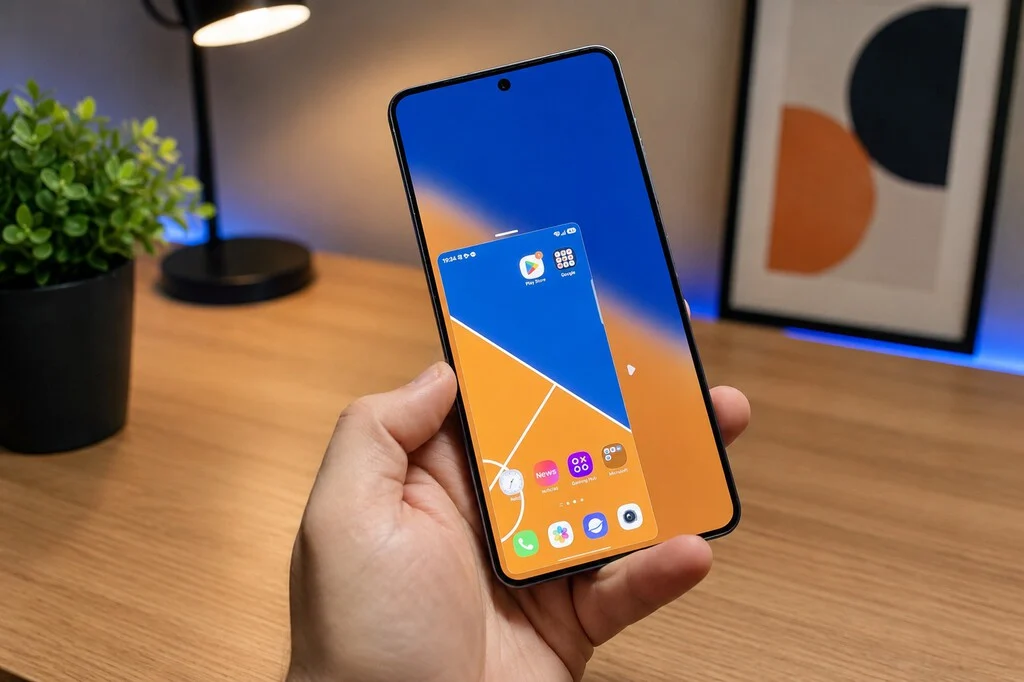
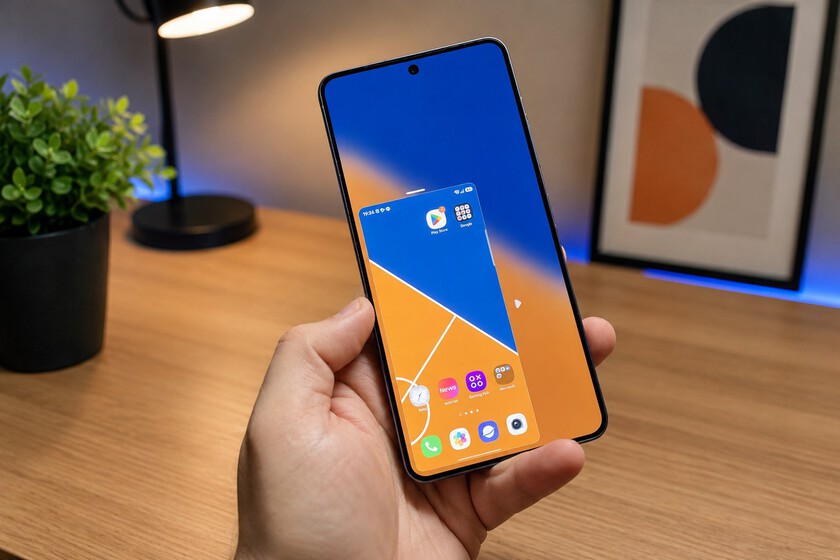
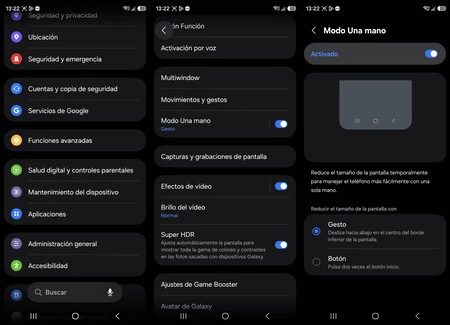
One of the most foundational and universally applicable solutions embedded within One UI is the native One-Hand Mode. This feature, accessible via Settings > Advanced features > One-Hand Mode, offers a quick and effective way to scale down the entire user interface to a more manageable size. Once activated, typically by a simple downward swipe gesture from the center of the bottom edge of the screen, the entire display content shrinks and shifts towards one of the lower corners. This miniaturized window can be dynamically adjusted in size by dragging its upper corner, and crucially, its vertical position on the screen can be altered by tapping and dragging the horizontal bar at its top. For users with shorter thumbs navigating an expansive display, this vertical repositioning can make a substantial difference in reaching otherwise inaccessible elements without resorting to awkward hand contortions or resorting to a second hand.
While incredibly practical, the native One-Hand Mode often remains an untapped resource. Industry observations suggest that many users, accustomed to default settings, do not actively explore the advanced features section of their phone. Furthermore, the transient nature of the mode – it deactivates with a tap outside the shrunken window – makes it ideal for momentary relief but perhaps less suitable for sustained one-handed interaction. Nonetheless, its immediate accessibility and system-wide application make it a vital tool in Samsung’s ergonomic arsenal, providing a fundamental solution for those critical moments when full screen reach is compromised.
One Hand Operation+: Precision Gestures from the Good Lock Ecosystem
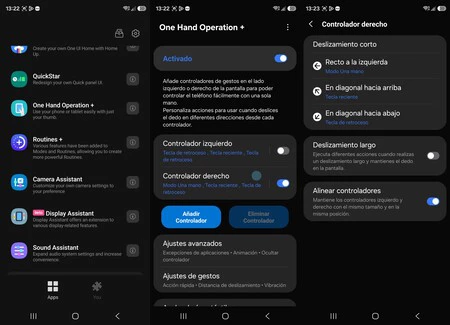
For users demanding a more refined and persistent solution to one-handed navigation, Samsung offers One Hand Operation+. This powerful module is part of the Good Lock suite, an official collection of experimental and advanced customization applications available through the Galaxy Store. Good Lock itself represents Samsung’s commitment to empowering power users with unparalleled control over their device’s aesthetics and functionality, often serving as a testing ground for features that may eventually be integrated into the main One UI.
One Hand Operation+ introduces highly configurable gesture zones along the lateral edges of the screen. Users can define specific swipe gestures—straight, diagonal up, or diagonal down—from either the left or right edge, and assign a wide array of actions to each. These actions range from core navigation commands like "back" or "home" to launching specific applications, taking screenshots, activating the flashlight, or even triggering quick tools. The significant advantage of this module lies in its granular customization: up to six distinct actions can be configured per side (three gestures, each with a short or long swipe variant), and the activation area’s height and width can be precisely adjusted to perfectly align with the user’s thumb reach.
For individuals who predominantly use their phone with one hand, for instance, the right hand, configuring the most frequent actions on the right edge virtually eliminates the need to stretch the thumb across the entire screen. This level of precision and personalization far surpasses the general utility of the native One-Hand Mode, transforming casual swipes into highly efficient command inputs. Tech reviewers and dedicated Samsung communities frequently highlight One Hand Operation+ as a "must-have" application for enhancing productivity and comfort on large Galaxy devices, often citing it as a key differentiator that elevates the Samsung user experience beyond that of competitors. Its robust functionality demonstrates Samsung’s understanding of diverse user needs and its willingness to provide advanced tools for those who seek to fully optimize their smartphone interaction.
The One-Handed Keyboard: Typing Efficiency Reimagined
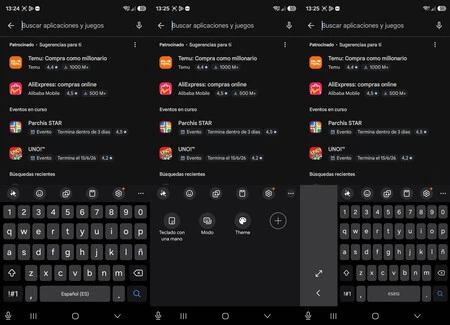
Typing on a large smartphone with one hand presents a unique set of challenges. The standard full-width keyboard often requires extensive thumb stretching, leading to slower typing speeds, increased error rates, and significant discomfort over prolonged use. Samsung’s native keyboard addresses this directly with a built-in "One-Handed Keyboard" mode, a feature often overlooked by users.
To activate it, users simply tap the three-dot menu icon typically found at the top right of the Samsung Keyboard interface and select "One-handed keyboard." This instantly transforms the full-width keyboard into a smaller, floating window that can be freely dragged and positioned anywhere on the screen. Crucially, it can be anchored to either the left or right bottom corner, depending on the user’s dominant hand. While the keys become marginally smaller, the overall reduction in reach makes typing significantly more comfortable and efficient when only one hand is available. The floating nature also ensures that the keyboard does not obscure critical content on the screen, a common issue with full-width keyboards.
This feature is particularly valuable for quick replies, messaging on the go, or any scenario where precise, two-handed typing is impractical. User studies on mobile typing ergonomics suggest that context-aware keyboard resizing and positioning can reduce thumb travel by up to 40% on large displays, leading to a noticeable improvement in user satisfaction and a reduction in musculoskeletal strain. The seamless integration of this feature within the Samsung Keyboard means no third-party apps are required, ensuring stability and full compatibility with the One UI ecosystem.
Calibrating Navigation Gestures: Balancing Responsiveness and Accidental Triggers
With the widespread adoption of gesture-based navigation, moving away from traditional on-screen buttons, the interaction paradigm for smartphones has shifted significantly. On large screens, the "back" gesture, typically performed by swiping inward from the left or right edge, can be particularly problematic. While intended for intuitive navigation, an overly sensitive activation zone can lead to frequent accidental triggers, interrupting workflows and frustrating users. Conversely, a zone that is too narrow makes the gesture difficult to execute reliably with a single thumb.
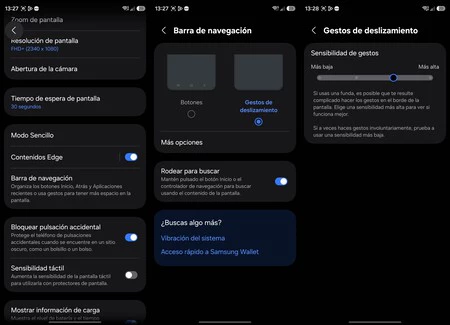
Samsung’s One UI provides a crucial adjustment for this: Settings > Display > Navigation bar > Swipe gestures > More options > Gesture sensitivity. This setting allows users to fine-tune how wide the lateral margin needs to be for the back gesture to register. Lowering the sensitivity requires the swipe to originate further into the screen, reducing accidental activations but potentially making it harder to reach. Conversely, increasing sensitivity makes the gesture easier to trigger but also more prone to unintended inputs.
For large Galaxy devices (typically those above 6.5 inches), finding the optimal balance is key. Many users find a medium sensitivity setting to be the most practical. However, the true synergy emerges when this setting is combined with One Hand Operation+. By carefully adjusting the sensitivity of native gestures and simultaneously configuring the custom gesture zones of One Hand Operation+ to occupy distinct areas or respond to different swipe angles, users can create a highly sophisticated and customized navigation scheme. This allows the lateral edges to perform different actions based on the specific interaction, eliminating interference and providing a truly gymnastic-free one-handed experience. This nuanced control over navigation gestures underscores Samsung’s dedication to providing a deeply personalized and efficient user interface.
Broader Impact and Strategic Implications: Samsung’s Vision for User-Centric Design
The collective implementation and intelligent configuration of these four distinct yet complementary software features—the native One-Hand Mode, the advanced One Hand Operation+ module, the adaptable One-Handed Keyboard, and fine-tuned navigation gesture sensitivity—fundamentally alter the user experience on large Samsung Galaxy smartphones. What might initially feel like an ergonomic compromise transforms into a device that is remarkably comfortable and efficient to operate with a single hand, even in challenging situations.
This strategic approach highlights several key aspects of Samsung’s product philosophy. Firstly, it demonstrates a profound commitment to user experience, extending beyond raw hardware specifications. While the impressive displays and powerful processors of the S26 series capture headlines, it is these subtle yet impactful software refinements that truly enhance daily interaction and user satisfaction. Secondly, these features represent a significant competitive advantage. In a market saturated with large-screen devices, Samsung distinguishes itself by offering not just the hardware, but also the comprehensive software ecosystem to make that hardware genuinely usable for a wider range of users and scenarios. This proactive stance in addressing ergonomic challenges positions Samsung as a leader in delivering a holistic and thoughtful smartphone experience.
Furthermore, the emphasis on customization and accessibility inherently makes Samsung devices more inclusive. Users with smaller hands, individuals with temporary mobility limitations, or simply those who frequently find themselves in one-handed situations are empowered to tailor their device to their unique needs. This commitment to accessibility ensures that the benefits of large screens are not exclusive to a subset of users.
Looking ahead, the trajectory suggests even more sophisticated solutions. Future iterations of One UI could potentially leverage artificial intelligence to dynamically adjust interface elements based on user grip, common usage patterns, or even real-time environmental context. Enhanced haptic feedback integrated with gesture controls, or more intuitive, adaptive UI scaling beyond simple shrinkage, could further refine the one-handed experience. Samsung’s continuous investment in its software ecosystem, particularly through platforms like Good Lock, indicates a clear strategic direction towards personalized, efficient, and ergonomically sound mobile computing.
In conclusion, by activating and meticulously configuring these often-underestimated features, a large Samsung Galaxy smartphone ceases to be an ergonomic sacrifice. Instead, it becomes a testament to thoughtful design, where cutting-edge hardware is seamlessly integrated with intelligent software, providing a flexible, comfortable, and highly efficient tool for the demands of modern mobile life, regardless of whether one or two hands are available.
