
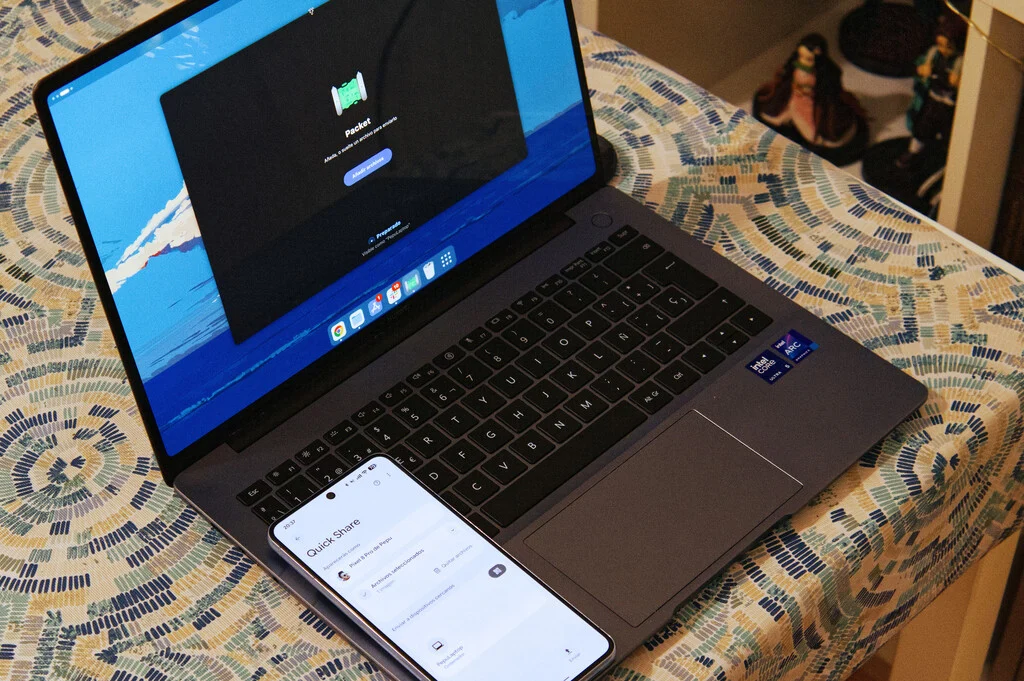

For the vast majority of individuals today, the smartphone has ascended to become the primary, if not exclusive, device for capturing photographs and recording videos. This ubiquitous reliance on mobile cameras has dramatically reshaped how we manage our digital media. Those with a longer memory of the digital age will recall a time when transferring these precious memories and crucial documents to a computer for editing, archiving, or sharing necessitated a physical connection, typically via a USB cable. This once-indispensable ritual has largely faded into obsolescence, superseded by a suite of sophisticated, direct, and remarkably swift wireless alternatives.
A Brief History of Digital Content Mobility: The Evolution of Transfer Methods
The journey from cumbersome wired transfers to seamless wireless synchronization has been a testament to relentless technological innovation. In the early days of mobile telephony, memory cards were the primary conduit for moving media, often requiring a dedicated card reader for PC access. The advent of USB connectivity brought a modicum of convenience, standardizing the physical interface. Early USB 1.0 connections offered modest speeds, which gradually improved with USB 2.0 and later USB 3.0, enabling quicker transfers of larger files. However, the fundamental limitation remained: a physical cable was always required, tethering the mobile device to the computer.
The late 2000s and early 2010s saw the nascent rise of short-range wireless technologies like Bluetooth, primarily used for small file transfers or audio streaming. Concurrently, the proliferation of Wi-Fi networks in homes and workplaces opened new possibilities. Cloud storage services, such as Dropbox and Google Drive, began gaining traction, offering a convenient, albeit internet-dependent, method for syncing files across devices. Apple’s introduction of AirDrop in 2011 marked a significant milestone, providing a proprietary, peer-to-peer solution that leveraged Wi-Fi Direct and Bluetooth Low Energy for fast, secure transfers within its ecosystem. This set a new benchmark for user experience, highlighting the potential for truly untethered content mobility. The subsequent years have seen an acceleration of this trend, driven by increasing file sizes from high-resolution cameras and a pervasive demand for instant access and sharing.
The Paradigm Shift: From Tangled Wires to Seamless Wireless Transfers
The transition away from physical cables is not merely about convenience; it reflects a broader industry movement towards integrated, user-centric ecosystems where devices communicate effortlessly. Modern smartphones are capable of recording 4K video, capturing high-resolution RAW images, and handling large document files, making efficient transfer mechanisms more critical than ever. Industry estimates suggest that over 90% of all photographs taken globally are now captured on smartphones, underscoring the sheer volume of data users need to manage. This shift has propelled the development and refinement of wireless transfer solutions that circumvent the limitations of messaging apps – often plagued by file size limits, compression, or temporary storage – offering direct, high-fidelity data movement.
The market now offers a robust array of alternatives designed to move heavy files of all types between operating systems without compromising quality. These solutions range from deeply integrated system features to versatile third-party applications and web-based utilities. Below, we delve into four prominent methods that promise to make the USB cable a relic of the past for file transfers.
The Core Contenders: Integrated Ecosystem Solutions
The most seamless wireless transfer experiences often come from features deeply embedded within device ecosystems. These proprietary or semi-proprietary solutions leverage specific hardware and software integrations to offer unparalleled speed and ease of use.
AirDrop: Apple’s Pioneering Peer-to-Peer System
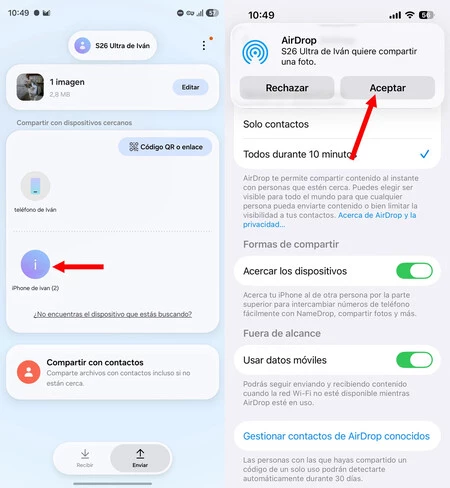
For users entrenched in the Apple ecosystem, AirDrop has been a cornerstone of digital convenience for over a decade. Introduced with macOS Lion and iOS 7, it revolutionized how photos, videos, documents, and even website links could be shared instantly between iPhones, iPads, and Mac computers. Operating over a combination of Wi-Fi Direct and Bluetooth, AirDrop establishes a secure, peer-to-peer connection between devices in close proximity, allowing for rapid transfers without the need for an internet connection or a central server. Its integration into the operating system means it’s as simple as tapping the share icon in any application, selecting the recipient device, and confirming the transfer. This "it just works" philosophy has made it an exemplar for cross-device sharing, fostering a strong sense of ecosystem lock-in for many users.
Quick Share: Google’s Evolving Standard for Android and Windows
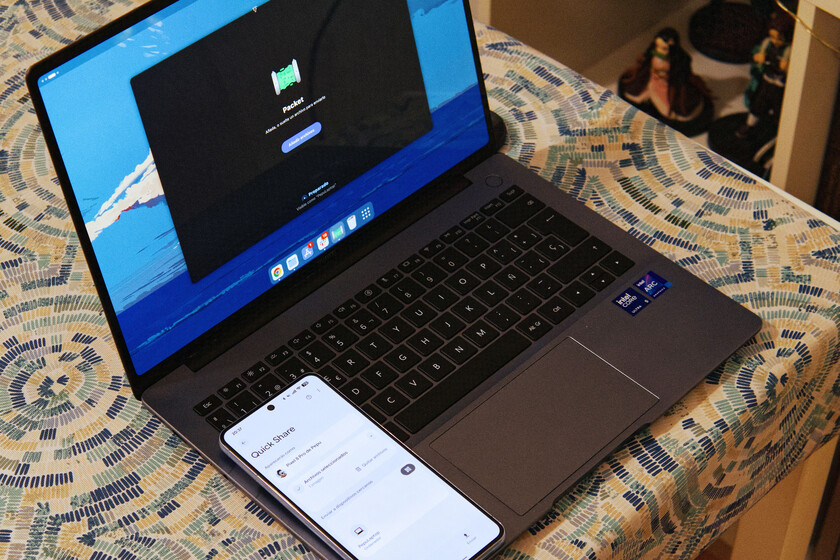
On the Android and Windows fronts, Google has been steadily developing its equivalent, Quick Share (formerly known as Nearby Share). This solution aims to replicate the intuitive experience of AirDrop, enabling swift file transfers between Android phones, Chromebooks, and Windows PCs. Like AirDrop, Quick Share leverages Wi-Fi Direct and Bluetooth to create a local, secure connection, ensuring high-speed data exchange. Its integration within the Android operating system means users can initiate transfers directly from the share menu in their gallery or file manager, making it an inherent part of the mobile experience for billions of Android users.
A significant development in the wireless transfer landscape occurred with Google’s recent announcement that Quick Share is gaining compatibility with iOS devices. This strategic move signals a concerted effort to bridge the long-standing divide between Apple and Android ecosystems, offering a more unified experience for users who often navigate both platforms. This interoperability is achieved through an open standard for cross-platform sharing, developed in collaboration with various industry partners. For devices not yet natively supporting this direct interaction, Quick Share offers an ingenious fallback: it generates a unique, single-use QR code. Any PC, regardless of its operating system or native Quick Share compatibility, can scan this code to download the files via Google’s secure servers, democratizing access to quick transfers. This approach significantly broadens the utility of Quick Share beyond its native Android and Windows confines, paving the way for more seamless digital interactions across diverse hardware. For Linux users, while native integration is not yet universal, the open-source community has developed clients like rquickshare and applications such as Packet, allowing them to participate in this evolving ecosystem. These community-driven efforts underscore the demand for universal, cable-free file sharing.
Prioritizing Privacy and Local Control: Open-Source Alternatives
While integrated solutions offer convenience, some users prioritize absolute privacy and local control over their data. For these individuals, open-source applications that keep data entirely within a local network offer compelling advantages.
LocalSend: Encrypted, Offline, and Cross-Platform Freedom
When the paramount concern is privacy in the movement of images or documents, LocalSend stands out as a premier alternative. This free, open-source application facilitates encrypted file transfers exclusively over a local Wi-Fi network. Its design philosophy centers on independence from external servers, meaning data never leaves the user’s immediate environment. This local-network dependency also confers a significant advantage: LocalSend functions perfectly even if the router loses its internet connection, ensuring continuous operability in various scenarios. Developers of open-source solutions like LocalSend often emphasize user empowerment and data sovereignty, offering transparency through publicly available code that can be audited for security and functionality.
LocalSend distinguishes itself with remarkable versatility, offering native applications for a comprehensive range of platforms: Windows, macOS, Linux, iOS, and Android, in addition to a web-based version. The operational requirement is straightforward: both the sender and receiver devices must be connected to the same local network, and the LocalSend application must be installed and open on both during the transfer process. This multi-platform support, combined with its commitment to privacy and offline capability, positions LocalSend as an ideal choice for users seeking robust, secure, and independent file transfer capabilities, reminiscent of earlier, simpler local network sharing methods but with modern encryption and ease of use.
The Browser-Based Bridge: Simplicity Without Installation
Sometimes, the need for a quick transfer arises on a public computer or a device where installing third-party applications is impractical or forbidden. In such scenarios, browser-based solutions offer an unparalleled level of accessibility.
Snapdrop: Instant Web-Based File Sharing
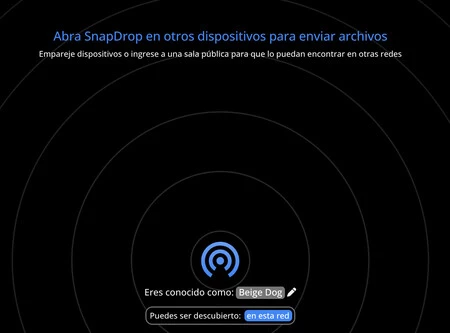
When dedicated applications might falter or are simply not an option, Snapdrop emerges as a highly direct and effective solution. Its functionality mirrors that of LocalSend in spirit, enabling local network transfers, but it achieves this without the need for any dedicated application installation. Snapdrop is a free, ad-free service accessible directly through a web browser, for instance, via www.snap-drop.net.
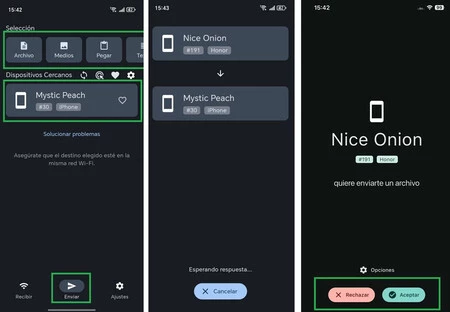
To initiate a file transfer with Snapdrop, users simply need to open the Snapdrop website on both the sending and receiving devices. Upon loading, the system automatically assigns a unique, whimsical name to each device (e.g., "Indigo Walrus," "Crimson Dolphin"), making identification straightforward. From that moment, transferring files is intuitive: on the mobile device, tap the icon representing the computer, select the desired photos or files from the gallery or file system, and then accept the incoming transfer on the receiving device. The copy process begins instantly. Snapdrop leverages WebRTC technology, allowing for direct peer-to-peer connections within the browser, ensuring that files are transferred locally without passing through external servers, thus offering a degree of privacy akin to LocalSend, albeit reliant on the security of the browser and network. Its primary advantages are its zero-installation requirement and universal compatibility across any operating system with a modern web browser, making it an invaluable tool for impromptu transfers.
The Cloud Continuum: Automatic Sync and Archival Powerhouses
For users seeking ultimate convenience, automated backup, and long-term archival, cloud storage services provided by tech giants like Google and Apple remain an exceptionally popular choice for transferring photos and files from mobile to PC.
Google Photos and iCloud: The Power of Automatic Synchronization
The core appeal of services like Google Photos and iCloud lies in their automatic synchronization capabilities, which ensure that no photo or video is ever truly "lost." These services offer a seamless experience, continuously backing up media to the cloud as soon as an internet connection is available. For Android users, the process is as simple as opening the Google Photos app and activating the backup feature. On an iPhone, enabling synchronization in Photos is equally straightforward, accessed through the iCloud settings within the device’s profile.
Beyond simple transfer, these platforms offer sophisticated organizational tools, AI-powered search capabilities (e.g., searching for "dogs" or "beaches"), and automatic album creation, transforming them into comprehensive media management solutions. To access these files on a computer, users simply log into their respective cloud service via a web browser (photos.google.com or iCloud.com), select the desired files, and initiate a download. This method offers unparalleled convenience for accessing media from any device, anywhere, provided there’s an internet connection.
However, a critical limitation frequently arises: the generous free storage tiers provided by these services (e.g., 15GB for Google Photos shared across Google services, 5GB for iCloud) are quickly consumed by high-resolution content. Modern smartphone cameras capture incredibly detailed images and videos, with 4K video files and especially uncompressed RAW photo files rapidly filling up even substantial storage allocations. For example, a single RAW photo can be tens of megabytes, and a few minutes of 4K video can easily consume gigabytes. Industry trends indicate a consistent increase in file sizes as camera technology improves. Consequently, users with extensive media libraries or those working with professional-grade content often find themselves facing the necessity of purchasing additional storage. Cloud service providers continually innovate to offer competitive pricing tiers and bundled services, recognizing that storage capacity is a key differentiator and a recurring revenue stream. While a paid subscription becomes the long-term, virtually indispensable solution for many, it represents an ongoing financial commitment. Furthermore, privacy considerations regarding data stored on third-party servers remain a pertinent discussion point for some users.
Beyond the Transfer: Implications for Users, Industry, and Data Management
The evolution of wireless file transfer methods carries significant implications that extend beyond mere technical convenience.
Productivity and Workflow Enhancements
For content creators, photographers, videographers, and even everyday users, the ability to transfer large files wirelessly and instantly has dramatically streamlined workflows. Gone are the days of waiting for slow USB transfers or hunting for specific cables. This efficiency translates into increased productivity, allowing professionals to move rapidly from capture to edit, and empowering casual users to share their experiences without friction. The integration of these features into operating systems means less time spent managing technical hurdles and more time focused on creative output or personal enjoyment.
The Evolving Landscape of Digital Privacy
The array of available solutions presents users with a spectrum of choices regarding data privacy. Cloud services, while convenient, involve entrusting personal data to third-party servers, raising questions about data security, potential access by authorities, and company data policies. Local network solutions like LocalSend and Snapdrop offer a more private alternative, ensuring data remains within the user’s direct control and never traverses external servers. This choice empowers users to select a method that aligns with their personal privacy preferences, highlighting a growing awareness and demand for data sovereignty in the digital age.
Ecosystem Competition and Interoperability
The development of features like Quick Share’s compatibility with iOS signifies a broader trend towards increased interoperability between historically walled-off ecosystems. While proprietary solutions like AirDrop remain powerful tools for ecosystem loyalty, the push for cross-platform compatibility benefits consumers by reducing friction and enhancing choice. This competition drives innovation, forcing developers to continuously improve user experience, speed, and security across all platforms. Analysts point to this trend as a maturation of the digital landscape, where user experience increasingly trumps strict platform exclusivity.
Future Outlook: Towards a Truly Unified Digital Experience
Looking ahead, the trajectory of file transfer technology points towards even greater integration and intelligence. We can anticipate further advancements in AI-powered file management, predictive transfer capabilities, and seamless multi-device experiences where files are not merely "transferred" but rather exist fluidly across all owned devices, always accessible and synchronized. The "death of the cable" is not just about physical wires; it represents a fundamental shift towards an effortlessly connected digital life, where our content moves as freely as our thoughts. This continuous evolution promises to further empower users, making digital interactions more intuitive, efficient, and integrated than ever before.
