
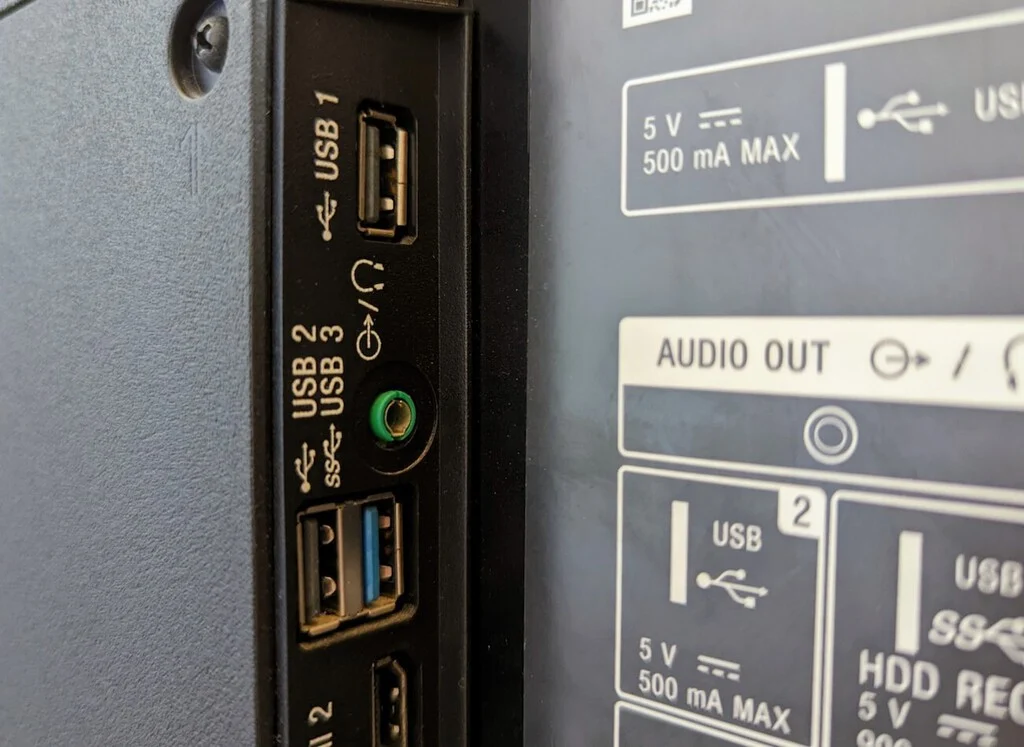

Behind the sleek facade of modern Smart Televisions lies a realm of underutilized potential, particularly within their often-overlooked USB ports. While commonly perceived as mere conduits for media playback from external drives or connecting laptops via HDMI, these versatile interfaces are evolving beyond simple input/output functions, transforming into critical hubs for enhanced connectivity, device management, and system optimization. This comprehensive analysis delves into the myriad ways these ports are being leveraged, from rudimentary charging to advanced system maintenance, highlighting their increasing importance in the evolving landscape of home technology.
The Evolution of TV Connectivity: A Brief History of USB Integration
The integration of USB (Universal Serial Bus) ports into televisions began primarily in the early 2000s, initially serving a singular purpose: facilitating the direct playback of multimedia files (photos, music, videos) from flash drives or external hard drives. This marked a significant departure from older systems that required separate media players. Over time, as televisions evolved into "Smart TVs" with integrated operating systems (like Android TV, webOS, Tizen), the potential of these ports expanded dramatically. Early USB 1.0 and 2.0 specifications offered limited data transfer speeds and power output, often insufficient for more demanding applications. However, the widespread adoption of USB 3.0, 3.1, and increasingly, USB-C with Power Delivery (PD), has unlocked new capabilities, enabling faster data throughput, higher power output, and bidirectional functionality, thus broadening the scope of what a TV’s USB port can achieve. This technological progression underscores a shift from passive media consumption to active device interaction and system augmentation.
Charging Devices: More Than Just a Power Outlet
One of the most immediate and universally accessible uses for a Smart TV’s USB port is device charging. In scenarios where wall outlets are scarce, such as hotel rooms or crowded living spaces, the TV’s USB port provides a convenient, albeit often slower, power source for smartphones, tablets, or other portable electronics. While traditional USB 2.0 ports typically deliver 0.5 Amps (2.5 Watts), sufficient for a slow overnight charge, newer Smart TVs are increasingly incorporating USB 3.0 ports (offering 0.9 Amps or 4.5 Watts) or even USB-C ports with Power Delivery (PD) capabilities. These advanced USB-C PD ports can supply up to 15 Watts or even 30 Watts, significantly accelerating charging times for compatible devices. This development transforms the TV from a static display into an active component of a device ecosystem, capable of keeping essential gadgets powered without monopolizing dedicated wall sockets. The convenience factor is particularly high for devices like streaming sticks (e.g., Chromecast, Fire TV Stick), which can often draw power directly from a TV’s USB port, eliminating the need for an additional power adapter and simplifying cable management.
Transforming Your TV into a Personal Video Recorder (PVR)

Beyond passive playback, a Smart TV’s USB port can empower users to record live television content, effectively turning the device into a Personal Video Recorder (PVR) or Digital Video Recorder (DVR). This functionality, particularly prevalent in regions relying on digital terrestrial television (DTT), allows viewers to capture broadcasts for later viewing, pause live TV, or even schedule recordings.
To enable PVR functionality, a compatible USB storage device (flash drive or external hard drive) is essential. The drive must possess sufficient storage capacity, typically ranging from 64GB for casual recording to several terabytes for extensive libraries. Crucially, the drive’s file system must be compatible with the TV’s operating system, with common formats including FAT32, exFAT, and NTFS. Furthermore, a USB 3.0 or higher interface is recommended for optimal recording and playback performance, minimizing buffering and ensuring smooth operation, especially for high-definition content. Many Smart TVs, particularly those running Android TV, offer an option to format a connected USB drive as "Internal Expanded Storage." This advanced feature allows the television to treat the external drive as an extension of its internal memory, providing additional space not only for recorded content but also for installing larger applications, games, and storing crucial cache data that modern apps require for fluid operation. This technical trick significantly enhances the TV’s internal capabilities, addressing a common limitation of entry-level Smart TVs, which often come with limited onboard storage.
It is important to note that while PVR functionality offers significant convenience, it often comes with certain limitations. Digital Rights Management (DRM) restrictions may prevent recorded content from being played back on other devices or even after the drive is removed from the original TV. Some manufacturers also impose regional restrictions or require specific drive types. Despite the rise of on-demand streaming services, the ability to record live broadcasts remains a valuable feature for capturing specific events, news programs, or series that may not be immediately available through streaming platforms.
Streamlining Application Installation (Sideloading)
For users seeking to expand their Smart TV’s application ecosystem beyond the confines of official app stores, the USB port serves as a critical conduit for "sideloading" applications. Sideloading involves installing applications from sources other than the primary app marketplace (e.g., Google Play Store for Android TV). While wireless methods like "Send Files to TV" applications or wireless ADB (Android Debug Bridge) are increasingly popular for their convenience, the USB port remains the most reliable and secure method for critical installations or large application packages.
The process typically involves downloading the desired application’s APK (Android Package Kit) file onto a computer, transferring it to a USB drive, and then connecting the drive to the Smart TV. Using a file explorer application installed on the TV, users can navigate to the USB drive, locate the APK, and initiate the installation. This method bypasses potential network issues, transfer corruptions, or speed limitations inherent in wireless transfers, ensuring a clean and direct installation. For users who need to install specific utility apps not available in the official store, or who wish to roll back to an older version of an app, sideloading via USB offers unparalleled control and reliability. However, users must exercise caution when sideloading, as installing applications from untrusted sources can pose security risks, including malware or privacy breaches. Verifying the source and integrity of APK files is paramount.
Enhancing User Interaction: Connecting Peripherals
Navigating a Smart TV’s interface with a remote control can often be cumbersome, particularly for tasks involving text input or extensive web browsing. The USB ports offer a simple yet effective solution: connecting external peripherals. Wired mice and keyboards, often repurposed from older desktop setups, can be plugged directly into the TV’s USB ports, instantly transforming the user experience. A connected mouse provides intuitive cursor control, making web browsing and navigating complex menus significantly easier. A physical keyboard drastically speeds up text entry for search queries, passwords, and form filling, eliminating the tedious on-screen keyboard interaction.
For Smart TVs equipped with Bluetooth, wireless peripherals offer similar advantages without occupying a USB port. However, for televisions lacking Bluetooth or for users with wired peripherals, the USB connection remains a robust and universally compatible option. Beyond standard input devices, some Smart TVs also support USB game controllers, enhancing the gaming experience for titles available on the TV’s app store. This adaptability underscores the USB port’s role in personalizing and optimizing the TV interaction based on individual user preferences and available hardware.
Transforming the TV into a Communication Hub: Adding a Webcam
The advent of widespread video conferencing has extended its reach to the living room, and Smart TV USB ports are at the forefront of this evolution. By connecting a compatible USB webcam, users can transform their large-screen television into a dedicated video conferencing hub. Applications like Zoom or Google Meet, available on many Smart TV platforms, leverage the connected webcam to facilitate high-quality video calls, allowing family and friends to connect from the comfort of their sofa, eliminating the need to huddle around a smaller laptop or smartphone screen.
Beyond traditional video calls, this capability is increasingly being integrated with emerging technologies, particularly in the fitness sector. New generations of AI-powered fitness applications utilize webcam recognition for real-time motion tracking and posture correction during home workouts. The TV, with a connected webcam, becomes an interactive personal trainer, providing immediate feedback and enhancing the effectiveness of exercise routines. This functionality positions the Smart TV not just as an entertainment device but as a versatile communication and wellness platform.
Critical System Maintenance: Software and Firmware Updates
For maintaining the optimal performance and security of a Smart TV, regular software and firmware updates are crucial. While most modern Smart TVs receive updates automatically over the internet, there are scenarios where manual intervention via a USB port becomes indispensable. This is particularly true for entry-level Smart TVs with limited processing power or unstable network connections, where over-the-air updates might fail or become corrupted.

Downloading the official firmware file from the manufacturer’s website onto a computer, transferring it to a USB drive, and then initiating the update process directly from the TV’s system settings is a highly reliable method. This "offline" update process is often the preferred method for service technicians and advanced users for several reasons: it guarantees a clean installation, bypasses network vulnerabilities, and can even serve as an "unbricking" solution for TVs that have become unresponsive due to a failed update or system error. By providing a direct pathway for system-level changes, the USB port ensures that critical updates can be applied reliably, safeguarding the TV’s operational integrity and extending its lifespan. This method is a cornerstone of proactive maintenance, ensuring the device remains up-to-date with the latest features, security patches, and performance enhancements.
Advanced and Niche Applications: Expanding the Horizon
The versatility of Smart TV USB ports extends to several advanced and niche applications, further demonstrating their underestimated potential:
- Powering External Streaming Devices: Many streaming sticks and dongles (e.g., Roku Express, certain Chromecast models) can be powered directly by a TV’s USB port, reducing cable clutter and the need for additional wall adapters. While this requires a USB port with sufficient power output, it simplifies the setup of supplementary media devices.
- Connecting USB-to-Ethernet Adapters: For older Smart TVs with unreliable Wi-Fi or for users who prefer a more stable wired network connection, a USB-to-Ethernet adapter can provide a robust internet link. This is particularly useful for bandwidth-intensive activities like 4K streaming or online gaming, where latency and connection drops can degrade the experience.
- Diagnostic Tools and Service Ports: In some cases, USB ports serve as diagnostic interfaces for service technicians, allowing them to connect specialized tools for troubleshooting, recalibrating settings, or retrieving error logs, which can be crucial for complex repairs.
- External Storage for Network-Attached Storage (NAS) Functionality: While not universally supported, some advanced Smart TV operating systems or third-party apps can configure an attached USB hard drive to function as a basic network-attached storage device. This allows other devices on the home network to access media files stored on the drive, effectively turning the TV into a rudimentary media server.
- Ambient Lighting and Decorative Enhancements: USB-powered LED strip lights can be connected to the TV’s rear USB port to provide bias lighting, reducing eye strain and enhancing the perceived contrast of the screen. These aesthetic additions leverage the constant power output of the USB port, integrating decorative elements seamlessly with the entertainment setup.
Technical Considerations and Best Practices
To maximize the utility of Smart TV USB ports, several technical considerations and best practices should be observed:
- USB Version Compatibility: Always check the TV’s specifications for the type of USB ports available (e.g., USB 2.0, USB 3.0, USB-C). Using a USB 3.0 drive in a USB 2.0 port will result in USB 2.0 speeds, but using a faster drive ensures readiness for future upgrades or more demanding tasks.
- File System Formats: Understand the TV’s supported file systems (FAT32, exFAT, NTFS). While FAT32 is universally compatible, it has a 4GB file size limit. NTFS supports larger files and is generally preferred for large video files and PVR functionality, but not all TVs fully support writing to NTFS. exFAT is a good compromise, offering large file support and wider compatibility than NTFS.
- Power Output Limitations: Be aware of the power output of each USB port. Not all ports are created equal; some may be designated for charging (higher amperage), while others are standard data ports. Overloading a port with high-power-demand devices can lead to instability or non-functionality.
- Security: Exercise caution when connecting unknown USB drives, especially those sourced externally. USB drives can carry malware that could potentially compromise the TV’s operating system or network security. Always scan drives for viruses on a trusted computer before connecting them to the TV.
- Manufacturer Specifics: Functionality can vary significantly between TV brands and operating systems. Always consult the TV’s user manual or the manufacturer’s support website for specific instructions, compatibility lists, and advanced features related to USB ports.
Conclusion: The Evolving Role of USB in Smart TV Ecosystems
The humble USB port on a Smart TV has evolved far beyond its initial purpose, transforming into a multifaceted connector that significantly enhances the device’s utility and versatility. From providing essential power for mobile devices to enabling advanced recording capabilities, facilitating secure application installations, improving user interaction with peripherals, and ensuring critical system maintenance, these ports are pivotal in unlocking the full potential of modern home entertainment systems. As technology continues to advance, with the increasing adoption of USB-C and higher power delivery standards, the role of these ports is only set to expand further, solidifying their position as indispensable components in the ever-evolving Smart TV ecosystem. Understanding and utilizing these capabilities empowers consumers to personalize their viewing experience, optimize their device management, and future-proof their home entertainment setup against emerging technological demands.
