

The unassuming box perched in a corner of countless homes, known as a router, serves as the indispensable nerve center of modern internet connectivity. While often perceived as a simple device, its seemingly uniform exterior belies a complex internal architecture meticulously engineered to manage the intricate flow of digital traffic that powers our increasingly connected lives. This article delves into the sophisticated components and design principles that enable routers to deliver seamless and efficient internet access, exploring their evolution, core functions, and the technological advancements shaping their future.
The Evolution of Home Networking: From Dial-Up to Fiber Optics
The journey of home internet connectivity has been marked by rapid technological advancements, transforming from the slow, often intermittent dial-up connections of the late 20th century to the blazing-fast fiber optic networks prevalent today. Early internet access primarily relied on modems that converted analog telephone signals into digital data. As broadband technologies like ADSL (Asymmetric Digital Subscriber Line) and cable modems emerged, the need for devices capable of distributing this internet connection to multiple devices within a household became paramount. This gave rise to the residential router, a device that not only routes data packets but also often integrates Wi-Fi capabilities, transforming a single internet line into a pervasive wireless network.
Initially, routers were relatively simple, designed to handle limited bandwidth and a modest number of connected devices. However, with the proliferation of smart devices, high-definition streaming, online gaming, and remote work, the demands on home networks have escalated exponentially. This increased strain has driven significant innovation in router design, pushing manufacturers to integrate more powerful processors, advanced memory systems, and sophisticated wireless technologies. The distinction between a modem, router, and access point, though sometimes blurred in combo devices, highlights the router’s specific role in network address translation (NAT), firewall protection, and local network management, distinct from the modem’s function of establishing the initial connection to the ISP.
Dissecting the Digital Hub: A Look Inside the Router

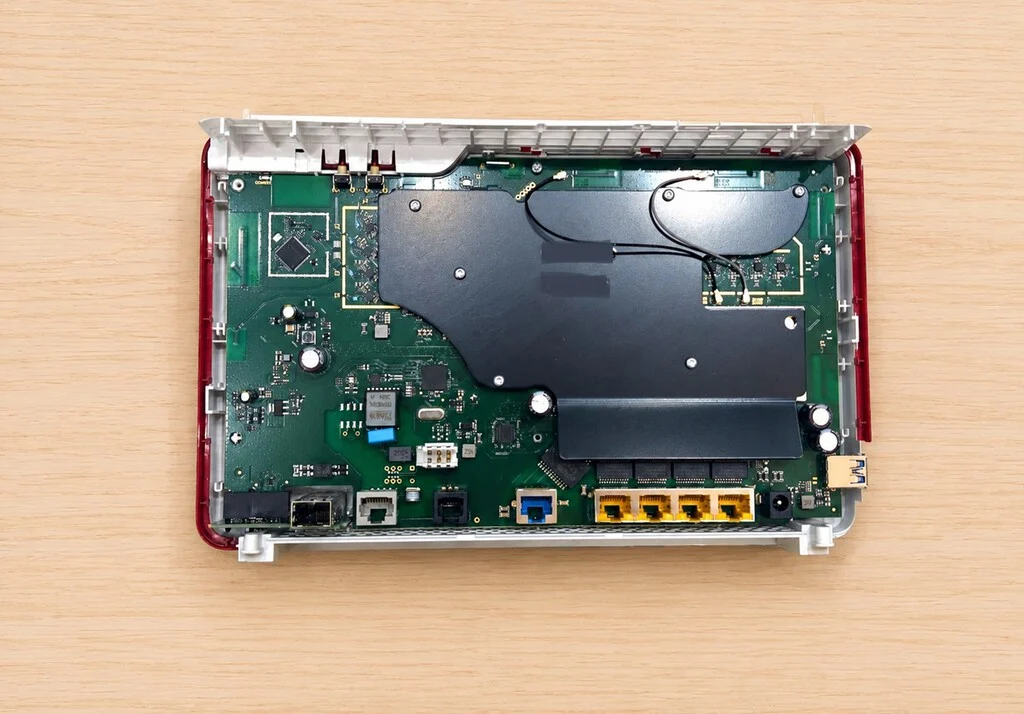
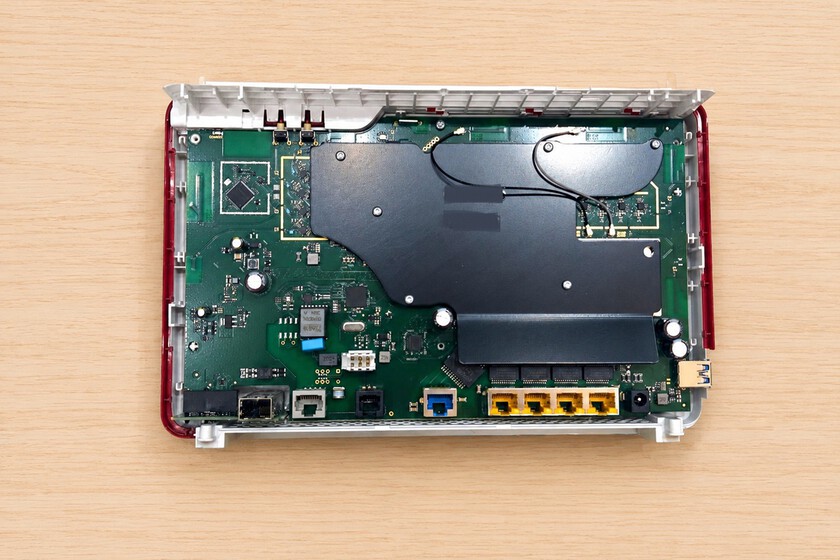
Peeling back the plastic casing of a typical home router reveals a meticulously organized circuit board, far less chaotic than one might initially imagine for a device tasked with managing the brain of a home’s internet. Despite variations in design and feature sets across models and manufacturers, a foundational architecture remains largely consistent. This core design revolves around a central printed circuit board (PCB) – the motherboard – upon which all essential components are assembled. For illustrative purposes, examining a high-performance model like the AVM Fritz!Box 7590 Pro, a Wi-Fi 7 capable neutral router, provides an excellent insight into contemporary router engineering, particularly its vertical form factor designed for enhanced passive cooling, eliminating the need for active fans often found in less optimized designs.
The Indispensable Internal Components: Processing Power and Memory
At the heart of every router lies a suite of components strikingly similar to those found in a personal computer or smartphone, albeit optimized for network processing:
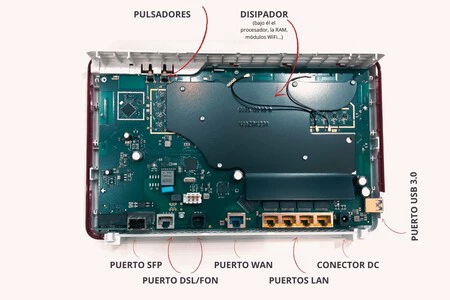
- Central Processing Unit (CPU): This is the "brain" of the router, responsible for processing all network traffic, managing connections, enforcing firewall rules, and handling the operating system’s tasks. Unlike general-purpose CPUs in computers, router CPUs are often specialized network processors designed for efficient packet forwarding and deep packet inspection. Entry-level routers might feature single or dual-core processors clocked at hundreds of MHz, while high-end models, especially those supporting Wi-Fi 6 or Wi-Fi 7, boast multi-core CPUs (quad-core or even hexa-core) running at 1 GHz or more, often incorporating hardware acceleration engines for tasks like NAT and encryption. The performance of the CPU directly impacts the router’s ability to handle high bandwidth, numerous simultaneous connections, and advanced features like QoS (Quality of Service) and VPNs without bottlenecks.
- Random Access Memory (RAM): Serving as the router’s short-term memory, RAM is crucial for temporarily storing data packets as they are processed, routing tables, and the operating system’s active processes. Much like a computer, insufficient RAM can lead to performance degradation, especially under heavy network load or when running multiple advanced services. Typical RAM capacities range from 64MB or 128MB in basic models to 512MB, 1GB, or even 2GB in high-performance or enterprise-grade routers. The transition to Wi-Fi 6 and Wi-Fi 7, with their increased data rates and greater capacity for concurrent devices, has necessitated larger and faster RAM modules to prevent latency and improve overall throughput.
- Flash Memory: This non-volatile memory stores the router’s firmware – its operating system, configuration settings, and any installed applications. Unlike RAM, flash memory retains its data even when the power is off. Capacities typically range from 16MB to 256MB or more. Larger flash memory allows for more complex operating systems, additional features, and space for firmware updates. It is critical for the router’s boot process and persistent storage of user settings.
- Wi-Fi Connectivity Chips: These specialized chips are responsible for transmitting and receiving wireless signals. Modern routers often incorporate multiple Wi-Fi chips to support different frequency bands (2.4 GHz, 5 GHz, and increasingly 6 GHz for Wi-Fi 6E/7) and multiple spatial streams (MIMO – Multiple Input, Multiple Output). These chips implement the various Wi-Fi standards (e.g., 802.11ac, 802.11ax, 802.11be), dictating the wireless speeds, range, and efficiency of the network. Advanced chipsets include features like OFDMA (Orthogonal Frequency-Division Multiple Access) for better efficiency in dense environments, beamforming for focused signal delivery, and MU-MIMO (Multi-User MIMO) for simultaneous data transmission to multiple devices.
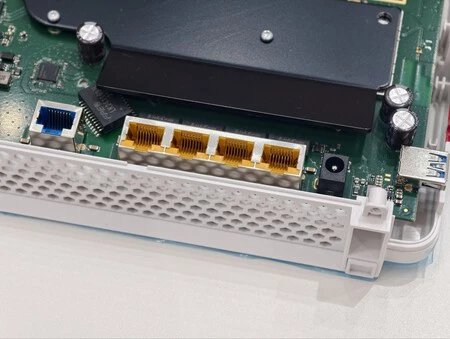
- Passive Heatsink: A prominent metallic structure, the passive heatsink is a critical component for thermal management. Beneath this heat-dissipating cover reside the CPU, Wi-Fi chips, and other components that generate significant heat during operation. The heatsink’s primary role is to absorb and radiate this heat away from sensitive electronics, preventing overheating which can lead to instability, reduced performance, or even permanent damage. The design and size of the heatsink are carefully calibrated, especially in fanless designs, to ensure optimal operating temperatures. The increasing power of router components, particularly with Wi-Fi 7’s higher throughput, makes efficient thermal management an ongoing challenge for engineers.
External Interfaces: The Router’s Connection to the World
While the internal components handle the processing, the external ports provide the physical pathways for data to enter and leave the router, connecting it to the internet service provider (ISP) and local devices. These ports are strategically placed and often color-coded for ease of identification:
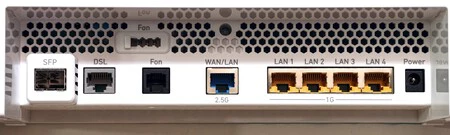
- LAN (Local Area Network) Ports: Typically colored yellow, these Ethernet ports are the gateways for wired devices within the local network. They allow for direct, high-speed, and stable connections to computers, smart TVs, gaming consoles, network-attached storage (NAS) devices, and other wired peripherals. Most modern routers feature Gigabit Ethernet (1 Gbps) LAN ports, providing significantly lower latency and greater stability compared to Wi-Fi, making them ideal for performance-critical applications. Some high-end routers are now incorporating 2.5 Gigabit or even 10 Gigabit LAN ports to cater to ultra-fast internal network demands, such as high-speed file transfers to a NAS or connection to a multi-gigabit switch.
- WAN (Wide Area Network) Port: Often colored blue, this is the router’s primary input for the internet connection from the external network (your ISP’s modem or optical network terminal). It acts as the bridge between your local network and the global internet. While traditionally 1 Gigabit, newer routers are increasingly equipped with 2.5 Gigabit or even 10 Gigabit WAN ports to support multi-gigabit fiber optic services, ensuring that the router itself doesn’t become a bottleneck for ultra-fast internet plans. The WAN port is distinct from LAN ports as it connects to an external network, typically through a modem, whereas LAN ports connect to internal devices.
- DC Power Connector: Located in a corner, this connector provides electrical power to the router. Routers typically operate on low-voltage DC power supplied by an external power adapter, which converts household AC power to the required DC voltage. The stability and quality of this power supply are critical for the router’s reliable operation.
- USB Ports (e.g., USB 3.0): Increasingly common on modern routers, USB ports (often blue for USB 3.0) enhance the router’s functionality beyond simple internet distribution. They allow users to connect external peripherals, effectively transforming the router into a basic home server. Common applications include:
- Network Storage: Connecting an external hard drive or flash drive to share files across the network, creating a simple NAS for media streaming or backup.
- Network Printing: Connecting a printer to be accessible by all devices on the network.
- 3G/4G/5G Dongle Support: Some routers can use a cellular modem connected via USB as a primary or backup internet connection, useful in areas without fixed-line broadband or during outages.
- Charging Devices: While not its primary function, a USB port can provide power for charging small devices.
The evolution from USB 2.0 to USB 3.0 (and increasingly USB 3.1/3.2) has significantly improved data transfer speeds, making network storage applications more practical.
- DSL Port: Typically grey, this port is a relic of older broadband technologies, specifically designed for ADSL or VDSL (Very-high-bit-rate Digital Subscriber Line) connections over traditional copper telephone lines. Routers equipped with a DSL port often integrate a DSL modem, acting as a modem-router combo device. Its relevance has diminished significantly with the widespread adoption of fiber optic internet.
- Fon Port (RJ11/Telephone Jack): Similar to the DSL port, the Fon port (or telephone port) is used to connect traditional fixed-line telephones for VoIP (Voice over IP) services or for passing through an analog telephone line when the router integrates telephony features. While still present on some ISP-provided routers, particularly in regions where landlines remain common, its utility has waned with the rise of mobile communication and internet-based calling apps.
- SFP (Small Form-Factor Pluggable) Port: Often silver, the SFP port represents a more advanced and versatile connectivity option, gaining traction in high-end consumer and prosumer routers. An SFP port is a hot-pluggable transceiver port that accepts various SFP modules. Its primary advantage is flexibility:
- Direct Fiber Connection: With an appropriate SFP module, a router can directly connect to an optical fiber line from the ISP, eliminating the need for a separate Optical Network Terminal (ONT) or modem. This simplifies the home network setup, reduces power consumption, and can improve latency.
- Multi-Gigabit Ethernet: SFP ports can also accept Ethernet SFP modules, enabling multi-gigabit (2.5 Gbps, 5 Gbps, 10 Gbps) WAN or LAN connections, offering future-proofing for faster internet speeds and high-bandwidth internal networks.
The SFP port’s inclusion signifies a router’s capability to handle advanced networking scenarios and higher bandwidth demands, making it a feature increasingly sought after by tech enthusiasts and users with multi-gigabit internet subscriptions.
The Broader Implications: Cybersecurity, Performance, and the Future of Connected Living
The intricate design and robust components within a router are not merely about speed; they are fundamental to the security and reliability of our digital lives. A router’s CPU, RAM, and flash memory directly influence its ability to run sophisticated firewall software, detect and mitigate cyber threats, and process encrypted traffic efficiently. Outdated or underpowered routers can become significant vulnerabilities in a home network, susceptible to attacks and unable to handle modern security protocols.
The continuous evolution of router technology, exemplified by the transition to Wi-Fi 7 (802.11be), promises even greater speeds, lower latency, and enhanced capacity. Wi-Fi 7, also known as "Extremely High Throughput (EHT)," builds upon Wi-Fi 6E by utilizing wider 320 MHz channels, 4096-QAM modulation, and Multi-Link Operation (MLO) to aggregate bandwidth across multiple frequency bands. This leap requires even more powerful internal hardware, improved thermal management, and sophisticated antenna arrays to deliver theoretical speeds approaching 40 Gbps. These advancements are critical for supporting the burgeoning ecosystem of IoT (Internet of Things) devices, augmented and virtual reality applications, and the increasing demand for ultra-reliable low-latency communications (URLLC) in smart homes and beyond.
Industry experts emphasize that a well-designed router is an investment in a robust digital future. According to a representative from a leading network hardware manufacturer, "The focus is no longer just on raw speed, but on intelligent network management, security at the edge, and seamless integration with smart home ecosystems. Our internal architecture reflects this, prioritizing not just powerful processors but also dedicated AI engines for traffic optimization and advanced security chipsets."
In conclusion, the seemingly simple router is a marvel of miniaturized engineering, a testament to decades of innovation in network technology. Beneath its often-nondescript exterior lies a complex interplay of processing power, memory, specialized communication chips, and diverse connectivity ports, all working in concert to orchestrate the digital symphony of our connected world. Understanding these internal workings provides not only an appreciation for the technology but also empowers users to make informed decisions about their home network infrastructure, ensuring a fast, secure, and future-proof connection.
Further Reading:
- Xataka Móvil: Qué router WiFi comprar (2026): guía para saber qué modelo elegir
- Xataka Móvil: Mejores routers WiFi 7. Cuál comprar en función del uso y once modelos recomendados
