
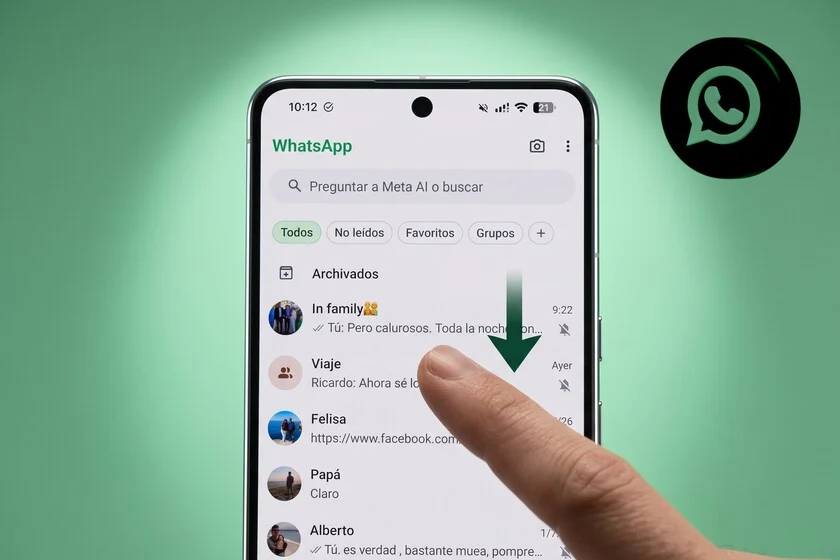

WhatsApp, the ubiquitous messaging platform, continues its relentless pursuit of enhancing user experience, a journey marked by continuous updates that often introduce valuable functionalities easily overlooked by its vast user base. Following recent advisories on crucial security measures, such as disabling automatic media downloads to mitigate risks of scams and spyware, and activating stricter account protection settings, the focus now shifts to a potent, yet frequently underutilized, feature designed to bring order to the often-chaotic world of digital communication: chat filters. This powerful tool, progressively rolled out and refined by Meta, addresses a fundamental challenge faced by millions: managing an ever-growing deluge of personal and professional conversations.
The contemporary digital landscape has transformed WhatsApp from a simple messaging application into a central hub for daily interactions, encompassing everything from casual family updates and social planning to critical business communications and community engagement. With over 2 billion global users, the sheer volume of messages and groups can quickly lead to an overwhelming chat list, where important conversations are easily buried beneath a cascade of less urgent notifications. This digital clutter not only creates a sense of disorganization but also significantly impacts productivity, attention span, and overall digital wellbeing. Messages requiring immediate attention can be missed, leading to delays, misunderstandings, and increased stress. Recognizing this widespread predicament, WhatsApp introduced chat filters, a feature aimed at empowering users to regain control over their chat interface and streamline their communication workflow.
The Genesis of Chat Organization on WhatsApp
The concept of organizing chats within WhatsApp is not entirely novel. The platform has, for years, allowed users to archive chats or pin important conversations to the top. However, these functionalities offered only limited scope for systematic categorization. The introduction of dedicated chat filters marked a significant evolutionary leap in WhatsApp’s approach to user interface management. While the precise global rollout timeline for personal accounts has seen gradual implementation across regions and operating systems, the feature gained broader visibility and adoption in late 2023 and early 2024. Initially, robust filtering capabilities were more prominently featured within WhatsApp Business accounts, where the need for segregating customer inquiries, orders, and support requests was paramount for operational efficiency. The successful implementation and positive feedback from the business segment likely underscored the universal utility of such organizational tools, prompting Meta to expand these capabilities to general users. This strategic expansion reflects a broader industry trend towards providing users with more granular control over their digital environments, recognizing that a cluttered interface can be a barrier to effective communication.
Competitors in the messaging space, such as Telegram, have long offered advanced folder systems for chat organization, allowing users to group chats based on custom criteria. This comparative landscape likely informed WhatsApp’s development, pushing it to offer a solution that, while perhaps less overtly visible by default, provides comparable organizational depth once discovered and utilized. The challenge for WhatsApp, with its minimalist design philosophy, was to integrate powerful organizational tools without overwhelming the primary chat screen. The solution, a discreetly hidden yet easily accessible filter bar, strikes a balance between functionality and interface cleanliness.
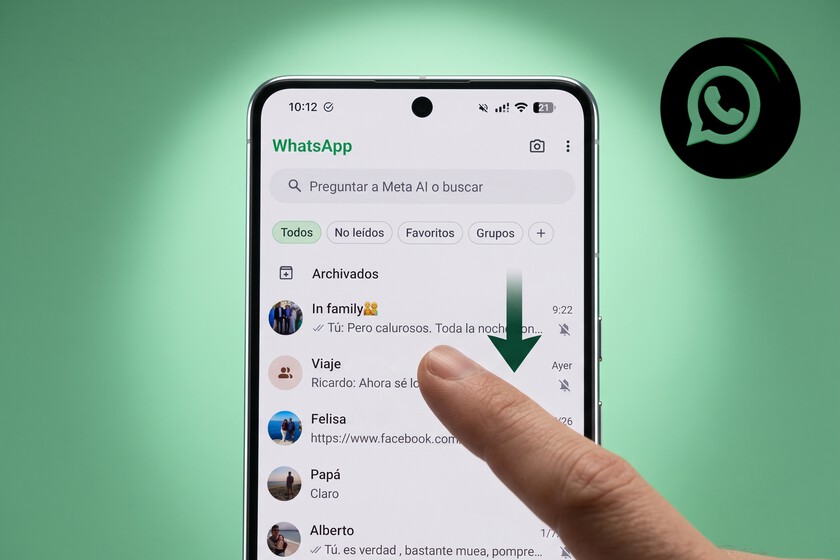
Unveiling the Hidden Menu: Accessing Predetermined Filters
The power of WhatsApp’s chat filters lies in their accessibility and immediate impact. For many users, the feature remains a hidden gem because the filter bar does not persistently occupy screen real estate. Instead, it is invoked through a simple, intuitive gesture designed to keep the main chat interface uncluttered until needed.
To access this organizational hub, users need only open the WhatsApp application and perform a gentle downward swipe gesture on the main chat screen. Immediately, a horizontal row of filter options materializes directly beneath the familiar search bar at the top of the display. This subtle animation reveals a robust set of tools, transforming a potentially overwhelming list of conversations into a structured, manageable overview.
Upon activation, WhatsApp typically presents a set of predetermined filters, each designed to categorize conversations based on common attributes:
- All (Todos): This is the default view, displaying every conversation in the user’s chat list, regardless of its status or type. It serves as the baseline from which other filters provide a refined view.
- Unread (No Leídos): Perhaps the most immediately useful filter for many, this option consolidates all chats that contain unread messages. In an environment where dozens of notifications might accumulate, this filter cuts through the noise, allowing users to prioritize and address pending communications swiftly. For professionals, this means quickly identifying critical messages from colleagues or clients. For personal use, it ensures that important updates from family or friends are not overlooked.
- Contacts (Contactos): This filter narrows the display to only show chats from individuals saved in the user’s contact list. It helps distinguish known communicators from potential spam or unsolicited messages from unknown numbers, offering a layer of clarity and potentially security.
- Groups (Grupos): Given the pervasive nature of group chats on WhatsApp – from family groups and social circles to work teams and community organizations – this filter is invaluable. It isolates all group conversations, allowing users to focus on collective discussions without individual one-on-one chats cluttering the view. This is particularly useful for managing different aspects of one’s social or professional life.
- Business (Empresas): As WhatsApp has increasingly become a platform for business-to-consumer communication, this filter separates interactions with official business accounts. This includes customer service chats, order confirmations, promotional messages, and other commercial exchanges, helping users distinguish these from personal communications.
These default filters provide an immediate, tangible benefit, allowing users to quickly navigate their chat landscape based on their current needs. Whether one needs to catch up on unread messages, engage solely with group discussions, or review business interactions, the hidden filter bar offers a rapid solution.
Advanced Customization: Crafting Tailored Chat Lists
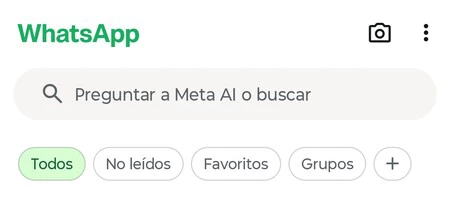
While the default filters offer a significant improvement in chat management, WhatsApp’s true organizational power unfolds through its advanced customization options. The platform understands that users’ needs extend beyond predefined categories, necessitating a more personalized approach to chat organization. This capability is accessed via a prominent "+" (plus) symbol located at the far end of the filter bar.
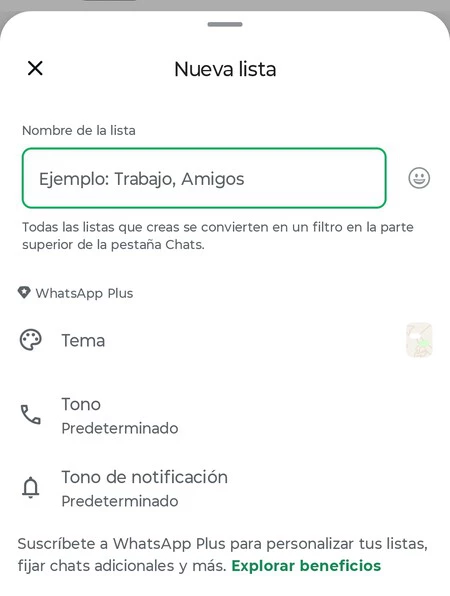
Tapping this icon opens a dedicated "Manage Filters" interface, where users can transcend the standard options and create bespoke chat lists tailored precisely to their unique communication patterns and priorities. The possibilities for personalization are extensive, allowing for the creation of categories such as:
- Work (Trabajo): Consolidating all professional communications, including chats with colleagues, clients, and project-specific groups.
- Family (Familia): Grouping conversations with immediate and extended family members, ensuring important personal updates are easily accessible.
- Friends (Amigos): Separating social chats from other categories, making it easier to coordinate social events or simply catch up with friends.
- Projects (Proyectos): For individuals managing multiple initiatives, this filter allows grouping all chats related to a specific project, enhancing focus and preventing information silos.
- Shopping (Compras): A convenient category for managing communications related to online orders, delivery updates, or customer service for purchases.
- Hobbies/Interests: Users can create filters for specific interests, like a "Book Club" group, a "Hiking Team," or a "Gaming Community," keeping these separate from daily essential communications.
The process of creating a custom filter is straightforward:
- Tap the "+" icon.
- Give the new filter a descriptive name (e.g., "Team Alpha," "Volunteer Work").
- Select the specific chats and groups that should belong to this category. WhatsApp allows users to handpick individual contacts and groups, ensuring precise inclusion.
Once created, these custom filters appear alongside the default options in the horizontal filter bar, providing instant access to these curated lists. Furthermore, WhatsApp offers the flexibility to reorder these filters. Within the "Manage Filters" menu, users can easily drag and drop filter tiles to arrange them in an order that best suits their workflow, placing the most frequently used categories at the forefront. This level of granular control ensures that the organizational tools truly adapt to the user, rather than the other way around.
The Broader Impact: Productivity, Wellbeing, and Seamless Integration
The integration of advanced chat filters into WhatsApp carries significant implications for user productivity, digital wellbeing, and the overall efficiency of communication.

Enhanced Productivity: By categorizing chats, users can drastically reduce the time spent scrolling through an undifferentiated list. A study by the University of California, Irvine, found that it takes an average of 23 minutes and 15 seconds to return to an original task after being interrupted. While chat filters don’t eliminate interruptions, they significantly reduce the cognitive load associated with sorting through irrelevant messages to find pertinent information. Professionals can switch between "Work" and "Personal" filters, maintaining focus on the task at hand and preventing context switching fatigue. For instance, a small business owner can swiftly toggle to their "Clients" filter to address customer queries during business hours, then switch to "Family" after hours, ensuring a clearer boundary between work and personal life.
Improved Digital Wellbeing: The constant barrage of notifications and the visual clutter of a never-ending chat list can contribute to feelings of overwhelm and stress. Chat filters offer a psychological respite by presenting a cleaner, more organized interface. This reduction in visual noise can lead to a calmer, more focused interaction with the app, mitigating some of the negative effects associated with hyper-connectivity. By intentionally engaging with specific categories of chats, users can practice a form of digital mindfulness, choosing when and how to interact with different facets of their digital life.
Seamless Synchronization: A crucial advantage of WhatsApp’s chat filters is their seamless synchronization across all linked devices. Whether a user accesses WhatsApp on their primary smartphone (iOS or Android), a secondary tablet, or a desktop client via WhatsApp Web or the dedicated application, all custom filters and their associated chat assignments are updated automatically and instantaneously. This ensures a consistent organizational experience, eliminating the need to recreate filters or re-categorize chats on each device, a testament to Meta’s commitment to a unified multi-device experience. This cross-platform consistency is vital for users who frequently switch between devices throughout their day, ensuring that their organized workflow remains uninterrupted.
Addressing Minor Friction Points and Future Potential
While the utility of chat filters is undeniable, the current implementation presents a minor friction point: the filter bar automatically hides when the user navigates away from the main chat screen or closes the app. This necessitates the downward swipe gesture each time the user wishes to apply a filter. WhatsApp’s design choice here is likely a deliberate one, prioritizing a clean, minimalist default interface over persistent filter visibility. However, some users might prefer an option to keep their most-used filter categories permanently visible or to have the app remember the last-applied filter upon reopening.
Despite this minor inconvenience, the benefits far outweigh the effort of a simple swipe. The ability to instantly declutter and categorize one’s digital communications fundamentally transforms the WhatsApp experience from a potentially overwhelming stream into a highly manageable, personalized information hub.
A notable, often overlooked, shortcut further enhances the utility of the "Unread" filter: by pressing and holding down on the "Unread" filter option for a few seconds, users are presented with the option to mark all currently unread conversations as read. This simple yet powerful gesture is a significant time-saver for individuals who frequently receive a high volume of messages and wish to clear their unread count efficiently, without individually opening each chat.
Looking ahead, the evolution of WhatsApp’s organizational tools could potentially include even more advanced features. Imagine AI-powered suggestions for filter creation based on communication patterns, or integration with calendar applications to prioritize chats related to upcoming events. Persistent filter options, customizable display settings for the filter bar, or even the ability to create nested filter categories could further enhance the user experience. Such future developments would continue to solidify WhatsApp’s position not just as a messaging app, but as a comprehensive communication management platform.
In conclusion, WhatsApp’s chat filters represent a powerful, albeit somewhat hidden, tool that addresses the critical modern challenge of digital information overload. By offering both predetermined categories and extensive customization options, the feature empowers users to transform their chat lists from a source of chaos into a streamlined, productive environment. While requiring a simple gesture to reveal, the benefits of categorization, enhanced focus, and improved digital wellbeing far outweigh this minor interaction. As digital communication continues to intensify, mastering these organizational tools is no longer a mere convenience but an essential skill for anyone seeking to navigate their digital life with greater efficiency, clarity, and control. Integrating this dynamic into daily smartphone routines fundamentally changes the WhatsApp experience, proving that sometimes, the most impactful features are the ones waiting to be discovered just beneath the surface.
