
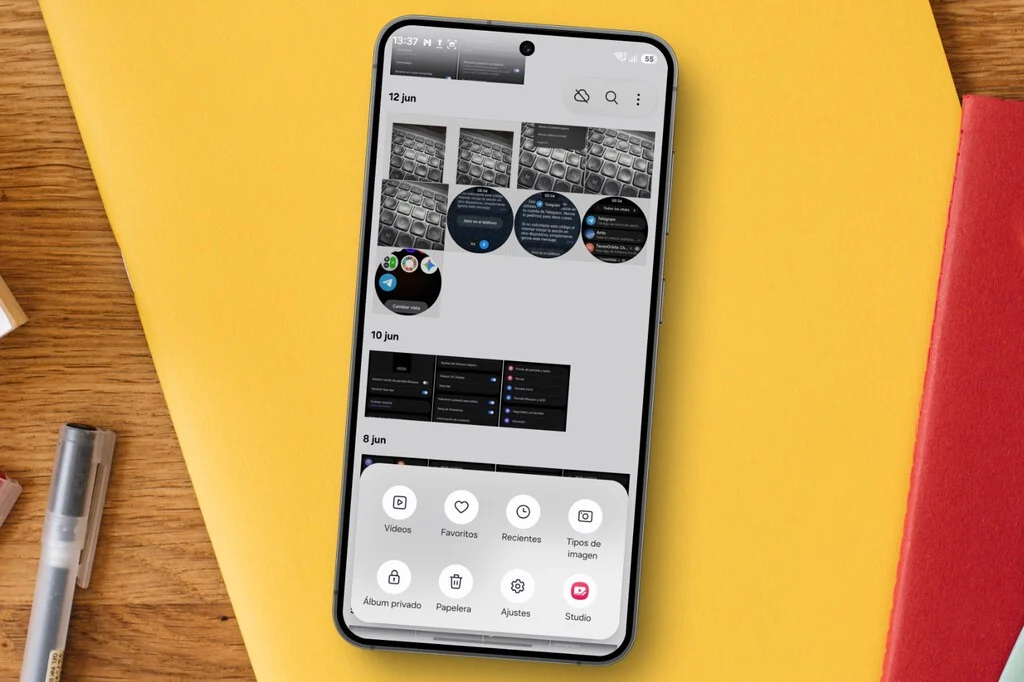

When the discussion turns to safeguarding sensitive visual content on a Samsung Galaxy device, the default and often immediate association for many users is the Secure Folder. Introduced in 2017, this feature has become synonymous with digital privacy, offering robust encryption, compartmentalization of applications, and even the ability to camouflage its own icon, effectively creating a hidden digital vault within the smartphone. However, as the landscape of personal data management evolves and user needs diversify, Samsung has steadily expanded its privacy toolkit within the One UI ecosystem, introducing a suite of alternatives that, while distinct in their approach, offer compelling advantages for specific use cases. These new functionalities demonstrate a strategic shift towards more granular, integrated, and user-friendly privacy controls, moving beyond a singular, all-encompassing solution.
The continuous development of One UI, Samsung’s proprietary Android overlay, reflects a broader industry trend emphasizing user control over personal data. In an era where digital footprints are constantly expanding and privacy concerns are at an all-time high, smartphone manufacturers are under increasing pressure to provide intuitive yet robust mechanisms for data protection. Samsung’s response has been to integrate smaller, context-specific privacy functions directly into core applications like the Gallery, thereby streamlining the process of securing photos and videos without necessitating a departure into a separate, password-protected environment or the configuration of an entirely new security protocol. This approach caters to a diverse user base, ranging from individuals requiring the highest level of isolation for critical data to those seeking a quick and convenient way to shield casual, personal images from prying eyes.
The Evolution of Digital Privacy on Samsung Devices: A Chronology
The journey towards comprehensive on-device privacy on Samsung smartphones can be traced through several key milestones, each building upon the last to offer increasingly sophisticated and user-centric solutions.
-
2017: The Debut of Secure Folder. Leveraging Samsung’s defense-grade Knox security platform, Secure Folder was launched as a cornerstone privacy feature. Its core functionality was to create an encrypted, isolated space on the device where users could store sensitive files, photos, videos, and even duplicate applications. This "sandboxed" environment meant that data within the Secure Folder was completely separate from the rest of the device’s operating system, requiring an independent PIN, pattern, password, or biometric authentication for access. The ability to hide the Secure Folder icon itself further enhanced its stealth, making it an ideal solution for those requiring maximum discretion and security against unauthorized access. Cybersecurity experts lauded its implementation as a significant step forward in consumer-grade mobile security, offering protection against malware and unauthorized data access even if the main device was compromised.
-
Incremental Enhancements in One UI: Over subsequent iterations of One UI, Samsung continued to refine and integrate privacy settings. These often included subtle improvements to app permissions management, enhanced biometric security options, and more transparent data usage controls. While not always headline-grabbing features, these continuous updates underscored Samsung’s commitment to a holistic approach to device security and user privacy, adapting to new threats and evolving user expectations.
-
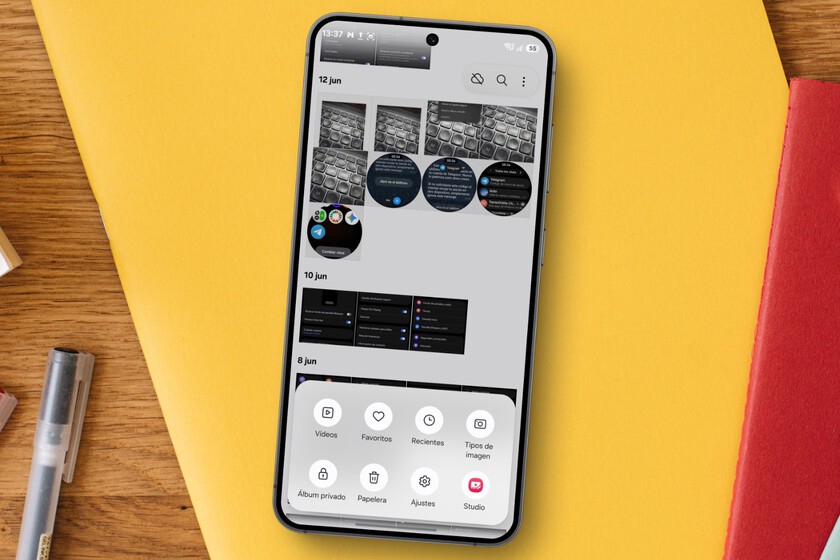
One UI 8.5: Introducing the Private Album. The most recent and arguably most significant addition to Samsung’s photo privacy arsenal arrives with One UI 8.5, coupled with Android 16. This new feature, aptly named Private Album, represents a departure from the Secure Folder’s compartmentalized approach. Instead of creating a separate, encrypted container, the Private Album lives directly within the native Gallery application. When photos or videos are moved to the Private Album, they cease to appear in the main camera roll, other albums, or any third-party applications that access the device’s image library. Crucially, access to this Private Album is protected by the same screen lock credentials already used to unlock the device—be it a PIN, pattern, fingerprint, or facial recognition. This seamless integration drastically reduces the friction associated with securing personal media, eliminating the need to configure and remember a secondary set of credentials. For users who frequently move photos to and from a private space, the Private Album offers unparalleled convenience. The process is streamlined: a long press on an image, navigating to the options menu, and selecting the appropriate action to move it. However, it is important to note that this feature is currently exclusive to Galaxy devices running Android 16 and One UI 8.5, indicating a phased rollout that will eventually encompass a wider range of compatible devices. This staged deployment aligns with Samsung’s update policies, ensuring stability and optimal performance across its diverse hardware portfolio.
Technical Deep Dive: How Each Feature Works
Understanding the underlying mechanisms of each privacy feature is crucial for users to make informed decisions about which tool best suits their needs.
-
Secure Folder: The Encrypted Sandbox. At its core, Secure Folder utilizes a hardware-backed security framework, typically integrated with Samsung Knox. When content is moved into the Secure Folder, it is encrypted and stored in a separate, isolated partition of the device’s storage. This isolation is robust; even if the main operating system were to be compromised by certain types of malware, the data within the Secure Folder would remain inaccessible without the correct credentials. The encryption ensures that even if the physical storage media were to be extracted, the data would be unreadable. Furthermore, apps duplicated within the Secure Folder run independently, with their own data and settings, further preventing cross-contamination with the main system. This makes Secure Folder the go-to option for highly sensitive documents, financial applications, or any data requiring the highest level of isolation and cryptographic protection. The ability to hide the icon further reinforces its utility for discreet data management.
-
Private Album: Integrated Biometric Security. The Private Album operates differently. While details on its exact technical implementation are proprietary, it is understood to leverage the device’s existing secure hardware and software components responsible for screen lock authentication. Instead of moving files to a separate encrypted partition, it likely modifies the metadata or file system attributes of the selected images, making them invisible to standard gallery views and third-party applications unless authenticated. The protection relies on the device’s primary security, which is generally robust due to hardware-level encryption and secure boot processes. The key advantage here is user experience: the photos are logically separated and protected without the overhead of managing a separate environment. This method is highly effective for casual privacy needs, where the primary concern is preventing accidental exposure or unauthorized viewing by someone with temporary access to the unlocked phone.
-
Gallery Labs: The Hidden Album Entry-Locks. For Galaxy users not yet on One UI 8.5, or those who prefer to manage entire albums rather than individual photos, a lesser-known, experimental feature called Gallery Labs offers an alternative. This "power user" option is hidden within the Gallery app’s settings and must be manually activated. The activation process involves navigating to "About Gallery" within the app’s settings and repeatedly tapping on the version number until a notification confirms that Gallery Labs has been enabled. Once activated, users can access Gallery Labs and enable an option called "Album entry-locks." The fundamental difference here is that this feature does not move files; instead, it locks access to existing albums in situ. This is particularly useful for users who meticulously organize their photos into thematic folders and wish to restrict access to a specific album without altering its location or moving its contents. While convenient for organizational purposes, a potential drawback is that blocking an album may prevent other applications, such as WhatsApp or social media platforms, from accessing its contents directly for sharing. To share images from a locked album, users typically need to first access the album via the Gallery app, authenticate, and then use the sharing functions provided within the Gallery itself. The experimental nature of Gallery Labs also implies that its functionality and integration might be less polished than officially released features.
Comparative Analysis: Choosing the Right Privacy Tool
The availability of multiple privacy features necessitates a comparative analysis to guide users in selecting the most appropriate tool for their specific needs.
-
Security Levels:
- Secure Folder offers the highest level of security. Its independent encryption, separate authentication, and isolated environment make it resilient against advanced threats and physical data extraction attempts. It is essentially a mini-OS within your OS.
- Private Album provides a strong layer of protection leveraging the device’s primary security. While highly secure for everyday use and against casual snooping, its reliance on the main device’s unlock credentials means that if the primary device lock is compromised, the Private Album would also be accessible. It offers logical separation and privacy, but not the same deep isolation as Secure Folder.
- Gallery Labs (Album Entry-Locks) offers a more superficial layer of protection, primarily focused on visibility and access control within the Gallery app. It’s excellent for organizing and preventing casual browsing of specific albums but does not offer the same cryptographic protection or isolation as the other two methods. Its experimental nature might also imply varying levels of robustness across different One UI versions.
-
Convenience vs. Robustness:
- Private Album excels in convenience. Its seamless integration with existing device security makes it incredibly fast and easy to use for frequently moved photos or for users who prioritize speed over maximum isolation. There’s no separate account or PIN to manage.
- Secure Folder prioritizes robustness. While it requires a separate setup and authentication, this overhead is a trade-off for its superior security and isolation. It’s designed for content that absolutely must be kept separate and highly protected.
- Gallery Labs offers a unique blend for specific organizational needs. Its convenience lies in not having to move files, but its setup is slightly more involved due to its hidden nature.
-
Use Cases:
- Secure Folder: Ideal for storing highly sensitive personal identification documents, financial records, confidential work-related files, or entire applications that handle critical personal data. It’s the digital equivalent of a fortified safe.
- Private Album: Perfect for personal photos or videos that users want to quickly hide from casual viewing, such as private moments, gifts, or work-in-progress creative projects. It’s akin to a locked drawer within a larger cabinet.
- Gallery Labs (Album Entry-Locks): Best suited for users who have organized their photos into specific albums and wish to restrict access to those entire collections without moving them. For example, an album of personal travel photos that you don’t want to delete but also don’t want readily visible to others browsing your phone.
-
Accessibility and Device Compatibility: The Private Album, being the newest feature, is limited to devices running One UI 8.5 (and Android 16). This means many older, yet still supported, Galaxy models will not have this option immediately. Secure Folder, having been around since 2017, is widely available across a vast range of Galaxy devices. Gallery Labs, as an experimental feature, is also generally available on many One UI versions, offering a privacy solution for those not yet updated to the latest OS.
Implications for User Experience and Digital Security
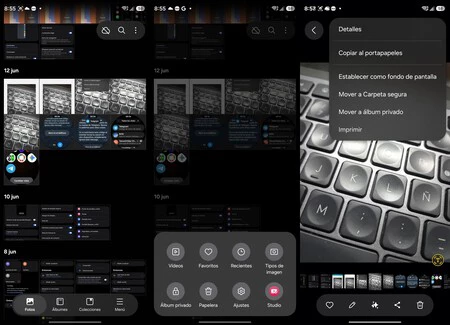
Samsung’s multi-pronged approach to photo privacy carries significant implications for user experience and the broader landscape of digital security.
-
User Empowerment: By offering a range of tools, Samsung empowers users to choose the level of privacy and convenience that aligns with their individual risk assessment and usage patterns. This caters to the nuanced demands of modern smartphone users, acknowledging that not all "private" content requires the same degree of protection. This flexibility can lead to better security practices overall, as users are more likely to utilize features that are convenient and intuitive.
-
Reduced Friction, Enhanced Adoption: The Private Album, in particular, addresses a key barrier to privacy adoption: friction. The traditional Secure Folder, while robust, can feel like an extra step for many users. By integrating protection seamlessly with the device’s primary security, Samsung makes securing photos as easy as unlocking the phone, thereby encouraging wider use of privacy features for everyday content. This frictionless experience could significantly increase the number of users who actively secure their personal media.
-
Layered Security Strategy: The existence of these diverse features showcases a sophisticated layered security strategy. Instead of a one-size-fits-all approach, Samsung provides different "layers" of protection that can be deployed according to the sensitivity of the data. This mirrors best practices in cybersecurity, where multiple, distinct controls are implemented to protect assets. For instance, a user might keep highly sensitive business documents in Secure Folder, personal family photos in Private Album, and organized hobby-related images locked via Gallery Labs.
-
Addressing Evolving Threats and User Needs: As digital life becomes more intertwined with personal devices, the need for robust on-device privacy solutions grows. Incidents of data breaches, unauthorized access, and the simple desire for personal space drive innovation in this area. Samsung’s continuous development in One UI demonstrates an agile response to these evolving user needs and the broader security landscape. It also reflects an understanding that privacy is not just about preventing malicious attacks, but also about managing casual access and maintaining personal boundaries in a shared digital environment.
-
Future Trajectories: This trend suggests that future iterations of One UI could see even deeper integration of privacy features, perhaps leveraging AI for intelligent content classification and automated privacy suggestions, or offering more sophisticated biometric controls. The ongoing commitment to seven years of updates for certain Galaxy models also ensures that these enhanced privacy features will remain current and effective for an extended period, providing long-term value to consumers.
Samsung’s Stance on Privacy
While Samsung does not typically issue specific statements on individual feature developments, the company has consistently affirmed its unwavering commitment to user privacy and data security across its ecosystem. Spokespersons for Samsung have repeatedly emphasized that security is integrated into every layer of their devices, from hardware to software. The continuous introduction of features like the Private Album and the refinement of existing tools like Secure Folder underscore Samsung’s dedication to providing users with robust, intuitive controls over their personal information. These innovations reflect a deep understanding of diverse user needs and the rapidly evolving digital landscape, where the sanctity of personal data is paramount. The company’s investments in the Knox platform and its ongoing software update commitments further solidify its position as a leader in mobile security and privacy.
Conclusion
The expansion of photo hiding options within Samsung’s One UI marks a significant advancement in personal digital privacy. While the Secure Folder remains the stalwart choice for maximum security and isolation, the introduction of the Private Album and the continued utility of the hidden Gallery Labs feature provide users with an unprecedented level of flexibility and convenience. This tiered approach allows Galaxy owners to tailor their privacy strategy precisely to their needs, whether it’s for quick, casual protection of individual photos or the comprehensive safeguarding of an entire digital life. In an increasingly interconnected world, empowering users with diverse and accessible tools to control their personal data is not just a feature—it’s a fundamental necessity. Samsung’s latest innovations in One UI reaffirm its commitment to this principle, ensuring that its users can navigate their digital lives with greater peace of mind.
