

The terms "virtual server" and "physical server" do not refer to a state of tangible or intangible existence but rather to the way the machines are structured. All digital data and systems have to exist and be hosted somewhere in the real world. A platform that runs on the cloud, your personal accounts, a company website you visit online, or an app on your phone can all be traced back to where they are hosted: a real machine. With the increasing reliance on digital infrastructure, understanding the fundamental differences and functionalities of these server types is crucial for businesses and IT professionals alike.
What is a Physical Server?
A physical server, often referred to as a bare-metal server, is a tangible piece of hardware dedicated to running server software and services. It is a complete computing system with its own chassis, central processing unit (CPU), graphics processing unit (GPU), random-access memory (RAM), storage devices, power supply unit, network interface, and operating system. These machines are engineered for continuous operation, typically running 24/7, and are not designed for general end-user computing. Instead, their primary purpose is to serve other computers by hosting applications, websites, databases, or other critical IT functions.
The size and form factor of a physical server can vary significantly, ranging from compact desktop-like units to large, rack-mounted systems designed for data centers. Regardless of its physical dimensions or location, a machine that comprises these core hardware components and operates as a dedicated server is classified as a physical server. The term "bare metal" emphasizes that the operating system and applications have direct access to the underlying hardware without any intervening layers of virtualization.
Key Features of Physical Servers
The defining characteristic of a physical server is its exclusive dedication of all its resources to the tasks it performs. This direct access to hardware translates into several key advantages:
- Exclusive Resource Allocation: A physical server dedicates its entire CPU, RAM, storage, and network bandwidth to the applications running on it. This means there is no competition for resources with other users or applications, ensuring consistent and predictable performance.
- Maximum Performance Potential: By having direct access to the hardware, physical servers can achieve the highest possible performance levels for demanding workloads. There is no overhead introduced by virtualization layers, allowing for optimized throughput and reduced latency.
- Enhanced Security and Isolation: With exclusive control over the hardware and its resources, physical servers offer a high degree of isolation. This makes them inherently more secure for sensitive data and applications, as there is no risk of resource contention or "noisy neighbor" issues that can arise in shared virtualized environments.
- Complete Hardware Control and Ownership: Organizations that deploy physical servers have complete control over the hardware, its configuration, and its security. This ownership is particularly important for industries with stringent compliance requirements or those that require highly customized hardware setups.
- Predictable and Stable Performance: The dedicated nature of physical servers leads to highly predictable performance. Workloads are not affected by the activity of other tenants, making them ideal for applications that require consistent response times and throughput.
Use Cases for Physical Servers
Historically, physical servers were the backbone of all digital infrastructure. In the early 2000s, the vast majority of server workloads were managed by these individual machines. Companies would typically host their own physical servers on-premises to power their IT systems, from internal applications to public-facing websites.
While the landscape has significantly shifted towards virtualized environments, physical servers remain indispensable for a variety of demanding workloads and specific industry needs. Their unique advantages make them the preferred choice for tasks that demand the utmost in performance, security, and direct hardware access.
Popular use cases for physical servers include:
- High-Performance Computing (HPC): Scientific simulations, complex data analysis, and rendering farms often require the raw processing power and dedicated resources that only physical servers can provide.
- Database Hosting for Critical Applications: For mission-critical databases that handle high transaction volumes or require extremely low latency, dedicated physical servers ensure optimal performance and reliability.
- Game Servers: Online gaming often demands high bandwidth and low latency to provide a smooth player experience. Physical servers can offer the consistent performance needed for these applications.
- Large-Scale Data Analytics and Big Data Processing: Processing massive datasets and running complex analytical models can benefit from the dedicated resources and raw power of physical servers.
- Virtualization Hosts (for Private Clouds): While it might seem counterintuitive, powerful physical servers are often used as the underlying infrastructure to host multiple virtual machines, forming the foundation of private cloud environments.
- Legacy Applications: Certain older applications may not be compatible with virtualized environments or may perform poorly when virtualized, necessitating their deployment on physical hardware.
- Specific Hardware Requirements: Applications that require specialized hardware components, such as high-end GPUs for AI or specific network cards, can only be accommodated on physical servers.
Industries Leveraging Physical Servers
Several industries place a high premium on the attributes that physical servers offer, leading to their continued adoption. These sectors often deal with sensitive data, require uncompromising performance, or operate under strict regulatory frameworks.
Industries that widely utilize physical servers include:
- Financial Services: Banks, investment firms, and trading platforms rely on physical servers for their high transaction volumes, stringent security needs, and the requirement for absolute data integrity and low latency in trading operations. The ability to isolate sensitive financial data and achieve predictable performance is paramount.
- Healthcare: Hospitals, research institutions, and medical device manufacturers often use physical servers to host electronic health records (EHRs), manage sensitive patient data, and run complex medical imaging and diagnostic systems. Compliance with regulations like HIPAA necessitates robust security and data isolation.
- Government and Defense: National security agencies, military operations, and government IT systems demand the highest levels of security, control, and isolation. Physical servers provide the necessary environment for classified data and critical command-and-control systems.
- Aerospace: The design, simulation, and manufacturing processes in the aerospace industry often involve computationally intensive tasks and require high-performance computing environments that benefit from dedicated physical hardware.
- Logistics and Supply Chain Management: Large-scale operations in logistics require robust systems for tracking, inventory management, and route optimization, often benefiting from the performance and reliability of physical servers.
- Public Services and Utilities: Critical infrastructure management, such as power grids and water systems, relies on secure and reliable computing infrastructure, often leveraging physical servers for their stability and control.
- Manufacturing: Industrial control systems, robotics, and advanced manufacturing processes can benefit from the direct hardware access and performance of physical servers.
- Media and Entertainment: High-definition video rendering, special effects processing, and large-scale media asset management often require the immense processing power and storage capabilities of physical servers.
These sectors value the inherent reliability, superior performance, robust security, complete isolation, and the direct ownership and control that physical servers provide.
What is a Virtual Server?
A virtual server, also known as a virtual machine (VM), is a software-based emulation of a physical server. It is created by using virtualization software (a hypervisor) to partition a single physical server into multiple isolated virtual environments. Each virtual server operates as an independent computing instance, with its own allocated CPU, RAM, storage, and network resources, all drawn from the underlying physical hardware.
Virtualization is the foundational technology behind cloud computing, enabling large technology providers to maximize their hardware investments by offering scalable and efficient computing resources to a vast number of users. Imagine a powerful, state-of-the-art physical server situated in a data center. This machine possesses significant computing power, substantial storage capacity, high-speed networking, and robust reliability.
When multiple customers require hosting services, instead of provisioning a separate physical server for each, the provider can transform that single physical server into several virtual servers. Each virtual server is then assigned a portion of the physical machine’s resources, such as a specific number of CPU cores, a defined amount of RAM, and a dedicated slice of storage. Each VM functions as an isolated system within the larger physical host, capable of running its own operating system and applications independently. This principle, scaled across thousands of physical servers, is what powers the immense capacity and flexibility of cloud computing platforms.
Key Features of Virtual Servers
Virtual servers offer a distinct set of advantages, primarily stemming from their software-defined nature and the underlying virtualization technology:
- Resource Flexibility and Scalability: Virtual servers can be easily scaled up or down by adjusting their allocated resources (CPU, RAM, storage). This allows businesses to adapt quickly to changing demands without needing to procure and install new physical hardware.
- Cost-Effectiveness: By consolidating multiple virtual servers onto a single physical machine, organizations can reduce hardware acquisition costs, power consumption, cooling requirements, and data center space. This efficiency is a cornerstone of cloud computing economics.
- Rapid Deployment and Provisioning: New virtual servers can be created, configured, and deployed in a matter of minutes, significantly accelerating IT project timelines and enabling faster response to business needs.
- Enhanced Disaster Recovery and Business Continuity: Virtualization facilitates easier backup, replication, and migration of entire server environments. This simplifies disaster recovery planning and enables quicker recovery times in the event of an outage.
- Isolation and Sandboxing: While sharing underlying hardware, virtual servers are logically isolated from each other. This prevents issues on one VM from affecting others and allows for secure testing and development environments (sandboxes).
- Portability: Virtual servers can be easily moved or migrated between different physical hardware hosts, even while they are running, with minimal or no downtime. This is crucial for maintenance, load balancing, and hardware upgrades.
- Abstraction from Hardware: Users of virtual servers are abstracted from the complexities of the underlying physical hardware. They interact with a standardized virtual environment, simplifying management and compatibility.
Use Cases for Virtual Servers
The versatility of virtual servers makes their use cases virtually limitless. They are integral to modern IT operations across all industries, powering a vast array of applications and services. Even everyday users interact with virtual servers constantly without realizing it, from accessing social media platforms to managing their online banking.

Some popular use cases for virtual servers include:
- Web Hosting: Providing the infrastructure for websites, from small personal blogs to large e-commerce platforms.
- Application Hosting: Running business applications, customer relationship management (CRM) systems, enterprise resource planning (ERP) software, and other critical business tools.
- Database Management: Hosting databases of all sizes and complexities for various applications.
- Development and Testing Environments: Creating isolated sandboxes for software developers to build, test, and debug applications without impacting production systems.
- Cloud Computing Infrastructure: Serving as the fundamental building blocks for public, private, and hybrid cloud services.
- Email Servers: Hosting email services for organizations.
- File Servers: Providing centralized storage and access to files.
- Virtual Desktop Infrastructure (VDI): Delivering virtualized desktop environments to end-users, allowing them to access their work desktops from any device.
- Big Data and Analytics Platforms: Running big data processing frameworks and analytical tools.
- Machine Learning and AI Workloads: Providing scalable computing resources for training and deploying machine learning models.
Beyond these common applications, virtual servers are also instrumental in advanced computing scenarios like High-Performance Computing (HPC) clusters, network function virtualization (NFV), and providing scalable compute for internet of things (IoT) platforms.
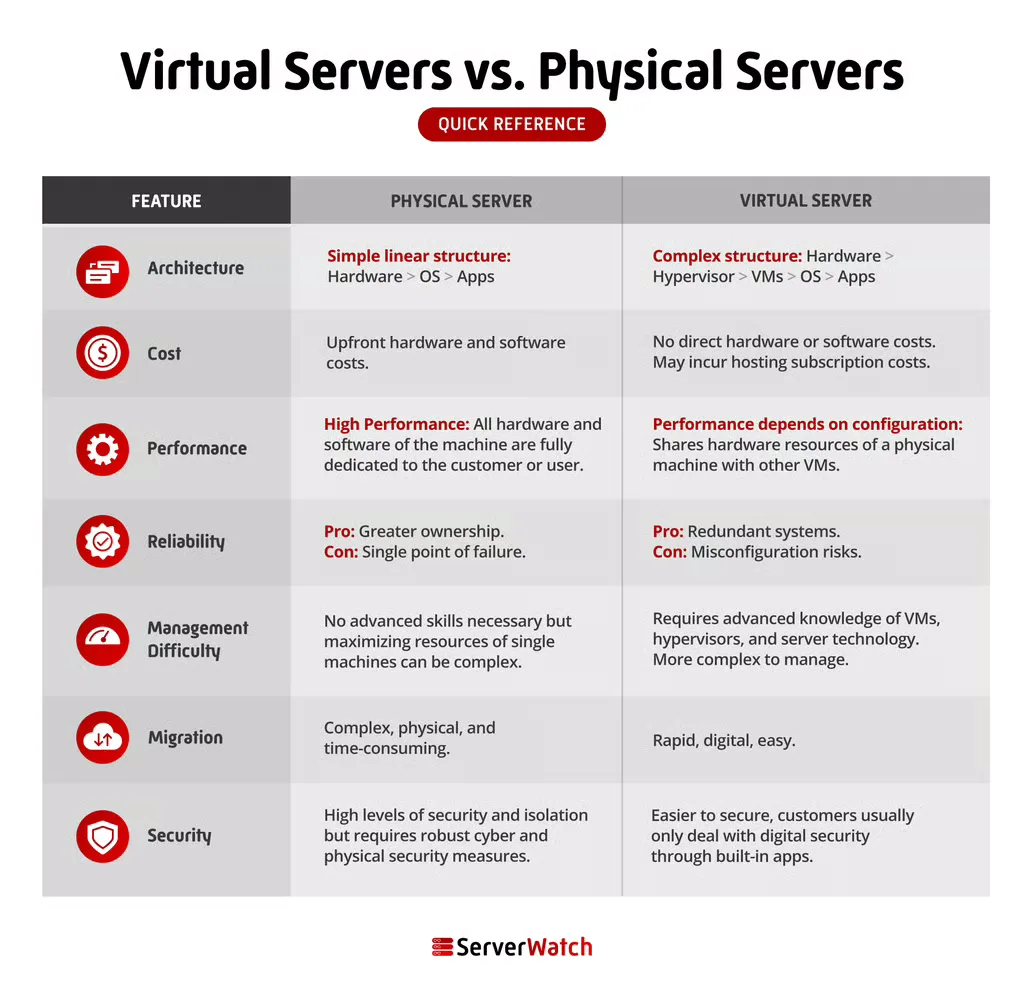
Virtual Servers vs. Physical Servers: Key Differences
The fundamental distinction between physical and virtual servers lies in their architecture and how they utilize computing resources. While both serve the purpose of hosting applications and data, their operational models, cost implications, performance characteristics, and management complexities differ significantly.
Architecture
The primary architectural difference is straightforward:
- Physical Servers: These are dedicated, single-tenant hardware systems. The operating system and applications have direct, unimpeded access to all the hardware components. This "bare metal" architecture offers maximum control and performance potential.
- Virtual Servers: These are software-based emulations running on top of a physical server. A hypervisor (virtualization software) creates and manages these virtual instances, abstracting the underlying hardware and allocating portions of it to each VM. This multi-tenant approach allows a single physical server to host multiple isolated virtual servers.
Cost
Cost considerations are a major driver in choosing between physical and virtual servers:
- Physical Servers: Involve significant upfront capital expenditure for hardware acquisition. Ongoing costs include power, cooling, maintenance, physical space, and potential IT staff dedicated to hardware management. While a single powerful physical server might seem expensive, it is dedicated to specific tasks.
- Virtual Servers: While virtualization software can incur licensing costs, the overall cost-effectiveness is often higher, especially at scale. By consolidating multiple VMs onto fewer physical servers, businesses reduce hardware, power, and cooling expenses. The pay-as-you-go model common in cloud-based virtual servers offers further cost flexibility, allowing businesses to pay only for the resources they consume. Furthermore, the responsibility for hardware maintenance, power, and physical security often shifts to the cloud provider, reducing operational overhead for the user.
Performance
Performance is a nuanced area where both types of servers can excel, depending on the workload and configuration:
- Physical Servers: Generally offer the highest raw performance potential due to direct hardware access. They are ideal for applications that are extremely resource-intensive, require ultra-low latency, or have specific hardware dependencies that cannot be met by virtualization. There’s no overhead from a hypervisor layer.
- Virtual Servers: Performance can be excellent, but it is influenced by the hypervisor’s efficiency and the allocation of resources from the underlying physical hardware. In heavily consolidated environments, "noisy neighbors" (other VMs consuming excessive resources) can sometimes impact performance. However, modern virtualization technologies have significantly minimized this overhead, and for most common workloads, virtual server performance is more than adequate. The ability to easily scale resources up or down also offers performance flexibility.
Reliability
Both physical and virtual servers can be configured for high reliability, but the mechanisms differ:
- Physical Servers: Reliability is achieved through redundant hardware components (e.g., dual power supplies, RAID storage, redundant network cards) and robust cooling and power infrastructure within the data center. Failures in individual components can often be managed through hot-swapping or failover to redundant systems.
- Virtual Servers: Reliability is enhanced through features like live migration (moving a running VM to another host without downtime), automatic failover, and distributed resource scheduling. If a physical host fails, the VMs can often be automatically restarted on other available hosts, minimizing disruption. Cloud providers invest heavily in redundant infrastructure and sophisticated management systems to ensure high availability for their virtualized environments.
Management Difficulty
The complexity of managing servers varies based on deployment and responsibility:
- Physical Servers: Require direct management of hardware, operating systems, and applications. This includes tasks like firmware updates, hardware diagnostics, physical security, and environmental monitoring. If hosted on-premises, organizations are responsible for all aspects of management.
- Virtual Servers: If hosted by a cloud provider, the provider handles the management of the underlying physical infrastructure and the hypervisor. The user is primarily responsible for managing the operating system and applications within their VMs. This outsourcing of infrastructure management significantly reduces the burden on internal IT teams. Managing virtualization platforms themselves (e.g., in a private cloud) can still be complex, requiring specialized skills.
Migration
The ease of moving server workloads is a significant differentiator:
- Physical Servers: Migrating a physical server involves physically moving the hardware, reconfiguring network settings, and potentially re-installing or restoring the operating system and applications. This is a time-consuming and labor-intensive process.
- Virtual Servers: Migration is considerably easier. VMs can be copied, cloned, or live-migrated between physical hosts with relative ease, often through simple point-and-click operations within management consoles. This agility is a key benefit for maintenance, load balancing, and disaster recovery.
Security
Security is a critical consideration for both server types, with different approaches to implementation:
- Physical Servers: Offer inherent isolation and direct control over the hardware, which can be advantageous for highly sensitive environments. Security measures focus on physical access controls, network segmentation, and robust endpoint security. The absence of a hypervisor layer can eliminate certain types of virtualization-specific vulnerabilities.
- Virtual Servers: While VMs are logically isolated, they share underlying hardware. Security measures must address both the VM operating system and applications, as well as the security of the hypervisor and the host system. Cloud providers implement robust security protocols at the infrastructure level, but users are responsible for securing their individual VMs. The ability to quickly patch or isolate compromised VMs is an advantage.
Bottom Line: Virtual Servers vs. Physical Servers for Your Business
The choice between virtual and physical servers is not a one-size-fits-all decision. Both have distinct advantages and disadvantages, and the optimal solution depends entirely on a business’s specific needs, priorities, and technical capabilities.
Virtual servers are generally the preferred choice for the majority of businesses today. Their affordability, flexibility, scalability, and the ease with which they can be deployed and managed make them an ideal solution for a wide range of applications. The ability to quickly adapt to changing demands, leverage the efficiency of cloud computing, and reduce operational overhead makes virtual servers a compelling option for startups, growing enterprises, and even large corporations looking for agile IT infrastructure. They offer excellent reliability and access to the latest technological advancements through cloud platforms, and their inherent scalability is a significant business advantage.
However, physical servers may still be a better choice for businesses that require absolute control, the highest possible performance for specific, resource-intensive workloads, or need the utmost level of security and isolation. Industries with stringent compliance mandates, those running legacy applications that cannot be virtualized, or organizations engaged in high-performance computing tasks often find that the dedicated resources and direct hardware access of physical servers are indispensable. The ownership and granular control offered by physical servers can be critical for organizations that cannot afford any compromise on performance or security.
Ultimately, a hybrid approach, combining the strengths of both virtual and physical servers, is also a common and effective strategy. This allows businesses to leverage virtual servers for their agility and cost-effectiveness for most workloads, while reserving physical servers for those few applications that truly demand their unique capabilities.
To make an informed decision, businesses should conduct a thorough assessment of their application requirements, performance needs, security protocols, compliance obligations, and budget constraints. Exploring advanced solutions like virtualization software can further empower organizations to optimize their server infrastructure for maximum efficiency and effectiveness.
Explore our analysis of the best server virtualization software to start taking advantage of the latest advances in virtualization technology.
