
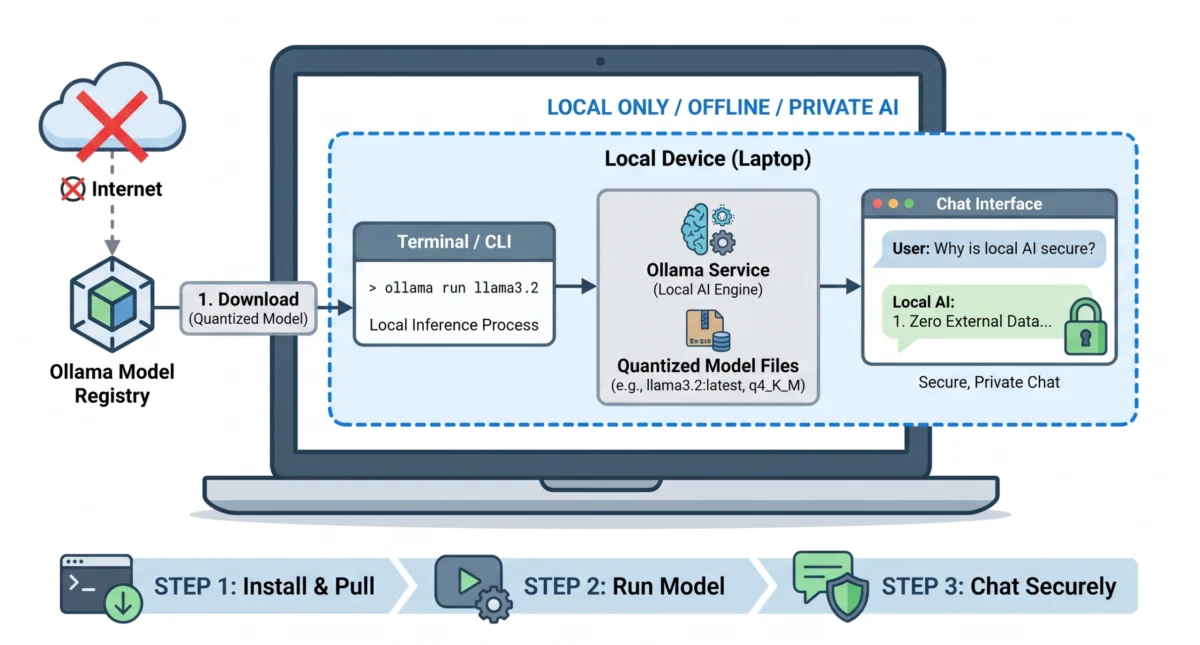

The landscape of artificial intelligence is undergoing a significant transformation, with a burgeoning shift from large, centralized cloud-based models to efficient, on-device deployments. This article serves as a comprehensive guide to understanding and implementing this paradigm, specifically focusing on how to run a small language model (SLM) locally on your personal machine using Ollama, a powerful and streamlined platform, in less than a quarter of an hour. The ability to execute advanced AI operations offline, privately, and without per-token costs represents a pivotal advancement in democratizing access to artificial intelligence.
The Evolving Landscape of Local AI and Small Language Models
The journey of AI has been marked by remarkable leaps, particularly in the realm of large language models (LLMs). For years, accessing the cutting-edge capabilities of AI often meant relying on massive, expensive cloud APIs, with data being transmitted to external servers for processing. This reliance presented challenges related to latency, data privacy, and recurring operational costs. However, a new generation of efficient AI models, termed Small Language Models (SLMs), is actively reshaping this dynamic. These models are specifically engineered for compactness and optimized performance on consumer-grade hardware, making local deployment not just feasible but increasingly advantageous.
In-depth analyses, such as our earlier ‘Introduction to Small Language Models,’ have elucidated how these compact yet highly capable models are shifting computational workloads away from the cloud. Further exploration, including ‘The Top 7 Small Language Models You Can Run on a Laptop,’ has highlighted specific examples like Meta’s Llama 3.2 3B and Google’s Gemma 2 9B. These models, while smaller in parameter count than their cloud-native counterparts, offer robust performance for a wide array of tasks, from text generation and summarization to coding assistance and creative writing. The theoretical understanding of these models and the selection of a suitable candidate represent only half of the equation; the true utility and profound impact materialize when these fully capable models operate autonomously on one’s own hardware. This ensures complete offline functionality, unparalleled data privacy, and a cost-free inference environment, eliminating per-token charges.
Historically, the endeavor to set up a local AI environment was fraught with technical complexities. Developers and enthusiasts often grappled with intricate CUDA driver installations, the meticulous configuration of Python virtual environments, and the laborious untangling of dependency conflicts across various operating systems and hardware configurations. This intricate setup process served as a significant barrier to entry for many, limiting the widespread adoption of local AI. The advent of tools like Ollama has fundamentally revolutionized this landscape, abstracting away these complexities and paving a much smoother path towards on-device AI.
Ollama: A Catalyst for On-Device AI Accessibility
Ollama has rapidly emerged as the preferred solution for local AI deployment due to its innovative approach to packaging and managing complex model architectures. It functions as a clean, lightweight background service that expertly handles numerous underlying technical challenges. This includes managing model downloads, optimizing for hardware acceleration across diverse GPUs (NVIDIA, AMD, Apple Silicon), and exposing a straightforward local API. This design philosophy positions Ollama as a ‘Docker for language models,’ allowing users to interact with sophisticated AI capabilities through intuitive commands rather than wrestling with raw model weights and intricate software stacks.
Industry analysts consistently highlight Ollama’s contribution to democratizing AI. Dr. Evelyn Reed, a prominent AI infrastructure expert, recently commented, "Ollama represents a crucial step towards making advanced AI accessible to everyone, irrespective of their deep technical expertise. By simplifying the deployment process, it empowers a broader community of developers, researchers, and individual users to experiment with and leverage AI locally, fostering innovation and enhancing data sovereignty." This sentiment is echoed by many in the developer community who commend Ollama for its robust performance and user-friendly interface.
A Step-by-Step Guide to Local SLM Deployment
The process of deploying your first SLM with Ollama is designed for efficiency and cross-platform compatibility. This unified workflow ensures that whether you are operating on macOS, Windows, or Linux, the underlying setup follows an identical, streamlined three-step sequence: installation, model pulling, and initiation of an AI chat session.
Step 1: Installing Ollama
The foundational step involves acquiring and installing the Ollama application tailored for your specific operating system. Ollama provides native installers for macOS, Windows, and Linux, ensuring optimal integration with the respective system environments.
- macOS: The installer integrates seamlessly with Apple Silicon and Intel-based Macs, leveraging Metal performance shaders for GPU acceleration.
- Windows: The Windows installer ensures compatibility with NVIDIA GPUs (via CUDA) and, increasingly, AMD GPUs (via ROCm), automatically configuring necessary dependencies.
- Linux: Ollama offers a straightforward shell script installation for various Linux distributions, providing robust support for NVIDIA CUDA and AMD ROCm.
Users are advised to download the latest stable release directly from the official Ollama website (ollama.com) to ensure access to the most recent features, bug fixes, and security updates. The installation process typically involves following on-screen prompts and usually completes within minutes.
Step 2: Downloading Your First Model
Once Ollama is installed and operating silently in the background, the next crucial step is to download a specific language model. This action is executed via the terminal (or Command Prompt/PowerShell on Windows). For this guide, we will utilize Llama 3.2 3B, a model renowned for its excellent balance of speed, capability, and resource efficiency, making it ideal for everyday laptop use.
To initiate the download and immediate execution of the model, open your terminal and input the following commands:
# Verify Ollama is running by checking the version
ollama --version

# Pull and immediately run the Llama 3.2 3B model
ollama run llama3.2
Upon execution, Ollama will commence downloading the model layers. Llama 3.2 3B is highly optimized, resulting in a manageable download size of approximately 2.0 GB. On a standard broadband connection, this download typically completes in under three minutes, allowing for rapid deployment. The ollama run command intelligently handles both the download (if the model isn’t present locally) and the subsequent loading into memory, streamlining the user experience.
Step 3: Your First Chat Session
Once the download reaches 100%, your terminal automatically transitions into an interactive chat interface. At this juncture, you are directly interacting with an advanced AI model running entirely on your local hardware. Crucially, this operation requires no active internet connection, and absolutely no data leaves your machine, ensuring maximum privacy and security.
To initiate your first interaction, consider using the following prompt:
>>> Write a three-bullet-point summary explaining why local AI is secure.

- **Zero External Data Transmission**: Your prompts and data never leave your local machine, eliminating the risk of cloud-based data leaks or third-party logging.
- **Complete Offline Functionality**: Because the model runs entirely on your local hardware, it requires no internet connection, preventing network-based interception.
- **Total Infrastructure Control**: You retain absolute ownership over the hardware and environment, allowing you to enforce strict access controls and compliance policies.

>>> /bye
To gracefully terminate the chat session at any point, simply type /bye and press Enter. This prompt demonstrates the immediate benefits of local AI in terms of data security and control.
Understanding the Mechanics: Quantization and Model Architecture
The three-step deployment process, while deceptively simple, involves sophisticated operations behind the scenes when you execute ollama run llama3.2. A deeper understanding of what is precisely stored on your hard drive and how it operates is crucial for making informed decisions regarding model selection, memory allocation, and performance optimization.
Model Tags and Defaults
When a model name is specified without an explicit tag, Ollama intelligently appends :latest by default. For Llama 3.2, this tag currently points to the 3-billion parameter (3B) variant. This particular variant strikes an excellent balance between processing speed and linguistic capability, making it a robust choice for consumer hardware, including most modern laptops and desktop PCs. Other models, like gemma2:9b or phi3.5, would similarly default to their latest standard configurations if no specific tag (e.g., gemma2:9b-instruct) is provided.
Understanding Quantization: The Key to Efficiency
A critical concept in enabling SLMs to run efficiently on local hardware is quantization. A 3-billion parameter model, if stored at standard 16-bit floating-point precision (fp16), would typically necessitate approximately 6 GB of VRAM (Video Random Access Memory) just to house its weights. Given that the Llama 3.2 3B download was around 2.0 GB, a significant reduction in size is evident.
Ollama defaults to 4-bit quantization, specifically employing the q4_K_M quantization scheme. Quantization is a technique that compresses the model’s weights from high-precision floating-point numbers (e.g., 16-bit or 32-bit floats) down to lower-precision integers (e.g., 4-bit or 8-bit integers). This process dramatically cuts the memory footprint—often by over 60%—and simultaneously accelerates inference speeds, albeit with a minimal and often imperceptible reduction in accuracy. This technical ingenuity is the primary reason why highly capable language models can now comfortably operate on devices with limited memory resources, such as laptops and even certain mobile devices. The trade-off between precision and performance is carefully balanced to deliver a high-quality user experience without requiring specialized, expensive hardware.
Output Sanity Check: Identifying Degraded Performance
Due to their compact nature, 3B models, while efficient, can exhibit signs of performance degradation if system resources become constrained. It is imperative to recognize these symptoms to ensure optimal operation:
- Excessive Repetition or Looping: The model might generate repetitive phrases or get stuck in a loop, indicating it’s struggling to maintain coherence.
- Nonsensical or Irrelevant Output: Responses may lack logical connection to the prompt or contain factual inaccuracies beyond typical model limitations.
- Very Slow Token Generation: While some delay is normal, if individual words appear with noticeable pauses (several seconds per word), it suggests the model is offloading heavily to slower system RAM rather than utilizing the GPU.
If your model’s output appears degraded, the following troubleshooting section offers immediate solutions.
Troubleshooting Common Deployment Challenges
While Ollama’s installation is generally robust, variations in hardware configurations can occasionally lead to minor hiccups during the initial setup. Instead of sifting through complex log files, this quick reference guide helps diagnose the three most common first-run failures, allowing for rapid resolution.
| Symptom / Error | Root Cause | The Immediate Fix |
|---|---|---|
| Chat response takes minutes to start, or text prints one word every few seconds. | Insufficient VRAM/RAM. The model is too heavy for your GPU, causing Ollama to fall back to slower CPU/system memory for inference. | Close RAM-heavy applications like web browsers (Chrome, Firefox) or integrated development environments (IDEs). Alternatively, switch to a significantly lighter model: ollama run smollm2:1.7b. |
| Error: "Failed to contact GPU driver" or Ollama defaults to CPU on a high-end gaming laptop. | GPU driver mismatch. Ollama cannot establish a connection with your dedicated GPU, a common issue with outdated Nvidia CUDA or AMD ROCm drivers. | Update your GPU drivers to the absolute latest version available from the manufacturer (NVIDIA, AMD). On Windows/Linux, verify that CUDA_VISIBLE_DEVICES or similar environment variables are not inadvertently blocking access. |
| Error: "address already in use" or "Error: listen tcp 127.0.0.1:11434: bind: address already in use" | Port conflict. Another instance of Ollama is already running as a background service, preventing the terminal from opening a new connection on the default port. | Do not attempt to relaunch the Ollama application. The background daemon is already actively listening on port 11434. Simply proceed by running your command directly (e.g., ollama run llama3.2). |
These common issues cover the vast majority of first-time deployment problems, allowing users to quickly get their local AI environment operational.
The Broader Implications of Local AI
The successful deployment of a local inference setup signifies much more than just a technical achievement; it represents the establishment of a private, autonomous AI engine. This engine operates without the need for API keys, is free from rate limits, requires no subscriptions, and crucially, ensures that no sensitive data ever leaves your machine. This level of control and privacy is a significant capability with far-reaching implications across various sectors.
Data Privacy and Security: The most immediate and profound implication is enhanced data privacy. In an era where data breaches and concerns about corporate data handling are paramount, local AI offers an impenetrable shield. For individuals, personal conversations and sensitive inquiries remain entirely on their device. For enterprises, particularly those in highly regulated industries such as healthcare, finance, or legal services, local AI compliance with stringent data protection regulations like GDPR, CCPA, and HIPAA becomes significantly easier to manage. This infrastructure empowers organizations to process sensitive client data, proprietary research, or confidential internal documents with absolute assurance of non-disclosure to third parties.
Cost Efficiency: Eliminating per-token costs associated with cloud-based LLMs offers substantial long-term cost savings, especially for high-volume users or continuous integration scenarios. This makes advanced AI capabilities more accessible to small businesses, independent developers, and academic researchers who might otherwise be constrained by budget limitations.
Reduced Latency and Offline Capability: Running models locally dramatically reduces latency, as there’s no network round trip to a remote server. This is critical for applications requiring real-time responses, such as interactive virtual assistants, on-device content generation, or embedded systems. Furthermore, the ability to operate entirely offline ensures AI functionality in environments with limited or no internet connectivity, from remote field operations to secure air-gapped networks.
Innovation and Customization: Local AI fosters an environment ripe for innovation. Developers can experiment with custom models, fine-tune existing ones with proprietary datasets, and integrate AI into their applications without worrying about API costs or usage policies. This freedom accelerates the development cycle and encourages the creation of highly specialized AI solutions tailored to unique needs. The localhost:11434 API compatibility with OpenAI’s API standards is a testament to this, enabling seamless integration into existing tools and workflows.
Future Trajectories and Advanced Applications
With a functional local inference setup, the journey into the world of on-device AI has just begun. The private AI engine now at your disposal is a powerful foundation for continued exploration and development.
Exploring Diverse Models: Expanding your local AI capabilities is as straightforward as swapping a model name in your terminal. Commands such as ollama run gemma2:9b, ollama run phi3.5, or ollama run mistral allow you to quickly download and experiment with a wide array of models from the ‘Top 7’ list and beyond. Each model possesses distinct strengths; some excel in complex reasoning tasks, others in code generation, or handling extensive contextual information. Experimenting with various models will rapidly reveal which best aligns with your specific workflow and computational needs.
Building Custom Applications: As you gain proficiency, consider leveraging Ollama’s local API, which operates on localhost:11434 and is designed to be OpenAI-compatible. This compatibility is a game-changer, opening avenues for integrating local SLMs into your custom scripts, tools, and applications. Whether it’s building a personalized AI assistant, an intelligent document processor, or an advanced code completion tool, the local API provides the necessary interface. This foundation, coupled with your understanding of quantization and hardware requirements, will be invaluable as you delve into more advanced local AI work, including fine-tuning models, creating custom model recipes, and deploying AI solutions in edge computing environments.
The proliferation of tools like Ollama marks a significant epoch in the democratization of AI. By empowering individuals and organizations to harness the power of advanced language models locally, it not only addresses critical concerns around privacy and cost but also ignites a new wave of innovation, making sophisticated AI capabilities more accessible and adaptable than ever before.
